
iOS开发-UIScreenEdgePanGestureRecognizer实战
UIScreenEdgePanGestureRecognizer名字很长,而且关于其文档也是少的的可怜,苹果官方给的唯一的一个属性是edges,文档中的解释是这样的:
A UIScreenEdgePanGestureRecognizer looks for panning (dragging) gestures that start near an edge of the screen. The system uses screen edge gestures in some cases to initiate view controller transitions. You can use this class to replicate the same gesture behavior for your own actions.
大概的意思就是UIScreenEdgePanGestureRecognizer跟pan(平移)手势差不多,需要从边缘进行拖动,在控制器转换的时候是有用的,看文档的话我们会发现UIScreenEdgePanGestureRecognizer是UIPanGestureRecognizer的子类,理解会更方便一点。
UIPanGestureRecognizer铺垫
先简单的看下需要实现的视图控制器的效果:

稍微回顾一下UIPanGestureRecognizer,第一个红色的视图我们通过Pan手势进行操作:
    self.panView=[[UIView alloc]initWithFrame:CGRectMake(0, 200, CGRectGetWidth(self.view.bounds), 100)];

    [self.panView setBackgroundColor:[UIColor redColor]];

    self.panLabel=[[UILabel alloc]initWithFrame:CGRectMake(20, 30, 150, 40)];

    [self.panLabel setText:@"博客园-FlyElephant"];

    [self.panLabel setFont:[UIFont systemFontOfSize:14]];

    [self.panView addSubview:self.panLabel];

    [self.view addSubview:self.panView];

    UIPanGestureRecognizer  *pangestureRecognizer=[[UIPanGestureRecognizer alloc]initWithTarget:self action:@selector(panGesture:)];

    [self.panView addGestureRecognizer:pangestureRecognizer];
手势事件:
-(void)panGesture:(UIPanGestureRecognizer *)gesture{

    CGPoint translation = [gesture translationInView:gesture.view];

    NSLog(@"%@",[NSString stringWithFormat:@"(%0.0f, %0.0f)", translation.x, translation.y]);

}
手势向左滑动的panView的变化:

UIScreenEdgePanGestureRecognizer实战
第二个视图我们可以通过UIScreenEdgePanGestureRecognizer进行设置,跟上面的代码稍微有点重复,如果你有代码洁癖的话可以考虑将以上代码进行惰性初始化,可能感官会更好一点,不过为了方便暂时都写在了一起:
    self.centerX=CGRectGetWidth(self.view.bounds)/2;

    self.edgeView=[[UIView alloc]initWithFrame:CGRectMake(0, 320, CGRectGetWidth(self.view.bounds), 100)];

    [self.edgeView setBackgroundColor:[UIColor greenColor]];

    self.label=[[UILabel alloc]initWithFrame:CGRectMake(10, 30, 320, 40)];

    [self.label setText:@"原文地址:http://www.cnblogs.com/xiaofeixiang/"];

    [self.label setFont:[UIFont systemFontOfSize:14]];

    [self.edgeView addSubview:self.label];

    [self.view addSubview:self.edgeView];
注意这个时候手势是加载view不是单独的edgeView上的,手势代码,edges是一个枚举,我们可以设置的是响应边缘右滑事件;
    UIScreenEdgePanGestureRecognizer *rightEdgeGesture =

    [[UIScreenEdgePanGestureRecognizer alloc] initWithTarget:self

                                                      action:@selector(handleRightEdgeGesture:)];

    rightEdgeGesture.edges = UIRectEdgeRight;           // 右滑显示

    [self.view addGestureRecognizer:rightEdgeGesture];
响应边缘事件的代码:
       //当前被触摸的view

        UIView *view = [self.view hitTest:[gesture locationInView:gesture.view]

                                withEvent:nil];

        if(UIGestureRecognizerStateBegan == gesture.state ||

           UIGestureRecognizerStateChanged == gesture.state)

        {

            CGPoint translation = [gesture translationInView:gesture.view];

            [UIView animateWithDuration:0.5 animations:^{

               view.center = CGPointMake(self.centerX + translation.x, view.center.y);

                NSLog(@"%@",NSStringFromCGPoint(view.center));

            }];

        }

        else//取消,失败,结束的时候返回原处

        {

            [UIView animateWithDuration:0.5 animations:^{

               view.center = CGPointMake(self.centerX, view.center.y);

            }];

        }
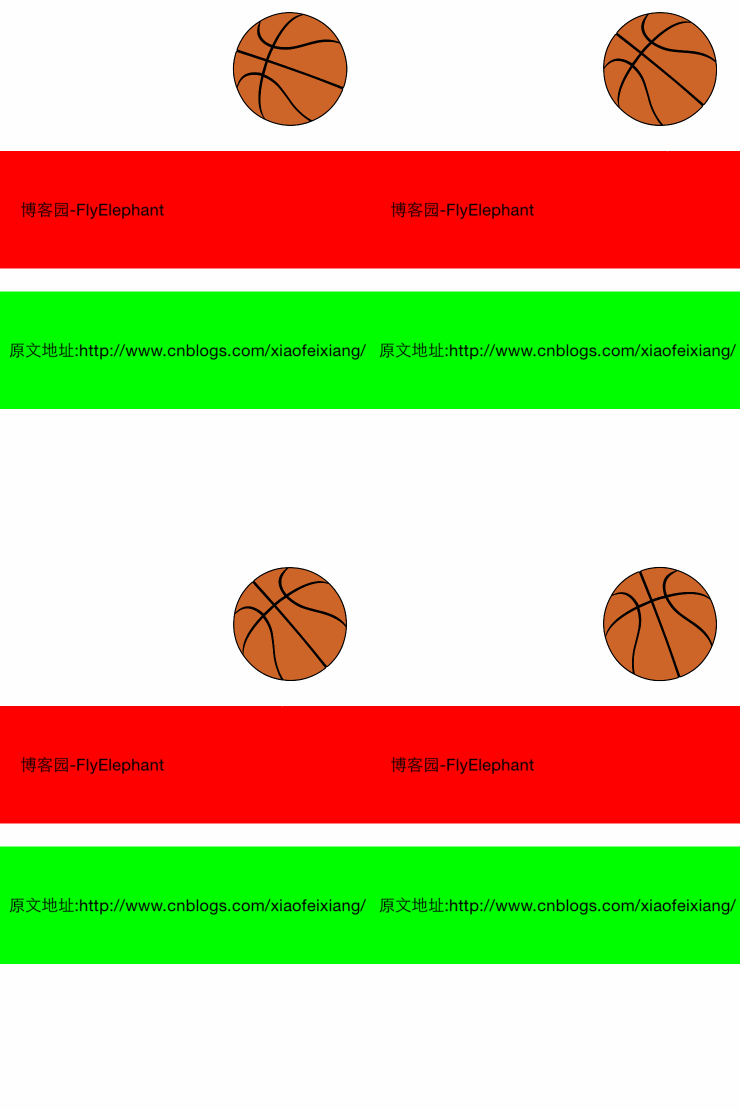
具体效果如下:

如果你细心点会发现那个篮球在滑动介结束的时候转动了一下,在处理动画结束的时候加了一个判断,代码如下:
    if (gesture.state==UIGestureRecognizerStateEnded) {

        //旋转360度之后归0

        if(self.currentRadius==360.f){

            self.currentRadius=0.0f;

        }

        [UIView animateWithDuration:1.0 animations:^{

            self.currentRadius += 90.0;

            self.circleView.transform = CGAffineTransformMakeRotation((self.currentRadius * M_PI) / 180.0);

        }];

    }
如果你想那个篮球一直转动的话通过NSTimer即可实现:
[NSTimer scheduledTimerWithTimeInterval:0.1 target:self selector:@selector(transformRotate) userInfo: nil repeats: YES];
转动的代码和上面的差不多,不过每次改变的弧度较小:
-(void)transformRotate{

    if(self.currentRadius==360.f){

        self.currentRadius=0.0f;

    }else{

        self.currentRadius += 10.0;

        self.circleView.transform = CGAffineTransformMakeRotation((self.currentRadius * M_PI) / 180.0);

    }

}
iOS开发-UIScreenEdgePanGestureRecognizer实战的更多相关文章
- iOS开发-CocoaPods实战
CocoaPods 是开发 OS X 和 iOS 应用程序的第三方库的依赖管理工具,如果是正常的开发不需要使用的第三方的代码,CocoaPods是不需要的,但是从实际情况上,为了提高开发效率,Coco ...
- iOS开发项目实战——Swift实现图片轮播与浏览
近期開始开发一个新的iOS应用,自己决定使用Swift.进行了几天之后,发现了一个非常严峻的问题.那就是无论是书籍,还是网络资源,关于Swift的实在是太少了,随便一搜全都是OC实现某某某功能.就算是 ...
- iOS开发项目实战——Swift实现ScrollView滚动栏功能
手机作为一个小屏设备,须要显示的信息往往无法在一个屏幕上显示,此时就须要使用到滚动栏,当然除了像TableView这样能够自带滚动功能的. 假设一个界面上View较多,那就必须要使用到ScrollVi ...
- IOS开发-项目实战-点赞功能的实现
实现思路: 1.每一条新闻就是一个cell,在cell上添加点赞按钮. 2.让cell的控制器成为自定义cell的代理,将点击了哪一个cell放在代理方法中传出去. 3.并将这条新闻的ID和当前用户的 ...
- iOS开发——项目实战总结&Block使用注意点浅析
Block使用注意点浅析 1.在使用block前需要对block指针做判空处理. 不判空直接使用,一旦指针为空直接产生崩溃. if (!self.isOnlyNet) { if (succBlock ...
- iOS开发——项目实战总结&带你看看Objective-C的精髓
带你看看Objective-C的精髓 1:接口与实现 @interface...@end @implementation...@end @class 接口(头文件) 实现文件 向前引用 注:类别通过增 ...
- iOS开发——项目实战总结&关于随机量
关于随机量 rand 是一个标准的 C 函数. random 是定义为 POSIX 标准的一部分. arc4random 是在 BSD 和派生平台. 随机数 arc4random_uniform(N) ...
- iOS开发——项目实战总结&数据持久化分析
数据持久化分析 plist文件(属性列表) preference(偏好设置) NSKeyedArchiver(归档) SQLite 3 CoreData 当存储大块数据时你会怎么做? 你有很多选择,比 ...
- iOS开发——项目实战总结&经典错误一
经典错误一 No architectures to compile for (ONLY_ACTIVE_ARCH=YES, active arch=armv7, VA 运行报错 出现的原因:armv7s ...
随机推荐
- ARP协议详解之Gratuitous ARP(免费ARP)
ARP协议详解之Gratuitous ARP(免费ARP) Gratuitous ARP(免费ARP) Gratuitous ARP也称为免费ARP,无故ARP.Gratuitous ARP不同于一般 ...
- android 项目上传SVN不需要上传的文件
bin,gen 不用提交 因为这两个文件夹是自动生成的.如果提交可能会产生编译异常..settings也是自动生成,也不用提交.
- GDI 泄漏检测方法
方法一 1.打开电脑的[任务管理器],选择[进程]页,点击菜单项的[查看]项,选择[选择列]: 2.勾选[GDI对象(J)]即可. 3.此时,用户就可以在进程中看到每个进程对应的GDI对象,每个进程的 ...
- Xtreme9.0 - Block Art 线段树
Block Art 题目连接: https://www.hackerrank.com/contests/ieeextreme-challenges/challenges/block-art Descr ...
- STM32F4 External interrupts
STM32F4 External interrupts Each STM32F4 device has 23 external interrupt or event sources. They are ...
- AES CBC/CTR 加解密原理
So, lets look at how CBC works first. The following picture shows the encryption when using CBC (in ...
- loading加载和layer.js
layer.js中的loading加载 l本篇主要介绍layerjs中的loading加载在实际项目中的应用 1.使用的技术 前端:HTML5+CSS3+JS+layer.js 后端:.net 2.遇 ...
- 解决oracle语句中 含数字的字符串按数字排序问题
普通排序利用:order by 字段名 ASC 但是遇到有中文而且类型是varchar类型的结果就是这样 政采代(甲)字第0298号 政采代(甲)字第0421号 政采代(甲)字第1098号 政采代(甲 ...
- 【Go命令教程】12. go tool pprof
我们可以使用 go tool pprof 命令来交互式的访问概要文件的内容.命令将会分析指定的概要文件,并会根据我们的要求为我们提供高可读性的输出信息. 在 Go 语言中,我们可以通过标准库的代码包 ...
- DM6467开发领航-开发坏境安装