
MapRedece(单表关联)
源数据:Child--Parent表
| Tom | Lucy |
| Tom | Jack |
| Jone | Lucy |
| Jone | Jack |
| Lucy | Marry |
| Lucy | Ben |
| Jack | Alice |
| Jack | Jesse |
| Terry | Alice |
| Terry | Jesse |
| Philop | Terry |
| Philop | Alma |
| Mark | Terry |
| Mark | Alma |
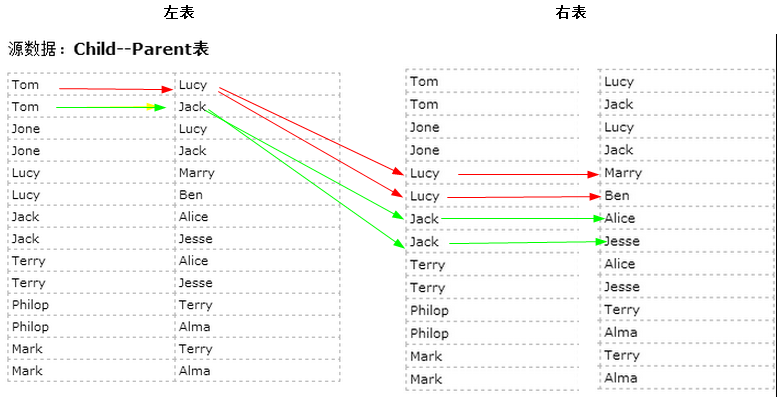
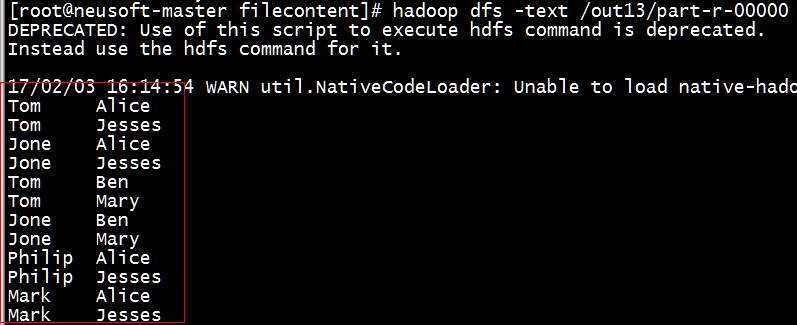
目标:表的自连接:从图中可以找出Tom的grandparent为Marry和Ben,同理可以找出其他的人的grandparent
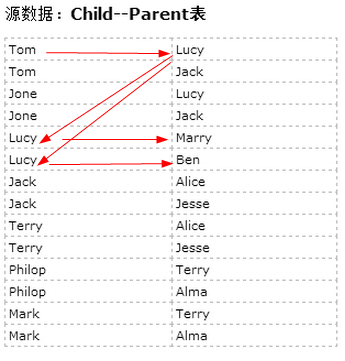
根据Child--Parent表推断grandchild和grandparent
左表 右表
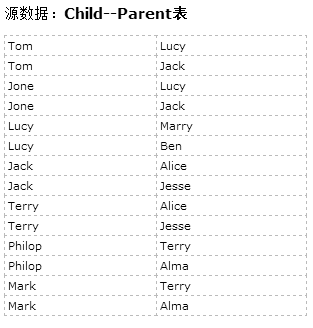
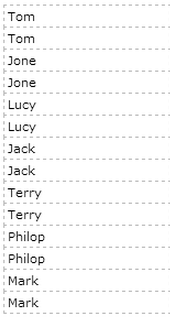
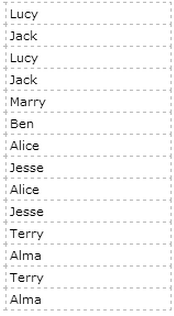
将一张表分解为两张表的连接:从图中可以找出Tom的grandparent为Marry和Ben,同理可以找出其他的人的grandparent
思路与步骤:
只有连接 左表的parent列和右表的child列,才能得到grandchild和grandparent的信息。
因此需要将源数据的一张表拆分成两张表,且左表和右表是同一个表,如上图。
- 所以在map阶段将读入数据分割成child和parent之后,将parent设置成key,child设置成value进行输出,并作为左表;
- 再将同一对child和parent中的child设置成key,parent设置成value进行输出,作为右表。
- 为了区分输出中的左右表,需要在输出的value中再加上左右表的信息,比如在value的String最开始处加上字符1表示左表,加上字符2表示右表。
- 这样在map的结果中就形成了左表和右表,然后在shuffle过程中完成连接。
- reduce接收到连接的结果,其中每个key的value-list就包含了"grandchild--grandparent"关系。
- 取出每个key的value-list进行解析,将左表中的child放入一个数组,右表中的parent放入一个数组,
- 最后对两个数组求笛卡尔积得到最后的结果
代码1:
(1)自定义Mapper类
 private static class MyMapper extends Mapper<Object, Text, Text, Text> {

         @Override

         protected void map(Object k1, Text v1,

                 Mapper<Object, Text, Text, Text>.Context context)

                 throws IOException, InterruptedException {

             String childName = new String();

             String parentName = new String();

             String relationType = new String();

             Text k2 = new Text();

             Text v2 = new Text();

             // 輸入一行预处理的文本

             StringTokenizer items = new StringTokenizer(v1.toString());

             String[] values = new String[2];

             int i = 0;

             while (items.hasMoreTokens()) {

                 values[i] = items.nextToken();

                 i++;

             }

             if (values[0].compareTo("child") != 0) {

                 childName = values[0];

                 parentName = values[1];

                 // 输出左表,左表加1的标识

                 relationType = "1";

                 k2 = new Text(values[1]); // parent作为key,作为表1的key

                 v2 = new Text(relationType + "+" + childName + "+" + parentName);//<1+Lucy+Tom>

                 context.write(k2, v2);

                 // 输出右表,右表加2的标识

                 relationType = "2";

                 k2 = new Text(values[0]);// child作为key,作为表2的key

                 v2 = new Text(relationType + "+" + childName + "+" + parentName);//<2+Jone+Lucy>

                 context.write(k2, v2);

             }

         }

     }
(2)自定义Reduce
 private static class MyReducer extends Reducer<Text, Text, Text, Text> {

         Text k3 = new Text();

         Text v3 = new Text();

         @Override

         protected void reduce(Text k2, Iterable<Text> v2s,

                 Reducer<Text, Text, Text, Text>.Context context)

                 throws IOException, InterruptedException {

             if (0 == time) {

                 context.write(new Text("grandchild"), new Text("grandparent"));

                 time++;

             }

             int grandchildnum = 0;

             String[] grandchild = new String[10];//孙子

             int grandparentnum = 0;

             String[] grandparent = new String[10];//爷爷

             Iterator items = v2s.iterator();//["1 Tom","2 Mary","2 Ben"]

             while (items.hasNext()) {

                 String record = items.next().toString();

                 int len = record.length();

                 int i = 2;

                 if (0 == len) {

                     continue;

                 }

                 // 取得左右表的标识

                 char relationType = record.charAt(0);

                 // 定义孩子和父母变量

                 String childname = new String();

                 String parentname = new String();

                 // 获取value列表中value的child

                 while (record.charAt(i) != '+') {

                     childname += record.charAt(i);

                     i++;

                 }

                 i = i + 1; //越过名字之间的“+”加号

                 // 获取value列表中value的parent

                 while (i < len) {

                     parentname += record.charAt(i);

                     i++;

                 }

                 // 左表,取出child放入grandchildren

                 if ('1' == relationType) {

                     grandchild[grandchildnum] = childname;

                     grandchildnum++;

                 }

                 // 右表,取出parent放入grandparent

                 if ('2' == relationType) {

                     grandparent[grandparentnum] = parentname;

                     grandparentnum++;

                 }

             }

             // grandchild和grandparentnum数组求笛卡尔积

             if (0 != grandchildnum && 0 != grandparentnum) {

                 for (int i = 0; i < grandchildnum; i++) {

                     for (int j = 0; j < grandparentnum; j++) {

                         k3 = new Text(grandchild[i]);

                         v3 = new Text(grandparent[j]);

                         context.write(k3, v3);

                     }

                 }

             }

         }

     }
(3)Map和Reduce组合
     public static void main(String[] args) throws Exception {

         //必须要传递的是自定的mapper和reducer的类,输入输出的路径必须指定,输出的类型<k3,v3>必须指定

         //2将自定义的MyMapper和MyReducer组装在一起

         Configuration conf=new Configuration();

         String jobName=SingleTableLink.class.getSimpleName();

         //1首先寫job,知道需要conf和jobname在去創建即可

         Job job = Job.getInstance(conf, jobName);

         //*13最后,如果要打包运行改程序,则需要调用如下行

         job.setJarByClass(SingleTableLink.class);

         //3读取HDFS內容:FileInputFormat在mapreduce.lib包下

         FileInputFormat.setInputPaths(job, new Path(args[0]));

         //4指定解析<k1,v1>的类(谁来解析键值对)

         //*指定解析的类可以省略不写,因为设置解析类默认的就是TextInputFormat.class

         job.setInputFormatClass(TextInputFormat.class);

         //5指定自定义mapper类

         job.setMapperClass(MyMapper.class);

         //6指定map输出的key2的类型和value2的类型  <k2,v2>

         //*下面两步可以省略,当<k3,v3>和<k2,v2>类型一致的时候,<k2,v2>类型可以不指定

         job.setMapOutputKeyClass(Text.class);

         job.setMapOutputValueClass(Text.class);

         //7分区(默认1个),排序,分组,规约 采用 默认

         //接下来采用reduce步骤

         //8指定自定义的reduce类

         job.setReducerClass(MyReducer.class);

         //9指定输出的<k3,v3>类型

         job.setOutputKeyClass(Text.class);

         job.setOutputValueClass(Text.class);

         //10指定输出<K3,V3>的类

         //*下面这一步可以省

         job.setOutputFormatClass(TextOutputFormat.class);

         //11指定输出路径

         FileOutputFormat.setOutputPath(job, new Path(args[1]));

         //12写的mapreduce程序要交给resource manager运行

         job.waitForCompletion(true);

     }
所有源代码:
 package Mapreduce;

 import java.io.IOException;

 import java.util.Iterator;

 import java.util.StringTokenizer;

 import org.apache.hadoop.conf.Configuration;

 import org.apache.hadoop.fs.Path;

 import org.apache.hadoop.io.Text;

 import org.apache.hadoop.mapreduce.Job;

 import org.apache.hadoop.mapreduce.Mapper;

 import org.apache.hadoop.mapreduce.Reducer;

 import org.apache.hadoop.mapreduce.lib.input.FileInputFormat;

 import org.apache.hadoop.mapreduce.lib.input.TextInputFormat;

 import org.apache.hadoop.mapreduce.lib.output.FileOutputFormat;

 import org.apache.hadoop.mapreduce.lib.output.TextOutputFormat;

 public class SingleTableLink {

     private static int time = 0;

     public static void main(String[] args) throws Exception {

         //必须要传递的是自定的mapper和reducer的类,输入输出的路径必须指定,输出的类型<k3,v3>必须指定

         //2将自定义的MyMapper和MyReducer组装在一起

         Configuration conf=new Configuration();

         String jobName=SingleTableLink.class.getSimpleName();

         //1首先寫job,知道需要conf和jobname在去創建即可

         Job job = Job.getInstance(conf, jobName);

         //*13最后,如果要打包运行改程序,则需要调用如下行

         job.setJarByClass(SingleTableLink.class);

         //3读取HDFS內容:FileInputFormat在mapreduce.lib包下

         FileInputFormat.setInputPaths(job, new Path(args[0]));

         //4指定解析<k1,v1>的类(谁来解析键值对)

         //*指定解析的类可以省略不写,因为设置解析类默认的就是TextInputFormat.class

         job.setInputFormatClass(TextInputFormat.class);

         //5指定自定义mapper类

         job.setMapperClass(MyMapper.class);

         //6指定map输出的key2的类型和value2的类型  <k2,v2>

         //*下面两步可以省略,当<k3,v3>和<k2,v2>类型一致的时候,<k2,v2>类型可以不指定

         job.setMapOutputKeyClass(Text.class);

         job.setMapOutputValueClass(Text.class);

         //7分区(默认1个),排序,分组,规约 采用 默认

         //接下来采用reduce步骤

         //8指定自定义的reduce类

         job.setReducerClass(MyReducer.class);

         //9指定输出的<k3,v3>类型

         job.setOutputKeyClass(Text.class);

         job.setOutputValueClass(Text.class);

         //10指定输出<K3,V3>的类

         //*下面这一步可以省

         job.setOutputFormatClass(TextOutputFormat.class);

         //11指定输出路径

         FileOutputFormat.setOutputPath(job, new Path(args[1]));

         //12写的mapreduce程序要交给resource manager运行

         job.waitForCompletion(true);

     }

     private static class MyMapper extends Mapper<Object, Text, Text, Text> {

         @Override

         protected void map(Object k1, Text v1,

                 Mapper<Object, Text, Text, Text>.Context context)

                 throws IOException, InterruptedException {

             String childName = new String();

             String parentName = new String();

             String relationType = new String();

             Text k2 = new Text();

             Text v2 = new Text();

             // 輸入一行预处理的文本

             StringTokenizer items = new StringTokenizer(v1.toString());

             String[] values = new String[2];

             int i = 0;

             while (items.hasMoreTokens()) {

                 values[i] = items.nextToken();

                 i++;

             }

             if (values[0].compareTo("child") != 0) {

                 childName = values[0];

                 parentName = values[1];

                 // 输出左表,左表加1的标识

                 relationType = "1";

                 k2 = new Text(values[1]); // parent作为key,作为表1的key

                 v2 = new Text(relationType + "+" + childName + "+" + parentName);//<1+Lucy+Tom>

                 context.write(k2, v2);

                 // 输出右表,右表加2的标识

                 relationType = "2";

                 k2 = new Text(values[0]);// child作为key,作为表2的key

                 v2 = new Text(relationType + "+" + childName + "+" + parentName);//<2+Jone+Lucy>

                 context.write(k2, v2);

             }

         }

     }

     private static class MyReducer extends Reducer<Text, Text, Text, Text> {

         Text k3 = new Text();

         Text v3 = new Text();

         @Override

         protected void reduce(Text k2, Iterable<Text> v2s,

                 Reducer<Text, Text, Text, Text>.Context context)

                 throws IOException, InterruptedException {

             if (0 == time) {

                 context.write(new Text("grandchild"), new Text("grandparent"));

                 time++;

             }

             int grandchildnum = 0;

             String[] grandchild = new String[10];//孙子

             int grandparentnum = 0;

             String[] grandparent = new String[10];//爷爷

             Iterator items = v2s.iterator();//["1 Tom","2 Mary","2 Ben"]

             while (items.hasNext()) {

                 String record = items.next().toString();

                 int len = record.length();

                 int i = 2;

                 if (0 == len) {

                     continue;

                 }

                 // 取得左右表的标识

                 char relationType = record.charAt(0);

                 // 定义孩子和父母变量

                 String childname = new String();

                 String parentname = new String();

                 // 获取value列表中value的child

                 while (record.charAt(i) != '+') {

                     childname += record.charAt(i);

                     i++;

                 }

                 i = i + 1; //越过名字之间的“+”加号

                 // 获取value列表中value的parent

                 while (i < len) {

                     parentname += record.charAt(i);

                     i++;

                 }

                 // 左表,取出child放入grandchildren

                 if ('1' == relationType) {

                     grandchild[grandchildnum] = childname;

                     grandchildnum++;

                 }

                 // 右表,取出parent放入grandparent

                 if ('2' == relationType) {

                     grandparent[grandparentnum] = parentname;

                     grandparentnum++;

                 }

             }

             // grandchild和grandparentnum数组求笛卡尔积

             if (0 != grandchildnum && 0 != grandparentnum) {

                 for (int i = 0; i < grandchildnum; i++) {

                     for (int j = 0; j < grandparentnum; j++) {

                         k3 = new Text(grandchild[i]);

                         v3 = new Text(grandparent[j]);

                         context.write(k3, v3);

                     }

                 }

             }

         }

     }

 }
代码1单表关联
代码2:参考的代码
 package Mapreduce;

 import java.io.IOException;

 import java.util.ArrayList;

 import java.util.Iterator;

 import java.util.List;

 import org.apache.hadoop.conf.Configuration;

 import org.apache.hadoop.fs.Path;

 import org.apache.hadoop.io.Text;

 import org.apache.hadoop.mapreduce.Job;

 import org.apache.hadoop.mapreduce.Mapper;

 import org.apache.hadoop.mapreduce.Reducer;

 import org.apache.hadoop.mapreduce.lib.input.FileInputFormat;

 import org.apache.hadoop.mapreduce.lib.input.TextInputFormat;

 import org.apache.hadoop.mapreduce.lib.output.FileOutputFormat;

 import org.apache.hadoop.mapreduce.lib.output.TextOutputFormat;

 public class SingleTableLink2 {

     public static void main(String[] args) throws Exception {

         // 必须要传递的是自定的mapper和reducer的类,输入输出的路径必须指定,输出的类型<k3,v3>必须指定

         // 2将自定义的MyMapper和MyReducer组装在一起

         Configuration conf = new Configuration();

         String jobName = SingleTableLink2.class.getSimpleName();

         // 1首先寫job,知道需要conf和jobname在去創建即可

         Job job = Job.getInstance(conf, jobName);

         // *13最后,如果要打包运行改程序,则需要调用如下行

         job.setJarByClass(SingleTableLink2.class);

         // 3读取HDFS內容:FileInputFormat在mapreduce.lib包下

         FileInputFormat.setInputPaths(job, new Path(args[0]));

         // 4指定解析<k1,v1>的类(谁来解析键值对)

         // *指定解析的类可以省略不写,因为设置解析类默认的就是TextInputFormat.class

         job.setInputFormatClass(TextInputFormat.class);

         // 5指定自定义mapper类

         job.setMapperClass(MyMapper.class);

         // 6指定map输出的key2的类型和value2的类型 <k2,v2>

         // *下面两步可以省略,当<k3,v3>和<k2,v2>类型一致的时候,<k2,v2>类型可以不指定

         job.setMapOutputKeyClass(Text.class);

         job.setMapOutputValueClass(Text.class);

         // 7分区(默认1个),排序,分组,规约 采用 默认

         // 接下来采用reduce步骤

         // 8指定自定义的reduce类

         job.setReducerClass(MyReducer.class);

         // 9指定输出的<k3,v3>类型

         job.setOutputKeyClass(Text.class);

         job.setOutputValueClass(Text.class);

         // 10指定输出<K3,V3>的类

         // *下面这一步可以省

         job.setOutputFormatClass(TextOutputFormat.class);

         // 11指定输出路径

         FileOutputFormat.setOutputPath(job, new Path(args[1]));

         // 12写的mapreduce程序要交给resource manager运行

         job.waitForCompletion(true);

     }

     private static class MyMapper extends Mapper<Object, Text, Text, Text> {

         @Override

         protected void map(Object k1, Text v1,

                 Mapper<Object, Text, Text, Text>.Context context)

                 throws IOException, InterruptedException {

             String childName = new String();

             String parentName = new String();

             String relationType = new String();

             Text k2 = new Text();

             Text v2 = new Text();

             // 輸入一行预处理的文本

             String line = v1.toString();

             String[] values = line.split("\t");

             if (values.length >= 2) {

                 if (values[0].compareTo("child") != 0) {

                     childName = values[0];

                     parentName = values[1];

                     // 输出左表,左表加1的标识

                     relationType = "1";

                     k2 = new Text(parentName); // parent作为key,作为表1的key

                     v2 = new Text(relationType + " " + childName);// <"Lucy","1 Tom">

                     context.write(k2, v2);

                     // 输出右表,右表加2的标识

                     relationType = "2";

                     k2 = new Text(childName);// child作为key,作为表2的key

                     v2 = new Text(relationType + " " + parentName);// //<"Jone","2 Lucy">

                     context.write(k2, v2);

                 }

             }

         }

     }

     private static class MyReducer extends Reducer<Text, Text, Text, Text> {

         @Override

         protected void reduce(Text key, Iterable<Text> values, Context context)

                 throws IOException, InterruptedException {

             List<String> grandChild = new ArrayList<String>();// 孙子

             List<String> grandParent = new ArrayList<String>();// 爷爷

             Iterator<Text> it = values.iterator();// ["1 Tom","2 Mary","2 Ben"]

             while (it.hasNext()) {

                 String[] record = it.next().toString().split(" ");// "1 Tom"---[1,Tom]

                 if (record.length == 0)

                     continue;

                 if (record[0].equals("1")) {// 左表,取出child放入grandchild

                     grandChild.add(record[1]);

                 } else if (record[0].equals("2")) {// 右表,取出parent放入grandParent

                     grandParent.add(record[1]);

                 }

             }

             // grandchild 和 grandparent数组求笛卡尔积

             if (grandChild.size() != 0 && grandParent.size() != 0) {

                 for (int i = 0; i < grandChild.size(); i++) {

                     for (int j = 0; j < grandParent.size(); j++) {

                         context.write(new Text(grandChild.get(i)), new Text(

                                 grandParent.get(j)));

                     }

                 }

             }

         }

     }

 }
代码2单表关联代码
代码运行:
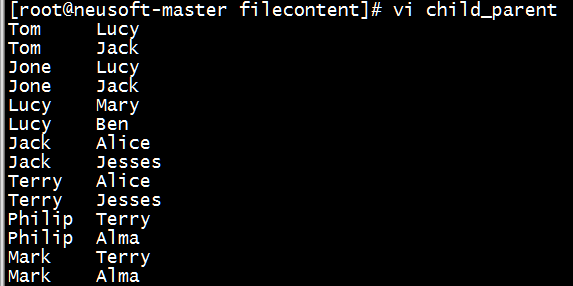
(1)准备数据
[root@neusoft-master filecontent]# vi child_parent
Tom Lucy
Tom Jack
Jone Lucy
Jone Jack
Lucy Mary
Lucy Ben
Jack Alice
Jack Jesses
Terry Alice
Terry Jesses
Philip Terry
Philip Alma
Mark Terry
Mark Alma
(以\t分隔)
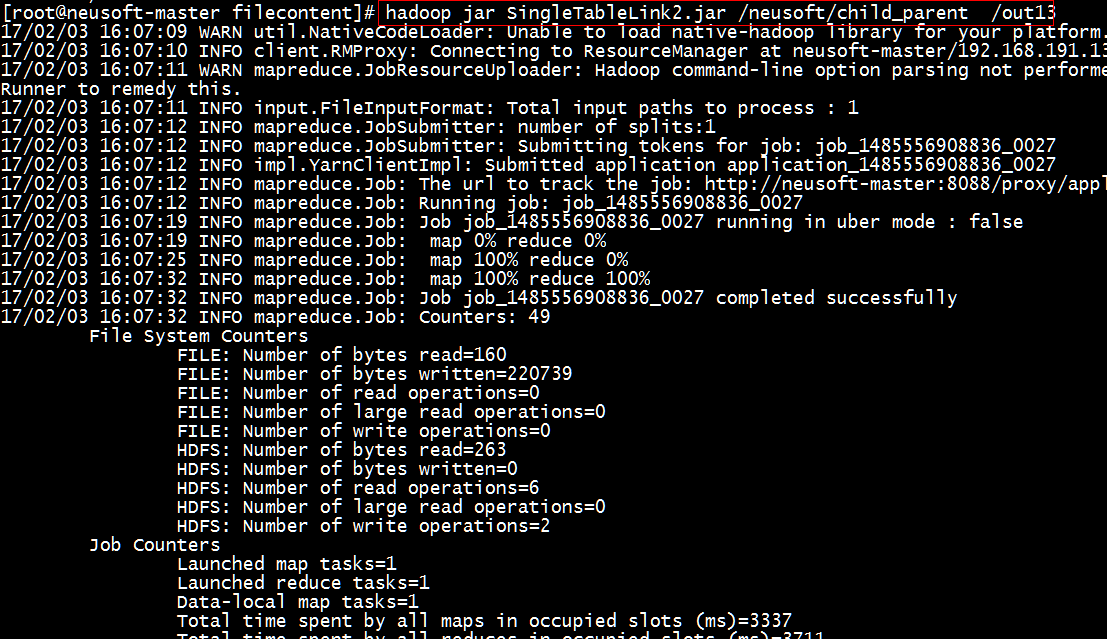
(2)执行jar包
[root@neusoft-master filecontent]# hadoop jar SingleTableLink2.jar /neusoft/child_parent /out13
(3)查看运行结果是否正确
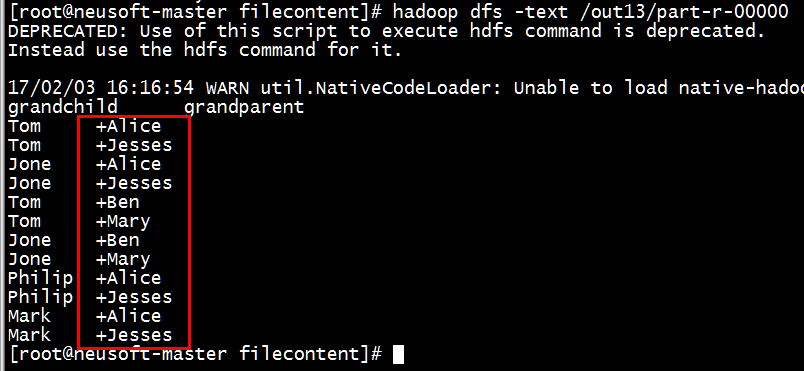
[root@neusoft-master filecontent]# hadoop dfs -text /out13/part-r-00000
备注:(1)如果显示的多一个+,加号,需要检查程序,在下面两个循环之间加移位操作。
// 获取value列表中value的child
32 while (record.charAt(i) != '+') {
33 childname += record.charAt(i);
34 i++;
35 }
36 i = i + 1; //越过名字之间的“+”加号
37 // 获取value列表中value的parent
38 while (i < len) {
39 parentname += record.charAt(i);
40 i++;
41 }
(2)补充点:
charAt
charAt(int index)方法是一个能够用来检索特定索引下的字符的String实例的方法.
charAt()方法返回指定索引位置的char值。索引范围为0~length()-1.
如: str.charAt(0)检索str中的第一个字符,str.charAt(str.length()-1)检索最后一个字符.
StringTokenizer是一个用来分隔String的应用类,相当于VB的split函数。
1.构造函数
public StringTokenizer(String str)
public StringTokenizer(String str, String delim)
public StringTokenizer(String str, String delim, boolean returnDelims)
第一个参数就是要分隔的String,第二个是分隔字符集合,第三个参数表示分隔符号是否作为标记返回,如果不指定分隔字符,默认的是:”\t\n\r\f”
2.核心方法
public boolean hasMoreTokens()
public String nextToken()
public String nextToken(String delim)
public int countTokens()
其实就是三个方法,返回分隔字符块的时候也可以指定分割符,而且以后都是采用最后一次指定的分隔符号。
MapRedece(单表关联)的更多相关文章
- MapReduce应用案例--单表关联
1. 实例描述 单表关联这个实例要求从给出的数据中寻找出所关心的数据,它是对原始数据所包含信息的挖掘. 实例中给出child-parent 表, 求出grandchild-grandparent表. ...
- Hadoop on Mac with IntelliJ IDEA - 8 单表关联NullPointerException
简化陆喜恒. Hadoop实战(第2版)5.4单表关联的代码时遇到空指向异常,经分析是逻辑问题,在此做个记录. 环境:Mac OS X 10.9.5, IntelliJ IDEA 13.1.5, Ha ...
- Hadoop 单表关联
前面的实例都是在数据上进行一些简单的处理,为进一步的操作打基础.单表关联这个实例要求从给出的数据中寻找到所关心的数据,它是对原始数据所包含信息的挖掘.下面进入这个实例. 1.实例描述 实例中给出chi ...
- MR案例:单表关联查询
"单表关联"这个实例要求从给出的数据中寻找所关心的数据,它是对原始数据所包含信息的挖掘. 需求:实例中给出 child-parent(孩子—父母)表,要求输出 grandchild ...
- MapReduce编程系列 — 5:单表关联
1.项目名称: 2.项目数据: chile parentTom LucyTom JackJone LucyJone JackLucy MaryLucy Ben ...
- MapRedece(多表关联)
多表关联: 准备数据 ******************************************** 工厂表: Factory Addressed BeijingRedStar 1 Shen ...
- MapReduce单表关联学习~
首先考虑表的自连接,其次是列的设置,最后是结果的整理. 文件内容: import org.apache.hadoop.conf.Configuration; import org.apache.had ...
- 利用hadoop来解决“单表关联”的问题
已知 child parent a b a c d b d c b e b f c g c h x g x h m x m n o x o n 则 c 2+c+g 2+c+h 1+a+c 1+d+c ...
- mapreduce-实现单表关联
//map类 package hadoop3; import java.io.IOException; import org.apache.hadoop.io.LongWritable;import ...
随机推荐
- Git学习笔记(三)
Git提交相关内容 在Git提交时,会保存一个提交对象,该对象包括一个指向暂存区内容快照的指针,包括本次提交作者等相关附属信息,包括零个或多个指向该提交对象的父对象指针:首次提交时是没有祖先,普通提交 ...
- 如何在O(n)的时间复杂度内找出数组中出现次数超过了一半的数
方法一:每次取出两个不同的数,剩下的数字中重复出现次数超过一半的数字肯定,将规模缩小化.如果每次删除两个不同的数,这里当然不是真的把它们踢出数组,而是对于候选数来说,出现次数减一,对于其他数来说,循环 ...
- POJ 3258 River Hopscotch(二分法搜索)
Description Every year the cows hold an event featuring a peculiar version of hopscotch that involve ...
- UITextField中文输入法输入时对字符长度的限制 输入时对字符类型的限制
检索一个字符串的长度的话:直接用 length,去进行判断就行了, 如果要检索字符串是否是自己要限制的类型的话,可以用正则表达式: 举个例子: 匹配9-15个由字母/数字组成的字符串的正则表达式: ...
- javascript 以“年-月-日 时:分:秒”格式显示当前时间
运行代码 /** * Created by shgbit on 2015/1/9. *js代码 */ function showNow(){ var t=new Date(); var mont ...
- 【MacOS】brew-python3
mkdir homebrew && curl -L https://github.com/Homebrew/brew/tarball/master | tar xz --strip 1 ...
- mysql临时表产生的执行效率问题改进(转)
问题: 近日,线上MySQL查出一个慢sql,每次都要查询1000ms以上,严重影响用户体验 今得空去诊断一番,记录如下: sql原句: SELECT r.object_id AS cardId, c ...
- windows自启动脚本
直接写一个普通批处理文件,如果是需要让它在系统启动时运行, 就将它放在C:\Windows\System32\GroupPolicy\Machine\Scripts\Startup目录下, 如果是需要 ...
- 关于OSG+QT+VS版本的问题
CMake3.10.0 Qt5.11.0安装包只有VS2017_64版本,没有VS2017的32位版本,有VS2015的32位版本 Qt5.11.0+osg3.4在CMake的时候,会出现 CMake ...
- Unity弹出MessageBox
[DllImport("User32.dll", SetLastError = true, ThrowOnUnmappableChar = true, CharSet = Char ...