
shiro的简单入门使用
这里只是测试登录认证,没有web模块,没有连接数据库,用户密码放在shiro.ini配置中,密码没有加密处理,简单入门。
基于maven
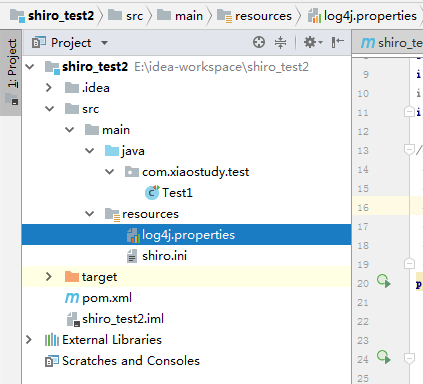
先看目录结构
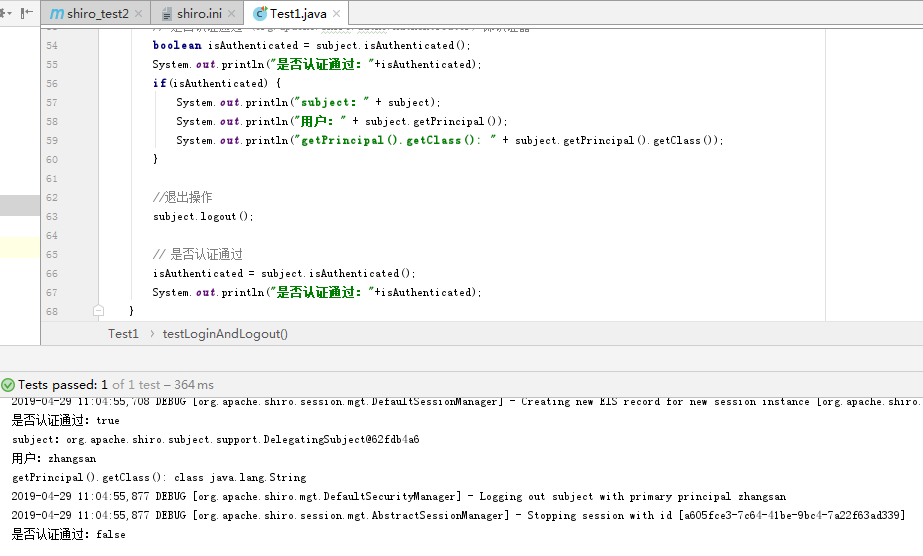
测试结果
pom.xml
 <?xml version="1.0" encoding="UTF-8"?>

 <project xmlns="http://maven.apache.org/POM/4.0.0" xmlns:xsi="http://www.w3.org/2001/XMLSchema-instance"

   xsi:schemaLocation="http://maven.apache.org/POM/4.0.0 http://maven.apache.org/xsd/maven-4.0.0.xsd">

   <modelVersion>4.0.0</modelVersion>

   <groupId>com.xiaostudy</groupId>

   <artifactId>shiro_test2</artifactId>

   <version>1.0-SNAPSHOT</version>

   <packaging>war</packaging>

   <name>shiro_test2 Maven Webapp</name>

   <!-- FIXME change it to the project's website -->

   <url>http://www.example.com</url>

   <properties>

     <project.build.sourceEncoding>UTF-8</project.build.sourceEncoding>

     <maven.compiler.source>1.7</maven.compiler.source>

     <maven.compiler.target>1.7</maven.compiler.target>

     <shiro.version>1.3.0</shiro.version>

     <quartz.version>2.2.3</quartz.version>

     <cas.client.version>3.1.9</cas.client.version>

     <junit.version>4.12</junit.version>

     <slf4j.version>1.7.7</slf4j.version>

     <log4j.version>1.2.17</log4j.version>

   </properties>

   <dependencies>

     <!-- shiro包开始 -->

     <dependency>

       <groupId>org.apache.shiro</groupId>

       <artifactId>shiro-ehcache</artifactId>

       <version>${shiro.version}</version>

     </dependency>

     <dependency>

       <groupId>org.apache.shiro</groupId>

       <artifactId>shiro-core</artifactId>

       <version>${shiro.version}</version>

     </dependency>

     <dependency>

       <groupId>org.apache.shiro</groupId>

       <artifactId>shiro-web</artifactId>

       <version>${shiro.version}</version>

     </dependency>

     <dependency>

       <groupId>org.apache.shiro</groupId>

       <artifactId>shiro-spring</artifactId>

       <version>${shiro.version}</version>

     </dependency>

     <dependency>

       <groupId>org.quartz-scheduler</groupId>

       <artifactId>quartz</artifactId>

       <version>${quartz.version}</version>

       <exclusions>

         <exclusion>

           <artifactId>c3p0</artifactId>

           <groupId>c3p0</groupId>

         </exclusion>

       </exclusions>

     </dependency>

     <dependency>

       <groupId>org.apache.shiro</groupId>

       <artifactId>shiro-cas</artifactId>

       <version>${shiro.version}</version>

     </dependency>

     <dependency>

       <groupId>org.jasig.cas</groupId>

       <artifactId>cas-client-core</artifactId>

       <version>${cas.client.version}</version>

     </dependency>

     <!-- shiro 包结束 -->

     <!--测试-->

     <dependency>

       <groupId>junit</groupId>

       <artifactId>junit</artifactId>

       <version>${junit.version}</version>

       <scope>test</scope>

     </dependency>

     <!-- 日志文件管理包 -->

     <dependency>

       <groupId>log4j</groupId>

       <artifactId>log4j</artifactId>

       <version>${log4j.version}</version>

     </dependency>

     <dependency>

       <groupId>org.slf4j</groupId>

       <artifactId>slf4j-api</artifactId>

       <version>${slf4j.version}</version>

     </dependency>

     <dependency>

       <groupId>org.slf4j</groupId>

       <artifactId>slf4j-log4j12</artifactId>

       <version>${slf4j.version}</version>

     </dependency>

     <dependency>

       <groupId>junit</groupId>

       <artifactId>junit</artifactId>

       <version>4.11</version>

       <scope>test</scope>

     </dependency>

     <dependency>

       <groupId>org.junit.jupiter</groupId>

       <artifactId>junit-jupiter-api</artifactId>

       <version>RELEASE</version>

       <scope>compile</scope>

     </dependency>

   </dependencies>

   <build>

     <finalName>shiro_test2</finalName>

     <pluginManagement><!-- lock down plugins versions to avoid using Maven defaults (may be moved to parent pom) -->

       <plugins>

         <plugin>

           <artifactId>maven-clean-plugin</artifactId>

           <version>3.1.0</version>

         </plugin>

         <!-- see http://maven.apache.org/ref/current/maven-core/default-bindings.html#Plugin_bindings_for_war_packaging -->

         <plugin>

           <artifactId>maven-resources-plugin</artifactId>

           <version>3.0.2</version>

         </plugin>

         <plugin>

           <artifactId>maven-compiler-plugin</artifactId>

           <version>3.8.0</version>

         </plugin>

         <plugin>

           <artifactId>maven-surefire-plugin</artifactId>

           <version>2.22.1</version>

         </plugin>

         <plugin>

           <artifactId>maven-war-plugin</artifactId>

           <version>3.2.2</version>

         </plugin>

         <plugin>

           <artifactId>maven-install-plugin</artifactId>

           <version>2.5.2</version>

         </plugin>

         <plugin>

           <artifactId>maven-deploy-plugin</artifactId>

           <version>2.8.2</version>

         </plugin>

       </plugins>

     </pluginManagement>

   </build>

 </project>
shiro.ini
 #对用户信息进行配置

 [users]

 #用户账号和密码

 zhangsan=123456

 lisi=654321
log4j.properties
 log4j.rootLogger=debug, stdout

 log4j.appender.stdout=org.apache.log4j.ConsoleAppender

 log4j.appender.stdout.layout=org.apache.log4j.PatternLayout

 log4j.appender.stdout.layout.ConversionPattern=%d %p [%c] - %m %n
测试代码
 package com.xiaostudy.test;

 import org.apache.shiro.SecurityUtils;

 import org.apache.shiro.authc.AuthenticationException;

 import org.apache.shiro.authc.UsernamePasswordToken;

 import org.apache.shiro.config.IniSecurityManagerFactory;

 import org.apache.shiro.mgt.DefaultSecurityManager;

 import org.apache.shiro.realm.text.IniRealm;

 import org.apache.shiro.subject.Subject;

 import org.apache.shiro.util.Factory;

 import org.junit.jupiter.api.Test;

 /**

  * Created with IntelliJ IDEA.

  * @author xiaostudy

  * Date: 2019/4/29

  * Time: 10:20

  * Description: No Description

  */

 public class Test1 {

     // 用户登录和退出

     @Test

     public void testLoginAndLogout() {

         DefaultSecurityManager defaultSecurityManager = new DefaultSecurityManager();

         IniRealm iniRealm = new IniRealm("classpath:shiro.ini");

         defaultSecurityManager.setRealm(iniRealm);

         SecurityUtils.setSecurityManager(defaultSecurityManager);

         // 从SecurityUtils中创建一个subject  (org.apache.shiro.subject.Subject) 即主体

         Subject subject = SecurityUtils.getSubject();

         // 在认证提交前准备token(令牌)   这里的账号和密码 将来是由用户输入进去的

         UsernamePasswordToken token = new UsernamePasswordToken("zhangsan", "123456");

         //执行认证提交

         try {

             subject.login(token);

         } catch (AuthenticationException e) {

             e.printStackTrace();

         }

         // 是否认证通过 (org.apache.shiro.authc.Authenticator) 即认证器

         boolean isAuthenticated = subject.isAuthenticated();

         System.out.println("是否认证通过:"+isAuthenticated);

         if(isAuthenticated) {

             System.out.println("subject:" + subject);

             System.out.println("用户:" + subject.getPrincipal());

             System.out.println("getPrincipal().getClass(): " + subject.getPrincipal().getClass());

         }

         //退出操作

         subject.logout();

         // 是否认证通过

         isAuthenticated = subject.isAuthenticated();

         System.out.println("是否认证通过:"+isAuthenticated);

     }

 }
shiro的简单入门使用的更多相关文章
- shiro简单入门介绍
shiro是apache的一个java安全框架 可以完成认证,授权,加密,会话管理,基于web继承,缓存等 功能简介: 从外部来看: shiro架构 Subject:主体,代表了当前“用户”,这个用 ...
- Shiro简介及入门(四)
1.1 什么是shiro shiro是apache的一个开源框架,是一个权限管理的框架,实现 用户认证.用户授权. spring中有spring security (原名Acegi),是一个权 ...
- Shiro官方快速入门10min例子源码解析框架2-Session
Shiro自身维护了一套session管理组件,它可以独立使用,并不单纯依赖WEB/Servlet/EJB容器等环境,使得它的session可以任何应用中使用. 2-Session)主要介绍在quic ...
- Shiro简介、入门案例、web容器的集成
目的: shiro简介 Shiro入门案例 Shiro与web容器的集成 shiro简介(中文官网:https://www.w3cschool.cn/shiro/andc1if0.html) 1.什么 ...
- 用IntelliJ IDEA创建Gradle项目简单入门
Gradle和Maven一样,是Java用得最多的构建工具之一,在Maven之前,解决jar包引用的问题真是令人抓狂,有了Maven后日子就好过起来了,而现在又有了Gradle,Maven有的功能它都 ...
- [原创]MYSQL的简单入门
MYSQL简单入门: 查询库名称:show databases; information_schema mysql test 2:创建库 create database 库名 DEFAULT CHAR ...
- Shiro安全框架入门篇(登录验证实例详解与源码)
转载自http://blog.csdn.net/u013142781 一.Shiro框架简单介绍 Apache Shiro是Java的一个安全框架,旨在简化身份验证和授权.Shiro在JavaSE和J ...
- Okio 1.9简单入门
Okio 1.9简单入门 Okio库是由square公司开发的,补充了java.io和java.nio的不足,更加方便,快速的访问.存储和处理你的数据.而OkHttp的底层也使用该库作为支持. 该库极 ...
- emacs最简单入门,只要10分钟
macs最简单入门,只要10分钟 windwiny @2013 无聊的时候又看到鼓吹emacs的文章,以前也有几次想尝试,结果都是玩不到10分钟就退出删除了. 这次硬着头皮,打开几篇文章都看完 ...
随机推荐
- 【Python虫师】多窗口定位
<注意>iframe框架 iframe也称作嵌入式框架,嵌入式框架和框架网页类似,它可以把一个网页的框架和内容嵌入在现有的网页中. 框架(framework)是一个基本概念上的结构,用于去 ...
- python-面向对象-10-单例
单例 目标 单例设计模式 __new__ 方法 Python 中的单例 01. 单例设计模式 设计模式 设计模式 是 前人工作的总结和提炼,通常,被人们广泛流传的设计模式都是针对 某一特定问题 的成熟 ...
- android奔溃日期一闪而过
Android Studio日期崩溃了一闪而过,看不到原因:可以设置No Filters就可以了
- (转)使用git stash解决git pull时的冲突
在使用git pull代码时,经常会碰到有冲突的情况,提示如下信息: error: Your local changes to 'c/environ.c' would be overwritten b ...
- eclipse向svn提交代码的时候忽略部分资源配置
eclipse向svn提交代码的时候有 .settings, .project, .classpath, target等不需要上传,所以在eclipse中配置一下就不会显示了,方法如下图:
- R实现的最小二乘lsfit函数学习
1.源码 function (x, y, wt = NULL, intercept = TRUE, tolerance = 1e-, yname = NULL) { x <- as.matrix ...
- python输出测试报告测试成功
import unittest # import HtmlTestRunner import HTMLTestRunner class DemoTest(unittest.TestCase): def ...
- webdriver鼠标上下滑动
有时候我们需要对窗口显示的页面上下滑动,以显示当前正在处理的位置,这就需要用到webdriver模拟鼠标上下滑动 package test20161201; import org.openqa.sel ...
- js五星好评
一般我们在一些购物以及美食的网站都会看到五星好评之类的,一下是使用js制作的五星好评! <!DOCTYPE html> <html lang="en"> & ...
- LinkedList详解
一.LinkedList的介绍与特点. 1.继承实现关系. 实现了双端队列接口Deque,因此具有双端队列的功能:addFirt,addLast,offerFirt,offerLast,removeF ...