
字符设备之register_chrdev与register_chrdev_region(转)
之前写字符设备驱动,都是使用register_chrdev向内核注册驱动程序中构建的file_operations结构体,之后创建的设备文件,只要是主设备号相同(次设备号不同),则绑定的都是同一个file_operations结构体,应用程序使用的也都是这一个结构体中注册的函数。这就会出现这样的一个弊端:同一类字符设备(即主设备号相同),会在内核中连续注册了256(分析内核代码中可知),也就是所以的此设备号都会被占用,而在大多数情况下都不会用到这么多次设备号,所以会造成极大的资源浪费。所以register_chrdev在某个角度上是有弊端的,这也是老版本内核中使用。
register_chrdev的注册,还分为静态注册和动态注册。而register_chrdev_region和alloc_chrdev_region正相当于将register_chrdev拆分来,它们分别是静态和动态注册的个体,但同时也解决了register_chrdev资源浪费的缺点。
register_chrdev_region(dev_t from, unsigned count, const char * name)
从参数中分析该函数的作用:
from:要分配的设备号范围的起始值。
count:所要求的连续设备编号个数。
name:和该编号范围相关的设备名称。
register_chrdev_region允许注册一个规定的设备号的范围,也就不一定把0~255个此设备号都注册占用。
在2.6之后的内核,利用的是一个struct cdev结构体来描述一个字符设备。
struct cdev {

struct kobject kobj;

struct module *owner;

const struct file_operations *ops;

struct list_head list;

dev_t dev;

unsigned int count;

};
再介绍几个用到的函数:
void cdev_init(struct cdev *, const struct file_operations *);//清空cdev,并填充file_operations 结构体

int cdev_add(struct cdev *, dev_t, unsigned);//注册字符设备到内核
例子:写一个简单的字符设备驱动,主设备号为major,只注册0~1两个此设备号,并创建主设备号为major,次设备号创建0,1,2三个设备文件。利用应用程序打开这三个文件,看有什么现象(是否都能打开)
#include <linux/module.h>

#include <linux/kernel.h>

#include <linux/fs.h>

#include <linux/init.h>

#include <linux/delay.h>

#include <linux/irq.h>

#include <asm/uaccess.h>

#include <asm/irq.h>

#include <asm/io.h>

#include <asm/arch/regs-gpio.h>

#include <asm/hardware.h>

#include <linux/poll.h>

#include <linux/cdev.h>

static int hello_open(struct inode *inode, struct file *filp)

{

printk("hello_open\n");

return 0;

}

//构建file_operations结构体

static struct file_operations hello_fops={

.owner=THIS_MODULE,

.open   =   hello_open,

};

static int major;

static struct cdev hello_cdev;

static struct class* hello_class;

static struct class_device* hello_class_dev[3];

static int hello_init(void)

{

dev_t devid;

if(major==0)

{

alloc_chrdev_region(&devid,0,2,"hello");//主设备号为major,次设备号为0,1则对应该file_operations

major=MAJOR(devid);

//int alloc_chrdev_region(dev_t *dev, unsigned baseminor, unsigned count,const char *name)

}

else

{

devid=MKDEV(major,0);

register_chrdev_region(devid,2,"hello");

//int register_chrdev_region(dev_t from, unsigned count, const char *name)

}

cdev_init(&hello_cdev,&hello_fops);

//注册

cdev_add(&hello_cdev,devid,2);

//创建类

hello_class=class_create(THIS_MODULE,"hello");

int i;

for(i=0;i<3;i++)

{   //自动创建设备

hello_class_dev[i]=class_device_create(hello_class,NULL,MKDEV(major,i),NULL,"hello%d",i);

}

return 0;

}

static void hello_exit(void)

{

cdev_del(&hello_cdev);

unregister_chrdev_region(MKDEV(major,0),2);

int i;

for(i=0;i<3;i++)

{

class_device_destroy(hello_class, MKDEV(major, i));

}

class_destroy(hello_class);

}

module_init(hello_init);

module_exit(hello_exit);

MODULE_LICENSE("GPL");
应用程序很简单:
#include <stdio.h>

#include <sys/types.h>

#include <sys/stat.h>

#include <unistd.h>

#include <fcntl.h>

int main(int argc, char const *argv[])

{

int fd=open(argv[1],O_RDWR);

if(-1==fd)

{

printf("Can‘t open!\n");

return ;

}

printf("Open OK!\n");

return 0;

}
结果/现象:
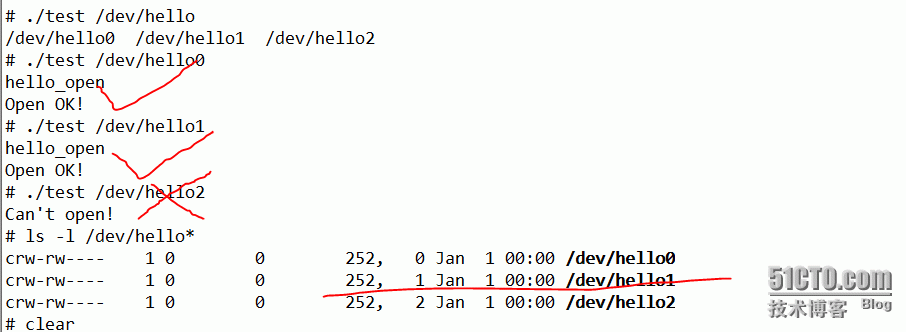
从此可以看出,现在只有(252,0)和(252,1)对应了驱动程序中的file_operations结构体,而(252,2)虽然也是一个存在的设备文件,但是由于驱动程序中没有它对应的file_operations结构体,所以应用程序打开它的时候被拒绝了。
http://10274409.blog.51cto.com/10264409/1762687
字符设备之register_chrdev与register_chrdev_region(转)的更多相关文章
- 使用register_chrdev注册字符设备
1.2.2 使用register_chrdev注册字符设备 注册字符设备可以使用register_chrdev函数. int register_chrdev (unsigned int major, ...
- Linux 字符设备驱动及一些简单的Linux知识
一.linux系统将设备分为3类:字符设备.块设备.网络设备 1.字符设备:是指只能一个字节一个字节读写的设备,不能随机读取设备内存中的某一数据,读取数据需要按照先后数据.字符设备是面向流的设备,常见 ...
- 字符设备 register_chrdev_region()、alloc_chrdev_region() 和 register_chrdev() (转载)
1. 字符设备结构体 内核中所有已分配的字符设备编号都记录在一个名为 chrdevs 散列表里.该散列表中的每一个元素是一个 char_device_struct 结构,它的定义如下: static ...
- 字符设备 register_chrdev_region()、alloc_chrdev_region() 和 register_chrdev()
1. 字符设备结构体 内核中所有已分配的字符设备编号都记录在一个名为 chrdevs 散列表里.该散列表中的每一个元素是一个 char_device_struct 结构,它的定义如下: static ...
- register_chrdev_region/alloc_chrdev_region和cdev注册字符设备驱动
内核提供了三个函数来注册一组字符设备编号,这三个函数分别是 register_chrdev_region().alloc_chrdev_region() 和 register_chrdev(). (1 ...
- 29.使用register_chrdev_region()系列来注册字符设备
1.之前注册字符设备用的如下函数注册字符设备驱动: register_chrdev(unsigned int major, const char *name,const struct file_ope ...
- linux驱动---字符设备的注册register_chrdev说起
首先我们在注册函数里面调用了register_chrdev(MEM_MAJOR,"mem",&memory_fops),向内核注册了一个字符设备. 第一个参数是主设备号,0 ...
- linux 字符设备驱动写法
字符设备,块设备书 一.register_chrdev_region, register_chrdev, misc_register misc device(杂项设备) 在 Linux 内核的incl ...
- Linux字符设备驱动结构(一)--cdev结构体、设备号相关知识机械【转】
本文转载自:http://blog.csdn.net/zqixiao_09/article/details/50839042 一.字符设备基础知识 1.设备驱动分类 linux系统将设备分为3类:字符 ...
随机推荐
- n转m进制标准写法(必须记忆)
#include <bits/stdc++.h> using namespace std; int main() { int n,m; cin >> n >> m; ...
- Activiti工作流笔记(1)
Activiti下载地址: eclipse的activiti插件下载地址:http://www.activiti.org/designer/archived/activiti-designer-5.1 ...
- iOS UI-Lable标签、NStimer定时器和RunLoop超级死循环
// 标签UILable -显示文字 // 1.创建标签 UILabel *lable = [[UILabel alloc] init]; // 2.设置标签的坐标和大小 [lable setFram ...
- tensoflow学习入门一
对于如何创建图并开启session,参考如下 # -- encoding:utf-8 -- import tensorflow as tf # 定义常量矩阵a和矩阵b a=tf.constant([[ ...
- VGA
VGA(Video Graphics Array )视频图形阵列,是IBM在1987年随PS/2机一起推出的一种视频传输标准,具有分辨率高.显示速率快.颜色丰富等优点,在彩色显示器领域得到了广泛的应用 ...
- bzoj1601
题解: 简单生成树 代码: #include<bits/stdc++.h> using namespace std; ; int n,dis[N],f[N],a[N][N],ans; in ...
- Oracle 等待事件 db file sequential read
db file sequential read-数据文件顺序读取 等待事件: "db file sequential read" Reference Note (文档 ID 345 ...
- iOS 证书 设置指南
点击这里跳转到改链接:http://docs.jpush.cn/pages/viewpage.action?pageId=1343727
- 基础练习 Huffuman树
基础练习 Huffuman树 时间限制:1.0s 内存限制:512.0MB 问题描述 Huffman树在编码中有着广泛的应用.在这里,我们只关心Huffman树的构造过程. 给 ...
- JAVA取得IP
通常这样取一个IP:request.getRemoteAddr(),但有时候取出来的是不对的,特别是在应用前加了Nginx之类的软件,下面的方法可以取出访问的IP地址 public static St ...