
获取天气预报API5_统计最容易生病时间段
python机器学习-乳腺癌细胞挖掘(博主亲自录制视频)

医药统计项目联系QQ:231469242
All rights reversed
commercial use not allowed
北京数据


重庆数据


美国Rockwell


澳大利亚悉尼


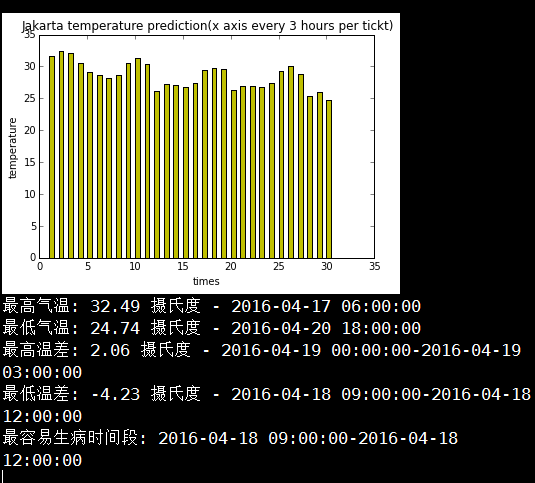
印尼雅加达

London 英国


# -*- coding: utf-8 -*-
# All rights reversed, commercial use not allowed

#! python3

# quickWeather.py - Prints the current weather for a location from the command line.

"""

k(开尔文)=273.15+T(摄氏度) json返回的是开尔文温度

Created on Sat Apr 16 10:24:28 2016

@author: daxiong

"""

import json, requests,sys,pylab,numpy

#城市名称

cityName="beijing"

#城市ID号

cityID="2038349"

#我的免费appID

appID="0383ae59663e14ab5a6855d5b6ad5d00"

#获取时间段数

cnt="30"

# Download the JSON data from OpenWeatherMap.org's API

url="http://api.openweathermap.org/data/2.5/forecast/city?id=%s&APPID=%s&cnt=%s"%(cityID,appID,cnt)

response = requests.get(url)

response.raise_for_status()

# Load JSON data into a Python variable.

weatherData = json.loads(response.text)

# Print weather descriptions.

#主要获取weatherData---weather---main和description信息

w = weatherData['list']

print('Current weather in %s:' % (cityName))

temperature_list=[]

cnt_list=[]

time_list=[]

for i in range(int(cnt)):

    time=w[i]['dt_txt']

    print(time)

    main=w[i]['weather'][0]['main']

    description=w[i]['weather'][0]['description']

    temp=w[i]['main']['temp']

    temp_Chinese=temp-273.15

    temp_Chinese_round=round(temp_Chinese,2)

    temperature_list.append(temp_Chinese_round)

    cnt_list.append(i+1)

    time_list.append(str(time))

    print(main, '-',description,'-',temp_Chinese_round,"摄氏度")

    print()

barwidth=0.5

pylab.bar(cnt_list,temperature_list,width=barwidth,color='y')

pylab.xlabel("times")

pylab.ylabel('temperature')

pylab.title("%s temperature prediction(x axis every 3 hours per tickt)"%cityName)

pylab.show()

#计算最高气温和最低气温

list_temperature_time=zip(temperature_list,time_list)

dict_temperature_time=dict(list_temperature_time)

max_temp=max(dict_temperature_time.keys())

min_temp=min(dict_temperature_time.keys())

print("最高气温:",max_temp,'摄氏度','-',dict_temperature_time[max_temp])

print("最低气温:",min_temp,'摄氏度','-',dict_temperature_time[min_temp])

#温差列表,用于统计哪天人最容易生病

temperature_difference_list=[]

for i in range(len(temperature_list)-1):

    temperature_difference=temperature_list[i+1]-temperature_list[i]

    temperature_difference_list.append(temperature_difference)

time_difference_list=[]

for i in range(len(time_list)-1):

    time_difference=time_list[i]+'-'+time_list[i+1]

    time_difference_list.append(time_difference)

list_temperature_time_difference=zip(temperature_difference_list,time_difference_list)

dict_temperature_time_difference=dict(list_temperature_time_difference)

max_temp_difference=max(dict_temperature_time_difference.keys())

min_temp_difference=min(dict_temperature_time_difference.keys())

print("最高温差:",round(max_temp_difference,2),'摄氏度','-',dict_temperature_time_difference[max_temp_difference])

print("最低温差:",round(min_temp_difference,2),'摄氏度','-',dict_temperature_time_difference[min_temp_difference])

#最容易生病时间段,取温差绝对值最大的key

if abs(max_temp_difference)>abs(min_temp_difference):

    ill_likely_day=dict_temperature_time_difference[max_temp_difference]

else:

    ill_likely_day=dict_temperature_time_difference[min_temp_difference]

print("最容易生病时间段:",ill_likely_day)

#统计温差又高到底排序的时间段

#温差绝对值列表

absolute_temperature_difference_list=[abs(i) for i in temperature_difference_list]

list_temperature_time_difference=zip(absolute_temperature_difference_list,time_difference_list)

dict_absolute_temperature_time_difference=dict(list_temperature_time_difference)

sorted_temperature_time_difference=sorted(dict_absolute_temperature_time_difference.items(),reverse=True)

'''

# Compute location from command line arguments.

if len(sys.argv) < 2:

    print('Usage: quickWeather.py location')

    sys.exit()

location = ' '.join(sys.argv[1:])

len(weatherData)

Out[21]: 5

for i in weatherData:

    print(i)

city  #城市信息

cod   #内部参数

cnt   #预测天数

list  #信息列表,主要获取weatherData---weather---main和description信息

message #内部参数

weatherData

Out[23]:

{'city': {'coord': {'lat': 30.25, 'lon': 107.75},

  'country': 'CN',

  'id': 1814905,

  'name': 'Chongqing Shi',

  'population': 0,

  'sys': {'population': 0}},

 'cnt': 1,

 'cod': '200',

 'list': [{'clouds': {'all': 44},

   'dt': 1460775600,

   'dt_txt': '2016-04-16 03:00:00',

   'main': {'grnd_level': 937.55,

    'humidity': 98,

    'pressure': 937.55,

    'sea_level': 1025.81,

    'temp': 288.16,

    'temp_kf': 0.4,

    'temp_max': 288.16,

    'temp_min': 287.759},

   'rain': {'3h': 0.01},

   'sys': {'pod': 'd'},

   'weather': [{'description': 'light rain',

     'icon': '10d',

     'id': 500,

     'main': 'Rain'}],

   'wind': {'deg': 267.501, 'speed': 1.63}}],

 'message': 0.0109}

#pylab.hist(temperature_list)

pylab.plot(cnt_list,temperature_list,'ro')

pylab.xlabel("times")

pylab.ylabel('temperature')

pylab.title("%s temperature prediction"%cityName)

pylab.show()

'''
https://study.163.com/provider/400000000398149/index.htm?share=2&shareId=400000000398149( 欢迎关注博主主页,学习python视频资源,还有大量免费python经典文章)

获取天气预报API5_统计最容易生病时间段的更多相关文章
- [整]C#获取天气预报信息(baidu api)包括pm2.5
/// <summary> /// 获取天气预报信息 /// </summary> /// <returns></returns> public Bai ...
- java获取天气预报的信息
运行效果: 主要功能: 1,jsp页面输入省份和城市 根据条件获取当地的天气信息 2,java代码 利用第三方的省份和城市的路径地址 本工程主要实现java获取天气预报的信息步骤1,创建工程weath ...
- Android 获取天气预报
界面布局 <?xml version="1.0" encoding="utf-8"?> <LinearLayout xmlns:android ...
- php从气象局获取天气预报并保存到服务器
思路:1.打开网页时读取中国气象网的接口得到每个城市的该日json:2.解析并保存到mysql:3.客户端访问mysql得到数据集. 所包含的技巧: 进度条.flush()问题.mysql.xml.p ...
- 获取分组后统计数量最多的纪录;limit用法;sql执行顺序
CREATE TABLE emp(id INT PRIMARY KEY,NAME VARCHAR(11),dep_id INT ,salary INT); CREATE TABLE dept(id I ...
- springboot 采用HttpClient获取天气预报 异常及原因
采用httpClient调用天气预报地址获取出现异常 2018-10-04 15:18:25.815 ERROR 10868 --- [nio-8080-exec-5] o.a.c.c.C.[.[.[ ...
- php获取本周、本月、本年的时间段
这是在TP框架里面自己用到的一个获取周.月.年时间段的方法.
- Ajax的封装,以及利用jquery的ajax获取天气预报
1.Ajax的封装 function ajax(type,url,param,sync,datetype,callback){//第一个参数是获取数据的类型,第二个参数是传入open的url,第三个是 ...
- vc中获取磁盘IO统计计数
想知道进程读写磁盘的情况,可以获取当前进程或指定进程的IO计数. #include <Windows.h> int get_io_bytes(ULONGLONG * read_bytes, ...
随机推荐
- 《Linux内核分析》期终总结
作者:杨舒雯,原创作品转载请注明出处,<Linux内核分析>MOOC课程http://mooc.study.163.com/course/USTC-1000029000 目录: 1.通过简 ...
- 第七周linux内核分析
可执行程序的装载 作者 黎静+ 原创作品转载请注明出处 + <Linux内核分析>MOOC课程http://mooc.study.163.com/course/USTC-100002900 ...
- CSS编码规则
/* 和HTML一样使用两个空格来代替制表符 */ div { /* 为了代码的易读性,在每个声明块的左花括号前添加一个空格 */' padding: 15px; /* 每个声明语句的:后应该插入一个 ...
- java可变参数长度
一: 在python中 有可变参数*args和万能参数**args参数分别为列表和字典.在java中也有类似的可变参数列表.不过传递进去的是可变参数数组. package com.company; p ...
- [问题解决]基于注解配置dubbo遇到ConnectionLoss for /dubbo/xxx问题解决
今天升级spring版本的时候,同时升级dubbo的版本,采用的是dubbo的基于注解的配置方法,采用curator作为dubbo的客户端, curator版本为4.1.0,启动之后,发现一直报错 C ...
- Eclipse Creating a New Runnable JAR File 清理工作空间下的配置文件
D:\workspacegit\.metadata\.plugins\org.eclipse.debug.core\.launches 相关文件存在这里.
- Qt开发之信号槽机制
一.信号槽机制原理 1.如何声明信号槽 Qt头文件中一段的简化版: class Example: public QObject { Q_OBJECT signals: void customSigna ...
- github使用指南(2015年3月23日更新了本地创建仓库再推送到remote仓库的使用方法)
我是通过这个来学习的.个人愚笨,琢磨了半天,终于搞通了,醉了醉了,以前一直使用svn,用git确实有点水土不服.本文以如何使用git为主来展开,不涉及太多理论. git是分布式的版本管理.什么叫分布式 ...
- hbase中文内容编码转换
/** * HBASE中文转换 */ @Test public void testHbaseStr() throws Exception { // Hbase UTF8编码 String conten ...
- JS中var声明与function声明两种函数声明方式的区别
JS中常见的两种函数声明(statement)方式有这两种: // 函数表达式(function expression) var h = function() { // h } // 函数声明(fun ...