
python中建模分析零息票收益率曲线--复利和连续复利
收益率曲线(Yield Curve)是显示一组货币和信贷风险均相同,但期限不同的债券或其他金融工具收益率的图表。纵轴代表收益率,横轴则是距离到期的时间。在此用python建模分析零息票收益率曲线,输出图表并制图。
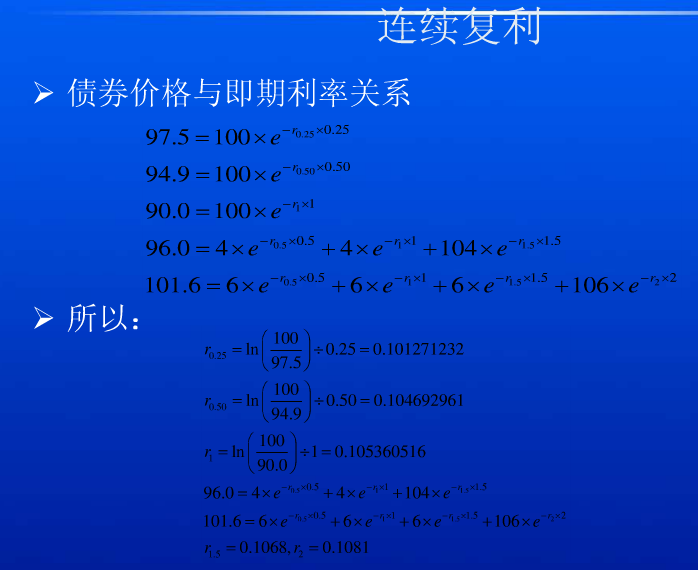
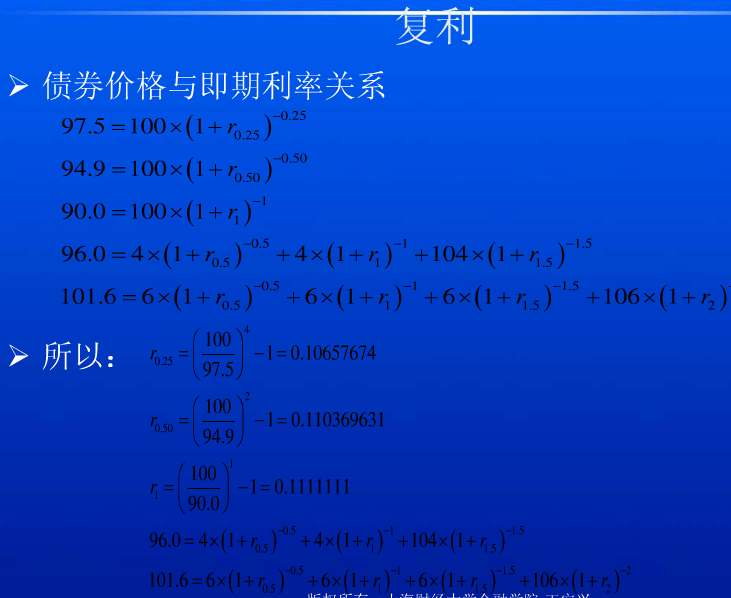
首先要理解收益率的计算方法,然后计算出连续复利和复利。再根据计算步骤在python中编写代码建模
此为连续复利的计算
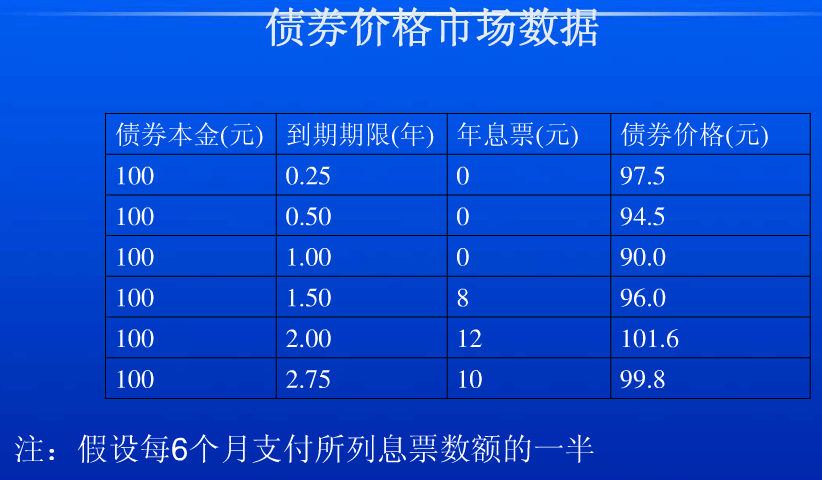
 # 没有年息票的一年期以内的零息票年收益率YTM=(log(面值/价格))/期限
 r1 = np.log(100/97.5)/0.25
 r2 = np.log(100/94.9)/0.5
 r3 = np.log(100/90)/1
 print('第0.25年年息票收益率:',round(r1,5))
 print('第0.5年年息票收益率:',round(r2,5))
 print('第1年年息票收益率:',round(r3,5))
 #每半年付息一次的有年息票的零息票年收益率YTM:零息票年收益率=[log((年息票/2+面值)/(债券价格-年息票/2*(前期价格/面值)))]/期限
 #价格=(年息票/2)*e^(-r2*0.5)+(年息票/2)*e^(-r3*1)+(年息票/2+面值)*e^(-r4*1.5)
 # r4=[log(104/(94-(94.9+90)/100)]/1.5
 #超过一年期的零息票年收益率YTM=(面值/价格)开期限n的次方根减1
 rate2 = math.pow(100 / 84.99, float(1) / float(3))-1
 print(rate2)
 # 96=4*(1+0.5*r2)^-1+4*(1+r3)^-1+104*(1+r4)^-1.5
 r4 = np.log(104/88.604)/1.5
 print('第1.5年年息票收益率:',round(r4,5))

 r5 = np.log(106/(101.6-(1.849*6+88.604/104*6)))/2#np.log(106/85.394)/2
 print('第2年年息票收益率:',round(r5,5))
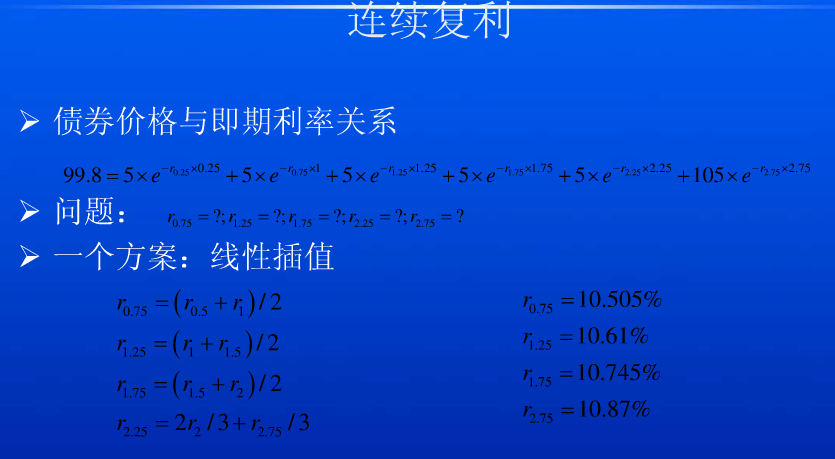
 #线性插值
 #第0.75年年息票收益率:
 r6 = (r2+r3)/2
 print('第0.75年年息票收益率:',round(r6,5))
 #第1.25年年息票收益率:
 r7 = (r3+r4)/2
 print('第1.25年年息票收益率:',round(r7,5))
 #第1.75年年息票收益率:
 r8 = (r4+r5)/2
 print('第1.75年年息票收益率:',round(r8,5))
 #第2.25年年息票收益率:
 # r9 = 2(r5)/3 +(r'第2.75年年息票收益率')/3
 # print('第2.25年年息票收益率:',round(r9,5))
1.我们需要在python中加载相应的模块来进行开发调式
 import pandas as pd
 import numpy as np
 import matplotlib.pyplot as plt
 import math
 import os
 import operator
 import sys#实现从程序外部向程序传递参数。
 import xlrd
2.确定输入及输出的文件路径,读取文件
 InputPath=sys.argv[1]#输入路径
 OutputPath=sys.argv[2]#输出路径
 filePath = InputPath#处理的文件为在输入路径中读取的文件
3.明确表中的字段,定义两个空字典输出计算的数值

上表为输入表,根据表中的字段来计算收益率,Period为付息频率,我们需要取CouponFrequency中的最大值来进行计算
 df = pd.read_excel(filePath)
 bondsCount = df.shape[0]

 dicE4Calc = {}#定义一个空的价格比计算表。价格/面值
 dicResult = {}#定义一个空的结果表

 Period = 1 / df['CouponFrequency'].max()#步长为0.5
4.定义一个价格合计,根据这个合计来进行迭代计算
 def getPreSum(pCoupon, targetTerm, startTerm):#前期价格合计
     sum = 0
     p = startTerm
     while (p < targetTerm):#要小于目标的期限
         sum += dicE4Calc[str(p)] * pCoupon
         p += Period#期限以0.5递增

     return sum#返回的是新计算出来的价格
5.定义线性插值法计算,利用前后两期数据可以求出中间的值
 def LinearInterpolation(pCoupon, targetTerm, interval):#线性插值法利用中位数求利率
     sum = 0
     p = interval
     while p < targetTerm:
         if str(p) not in dicResult:#结果表中没有的数据,left为前面一期,right为后面一期
             r_Left = str(p - interval)
             r_Right = str(p + interval)

             if r_Left in dicResult and r_Right in dicResult:#结果表中有前后的数据就用插值法计算
                 r = (dicResult[r_Left] + dicResult[r_Right]) / 2

             elif r_Left in dicResult and r_Right not in dicResult:#有前面的数据没有后面的数据
                 r_Left2 = str(p - interval - interval)#left为前2期
                 r = dicResult[r_Left2] + (dicResult[r_Left] - dicResult[r_Left2]) / (interval) * (p - float(r_Left2))

             dicResult[str(p)] = r
             dicE4Calc[str(p)] = pow(math.e, -r * p)#e的(-r*p)次方

         p += interval
6.读取表格
df['Coupon']=df['Coupon'].fillna(0)#若Coupon为空值则填充为0
for i in range(bondsCount):#读取表格中对应的列

    FaceValue = df.loc[i, 'FaceValue']
    Price = df.loc[i, 'Price']
    Term = df.loc[i, 'Term_Y']
    Coupon = df.loc[i, 'Coupon']
    CouponFrequency = df.loc[i, 'CouponFrequency']
    YTM = 0
    e4Calc = 0
7.计算有年息和无年息的收益率
  if Coupon == 0:

         e4Calc = Price / FaceValue

         YTM = math.log(FaceValue / Price) / Term

     else:#有息票的计算
         PeriodCoupon = Coupon * Period#年息票的0.5

         if Term % Period == 0:#从0.5年开始
             LinearInterpolation(PeriodCoupon, Term, Period)
             e4Calc = (Price - getPreSum(PeriodCoupon, Term, Period)) / (FaceValue + PeriodCoupon)

         else:#不是从0.5开始,需要在起始日期以0.5年递增
             LinearInterpolation(PeriodCoupon, Term, Term % Period)
             e4Calc = (Price - getPreSum(PeriodCoupon, Term, Term % Period)) / (FaceValue + PeriodCoupon)

         YTM = math.log(1 / e4Calc) / Term

     dicE4Calc[str(Term)] = e4Calc
     dicResult[str(Term)] = round(YTM, 9)
8.把计算结果写到输出表中
 sorted_dicResult = sorted(dicResult.items(),key =operator.itemgetter(0))#把求出的收益率按期限排序,把字典转为列表
 # print(dicResult)
 print(sorted_dicResult)
 Term = [i[0] for i in sorted_dicResult ]#遍历列表中的期限
 Yield = [i[1] for i in sorted_dicResult ]#遍历列表中的
 data={"Term":Term,"Yield":Yield}
 columns=['Term','Yield']
 df=pd.DataFrame(data=data,columns=columns)
 df['TermBase']='Y'
 df = df.set_index("TermBase")
 df.to_excel(OutputPath,sheet_name='OutPut')

 print(df)
9.绘制出收益率曲线图
 x = Term
 y = Yield
 plt.plot(x,y)
 plt.xlabel('CouponFrequency')#期限
 plt.ylabel('YTM')#收益率
 plt.title('Zero coupon yield curve')#命名
 plt.show()
最终结果如下:

复利的计算也类似,完整代码如下:
 #复利计算
 import pandas as pd
 import numpy as np
 import matplotlib.pyplot as plt
 import math
 import os
 import operator
 import sys
 import xlrd
 from openpyxl import Workbook
 from openpyxl import load_workbook
 from openpyxl.utils import get_column_letter
 from openpyxl.compat import range

 InputPath=sys.argv[1]
 OutputPath=sys.argv[2]
 print(InputPath)
 print(OutputPath)

 filePath = InputPath
 df = pd.read_excel(filePath)
 bondsCount = df.shape[0]
 dicE4Calc = {}
 dicResult = {}
 Period = 0.5

 def getPreSum(pCoupon, targetTerm, startTerm):
     sum = 0
     p = startTerm
     while (p < targetTerm):
         sum += dicE4Calc[str(p)] * pCoupon
         p += Period

     return sum

 def LinearInterpolation(pCoupon, targetTerm, interval):
     sum = 0
     p = interval
     while p < targetTerm:
         if str(p) not in dicResult:
             r_Left = str(p - interval)
             r_Right = str(p + interval)

             if r_Left in dicResult and r_Right in dicResult:
                 r = (dicResult[r_Left] + dicResult[r_Right]) / 2

             elif r_Left in dicResult and r_Right not in dicResult:
                 r_Left2 = str(p - interval - interval)
                 r = dicResult[r_Left2] + (dicResult[r_Left] - dicResult[r_Left2]) / (interval) * (p - float(r_Left2))

             dicResult[str(p)] = r
             dicE4Calc[str(p)] = pow(math.e, -r * p)

         p += interval
 Period = 1 / df['CouponFrequency'].max()
 df['Coupon']=df['Coupon'].fillna(0)
 for i in range(bondsCount):

     FaceValue = df.loc[i, 'FaceValue']
     Price = df.loc[i, 'Price']
     Term = df.loc[i, 'Term_Y']
     Coupon = df.loc[i, 'Coupon']
     CouponFrequency = df.loc[i, 'CouponFrequency']
     YTM = 0
     e4Calc = 0

     if Coupon == 0:

         e4Calc = Price / FaceValue

         YTM = pow(FaceValue / Price,1/ Term) -1

     else:
         PeriodCoupon = Coupon * Period

         if Term % Period == 0:
             LinearInterpolation(PeriodCoupon, Term, Period)

             e4Calc = (Price - getPreSum(PeriodCoupon, Term, Period)) / (FaceValue + PeriodCoupon)

         else:

             LinearInterpolation(PeriodCoupon, Term, Term % Period)
             e4Calc = (Price - getPreSum(PeriodCoupon, Term, Term % Period)) / (FaceValue + PeriodCoupon)

         YTM = pow(1 / e4Calc,1/ Term) - 1

     dicE4Calc[str(Term)] = e4Calc
     dicResult[str(Term)] = round(YTM, 9)

 # print(dicE4Calc)
 # print(dicResult)

 sorted_dicResult = sorted(dicResult.items(),key =operator.itemgetter(0))
 # print(dicResult)
 print(sorted_dicResult)
 Term = [i[0] for i in sorted_dicResult ]
 Yield = [i[1] for i in sorted_dicResult ]

 data={"Term":Term,"Yield":Yield}
 columns=['Term','Yield']
 df=pd.DataFrame(data=data,columns=columns)
 df['TermBase']='Y'
 df = df.set_index("TermBase")
 df.to_excel(OutputPath,sheet_name='OutPut')
 print(df)

 x = Term
 y = Yield
 plt.plot(x,y)
 plt.xlabel('CouponFrequency')
 plt.ylabel('YTM')
 plt.title('Zero coupon yield curve')
 plt.show()
python中建模分析零息票收益率曲线--复利和连续复利的更多相关文章
- Python中利用LSTM模型进行时间序列预测分析
时间序列模型 时间序列预测分析就是利用过去一段时间内某事件时间的特征来预测未来一段时间内该事件的特征.这是一类相对比较复杂的预测建模问题,和回归分析模型的预测不同,时间序列模型是依赖于事件发生的先后顺 ...
- Python中if __name__=="__main__" 语句在调用多进程Process过程中的作用分析
2018年2月27日 于创B515 引言 最近准备学习一下如何使用Python中的多进程.在翻看相关书籍.网上资料时发现所有代码都含有if __name__=="__main__" ...
- 《构建之法》教学笔记——Python中的效能分析与几个问题
<构建之法:现代软件工程>中第2章对效能分析进行了介绍,基于的工具是VSTS.由于我教授的学生中只有部分同学选修了C#,若采用书中例子讲解,学生可能理解起来比较困难.不过所有这些学生都学习 ...
- Python中方法的缺省参数问题分析
引言: 在Python中可以缺省给方法制定缺省值,但是这个缺省值在某些情况下确是和我们预期不太一致的-... 这个诡异的问题,曾经困然了我几天时间,才最终定位出来-.. 测试代码 from datet ...
- Python中的单继承与多继承实例分析
Python中的单继承与多继承实例分析 本文实例讲述了Python中的单继承与多继承.分享给大家供大家参考,具体如下: 单继承 一.介绍 Python 同样支持类的继承,如果一种语言不支持继承,类就没 ...
- 分析Python中解析构建数据知识
分析Python中解析构建数据知识 Python 可以通过各种库去解析我们常见的数据.其中 csv 文件以纯文本形式存储表格数据,以某字符作为分隔值,通常为逗号:xml 可拓展标记语言,很像超文本标记 ...
- Python中的浮点数原理与运算分析
Python中的浮点数原理与运算分析 本文实例讲述了Python中的浮点数原理与运算.分享给大家供大家参考,具体如下: 先看一个违反直觉的例子: >>> s = 0. > ...
- 第8.23节 Python中使用sort/sorted排序与“富比较”方法的关系分析
一. 引言 <第8.21节 Python中__lt__.gt__等 "富比较"("rich comparison")方法用途探究>和<第8.2 ...
- python中xrange用法分析
本文实例讲述了python中xrange用法.分享给大家供大家参考.具体如下: 先来看如下示例: >>> x=xrange(0,8) >>> print x xra ...
随机推荐
- CCF关于NOI省选申诉的说明
NOI省选由各省根据NOI条例及CCF省选规定组织省内选拔,各省组织单位对其省选过程和结果负责 对省选的申诉首先提交至NOI省组织单位,NOI省组织单位必须先给出处理意见.对于NOI省组织单位不能决定 ...
- Mysql怎么判断繁忙 checkpoint机制 innodb的主要参数
Mysql怎么判断繁忙,innodb的主要参数,checkpoint机制,show engine innodb status 2018年07月13日 15:45:36 anzhen0429 阅读数 ...
- openFileDialog的使用
这两天应用了一下openFileDialog,做的是上传的功能,在打开页面的时候进行的一系列操作虽说远远没有asp.net的上传控件好使,但是学习起来也是蛮还用的,下面是一个简单的应用 //点击浏览按 ...
- 自用IP查询网址 - 地址 - 归属地 - 地理位置 - 2017.5
下面速度较快排行 http://city.ip138.com/ip2city.asp http://1212.ip138.com/ic.asp http://www.taobao.com/help/g ...
- 剑指Offer 22. 从上往下打印二叉树 (二叉树)
题目描述 从上往下打印出二叉树的每个节点,同层节点从左至右打印. 题目地址 https://www.nowcoder.com/practice/7fe2212963db4790b57431d9ed25 ...
- 【转】spring boot mybatis 读取配置文件
spring boot mybatis 配置整理 一.加载mybatis的配置 1.手写配置,写死在代码里 import java.io.IOException; import java.util.P ...
- 姿势估计实验-Realtime_Multi-Person_Pose_Estimation-CMU
前言: 论文及源代码网址: https://github.com/ZheC/Realtime_Multi-Person_Pose_Estimation 地址2: https://github.com/ ...
- Linux下,用命令进行 日志分割、日志合并
指定文件大小分割: split -b 10m catalina.out imsoft 以每个文本文件10M方式分割日志 文件合并: cat small_file* > large_file
- springdata笔记
SpringData整合hibernate CRUD操作: applicationContext.xml: <?xml version="1.0" encoding=&quo ...
- Office常用技巧
文章目录 大小写切换 把word里的自动编号转换为真实的文本 大小写切换 word中修改单词/句子的大小写:选中文字,按shift+F3,可在全大写.全小写.首字符大写间切换. 把word里的自动编号 ...