
Fetch的使用及兼容ie的处理
Fetch
作为一个与时俱进的前端,Fetch当然应该有所了解和涉猎。如果你没有听说过Fetch,那么ajax应该不陌生吧。Fetch相当于是一个新版本的Ajax,虽然现在我们常常使用的仍是ajax,但是fetch已经在渐渐地撼动ajax的地位。在最近的项目中,为了更新一下技术栈,所以使用了fetch。所以写一篇文章记录一下fetch相关的内容。
先说一下fetch的优点吧,首先ajax最遭人诟病的就是回调地狱了,也就是比如说如果你要发送一个Ajax请求,但是请求的参数却需要上一个ajax来返回。那么这次的请求就需要放在上一次请求的回调函数中,如果只有两个请求还好,要是多个请求那么代码不仅可读性差,维护起来也十分的困难。在Es6中我们可以使用promise来解决回调地狱的问题,实际上fetch的解决方式就是类似于使用promise的ajax,它的使用方式也类似于promise,使用起来代码的可读性可维护性都变得更好了。
如果不了解promise的童鞋可以去看es6的文档,或者看相关的教程,这里为了直奔主题就不讲解promise了
先看一下MDN的官方文档

这是fetch的基本用法,第一个参数是url也就是你请求的地址,第二个参数接受一个配置对象,该对象的具体属性以及可以设置的值已经在上图展示。
具体参数配置如下:
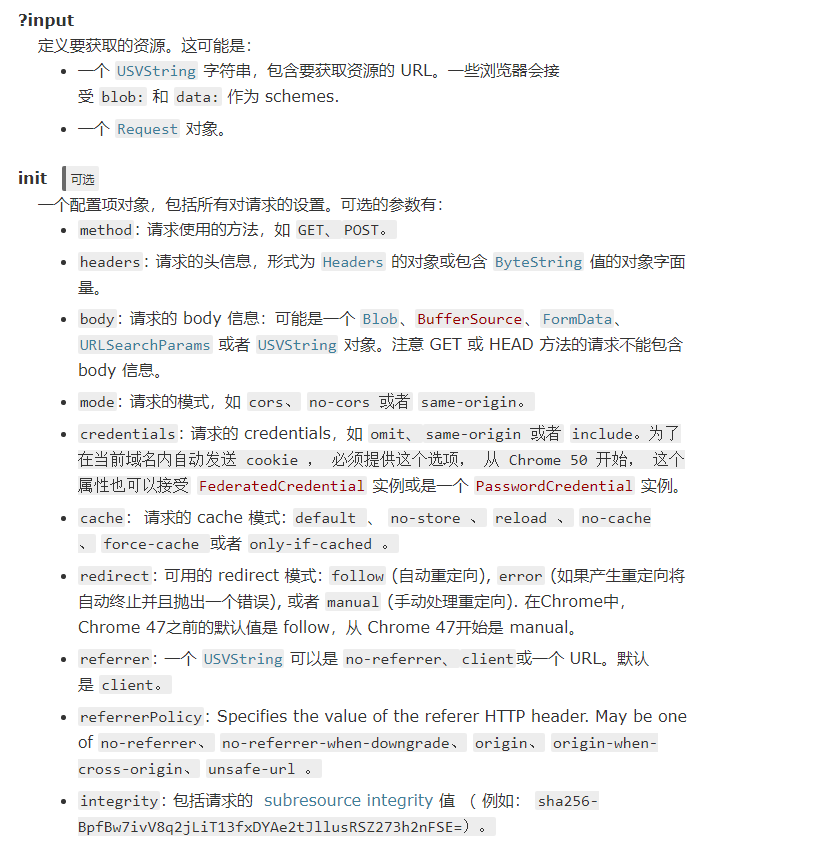
一般来说使用fetch会用url加上配置对象的方式来发送请求,不过你也可以使用request构造函数实例化一个request对象作为参数传入
在这里主要讲一下使用配置对象的方式来使用fetch
首先要进行请求,我们需要一个后台接口,由于现如今开发模式基本上都是前后分离,所以我们的fetch请求不可避免的要涉及到跨域问题。
在下面的例子中,我使用的是nodejs,和express搭建的后台。
由于我使用的是项目的后台只是在app.js中加了一个测试接口所以就不贴出完整的app.js的代码了
我使用的后台接口代码如下
app.all('/Api', function(req, res, next) {
// 打印前端的信息

    console.log(req.body);
  console.log(req.cookies);
  console.log(req.get('Token'));

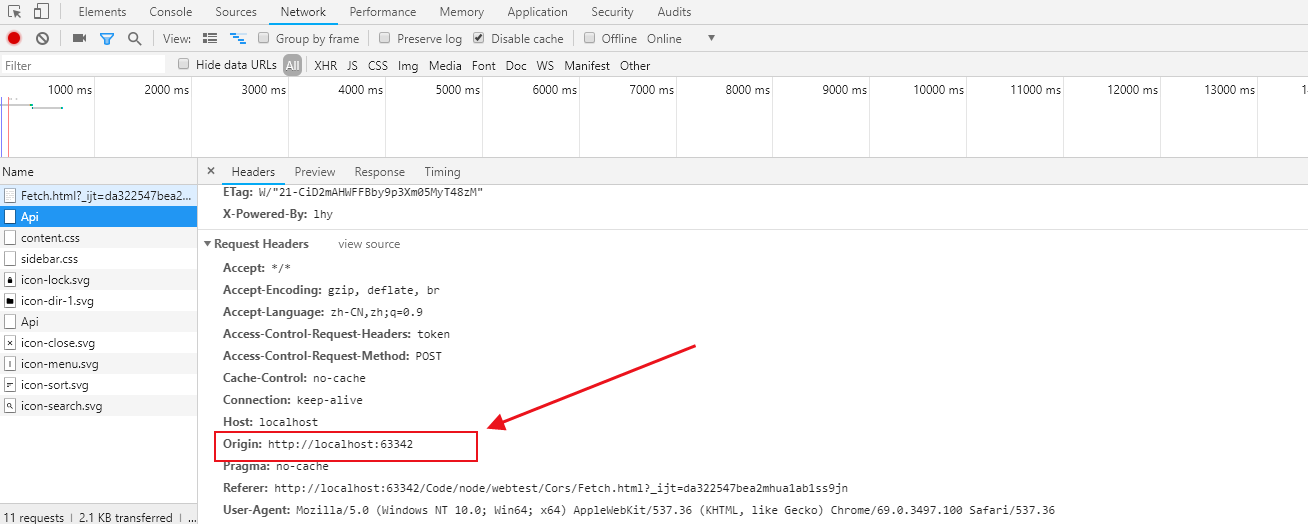
    res.header("Access-Control-Allow-Origin", "http://localhost:63342"); // 设置请求的来源的域

    res.header("Access-Control-Allow-Headers", "Token,x-token,Content-Type"); // 设置允许的自定义头部

    res.header("Access-Control-Allow-Methods","PUT,POST,GET,DELETE,OPTIONS"); // 设置允许的请求的类型

    res.header("Access-Control-Allow-Credentials",true); // 设置是否允许跨域请求携带cookie等浏览器信息

    res.header("X-Powered-By",'lhy');

    res.header("Content-Type", "application/json;charset=utf-8"); // 设置返回的数据类型,这里设置为返回的json类型的数据

    res.send({meta:{token:"123",code:1}}); // 发送响应信息

});
前端使用fetch代码如下
<!DOCTYPE html>

<html lang="zh">

<head>

    <meta charset="UTF-8">

    <title>Fetch</title>

    <meta name="Description" content=""/>

    <meta name="Author" content="lhy"/>

</head>

<body>

<p></p>

<script>

    let options = {

        method:"post",

        body:JSON.stringify({name:"lhy",content:"hello"}), // 这里传入的数据类型必须和下面content-type的类型一致

        cache:'reload', // 表示请求时忽略http缓存,但是请求完成后会刷新http缓存

        credentials:'include', // 表示请求携带cookie等信息

        headers:{

            'Token':"lhytest", // 用于设置请求头

            'content-type': 'application/json' // 设置发送的数据类型

        }

    };

    fetch('http://localhost/Api',options).then(function (response) {

        return response.json()

    }).then(function (data) {

        console.log(data);

        document.getElementsByTagName('p')[0].innerText = data.meta.token;

    }).catch(function (error) {

        console.log(error);

    })

</script>

</body>

</html>
PS:刚才在后台设置的允许跨域的源我们可以在浏览器调试窗口看到,而且如果你的html是本地环境打开Origin的值会为null,我这里是使用的webstrom打开的
现在我们来看看结果
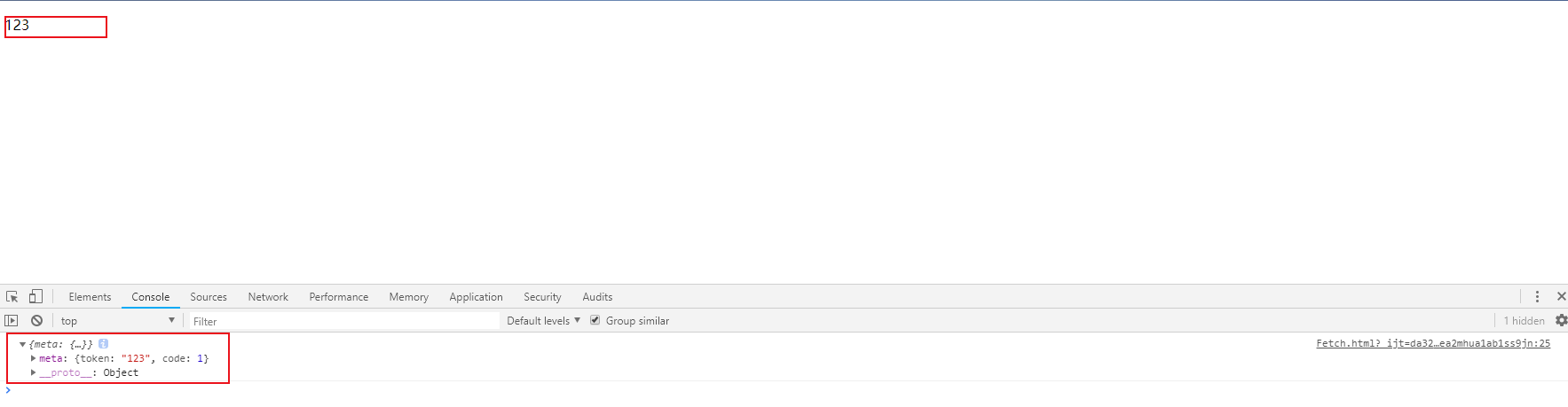
可以看到我们已经成功地拿到了后台地数据,我们再去看看后台是否也能拿到我传递的参数,以及cookie的信息

PS:你设置的自定义头部在浏览器调试窗口无法看到,因为浏览器显示的头只显示它默认规定的请求头信息,如果你希望在浏览器窗口看到就需要将它暴露出去,这里不要再细说
Fetch的兼容
在上面我们可以看到,fetch还是十分方便强大的,所有的新的这些好用的技术往往都有一个限制那就是兼容问题
我们先看一下原生的fetch的兼容性如何
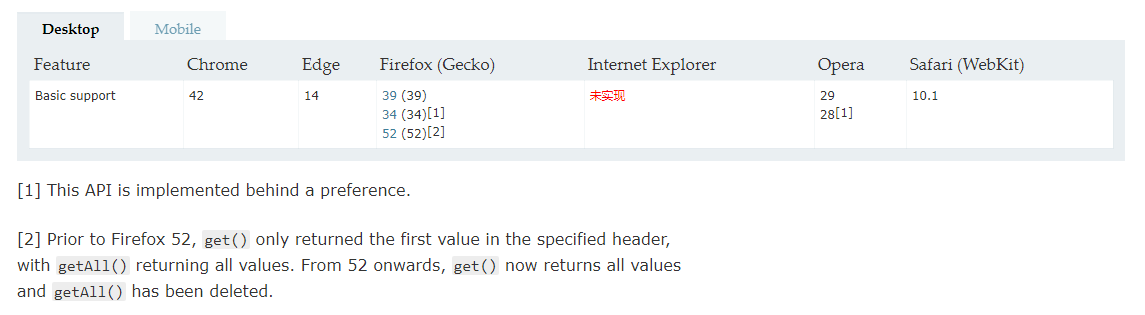
这么好用的东西,ie竟然完全不支持(垃圾ie毁我青春!!)
没办法,这可不是低版本ie不兼容,而是ie完全不兼容,虽然现在ie的市场份额在逐年下降,但是其用户群体还是十分庞大的,而不巧的是这次的项目要求兼容到ie8
这不是为难我胖虎吗?我又不想舍弃好用的fetch,没办法那就自己封装一个ie版本的fetch吧。
封装一个ie版本的fetch,首先我们要了解这个fetch到底包含了些什么,作为一个精致的前端,我可不想直接调用fetch时检测一下window下有没有这个函数,没有就用ajax的粗陋的方式。
所以就有了这篇文章的后半部分。
我们先来看看MDN的fetch的使用模块下有些什么东西
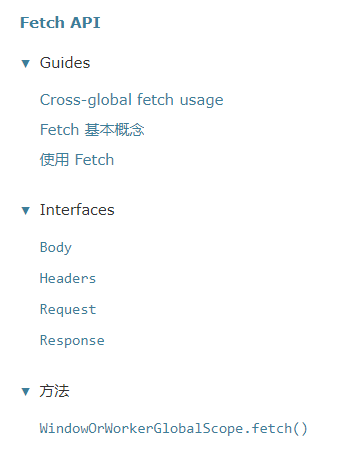
所以我们要重新封装一下 Body,Headers,Request,Response
本人很菜,下面的封装方式全是我自己的看法,很有可能并不是fetch的内部实现方式,特此声明。
参考文章:https://segmentfault.com/a/1190000006220369
主要思路:
检测浏览器版本,是ie10,11使用XMLHttpRequest进行请求
ie8,9 使用XDomainRequest
ie8以下使用ActiveXObject进行请求
(function webpackUniversalModuleDefinition(root, factory) {
if (typeof exports === 'object' && typeof module === 'object')
module.exports = factory();
else if (typeof define === 'function' && define.amd)
define([], factory);
else if (typeof exports === 'object')
exports["fetch"] = factory();
else
root["fetch"] = factory();
})(this, function () {
return /******/ (function (modules) { // webpackBootstrap
/******/ // The module cache
/******/
var installedModules = {};
/******/ // The require function
/******/
function __webpack_require__(moduleId) {
/******/ // Check if module is in cache
/******/
if (installedModules[moduleId])
/******/ return installedModules[moduleId].exports;
/******/ // Create a new module (and put it into the cache)
/******/
var module = installedModules[moduleId] = {
/******/ exports: {},
/******/ id: moduleId,
/******/ loaded: false
/******/
};
/******/ // Execute the module function
/******/
modules[moduleId].call(module.exports, module, module.exports, __webpack_require__);
/******/ // Flag the module as loaded
/******/
module.loaded = true;
/******/ // Return the exports of the module
/******/
return module.exports;
/******/
}
/******/ // expose the modules object (__webpack_modules__)
/******/
__webpack_require__.m = modules;
/******/ // expose the module cache
/******/
__webpack_require__.c = installedModules;
/******/ // __webpack_public_path__
/******/
__webpack_require__.p = "";
/******/ // Load entry module and return exports
/******/
return __webpack_require__(0);
/******/
})
/************************************************************************/
/******/([
/* 0 */
/***/ function (module, exports, __webpack_require__) {
var Request = __webpack_require__(1)
var Response = __webpack_require__(5)
var Headers = __webpack_require__(2)
var Transport = __webpack_require__(6)
if (![].forEach) {
Array.prototype.forEach = function (fn, scope) {
'use strict'
var i, len
for (i = 0, len = this.length; i < len; ++i) {
if (i in this) {
fn.call(scope, this[i], i, this)
}
}
}
}
// 用于读取响应头信息
if (!'lhy'.trim) {
var rtrim = /^[\s\uFEFF\xA0]+|[\s\uFEFF\xA0]+$/g
String.prototype.trim = function () {
return this.replace(rtrim, '')
}
}
function headers(xhr) {
var head = new Headers()
if (xhr.getAllResponseHeaders) {
var headerStr = xhr.getAllResponseHeaders() || ''
if (/\S/.test(headerStr)) {
//http://www.w3.org/TR/XMLHttpRequest/#the-getallresponseheaders-method
var headerPairs = headerStr.split('\u000d\u000a');
for (var i = 0; i < headerPairs.length; i++) {
var headerPair = headerPairs[i];
// 读取header的信息
var index = headerPair.indexOf('\u003a\u0020')
if (index > 0) {
var key = headerPair.substring(0, index).trim()
var value = headerPair.substring(index + 2).trim()
head.append(key, value)
}
}
}
}
return head
}
function fetch(input, init) {
return new Promise(function (resolve, reject) {
var request
if (!init && (init instanceof Request)) {
request = input
} else {
request = new Request(input, init)
}
var msie = 11
// 用于判断是否为ie
if (window.VBArray) {
// 返回浏览器渲染文档模式
msie = document.documentMode || (window.XMLHttpRequest ? 7 : 6)
}
if (msie > 7) {
var xhr = new Transport(request)
function responseURL() {
if ('responseURL' in xhr) {
return xhr.responseURL
}
return
}
xhr.on('load', function (event) {
var options = {
status: event.status || 200,
statusText: event.statusText || '',
headers: headers(event),
url: responseURL()
}
var body = 'response' in event ? event.response : event.responseText
resolve(new Response(body, options))
})
xhr.on('error', function () {
reject(new TypeError('Network request failed'))
})
xhr.on('timeout', function () {
reject(new TypeError('Network request timeout'))
})
xhr.open(request.method, request.url, true)
request.headers.forEach(function (value, name) {
xhr.setRequestHeader(name, value)
})
xhr.send(typeof request._body === 'undefined' ? null : request._body)
} else {
var xhr = new ActiveXObject('Microsoft.XMLHTTP')
xhr.onreadystatechange = function () {
if (xhr.readyState === 4) {
var options = {
status: xhr.status || 200,
statusText: xhr.statusText || '',
headers: headers(xhr),
url: responseURL()
}
var body = 'response' in xhr ? xhr.response : xhr.responseText
resolve(new Response(body, options))
}
}
xhr.open(request.method, request.url, true)
xhr.send(typeof request._body === 'undefined' ? null : request._body)
}
})
}
function notFunc(a) {
return !/\scode\]\s+\}$/.test(a)
}
if (notFunc(window.fetch)) {
window.fetch = fetch
}
if (typeof avalon === 'function') {
avalon.fetch = fetch
}
module.exports = fetch
/***/
},
/* 1 */
/***/ function (module, exports, __webpack_require__) {
var Headers = __webpack_require__(2)
var Body = __webpack_require__(4)
// 自定义Request函数
function Request(input, options) {
options = options || {}
var body = options.body
// 用于判断函数接受的参数是否为自定义的Request对象 即判断input是否由Request创建
if (input instanceof Request) {
// 判断body是否已被使用
if (input.bodyUsed) {
throw new TypeError('Already read')
}
this.url = input.url
this.credentials = input.credentials
if (!options.headers) {
var h = this.headers = new Headers(input.headers)
if (!h.map['x-requested-with']) {
h.set('X-Requested-With', 'XMLHttpRequest')
}
}
this.method = input.method
this.mode = input.mode
if (!body) {
body = input._body
input.bodyUsed = true
}
} else {
// 如果input不是由Request创建的自定义Request对象 则input为url参数
this.url = input
}
// 优先判断option中是否设置了相关选项,再判断credentials自定义request对象的相关属性,如果都没有默认为‘omit’
this.credentials = options.credentials || this.credentials || 'omit'
// 判断参数是否设置了header的相关选项
if (options.headers || !this.headers) {
this.headers = new Headers(options.headers)
}
this.method = (options.method || this.method || 'GET').toUpperCase()
this.mode = options.mode || this.mode || null
this.referrer = null
// 如果是head请求却携带了请求体,抛出错误
if ( this.method === 'HEAD' && body) {
throw new TypeError('Body not allowed for HEAD requests')
}else if(this.method === 'GET' && body){
var Obody = JSON.parse(body)
var str = ''
for (var name in Obody) {
if(Obody.hasOwnProperty(name)){
str = str? str + '&' + name + '=' + Obody[name] : str + name + '=' + Obody[name]
}
}
this.url += '?' + str
body = null
}
this._initBody(body)
}
Request.prototype.clone = function () {
return new Request(this)
}
var F = function () {
}
F.prototype = Body.prototype
Request.prototype = new F()
module.exports = Request
/***/
},
/* 2 */
/***/ function (module, exports, __webpack_require__) {
var support = __webpack_require__(3)
// 自定义Header
function Headers(headers) {
this.map = {}
if (headers instanceof Headers) {
headers.forEach(function (value, name) {
this.append(name, value)
}, this)
} else if (headers) {
for (var name in headers) {
if (headers.hasOwnProperty(name)) {
this.append(name, headers[name])
}
}
}
}
// 向header对象中的map 添加键值对
Headers.prototype.append = function (name, value) {
name = normalizeName(name)
value = normalizeValue(value)
var list = this.map[name]
if (!list) {
list = []
this.map[name] = list
}
list.push(value)
}
// 定义header上的delet方法用于删除键值对
Headers.prototype['delete'] = function (name) {
delete this.map[normalizeName(name)]
}
// 用于获取header对象上的某个键的第一个值
Headers.prototype.get = function (name) {
var values = this.map[normalizeName(name)]
return values ? values[0] : null
}
// 用于获取header对象上某个键的所有值
Headers.prototype.getAll = function (name) {
return this.map[normalizeName(name)] || []
}
// 判断该header对象是否拥有某个属性
Headers.prototype.has = function (name) {
return this.map.hasOwnProperty(normalizeName(name))
}
// 用于设置该header对象上的值
Headers.prototype.set = function (name, value) {
this.map[normalizeName(name)] = [normalizeValue(value)]
}
// 为了在低版本浏览器使用,定义forEach以遍历
Headers.prototype.forEach = function (callback, thisArg) {
for (var name in this.map) {
if (this.map.hasOwnProperty(name)) {
this.map[name].forEach(function (value) {
callback.call(thisArg, value, name, this)
}, this)
}
}
}
// 返回header对象的可枚举属性及函数名
Headers.prototype.keys = function () {
var items = []
this.forEach(function (value, name) {
items.push(name)
})
return items
}
// 返回header对象的所有可枚举的值
Headers.prototype.values = function () {
var items = []
this.forEach(function (value) {
items.push(value)
})
return items
}
// 修改迭代器的方法
Headers.prototype.entries = function () {
var items = []
this.forEach(function (value, name) {
items.push([name, value])
})
return items
}
// 判断是否支持迭代器
if (support.iterable) {
// 如果支持 则让header的iterable为上方的entries函数
Headers.prototype[Symbol.iterator] = Headers.prototype.entries
}
// 判断头名是否合法,只要不包含特殊字符就返回 头名的字符串
function normalizeName(name) {
if (typeof name !== 'string') {
name = String(name)
}
if (/[^a-z0-9\-#$%&'*+.\^_`|~]/i.test(name)) {
throw new TypeError('Invalid character in header field name')
}
return name.toLowerCase()
}
// 将值转为字符串
function normalizeValue(value) {
if (typeof value !== 'string') {
value = String(value)
}
return value
}
module.exports = Headers
/***/
},
/* 3 */
/**
* 该函数用于判断浏览器是否支持
* */ function (module, exports) {
module.exports = {
searchParams: 'URLSearchParams' in window,
iterable: 'Symbol' in window && 'iterator' in window,
blob: 'FileReader' in window && 'Blob' in window && (function () {
try {
new Blob()
return true
} catch (e) {
return false
}
})(),
formData: 'FormData' in window,
arrayBuffer: 'ArrayBuffer' in window
}
/***/
},
/* 4 */
/***/ function (module, exports, __webpack_require__) {
var support = __webpack_require__(3)
// 用于创建body对象
function Body() {
this.bodyUsed = false
}
var p = Body.prototype
'text,blob,formData,json,arrayBuffer'.replace(/\w+/g, function (method) {
p[method] = function () {
return consumeBody(this).then(function (body) {
return convertBody(body, method)
})
}
})
// 初始化请求的头部
p._initBody = function (body) {
this._body = body
if (!this.headers.get('content-type')) {
var a = bodyType(body)
switch (a) {
case 'text':
this.headers.set('content-type', 'text/plain;charset=UTF-8')
break
case 'blob':
if (body && body.type) {
this.headers.set('content-type', body.type)
}
break
case 'searchParams':
this.headers.set('content-type', 'application/x-www-form-urlencoded;charset=UTF-8')
break
}
}
}
// 判断Body是否已被使用
function consumeBody(body) {
if (body.bodyUsed) {
return Promise.reject(new TypeError('Already read'))
} else {
body.bodyUsed = true
return Promise.resolve(body._body)
}
}
// 用于处理返回的response对象body的数据
function convertBody(body, to) {
var from = bodyType(body)
if (body === null || body === void 0 || !from || from === to) {
return Promise.resolve(body)
} else if (map[to] && map[to][from]) {
return map[to][from](body)
} else {
return Promise.reject(new Error('Convertion from ' + from + ' to ' + to + ' not supported'))
}
}
// 定义对各种类型数据的处理方法
var map = {
text: {
json: function (body) {//json --> text
return Promise.resolve(JSON.stringify(body))
},
blob: function (body) {//blob --> text
return blob2text(body)
},
searchParams: function (body) {//searchParams --> text
return Promise.resolve(body.toString())
}
},
json: {
text: function (body) {//text --> json
return Promise.resolve(parseJSON(body))
},
blob: function (body) {//blob --> json
return blob2text(body).then(parseJSON)
}
},
formData: {
text: function (body) {//text --> formData
return text2formData(body)
}
},
blob: {
text: function (body) {//json --> blob
return Promise.resolve(new Blob([body]))
},
json: function (body) {//json --> blob
return Promise.resolve(new Blob([JSON.stringify(body)]))
}
},
arrayBuffer: {
blob: function (body) {
return blob2ArrayBuffer(body)
}
}
}
// 用于返回body携带的数据类型
function bodyType(body) {
if (typeof body === 'string') {
return 'text'
} else if (support.blob && (body instanceof Blob)) {
return 'blob'
} else if (support.formData && (body instanceof FormData)) {
return 'formData'
} else if (support.searchParams && (body instanceof URLSearchParams)) {
return 'searchParams'
} else if (body && typeof body === 'object') {
return 'json'
} else {
return null
}
}
// 用于低版本浏览器的reader
function reader2Promise(reader) {
return new Promise(function (resolve, reject) {
reader.onload = function () {
resolve(reader.result)
}
reader.onerror = function () {
reject(reader.error)
}
})
}
/*
模拟下列函数 用于处理各种类型的返回值数据
readAsBinaryString(File|Blob)
readAsText(File|Blob [, encoding])
readAsDataURL(File|Blob)
readAsArrayBuffer(File|Blob)
*/
function text2formData(body) {
var form = new FormData()
body.trim().split('&').forEach(function (bytes) {
if (bytes) {
var split = bytes.split('=')
var name = split.shift().replace(/\+/g, ' ')
var value = split.join('=').replace(/\+/g, ' ')
form.append(decodeURIComponent(name), decodeURIComponent(value))
}
})
return Promise.resolve(form)
}
function blob2ArrayBuffer(blob) {
var reader = new FileReader()
reader.readAsArrayBuffer(blob)
return reader2Promise(reader)
}
function blob2text(blob) {
var reader = new FileReader()
reader.readAsText(blob)
return reader2Promise(reader)
}
function parseJSON(body) {
try {
return JSON.parse(body)
} catch (ex) {
throw 'Invalid JSON'
}
}
module.exports = Body
/***/
},
/* 5 */
/***/ function (module, exports, __webpack_require__) {
var Headers = __webpack_require__(2)
var Body = __webpack_require__(4)
// 用于返回response对象 即请求到的数据
function Response(bodyInit, options) {
if (!options) {
options = {}
}
this.type = 'default'
// status
this.status = options.status
// ok
this.ok = this.status >= 200 && this.status < 300
// status
this.statusText = options.statusText
this.headers = options.headers instanceof Headers ? options.headers : new Headers(options.headers)
this.url = options.url || ''
this._initBody(bodyInit)
}
var F = function () {
}
F.prototype = Body.prototype
Response.prototype = new F()
Response.prototype.clone = function () {
return new Response(this._bodyInit, {
status: this.status,
statusText: this.statusText,
headers: new Headers(this.headers),
url: this.url
})
}
Response.error = function () {
var response = new Response(null, {status: 0, statusText: ''})
response.type = 'error'
return response
}
// 重定向状态码
var redirectStatuses = [301, 302, 303, 307, 308]
Response.redirect = function (url, status) {
if (redirectStatuses.indexOf(status) === -1) {
throw new RangeError('Invalid status code')
}
return new Response(null, {status: status, headers: {location: url}})
}
module.exports = Response
/***/
},
/* 6 */
/***/ function (module, exports, __webpack_require__) {
// ajax 非低版本ie及谷歌火狐使用XMLHttpRequest
//ie 8 - 9 使用XDomainRequest
//低版本ie 使用 ActiveXObject('Microsoft.XMLHTTP')
var AXO = __webpack_require__(7)
var JSONP = __webpack_require__(8)
var XDR = __webpack_require__(9)
var XHR = __webpack_require__(10)
var msie = 0
if (window.VBArray) {
msie = document.documentMode || (window.XMLHttpRequest ? 7 : 6)
}
function Transport(request) {
if (msie === 8 || msie === 9) {
this.core = new XDR(request)
} else if (!msie || msie > 9) {
this.core = new XHR(request)
}
}
var p = Transport.prototype
p.on = function (type, fn) {
this.core.on(type, fn)
}
p.setRequestHeader = function (a, b) {
if (this.core.setRequestHeader) {
this.core.setRequestHeader(a, b)
}
}
p.open = function (a, b, c, d, e) {
if (this.core.open) {
this.core.open(a, b, c, d, e)
}
}
p.send = function (a) {
if (this.core.send) {
this.core.send(a)
}
}
p.abort = function () {
if (this.core.abort) {
this.core.abort()
}
}
module.exports = Transport
/***/
},
/* 7 */
/***/ function (module, exports) {
module.exports = function AXO(opts) {
var xhr = new ActiveXObject('Microsoft.XMLHTTP')
// xhr.onreadystatechange = function () {
// if (xhr.readyState === 4) {
// if (/^2\d\d|1224/.test(xhr.status)) {
// events['load'] && events['load'](xhr)
// } else {
// events['error'] && events['error']()
// }
// }
// }
//
// var events = {}
// Object.defineProperty(xhr,on,)
// xhr.on = function (type, fn) {
// events[type] = fn
// }
// if (opts.timeout === 'number') {
// setTimeout(function () {
// events['timeout'] && events['timeout']()
// xhr.abort()
// }, opts.timeout)
// }
return xhr
}
/***/
},
/* 8 */
/***/ function (module, exports) {
function JSONP(opts) {
var callbackFunction = opts.jsonpCallbackFunction || generateCallbackFunction();
var jsonpCallback = opts.jsonpCallback || 'callback'
var xhr = document.createElement('script')
if (xhr.charset) {
xhr.charset = opts.charset
}
xhr.onerror = xhr[useOnload ? 'onload' : 'onreadystatechange'] = function (e) {
var execute = /loaded|complete|undefined/i.test(xhr.readyState)
if (e && e.type === 'error') {
events['error'] && events['error']()
} else if (execute) {
setTimeout(function () {
xhr.abort()
}, 0)
}
}
var events = {}
xhr.on = function (type, fn) {
events[type] = fn
}
xhr.abort = function () {
events = {}
removeNode(xhr)
clearFunction(callbackFunction)
}
xhr.open = function (a, url) {
window[callbackFunction] = function (response) {
events['load'] && events['load']({
status: 200,
statusText: 'ok',
response: response
})
clearFunction(callbackFunction)
}
var head = document.getElementsByTagName('head')[0]
url += (url.indexOf('?') === -1) ? '?' : '&';
xhr.setAttribute('src', url + jsonpCallback + '=' + callbackFunction);
head.insertBefore(xhr, head.firstChild)
if (typeof opts.timeout === 'number') {
setTimeout(function () {
events['timeout'] && events['timeout']()
xhr.abort()
}, opts.timeout)
}
}
return xhr
}
function generateCallbackFunction() {
return ('jsonp' + Math.random()).replace(/0\./, '')
}
// Known issue: Will throw 'Uncaught ReferenceError: callback_*** is not defined' error if request timeout
function clearFunction(functionName) {
// IE8 throws an exception when you try to delete a property on window
// http://stackoverflow.com/a/1824228/751089
try {
delete window[functionName];
} catch (e) {
window[functionName] = undefined;
}
}
var f = document.createDocumentFragment()
var useOnload = 'textContent' in document
function removeNode(node) {
f.appendChild(node)
f.removeChild(node)
node.onload = onerror = onreadystatechange = function () {
}
return node
}
module.exports = JSONP
/***/
},
/* 9 */
/***/ function (module, exports) {
//https://msdn.microsoft.com/en-us/library/cc288060(v=VS.85).aspx
module.exports = function XDR(opts) {
var xhr = new XDomainRequest()
'load,error,timeout'.replace(/\w+/g, function (method) {
xhr['on' + method] = function () {
if (events[method]) {
events[method](xhr)
}
}
})
var events = {}
xhr.on = function (type, fn) {
events[type] = fn
}
xhr.onabort = function () {
events = {}
}
if (typeof opts.timeout === 'number') {
xhr.timeout = opts.timeout
}
return xhr
}
/***/
},
/* 10 */
/***/ function (module, exports) {
module.exports = function XHR(opts) {
var xhr = new XMLHttpRequest
'load,error,timeout'.replace(/\w+/g, function (method) {
xhr['on' + method] = function () {
if (events[method]) {
events[method](xhr)
}
}
})
var events = {}
xhr.on = function (type, fn) {
events[type] = fn
}
xhr.onabort = function () {
events = {}
}
if (opts.credentials === 'include') {
xhr.withCredentials = true
}
if ('responseType' in xhr && ('Blob' in window)) {
var msie = document.documentMode || (window.XMLHttpRequest ? 7 : 6)
if (msie !== 10 && msie !== 11) {
xhr.responseType = 'blob'
}
}
return xhr
}
/***/
}
/******/])
});
;
声明:在封装的过程中,由于考虑到项目的实际情况我封装的fetch可以在get中设置body,其本质是把body中的数据拼接到url上
在使用原生fetch的时候get,head请求是不能设置body的,否则会报错
Fetch的使用及兼容ie的处理的更多相关文章
- fetch ios低版本兼容cannot clone a disturbed response
报错信息 ios 11以下 cannot clone a disturbed response github.com/github/fetc- 问题发生场景 使用了一个或者多个三方库 三方库或者自己的 ...
- Fetch方法封装、业务实践
说Fetch之前啊,我们不得不说一说Ajax了,以前使用最多的自然是jQuery封装的Ajax方法了,强大而且好用. 有人说了,jQuery的Ajax都已经封装得那么好了,你还整Fetch干什么,这不 ...
- Ajax语法浅析
Ajax是目前很普遍的一门技术,也是很值得探讨和研究的一门技术.本文将针对Ajax的发展过程并结合其在不同库框架中的使用方式来和大家分享下Ajax的那些新老语法. Ajax简介 Ajax全称为“Asy ...
- Fetch-新一代Ajax API
AJAX半遮半掩的底层API是饱受诟病的一件事情. XMLHttpRequest 并不是专为Ajax而设计的. 虽然各种框架对 XHR 的封装已经足够好用, 但我们可以做得更好. window.fet ...
- Chrome接口请求一直是pending状态,但接口实际上是正常的
1.现象 个别机器突然出现Chrome访问我司产品异常,本该通过接口获取的数据没有呈现,之前都是好好的,而且其他机器同样用同版本Chrome访问正常. 出现问题的机器重装Chrome问题依然存在,直到 ...
- cobra-强大的CLI应用程序库
cobra介绍 Cobra是一个用于创建强大的现代CLI应用程序的库,也是一个用于生成应用程序和命令文件的程序. Cobra用于许多Go项目,如Kubernetes.Hugo和Github CLI等. ...
- 在 JS 中使用 fetch 更加高效地进行网络请求
在前端快速发展地过程中,为了契合更好的设计模式,产生了 fetch 框架,此文将简要介绍下 fetch 的基本使用. 我的源博客地址:http://blog.parryqiu.com/2016/03/ ...
- 新一代Ajax API --fetch
之前 师傅跟我提过 一个新的Ajax API fetch 今天看到一篇关于fetch的文章,受益匪浅. XMLHttpRequest并不是专为Ajax而设计的,虽然各种框架对XHR的封装已经足够好用 ...
- (转)这个API很“迷人”——新的Fetch API
原文:https://hacks.mozilla.org/2015/03/this-api-is-so-fetching 原标题是This API is So Fetching,Fetching也可以 ...
随机推荐
- OpenStack 安装:glance 安装
接上一篇keystone, 这一篇介绍glance服务: 在开始操作之前,先用source环境变量,然后创建glance 用户,并设置密码为glance [root@linux-node1 ~]#op ...
- Docker 简介,入门
1.简介 Docker 使用 Google 公司推出的 Go 语言 进行开发实现,基于 Linux 内核的 cgroup,namespace,以及 AUFS 类的 Union FS 等技术,对进程进行 ...
- 基于Gitlab统计代码行--统计所有仓库、所有提交人的代码总行数(新增加-删除)
公司绩效考核要求,统计GITLAB仓库所有人提示有效代码行业 脚本1: 统计所有仓库.所有提交人的代码总行数(新增加-删除) 脚本2: 统计所有仓库.所有提交人的代码提交汇总与删除汇总 脚本3: 统计 ...
- 丑数(python)
题目描述 把只包含质因子2.3和5的数称作丑数(Ugly Number).例如6.8都是丑数,但14不是,因为它包含质因子7. 习惯上我们把1当做是第一个丑数.求按从小到大的顺序的第N个丑数. # ...
- Linux磁盘配额
Step1:修改fstab文件,增加磁盘限额用户和用户组信息 # /etc/fstab# Created by anaconda on Sat Dec 29 04:48:18 2018## Acces ...
- Python基础-python基本语法(二)
一.注释 分类:单行注释和多行注释 1.单行注释 单行注释以#开头,在当前行内,#后面的内容就是注释内容 2.多行注释 被两个 ''' 或 '''''' 包括起来的内容就是注释 ...
- git回滚远程仓库
关于远程仓库回滚 首先,必须要明白的一件事,任何普通用户不能擅自做有关远程仓库回退的操作,如果你擅自回滚了远程仓库,会对项目团队其他人造成不可预知的影响.如果需要回退版本,先联系项目的仓库管理员,在团 ...
- MVC的SignalR例子
# SignalR学习 ASP.NET SignalR 是为.NET 开发者提供即时通讯Web 应用的类库.即时通讯Web服务就是服务器将内容自动推送到已经连接的客户端,而不是服务器等待客户端发起一个 ...
- 微信公众号的分享接口,分享提示config:fail,invalid signature的解决办法(2017年12月)
微信中打开网页,使用微信右上角菜单中自带的分享功能的经历及总结: 最开始,微信分享页面时,直接读取页面的标题(title)和页面中的第一张符合条件的图片[此种方式在2017-03-29之前管用,这一天 ...
- Linux驱动之异步OR同步,阻塞OR非阻塞概念介绍
链接:https://www.zhihu.com/question/19732473/answer/20851256 1.同步与异步同步和异步关注的是消息通信机制 (synchronous commu ...