
Linux平台 Oracle 18c RAC安装Part2:GI配置
- 3.1 解压GI的安装包
- 3.2 安装配置Xmanager软件
- 3.3 共享存储LUN的赋权
- 3.4 使用Xmanager图形化界面配置GI
- 3.5 验证crsctl的状态
- 3.6 测试集群的FAILED OVER功能
Linux平台 Oracle 18c RAC安装指导:
Part1:Linux平台 Oracle 18c RAC安装Part1:准备工作
Part2:Linux平台 Oracle 18c RAC安装Part2:GI配置
Part3:Linux平台 Oracle 18c RAC安装Part3:DB配置
本文安装环境:OEL 7.5 + Oracle 18.3 GI & RAC
三、GI(Grid Infrastructure)安装
3.1 解压GI的安装包
su - grid
解压 GRID 到 GRID用户的$ORACLE_HOME下
[grid@db40 grid]$ pwd

/u01/app/18.3.0/grid

[grid@db40 grid]$ unzip /tmp/LINUX.X64_180000_grid_home.zip
3.2 安装配置Xmanager软件
在自己的Windows系统上成功安装Xmanager Enterprise之后,运行Xstart.exe可执行程序,
配置如下
Session:db40
Host:192.168.1.40
Protocol:SSH
User Name:grid
Execution Command:/usr/bin/xterm -ls -display $DISPLAY
点击RUN,输入grid用户的密码可以正常弹出命令窗口界面,即配置成功。
当然也可以通过开启Xmanager - Passive,直接在SecureCRT连接的会话窗口中临时配置DISPLAY变量直接调用图形:
export DISPLAY=192.168.1.31:0.0
3.3 共享存储LUN的赋权
vi /etc/udev/rules.d/12-dm-permissions.rules
# MULTIPATH DEVICES

#

# Set permissions for all multipath devices

ENV{DM_UUID}=="mpath-?*", OWNER:="grid", GROUP:="asmadmin", MODE:="660"
配置重载生效:
# udevadm control --reload

# udevadm trigger
3.4 使用Xmanager图形化界面配置GI
Xmanager通过grid用户登录,进入$ORACLE_HOME目录,运行gridSetup配置GI
$ cd $ORACLE_HOME

$ ./gridSetup.sh
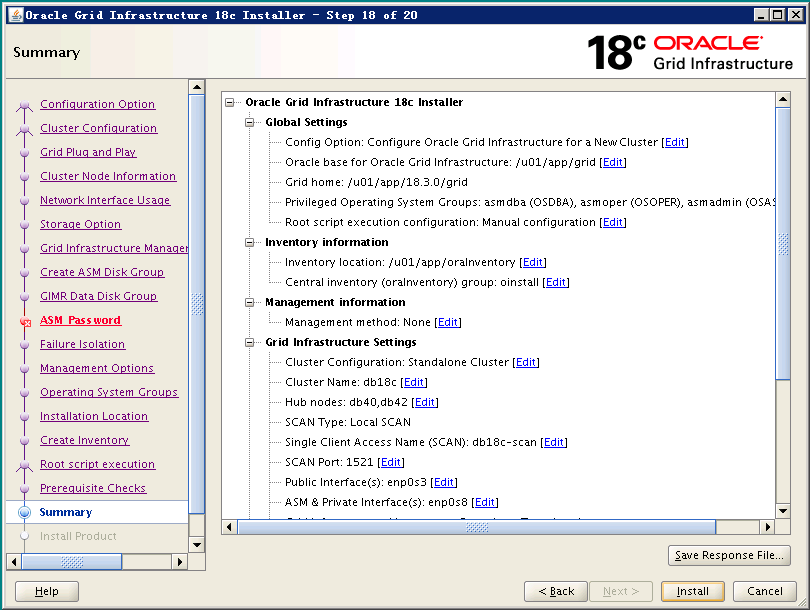
其实从12cR2开始,GI的配置就跟之前有一些变化,18c也一样,下面来看下GI配置的整个图形化安装的过程截图:
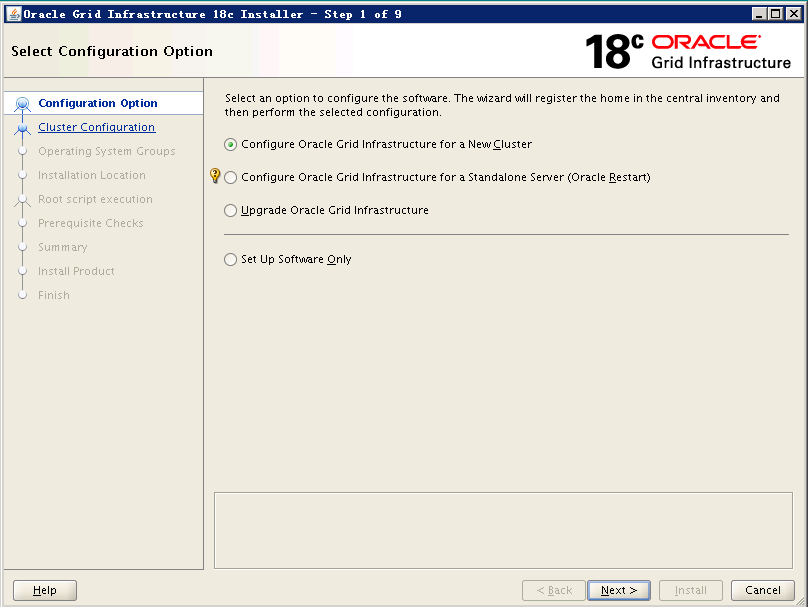
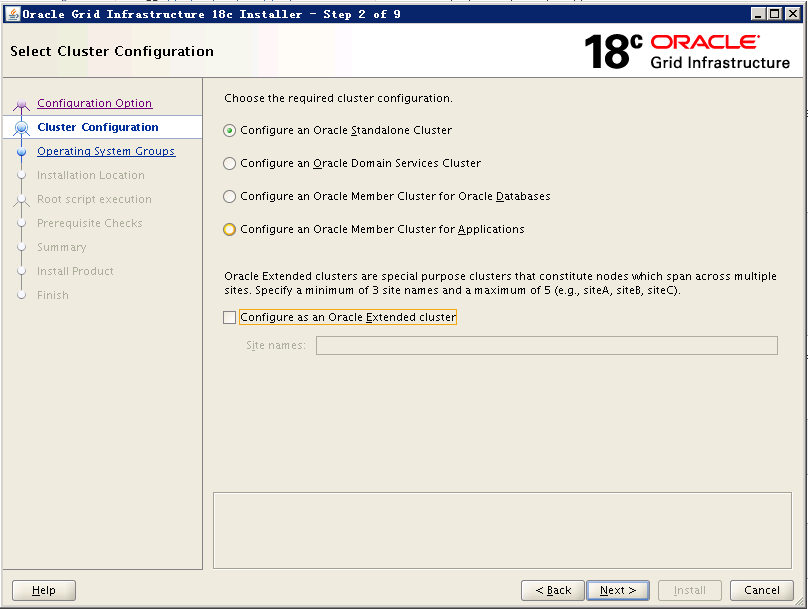
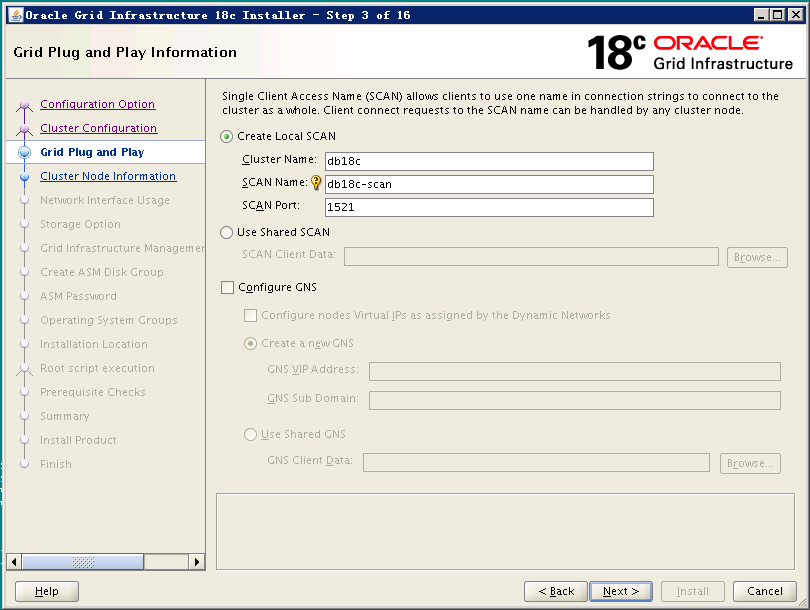
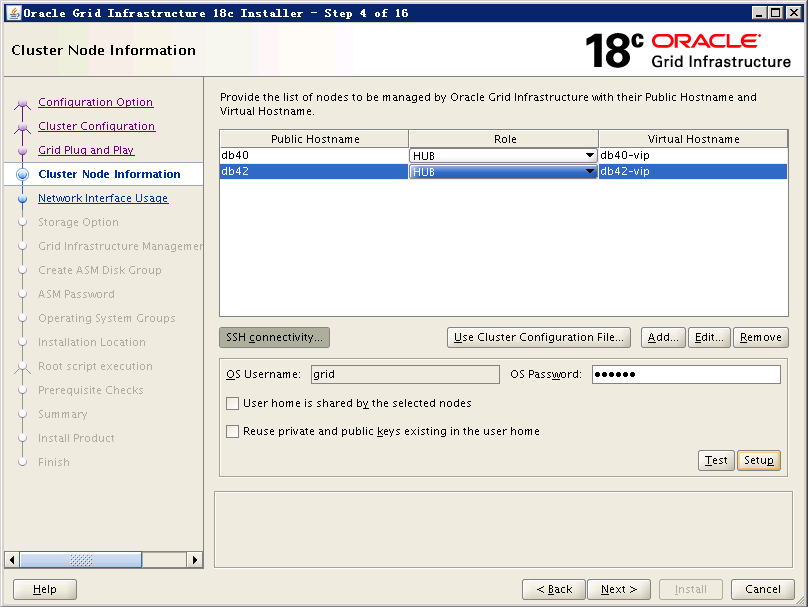
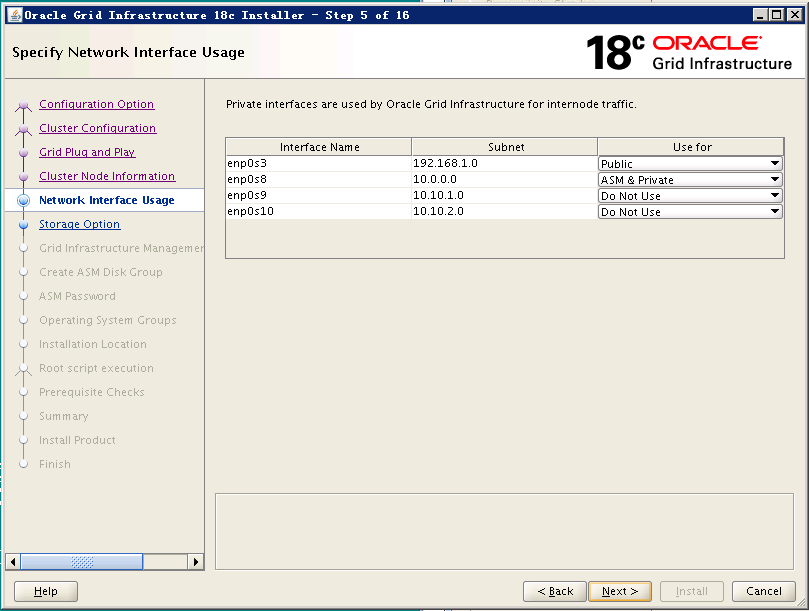
注:这里Public网卡这里用的enp0s3,ASM&Private这里用的enp0s8,enp0s9和enp0s10是模拟IPSAN用到的网卡,所以这里不使用它们。
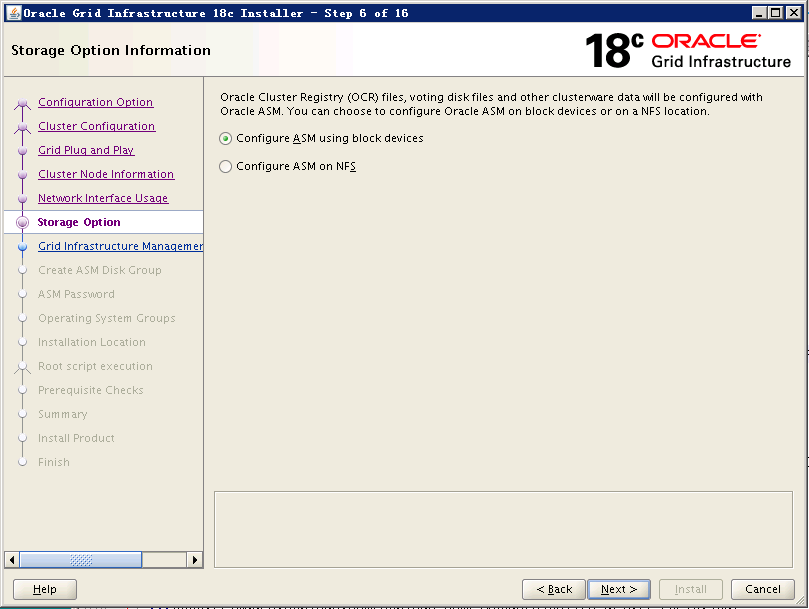
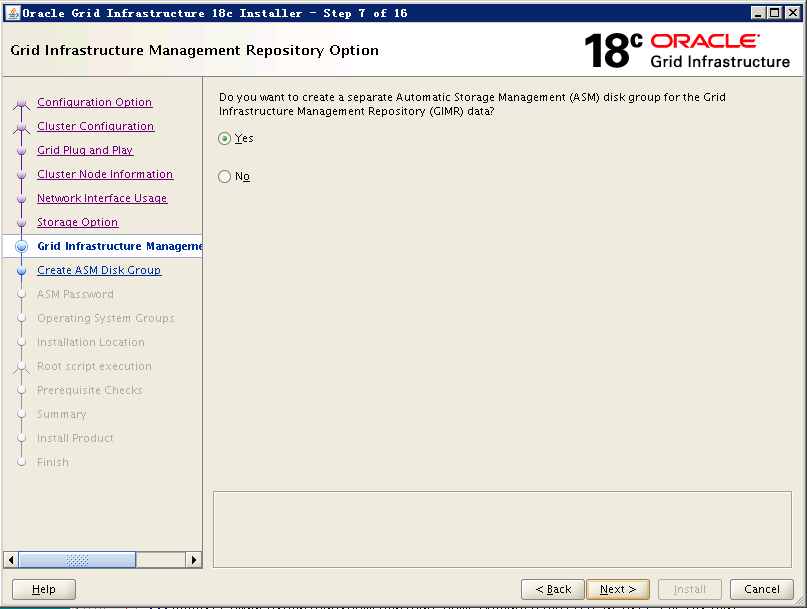

注:这里跟之前区别不大,我依然是选择3块1G的盘,Normal冗余作为OCR和voting disk。

注:这里有一个新的存储GIMR的,我这里选择是外部冗余的一个40G大小的盘,这是12c新引入的概念,18c依然如此。
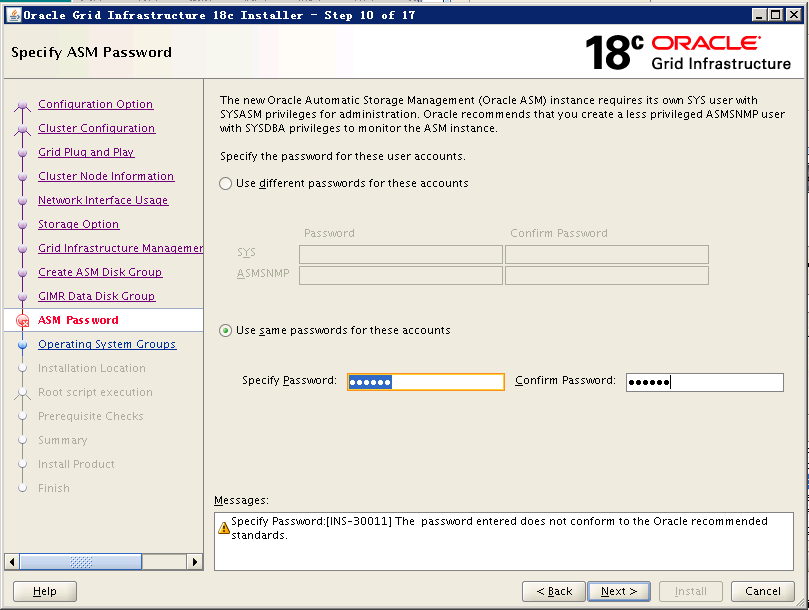


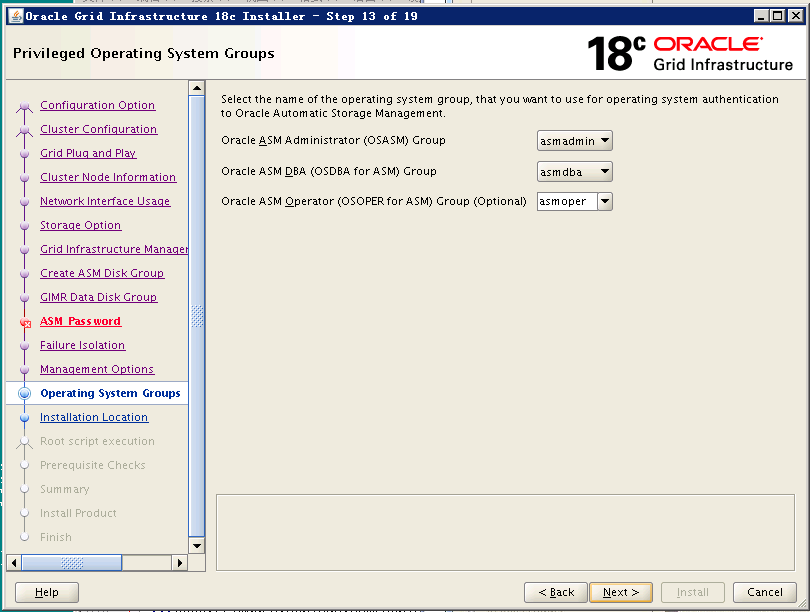


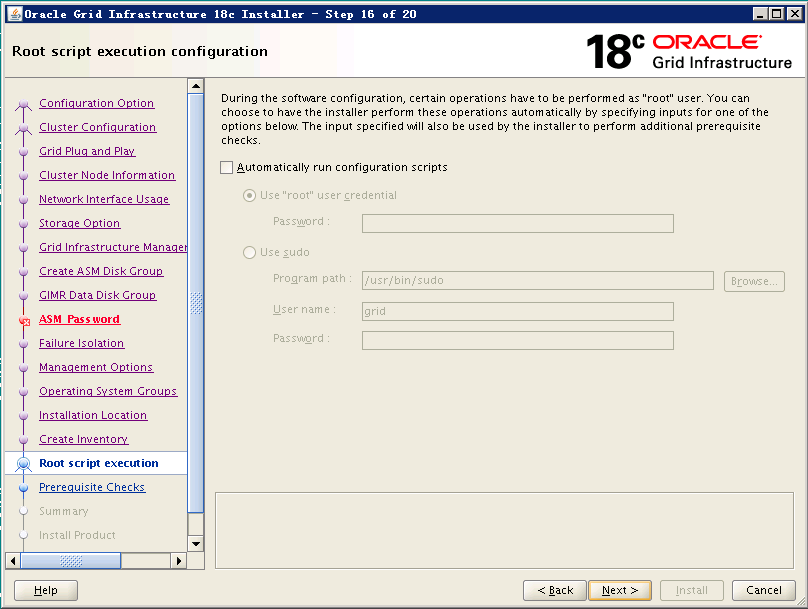

注:这里检查出来的问题都需要认真核对,确认确实可以忽略才可以点击“Ignore All”,如果这里检测出缺少某些RPM包,需要使用yum安装好。


注:执行root脚本,确保先在一节点执行完毕后,再在其他节点执行。
第一个节点root执行脚本:
[root@db40 tmp]# /u01/app/oraInventory/orainstRoot.sh

Changing permissions of /u01/app/oraInventory.

Adding read,write permissions for group.

Removing read,write,execute permissions for world.

Changing groupname of /u01/app/oraInventory to oinstall.

The execution of the script is complete.

[root@db40 tmp]# /u01/app/18.3.0/grid/root.sh

Performing root user operation.

The following environment variables are set as:

    ORACLE_OWNER= grid

    ORACLE_HOME=  /u01/app/18.3.0/grid

Enter the full pathname of the local bin directory: [/usr/local/bin]:

   Copying dbhome to /usr/local/bin ...

   Copying oraenv to /usr/local/bin ...

   Copying coraenv to /usr/local/bin ...

Creating /etc/oratab file...

Entries will be added to the /etc/oratab file as needed by

Database Configuration Assistant when a database is created

Finished running generic part of root script.

Now product-specific root actions will be performed.

Relinking oracle with rac_on option

Using configuration parameter file: /u01/app/18.3.0/grid/crs/install/crsconfig_params

The log of current session can be found at:

  /u01/app/grid/crsdata/db40/crsconfig/rootcrs_db40_2018-08-04_10-25-09AM.log

2018/08/04 10:25:34 CLSRSC-594: Executing installation step 1 of 20: 'SetupTFA'.

2018/08/04 10:25:35 CLSRSC-4001: Installing Oracle Trace File Analyzer (TFA) Collector.

2018/08/04 10:26:29 CLSRSC-4002: Successfully installed Oracle Trace File Analyzer (TFA) Collector.

2018/08/04 10:26:29 CLSRSC-594: Executing installation step 2 of 20: 'ValidateEnv'.

2018/08/04 10:26:29 CLSRSC-363: User ignored prerequisites during installation

2018/08/04 10:26:29 CLSRSC-594: Executing installation step 3 of 20: 'CheckFirstNode'.

2018/08/04 10:26:35 CLSRSC-594: Executing installation step 4 of 20: 'GenSiteGUIDs'.

2018/08/04 10:26:37 CLSRSC-594: Executing installation step 5 of 20: 'SaveParamFile'.

2018/08/04 10:26:53 CLSRSC-594: Executing installation step 6 of 20: 'SetupOSD'.

2018/08/04 10:26:53 CLSRSC-594: Executing installation step 7 of 20: 'CheckCRSConfig'.

2018/08/04 10:26:53 CLSRSC-594: Executing installation step 8 of 20: 'SetupLocalGPNP'.

2018/08/04 10:27:47 CLSRSC-594: Executing installation step 9 of 20: 'CreateRootCert'.

2018/08/04 10:27:54 CLSRSC-594: Executing installation step 10 of 20: 'ConfigOLR'.

2018/08/04 10:28:09 CLSRSC-594: Executing installation step 11 of 20: 'ConfigCHMOS'.

2018/08/04 10:28:10 CLSRSC-594: Executing installation step 12 of 20: 'CreateOHASD'.

2018/08/04 10:28:21 CLSRSC-594: Executing installation step 13 of 20: 'ConfigOHASD'.

2018/08/04 10:28:21 CLSRSC-330: Adding Clusterware entries to file 'oracle-ohasd.service'

2018/08/04 10:30:29 CLSRSC-594: Executing installation step 14 of 20: 'InstallAFD'.

2018/08/04 10:30:43 CLSRSC-594: Executing installation step 15 of 20: 'InstallACFS'.

CRS-2791: Starting shutdown of Oracle High Availability Services-managed resources on 'db40'

CRS-2793: Shutdown of Oracle High Availability Services-managed resources on 'db40' has completed

CRS-4133: Oracle High Availability Services has been stopped.

CRS-4123: Oracle High Availability Services has been started.

2018/08/04 10:32:34 CLSRSC-594: Executing installation step 16 of 20: 'InstallKA'.

2018/08/04 10:32:47 CLSRSC-594: Executing installation step 17 of 20: 'InitConfig'.

CRS-2791: Starting shutdown of Oracle High Availability Services-managed resources on 'db40'

CRS-2793: Shutdown of Oracle High Availability Services-managed resources on 'db40' has completed

CRS-4133: Oracle High Availability Services has been stopped.

CRS-4123: Oracle High Availability Services has been started.

CRS-2672: Attempting to start 'ora.evmd' on 'db40'

CRS-2672: Attempting to start 'ora.mdnsd' on 'db40'

CRS-2676: Start of 'ora.mdnsd' on 'db40' succeeded

CRS-2676: Start of 'ora.evmd' on 'db40' succeeded

CRS-2672: Attempting to start 'ora.gpnpd' on 'db40'

CRS-2676: Start of 'ora.gpnpd' on 'db40' succeeded

CRS-2672: Attempting to start 'ora.cssdmonitor' on 'db40'

CRS-2672: Attempting to start 'ora.gipcd' on 'db40'

CRS-2676: Start of 'ora.cssdmonitor' on 'db40' succeeded

CRS-2676: Start of 'ora.gipcd' on 'db40' succeeded

CRS-2672: Attempting to start 'ora.cssd' on 'db40'

CRS-2672: Attempting to start 'ora.diskmon' on 'db40'

CRS-2676: Start of 'ora.diskmon' on 'db40' succeeded

CRS-2676: Start of 'ora.cssd' on 'db40' succeeded

[INFO] [DBT-30001] Disk groups created successfully. Check /u01/app/grid/cfgtoollogs/asmca/asmca-180804AM103332.log for details.

2018/08/04 10:37:38 CLSRSC-482: Running command: '/u01/app/18.3.0/grid/bin/ocrconfig -upgrade grid oinstall'

CRS-2672: Attempting to start 'ora.crf' on 'db40'

CRS-2672: Attempting to start 'ora.storage' on 'db40'

CRS-2676: Start of 'ora.storage' on 'db40' succeeded

CRS-2676: Start of 'ora.crf' on 'db40' succeeded

CRS-2672: Attempting to start 'ora.crsd' on 'db40'

CRS-2676: Start of 'ora.crsd' on 'db40' succeeded

CRS-4256: Updating the profile

Successful addition of voting disk e234d69db62c4f41bff377eec5bed671.

Successful addition of voting disk eb9d2950a5aa4f4cbfa46432f7c4f709.

Successful addition of voting disk 84c44e2025be4fe3bf7d5a7a4049d4fd.

Successfully replaced voting disk group with +OCRVT.

CRS-4256: Updating the profile

CRS-4266: Voting file(s) successfully replaced

##  STATE    File Universal Id                File Name Disk group

--  -----    -----------------                --------- ---------

 1. ONLINE   e234d69db62c4f41bff377eec5bed671 (/dev/mapper/mpatha) [OCRVT]

 2. ONLINE   eb9d2950a5aa4f4cbfa46432f7c4f709 (/dev/mapper/mpathb) [OCRVT]

 3. ONLINE   84c44e2025be4fe3bf7d5a7a4049d4fd (/dev/mapper/mpathc) [OCRVT]

Located 3 voting disk(s).

CRS-2791: Starting shutdown of Oracle High Availability Services-managed resources on 'db40'

CRS-2673: Attempting to stop 'ora.crsd' on 'db40'

CRS-2677: Stop of 'ora.crsd' on 'db40' succeeded

CRS-2673: Attempting to stop 'ora.storage' on 'db40'

CRS-2673: Attempting to stop 'ora.crf' on 'db40'

CRS-2673: Attempting to stop 'ora.drivers.acfs' on 'db40'

CRS-2673: Attempting to stop 'ora.mdnsd' on 'db40'

CRS-2677: Stop of 'ora.crf' on 'db40' succeeded

CRS-2677: Stop of 'ora.storage' on 'db40' succeeded

CRS-2673: Attempting to stop 'ora.asm' on 'db40'

CRS-2677: Stop of 'ora.drivers.acfs' on 'db40' succeeded

CRS-2677: Stop of 'ora.mdnsd' on 'db40' succeeded

CRS-2677: Stop of 'ora.asm' on 'db40' succeeded

CRS-2673: Attempting to stop 'ora.cluster_interconnect.haip' on 'db40'

CRS-2677: Stop of 'ora.cluster_interconnect.haip' on 'db40' succeeded

CRS-2673: Attempting to stop 'ora.ctssd' on 'db40'

CRS-2673: Attempting to stop 'ora.evmd' on 'db40'

CRS-2677: Stop of 'ora.evmd' on 'db40' succeeded

CRS-2677: Stop of 'ora.ctssd' on 'db40' succeeded

CRS-2673: Attempting to stop 'ora.cssd' on 'db40'

CRS-2677: Stop of 'ora.cssd' on 'db40' succeeded

CRS-2673: Attempting to stop 'ora.gipcd' on 'db40'

CRS-2673: Attempting to stop 'ora.gpnpd' on 'db40'

CRS-2677: Stop of 'ora.gipcd' on 'db40' succeeded

CRS-2677: Stop of 'ora.gpnpd' on 'db40' succeeded

CRS-2793: Shutdown of Oracle High Availability Services-managed resources on 'db40' has completed

CRS-4133: Oracle High Availability Services has been stopped.

2018/08/04 10:42:19 CLSRSC-594: Executing installation step 18 of 20: 'StartCluster'.

CRS-4123: Starting Oracle High Availability Services-managed resources

CRS-2672: Attempting to start 'ora.evmd' on 'db40'

CRS-2672: Attempting to start 'ora.mdnsd' on 'db40'

CRS-2676: Start of 'ora.mdnsd' on 'db40' succeeded

CRS-2676: Start of 'ora.evmd' on 'db40' succeeded

CRS-2672: Attempting to start 'ora.gpnpd' on 'db40'

CRS-2676: Start of 'ora.gpnpd' on 'db40' succeeded

CRS-2672: Attempting to start 'ora.gipcd' on 'db40'

CRS-2676: Start of 'ora.gipcd' on 'db40' succeeded

CRS-2672: Attempting to start 'ora.crf' on 'db40'

CRS-2672: Attempting to start 'ora.cssdmonitor' on 'db40'

CRS-2676: Start of 'ora.cssdmonitor' on 'db40' succeeded

CRS-2672: Attempting to start 'ora.cssd' on 'db40'

CRS-2672: Attempting to start 'ora.diskmon' on 'db40'

CRS-2676: Start of 'ora.diskmon' on 'db40' succeeded

CRS-2676: Start of 'ora.crf' on 'db40' succeeded

CRS-2676: Start of 'ora.cssd' on 'db40' succeeded

CRS-2672: Attempting to start 'ora.cluster_interconnect.haip' on 'db40'

CRS-2672: Attempting to start 'ora.ctssd' on 'db40'

CRS-2676: Start of 'ora.ctssd' on 'db40' succeeded

CRS-2676: Start of 'ora.cluster_interconnect.haip' on 'db40' succeeded

CRS-2672: Attempting to start 'ora.asm' on 'db40'

CRS-2676: Start of 'ora.asm' on 'db40' succeeded

CRS-2672: Attempting to start 'ora.storage' on 'db40'

CRS-2676: Start of 'ora.storage' on 'db40' succeeded

CRS-2672: Attempting to start 'ora.crsd' on 'db40'

CRS-2676: Start of 'ora.crsd' on 'db40' succeeded

CRS-6023: Starting Oracle Cluster Ready Services-managed resources

CRS-6017: Processing resource auto-start for servers: db40

CRS-6016: Resource auto-start has completed for server db40

CRS-6024: Completed start of Oracle Cluster Ready Services-managed resources

CRS-4123: Oracle High Availability Services has been started.

2018/08/04 10:45:28 CLSRSC-343: Successfully started Oracle Clusterware stack

2018/08/04 10:45:28 CLSRSC-594: Executing installation step 19 of 20: 'ConfigNode'.

CRS-2672: Attempting to start 'ora.ASMNET1LSNR_ASM.lsnr' on 'db40'

CRS-2676: Start of 'ora.ASMNET1LSNR_ASM.lsnr' on 'db40' succeeded

CRS-2672: Attempting to start 'ora.asm' on 'db40'

CRS-2676: Start of 'ora.asm' on 'db40' succeeded

CRS-2672: Attempting to start 'ora.OCRVT.dg' on 'db40'

CRS-2676: Start of 'ora.OCRVT.dg' on 'db40' succeeded

2018/08/04 10:49:35 CLSRSC-594: Executing installation step 20 of 20: 'PostConfig'.

[INFO] [DBT-30001] Disk groups created successfully. Check /u01/app/grid/cfgtoollogs/asmca/asmca-180804AM104944.log for details.

2018/08/04 10:55:24 CLSRSC-325: Configure Oracle Grid Infrastructure for a Cluster ... succeeded
执行成功后,在第二个节点root执行脚本:
[root@db42 app]# /u01/app/oraInventory/orainstRoot.sh

Changing permissions of /u01/app/oraInventory.

Adding read,write permissions for group.

Removing read,write,execute permissions for world.

Changing groupname of /u01/app/oraInventory to oinstall.

The execution of the script is complete.

[root@db42 app]# /u01/app/18.3.0/grid/root.sh

Performing root user operation.

The following environment variables are set as:

    ORACLE_OWNER= grid

    ORACLE_HOME=  /u01/app/18.3.0/grid

Enter the full pathname of the local bin directory: [/usr/local/bin]:

   Copying dbhome to /usr/local/bin ...

   Copying oraenv to /usr/local/bin ...

   Copying coraenv to /usr/local/bin ...

Creating /etc/oratab file...

Entries will be added to the /etc/oratab file as needed by

Database Configuration Assistant when a database is created

Finished running generic part of root script.

Now product-specific root actions will be performed.

Relinking oracle with rac_on option

Using configuration parameter file: /u01/app/18.3.0/grid/crs/install/crsconfig_params

The log of current session can be found at:

  /u01/app/grid/crsdata/db42/crsconfig/rootcrs_db42_2018-08-04_11-09-32AM.log

2018/08/04 11:09:50 CLSRSC-594: Executing installation step 1 of 20: 'SetupTFA'.

2018/08/04 11:09:50 CLSRSC-4001: Installing Oracle Trace File Analyzer (TFA) Collector.

2018/08/04 11:10:38 CLSRSC-4002: Successfully installed Oracle Trace File Analyzer (TFA) Collector.

2018/08/04 11:10:38 CLSRSC-594: Executing installation step 2 of 20: 'ValidateEnv'.

2018/08/04 11:10:38 CLSRSC-363: User ignored prerequisites during installation

2018/08/04 11:10:39 CLSRSC-594: Executing installation step 3 of 20: 'CheckFirstNode'.

2018/08/04 11:10:41 CLSRSC-594: Executing installation step 4 of 20: 'GenSiteGUIDs'.

2018/08/04 11:10:42 CLSRSC-594: Executing installation step 5 of 20: 'SaveParamFile'.

2018/08/04 11:10:48 CLSRSC-594: Executing installation step 6 of 20: 'SetupOSD'.

2018/08/04 11:10:48 CLSRSC-594: Executing installation step 7 of 20: 'CheckCRSConfig'.

2018/08/04 11:10:49 CLSRSC-594: Executing installation step 8 of 20: 'SetupLocalGPNP'.

2018/08/04 11:10:52 CLSRSC-594: Executing installation step 9 of 20: 'CreateRootCert'.

2018/08/04 11:10:52 CLSRSC-594: Executing installation step 10 of 20: 'ConfigOLR'.

2018/08/04 11:10:58 CLSRSC-594: Executing installation step 11 of 20: 'ConfigCHMOS'.

2018/08/04 11:10:58 CLSRSC-594: Executing installation step 12 of 20: 'CreateOHASD'.

2018/08/04 11:11:01 CLSRSC-594: Executing installation step 13 of 20: 'ConfigOHASD'.

2018/08/04 11:11:02 CLSRSC-330: Adding Clusterware entries to file 'oracle-ohasd.service'

2018/08/04 11:13:06 CLSRSC-594: Executing installation step 14 of 20: 'InstallAFD'.

2018/08/04 11:13:10 CLSRSC-594: Executing installation step 15 of 20: 'InstallACFS'.

CRS-2791: Starting shutdown of Oracle High Availability Services-managed resources on 'db42'

CRS-2793: Shutdown of Oracle High Availability Services-managed resources on 'db42' has completed

CRS-4133: Oracle High Availability Services has been stopped.

CRS-4123: Oracle High Availability Services has been started.

2018/08/04 11:14:48 CLSRSC-594: Executing installation step 16 of 20: 'InstallKA'.

2018/08/04 11:14:50 CLSRSC-594: Executing installation step 17 of 20: 'InitConfig'.

CRS-2791: Starting shutdown of Oracle High Availability Services-managed resources on 'db42'

CRS-2793: Shutdown of Oracle High Availability Services-managed resources on 'db42' has completed

CRS-4133: Oracle High Availability Services has been stopped.

CRS-4123: Oracle High Availability Services has been started.

CRS-2791: Starting shutdown of Oracle High Availability Services-managed resources on 'db42'

CRS-2673: Attempting to stop 'ora.drivers.acfs' on 'db42'

CRS-2677: Stop of 'ora.drivers.acfs' on 'db42' succeeded

CRS-2793: Shutdown of Oracle High Availability Services-managed resources on 'db42' has completed

CRS-4133: Oracle High Availability Services has been stopped.

2018/08/04 11:15:18 CLSRSC-594: Executing installation step 18 of 20: 'StartCluster'.

CRS-4123: Starting Oracle High Availability Services-managed resources

CRS-2672: Attempting to start 'ora.evmd' on 'db42'

CRS-2672: Attempting to start 'ora.mdnsd' on 'db42'

CRS-2676: Start of 'ora.evmd' on 'db42' succeeded

CRS-2676: Start of 'ora.mdnsd' on 'db42' succeeded

CRS-2672: Attempting to start 'ora.gpnpd' on 'db42'

CRS-2676: Start of 'ora.gpnpd' on 'db42' succeeded

CRS-2672: Attempting to start 'ora.gipcd' on 'db42'

CRS-2676: Start of 'ora.gipcd' on 'db42' succeeded

CRS-2672: Attempting to start 'ora.crf' on 'db42'

CRS-2672: Attempting to start 'ora.cssdmonitor' on 'db42'

CRS-2676: Start of 'ora.crf' on 'db42' succeeded

CRS-2676: Start of 'ora.cssdmonitor' on 'db42' succeeded

CRS-2672: Attempting to start 'ora.cssd' on 'db42'

CRS-2672: Attempting to start 'ora.diskmon' on 'db42'

CRS-2676: Start of 'ora.diskmon' on 'db42' succeeded

CRS-2676: Start of 'ora.cssd' on 'db42' succeeded

CRS-2672: Attempting to start 'ora.cluster_interconnect.haip' on 'db42'

CRS-2672: Attempting to start 'ora.ctssd' on 'db42'

CRS-2676: Start of 'ora.ctssd' on 'db42' succeeded

CRS-2672: Attempting to start 'ora.crsd' on 'db42'

CRS-2676: Start of 'ora.crsd' on 'db42' succeeded

CRS-2676: Start of 'ora.cluster_interconnect.haip' on 'db42' succeeded

CRS-2672: Attempting to start 'ora.asm' on 'db42'

CRS-2676: Start of 'ora.asm' on 'db42' succeeded

CRS-6017: Processing resource auto-start for servers: db42

CRS-2672: Attempting to start 'ora.ASMNET1LSNR_ASM.lsnr' on 'db42'

CRS-2672: Attempting to start 'ora.ons' on 'db42'

CRS-2676: Start of 'ora.ASMNET1LSNR_ASM.lsnr' on 'db42' succeeded

CRS-2672: Attempting to start 'ora.asm' on 'db42'

CRS-2676: Start of 'ora.ons' on 'db42' succeeded

CRS-2676: Start of 'ora.asm' on 'db42' succeeded

CRS-2672: Attempting to start 'ora.proxy_advm' on 'db40'

CRS-2672: Attempting to start 'ora.proxy_advm' on 'db42'

CRS-2676: Start of 'ora.proxy_advm' on 'db40' succeeded

CRS-2676: Start of 'ora.proxy_advm' on 'db42' succeeded

CRS-6016: Resource auto-start has completed for server db42

CRS-6024: Completed start of Oracle Cluster Ready Services-managed resources

CRS-4123: Oracle High Availability Services has been started.

2018/08/04 11:21:10 CLSRSC-343: Successfully started Oracle Clusterware stack

2018/08/04 11:21:11 CLSRSC-594: Executing installation step 19 of 20: 'ConfigNode'.

2018/08/04 11:21:52 CLSRSC-594: Executing installation step 20 of 20: 'PostConfig'.

2018/08/04 11:22:06 CLSRSC-325: Configure Oracle Grid Infrastructure for a Cluster ... succeeded
root脚本成功执行完后继续安装:

这段时间也很漫长,看来Oracle集群软件是越来越庞大了,老DBA们此时此刻有没有怀念11g甚至10g的时代呢?
安装过程中可以跟踪安装日志:
tail -20f /tmp/GridSetupActions2018-08-03_11-27-06PM/gridSetupActions2018-08-03_11-27-06PM.log
注:日志中可以看到有一个阶段starting read loop消耗了1个多小时才进入到下个阶段,这很可能是有异常导致时间过长,但即使排除这个异常时间段依然还有将近2小时的时间。
INFO:  [Aug 4, 2018 2:04:42 PM] ... GenericInternalPlugIn: starting read loop.

INFO:  [Aug 4, 2018 3:25:37 PM] Completed Plugin named: mgmtca
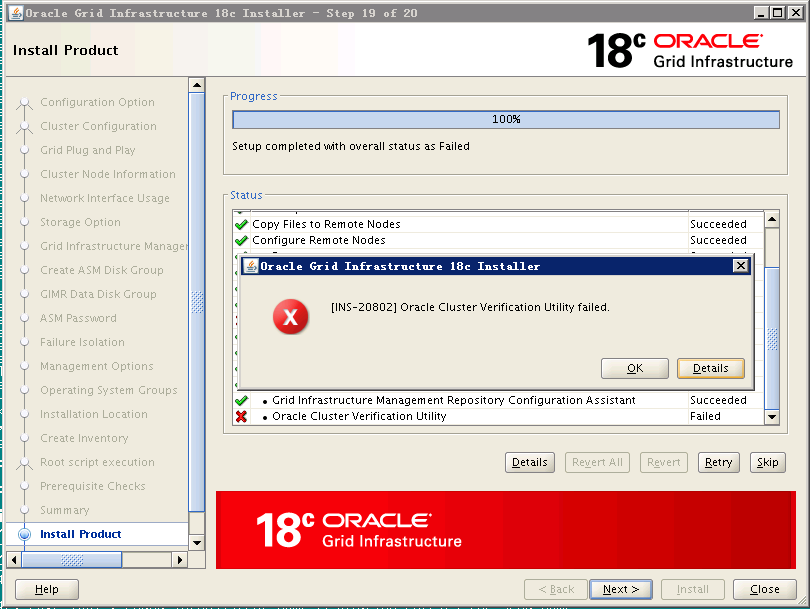
注:最后这个报错提示,查看日志发现是因为使用了一个scan ip的提示,可以忽略。
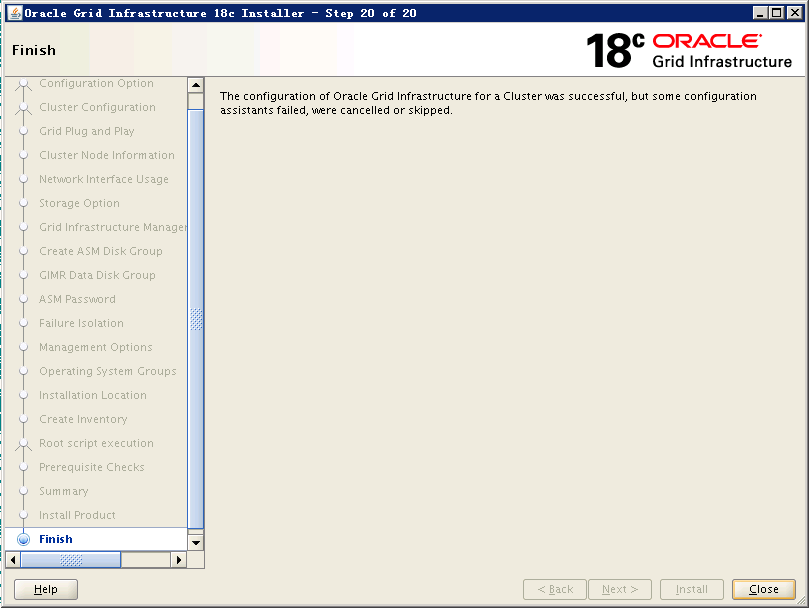
至此GI配置完成。
3.5 验证crsctl的状态
crsctl stat res -t查看集群资源状态信息,看到18c又新出现一些资源了,看来DBA又有新东西需要学习了~
[grid@db40 grid]$ crsctl stat res -t

--------------------------------------------------------------------------------

Name           Target  State        Server                   State details

--------------------------------------------------------------------------------

Local Resources

--------------------------------------------------------------------------------

ora.ASMNET1LSNR_ASM.lsnr

               ONLINE  ONLINE       db40                     STABLE

               ONLINE  ONLINE       db42                     STABLE

ora.LISTENER.lsnr

               ONLINE  ONLINE       db40                     STABLE

               ONLINE  ONLINE       db42                     STABLE

ora.MGMT.GHCHKPT.advm

               OFFLINE OFFLINE      db40                     STABLE

               OFFLINE OFFLINE      db42                     STABLE

ora.MGMT.dg

               ONLINE  ONLINE       db40                     STABLE

               ONLINE  ONLINE       db42                     STABLE

ora.OCRVT.dg

               ONLINE  ONLINE       db40                     STABLE

               ONLINE  ONLINE       db42                     STABLE

ora.chad

               ONLINE  ONLINE       db40                     STABLE

               ONLINE  ONLINE       db42                     STABLE

ora.helper

               OFFLINE OFFLINE      db40                     STABLE

               OFFLINE OFFLINE      db42                     IDLE,STABLE

ora.mgmt.ghchkpt.acfs

               OFFLINE OFFLINE      db40                     volume /opt/oracle/r

                                                             hp_images/chkbase is

                                                             unmounted,STABLE

               OFFLINE OFFLINE      db42                     STABLE

ora.net1.network

               ONLINE  ONLINE       db40                     STABLE

               ONLINE  ONLINE       db42                     STABLE

ora.ons

               ONLINE  ONLINE       db40                     STABLE

               ONLINE  ONLINE       db42                     STABLE

ora.proxy_advm

               ONLINE  ONLINE       db40                     STABLE

               ONLINE  ONLINE       db42                     STABLE

--------------------------------------------------------------------------------

Cluster Resources

--------------------------------------------------------------------------------

ora.LISTENER_SCAN1.lsnr

      1        ONLINE  ONLINE       db40                     STABLE

ora.MGMTLSNR

      1        ONLINE  ONLINE       db40                     169.254.7.255 10.0.0

                                                             .40,STABLE

ora.asm

      1        ONLINE  ONLINE       db40                     Started,STABLE

      2        ONLINE  ONLINE       db42                     Started,STABLE

      3        OFFLINE OFFLINE                               STABLE

ora.cvu

      1        ONLINE  ONLINE       db40                     STABLE

ora.db40.vip

      1        ONLINE  ONLINE       db40                     STABLE

ora.db42.vip

      1        ONLINE  ONLINE       db42                     STABLE

ora.mgmtdb

      1        ONLINE  ONLINE       db40                     Open,STABLE

ora.qosmserver

      1        ONLINE  ONLINE       db40                     STABLE

ora.rhpserver

      1        OFFLINE OFFLINE                               STABLE

ora.scan1.vip

      1        ONLINE  ONLINE       db40                     STABLE

--------------------------------------------------------------------------------
crsctl stat res -t -init
--------------------------------------------------------------------------------

Name           Target  State        Server                   State details

--------------------------------------------------------------------------------

Cluster Resources

--------------------------------------------------------------------------------

ora.asm

      1        ONLINE  ONLINE       db40                     Started,STABLE

ora.cluster_interconnect.haip

      1        ONLINE  ONLINE       db40                     STABLE

ora.crf

      1        ONLINE  ONLINE       db40                     STABLE

ora.crsd

      1        ONLINE  ONLINE       db40                     STABLE

ora.cssd

      1        ONLINE  ONLINE       db40                     STABLE

ora.cssdmonitor

      1        ONLINE  ONLINE       db40                     STABLE

ora.ctssd

      1        ONLINE  ONLINE       db40                     ACTIVE:0,STABLE

ora.diskmon

      1        OFFLINE OFFLINE                               STABLE

ora.drivers.acfs

      1        ONLINE  ONLINE       db40                     STABLE

ora.evmd

      1        ONLINE  ONLINE       db40                     STABLE

ora.gipcd

      1        ONLINE  ONLINE       db40                     STABLE

ora.gpnpd

      1        ONLINE  ONLINE       db40                     STABLE

ora.mdnsd

      1        ONLINE  ONLINE       db40                     STABLE

ora.storage

      1        ONLINE  ONLINE       db40                     STABLE

--------------------------------------------------------------------------------
3.6 测试集群的FAILED OVER功能
节点2被重启,查看节点1状态:
[grid@db40 trace]$ crsctl stat res -t

--------------------------------------------------------------------------------

Name           Target  State        Server                   State details

--------------------------------------------------------------------------------

Local Resources

--------------------------------------------------------------------------------

ora.ASMNET1LSNR_ASM.lsnr

               ONLINE  ONLINE       db40                     STABLE

ora.LISTENER.lsnr

               ONLINE  ONLINE       db40                     STABLE

ora.MGMT.GHCHKPT.advm

               OFFLINE OFFLINE      db40                     STABLE

ora.MGMT.dg

               ONLINE  ONLINE       db40                     STABLE

ora.OCRVT.dg

               ONLINE  ONLINE       db40                     STABLE

ora.chad

               ONLINE  ONLINE       db40                     STABLE

ora.helper

               OFFLINE OFFLINE      db40                     STABLE

ora.mgmt.ghchkpt.acfs

               OFFLINE OFFLINE      db40                     volume /opt/oracle/r

                                                             hp_images/chkbase is

                                                             unmounted,STABLE

ora.net1.network

               ONLINE  ONLINE       db40                     STABLE

ora.ons

               ONLINE  ONLINE       db40                     STABLE

ora.proxy_advm

               ONLINE  ONLINE       db40                     STABLE

--------------------------------------------------------------------------------

Cluster Resources

--------------------------------------------------------------------------------

ora.LISTENER_SCAN1.lsnr

      1        ONLINE  ONLINE       db40                     STABLE

ora.MGMTLSNR

      1        ONLINE  ONLINE       db40                     169.254.7.255 10.0.0

                                                             .40,STABLE

ora.asm

      1        ONLINE  ONLINE       db40                     Started,STABLE

      2        ONLINE  OFFLINE                               STABLE

      3        OFFLINE OFFLINE                               STABLE

ora.cvu

      1        ONLINE  ONLINE       db40                     STABLE

ora.db40.vip

      1        ONLINE  ONLINE       db40                     STABLE

ora.db42.vip

      1        ONLINE  INTERMEDIATE db40                     FAILED OVER,STABLE

ora.mgmtdb

      1        ONLINE  ONLINE       db40                     Open,STABLE

ora.qosmserver

      1        ONLINE  ONLINE       db40                     STABLE

ora.rhpserver

      1        OFFLINE OFFLINE                               STABLE

ora.scan1.vip

      1        ONLINE  ONLINE       db40                     STABLE

--------------------------------------------------------------------------------
节点1被重启,查看节点2状态:
[grid@db42 ~]$ crsctl stat res -t

--------------------------------------------------------------------------------

Name           Target  State        Server                   State details

--------------------------------------------------------------------------------

Local Resources

--------------------------------------------------------------------------------

ora.ASMNET1LSNR_ASM.lsnr

               ONLINE  ONLINE       db42                     STABLE

ora.LISTENER.lsnr

               ONLINE  ONLINE       db42                     STABLE

ora.MGMT.GHCHKPT.advm

               OFFLINE OFFLINE      db42                     STABLE

ora.MGMT.dg

               ONLINE  INTERMEDIATE db42                     STABLE

ora.OCRVT.dg

               ONLINE  INTERMEDIATE db42                     STABLE

ora.chad

               ONLINE  ONLINE       db42                     STABLE

ora.helper

               OFFLINE OFFLINE      db42                     STABLE

ora.mgmt.ghchkpt.acfs

               OFFLINE OFFLINE      db42                     STABLE

ora.net1.network

               ONLINE  ONLINE       db42                     STABLE

ora.ons

               ONLINE  ONLINE       db42                     STABLE

ora.proxy_advm

               ONLINE  ONLINE       db42                     STABLE

--------------------------------------------------------------------------------

Cluster Resources

--------------------------------------------------------------------------------

ora.LISTENER_SCAN1.lsnr

      1        ONLINE  ONLINE       db42                     STABLE

ora.MGMTLSNR

      1        ONLINE  ONLINE       db42                     169.254.7.154 10.0.0

                                                             .42,STABLE

ora.asm

      1        ONLINE  OFFLINE                               STABLE

      2        ONLINE  ONLINE       db42                     Started,STABLE

      3        OFFLINE OFFLINE                               STABLE

ora.cvu

      1        ONLINE  ONLINE       db42                     STABLE

ora.db40.vip

      1        ONLINE  INTERMEDIATE db42                     FAILED OVER,STABLE

ora.db42.vip

      1        ONLINE  ONLINE       db42                     STABLE

ora.mgmtdb

      1        ONLINE  ONLINE       db42                     Open,STABLE

ora.qosmserver

      1        ONLINE  ONLINE       db42                     STABLE

ora.rhpserver

      1        OFFLINE OFFLINE                               STABLE

ora.scan1.vip

      1        ONLINE  ONLINE       db42                     STABLE

--------------------------------------------------------------------------------
附:集群日志位置:
[grid@db40 log]$ cd $ORACLE_BASE/diag/crs/db40/crs/trace

[grid@db40 trace]$ pwd

/u01/app/grid/diag/crs/db40/crs/trace

[grid@db40 trace]$ tail -5f ocssd.trc

2018-08-04 17:35:16.507 :    CSSD:758277888: clssgmMbrDataUpdt: Sending member data change to GMP for group HB+ASM, memberID 17:2:1

2018-08-04 17:35:16.509 :    CSSD:770635520: clssgmpcMemberDataUpdt: grockName HB+ASM memberID 17:2:1, datatype 1 datasize 4

2018-08-04 17:35:16.514 :    CSSD:755123968: clssgmcpDataUpdtCmpl: Status 0 mbr data updt memberID 17:2:1 from clientID 1:39:2

2018-08-04 17:35:17.319 :    CSSD:3337582336: clssnmSendingThread: sending status msg to all nodes

2018-08-04 17:35:17.321 :    CSSD:3337582336: clssnmSendingThread: sent 4 status msgs to all nodes

2018-08-04 17:35:17.793 :    CSSD:762750720: clssgmpcGMCReqWorkerThread: processing msg (0x7f2914038720) type 2, msg size 76, payload (0x7f291403874c) size 32, sequence 27970, for clientID 1:39:2

2018-08-04 17:35:18.424 :    CSSD:758277888: clssgmMbrDataUpdt: Processing member data change type 1, size 4 for group HB+ASM, memberID 17:2:1

2018-08-04 17:35:18.424 :    CSSD:758277888: clssgmMbrDataUpdt: Sending member data change to GMP for group HB+ASM, memberID 17:2:1

2018-08-04 17:35:18.425 :    CSSD:770635520: clssgmpcMemberDataUpdt: grockName HB+ASM memberID 17:2:1, datatype 1 datasize 4

2018-08-04 17:35:18.427 :    CSSD:755123968: clssgmcpDataUpdtCmpl: Status 0 mbr data updt memberID 17:2:1 from clientID 1:39:2

2018-08-04 17:35:19.083 :    CSSD:755123968: clssgmSendEventsToMbrs: Group GR+DB_+ASM, member count 1, event master 0, event type 6, event incarn 346, event member count 1, pids 31422-21167708,

2018-08-04 17:35:19.446 :    CSSD:762750720: clssgmpcGMCReqWorkerThread: processing msg (0x7f2914038720) type 2, msg size 76, payload (0x7f291403874c) size 32, sequence 27972, for clientID 1:37:2

[grid@db40 trace]$ tail -20f alert.log

    Build version: 18.0.0.0.0

    Build full version: 18.3.0.0.0

    Build hash:    9256567290

    Bug numbers:   NoTransactionInformation

Commands:

    Build version: 18.0.0.0.0

    Build full version: 18.3.0.0.0

    Build hash:    9256567290

    Bug numbers:   NoTransactionInformation

2018-08-04 18:02:57.013 [CLSECHO(3376)]ACFS-9327: Verifying ADVM/ACFS devices.

2018-08-04 18:02:57.058 [CLSECHO(3384)]ACFS-9156: Detecting control device '/dev/asm/.asm_ctl_spec'.

2018-08-04 18:02:57.115 [CLSECHO(3395)]ACFS-9156: Detecting control device '/dev/ofsctl'.

2018-08-04 18:02:58.991 [CLSECHO(3482)]ACFS-9294: updating file /etc/sysconfig/oracledrivers.conf

2018-08-04 18:02:59.032 [CLSECHO(3490)]ACFS-9322: completed

2018-08-04 18:03:00.398 [OSYSMOND(3571)]CRS-8500: Oracle Clusterware OSYSMOND process is starting with operating system process ID 3571

2018-08-04 18:03:00.324 [CSSDMONITOR(3567)]CRS-8500: Oracle Clusterware CSSDMONITOR process is starting with operating system process ID 3567

2018-08-04 18:03:00.796 [CSSDAGENT(3598)]CRS-8500: Oracle Clusterware CSSDAGENT process is starting with operating system process ID 3598

2018-08-04 18:03:01.461 [OCSSD(3621)]CRS-8500: Oracle Clusterware OCSSD process is starting with operating system process ID 3621

2018-08-04 18:03:03.374 [OCSSD(3621)]CRS-1713: CSSD daemon is started in hub mode

2018-08-04 18:03:23.052 [OCSSD(3621)]CRS-1707: Lease acquisition for node db40 number 1 completed

2018-08-04 18:03:29.122 [OCSSD(3621)]CRS-1605: CSSD voting file is online: /dev/mapper/mpathc; details in /u01/app/grid/diag/crs/db40/crs/trace/ocssd.trc.

2018-08-04 18:03:29.150 [OCSSD(3621)]CRS-1605: CSSD voting file is online: /dev/mapper/mpathb; details in /u01/app/grid/diag/crs/db40/crs/trace/ocssd.trc.

2018-08-04 18:03:31.087 [OCSSD(3621)]CRS-1605: CSSD voting file is online: /dev/mapper/mpatha; details in /u01/app/grid/diag/crs/db40/crs/trace/ocssd.trc.

2018-08-04 18:03:33.767 [OCSSD(3621)]CRS-1601: CSSD Reconfiguration complete. Active nodes are db40 db42 .

2018-08-04 18:03:35.311 [OLOGGERD(3862)]CRS-8500: Oracle Clusterware OLOGGERD process is starting with operating system process ID 3862

2018-08-04 18:03:35.833 [OCTSSD(3869)]CRS-8500: Oracle Clusterware OCTSSD process is starting with operating system process ID 3869

2018-08-04 18:03:36.055 [OCSSD(3621)]CRS-1720: Cluster Synchronization Services daemon (CSSD) is ready for operation.

2018-08-04 18:03:39.797 [OCTSSD(3869)]CRS-2407: The new Cluster Time Synchronization Service reference node is host db42.

2018-08-04 18:03:39.810 [OCTSSD(3869)]CRS-2401: The Cluster Time Synchronization Service started on host db40.

2018-08-04 18:03:41.572 [CRSD(3956)]CRS-8500: Oracle Clusterware CRSD process is starting with operating system process ID 3956

2018-08-04 18:03:57.242 [CRSD(3956)]CRS-1012: The OCR service started on node db40.

2018-08-04 18:03:59.550 [CRSD(3956)]CRS-1201: CRSD started on node db40.
至此,12cR2的GI配置已全部完成。
Linux平台 Oracle 18c RAC安装Part2:GI配置的更多相关文章
- Linux平台 Oracle 18c RAC安装
Linux平台 Oracle 18c RAC安装Part1:准备工作 2018-08-04 22:20 by AlfredZhao, 1065 阅读, 0 评论, 收藏, 编辑 一.实施前期准备工作 ...
- Linux平台 Oracle 18c RAC安装Part1:准备工作
一.实施前期准备工作 1.1 服务器安装操作系统 1.2 Oracle安装介质 1.3 共享存储规划 1.4 网络规范分配 二.安装前期准备工作 2.1 各节点系统时间校对 2.2 各节点关闭防火墙和 ...
- Linux平台 Oracle 18c RAC安装Part3:DB配置
四.DB(Database)配置 4.1 解压DB的安装包 4.2 DB软件配置 4.3 ASMCA创建磁盘组 4.4 DBCA建库 4.5 验证crsctl的状态 Linux平台 Oracle 18 ...
- Linux平台 Oracle 19c RAC安装Part2:GI配置
三.GI(Grid Infrastructure)安装 3.1 解压GI的安装包 3.2 安装配置Xmanager软件 3.3 共享存储LUN的赋权 3.4 使用Xmanager图形化界面配置GI 3 ...
- Linux平台 Oracle 11gR2 RAC安装Part2:GI安装
三.GI(Grid Infrastructure)安装 3.1 解压GI的安装包 3.2 安装配置Xmanager软件 3.3 共享存储LUN的赋权 3.4 使用Xmanager图形化界面安装GI 3 ...
- Linux平台 Oracle 12cR2 RAC安装Part2:GI配置
Linux平台 Oracle 12cR2 RAC安装Part2:GI配置 三.GI(Grid Infrastructure)安装 3.1 解压GI的安装包 3.2 安装配置Xmanager软件 3.3 ...
- Linux平台 Oracle 19c RAC安装Part1:准备工作
一.实施前期准备工作 1.1 服务器安装操作系统 1.2 Oracle安装介质 1.3 共享存储规划 1.4 网络规范分配 二.安装前期准备工作 2.1 各节点系统时间校对 2.2 各节点关闭防火墙和 ...
- Linux平台 Oracle 19c RAC安装Part3:DB配置
Linux平台 Oracle 19c RAC安装Part3:DB配置 四.DB(Database)配置 4.1 解压DB的安装包 4.2 DB软件配置 4.3 ASMCA创建磁盘组 4.4 DBCA建 ...
- Linux平台 Oracle 11gR2 RAC安装Part1:准备工作
一.实施前期准备工作 1.1 服务器安装操作系统 1.2 Oracle安装介质 1.3 共享存储规划 1.4 网络规范分配 二.安装前期准备工作 2.1 各节点系统时间校对 2.2 各节点关闭防火墙和 ...
随机推荐
- [转]让iframe自适应高度-真正解决
原文地址:https://www.cnblogs.com/rogge7/p/7762052.html 需求:实现 iframe 的自适应高度,能够随着页面的长度自动的适应以免除页面和 iframe 同 ...
- 【iCore4 双核心板_ARM】例程二十七:LWIP_NETIO实验——以太网测速
实验现象: 核心代码: int main(void) { system_clock.initialize(); led.initialize(); adc.initialize(); delay.in ...
- 什么是面向切面编程AOP--知识点汇总
最近在学这方面的内容,读到的这段话我感觉说的很清楚了:这种在运行时,动态地将代码切入到类的指定方法.指定位置上的编程思想就是面向切面的编程. 面向切面编程(AOP是Aspect Orie ...
- 【gulp】gulp + browsersync 构建前端项目自动化工作流
什么是 gulp? gulp.js 是一个自动化构建工具,开发者可以使用它在项目开发过程中自动执行常见任务.gulp.js 是基于 node.js 构建的,利用 node.js 流的威力,你可以快速构 ...
- 【中间件安全】IIS6安全加固规范
1. 适用情况 适用于使用IIS6进行部署的Web网站. 2. 技能要求 熟悉IIS配置操作,能够利用IIS进行建站,并能针对站点使用IIS进行安全加固. 3. 前置条件 1. 根据站点开放端口.进程 ...
- k8s(4)-使用服务公开应用程序
Kubernetes中的服务是一个抽象,它定义了一组逻辑Pod和一个访问它们的策略.服务允许从属Pod之间的松散耦合.与所有Kubernetes对象一样,使用YAML (首选)或JSON 定义服务.服 ...
- array_walk 与 array_map的 区别
1.array_walk是用于用户自定义的函数,所以想用array_walk($aIds, "trim");去掉数据元素中的空格是达不到目的的只能用array_walk($aIds ...
- 【微信开发】cURL error 60: SSL certificate problem: unable to get local issuer certificate (see http://curl.haxx.se/libcurl/c/libcurl-errors.html)
在做微信开发时候,请求为你接口报错: 解决方案: 1 下载cacert https://curl.haxx.se/ca/cacert.pem 2 修改 php.ini , 并重启 curl.cainf ...
- cf 893 E
有 次询问,第 次询问包含两个数 . 求满足下面两个要求的 数组的方案数. 1. 数组由 个整数构成 2. A与B不同当且仅当至少存在一个数 满足 .答案对 取模 数据范围: 显 ...
- 性能测试yslow
YSlow YSlow可以对网站的页面进行分析,并告诉你为了提高网站性能,如何基于某些规则而进行优化. YSlow可以分析任何网站,并为每一个规则产生一个整体报告,如果页面可以进行优化,则YSlow会 ...