
BOOST 定时器 stop探究
Asio是一个建立在Boost所提供的相关组件之上的异步的网络库,可以运行在Win/Linux/Unix等各种平台之上。
不过随着C++11的发布,其对Boost的依赖也越来越少,作者又做了一个不依赖于Boost的版本。
1. 同步Timer: 调用wait后立即阻塞
#include <iostream>

#include <boost/asio.hpp>

int main()

{

boost::asio::io_service io;

boost::asio::deadline_timer timer(io, boost::posix_time::seconds(5));

timer.wait();

std::cout << "Hello, world!" << std::endl;

return 0;

}
实测效果,程序开始运行后3秒,打印了:Hello, world!
2. 异步Timer: wait后不立即阻塞,调用io的run方法时才会阻塞
#include <iostream>

#include <boost/asio.hpp>

#include <boost/thread.hpp>

void print(const boost::system::error_code& err)

{

   std::cout << "Hello, world! " << std::endl;

}

int main()

{

    boost::asio::io_service io;

    boost::asio::deadline_timer timer(io, boost::posix_time::seconds(5));

    std::cout << "----gointo 0---- " << std::endl;

    timer.async_wait(&print);

    //timer.cancel();  取消定时器, 这样后续io.run方法将不会阻塞,但是定时器回调函数会立马被执行

    std::cout << "----gointo 1---- " << std::endl;

    io.run();

    std::cout << "----gointo 2-!--- " << std::endl;

    return 0;

}
运行:
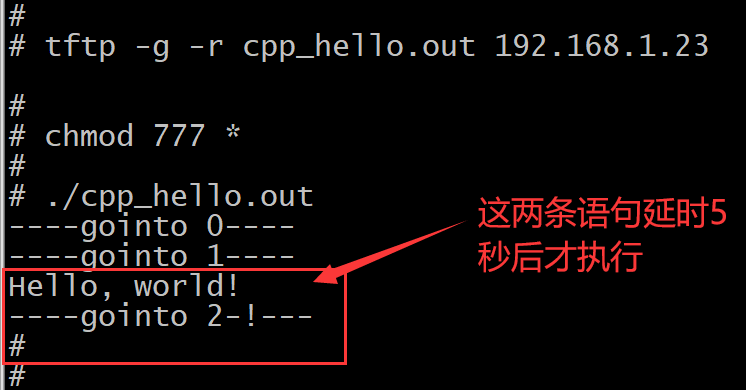
2.1
如果让上图内的timer.cancel()这句代码工作,那么效果将是:
取消定时器后, 定时器回调函数会立马被执行,同时后续io.run方法将不会阻塞 !
2.2
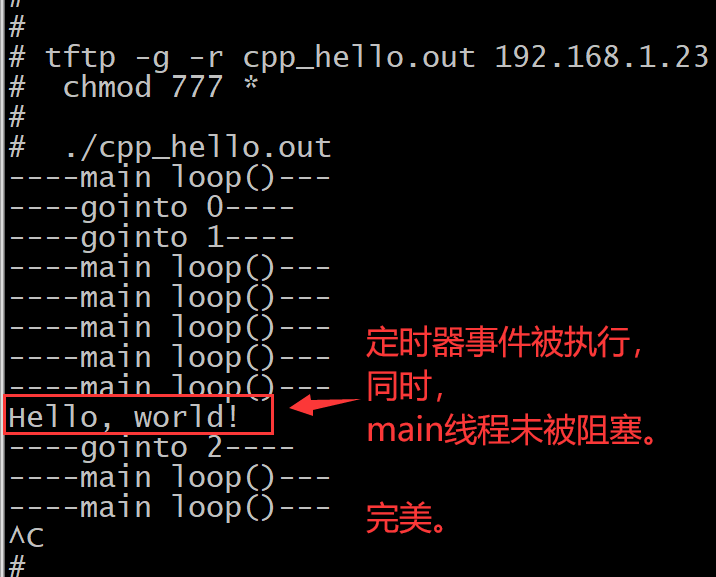
如果我们希望在开启定时器后,本线程内的代码流仍能继续向下走,
我们只有改一改代码了:将开启定时器的代码封装在一个新的线程内,这样阻塞的就不是本线程,而是新开的线程了。
如下面的例子3所示。
3 异步Timer: 将开启定时器的代码封装在一个新的线程内,这样阻塞的就不是本线程,而是新开的线程了。
#include <iostream>

#include <boost/asio.hpp>

#include <boost/thread.hpp>

void print(const boost::system::error_code& err)

{

   std::cout << "Hello, world! " << std::endl;

}

void func_timer_test()

{

   boost::asio::io_service io;

   boost::asio::deadline_timer timer(io, boost::posix_time::seconds(5));

   std::cout << "----gointo 0---- " << std::endl;

   timer.async_wait(&print);

   std::cout << "----gointo 1---- " << std::endl;

   io.run();

   std::cout << "----gointo 2---- " << std::endl;

}

int main()

{

    boost::thread thread_timer_test(func_timer_test);

    thread_timer_test.detach();

    while(1){

       std::cout << "----main loop()--- " << std::endl;

       boost::this_thread::sleep(boost::posix_time::seconds(1));

    }

    return 0;

}
运行:
4 异步Timer: 取消定时器,因为取消定时器后,事先设置的定时器回调函数会被立马执行,所以必须在定时器回调函数内通过当前的错误码来进行判断。
#include <iostream>

#include <boost/asio.hpp>

#include <boost/thread.hpp>

#include <boost/exception/all.hpp>

#include <boost/system/error_code.hpp>

#include <boost/asio.hpp>

#include <string>

void print(const boost::system::error_code& err)

{

   if(err){

      std::cout << err.category().name() << std::endl;

      std::cout << err.value() << std::endl;

   }

   std::cout << "Hello, world! " << std::endl;

}

int main()

{

    boost::asio::io_service io;

    boost::asio::deadline_timer timer(io, boost::posix_time::seconds(5));

    std::cout << "----gointo 0---- " << std::endl;

    timer.async_wait(&print);

    timer.cancel();

    std::cout << "----gointo 1-*--- " << std::endl;

    io.run();

    std::cout << "----gointo 2-$--- " << std::endl;

    return 0;

}
4.1
如果屏蔽上图代码内的timer.cancel()这句,即不取消定时器时,
运行结果如下图:
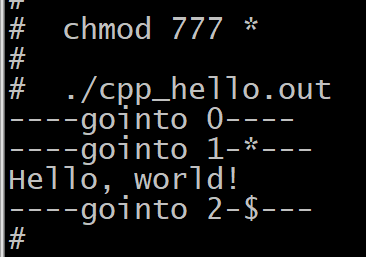
存在5秒的定时。
4.2
取消定时器,即上图代码的运行结果:
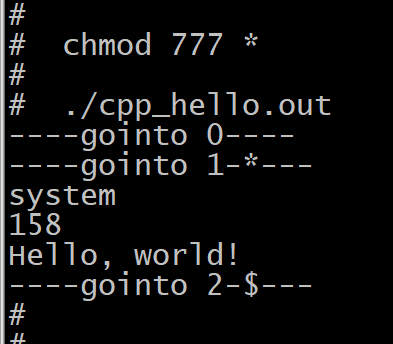
代码立即执行完毕,且定时器回调内判断出,发生了异常。
那么,我们平常在使用boost库定时器的时候,如果我们希望真正取消一个事先已经设置好的定时器回调函数的执行,
我们可以换种思路:在定时器回调函数内做if-else判断,如果被取消了干啥(一般是空处理),定时结束正常进入时干啥,区分开处理就好了。
后记:
对于取消定时器任务,如果我在主线程内调用timer.cancel来取消定时器线程内的定时器任务,实测运行会段错误。
也即是说,本博客最终还是没能搞定单次定时器任务的取消。
百度了不少博客,都没能搞定定时器任务的取消。
需要重要说明的是:我所谓的取消定时器任务的严格定义是,我开了一个定时器任务,但是这个任务由于时间未到所以还没有被执行到,我中途希望取消该定时器任务。
https://blog.csdn.net/zhongjiezheng/article/details/44343959
这篇博客的访问量竟然还挺高的,但是他实现的是一个周期性定时器,他所谓的停止指的仅仅是取消这个定时器任务的周期性执行而已。和我所需要的取消定时器任务的需求完全是两码事。
我们来验证上面博客的代码是无法完成取消定时器任务的,复制其代码,简单修改了下,贴代码:
#include <boost/asio.hpp>

#include <boost/thread.hpp>

#include <iostream>

class MyTimer

{

public:

    template<typename F>

    MyTimer(boost::asio::io_service& ios, F func, int interval, bool start = true) :

        m_func(func),

        m_interval(interval),

        m_timer(ios, boost::posix_time::millisec(interval)),

        m_flag(start)

    {

        m_timer.async_wait(boost::bind(&MyTimer::call_func, this, boost::asio::placeholders::error));

    }

    void call_func(const boost::system::error_code&)

    {

        if (!m_flag)

        {

        std::cout << "cancel!" << std::endl;

            return;

        }

        m_func();

        //m_timer.expires_at(m_timer.expires_at() + boost::posix_time::millisec(m_interval));

        //m_timer.async_wait(boost::bind(&MyTimer::call_func, this, boost::asio::placeholders::error));

    }

    void stop()

    {

        m_flag = false;

    }

    void start(int new_interval)

    {

        m_flag = true;

        m_interval = new_interval;

        m_timer.expires_from_now(boost::posix_time::millisec(m_interval));

        m_timer.async_wait(boost::bind(&MyTimer::call_func, this, boost::asio::placeholders::error));

    }

private:

    boost::function<void()> m_func;

    int m_interval;

    boost::asio::deadline_timer m_timer;

    bool m_flag;

};

void print1()

{

    std::cout << "11111" << std::endl;

}

void print2()

{

    std::cout << "22222" << std::endl;

}

boost::asio::io_service ios;

MyTimer at1(ios, print1, 15000); // 希望该定时器任务15秒后被执行,中途我们来取消之

//MyTimer at2(ios, print2, 8000);

void threadfun()

{

    boost::this_thread::sleep(boost::posix_time::milliseconds(2000));

    at1.stop();

    //at2.start(1000);

    //at1.stop();

    //at2.stop();

}

int main()

{

    // boost::this_thread::sleep(boost::posix_time::milliseconds(5000));

    boost::thread_group thr_grp;

    thr_grp.create_thread(boost::bind(threadfun));

    ios.run();

    getchar();

    return 0;

}

// 实验失败  定时器任务没有被取消。
运行:

实验失败 定时器任务没有被取消。
好吧,折腾得够久了,无比的烦躁。 我还是自己基于linux去封装一个CPP的定时器吧!
.
.
BOOST 定时器 stop探究的更多相关文章
- boost 定时器.
#include <iostream> #include <boost/asio.hpp> int main() { boost::asio::io_service io; b ...
- 简单的几个Boost定时器
boost的asio库里有几个定时的器,老的有 deadline_timer , 还有三个可配合 C++11 的 chrono 使用的 high_resolution_timer . steady_ ...
- boost timer 定时器 Operation cancel !
前面段时间处理一个定时器时,老是提示 操作取消. 硬是没搞明白为什么! 其实我遇到的这个情况很简单就是(boost::asio::deadline_timer timer)这个变量的生命同期结束了,对 ...
- 使用boost的deadline_timer实现一个异步定时器
概述 最近在工作上需要用到定时器,然后看到boost里面的deadline_timer可以实现一个定时器,所以就直接将其封装成了ATimer类,方便使用,ATimer有以下优点: 可以支持纳秒.毫秒. ...
- boost库学习随记六:使用同步定时器、异步定时器、bind、成员函数回调处理、多线程的同步处理示例等
一.使用同步定时器 这个示例程序通过展示如何在一个定时器执行一个阻塞等待. //makefile #-------------------------------------------------- ...
- [Boost基础]并发编程——asio网络库——定时器deadline_timer
asio库基于操作系统提供的异步机制,采用前摄器设计模式(Proactor)实现了可移植的异步(或者同步)IO操作,而且并不要求使用多线程和锁定,有些的避免了多线程编程带来的诸多有害副作用(如条件竞争 ...
- boost asio 学习(六) 定时器
http://www.gamedev.net/blog/950/entry-2249317-a-guide-to-getting- started-with-boostasio?pg=7 6 定时器 ...
- 使用boost线程定时器作为后台线程来切换主循环程序状态方法2
上一篇的方法主要使用的是:通过线程延时实 现的定时,并且只能定时一次,如果需要对此定时处理,就需要使用下面的定时器: #include "stdafx.h" #include &l ...
- Tcp/ip实验准备:一个简单的定时器——boost实现
tcp/ip实验须要在指定的时间查看结果,为了实验方便,做了一个定时器.用法是: 在命令行输入:timer 输入数字之后,计时对应秒数 输入m数字之后.计时对应分钟数(支持小数分钟数) 输入q退出. ...
- boost::asio学习(定时器)
#include <boost/asio.hpp> #include <iostream> void handle1(const boost::system::error_co ...
随机推荐
- Nuxt 使用指南:掌握 useNuxtApp 和运行时上下文
title: Nuxt 使用指南:掌握 useNuxtApp 和运行时上下文 date: 2024/7/21 updated: 2024/7/21 author: cmdragon excerpt: ...
- 【jQuery学习日记】从入门到再入门
1,jQuery介绍 jQuery 是一个 JavaScript 库. jQuery 极大地简化了 JavaScript 编程. 2,入门jQuery jQuery有两大核心:jQuery核心函数和j ...
- MiniAuth 一个轻量 ASP.NET Core Identity Web 后台管理中间插件
MiniAuth 一个轻量 ASP.NET Core Identity Web 后台管理中间插件 「一行代码」为「新.旧项目」 添加 Identity 系统跟用户.权限管理网页后台系统 开箱即用,避免 ...
- Java代码实现七夕魔方照片墙
创建一个七夕魔方照片墙是一个相对复杂的任务,涉及到前端展示和后端数据处理.在这里,我会提供一个简化的Java后端示例,用于生成一个模拟的"照片墙"数据模型,并给出一个基本的前端HT ...
- nacos:关于注册服务与配置管理
为什么要用nacos做配置中心? 1.nacos可以做到统一管理,而且在修改时可以做到动态管理,无需重启即可生效. 2.nacos通过namespace进行环境隔离, 约定: namespace:用于 ...
- 【SQL】 牛客网SQL训练Part1 简单难度
地址位置: https://www.nowcoder.com/exam/oj?difficulty=2 查找入职员工时间排名倒数第三的员工所有信息 -- 准备脚本 drop table if exis ...
- 《Python数据可视化之matplotlib实践》 源码 第四篇 扩展 第十二章
图 12.1 import matplotlib.pyplot as plt import numpy as np barSlices=12 theta=np.linspace(0.0, 2*np. ...
- 【解决】ValueError: Memory growth cannot differ between GPU devices
在ubuntu系统下双显卡运行TensorFlow代码报错: ValueError: Memory growth cannot differ between GPU devices 报错的代码位置为: ...
- 英特尔Movidius神经计算棒的介绍
手上有一款英特尔Movidius神经计算棒,本打算疫情结束返回学校,突然得到非官方的通知告诉我只能等到9月份返校了,于是就想起这个被闲置的计算棒了,手上的是1代的计算棒,不过1代的和二代的使用起来方法 ...
- python语言绘图:绘制一组beta分布图
代码源自: https://github.com/PacktPublishing/Bayesian-Analysis-with-Python ============================= ...