
SpringBoot项目 填充Excel模板 导出 下载
模板
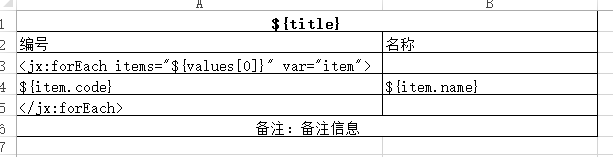
下载后的效果

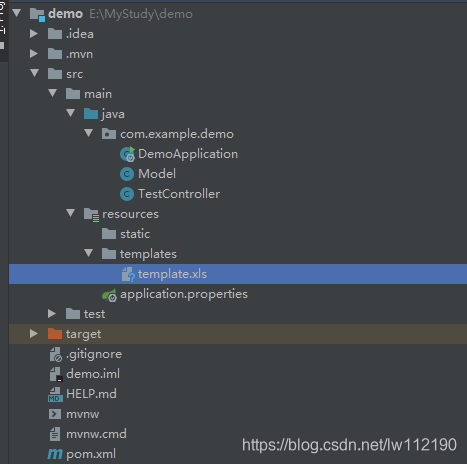
项目结构
pom
<?xml version="1.0" encoding="UTF-8"?>

<project xmlns="http://maven.apache.org/POM/4.0.0" xmlns:xsi="http://www.w3.org/2001/XMLSchema-instance"

         xsi:schemaLocation="http://maven.apache.org/POM/4.0.0 https://maven.apache.org/xsd/maven-4.0.0.xsd">

    <modelVersion>4.0.0</modelVersion>

    <parent>

        <groupId>org.springframework.boot</groupId>

        <artifactId>spring-boot-starter-parent</artifactId>

        <version>2.3.1.RELEASE</version>

        <relativePath/> <!-- lookup parent from repository -->

    </parent>

    <groupId>com.example</groupId>

    <artifactId>demo</artifactId>

    <version>0.0.1-SNAPSHOT</version>

    <name>demo</name>

    <description>Demo project for Spring Boot</description>

    <properties>

        <java.version>1.8</java.version>

    </properties>

    <dependencies>

        <dependency>

            <groupId>org.springframework.boot</groupId>

            <artifactId>spring-boot-starter-web</artifactId>

        </dependency>

        <dependency>

            <groupId>net.sf.jxls</groupId>

            <artifactId>jxls-core</artifactId>

            <version>1.0.3</version>

        </dependency>

        <dependency>

            <groupId>org.springframework.boot</groupId>

            <artifactId>spring-boot-starter-test</artifactId>

            <scope>test</scope>

            <exclusions>

                <exclusion>

                    <groupId>org.junit.vintage</groupId>

                    <artifactId>junit-vintage-engine</artifactId>

                </exclusion>

            </exclusions>

        </dependency>

    </dependencies>

    <build>

        <plugins>

            <plugin>

                <groupId>org.springframework.boot</groupId>

                <artifactId>spring-boot-maven-plugin</artifactId>

            </plugin>

        </plugins>

    </build>

</project>
TestController
package com.example.demo;

import net.sf.jxls.transformer.XLSTransformer;

import org.springframework.web.bind.annotation.RequestMapping;

import org.springframework.web.bind.annotation.RestController;

import javax.servlet.ServletOutputStream;

import javax.servlet.http.HttpServletRequest;

import javax.servlet.http.HttpServletResponse;

import java.io.*;

import java.net.URLEncoder;

import java.text.SimpleDateFormat;

import java.util.*;

@RestController

@RequestMapping("/excel")

public class TestController {

    @RequestMapping("/export")

    private void export(HttpServletRequest request, HttpServletResponse response) throws Exception {

        //region 数据源

        List<Model> resultList = new ArrayList<>();

        Model model = new Model();

        model.setCode("01");

        model.setName("测试1");

        resultList.add(model);

        model = new Model();

        model.setCode("02");

        model.setName("测试2");

        resultList.add(model);

        //endregion

        //获得模版

        File directory = new File("src/main/resources/templates");

        String templatePath = directory.getCanonicalPath();

        String templateFile = templatePath + "\\template.xls";

        //导出文件名

        SimpleDateFormat simpl = new SimpleDateFormat("yyyyMMddHHmmss");

        String currntTime = simpl.format(new Date());

        String fileName = currntTime + "报表.xls";

        //将结果放入

        Map beans = new HashMap();

        List values = new ArrayList();

        values.add(resultList);

        beans.put("values", values);

        beans.put("title", "测试title");

        //文件名称统一编码格式

        fileName = URLEncoder.encode(fileName, "utf-8");

        //生成的导出文件

        File destFile = File.createTempFile(fileName, ".xls");

        //transformer转到Excel

        XLSTransformer transformer = new XLSTransformer();

        BufferedInputStream bis = null;

        BufferedOutputStream bos = null;

        try {

            //将数据添加到模版中生成新的文件

            transformer.transformXLS(templateFile, beans, destFile.getAbsolutePath());

            //将文件输入

            InputStream inputStream = new FileInputStream(destFile);

            //设置response参数,可以打开下载页面

            response.reset();

            //设置响应文本格式

            response.setContentType("application/vnd.ms-excel;charset=utf-8");

            response.setHeader("Content-Disposition",

                    "attachment;filename=" + new String((fileName + ".xls").getBytes(), "iso-8859-1"));

            //将文件输出到页面

            ServletOutputStream out = response.getOutputStream();

            bis = new BufferedInputStream(inputStream);

            bos = new BufferedOutputStream(out);

            byte[] buff = new byte[2048];

            int bytesRead;

            //读取并写入

            while (-1 != (bytesRead = bis.read(buff, 0, buff.length))) {

                bos.write(buff, 0, bytesRead);

            }

        } catch (Exception e) {

            e.printStackTrace();

        } finally {

            //使用完成后关闭流

            try {

                if (bis != null)

                    bis.close();

                if (bos != null)

                    bos.close();

            } catch (IOException e) {

                e.printStackTrace();

            }

        }

    }

}
model
package com.example.demo;

public class Model {

    private String code;

    private String name;

    public String getCode() {

        return code;

    }

    public void setCode(String code) {

        this.code = code;

    }

    public String getName() {

        return name;

    }

    public void setName(String name) {

        this.name = name;

    }

}
SpringBoot项目 填充Excel模板 导出 下载的更多相关文章
- ASP.NET Core 2.2 : 十六.扒一扒新的Endpoint路由方案 try.dot.net 的正确使用姿势 .Net NPOI 根据excel模板导出excel、直接生成excel .Net NPOI 上传excel文件、提交后台获取excel里的数据
ASP.NET Core 2.2 : 十六.扒一扒新的Endpoint路由方案 ASP.NET Core 从2.2版本开始,采用了一个新的名为Endpoint的路由方案,与原来的方案在使用上差别不 ...
- .Net NPOI 根据excel模板导出excel、直接生成excel
一.根据Excel模板导出excel 1.导入NPOI.dll 2.DAL中添加类ExportExcel.cs using NPOI.SS.UserModel; using System; usin ...
- java实现excel模板导出
一. 准备工作 1. 点击此下载相关开发工具 2. 将poi-3.8.jxls-core-1.0两个jar包放到工程中,并引用 3. 将excel模板runRecord.xls放到RunRecordB ...
- kettle 使用excel模板导出数据
通过excel进行高速开发报表: 建设思路: 1.首先制订相关的execl模板. 2.通过etl工具(kettle)能够高速的 将数据库中的数据按excel模板导出成新的excel就可以. 当中ket ...
- Magicodes.IE之Excel模板导出教材订购表
说明 本教程主要说明如果使用Magicodes.IE.Excel完成教材订购表的Excel模板导出. 要点 本教程使用Magicodes.IE.Excel来完成Excel模板导出 需要通过创建Dto来 ...
- Excel模板导出之动态导出
说明 目前Magicodes.IE已支持Excel模板导出时使用JObject.Dictionary和ExpandoObject来进行动态导出,具体使用请看本篇教程. 本功能的想法.部分实现初步源于a ...
- SpringBoot图文教程10—模板导出|百万数据Excel导出|图片导出「easypoi」
有天上飞的概念,就要有落地的实现 概念十遍不如代码一遍,朋友,希望你把文中所有的代码案例都敲一遍 先赞后看,养成习惯 SpringBoot 图文教程系列文章目录 SpringBoot图文教程1「概念+ ...
- C#实现Excel模板导出和从Excel导入数据
午休时间写了一个Demo关于Excel导入导出的简单练习 1.窗体 2.引用office命名空间 添加引用-程序集-扩展-Microsoft.Office.Interop.Excel 3.封装的Exc ...
- Net 自定义Excel模板导出数据
转载自:http://www.cnblogs.com/jbps/p/3549671.html?utm_source=tuicool&utm_medium=referral 1 using Sy ...
- 6、jeecg 笔记之 自定义excel 模板导出(一)
1.前言 jeecg 中已经自带 excel 的导出导出功能,其所使用的是 easypoi,尽管所导出的 excel 能满足大部分需求, 但总是有需要用到自定义 excel 导出模板,下文所用到的皆是 ...
随机推荐
- NC16496 [NOIP2014]飞扬的小鸟
题目链接 题目 题目描述 为了简化问题,我们对游戏规则进行了简化和改编: \1. 游戏界面是一个长为n,高 为m的二维平面,其中有k个管道(忽略管道的宽度). \2. 小鸟始终在游戏界面内移动.小鸟从 ...
- VueRouter导航守卫
VueRouter导航守卫 vue-router提供的导航守卫主要用来通过跳转或取消的方式守卫导航,简单来说导航守卫就是路由跳转过程中的一些钩子函数,路由跳转是一个大的过程,这个大的过程分为跳转前中后 ...
- Shiro实战2-Springboot集成Shiro实战
说明 最近打算打造一个简易的权限管理系统,打算用shiro做认证和授权.本篇作为springboot集成shiro的入门实战案例记录下来,希望也可以帮到大家,代码整理自网络. 技术栈 springbo ...
- SpringBoot中Redis的基础使用
基础使用 首先引入依赖 <!-- redis依赖--> <dependency> <groupId>org.springframework.boot</gro ...
- [BUUCTF][Web][ACTF2020 新生赛]Include 1
打开靶机对应的url 显示一个tips 超链接 点击访问超链接,对应Url为 http://469398f2-5677-4270-a4a4-55c5e4a7504a.node4.buuoj.cn:81 ...
- Nacos2作为Dubbo3的配置中心踩坑总结
本文阐述问题所使用的组件版本分别是,Dubbo:3.2.4,Nacos服务端:2.2.3,Nacos客户端:2.2.4. 在Dubbo3的官方文档中,关于如何使用Nacos作为配置中心的详细介绍参考: ...
- 教你如何判断Java代码中异步操作是否完成
本文分享自华为云社区<java代码实现异步返回结果如何判断异步执行完成>,作者: 皮牙子抓饭. 在许多应用程序中,我们经常使用异步操作来提高性能和响应度.在Java中,我们可以使用多线程或 ...
- 对find命令结果进行操作
# find匹配到一些文件后,可能希望对其进行一些操作,这时就可以使用-exec选项,exec选项后面跟着所要执行的命令,然后是一对{},一个空格和一个\,最后是一个分号; find . -type ...
- 【Azure 应用服务】查看App Service for Linux上部署PHP 7.4 和 8.0时,所使用的WEB服务器是什么?
问题描述 如何查看PHP应用部署到App Service后,Azure上面使用的应用服务器是什么呢?因为App Service支持两种操作系统,Windows 和 Linux.在Windows中,使用 ...
- 【Azure 应用服务】azure function powershell 调用 New-AzADServicePrincipal -DisplayName $sp -PasswordCredential $spCred
问题描述 powershell 调用New-AzADServicePrincipal -DisplayName $sp -PasswordCredential $spCred,出现如下错误: Reso ...