
PWA 实践/应用(Google Workbox)
桌面端 PWA 应用:
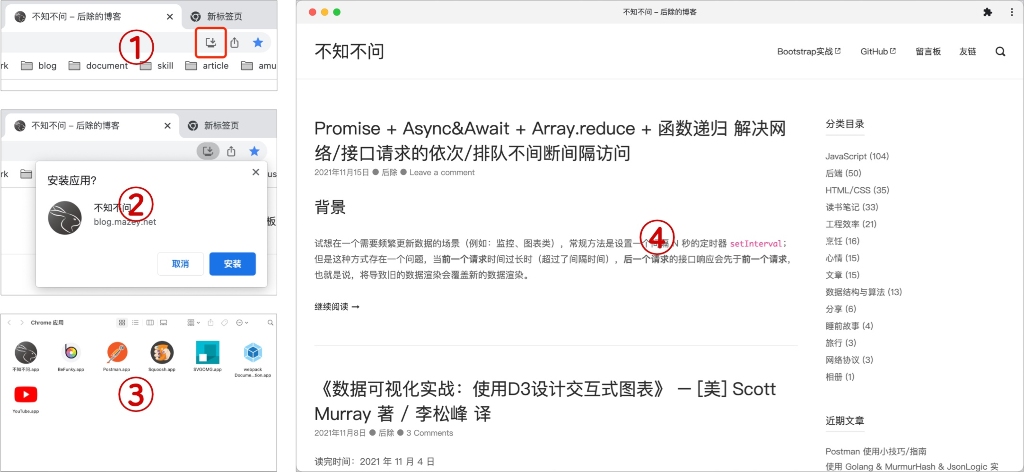
移动端添加到桌面:

1 什么是 PWA
PWA(Progressive Web App - 渐进式网页应用)是一种理念,由 Google Chrome 在 2015 年提出。PWA 它不是特指某一项技术,而是应用多项技术来改善用户体验的 Web App,其核心技术包括 Web App Manifest、Service Worker、Web Push 等,用户体验才是 PWA 的核心。
PWA 主要特点如下:
- 可靠 - 即使在网络不稳定甚至断网的环境下,也能瞬间加载并展现。
- 用户体验 - 快速响应,具有平滑的过渡动画及用户操作的反馈。
- 用户黏性 - 和 Native App 一样,可以被添加到桌面,能接受离线通知,具有沉浸式的用户体验。
PWA 本身强调渐进式(Progressive),可以从两个角度来理解渐进式,首先,PWA 还在不断进化,Service Worker、Web App Manifest、Device API 等标准每年都会有不小的进步;其次,标准的设计向下兼容,并且侵入性小,开发者使用新特性代价很小,只需要在原有站点上新增,让站点的用户体验渐进式的增强。相关技术基准线:What makes a good Progressive Web App?。
- 站点需要使用 HTTPS。
- 页面需要响应式,能够在平板和移动设备上都具有良好的浏览体验。
- 所有的 URL 在断网的情况下有内容展现,不会展现浏览器默认页面。
- 需要支持 Wep App Manifest,能被添加到桌面。
- 即使在 3G 网络下,页面加载要快,可交互时间要短。
- 在主流浏览器下都能正常展现。
- 动画要流畅,有用户操作反馈。
- 每个页面都有独立的 URL。
2 案例调研
2.1 米哈游 - 崩坏3

访问地址:https://bbs.mihoyo.com/bh3/
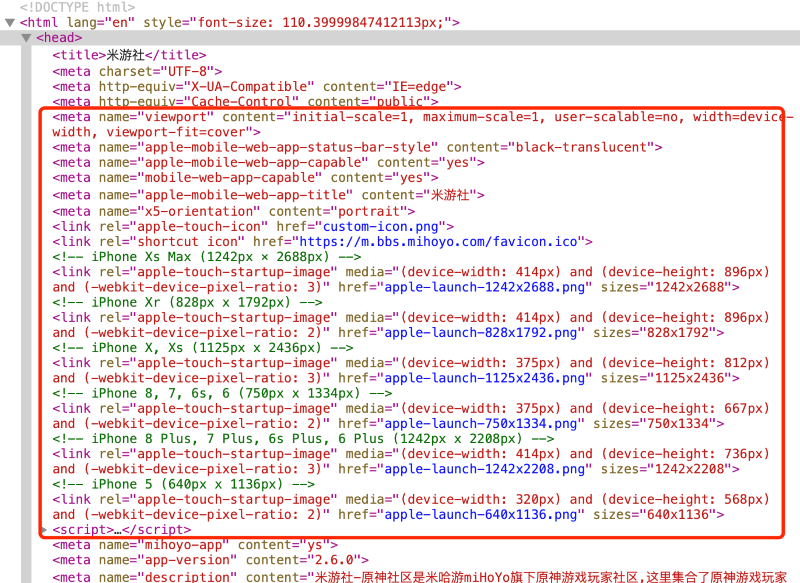
PWA:仅支持在 IOS 端添加到桌面。
2.2 阿里速卖通(AliExpress)

访问地址:https://m.aliexpress.com/
PWA:使用 Google Workbox(CDN)
- 支持添加到桌面,manifest。
- 支持缓存,Service Worker。
2.3 饿了么

访问地址:https://h5.ele.me/msite/#pwa=true
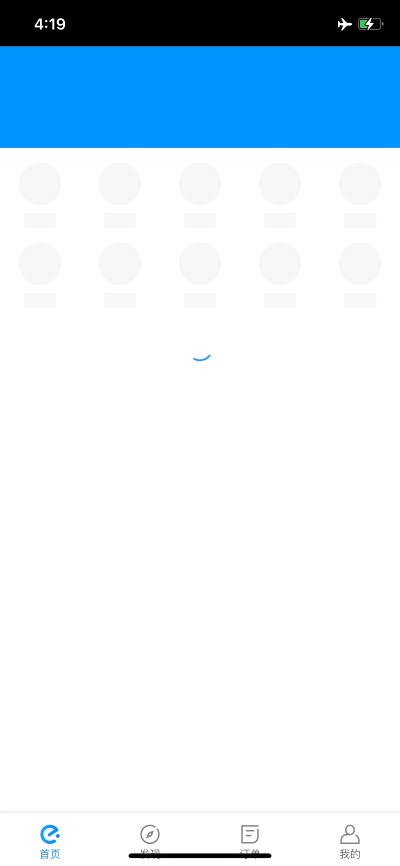
PWA:自研 - PWA 在饿了么的实践经验
- 支持添加到桌面,manifest。
- 支持缓存和离线访问,Service Worker。
2.4 Instagram
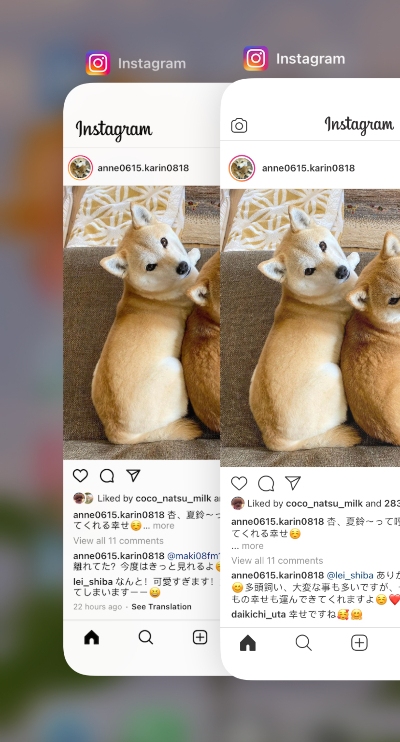
左边原生应用,右边 PWA

访问地址:https://www.instagram.com/
PWA:使用 Google Workbox
- 支持添加到桌面,manifest。
- 支持缓存,Service Worker。
2.5 Twitter
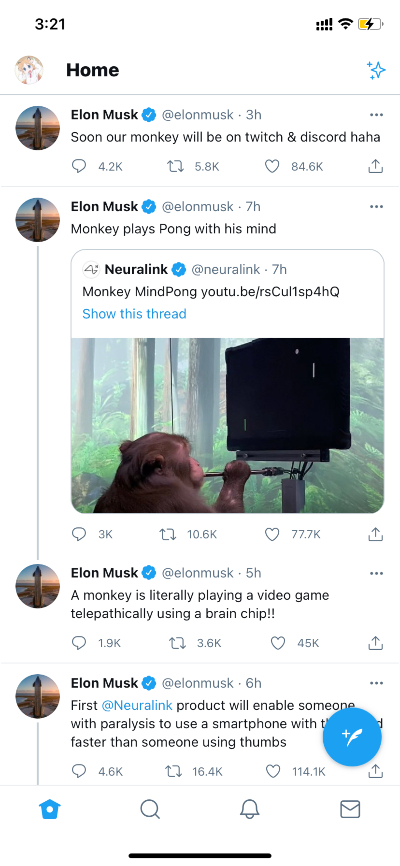
访问地址:https://mobile.twitter.com/home
PWA:Twitter 自研 - How we built Twitter Lite
- 支持添加到桌面,manifest。
- 支持缓存和离线访问,Service Worker。
除了正常的静态资源以外,Twitter 把首页也缓存了下来。
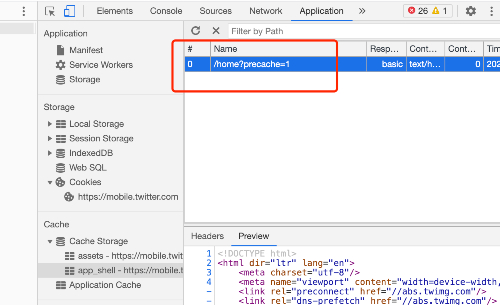
离线状态下有很好的用户体验,而不是显示默认的浏览器页面。

3 技术选型(Service Worker)
3.1 使用 Google Workbox 构建 Service Worker
3.1.1 什么是 Workbox
Workbox 是一组库,可以帮助开发者编写 Service Worker,通过 CacheStorage API 缓存资源。当一起使用 Service Worker 和 CacheStorage API 时,可以控制网站上使用的资源(HTML、CSS、JS、图像等)如何从网络或缓存中请求,甚至允许在离线时返回缓存的内容。
3.1.2 如何使用 Workbox
Workbox 是由许多 NPM 模块组成的。首先要从 NPM 中安装它,然后导入项目 Service Worker 所需的模块。Workbox 的主要特性之一是它的路由和缓存策略模块。
路由和缓存策略
Workbox 允许使用不同的缓存策略来管理 HTTP 请求的缓存。首先确定正在处理的请求是否符合条件,如果符合,则对其应用缓存策略。匹配是通过返回真值的回调函数进行的。缓存策略可以是 Workbox 的一种预定义策略,也可以创建自己的策略。如下是一个使用路由和缓存的基本 Service Worker。
import { registerRoute } from 'workbox-routing';

import {

  NetworkFirst,

  StaleWhileRevalidate,

  CacheFirst,

} from 'workbox-strategies';

// Used for filtering matches based on status code, header, or both

import { CacheableResponsePlugin } from 'workbox-cacheable-response';

// Used to limit entries in cache, remove entries after a certain period of time

import { ExpirationPlugin } from 'workbox-expiration';

// Cache page navigations (html) with a Network First strategy

registerRoute(

  // Check to see if the request is a navigation to a new page

  ({ request }) => request.mode === 'navigate',

  // Use a Network First caching strategy

  new NetworkFirst({

    // Put all cached files in a cache named 'pages'

    cacheName: 'pages',

    plugins: [

      // Ensure that only requests that result in a 200 status are cached

      new CacheableResponsePlugin({

        statuses: [200],

      }),

    ],

  }),

);

// Cache CSS, JS, and Web Worker requests with a Stale While Revalidate strategy

registerRoute(

  // Check to see if the request's destination is style for stylesheets, script for JavaScript, or worker for web worker

  ({ request }) =>

    request.destination === 'style' ||

    request.destination === 'script' ||

    request.destination === 'worker',

  // Use a Stale While Revalidate caching strategy

  new StaleWhileRevalidate({

    // Put all cached files in a cache named 'assets'

    cacheName: 'assets',

    plugins: [

      // Ensure that only requests that result in a 200 status are cached

      new CacheableResponsePlugin({

        statuses: [200],

      }),

    ],

  }),

);

// Cache images with a Cache First strategy

registerRoute(

  // Check to see if the request's destination is style for an image

  ({ request }) => request.destination === 'image',

  // Use a Cache First caching strategy

  new CacheFirst({

    // Put all cached files in a cache named 'images'

    cacheName: 'images',

    plugins: [

      // Ensure that only requests that result in a 200 status are cached

      new CacheableResponsePlugin({

        statuses: [200],

      }),

      // Don't cache more than 50 items, and expire them after 30 days

      new ExpirationPlugin({

        maxEntries: 50,

        maxAgeSeconds: 60 * 60 * 24 * 30, // 30 Days

      }),

    ],

  }),

);
这个 Service Worker 使用一个网络优先的策略来缓存导航请求(用于新的 HTML 页面),当它状态码为 200 时,该策略将缓存的页面存储在一个名为 pages 的缓存中。使用 Stale While Revalidate strategy 缓存 CSS、JavaScript 和 Web Worker,将缓存的资源存储在一个名为 assets 的缓存中。采用缓存优先的策略来缓存图像,将缓存的图像存储在名为 images 的缓存中,30 天过期,并且一次只允许 50 个。
预缓存
除了在发出请求时进行缓存(运行时缓存)之外,Workbox 还支持预缓存,即在安装 Service Worker 时缓存资源。有许多资源是非常适合预缓存的:Web 应用程序的起始 URL、离线回退页面以及关键的 JavaScript 和 CSS 文件。
使用一个支持预缓存清单注入的插件(webpack 或 rollup)来在新的 Service Worker 中使用预缓存。
import { precacheAndRoute } from 'workbox-precaching';

// Use with precache injection

precacheAndRoute(self.__WB_MANIFEST);
这个 Service Worker 将在安装时预缓存文件,替换 self.__WB_MANIFEST,其中包含在构建时注入到 Service Worker 中的资源。
离线回退
让 Web 应用在离线工作时感觉更健壮的常见模式是提供一个后退页面,而不是显示浏览器的默认错误页面。通过 Workbox 路由和预缓存,你可以在几行代码中设置这个模式。
import { precacheAndRoute, matchPrecache } from 'workbox-precaching';

import { setCatchHandler } from 'workbox-routing';

// Ensure your build step is configured to include /offline.html as part of your precache manifest.

precacheAndRoute(self.__WB_MANIFEST);

// Catch routing errors, like if the user is offline

setCatchHandler(async ({ event }) => {

  // Return the precached offline page if a document is being requested

  if (event.request.destination === 'document') {

    return matchPrecache('/offline.html');

  }

  return Response.error();

});
如果用户处于离线状态,则返回缓存的离线页面的内容,而不是生成一个浏览器错误。
有了 Workbox,可以利用 Service Worker 的力量来提高性能,并给您的站点提供独立于网络的优秀的用户体验。
3.2 自研 Service Worker
自研 Service Worker 更加灵活、可控,但是因为需要考虑到各种兼容,研发成本较高。可以参考在线图书《PWA 应用实战》。
4 技术实践(Service Worker)
4.1 使用 CLI
安装 Workbox:
npm install workbox-cli -D

npx workbox --help
按照引导配置 workbox-config.js:
npx workbox wizard
根据配置生成 Service Worker 程序:
npx workbox generateSW workbox-config.js
由于实际静态资源是挂载在 CDN 上面,需要修改预渲染资源的前缀。
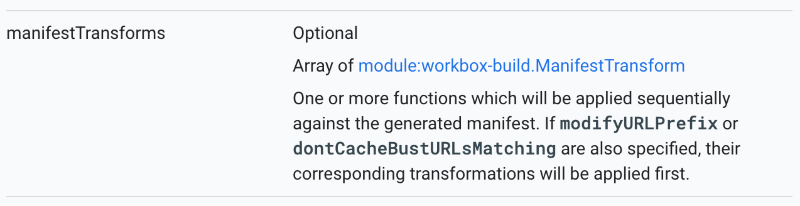
Workbox CLI - generateSW - Configuration
// A transformation that prepended the origin of a CDN for any URL starting with '/assets/' could be implemented as:

const cdnTransform = async (manifestEntries) => {

  const manifest = manifestEntries.map(entry => {

    const cdnOrigin = 'https://example.com';

    if (entry.url.startsWith('/assets/')) {

      entry.url = cdnOrigin + entry.url;

    }

    return entry;

  });

  return {manifest, warnings: []};

};
更多缓存配置可查阅官方文档。
4.2 使用 Webpack
安装:
npm install workbox-webpack-plugin --save-dev
Webpack 配置:
// Inside of webpack.config.js:

const WorkboxPlugin = require('workbox-webpack-plugin');

// Version info...

const id = `${page}-v${version}`;

module.exports = {

  // Other webpack config...

  plugins: [

    // Other plugins...

    // WIKI https://developers.google.com/web/tools/workbox/reference-docs/latest/module-workbox-webpack-plugin.GenerateSW#GenerateSW

    new WorkboxPlugin.GenerateSW({

        cacheId: `${id}-gsw`,

        // Do not precache images

        exclude: [/\.(?:png|jpg|jpeg|svg)$/, 'service-wroker.js'], // Page need refresh twice.

        // target dir

        swDest: `../dist/${page}/service-worker.js`,

        skipWaiting: true,

        clientsClaim: true,

        // Define runtime caching rules.

        // WIKI https://developers.google.com/web/tools/workbox/reference-docs/latest/module-workbox-build#.RuntimeCachingEntry

        // Example https://gist.github.com/jeffposnick/fc761c06856fa10dbf93e62ce7c4bd57

        runtimeCaching: [

          // icon images

          {

            // Match any request that ends with .png, .jpg, .jpeg or .svg.

            urlPattern: /^https:\/\/cdn.example.com\/platform/, // /\.(?:png|jpg|jpeg|svg)$/,

            // Apply a cache-first strategy.

            handler: 'CacheFirst',

            options: {

              // Use a custom cache name.

              cacheName: `${id}-icon-images`,

              // Only cache 50 images, and expire them after 30 days

              expiration: {

                maxEntries: 50

              },

              // Ensure that only requests that result in a 200 status are cached

              cacheableResponse: {

                statuses: [0, 200]

              }

            }

          },

          // note images & others

          {

            // Match any request that ends with .png, .jpg, .jpeg or .svg.

            urlPattern: /^https:\/\/image.example.com/, // /\.(?:png|jpg|jpeg|svg)$/,

            // Apply a cache-first strategy.

            handler: 'CacheFirst',

            options: {

              // Use a custom cache name.

              cacheName: `${id}-note-images`,

              // Only cache 50 images, and expire them after 30 days

              expiration: {

                maxEntries: 50,

                maxAgeSeconds: 60 * 60 * 24 * 30 // 30 Days

              },

              // Ensure that only requests that result in a 200 status are cached

              cacheableResponse: {

                statuses: [0, 200]

              }

            }

          }

        ]

      });

  ]

};
页面中触发 Service Work:
<script>

// Check that service workers are supported

if ('serviceWorker' in navigator) {

  // Use the window load event to keep the page load performant

  window.addEventListener('load', () => {

    navigator.serviceWorker.register('/service-worker.js');

  });

}

</script>
5 添加到桌面方案
5.1 manifest.json 配置
{

  "name": "不知不问",

  "short_name": "不知不问",

  "description": "yyds",

  "start_url": "/?entry_mode=standalone",

  "display": "standalone",

  "orientation": "portrait",

  "background_color": "#F3F3F3",

  "theme_color": "#F3F3F3",

  "icons": [

    {

      "src": "https://mazey.cn/fav/logo-dark-circle-32x32.png",

      "sizes": "32x32",

      "type": "image/png"

    },

    {

      "src": "https://mazey.cn/fav/logo-dark-circle-144x144.png",

      "sizes": "144x144",

      "type": "image/png"

    },

    {

      "src": "https://mazey.cn/fav/logo-dark-circle-152x152.png",

      "sizes": "152x152",

      "type": "image/png"

    },

    {

      "src": "https://mazey.cn/fav/logo-dark-circle-180x180.png",

      "sizes": "180x180",

      "type": "image/png"

    },

    {

      "src": "https://mazey.cn/fav/logo-dark-circle-192x192.png",

      "sizes": "192x192",

      "type": "image/png"

    },

    {

      "src": "https://mazey.cn/fav/logo-dark-circle-512x512.png",

      "sizes": "512x512",

      "type": "image/png"

    }

  ],

  "scope": "/"

}
5.2 <head> 配置
为网站配置开屏图片、状态栏等。
<!--Mazey's favicon begin-->

<link rel="shortcut icon" type="image/png" href="https://mazey.cn/fav/logo-dark-circle-transparent-144x144.png">

<link rel="icon" type="image/png" sizes="32x32" href="https://mazey.cn/fav/logo-dark-circle-transparent-32x32.png">

<link rel="apple-touch-icon" sizes="144x144" href="https://mazey.cn/fav/logo-dark-circle-144x144.png">

<link rel="apple-touch-icon" sizes="152x152" href="https://mazey.cn/fav/logo-dark-circle-152x152.png">

<link rel="apple-touch-icon" sizes="180x180" href="https://mazey.cn/fav/logo-dark-circle-180x180.png">

<link rel="apple-touch-icon" sizes="192x192" href="https://mazey.cn/fav/logo-dark-circle-192x192.png">

<link rel="apple-touch-icon" sizes="512x512" href="https://mazey.cn/fav/logo-dark-circle-512x512.png">

<!--Mazey's favicon end-->

<!--Mazey's pwa manifest.json-->

<link rel="manifest" href="/wp-content/themes/polestar/manifest.json">

<!-- 开机图片 - begin -->

<!-- iPhone Xs Max (1242px × 2688px) -->

<link rel="apple-touch-startup-image" media="(device-width: 414px) and (device-height: 896px) and (-webkit-device-pixel-ratio: 3)" href="https://i.mazey.net/asset/read/cat-lovers-1242x2688.jpg" sizes="1242x2688">

<!-- iPhone Xr (828px x 1792px) -->

<link rel="apple-touch-startup-image" media="(device-width: 414px) and (device-height: 896px) and (-webkit-device-pixel-ratio: 2)" href="https://i.mazey.net/asset/read/cat-lovers-828x1792.jpg" sizes="828x1792">

<!-- iPhone X, Xs (1125px x 2436px) -->

<link rel="apple-touch-startup-image" media="(device-width: 375px) and (device-height: 812px) and (-webkit-device-pixel-ratio: 3)" href="https://i.mazey.net/asset/read/cat-lovers-1125x2436.jpg" sizes="1125x2436">

<!-- iPhone 8, 7, 6s, 6 (750px x 1334px) -->

<link rel="apple-touch-startup-image" media="(device-width: 375px) and (device-height: 667px) and (-webkit-device-pixel-ratio: 2)" href="https://i.mazey.net/asset/read/cat-lovers-750x1334.jpg" sizes="750x1334">

<!-- iPhone 8 Plus, 7 Plus, 6s Plus, 6 Plus (1242px x 2208px) -->

<link rel="apple-touch-startup-image" media="(device-width: 414px) and (device-height: 736px) and (-webkit-device-pixel-ratio: 3)" href="https://i.mazey.net/asset/read/cat-lovers-1242x2208.jpg" sizes="1242x2208">

<!-- iPhone 5 (640px x 1136px) -->

<link rel="apple-touch-startup-image" media="(device-width: 320px) and (device-height: 568px) and (-webkit-device-pixel-ratio: 2)" href="https://i.mazey.net/asset/read/cat-lovers-640x1136.jpg" sizes="640x1136">

<!-- 开机图片 - end -->

<!-- Touch Bar区域显示的网站图标 -->

<link rel="mask-icon" href="https://mazey.cn/fav/logo-dark-circle.svg" color="#F3F3F3">

<!-- 主题色 = manifest.json theme_color -->

<meta name="theme-color" content="#F3F3F3">

<meta name="apple-mobile-web-app-capable" content="yes">

<!-- 状态栏颜色 default/black/black-translucent -->

<meta name="apple-mobile-web-app-status-bar-style" content="black-translucent">

<!-- 应用名 -->

<meta name="apple-mobile-web-app-title" content="不知不问">

<!-- 在Windows 8上,我们可以将网站固定在开始屏幕上,而且支持个性化自定义色块icon和背景图片。这个标签是用来定义色块的背景图的。色块图应该为144*144像素的png格式图片,背景透明。 -->

<meta name="msapplication-TileImage" content="https://mazey.cn/fav/logo-dark-circle-transparent-144x144.png">

<!-- 同前一个元数据msapplication-TileImage类似,这个功能是用来设置颜色值,个性化自定义色块(磁贴)icon -->

<meta name="msapplication-TileColor" content="#F3F3F3">
开屏图片尺寸总结:
| 屏幕尺寸 | 倍数 | 图片尺寸 |
|---|---|---|
| 1024x1366(512x683) | x2 | 2048x2732 |
| 834x1194(417x597) | x2 | 1668x2388 |
| 768x1024(384x512) | x2 | 1536x2048 |
| 834x1112(417x556) | x2 | 1668x2224 |
| 810x1080 | x2 | 1620x2160 |
| 428x926(214x463) | x3 | 1284x2778 |
| 390x844 | x3 | 1170x2532 |
| 375x812 | x3 | 1125x2436 |
| 414x896 | x3 | 1242x2688 |
| 414x896 | x2 | 828x1792 |
| 414x736 | x3 | 1242x2208 |
| 375x667 | x2 | 750x1334 |
| 320x568 | x2 | 640x1136 |
版权声明
本博客所有的原创文章,作者皆保留版权。转载必须包含本声明,保持本文完整,并以超链接形式注明作者后除和本文原始地址:https://blog.mazey.net/2675.html
(完)
PWA 实践/应用(Google Workbox)的更多相关文章
- 缓存&PWA实践
缓存&PWA 实践 一.背景 从上一篇<前端动画实现与原理分析>,我们从 Performance 进行动画的性能分析,并根据 Performance 分析来优化动画.但,前端不仅仅 ...
- 前端性能和加载体验优化实践(附:PWA、离线包、内存优化、预渲染)
一.背景:页面为何会卡? 1.1 等待时间长(性能) 项目本身包/第三方脚本比较大. JavaScript 执行阻塞页面加载. 图片体积大且多. 特别是对于首屏资源加载中的白屏时间,用户等待的时间就越 ...
- PWA初体验
一.前言 现在市面上的Native APP成千上万个,各种应用商店里面的APP琳琅满目.原生的APP下载到手机上之后,用户就可以获取一个方便的入口,体验上也十分顺畅.但是再好的事物难免有点缺点: 1 ...
- Google搜索解析
Google搜索解析 是一款相似于Google趋势的SEO 在 线keyword工具,其官方提出的口号是“看看全世界的人们都在搜索些什么”.利用Google搜索解析,能够比較特定区域.类别.时间范围以 ...
- 网站PWA升级
前面的话 渐进式网络应用 ( Progressive Web Apps ),即我们所熟知的 PWA,是 Google 提出的用前沿的 Web 技术为网页提供 App 般使用体验的一系列方案.PWA 本 ...
- PWA web应用模型
2018年的第一篇博客,最近都去挤图书馆了,希望新年新气象... 简介 PWA 是一门Google推出的web前端新技术,全称是Progressive Web App,是Google在2015年提出, ...
- 使用react全家桶制作博客后台管理系统 网站PWA升级 移动端常见问题处理 循序渐进学.Net Core Web Api开发系列【4】:前端访问WebApi [Abp 源码分析]四、模块配置 [Abp 源码分析]三、依赖注入
使用react全家桶制作博客后台管理系统 前面的话 笔者在做一个完整的博客上线项目,包括前台.后台.后端接口和服务器配置.本文将详细介绍使用react全家桶制作的博客后台管理系统 概述 该项目是基 ...
- Google Developer Days 2019 & GDD
Google Developer Days 2019 2019 Google 开发者大会 GDD Google Developer Days https://events.google.cn/intl ...
- Chrome & install App & PWA
Chrome & install App & PWA Chrome & install website as an app chrome://apps https://medi ...
- 用Web Picasa API搭建站内相册
在flickr时代,为了专门把站内嵌入相册,还专门写了一篇文章把Flickr相册搬回家.flickr被墙之后,我就把个人相册转到了Web Picasa上.用Picasa Web就简单多了,官方提供了S ...
随机推荐
- OpenCV开发笔记(六十八):红胖子8分钟带你使用特征点Flann最邻近差值匹配识别(图文并茂+浅显易懂+程序源码)
若该文为原创文章,未经允许不得转载原博主博客地址:https://blog.csdn.net/qq21497936原博主博客导航:https://blog.csdn.net/qq21497936/ar ...
- CentOS8安装Geant4笔记(二):CentOS8安装Qt5.15.2并测试运行环境
前言 在服务器CentOs8.2上安装geant4软件,但是运行不起来,所以本节开始主要是安装qt,测试qt基本功能. 要点 添加qt环境到系统环境中,是geant4启动qt的必要条件. ...
- 名校AI课推荐 | MIT6.S191《深度学习导论》
"连续开设5年,对新手友好.易于上手,参加课程的多数学生来自非计算机科学领域--" 推荐一门AI课程--MIT官方深度学习入门课程6.S191<深度学习导论(2022)> ...
- SpringCloud组件:Feign之日志输出
目录 Feign之日志输出 Feign日志输出说明 前期准备 构建项目 tairan-spring-cloud-feign-logger配置 源码位置 Feign之日志输出 在我们日常开发过程中,经常 ...
- DataGear 制作联动异步加载图表的数据可视化看板
通过DataGear的参数化数据集.图表事件处理和看板API功能,可以很方便地制作联动异步加载图表的数据可视化看板. 首先,新建一个参数化SQL数据集,如下所示: SELECT COL_NAME, - ...
- 【Azure 应用服务】App Service的运行状况检查功能失效,一直提示"实例运行不正常"
问题描述 为App Service配置了健康检查,单独访问Health Check Path的路径,返回代码为200.但为什么在App Service的页面上,一直提示"实例运行不正常&qu ...
- Java 常用类 String的使用---测试
1 package com.bytezero.stringclass; 2 3 import org.junit.Test; 4 5 /** 6 * 7 * 8 * 9 * @author Bytez ...
- vscode vue 鼠标Ctrl+单击 函数跳转 插件名称:vue-helper
- python getOpenFileNames 获取文件实例解析
一 概念 选取文件夹 QFileDialog.getExistingDirectory() 选择文件 QFileDialog.getOpenFileName() 选择多个文件 QFileDialog. ...
- Spring Boot 2.0 新人会踩的坑--启动报404错误
转载自:http://www.javaman.cn/channels/sb2 启动程序,验证效果 根据图示,点击按钮,来启动 Spring Boot Web 程序, 查看控制台输出: . ____ _ ...