
自定义Graph Component:1.1-JiebaTokenizer具体实现
JiebaTokenizer类继承自Tokenizer类,而Tokenizer类又继承自GraphComponent类,GraphComponent类继承自ABC类(抽象基类)。本文使用《使用ResponseSelector实现校园招聘FAQ机器人》中的例子,主要详解介绍JiebaTokenizer类中方法的具体实现。
0.JiebaTokenizer类中方法列表
下面是JiebaTokenizer类中所有方法和属性列表,也包括从其它类中继承来的方法和属性,如下所示:
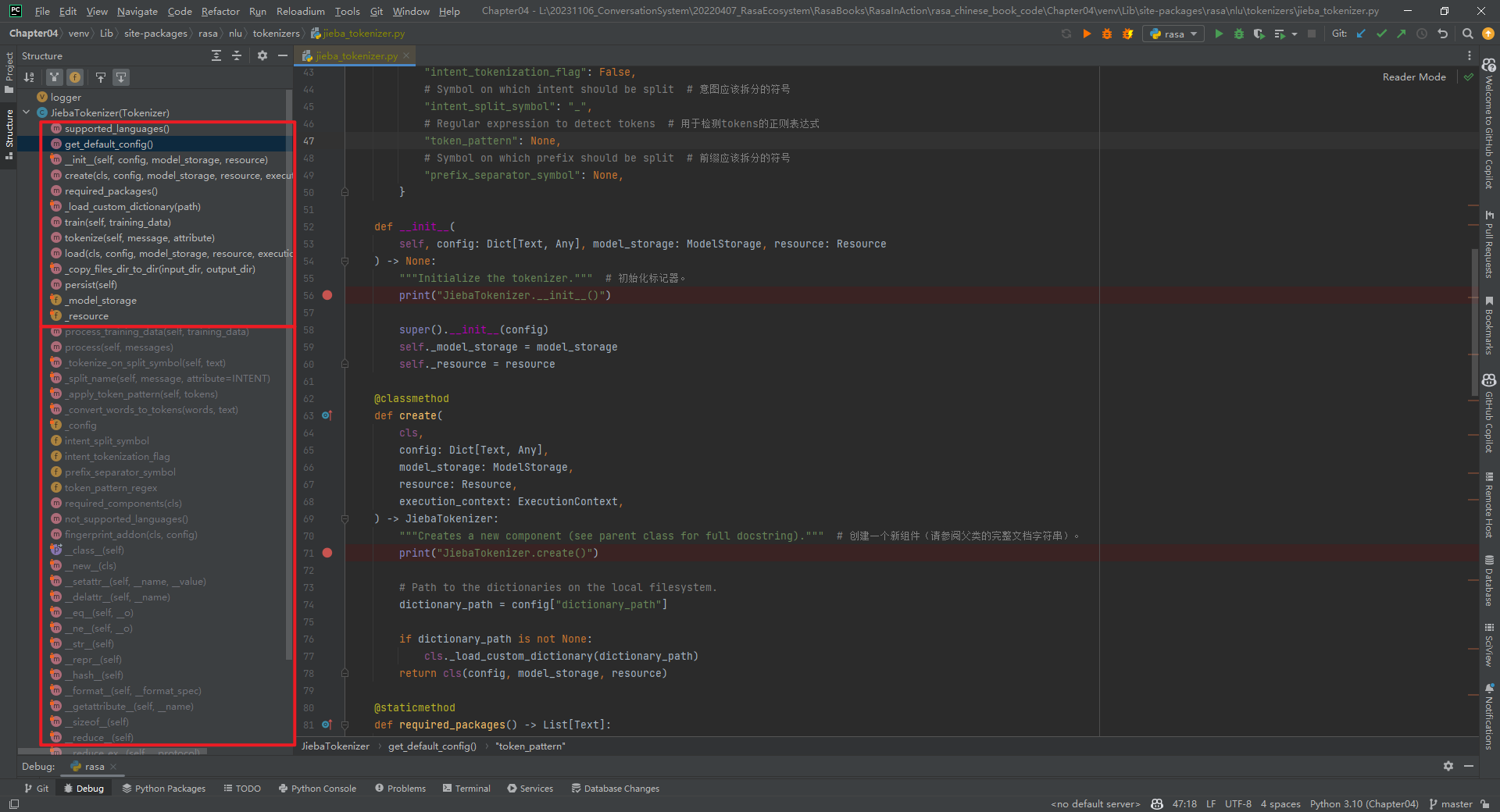
JiebaTokenizer类(默认参数)中本身方法执行顺序,如下所示:
JiebaTokenizer.supported_languages()
JiebaTokenizer.required_packages()
JiebaTokenizer.get_default_config()
JiebaTokenizer.create()
JiebaTokenizer.__init__()
JiebaTokenizer.train()
JiebaTokenizer.persist()
JiebaTokenizer.load()
JiebaTokenizer.tokenize()
默认参数没有执行2个方法,如下所示:
_load_custom_dictionarypipeline(*)方法
_copy_files_dir_to_dir(*)方法
接下来自然而然的问题是,如何在config.yml中给JiebaTokenizer自定义参数呢?可参考get_default_config()方法,如下所示:
def get_default_config() -> Dict[Text, Any]:
    return {
        # default don't load custom dictionary  # 默认不加载自定义字典
        "dictionary_path": None,  # 自定义字典的路径
        # Flag to check whether to split intents  # 检查是否拆分intent的标志
        "intent_tokenization_flag": False,
        # Symbol on which intent should be split  # intent应该拆分的符号
        "intent_split_symbol": "_",
        # Regular expression to detect tokens  # 用于检测tokens的正则表达式
        "token_pattern": None,
        # Symbol on which prefix should be split  # 前缀应该拆分的符号
        "prefix_separator_symbol": None,
    }
1.supported_languages(*)方法
解析:支持的语言,即["zh"]。如下所示:
@staticmethod
def supported_languages() -> Optional[List[Text]]:
    """Supported languages (see parent class for full docstring)."""  # 支持的语言(请参阅父类的完整文档字符串)。
    print("JiebaTokenizer.supported_languages()")

    return ["zh"]
2.get_default_config(*)方法
解析:返回默认配置,如下所示:
@staticmethod
def get_default_config() -> Dict[Text, Any]:
    """Returns default config (see parent class for full docstring)."""  # 返回默认配置(请参阅父类的完整文档字符串)。
    print("JiebaTokenizer.get_default_config()")

    return {
        # default don't load custom dictionary  # 默认不加载自定义字典
        "dictionary_path": None,
        # Flag to check whether to split intents  # 检查是否拆分意图的标志
        "intent_tokenization_flag": False,
        # Symbol on which intent should be split  # 意图应该拆分的符号
        "intent_split_symbol": "_",
        # Regular expression to detect tokens  # 用于检测tokens的正则表达式
        "token_pattern": None,
        # Symbol on which prefix should be split  # 前缀应该拆分的符号
        "prefix_separator_symbol": None,
    }
3.__init__(*)方法
解析:执行到create()方法的cls(config, model_storage, resource)时,实际调用的是def __init__()。如下所示:
def __init__(
    self, config: Dict[Text, Any], model_storage: ModelStorage, resource: Resource
) -> None:
    """Initialize the tokenizer."""  # 初始化标记器。
    print("JiebaTokenizer.__init__()")

    super().__init__(config)
    self._model_storage = model_storage
    self._resource = resource
4.create(*)方法
解析:创建一个新组件,如下所示:
@classmethod
def create(
    cls,
    config: Dict[Text, Any],
    model_storage: ModelStorage,
    resource: Resource,
    execution_context: ExecutionContext,
) -> JiebaTokenizer:
    """Creates a new component (see parent class for full docstring)."""  # 创建一个新组件(请参阅父类的完整文档字符串)。
    print("JiebaTokenizer.create()")

    # Path to the dictionaries on the local filesystem.
    dictionary_path = config["dictionary_path"]

    if dictionary_path is not None:
        cls._load_custom_dictionary(dictionary_path)
    return cls(config, model_storage, resource)
(1)config: Dict[Text, Any]
{
 'dictionary_path': None,
 'intent_split_symbol': '_',
 'intent_tokenization_flag': False,
 'prefix_separator_symbol': None,
 'token_pattern': None
}
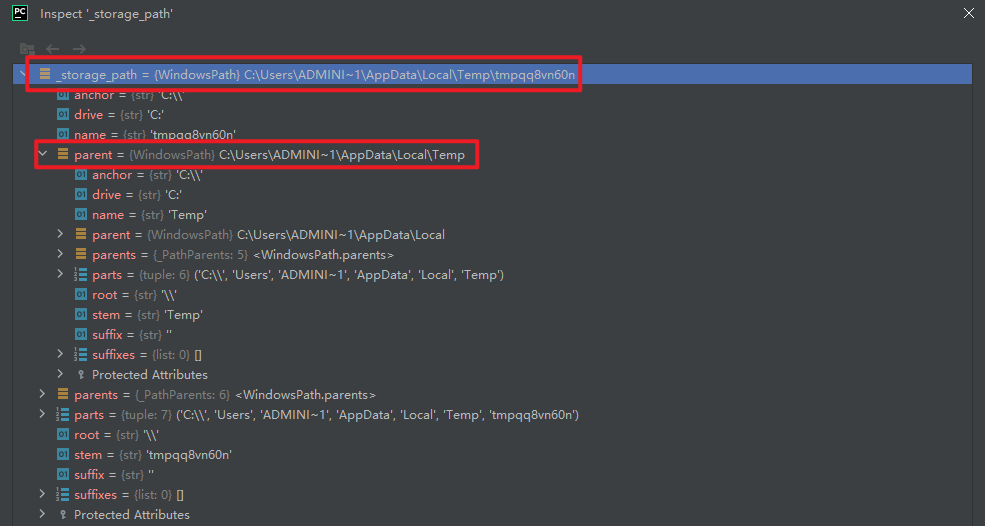
(2)model_storage: ModelStorage
(3)resource: Resource
{
 name = 'train_JiebaTokenizer0',
 output_fingerprint = '318d7f231c4544dc9828e1a9d7dd1851'
}
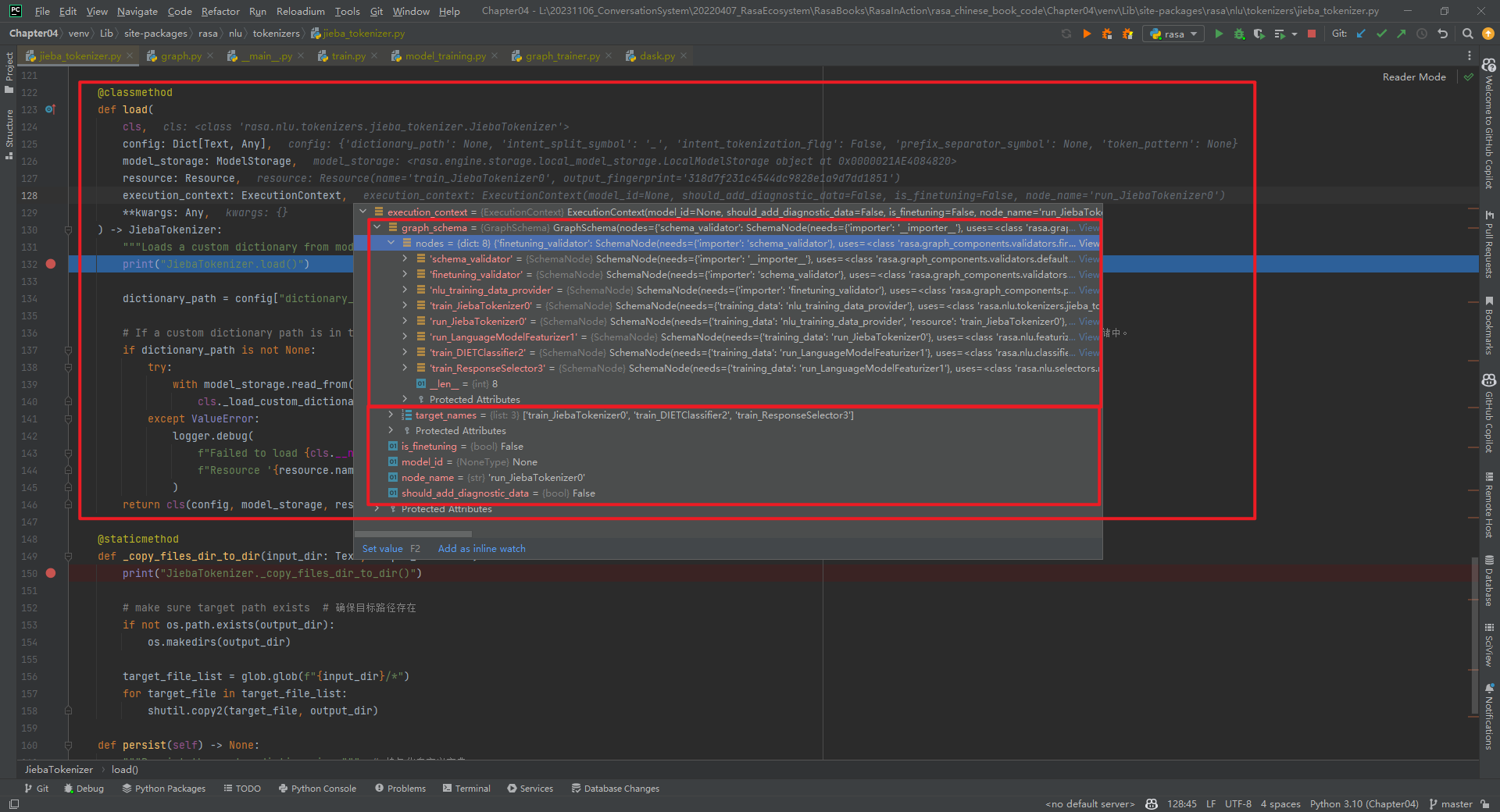
(4)execution_context: ExecutionContext
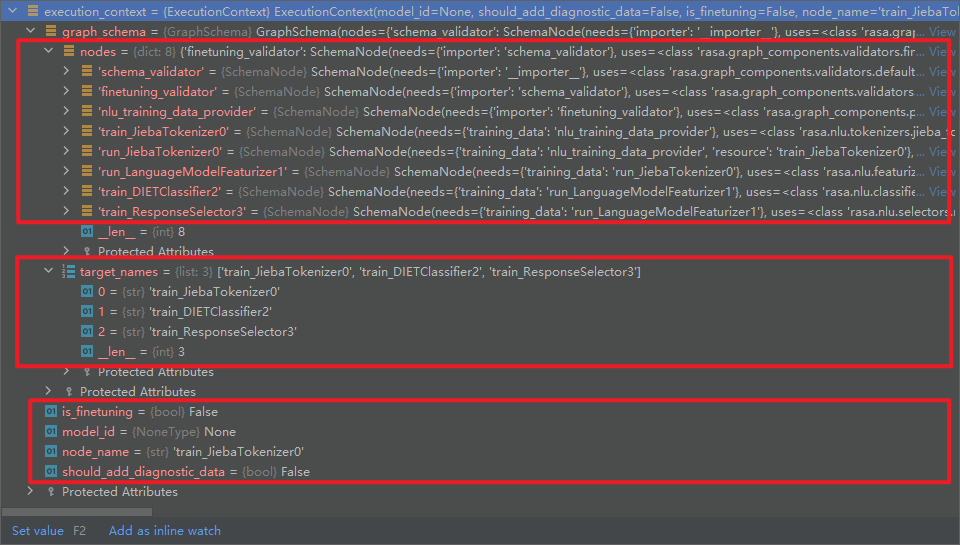
其中,cls(config, model_storage, resource)实际调用的是def __init__()。
5.required_packages(*)方法
解析:此组件运行所需的任何额外python依赖项,即["jieba"]。如下所示:
@staticmethod
def required_packages() -> List[Text]:
    """Any extra python dependencies required for this component to run."""  # 此组件运行所需的任何额外python依赖项。
    print("JiebaTokenizer.required_packages()")

    return ["jieba"]
6._load_custom_dictionary(*)方法
解析:从模型存储加载自定义字典,如下所示:
@staticmethod
def _load_custom_dictionary(path: Text) -> None:
    """Load all the custom dictionaries stored in the path.  # 加载存储在路径中的所有自定义字典。
    More information about the dictionaries file format can be found in the documentation of jieba. https://github.com/fxsjy/jieba#load-dictionary
    """
    print("JiebaTokenizer._load_custom_dictionary()")
    import jieba

    jieba_userdicts = glob.glob(f"{path}/*")  # 获取路径下的所有文件。
    for jieba_userdict in jieba_userdicts:  # 遍历所有文件。
        logger.info(f"Loading Jieba User Dictionary at {jieba_userdict}")  # 加载结巴用户字典。
        jieba.load_userdict(jieba_userdict)  # 加载用户字典。
7.train(*)方法
解析:将字典复制到模型存储,如下所示:
def train(self, training_data: TrainingData) -> Resource:
    """Copies the dictionary to the model storage."""
    print("JiebaTokenizer.train()")

    self.persist()  # 持久化。
    return self._resource
其中,返回的self._resource内容如下所示:

8.tokenize(*)方法(重点)
解析:对传入消息的提供属性的文本进行tokenize,如下所示:
def tokenize(self, message: Message, attribute: Text) -> List[Token]:
    """Tokenizes the text of the provided attribute of the incoming message."""
    print("JiebaTokenizer.tokenize()")

    import jieba

    text = message.get(attribute)  # 获取消息的属性

    tokenized = jieba.tokenize(text)  # 对文本进行标记化
    tokens = [Token(word, start) for (word, start, end) in tokenized]  # 生成标记

    return self._apply_token_pattern(tokens)
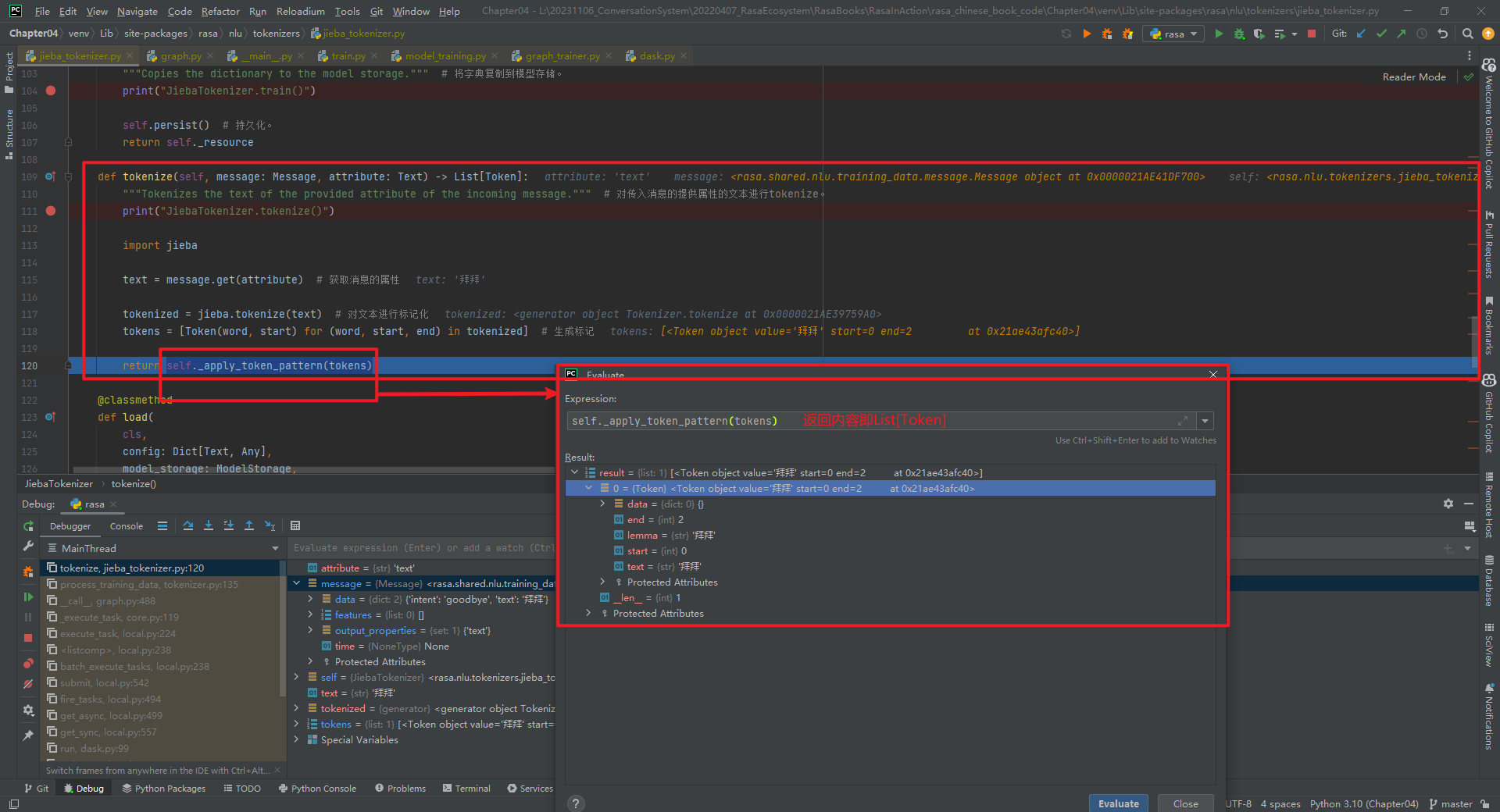
其中,message.data内容为{'intent': 'goodbye', 'text': '拜拜'}。其它字段具体数值,如下所示:
9.load(*)方法
解析:从模型存储加载自定义字典,如下所示:
@classmethod
def load(
    cls,
    config: Dict[Text, Any],
    model_storage: ModelStorage,
    resource: Resource,
    execution_context: ExecutionContext,
    **kwargs: Any,
) -> JiebaTokenizer:
    """Loads a custom dictionary from model storage."""  # 从模型存储加载自定义字典。
    print("JiebaTokenizer.load()")

    dictionary_path = config["dictionary_path"]

    # If a custom dictionary path is in the config we know that it should have been saved to the model storage.  # 如果配置中有自定义字典路径,我们知道它应该已保存到模型存储中。
    if dictionary_path is not None:
        try:
            with model_storage.read_from(resource) as resource_directory:
                cls._load_custom_dictionary(str(resource_directory))
        except ValueError:
            logger.debug(
                f"Failed to load {cls.__name__} from model storage. "
                f"Resource '{resource.name}' doesn't exist."
            )
    return cls(config, model_storage, resource)
10._copy_files_dir_to_dir(*)方法
解析:执行persist(*)方法时会调用该方法,如下所示:
@staticmethod
def _copy_files_dir_to_dir(input_dir: Text, output_dir: Text) -> None:
    print("JiebaTokenizer._copy_files_dir_to_dir()")

    # make sure target path exists  # 确保目标路径存在
    if not os.path.exists(output_dir):
        os.makedirs(output_dir)

    target_file_list = glob.glob(f"{input_dir}/*")
    for target_file in target_file_list:
        shutil.copy2(target_file, output_dir)
11.persist(*)方法
解析:持久化自定义字典,如下所示:
def persist(self) -> None:
    """Persist the custom dictionaries."""
    print("JiebaTokenizer.persist()")

    dictionary_path = self._config["dictionary_path"]
    if dictionary_path is not None:
        with self._model_storage.write_to(self._resource) as resource_directory:
            self._copy_files_dir_to_dir(dictionary_path, str(resource_directory))
12._model_storage属性
解析:用来初始化JiebaTokenizer类的属性,详见构造函数。
13._resource属性
解析:用来初始化JiebaTokenizer类的属性,详见构造函数。
参考文献:
[1]https://github.com/RasaHQ/rasa/blob/main/rasa/nlu/tokenizers/jieba_tokenizer.py
[2]使用ResponseSelector实现校园招聘FAQ机器人:https://mp.weixin.qq.com/s/ZG3mBPvkAfaRcjmXq7zVLA
自定义Graph Component:1.1-JiebaTokenizer具体实现的更多相关文章
- 自定义组件Component
定义compa组件 由4个页面构成 compa.js: compa.json: compa.wxml: compa:wxss: 1.compa.json:在json文件进行自定义组件声明 { &quo ...
- ionic3.x angular4.x ng4.x 自定义组件component双向绑定之自定义计数器
本文主要示例在ionic3.x环境下实现一个自定义计数器,实现后最终效果如图: 1.使用命令创建一个component ionic g component CounterInput 类似的命令还有: ...
- Yii2.0 高级模版编写使用自定义组件(component)
翻译自:http://www.yiiframework.com/wiki/760/yii-2-0-write-use-a-custom-component-in-yii2-0-advanced-tem ...
- angular custom Element 自定义web component
angular 自定义web组件: 首先创建一个名为myCustom的组件. 引入app.module: ... import {customComponent} from ' ./myCustom. ...
- Magicodes.WeiChat——自定义knockoutjs template、component实现微信自定义菜单
本人一向比较喜欢折腾,玩了这么久的knockoutjs,总觉得不够劲,于是又开始准备折腾自己了. 最近在完善Magicodes.WeiChat微信开发框架时,发现之前做的自定义菜单这块太不给力了,而各 ...
- weex 自定义Component
扩展iOS的功能 ~ Component 与UI控件相关 ,即通过原生方法创建UI界面,返回给weex 使用 一. 新建 WXComponent 的子类 在子类实现WXComponent 的 ...
- springboot +spring security4 自定义手机号码+短信验证码登录
spring security 默认登录方式都是用户名+密码登录,项目中使用手机+ 短信验证码登录, 没办法,只能实现修改: 需要修改的地方: 1 .自定义 AuthenticationProvide ...
- Spring Security验证流程剖析及自定义验证方法
Spring Security的本质 Spring Security本质上是一连串的Filter, 然后又以一个独立的Filter的形式插入到Filter Chain里,其名为FilterChainP ...
- zabbix监控之自定义item
zabbix安装完成后,当需要使用自定义脚本构建自定义item必须注意以下几点: 1.首先使用zabbix_get手动在zabbix-server服务端获取监控的默认的item值,如下: [root@ ...
- Cacti自定义脚本,监测Docker信息(Script/Command方式)
一 环境背景 监控主机A:192.168.24.231:被监控主机B:192.168.24.233 A/B主机,通过公私钥建立ssh连接 [操作B主机时不需要输入密码,详见笔记:http://app. ...
随机推荐
- JavaCore extends Plugin
/******************************************************************************* 2 * Copyright (c) 2 ...
- MySQL误删恢复方法2
实际工作中总会发生数据误删除的场景,在没有备份情况下,如何快速恢复误删数据就显得非常重要. 本文基于MySQL的binlog日志机制,当日志格式设置为"binlog_format=ROW&q ...
- Java 中 extends 与implements 的区别 ?
一.介绍extends 与 implements 的概念 1.类与类之间的继承使用extends : 子类extends父类的属性和方法,并且进行扩展或者重写. // 父类 class Animal ...
- Java多线程笔记全过程(一)
一.多线程最基础的基本概念 一个程序最少需要一个进程,而一个进程最少需要一个线程. 我们常说的高并发,也并不全是线程级别的并发,在很多开发语言中,比如PHP,很常见的都是进程级别的并发.但是在Java ...
- 黄金眼PAAS化数据服务DIFF测试工具的建设实践
一.背景介绍 黄金眼PAAS化数据服务是一系列实现相同指标服务协议的数据服务,各个服务间按照所生产指标的主题作划分,比如交易实时服务提供实时交易指标的查询,财务离线服务提供离线财务指标的查询.黄金眼P ...
- Maximum Diameter 题解
Maximum Diameter 题目大意 定义长度为 \(n\) 的序列 \(a\) 的权值为: 所有的 \(n\) 个点的第 \(i\) 个点的度数为 \(a_i\) 的树的直径最大值,如果不存在 ...
- c#享元模式详解
基本介绍: 享元模式的定义:运用共享技术有效地支持大量细粒度的对象重复使用.适用于大量小粒度的对象造成的运行效率和内存使用效率低下的情况. "享元"顾名思义,"享 ...
- 八个SVN提交的好习惯(转)
一.提交之前先更新 1. SVN更新的原则是要随时更新,随时提交.当完成了一个小功能,能够通过编译并且自己测试之后,谨慎地提交. 2. 如果在修改的期间别人也更改了sv ...
- 二、RHEL8操作系统安装
一.如何安装rhel的操作系统? 必要的前提条件:硬件(CPU.内存.硬盘--) + 安装介质(操作系统的安装文件) 会不会把自己的笔记本装成rhel的操作系统呢? 不会 使用虚拟机软 ...
- L2-040 哲哲打游戏
这题读懂题目之后就发现它很呆 #include <bits/stdc++.h> using namespace std; const int N = 100010, M = 110; ve ...