
flask之创建项目
一:安装flask
workon flask_project 进入虚拟后安装flask
pip install flask==0.10.1 安装指定的版本

进入虚拟环境的目录,查看创建的所有的虚拟环境,创建的虚拟环境中有指定的python解释器

进入虚拟环境,查看包的管理
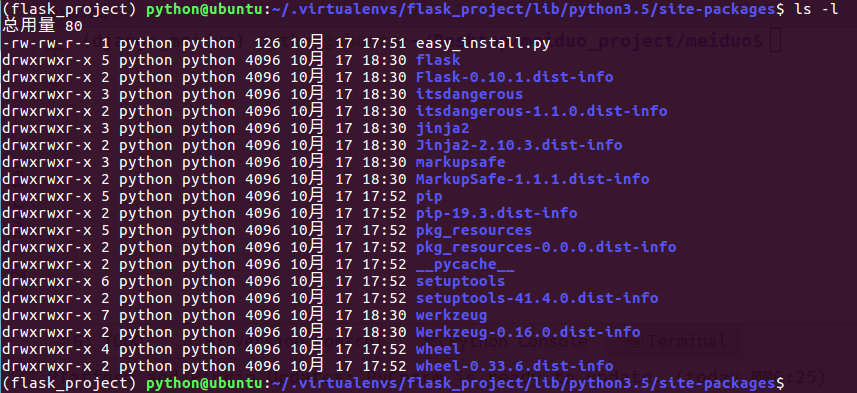
总结:虚拟环境与真实环境怎么进行隔离:1.python解释器的隔离 2.包管理的隔离
二:项目迁移
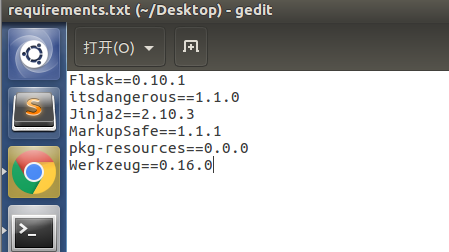
加入项目迁移到别的机器上,那么项目运行所依赖的包,就要到新机器上重亲一个一个重新安装,比较麻烦,经pip的包名生成文件,方便迁移
pip freeze > requirements.txt

三:pycharm创建创建一个桌面目录,项目解释器选择flask_project虚拟环境里面的python3。

1.工程文件下,创建一个hello.py文件

hello.py
from flask import Flask

# 创建flask的应用对象

app = Flask(__name__)

# 这样设定,就是可以让这个包被别人导入后,__name__== hello.py,判断条件下不满足,因此一般作为程序的入口。

if __name__ == "__main__":

    pass
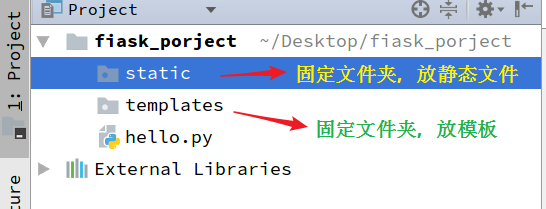
2.创建静态文件和模板文件夹:
静态文件夹:static
模板文件夹:templates
3.定义视图函数
hello.py
from flask import Flask  # 从flask包中导入一个Flaks类

app = Flask(__name__)  # 创建一个实例对象  __name__是必传的参数

@app.route("/")

def index():

    """

    定义视图函数

    :return:

    """

    return "hello flask"

if __name__ == "__main__":

    app.run()
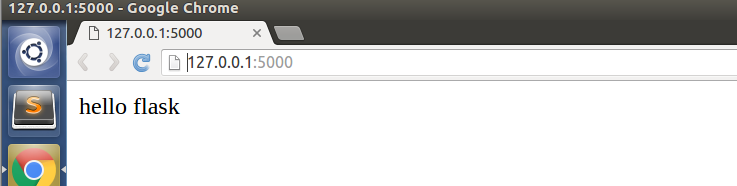
运行这个hello.py,控制台显示

点击或者浏览器输入网址得到:
四:总结程序运行的基本思路
点击app.route进入看源码:route函数
    def route(self, rule, **options):

        """A decorator that is used to register a view function for a  # 用于注册视图函数的装饰器,参数为给定的rule规则。

        given URL rule.  This does the same thing as :meth:`add_url_rule`

        but is intended for decorator usage::

            @app.route('/')

            def index():

                return 'Hello World'

        For more information refer to :ref:`url-route-registrations`.

        :param rule: the URL rule as string  # url规则的字符串

        :param endpoint: the endpoint for the registered URL rule.  Flask

                         itself assumes the name of the view function as

                         endpoint  # 注册视图规则的端点,flask中假设视图函数的名字为endpoint

        :param options: the options to be forwarded to the underlying  # 请求方式,get,post,默认是get请求方式

                        :class:`~werkzeug.routing.Rule` object.  A change

                        to Werkzeug is handling of method options.  methods

                        is a list of methods this rule should be limited

                        to (`GET`, `POST` etc.).  By default a rule

                        just listens for `GET` (and implicitly `HEAD`).

                        Starting with Flask 0.6, `OPTIONS` is implicitly

                        added and handled by the standard request handling.

        """

        def decorator(f):

            endpoint = options.pop('endpoint', None)

            self.add_url_rule(rule, endpoint, f, **options)

            return f

        return decorator # 返回一个decorate函数的引用
装饰器:用route函数,装饰index函数
def route(self,route,**options):

    def decorate(f):

        endpoint = options.pop("endpoint",None)

        self.add_url_rule(rule, endpoint,f,**options)

        return f

    return decorator

@route("/")

def index():

    pass

# 相当于
route = route("/")
route(index)
f是什么东西呢?add_url_rule是什么东西呢?点击进如add_url_rule函数: 解释:f 就是视图函数的引用 route就是:"/"
 @setupmethod

    def add_url_rule(self, rule, endpoint=None, view_func=None, **options):

        """Connects a URL rule.  Works exactly like the :meth:`route`

        decorator.  If a view_func is provided it will be registered with the

        endpoint.

        Basically this example::

            @app.route('/')

            def index():

                pass

        Is equivalent to the following::

            def index():

                pass

            app.add_url_rule('/', 'index', index)

        If the view_func is not provided you will need to connect the endpoint

        to a view function like so::

            app.view_functions['index'] = index

        Internally :meth:`route` invokes :meth:`add_url_rule` so if you want

        to customize the behavior via subclassing you only need to change

        this method.

        For more information refer to :ref:`url-route-registrations`.

        .. versionchanged:: 0.2

           `view_func` parameter added.

        .. versionchanged:: 0.6

           `OPTIONS` is added automatically as method.

        :param rule: the URL rule as string

        :param endpoint: the endpoint for the registered URL rule.  Flask

                         itself assumes the name of the view function as

                         endpoint

        :param view_func: the function to call when serving a request to the  # 视图函数的引用

                          provided endpoint

        :param options: the options to be forwarded to the underlying

                        :class:`~werkzeug.routing.Rule` object.  A change

                        to Werkzeug is handling of method options.  methods

                        is a list of methods this rule should be limited

                        to (`GET`, `POST` etc.).  By default a rule

                        just listens for `GET` (and implicitly `HEAD`).

                        Starting with Flask 0.6, `OPTIONS` is implicitly

                        added and handled by the standard request handling.

        """

        if endpoint is None: # 没有指明endpoint,默认的用的是视图函数的名字,怎么实现的呢?

            endpoint = _endpoint_from_view_func(view_func) #

        options['endpoint'] = endpoint

        methods = options.pop('methods', None)

        # if the methods are not given and the view_func object knows its

        # methods we can use that instead.  If neither exists, we go with

        # a tuple of only `GET` as default.

        if methods is None:

            methods = getattr(view_func, 'methods', None) or ('GET',)

        methods = set(methods)

        # Methods that should always be added

        required_methods = set(getattr(view_func, 'required_methods', ()))

        # starting with Flask 0.8 the view_func object can disable and

        # force-enable the automatic options handling.

        provide_automatic_options = getattr(view_func,

            'provide_automatic_options', None)

        if provide_automatic_options is None:

            if 'OPTIONS' not in methods:

                provide_automatic_options = True

                required_methods.add('OPTIONS')

            else:

                provide_automatic_options = False

        # Add the required methods now.

        methods |= required_methods

        # due to a werkzeug bug we need to make sure that the defaults are

        # None if they are an empty dictionary.  This should not be necessary

        # with Werkzeug 0.7

        options['defaults'] = options.get('defaults') or None

        rule = self.url_rule_class(rule, methods=methods, **options)

        rule.provide_automatic_options = provide_automatic_options

        self.url_map.add(rule)

        if view_func is not None:

            old_func = self.view_functions.get(endpoint)

            if old_func is not None and old_func != view_func:

                raise AssertionError('View function mapping is overwriting an '

                                     'existing endpoint function: %s' % endpoint)

            self.view_functions[endpoint] = view_func
先看setupmethos这个函数,也是一个装饰器
def setupmethod(f):

    """Wraps a method so that it performs a check in debug mode if the

    first request was already handled.

    """

    def wrapper_func(self, *args, **kwargs):

        if self.debug and self._got_first_request:

            raise AssertionError('A setup function was called after the '

                'first request was handled.  This usually indicates a bug '

                'in the application where a module was not imported '

                'and decorators or other functionality was called too late.\n'

                'To fix this make sure to import all your view modules, '

                'database models and everything related at a central place '

                'before the application starts serving requests.')

        return f(self, *args, **kwargs)

    return update_wrapper(wrapper_func, f)
def add_url_rule(self, rule, endpoint=None, view_func=None, **options):

        if endpoint is None: # 没有指明endpoint,默认的用的是视图函数的名字,怎么实现的呢?

            endpoint = _endpoint_from_view_func(view_func) #

        options['endpoint'] = endpoint

        methods = options.pop('methods', None)

        provide_automatic_options = getattr(view_func,

            'provide_automatic_options', None)

        if provide_automatic_options is None:

            if 'OPTIONS' not in methods:

                provide_automatic_options = True

                required_methods.add('OPTIONS')

            else:

                provide_automatic_options = False

        options['defaults'] = options.get('defaults') or None

        rule = self.url_rule_class(rule, methods=methods, **options)

        rule.provide_automatic_options = provide_automatic_options

        self.url_map.add(rule)

        if view_func is not None:

            old_func = self.view_functions.get(endpoint)

            if old_func is not None and old_func != view_func:

                raise AssertionError('View function mapping is overwriting an '

                                     'existing endpoint function: %s' % endpoint)

            self.view_functions[endpoint] = view_func

# 相当于
setmethod = setmethod(add_url_rule)
setmethod()
化简函数,分析setmethods怎么装饰函数add_url_rule
def setupmethod(f):  # f函数其实就是add_url_role函数

    def wrapper_func(self, *args, **kwargs):

        if self.debug and self._got_first_request:

            raise AssertionError('A setup function was called after the '

                'first request was handled.  This usually indicates a bug '

                'in the application where a module was not imported '

                'and decorators or other functionality was called too late.\n'

                'To fix this make sure to import all your view modules, '

                'database models and everything related at a central place '

                'before the application starts serving requests.')

        return f(self, *args, **kwargs)

    return update_wrapper(wrapper_func, f)  # 等价于 return wrapper

setupmethod = settupmethod(add_url_role)
setupmethod()  # update_wrapper(wrapper_func,add_url_role)
来看看update_wrapper()函数:
WAPPER_ASSIGNMENTS = ("__module","__name__","__qualname__","__doc__","__annotation__") # 提前定义好的常量
WRAPPER_UPDATES = ("__dict__") # 提前定义好的常量
def update_wrapper(wrapper,     wrapper == wrapper_func

                   wrapped,     wrapperd == add_url_role

                   assigned = WRAPPER_ASSIGNMENTS,

                   updated = WRAPPER_UPDATES): """Update a wrapper function to look like the wrapped function

    #

       wrapper is the function to be updated  # 内层函数wrapper_func

       wrapped is the original function # 原始函数  add_url_role

       assigned is a tuple naming the attributes assigned directly

       from the wrapped function to the wrapper function (defaults to

       functools.WRAPPER_ASSIGNMENTS)

       updated is a tuple naming the attributes of the wrapper that

       are updated with the corresponding attribute from the wrapped

       function (defaults to functools.WRAPPER_UPDATES)

    """

    for attr in assigned:

        try:

            value = getattr(wrapped, attr)

        except AttributeError:

            pass

        else:

            setattr(wrapper, attr, value)

    for attr in updated:

        getattr(wrapper, attr).update(getattr(wrapped, attr, {}))

    # Issue #17482: set __wrapped__ last so we don't inadvertently copy it

    # from the wrapped function when updating __dict__

    wrapper.__wrapped__ = wrapped

    # Return the wrapper so this can be used as a decorator via partial()

    return wrapper  # 返回值还是内函数的引用,为什么要这么麻烦,多写这么多的代码?
# getattr函数的作用?settattr函数的作用?
def a():

    pass

def b():

    pass

WAPPER_ASSIGNMENTS = ("__module","__name__","__qualname__","__doc__","__annotation__")

for attr in WAPPER_ASSIGNMENTS:

    try:

        value = getattr(a,attr)

        print("a函数的{}属性值是{}".format(attr,value))

    except AttributeError:

        pass

    else:

        setattr(b,attr,value)  # 把b函数的__name__的值设置成a的__name__的值

print(b.__name__)

# 打印的结果

a函数的__name__属性值是a

a函数的__qualname__属性值是a

a函数的__doc__属性值是None

a
endpoint到底是个啥东西,怎么默认值为None,官方解释确实endpoint默认为视图函数的名字呢?点进_endpoint_from_view_func(view_func):
def _endpoint_from_view_func(view_func):

    """Internal helper that returns the default endpoint for a given

    function.  This always is the function name.

    """

    assert view_func is not None, 'expected view func if endpoint ' \  # view_func本来就是None,默认值为None

                                  'is not provided.'

    return view_func.__name__  #  返回view_func.__name__名称
flask之创建项目的更多相关文章
- 用 Flask 来写个轻博客 (1) — 创建项目
目录 目录 前言 扩展阅读 部署开发环境 创建 Github 项目 前言 一步一步的实现一个 Flask 轻博客项目启动,最新的代码会上传到 Github. 扩展阅读 欢迎使用 Flask - vir ...
- 快速创建Flask Restful API项目
前言 Python必学的两大web框架之一Flask,俗称微框架.它只需要一个文件,几行代码就可以完成一个简单的http请求服务. 但是我们需要用flask来提供中型甚至大型web restful a ...
- PyCharm中创建项目时,在所创建的python虚拟环境下的pip失效
在这篇博文里,我简单地叙述了我在使用PyCharm创建一个flask项目时遇到的问题,以及我解决这个问题的过程.其中比较值得注意的点有:①PyCharm创建新项目时的解释器配置②Python虚拟环境的 ...
- (1)PyCharm开发工具安装Flask并创建helloworld程序
一.环境描述 1.操作系统:windows7 2.编程语言:python3.6 下载地址:https://www.python.org/downloads/windows/ 3.虚拟化环境:virtu ...
- 【Azure 应用服务】Azure App Service For Linux 上实现 Python Flask Web Socket 项目 Http/Https
问题描述 在上篇博文"[Azure 应用服务]App Service for Linux 中实现 WebSocket 功能 (Python SocketIO)"中,实现了通过 HT ...
- MVC Core 网站开发(Ninesky) 1、创建项目
又要开一个新项目了!说来惭愧,以前的东西每次都没写完,不是不想写完,主要是我每次看到新技术出来我都想尝试一下,看到.Net Core 手又痒了,开始学MVC Core. MVC Core最吸引我的有三 ...
- MVC5 网站开发之二 创建项目
昨天对项目的思路大致理了一下,今天先把解决方案建立起来.整个解决包含Ninesky.Web.Ninesky.Core,Ninesky.DataLibrary等3个项目.Ninesky.Web是web应 ...
- Maven自定义绑定插件目标:创建项目的源码jar
<build> <plugins> <!-- 自定义绑定,创建项目的源码jar --> <plugin> <groupId>org.apac ...
- Vs2012 创建项目失败 未找到与约束ContractName
刚开始使用vs2012的时候,创建项目失败,后来找到原因 ,是KB2840642V2的原因,于是 卸载之.vs正常
随机推荐
- Linux超全实用指令大全
参考 Linux超全实用指令大全
- 关于【C++项目:无法解析的外部符号】
1,基本原因,[链接器]->[附加库目录]没有填写相关库的路径.或没有在[链接器]->[输入]->[附加依赖项]中填写相关库的名称 2,高级原因:如果不是1的原因,那就有可能是平台与 ...
- log4j.properties 输出指定类日志
比如,我只要众多日志中,红色框的日志,则可以指定类:com.dangdang.ddframe.rdb.sharding.parser.SQLParserFactory 修改配置文件: 再次输出结果为:
- Java ——日期时间 日期时间相关类 随机数 定义类属性时建议使用引用数据类型
本节重点思维导图 Date对象创建 两个构造函数: Date() ----使用当前日期和时间来初始化对象 Date(long millisec) -----接收一个参数,该参数是从1970年1月1日起 ...
- 【ABAP系列】SAP 生产订单完工确认(CO11N) BAPI : BAPI_PRODORDCONF_CREATE_TT
公众号:SAP Technical 本文作者:matinal 原文出处:http://www.cnblogs.com/SAPmatinal/ 原文链接:[ABAP系列]SAP 生产订单完工确认(CO1 ...
- K近邻实战手写数字识别
1.导包 import numpy as np import operator from os import listdir from sklearn.neighbors import KNeighb ...
- 排序算法七:基数排序(Radix sort)
上一篇提到了计数排序,它在输入序列元素的取值范围较小时,表现不俗.但是,现实生活中不总是满足这个条件,比如最大整形数据可以达到231-1,这样就存在2个问题: 1)因为m的值很大,不再满足m=O(n) ...
- python列表-简单操作
一.下标操作(下标只能是整数,不能是浮点值) 1.用下标取值 (1)取单个值 In [69]: list01 Out[69]: [2, 3, 4, 5, 'b', 'v', 'c', 666] In ...
- 监听器 ServletRequestAttributeListener&ServletRequestListener详解
在web开发中,监听器不仅可以对Application监听,同时还可以对seesion和request对象进行监听: 该文章主要演示的是对request对象的创建和request属性的监听. 项目结构 ...
- spring注解之@Scope
转自:https://blog.51cto.com/4247649/2118351 作者:知了123 主要从以下几方面来介绍一下@Scope注解 @Scope注解是什么 @Scope注解怎么使用 @S ...