
SpringBootMVC01——A simple SpringBootMVC Sample
不带数据库的SpringBootMVC案例
1.创建一个SpringBoot项目,添加thymeleaf,webstarter
2.目录层级
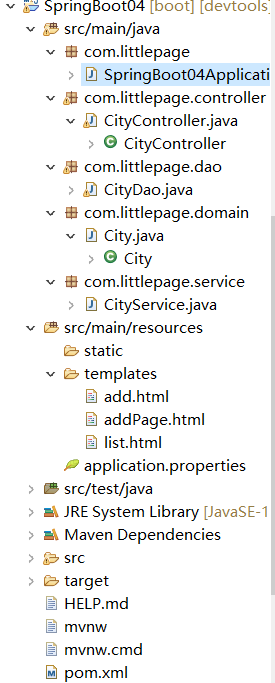
3.启动器代码
package com.littlepage;

import org.springframework.boot.SpringApplication;

import org.springframework.boot.autoconfigure.SpringBootApplication;

@SpringBootApplication

public class SpringBoot04Application {

    public static void main(String[] args) {

        SpringApplication.run(SpringBoot04Application.class, args);

    }

}
4.Dao层代码
package com.littlepage.dao;

import java.util.ArrayList;

import java.util.Collections;

import java.util.HashMap;

import java.util.List;

import java.util.Map;

import javax.management.RuntimeErrorException;

import org.springframework.stereotype.Repository;

import com.littlepage.domain.City;

@Repository

public class CityDao {

    /**

     * 在内存中虚拟出一份数据

     * @return

     */

    static Map<Integer, City> dataMap=Collections.synchronizedMap(new HashMap<>());

    public List<City> findAll(){

        return new ArrayList<City>(dataMap.values());

    }

    public void save(City city) throws Exception {

        if(dataMap.get(city.getId())==null) {

            dataMap.put(city.getId(), city);

        }else {

            throw new RuntimeException("数据已经存在");

        }

    }

}
5.service层代码
package com.littlepage.service;

import java.util.List;

import org.springframework.beans.factory.annotation.Autowired;

import org.springframework.stereotype.Service;

import com.littlepage.dao.CityDao;

import com.littlepage.domain.City;

@Service

public class CityService {

    @Autowired

    CityDao cityDao;

    public List<City> findAll(){

        return cityDao.findAll();

    }

    public String add(Integer id,String name) {

        try {

            cityDao.save(new City(id, name));

            return "保存成功";

        } catch (Exception e) {

            return "保存失败";

        }

    }

}
6.controller层代码
package com.littlepage.controller;

import java.util.List;

import org.springframework.beans.factory.annotation.Autowired;

import org.springframework.stereotype.Controller;

import org.springframework.ui.Model;

import org.springframework.ui.ModelMap;

import org.springframework.web.bind.annotation.RequestMapping;

import org.springframework.web.bind.annotation.RequestParam;

import com.littlepage.dao.CityDao;

import com.littlepage.domain.City;

import com.littlepage.service.CityService;

@Controller

@RequestMapping("city")

public class CityController {

    @Autowired

    CityService citySrv;

    @RequestMapping("/list")

    public String list(Model model) {

        List<City> list=citySrv.findAll();

        model.addAttribute("list",list);return "list";

    }

    @RequestMapping("/add")

    public String add(@RequestParam("id") Integer id,@RequestParam("name") String name,Model model) {

        String success=citySrv.add(id, name);

        model.addAttribute("success",success);

        return "add";

    }

    @RequestMapping("/addPage")

    public String addPage() {

        return "addPage";

    }

}
7.三个页面
list
<!DOCTYPE html>

<html>

<head>

<meta charset="UTF-8">

<title>list</title>

</head>

<body>

    <table>

        <tr>

            <th>ID</th>

            <th>Name</th>

        </tr>

        <tr th:each="city:${list}">

            <td th:text="${city.id}"></td>

            <td th:text="${city.name}"></td>

        </tr>

    </table>

</body>

</html>
add
<!DOCTYPE html>

<html>

<head>

<meta charset="UTF-8">

<title>Insert title here</title>

</head>

<body>

    <h1 th:text="${success}"></h1>

</body>

</html>
addPage
<!DOCTYPE html>

<html>

<head>

<meta charset="UTF-8">

<title>add</title>

</head>

    <body>

        <form action="add" method="post" >

        id:<input name="id" type="text" ><br>

        name:<input name="name" type="text"><br>

        <button type="submit">提交</button>

        </form>

    </body>

</html>
实现功能:基于内存进行增加和显示页面效果
SpringBootMVC01——A simple SpringBootMVC Sample的更多相关文章
- 加州大学伯克利分校Stat2.2x Probability 概率初步学习笔记: Section 5 The accuracy of simple random samples
Stat2.2x Probability(概率)课程由加州大学伯克利分校(University of California, Berkeley)于2014年在edX平台讲授. PDF笔记下载(Acad ...
- Server-Side UI Automation Provider - WinForm Sample
Server-Side UI Automation Provider - WinForm Sample 2014-09-14 源代码 目录 引用程序集提供程序接口公开服务器端 UI 自动化提供程序从 ...
- spring boot源码分析之SpringApplication
spring boot提供了sample程序,学习spring boot之前先跑一个最简单的示例: /* * Copyright 2012-2016 the original author or au ...
- ANNOTATION PROCESSING 101 by Hannes Dorfmann — 10 Jan 2015
原文地址:http://hannesdorfmann.com/annotation-processing/annotationprocessing101 In this blog entry I wo ...
- A quick introduction to HTML
w3c reference : https://www.w3.org/TR/2014/REC-html5-20141028/introduction.html#writing-secure-appli ...
- 加州大学伯克利分校Stat2.2x Probability 概率初步学习笔记: Final
Stat2.2x Probability(概率)课程由加州大学伯克利分校(University of California, Berkeley)于2014年在edX平台讲授. PDF笔记下载(Acad ...
- 加州大学伯克利分校Stat2.2x Probability 概率初步学习笔记: Midterm
Stat2.2x Probability(概率)课程由加州大学伯克利分校(University of California, Berkeley)于2014年在edX平台讲授. PDF笔记下载(Acad ...
- 加州大学伯克利分校Stat2.2x Probability 概率初步学习笔记: Section 2 Random sampling with and without replacement
Stat2.2x Probability(概率)课程由加州大学伯克利分校(University of California, Berkeley)于2014年在edX平台讲授. PDF笔记下载(Acad ...
- 加州大学伯克利分校Stat2.3x Inference 统计推断学习笔记: FINAL
Stat2.3x Inference(统计推断)课程由加州大学伯克利分校(University of California, Berkeley)于2014年在edX平台讲授. PDF笔记下载(Acad ...
随机推荐
- JS - 获取函数的参数名称
看 Angular 依赖注入时发现的神奇的操作,实现原理是 Function.prototype.toString() 得到函数的字符串然后用正则判断. 参见 javascript - How to ...
- 阶段3 2.Spring_03.Spring的 IOC 和 DI_1 ioc的概念和作用
IOC的含义 new的方式创建对象,是主动去找对象.对我的资源独立就变的很难,因为这有明显的依赖关系 第二种方式创建对象.app断开了和资源的联系,.而是去找工厂要一个资源.由工厂负责和资源去的联系, ...
- git clone的代码没有前端代码
需要切换到文件夹目录下,然后 git checkout dev 切换到开发环境(其实是切换到了dev分支) 后来查看分支,发现有两个分支:master 和 dev . ================ ...
- GitHub Port 443 Refused
最近在本地Github上传和更新远程仓库的时候老是显示 GitHub - failed to connect to github 443 windows/ Failed to connect to g ...
- 【SSM】---增删改查
20:43:06 package com.chinasofti.dao; import java.util.List; import com.chinasofti.entity.User; publi ...
- python指定pip安装源
python的pip默认的安装源的位置是国外的,导致有时候下载很慢或者直接失败我们可以切换国内的源 目前国内可用的我知道的有两个 豆瓣的:http://pypi.doubanio.com/simple ...
- python2.X与3.X比较及Python编译器选择
- 手写BP(反向传播)算法
BP算法为深度学习中参数更新的重要角色,一般基于loss对参数的偏导进行更新. 一些根据均方误差,每层默认激活函数sigmoid(不同激活函数,则更新公式不一样) 假设网络如图所示: 则更新公式为: ...
- pip提示ModuleNotFoundError: No module named 'pkg_resources'
卸载setuptools后,pip下载python包一直提示ModuleNotFoundError: No module named 'pkg_resources',如下图: 在网上找了很多贴了都无法 ...
- vue-cli3.0使用及部分配置详解
1.检测安装 vue-V 2.创建项目命令:(官网) 3.简单的配置信息 这里如果你是第一次用3.0版本的话,是没有前两个的,而只有最后两个,这里是 让你选的,第一个是默认配置,一般选第二个,自己 ...