
linux运维、架构之路-全网备份项目方案
一、项目需求说明
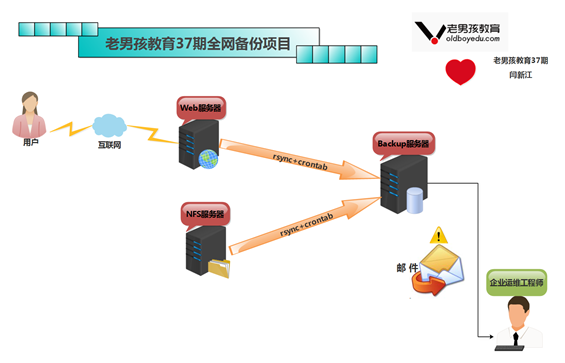
某公司有多台服务器,里面的数据很重要,如果磁盘坏了,数据就会丢失,所以公司要求把重要服务器数据备份以便出现问题时可以进行恢复,要求:每天晚上00点整在所有服务器上打包备份系统配置文件、网站程序目录及访问日志并通过rsync命令推送备份服务器backup上备份保留(备份思路可以是先在本地按日期打包,然后再推到备份服务器backup上)
二、具体需求规划
所有服务器的备份目录必须一致 /backup/
要备份的系统配置文件包括但不限于:
一、定时任务服务器的配置文件(/var/spool/cron/root 适合web服务器和nfs服务器)
二、开机自启动服务的配置文件(/etc/rc.local 适合web和nfs服务器)
三、日常脚本目录(/server/scripts)
四、防火墙iptables的配置文件 (/etc/init.d/iptables)
1、web服务器站点目录例如(/var/html/www)
2、web服务器访问日志路径例如(/app/logs)
3、web服务器保留打包后的7天的备份数据即可(因为本地服务器的磁盘会满)
4、备份服务器上,保留近180天的备份数据,6个月前的数据清除 每周一的所有数据进行保留
5、备份服务器上,要按照备份服务器的内网IP为目录保存备份,备份的文件按照时间名字保存
6、需要保存的数据尽量完整正确,在备份服务器上对备份的数据进行检查,把本分成功及失败的结果信息发送到系统管理员邮箱中
三、服务器信息
|
服务器说明 |
外网IP |
内网IP |
服务器主机名 |
|
Nginx web服务器 |
10.0.0.8/24 |
172.16.1.8/24 |
web01 |
|
NFS存储服务器 |
10.0.0.31/24 |
172.16.1.31/24 |
nfs01 |
|
rsync备份服务器 |
10.0.0.41/24 |
172.16.1.41/24 |
backup |
四、项目实战部署—搭建rsync服务端(backup)
1、rsync主配置文件
cat >/etc/rsyncd.conf<<EOF

#rsync server#

#created by yanxinjiang --

##rsyncd.conf start##

uid = rsync

gid = rsync

use chroot = no

max connections =

timeout =

pid file = /var/run/rsyncd.pid

lock file = /var/run/rsync.lock

log file = /var/log/rsyncd.log

ignore errors

read only = false

list = false

hosts allow = 172.16.1.0/

hosts deny = 0.0.0.0/

auth users = rsync_backup

secrets file = /etc/rsync.password

[backup]

path = /backup

EOF
2、创建统一备份数据的目录,添加备份目录管理用户
useradd -s /sbin/nologin -M rsync

mkdir /backup -p

chown -R rsync.rsync /backup/
3、创建用户认证文件
echo "rsync_backup:123456" >/etc/rsync.password

chmod  /etc/rsync.password
4、启动rsync服务并设置开机自启动
rsync --daemon

lsof -i:

echo "rsync --daemon" >>/etc/rc.local
5、rsync客户端创建用户认证文件
echo "" >/etc/rsync.password

chmod  /etc/rsync.password
6、客户端验证rsync服务推送功能
①nfs01服务器验证

[root@nfs01 backup]#rsync -avz /etc/hosts rsync_backup@172.16.1.41::backup --password-file=/etc/rsync.password

sending incremental file list

hosts

②web01服务器验证

[root@web01 ~]#rsync -avz /etc/hosts rsync_backup@172.16.1.41::backup --password-file=/etc/rsync.password

sending incremental file list

hosts
7、rsync服务脚本一键部署
#!/bin/sh

. /etc/init.d/functions

#created by yanxinjiang --

BakPath=/backup

Passwd=

IP=172.16.1.0/

Port=`netstat -lntup|grep |wc -l`

Create_file(){

cat >/etc/rsyncd.conf<<EOF

uid = rsync

gid = rsync

use chroot = no

max connections =

timeout =

pid file = /var/run/rsyncd.pid

lock file = /var/run/rsync.lock

log file = /var/log/rsyncd.log

ignore errors

read only = false

list = false

hosts allow = $IP

hosts deny = 0.0.0.0/

auth users = rsync_backup

secrets file = /etc/rsync.password

[backup]

path = $BakPath

EOF

if [ ! -f /etc/rsyncd.conf ]

  then

    action "rsync配置" /bin/false

    exit

elif [ ! -f /usr/bin/rsync ]

  then

    action "rsync命令" /bin/false

    exit

fi

}

Create_user(){

id rsync &>/dev/null

if [ $? -ne  ];then

  useradd rsync -s /sbin/nologin -M

elif [ ! -d $BakPath ];then

    mkdir -p $BakPath

    chown -R rsync.rsync $BakPath

    echo "rsync_backup:$Passwd" >/etc/rsync.password

    /bin/chmod  /etc/rsync.password

fi

}

Start_rsync(){

if [ $Port -lt  ];then

  rsync --daemon

  action "Starting rsync..." /bin/true

else

  action "Rsync is running..." /bin/true

fi

}

main(){

Create_file

Create_user

Start_rsync

}

main
五、rsync客户端编写备份脚本(web01)
#!/bin/sh

. /etc/init.d/functions

Backup_Dir=/backup

Passwd=

Passwd_File=/etc/rsync.password

IP=`hostname -I|awk '{print $2}'`

Remote_IP=172.16.1.41

#no. create backup dir

Create_dir(){

[ ! -d ${Backup_Dir}/$IP ] && mkdir -p ${Backup_Dir}/$IP

echo "$Passwd" >$Passwd_File && chmod  $Passwd_File

}

#no. compress system data to backup_dir

Backup_File(){

cd / &&\

tar zchf ${Backup_Dir}/$IP/sysconfig_$(date +%F).tar.gz var/spool/cron/root etc/rc.local server/scripts etc/sysconfig/iptables &&\

tar zchf ${Backup_Dir}/$IP/html_$(date +%F).tar.gz application/nginx/html/ &&\

tar zchf ${Backup_Dir}/$IP/conf_$(date +%F).tar.gz application/nginx/conf/

}

#no. push finger info data to remote backup

Push_date(){

find ${Backup_Dir}/$IP/ -type f -name "*.tar.gz"|xargs md5sum >${Backup_Dir}/$IP/zhiwen_$(date +%F).txt

rsync -az ${Backup_Dir}/$IP "rsync_backup"@${Remote_IP}::backup --password-file=${Passwd_File}

if [ $? -eq  ];then

  action "backup" /bin/true

else

  action "backup" /bin/false

fi

find ${Backup_Dir}/$IP -type f -name "*.tar.gz" -mtime +|xargs rm -f

if [ $? -eq  ];then

  action "rm" /bin/true

else

  action "rm" /bin/false

fi

}

main(){

Create_dir

Backup_File

Push_date

}

main
六、rsync客户端编写备份脚本(nfs01)
#!/bin/sh

. /etc/init.d/functions

Backup_Dir=/backup

Passwd=

Passwd_File=/etc/rsync.password

IP=`hostname -I|awk '{print $2}'`

Remote_IP=172.16.1.41

Create_dir(){

[ ! -d ${Backup_Dir}/$IP ] && mkdir -p ${Backup_Dir}/$IP

echo "$Passwd" >$Passwd_File && chmod  $Passwd_File

}

Backup_File(){

cd / &&\

tar zchf ${Backup_Dir}/$IP/sysconfig_$(date +%F).tar.gz var/spool/cron/root etc/rc.local server/scripts etc/sysconfig/iptables

}

Push_date(){

find ${Backup_Dir}/$IP/ -type f -name "*.tar.gz"|xargs md5sum >${Backup_Dir}/$IP/zhiwen_$(date +%F).txt

rsync -az ${Backup_Dir}/$IP "rsync_backup"@${Remote_IP}::backup --password-file=${Passwd_File}

if [ $? -eq  ];then

  action "backup" /bin/true

else

  action "backup" /bin/false

fi

find ${Backup_Dir}/$IP -type f -name "*.tar.gz" -mtime +|xargs rm -f

if [ $? -eq  ];then

  action "rm" /bin/true

else

  action "rm" /bin/false

fi

}

main(){

Create_dir

Backup_File

Push_date

}

main
七、rsync服务端编写检验脚本(backup)
#!/bin/sh

. /etc/init.d/functions

BakPath=/backup

Check_backup(){

if [ ! -d $BakPath ]

  then

    exit

else

find $BakPath -type f -name "zhiwen*.txt"|xargs md5sum -c >$BakPath/check_info.txt

mail -s "check_data mail" @qq.com <$BakPath/check_info.txt &>/dev/null

find $BakPath -type f -name "*.tar.gz" -mtime + ! -name "*1.tar.gz" |xargs rm -f

fi

  if [ $? -eq  ];then

    action "check" /bin/true

  else

    action "check" /bin/false

  fi

}

Check_backup
八、编写全网备份定时任务
1.nfs01服务器定时任务编写
#nfs01 backup data info-cron

  * * * /bin/sh /server/scripts/nfs_backup.sh &>dev/null
2.web01服务器定时任务编写
#web01 backup data info-cron

  * * * /bin/sh /server/scripts/web_backup.sh &>dev/null
3.backup服务器定时任务编写
# backup: backup data info cron

  * * * /bin/sh /server/scripts/backup_server.sh &>/dev/null
linux运维、架构之路-全网备份项目方案的更多相关文章
- linux运维架构师职业规划
1.假如你从来未接触过Linux的话,首先要做的就找一本指导书来学习.现在公认的Linux的入门书籍是“鸟哥的私房菜”,讲的很全面,鸟哥的私房菜一共分为两部,一部是基础篇,一部是服务器篇.“鸟哥的私房 ...
- 从苦逼到牛逼,详解Linux运维工程师的打怪升级之路
做运维也快四年多了,就像游戏打怪升级,升级后知识体系和运维体系也相对变化挺大,学习了很多新的知识点. 运维工程师是从一个呆逼进化为苦逼再成长为牛逼的过程,前提在于你要能忍能干能拼,还要具有敏锐的嗅觉感 ...
- Linux运维企业架构实战系列
Linux运维企业架构项目实战系列 项目实战1-LNMP的搭建.nginx的ssl加密.权限控制的实现 项目实战2-LVS.nginx实现负载均衡系列 2.1 项目实战2.1-实现基于LVS负载均衡集 ...
- Linux运维企业架构项目实战系列
Linux运维企业架构项目实战系列 项目实战1—LNMP的搭建.nginx的ssl加密.权限控制的实现 项目实战2—LVS.nginx实现负载均衡系列2.1 项目实战2.1—实现基于LVS负载均衡集群 ...
- Linux 运维入门到跑路书单推荐
一.基础入门 <鸟哥的Linux私房菜基础学习篇>:最具知名度的Linux入门书<鸟哥的Linux私房菜基础学习篇>,全面而详细地介绍了Linux操作系统. https://b ...
- Nginx+Lua+Redis整合实现高性能API接口 - 网站服务器 - LinuxTone | 运维专家网论坛 - 最棒的Linux运维与开源架构技术交流社区! - Powered by Discuz!
Nginx+Lua+Redis整合实现高性能API接口 - 网站服务器 - LinuxTone | 运维专家网论坛 - 最棒的Linux运维与开源架构技术交流社区! - Powered by Disc ...
- Linux运维知识之linux shell date 用当天时间做备份文件名
本文主要向大家介绍了Linux运维知识之linux shell date 用当天时间做备份文件名,通过具体的内容向大家展现,希望对大家学习Linux运维知识有所帮助. #!/bin/bash #dat ...
- linux运维工程师面试题收集
面试必考 mysql5和mysql6 有什么区别 mysql-server-5.5:默认引擎改为Innodb,提高了性能和扩展性,提高实用性(中继日志自动恢复) mysql-server-5.6:In ...
- Linux运维工程师成长必经之路
本路线图是从0基础开始,全方位由浅入深,按照多年Linux培训经验和优秀教学方法制定的学习思路和学习方法,路线图包括初级入门.中级进阶.高级提升和资深冲刺四个阶段,每阶段对应着不同优秀的课程和学习方法 ...
随机推荐
- 2018.03.29 python-pandas transform/apply 的使用
#一般化的groupby方法:apply df = pd.DataFrame({'data1':np.random.rand(5), 'data2':np.random.rand(5), 'key1' ...
- 什么是SLF,PSL,MLF,SLO?
受国际经济金融形势不确定性增强以及各种影响流动性的因素波动较大影响,近年来我国银行体系短期流动性供求的波动性有所加大,尤其是当多个因素相互叠加或市场预期发生变化时,有可能出现市场短期资金供求缺口难以通 ...
- python 开启进程两种方法 multiprocessing模块 介绍
一 multiprocessing模块介绍 python中的多线程无法利用多核优势,如果想要充分地使用多核CPU的资源(os.cpu\_count\(\)查看),在python中大部分情况需要使用多进 ...
- 11g Oracle Rac安装(基于linux6)
安装 Oracle 11gR2 RAC on Linux 6 本文介绍如何在Oracle Linux 6上安装2节点Oracle 11gR2 Real Application Cluster(RAC) ...
- Ubuntu 16.04简单配置备忘录
1.几个安装包的地址 1.Linux QQ:https://im.qq.com/linuxqq/index.html 2.网易云音乐:http://s1.music.126.net/download/ ...
- [Python3] 001 "Hello World" 与注释
目录 1. 致敬 1.1 致敬 "Hello World" 1.2 致敬 Python 之父 Guido van Rossum 2. 注释 2.1 单行注释 2.2 多行注释 3. ...
- 【烦人的字符集】linux字符集问题,中文乱码
[1]快速修改命令 [2]locale 查看现在服务器的字符 [root@Master ~]# localeLANG=en_US.UTF-8LC_CTYPE="zh_CN.UTF-8&quo ...
- 2. Docker部署tomcat, nginx, redis,及docker私有仓库
1. 部署tomcat 1.1 下载tomcat docker pull tomcat:7-jre8 1.2 部署容器 docker run -di --name=tomcat -p 8 ...
- 03.AutoMapper 之反向映射与逆向扁平化(Reverse Mapping and Unflattening)
https://www.jianshu.com/p/d72400b337e0 AutoMapper现在支持更丰富的反向映射支持. 假设有以下实体: public class Order { publi ...
- 利用中转输出表制作HijackDll
[原创]利用中转输出表制作HijackDll(附工具源码)作 者: baixinye时 间: 2012-08-05,16:48:45链 接: http://bbs.pediy.com/showthre ...