
cocos2dx - 伤害实现
接上一节内容:cocos2dx - 生成怪物及AI
本节主要讲如何通过创建简单的矩形区域来造成伤害
在小游戏中简单的碰撞需求应用box2d等引擎会显得过于臃肿复杂,且功能不是根据需求定制,还要封装,为此本节讲述一下如何自己实现简单的碰撞,来达到伤害效果。
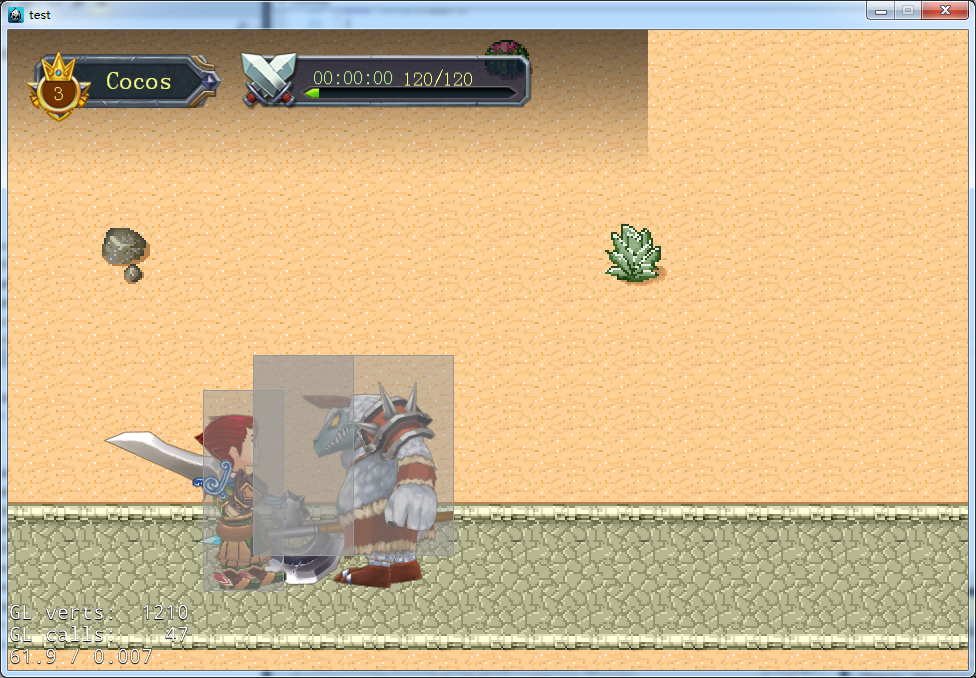
这里先看下效果图:

一、定义小组类别
定义如下:
// 组别mask

enum enGroupMask

{

    GROUP_NONE    = 0x0000,

    GROUP_PLAYER  = 0x0001,

    GROUP_MONSTER = 0x0002,

};
用二进制位来定义小组,方便后面判断用位快速判断。
二、定义CBody类用于碰撞实现
代码如下:
#ifndef __CBody_H__

#define __CBody_H__

#include "IGameDef.h"

#include "cocos2d.h"

#define DRAW_BODY 1

#ifdef DRAW_BODY

#include "GLES-Render.h"

#endif

USING_NS_CC;

class CBody : public Node

{

public:

    // implement the "static create()" method manually

    CREATE_FUNC(CBody);

    virtual bool init();

    void SetRect(float x, float y, float w, float h){ m_cRect = Rect(x,y,w,h); }

    void SetGroupMask(enGroupMask nGroupMask){ m_nGroupMask = nGroupMask; }

    enGroupMask GetGroupMask() const{ return m_nGroupMask; }

    enGroupMask CanContactGroup() const;

    //判断是否可以碰撞该类别

    bool IsGroupCanContact(enGroupMask nGroupMask)  const;

    const Rect GetRect()  const;

    //判断矩形是否交叉

    bool IntersectsRect(const Rect& rect)  const;

    void SetContactCallback(const std::function<void(CBody*)>& callback){ m_constactFunc = callback; }

    // 碰撞回调函数

    void OnContact(CBody* pBody);

    // 绘制矩形区域

#ifdef DRAW_BODY

    virtual void draw(Renderer *renderer, const Mat4& transform, uint32_t flags);

    virtual    void onDraw(const Mat4 &transform, uint32_t flags);

#endif

private:

    CBody();

    ~CBody();

#ifdef DRAW_BODY

    CustomCommand m_pCustomCommand;

    b2Draw* m_debugDraw;

#endif

    Rect m_cRect;

    std::function<void(CBody*)> m_constactFunc;

    enGroupMask        m_nGroupMask;

};

#endif __CBody_H__
关键实现有以下几个:
1、用位快速判断是否可以产生碰撞
bool CBody::IsGroupCanContact(enGroupMask nGroupMask)  const

{

    return nGroupMask&CanContactGroup();

}
2、获取矩形实际的坐标,利用cocos2dx矩形相交判断方法,判断重叠
const Rect CBody::GetRect()  const

{

    const Vec2& pt =this->convertToWorldSpace(this->getPosition());

    return Rect(pt.x + m_cRect.origin.x, pt.y + m_cRect.origin.y, m_cRect.size.width, m_cRect.size.height);

}

bool CBody::IntersectsRect(const Rect& rect)  const

{

    return GetRect().intersectsRect(rect);

}
3、将创建的CBody类添加到管理中vector的实例m_vBody管理
CBody::~CBody()

{

    CBattleMgr::getInstance()->EreaseBody(this);

#ifdef DRAW_BODY

    if (m_debugDraw)

    {

        delete m_debugDraw;

        m_debugDraw = NULL;

    }

#endif

}

bool CBody::init()

{

#ifdef DRAW_BODY

    m_debugDraw = new GLESDebugDraw(1.0);

#endif

    CBattleMgr::getInstance()->InsertBody(this);

    return true;

}
同时每帧在管理类中的update进行碰撞判断如下:
void CBattleMgr::update(float dt)

{

    while (m_vBody.size()>)

    {

        size_t nLast = m_vBody.size() - ;

        CBody* pBody = m_vBody[nLast];

        m_vBody.pop_back();

        if (pBody)

        {

            m_vSwapBody.push_back(pBody);

            for (size_t i = ; i < nLast; ++i)

            {

                CBody* pTempBody = m_vBody[i];

                if (pTempBody )

                {

                    bool hurt1 = pTempBody->IsGroupCanContact(pBody->GetGroupMask());

                    bool hurt2 = pBody->IsGroupCanContact(pTempBody->GetGroupMask());

                    if ((hurt1 || hurt2)&&pTempBody->IntersectsRect(pBody->GetRect()))

                    {

                        if (hurt1)

                        {

                            pTempBody->OnContact(pBody);

                        }

                        if (hurt2)

                        {

                            pBody->OnContact(pTempBody);

                        }

                    }

                }

            }

        }

    }

    m_vSwapBody.swap(m_vBody);

}
上述代码通过2个vector管理CBody,在update时进行一次判断碰撞并调用OnContact方法。
4、为了方便显示上图的灰色矩形框需要用以下的类进行显示图形
/*

* Copyright (c) 2006-2007 Erin Catto http://www.gphysics.com

*

* iPhone port by Simon Oliver - http://www.simonoliver.com - http://www.handcircus.com

*

* This software is provided 'as-is', without any express or implied

* warranty.  In no event will the authors be held liable for any damages

* arising from the use of this software.

* Permission is granted to anyone to use this software for any purpose,

* including commercial applications, and to alter it and redistribute it

* freely, subject to the following restrictions:

* 1. The origin of this software must not be misrepresented; you must not

* claim that you wrote the original software. If you use this software

* in a product, an acknowledgment in the product documentation would be

* appreciated but is not required.

* 2. Altered source versions must be plainly marked as such, and must not be

* misrepresented as being the original software.

* 3. This notice may not be removed or altered from any source distribution.

*/

#ifndef RENDER_H

#define RENDER_H

#include "Box2D/Box2D.h"

#include "cocos2d.h"

struct b2AABB;

// This class implements debug drawing callbacks that are invoked

// inside b2World::Step.

class GLESDebugDraw : public b2Draw

{

    float32 mRatio;

    cocos2d::GLProgram* mShaderProgram;

    GLint        mColorLocation;

    void initShader( void );

public:

    GLESDebugDraw();

    GLESDebugDraw( float32 ratio );

    virtual void DrawPolygon(const b2Vec2* vertices, int vertexCount, const b2Color& color);

    virtual void DrawSolidPolygon(const b2Vec2* vertices, int vertexCount, const b2Color& color);

    virtual void DrawCircle(const b2Vec2& center, float32 radius, const b2Color& color);

    virtual void DrawSolidCircle(const b2Vec2& center, float32 radius, const b2Vec2& axis, const b2Color& color);

    virtual void DrawSegment(const b2Vec2& p1, const b2Vec2& p2, const b2Color& color);

    virtual void DrawTransform(const b2Transform& xf);

    virtual void DrawPoint(const b2Vec2& p, float32 size, const b2Color& color);

    virtual void DrawString(int x, int y, const char* string, ...);

    virtual void DrawAABB(b2AABB* aabb, const b2Color& color);

};

#endif

/*

 * Copyright (c) 2006-2007 Erin Catto http://www.gphysics.com

 *

 * iPhone port by Simon Oliver - http://www.simonoliver.com - http://www.handcircus.com

 *

 * This software is provided 'as-is', without any express or implied

 * warranty.  In no event will the authors be held liable for any damages

 * arising from the use of this software.

 * Permission is granted to anyone to use this software for any purpose,

 * including commercial applications, and to alter it and redistribute it

 * freely, subject to the following restrictions:

 * 1. The origin of this software must not be misrepresented; you must not

 * claim that you wrote the original software. If you use this software

 * in a product, an acknowledgment in the product documentation would be

 * appreciated but is not required.

 * 2. Altered source versions must be plainly marked as such, and must not be

 * misrepresented as being the original software.

 * 3. This notice may not be removed or altered from any source distribution.

 */

#include "GLES-Render.h"

#include "cocos2d.h"

#include <stdio.h>

#include <stdarg.h>

#include <string.h>

USING_NS_CC;

GLESDebugDraw::GLESDebugDraw()

    : mRatio( 1.0f )

{

    this->initShader();

}

GLESDebugDraw::GLESDebugDraw( float32 ratio )

    : mRatio( ratio )

{

    this->initShader();

}

void GLESDebugDraw::initShader( void )

{

    mShaderProgram = GLProgramCache::getInstance()->getGLProgram(GLProgram::SHADER_NAME_POSITION_U_COLOR);

    mColorLocation = glGetUniformLocation( mShaderProgram->getProgram(), "u_color");

}

void GLESDebugDraw::DrawPolygon(const b2Vec2* old_vertices, int vertexCount, const b2Color& color)

{

    mShaderProgram->use();

    mShaderProgram->setUniformsForBuiltins();

    b2Vec2* vertices = new b2Vec2[vertexCount];

    for( int i=;i<vertexCount;i++)

    {

        vertices[i] = old_vertices[i];

        vertices[i] *= mRatio;

    }

    mShaderProgram->setUniformLocationWith4f(mColorLocation, color.r, color.g, color.b, );

    glVertexAttribPointer(GLProgram::VERTEX_ATTRIB_POSITION, , GL_FLOAT, GL_FALSE, , vertices);

    glDrawArrays(GL_LINE_LOOP, , vertexCount);

    CC_INCREMENT_GL_DRAWN_BATCHES_AND_VERTICES(,vertexCount);

    CHECK_GL_ERROR_DEBUG();

    delete[] vertices;

}

void GLESDebugDraw::DrawSolidPolygon(const b2Vec2* old_vertices, int vertexCount, const b2Color& color)

{

    mShaderProgram->use();

    mShaderProgram->setUniformsForBuiltins();

    b2Vec2* vertices = new b2Vec2[vertexCount];

    for( int i=;i<vertexCount;i++) {

        vertices[i] = old_vertices[i];

        vertices[i] *= mRatio;

    }

    mShaderProgram->setUniformLocationWith4f(mColorLocation, color.r*0.5f, color.g*0.5f, color.b*0.5f, 0.5f);

    glVertexAttribPointer(GLProgram::VERTEX_ATTRIB_POSITION, , GL_FLOAT, GL_FALSE, , vertices);

    glDrawArrays(GL_TRIANGLE_FAN, , vertexCount);

    mShaderProgram->setUniformLocationWith4f(mColorLocation, color.r, color.g, color.b, );

    glDrawArrays(GL_LINE_LOOP, , vertexCount);

    CC_INCREMENT_GL_DRAWN_BATCHES_AND_VERTICES(,vertexCount*);

    CHECK_GL_ERROR_DEBUG();

    delete[] vertices;

}

void GLESDebugDraw::DrawCircle(const b2Vec2& center, float32 radius, const b2Color& color)

{

    mShaderProgram->use();

    mShaderProgram->setUniformsForBuiltins();

    const float32 k_segments = 16.0f;

    int vertexCount=;

    const float32 k_increment = 2.0f * b2_pi / k_segments;

    float32 theta = 0.0f;

    GLfloat*    glVertices = new GLfloat[vertexCount*];

    for (int i = ; i < k_segments; ++i)

    {

        b2Vec2 v = center + radius * b2Vec2(cosf(theta), sinf(theta));

        glVertices[i*]=v.x * mRatio;

        glVertices[i*+]=v.y * mRatio;

        theta += k_increment;

    }

    mShaderProgram->setUniformLocationWith4f(mColorLocation, color.r, color.g, color.b, );

    glVertexAttribPointer(GLProgram::VERTEX_ATTRIB_POSITION, , GL_FLOAT, GL_FALSE, , glVertices);

    glDrawArrays(GL_LINE_LOOP, , vertexCount);

    CC_INCREMENT_GL_DRAWN_BATCHES_AND_VERTICES(,vertexCount);

    CHECK_GL_ERROR_DEBUG();

    delete[] glVertices;

}

void GLESDebugDraw::DrawSolidCircle(const b2Vec2& center, float32 radius, const b2Vec2& axis, const b2Color& color)

{

    mShaderProgram->use();

    mShaderProgram->setUniformsForBuiltins();

    const float32 k_segments = 16.0f;

    int vertexCount=;

    const float32 k_increment = 2.0f * b2_pi / k_segments;

    float32 theta = 0.0f;

    GLfloat*    glVertices = new GLfloat[vertexCount*];

    for (int i = ; i < k_segments; ++i)

    {

        b2Vec2 v = center + radius * b2Vec2(cosf(theta), sinf(theta));

        glVertices[i*]=v.x * mRatio;

        glVertices[i*+]=v.y * mRatio;

        theta += k_increment;

    }

    mShaderProgram->setUniformLocationWith4f(mColorLocation, color.r*0.5f, color.g*0.5f, color.b*0.5f, 0.5f);

    glVertexAttribPointer(GLProgram::VERTEX_ATTRIB_POSITION, , GL_FLOAT, GL_FALSE, , glVertices);

    glDrawArrays(GL_TRIANGLE_FAN, , vertexCount);

    mShaderProgram->setUniformLocationWith4f(mColorLocation, color.r, color.g, color.b, );

    glDrawArrays(GL_LINE_LOOP, , vertexCount);

    // Draw the axis line

    DrawSegment(center,center+radius*axis,color);

    CC_INCREMENT_GL_DRAWN_BATCHES_AND_VERTICES(,vertexCount*);

    CHECK_GL_ERROR_DEBUG();

    delete[] glVertices;

}

void GLESDebugDraw::DrawSegment(const b2Vec2& p1, const b2Vec2& p2, const b2Color& color)

{

    mShaderProgram->use();

    mShaderProgram->setUniformsForBuiltins();

    mShaderProgram->setUniformLocationWith4f(mColorLocation, color.r, color.g, color.b, );

    GLfloat    glVertices[] =

    {

        p1.x * mRatio, p1.y * mRatio,

        p2.x * mRatio, p2.y * mRatio

    };

    glVertexAttribPointer(GLProgram::VERTEX_ATTRIB_POSITION, , GL_FLOAT, GL_FALSE, , glVertices);

    glDrawArrays(GL_LINES, , );

    CC_INCREMENT_GL_DRAWN_BATCHES_AND_VERTICES(,);

    CHECK_GL_ERROR_DEBUG();

}

void GLESDebugDraw::DrawTransform(const b2Transform& xf)

{

    b2Vec2 p1 = xf.p, p2;

    const float32 k_axisScale = 0.4f;

    p2 = p1 + k_axisScale * xf.q.GetXAxis();

    DrawSegment(p1, p2, b2Color(,,));

    p2 = p1 + k_axisScale * xf.q.GetYAxis();

    DrawSegment(p1,p2,b2Color(,,));

}

void GLESDebugDraw::DrawPoint(const b2Vec2& p, float32 size, const b2Color& color)

{

    mShaderProgram->use();

    mShaderProgram->setUniformsForBuiltins();

    mShaderProgram->setUniformLocationWith4f(mColorLocation, color.r, color.g, color.b, );

    //    glPointSize(size);

    GLfloat                glVertices[] = {

        p.x * mRatio, p.y * mRatio

    };

    glVertexAttribPointer(GLProgram::VERTEX_ATTRIB_POSITION, , GL_FLOAT, GL_FALSE, , glVertices);

    glDrawArrays(GL_POINTS, , );

    //    glPointSize(1.0f);

    CC_INCREMENT_GL_DRAWN_BATCHES_AND_VERTICES(,);

    CHECK_GL_ERROR_DEBUG();

}

void GLESDebugDraw::DrawString(int x, int y, const char *string, ...)

{

//    NSLog(@"DrawString: unsupported: %s", string);

    //printf(string);

    /* Unsupported as yet. Could replace with bitmap font renderer at a later date */

}

void GLESDebugDraw::DrawAABB(b2AABB* aabb, const b2Color& color)

{

    mShaderProgram->use();

    mShaderProgram->setUniformsForBuiltins();

    mShaderProgram->setUniformLocationWith4f(mColorLocation, color.r, color.g, color.b, );

    GLfloat                glVertices[] = {

        aabb->lowerBound.x * mRatio, aabb->lowerBound.y * mRatio,

        aabb->upperBound.x * mRatio, aabb->lowerBound.y * mRatio,

        aabb->upperBound.x * mRatio, aabb->upperBound.y * mRatio,

        aabb->lowerBound.x * mRatio, aabb->upperBound.y * mRatio

    };

    glVertexAttribPointer(GLProgram::VERTEX_ATTRIB_POSITION, , GL_FLOAT, GL_FALSE, , glVertices);

    glDrawArrays(GL_LINE_LOOP, , );

    CC_INCREMENT_GL_DRAWN_BATCHES_AND_VERTICES(,);

    CHECK_GL_ERROR_DEBUG();

}
然后在CBody的draw中做如下处理进行绘制
#ifdef DRAW_BODY

void CBody::onDraw(const Mat4 &transform, uint32_t flags)

{

    if (m_debugDraw)

    {

        b2Vec2 vs[];

        const Rect rect = GetRect();

        vs[].Set(rect.origin.x, rect.origin.y);

        vs[].Set(rect.origin.x + rect.size.width, rect.origin.y);

        vs[].Set(rect.origin.x + rect.size.width, rect.origin.y + rect.size.height);

        vs[].Set(rect.origin.x, rect.origin.y + rect.size.height);

        m_debugDraw->DrawSolidPolygon(vs, , b2Color(0.6f, 0.6f, 0.6f));

    }

}

void CBody::draw(Renderer *renderer, const Mat4& transform, uint32_t flags)

{

    //_globalZOrder

    m_pCustomCommand.init();

    m_pCustomCommand.func = CC_CALLBACK_0(CBody::onDraw, this, transform, flags);

    renderer->addCommand(&m_pCustomCommand);

}

#endif
5、最后在Monster等实体类init中添加该CBody的实例,即可为其添加碰撞形状。
如下:
        m_pBody = CBody::create();

        m_pBody->SetGroupMask(enGroupMask::GROUP_MONSTER);

        m_pBody->SetRect(-, -, , );

        this->addChild(m_pBody);
三、定义CDamage用于创建伤害
主要实现以下方法:
#ifndef __CDamage_H__

#define __CDamage_H__

#include "IGameDef.h"

#include "Body.h"

#include <set>

USING_NS_CC;

class CDamage : public Node

{

public:

    // implement the "static create()" method manually

    CREATE_FUNC(CDamage);

    virtual bool init();

    void update(float dt);

    void SetRect(float x, float y, float w, float h);

    void SetGroupMask(enGroupMask nGroupMask);

    void OnContact(CBody* pBody);

private:

    CDamage();

    ~CDamage();

    int m_nDieTime; // 伤害区域消失时间

    CBody           *m_pBody;

    std::set<CBody*>    m_sContact;

};

#endif __CDamage_H__
关键点:
1、m_nDieTime在update中实现控制伤害区域存在时间
2、m_sContact控制一个CDamage实例对每个实体仅造成一次伤害。
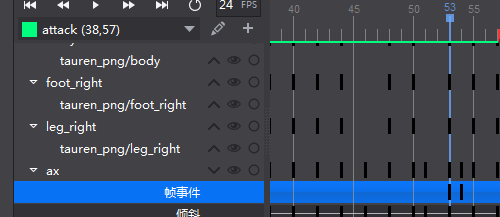
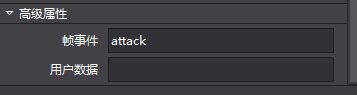
在怪物等攻击动作中添加事件并在事件回调中添加如下代码创建伤害
void  CEntity::ActionEvent(Frame *frame)

{

    cocostudio::timeline::EventFrame* evnt = dynamic_cast<cocostudio::timeline::EventFrame*>(frame);

    if (!evnt)

        return;

    std::string str = evnt->getEvent();

    if (str == "attack")

    {

        auto damage = CDamage::create();

        damage->SetRect(-, -, , );

        damage->SetGroupMask(m_nGroupMask);

        if (this->getScaleX()<)

        {

            damage->setPositionX(-);

        }

        this->addChild(damage);

    }

}
添加事件方法,即在特定帧添加以下的帧事件
至此,游戏的基本元素已经都有了。
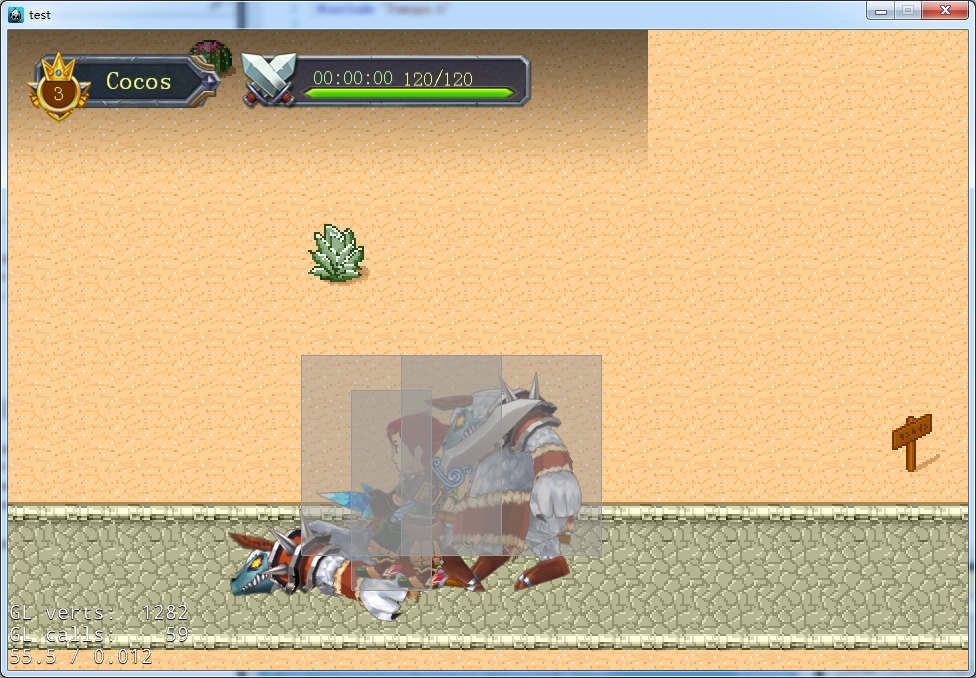
剩下的自己可以进行扩展了,如:血量为0时,播放死亡动画,并显示失败等。

在怪物死亡创建一个新的怪物:
cocos2dx - 伤害实现的更多相关文章
- cocos2dx - android环境配置及编译
接上一节内容:cocos2dx - 伤害实现 本节主要讲Android环境配置及编译 在第一节中setup.py的配置里,我们没有配置对应的ndk,sdk,ant的路径,在这里需要先配置好环境变量. ...
- 【cocos2d-x 手游研发小技巧(1)自定义制作怪物伤害数值】
直插主题了,今天写了一下午,早就想要写这类似东西的,首先我不会选用CCLabelAtlas了,我直接用帧图片做. 首先我们要准备素材,我先把素材帖出来给大家: 这个是一张比较全的素材图,它包含了扣血的 ...
- 【cocos2d-x 手游研发----目录】
感谢大家一直支持我写这样一系列的博客,从中我自己也获益良多,cocos2d-x这样一款非常棒的引擎,是值得我们去学习和分享的,谈到分享,那我就把这套写了差不多一两个月的框架给大家开源下载,写的很一般, ...
- Cocos2d-x 3.0 事件系统【转】
事件系统,是一个软件的核心组成部分.从小处讲它是应用程序内部各模块交互的设计模式,从大处讲,它是软件架构的组成模块.在现代软件开发中,操作系统通常通过一些预定义的事件,告知应用程序发生的一些事情如用户 ...
- Cocos2dx 小技巧(十一) 小人虽短,但能够旋转
转眼五一就到了,放假三天应该做些什么呢?窝在家里钻研技术?写博客?no no no no,这样的"伤害"自己的方式实在让我无法忍受.本来和大学那伙人越好了一起去哪里玩玩,喝酒聊天啥 ...
- Cocos2d-x 使用物理引擎进行碰撞检测
[转自]: http://blog.csdn.net/cbbbc/article/details/38541099 通常在游戏简单逻辑判断和模拟真实的物理世界时,我们只需要在定时器中判断游戏中各个精灵 ...
- cocos2d-x游戏开发系列教程-超级玛丽07-CMGameMap
背景 在上一篇博客中,我们提到CMGameScene,但是CMGameScene只是个框架,实际担任游戏逻辑的是CMGameMap类,这个博文就来了解下CMGameMap 头文件 class CMGa ...
- cocos2dx调用浏览器打开网址
安卓端cocos2dx/platform/android路径下CCApplication.h: virtual void openURL(const char* pszUrl); CCApplicat ...
- 使用“Cocos引擎”创建的cpp工程如何在VS中调试Cocos2d-x源码
前段时间Cocos2d-x更新了一个Cocos引擎,这是一个集合源码,IDE,Studio这一家老小的整合包,我们可以使用这个Cocos引擎来创建我们的项目. 在Cocos2d-x被整合到Cocos引 ...
随机推荐
- 【Alpha阶段】第五次scrum meeting
一.会议照片 二.会议内容 姓名 学号 负责模块 昨日任务完成度 今日任务 杨爱清 099 界面设计和交互功能 完成 去酷狗选择合适的轻音乐 杨立鑫 100 数据库搭建和其他 完成 继续对数据库进行编 ...
- Java 第七周总结
1. 本周学习总结 2. 书面作业 1.ArrayList代码分析 1.1 解释ArrayList的contains源代码 我们知道ArrayList是允许重复的,有序的元素的集合,但当我们想用它来放 ...
- 201521123080《Java程序设计》第12周学习总结
1. 本周学习总结 1.1 以你喜欢的方式(思维导图或其他)归纳总结多流与文件相关内容. 流(Stream): Stream是从起源(source)到接收(sink)的有序数据 按照流向分可以分为输入 ...
- 201521123019 《Java程序设计》第10周学习总结
1. 本周学习总结 2. 书面作业 本次PTA作业题集异常.多线程 1.finally 题目4-2 1.1 截图你的提交结果(出现学号) 1.2 4-2中finally中捕获异常需要注意什么? 只有执 ...
- java课程设计(Calculator) 201521123027 陈龙
1.团队博客链接 http://www.cnblogs.com/DevilRay/p/7064482.html 2.个人负责模块或任务说明 (1)主函数的编写: (2)加减乘除运算的实现: (3)求倒 ...
- 201521123079《java程序设计》第9周学习总结
1. 本周学习总结 1.1 以你喜欢的方式(思维导图或其他)归纳总结异常相关内容. 2. 书面作业 本次PTA作业题集异常 1.常用异常 题目5-1 1.1 截图你的提交结果(出现学号) 1.2 自己 ...
- centOS 7一个解决“network.service: control process exited, code=exited status=1”方法
今天早上2017-08-04,我打开虚拟机,使用远程工具xshell对虚拟机进行连接,我发现连接不上去,然后我ifconfig,发现找不到ens33了,就剩一个本地回环,看来是我的网络出现了问题,然后 ...
- Linux下安全证书申请以及配置到Nginx
wget https://raw.githubusercontent.com/xdtianyu/scripts/master/lets-encrypt/letsencrypt.shchmod +x l ...
- MyBatis框架(二)
导包, 配置mybatis的总配置文件: mybatis-config.xml, <?xml version="1.0" encoding="UTF-8" ...
- React——props的使用以及propTypes
组件的props是只读的,组件不能修改自己的props,在React中,组件可以接受任意的props,如函数,对象,基本类型以及react元素 一.props的使用 1.一些组件并不需要知道自己的ch ...