
Your data vis “Spidey-sense” & the need for a robust “utility belt”
@theboysmithy did a great piece on coming up with an alternate view for a timeline for an FT piece.
Here’s an excerpt (read the whole piece, though, it’s worth it):
Here is an example from a story recently featured in the FT: emerging- market populations are expected to age more rapidly than those in developed countries. The figures alone are compelling: France is expected to take 157 years (from 1865 to 2022) to triple the proportion of its population aged over 65, from 7 per cent to 21 per cent; for China, the equivalent period is likely to be just 34 years (from 2001 to 2035).
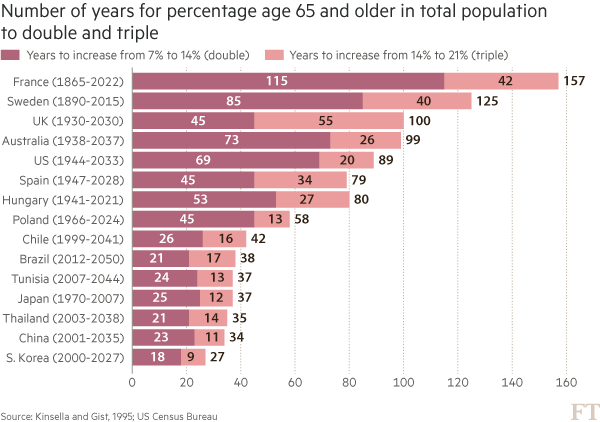
You may think that visualising this story is as simple as creating a bar chart of the durations ordered by length. In fact, we came across just such a chart from a research agency.
But, to me, this approach generates “the feeling” — and further scrutiny reveals specific problems. A reader must work hard to memorise the date information next to the country labels to work out if there is a relationship between the start date and the length of time taken for the population to age. The chart is clearly not ideal, but how do we improve it?
Alan went on to talk about the process of improving the vis, eventually turning to Joseph Priestly for inspiration. Here’s their makeover:
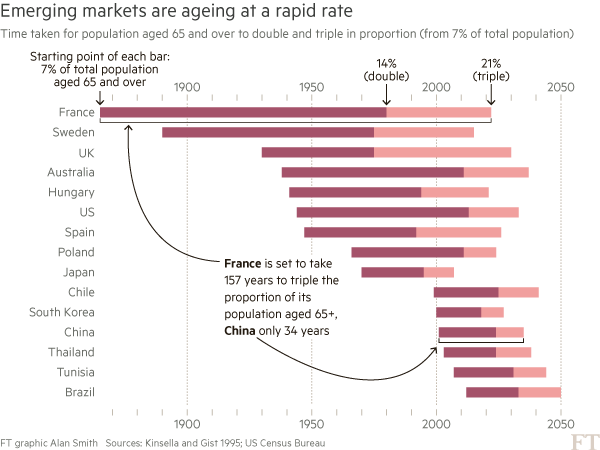
Alan used D3 to make this, which had me head scratching for a bit. Bostock is genius & I :heart: D3 immensely, but I never really thought of it as a “canvas” for doing general data visualization creation for something like a print publication (it’s geared towards making incredibly data-rich interactive visualizations). It’s 100% cool to do so, though. It has fine-grained control over every aspect of a visualization and you can easily turn SVGs into PDFs or use them in programs like Illustrator to make the final enhancements. However, D3 is not the only tool that can make a chart like this.
I made the following in R (of course):
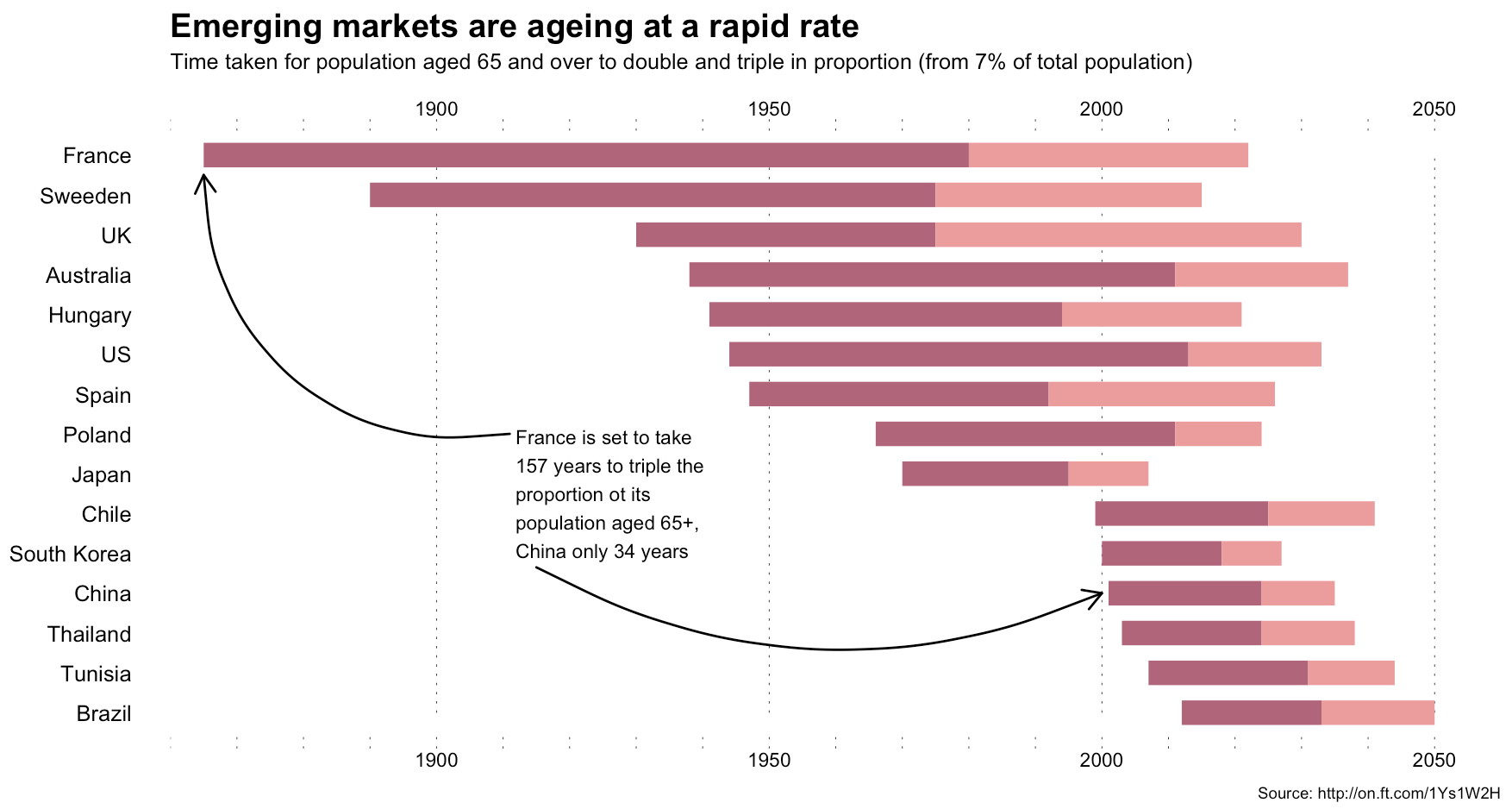
The annotations in Alan’s image were (99% most likely) made with something like Illustrator. I stopped short of fully reproducing the image (life is super-crazy, still), but could have done so (the entire image is one ggplot2 object).
This isn’t an “R > D3” post, though, since I use both. It’s about (a) reinforcing Alan’s posits that we should absolutely take inspiration from historical vis pioneers (so read more!) + need a diverse visualization “utility belt” (ref: Batman) to ensure you have the necessary tools to make a given visualization; (b) trusting your “Spidey-sense” when it comes to evaluating your creations/decisions; and, (c) showing that R is a great alternative to D3 for something like this :-)
Spider-man (you expected headier references from a dude with a shield avatar?) has this ability to sense danger right before it happens and if you’re making an effort to develop and share great visualizations, you definitely have this same sense in your DNA (though I would not recommend tossing pie charts at super-villains to stop them). When you’ve made something and it just doesn’t “feel right”, look to other sources of inspiration or reach out to your colleagues or the community for ideas or guidance. You can and do make awesome things, and you do have a “Spidey-sense”. You just need to listen to it more, add depth and breadth to your “utility belt” and keep improving with each creation you release into the wild.
R code for the ggplot vis reproduction is below, and it + the CSV file referenced are in this gist.
library(ggplot2)

library(dplyr)

ft <- read.csv("ftpop.csv", stringsAsFactors=FALSE)

arrange(ft, start_year) %>%

  mutate(country=factor(country, levels=c(" ", rev(country), "  "))) -> ft

ft_labs <- data_frame(

  x=c(1900, 1950, 2000, 2050, 1900, 1950, 2000, 2050),

  y=c(rep(" ", 4), rep("  ", 4)),

  hj=c(0.5, 0.5, 0.5, 0.5, 0.5, 0.5, 0.5, 0.5),

  vj=c(1, 1, 1, 1, 0, 0, 0, 0)

)

ft_lines <- data_frame(x=c(1900, 1950, 2000, 2050))

ft_ticks <- data_frame(x=seq(1860, 2050, 10))

gg <- ggplot()

# tick marks & gridlines

gg <- gg + geom_segment(data=ft_lines, aes(x=x, xend=x, y=2, yend=16),

                        linetype="dotted", size=0.15)

gg <- gg + geom_segment(data=ft_ticks, aes(x=x, xend=x, y=16.9, yend=16.6),

                        linetype="dotted", size=0.15)

gg <- gg + geom_segment(data=ft_ticks, aes(x=x, xend=x, y=1.1, yend=1.4),

                        linetype="dotted", size=0.15)

# double & triple bars

gg <- gg + geom_segment(data=ft, size=5, color="#b0657b",

                        aes(x=start_year, xend=start_year+double, y=country, yend=country))

gg <- gg + geom_segment(data=ft, size=5, color="#eb9c9d",

                        aes(x=start_year+double, xend=start_year+double+triple, y=country, yend=country))

# tick labels

gg <- gg + geom_text(data=ft_labs, aes(x, y, label=x, hjust=hj, vjust=vj), size=3)

# annotations

gg <- gg + geom_label(data=data.frame(), hjust=0, label.size=0, size=3,

                      aes(x=1911, y=7.5, label="France is set to take\n157 years to triple the\nproportion ot its\npopulation aged 65+,\nChina only 34 years"))

gg <- gg + geom_curve(data=data.frame(), aes(x=1911, xend=1865, y=9, yend=15.5),

                      curvature=-0.5, arrow=arrow(length=unit(0.03, "npc")))

gg <- gg + geom_curve(data=data.frame(), aes(x=1915, xend=2000, y=5.65, yend=5),

                      curvature=0.25, arrow=arrow(length=unit(0.03, "npc")))

# pretty standard stuff here

gg <- gg + scale_x_continuous(expand=c(0,0), limits=c(1860, 2060))

gg <- gg + scale_y_discrete(drop=FALSE)

gg <- gg + labs(x=NULL, y=NULL, title="Emerging markets are ageing at a rapid rate",

                subtitle="Time taken for population aged 65 and over to double and triple in proportion (from 7% of total population)",

                caption="Source: http://on.ft.com/1Ys1W2H")

gg <- gg + theme_minimal()

gg <- gg + theme(axis.text.x=element_blank())

gg <- gg + theme(panel.grid=element_blank())

gg <- gg + theme(plot.margin=margin(10,10,10,10))

gg <- gg + theme(plot.title=element_text(face="bold"))

gg <- gg + theme(plot.subtitle=element_text(size=9.5, margin=margin(b=10)))

gg <- gg + theme(plot.caption=element_text(size=7, margin=margin(t=-10)))

ggYour data vis “Spidey-sense” & the need for a robust “utility belt”的更多相关文章
- Fitting Bayesian Linear Mixed Models for continuous and binary data using Stan: A quick tutorial
I want to give a quick tutorial on fitting Linear Mixed Models (hierarchical models) with a full var ...
- Machine Learning and Data Mining(机器学习与数据挖掘)
Problems[show] Classification Clustering Regression Anomaly detection Association rules Reinforcemen ...
- JavaScript资源大全中文版(Awesome最新版)
Awesome系列的JavaScript资源整理.awesome-javascript是sorrycc发起维护的 JS 资源列表,内容包括:包管理器.加载器.测试框架.运行器.QA.MVC框架和库.模 ...
- PCI Express(四) - The transaction layer
原文出处:http://www.fpga4fun.com/PCI-Express4.html 感觉没什么好翻译的,都比较简单,主要讲了TLP的帧结构 In the transaction layer, ...
- Task schedule 分类: 比赛 HDU 查找 2015-08-08 16:00 2人阅读 评论(0) 收藏
Task schedule Time Limit: 2000/1000 MS (Java/Others) Memory Limit: 32768/32768 K (Java/Others) Total ...
- Doubles 分类: POJ 2015-06-12 18:24 11人阅读 评论(0) 收藏
Doubles Time Limit: 1000MS Memory Limit: 10000K Total Submissions: 19954 Accepted: 11536 Descrip ...
- codevs 3732 解方程
神题不可言会. f(x+p)=f(x)(mod p) #include<iostream> #include<cstdio> #include<cstring> # ...
- notes: the architecture of GDB
1. gdb structure at the largest scale,GDB can be said to have two sides to it:1. The "symbol si ...
- poj 2531 Network Saboteur(经典dfs)
题目大意:有n个点,把这些点分别放到两个集合里,在两个集合的每个点之间都会有权值,求可能形成的最大权值. 思路:1.把这两个集合标记为0和1,先默认所有点都在集合0里. 2 ...
随机推荐
- Nginx VS Apache
作为 Web 服务器:相比 Apache,Nginx 使用更少的资源,支持更多的并发连接,体现更高的效率 Nginx 静态处理性能比 Apache 高 3倍以上 最核心的区别在于apache是同步多进 ...
- Html 经典布局(三)
经典布局案例(三): <!DOCTYPE html> <html lang="en"> <head> <meta charset=&quo ...
- apache-maven-3.3.9 环境配置
本地 maven 环境 安装 Maven 之前要求先确定你的 JDK 已经安装配置完成.Maven是 Apache 下的一个项目,目前我的新版本是 3.3.9. 1.官网下载 Maven:http:/ ...
- oracle实现like多关键字查询
oracle实现like多关键字查询: select * from contract_info tt where 1=1 and REGEXP_LIKE(tt.contract_name,'关键字1| ...
- Unity -JsonUtility的使用
今天,为大家分享一下unity上的Json序列化,应该一说到这个词语,我们肯定会觉得,这应该是很常用的一个功能点:诚然,我们保存数据的时候,也许会用到json序列化,所以,我们有必要快速了解一下它的简 ...
- 笔记:查看linux系统开机时间
[root@localhost ~]# uptime -s -- :: 通过命令uptime -s 查看系统开机时间
- Unity调用Android的两个方式:其一、调用jar包
unity在Android端开发的时候,免不了要调用Java:Unity可以通过两种方式来调用Android:一是调用jar.二是调用aar. 这篇文章主要讲解怎么从无到有的生成一个jar包,然后un ...
- 基于Maven的SSM整合的web工程
此文章主要有以下几个知识点: 一.如何创建 Maven的Web 工程 二.整合SSM(Spring,SpringMvc,Mybatis),包括所有的配置文件 三.用 mybatis 逆向工程生成对应的 ...
- WebStorm 2017 最新版激活方式
注册时,在打开的License Activation窗口中选择“License server”,在输入框输入下面的网址:http://idea.iteblog.com/key.php 原文:https ...
- 使用 Laravel 实现微型博客系统
参考链接:An Introduction to Laravel Authorization Gates 这个微型博客系统包含两个用户角色(作者 和 编辑),它们的权限如下: 作者能创建博客 作者能更新 ...