
vue2.0+elementUI构建单页面后台管理平台
git:https://github.com/suweiteng/vue2-management-platform (记得点star哈,感谢~)
访问:https://suweiteng.github.io/vue2-management-platform
概述:
最近学习vue2.0和elementUI的使用,在各种文档的帮助下,尝试编写了一个后台管理平台。
目前数据采用mock.js模拟,比较简略。后续会进行细化并增加登录、表单等功能。
依赖项版本
"vue": "^2.1.0",
"vue-router": "^2.1.3", // vue.js官方路由
"axios": "^0.16.1", // 官方已不再推荐使用vue-resource,如今推荐axios。
"element-ui": "^1.2.3", // 样式库
"mockjs": "^1.0.1-beta3", //模拟数据使用
 更新:vue已升级至2.5.X,elementUI已升级至2.2,其他相关依赖也已升级,

 具体请参考https://github.com/suweiteng/vue2-management-platform/blob/master/package.json
更新
增加富文本编辑器(beta1.6)
2017年7月11日:集成Ueditor富文本编辑器,作为公共组件。
2017年7月13日:编辑器支持同页面多次调用。
2018年1月23日:编辑器支持小功能:获取纯文本(解决博客中40L评论的疑问)。
教程:http://www.cnblogs.com/dmcl/p/7152711.html
效果如下:
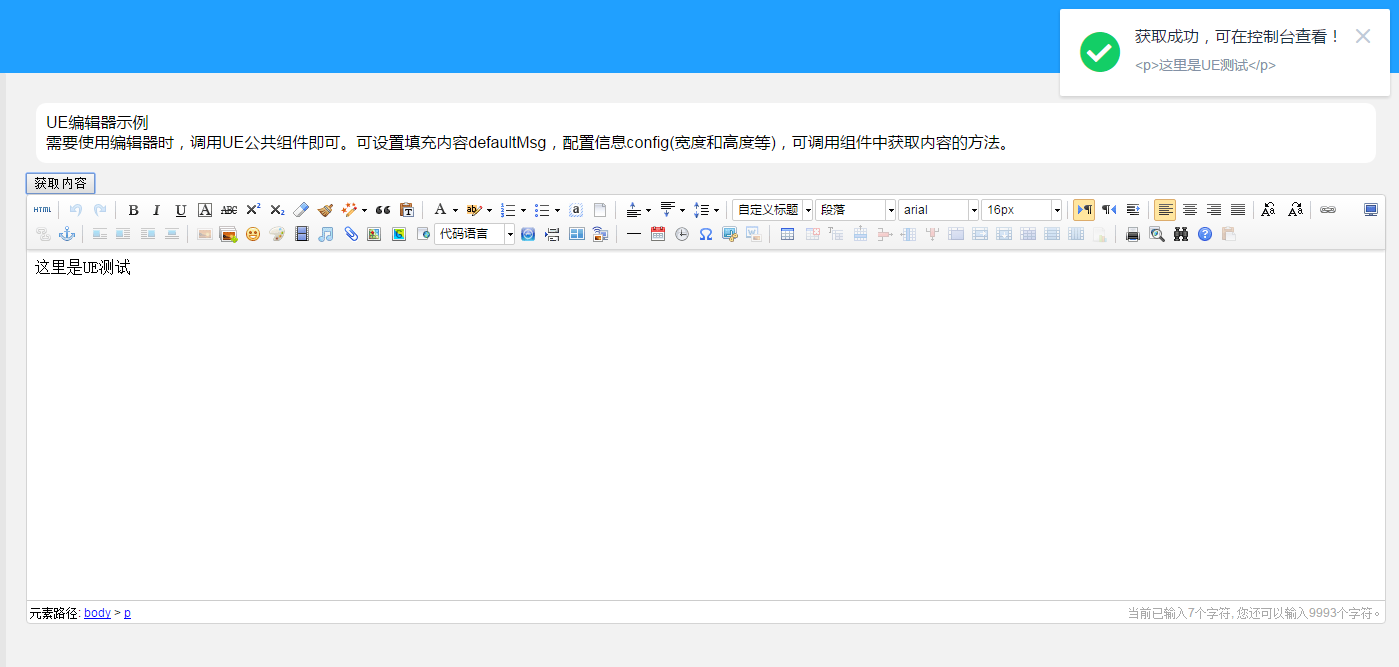
在线体验本功能:https://suweiteng.github.io/vue2-management-platform/#/editor
版本升级(beta2.0)
2018年2月25日:vue已升级至2.5.X,elementUI已升级至2.2,其他相关依赖也已升级。(beta2.0)
效果如下: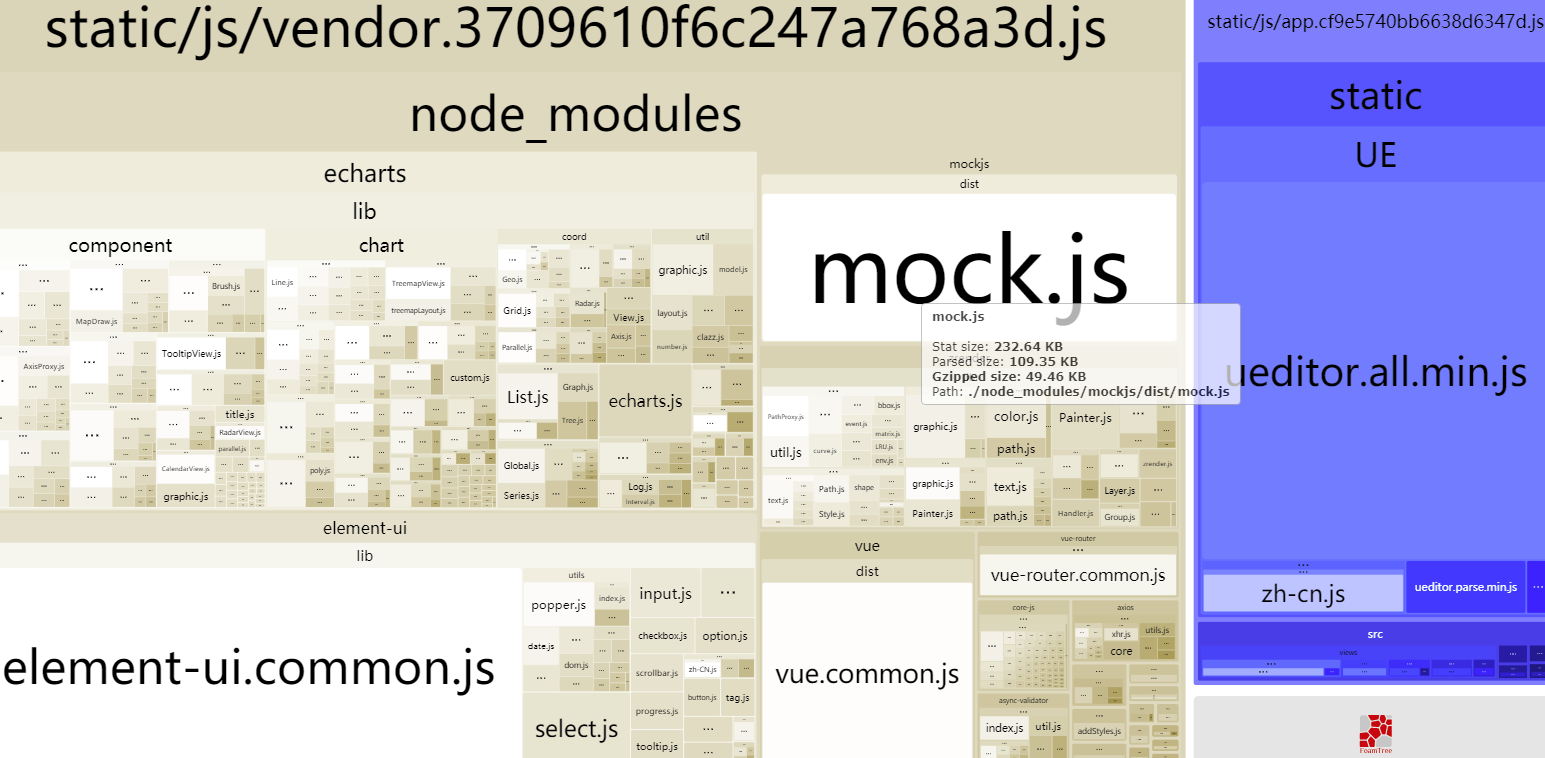
2018年2月26日:增加打包分析webpack-bundle-analyzer;优化导出功能。(beta2.1)
预览
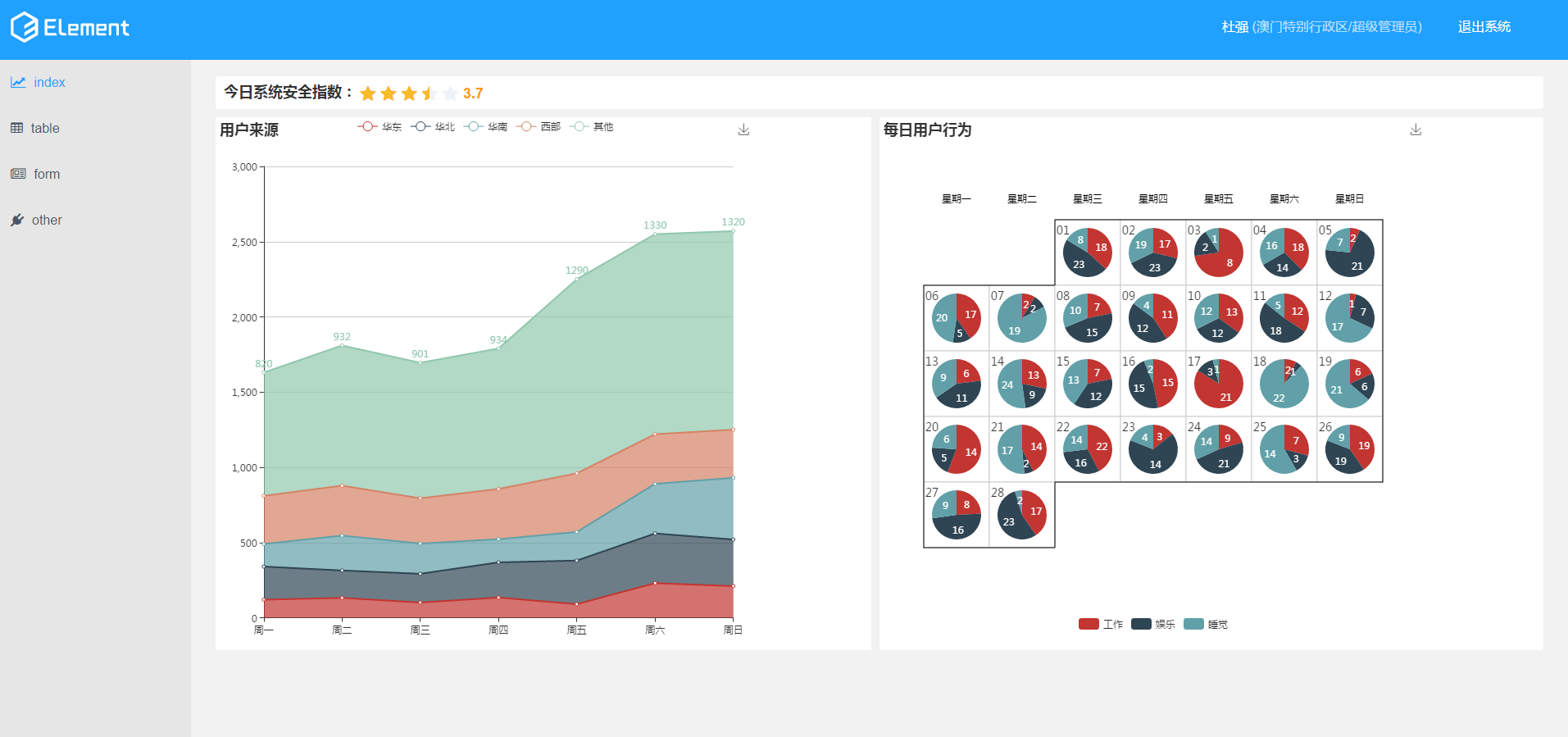
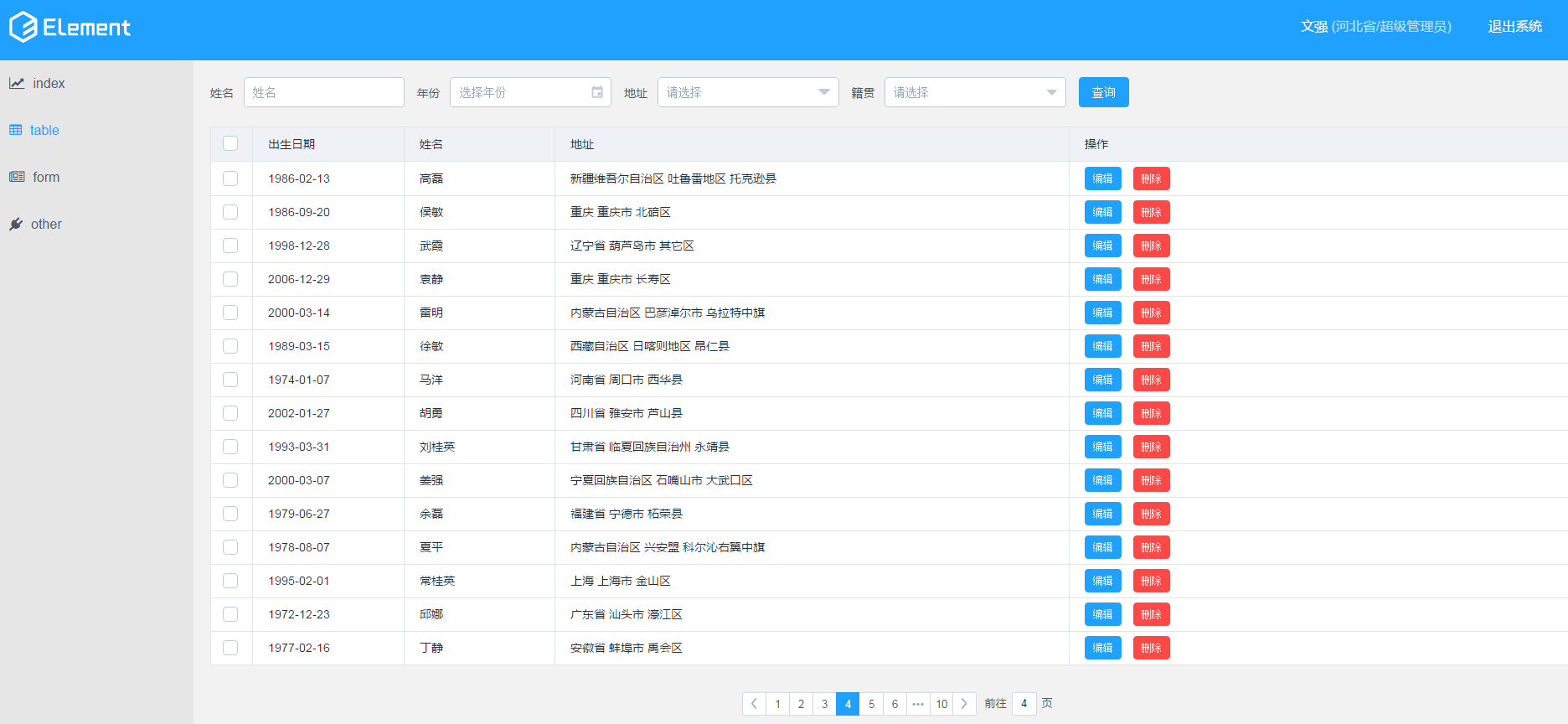
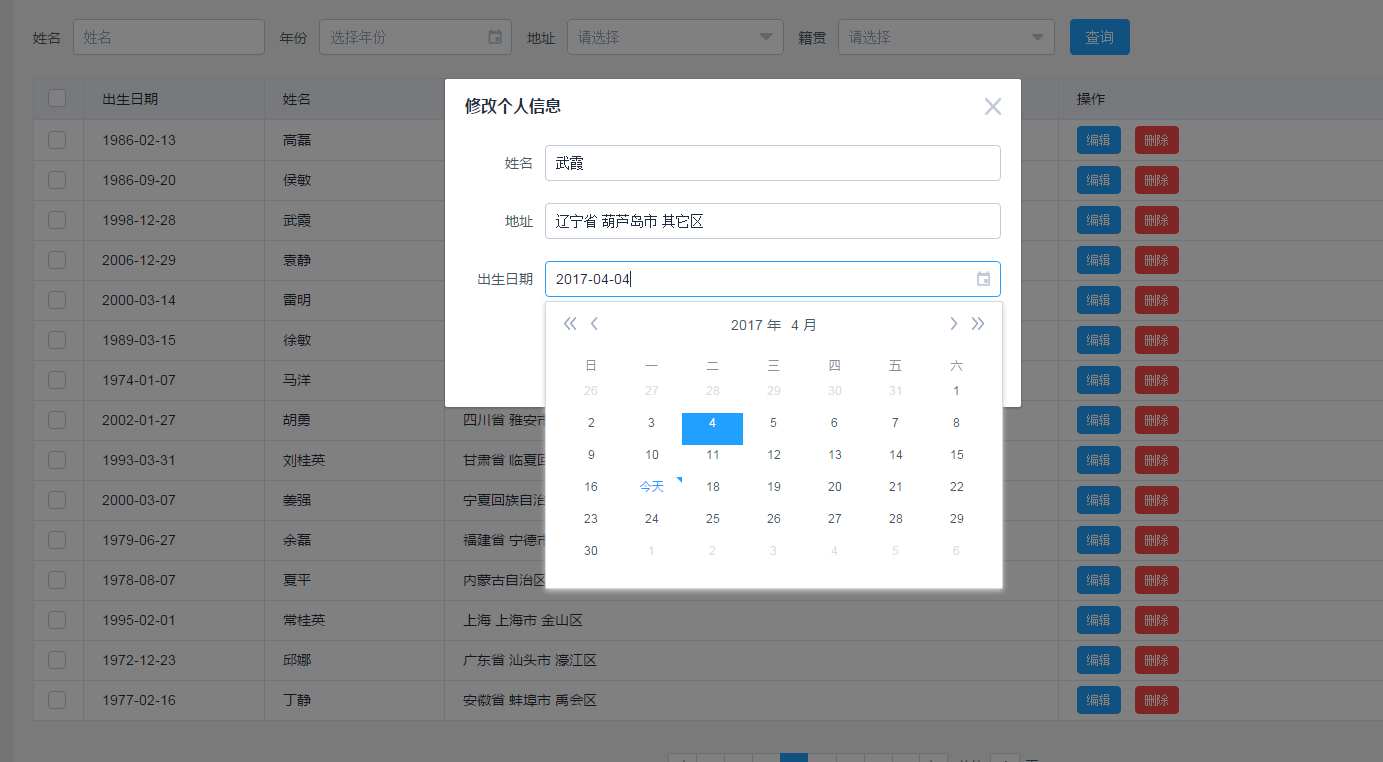
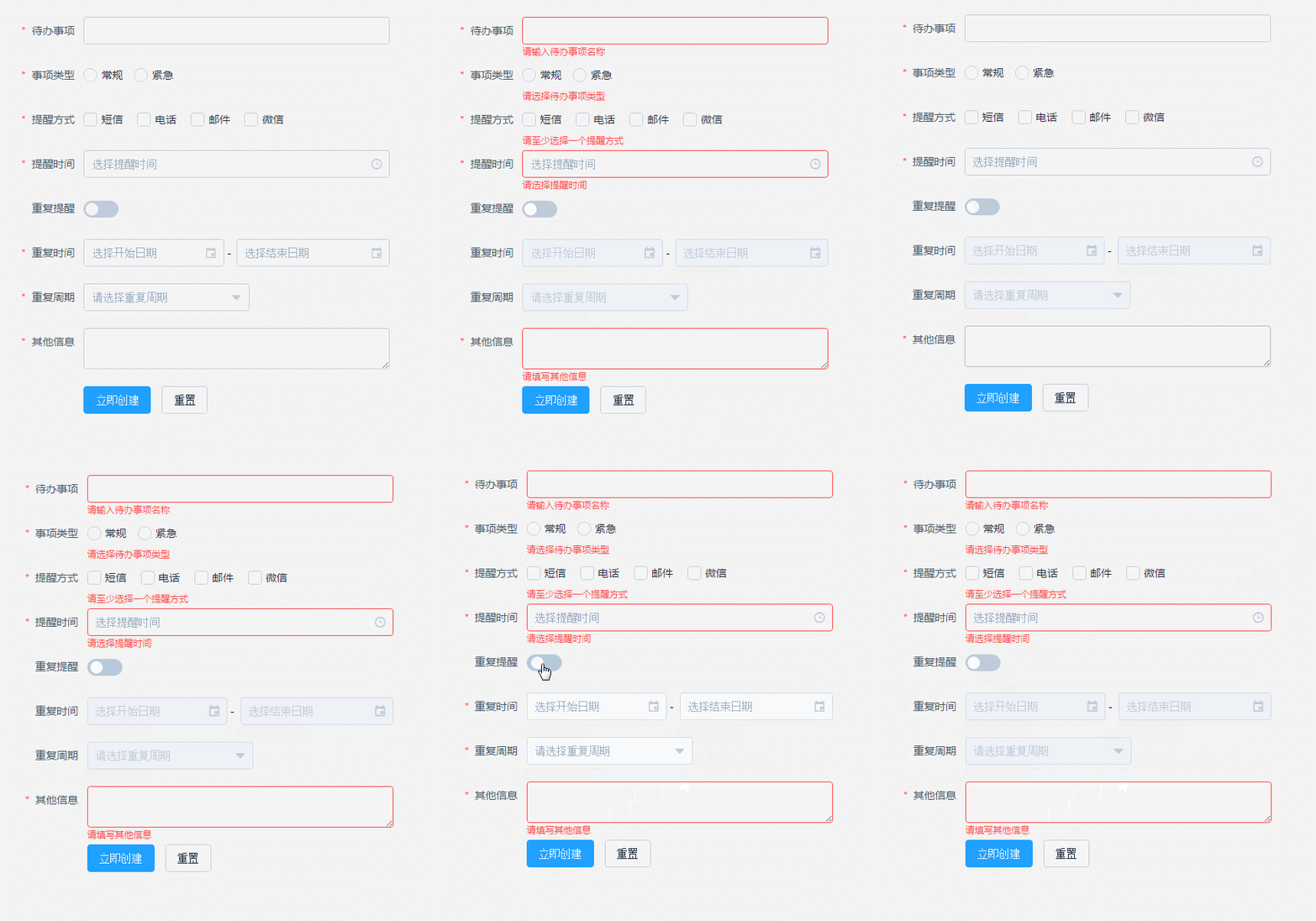
Build Setup
# install dependencies

npm install

# serve with hot reload at localhost:8080

npm run dev

# build for production with minification

npm run build
部分代码
首页index.html
<!DOCTYPE html>

<html>

  <head>

    <meta charset="utf-8">

    <title>后台管理系统</title>

    <meta name="viewport" content="width=device-width,initial-scale=1.0,maximum-scale=1.0,minimum-scale=1.0,user-scalable=no">

    <link rel="stylesheet" href="static/css/reset.css">

  </head>

  <body>

    <div id="app">

       <router-view></router-view>

    </div>

    <!-- built files will be auto injected -->

  </body>

</html>
App.vue
<template>

  <el-row class="container" style="height: 100%">

    <v-header :user="user"></v-header>

    <el-col :span="24" class="main">

      <el-row>

        <el-menu :default-active="$route.path" class="mar-l el-menu-vertical-demo el-col el-col-3" light router>

          <template v-for="(item,index) in $router.options.routes[0].children" v-if="!item.hidden">

            <el-menu-item :index="item.path" ><i class="fa" :class="item.class"></i>{{item.name}}</el-menu-item>

          </template>

        </el-menu>

        <section class="contentCon">

          <el-col :span="21" :offset="3" class="content-wrapper">

            <transition>

              <router-view></router-view>

            </transition>

          </el-col>

        </section>

      </el-row>

    </el-col>

  </el-row>

</template>

<script>

  import header from './components/header/header.vue';

  const ERR_OK = "000";

  export default {

    data () {

      return {

        user: {}

      };

    },

    created () {

      this.$http.get('/api/user').then((response) => {

        response = response.data;

        if (response.code === ERR_OK) {

          this.user = response.datas;

        }

      });

    },

    beforeCreate () {

      if (this.$route.path === '/') {

        this.$router.push({path: '/index'})

      }

    },

    components: {

      'v-header': header

    }

  };

</script>
App.vue
路由等
前期采用vue-resource,后期改为axios,方便修改,因此写了:Vue.prototype.$http = axios;
import Vue from 'vue';

import VueRouter from 'vue-router';

import axios from 'axios';

import ElementUI from 'element-ui';

import 'element-ui/lib/theme-default/index.css';

import App from './App';

import Index from './components/index/index';

import Table from './components/table/table';

import Form from './components/form/form';

import other from './components/other/other';

import 'font-awesome/css/font-awesome.min.css';

import Mock from './mock/mock';

Mock.mockData();

Vue.use(VueRouter);// 安装路由功能

/* eslint-disable no-new */

Vue.use(VueRouter);

Vue.prototype.$http = axios;

Vue.use(ElementUI);

let routes = [

  {

    path: '/',

    component: App,

    children: [

      {path: '/index', component: Index, name: 'index', class: 'fa-line-chart'},

      {path: '/table', component: Table, name: 'table', class: 'fa-table'},

      {path: '/form', component: Form, name: 'form', class: 'fa-newspaper-o'},

      {path: '/other', component: other, name: 'other', class: 'fa-plug'}

    ]

  }

];

let router = new VueRouter({

  'linkActiveClass': 'active',

  routes

});

let app = new Vue({

  router

}).$mount('#app');

export default app;
git:https://github.com/suweiteng/vue2-management-platform (记得点star哈,感谢~)
访问:https://suweiteng.github.io/vue2-management-platform
vue2.0+elementUI构建单页面后台管理平台的更多相关文章
- Vue2.0 + ElementUI 手写权限管理系统后台模板(一)——简述
挤一下: 一开始以为没有多少人用就没建群,但是加我的人太多了,好多问题都是重复的,所以建个群大家互相沟通交流方便点,但是建的有点晚,错过了好多人所以群里人有点少,QQ群: 157216616 小提示 ...
- Java快速开发平台强大的代码生成器,JEECG 3.7.5 VUE+ElementUI SPA单页面应用版本发布
JEECG 3.7.5 VUE+ElementUI SPA单页面应用版本发布 此版本为Vue+ElementUI SPA单页面应用版本,提供新一代风格代码生成器模板,采用Vue技术,提供两套精美模板E ...
- Vue2.0 + Element-UI + WebAPI实践:简易个人记账系统
最近正在学习Vue2.0相关知识,正好近期饿了么桌面端组件Element-UI发布,便动手做了一款简易个人记账系统,以达到实践及巩固目的. 1.开发环境 Win10 + VS2015 + Sqlser ...
- Vue2.0+ElementUI+PageHelper实现的表格分页
Vue2.0+ElementUI+PageHelper实现的表格分页 前言 最近做了一些前端的项目,要对表格进行一些分页显示.表格分页的方法有很多,从宏观上来说分为物理分页和逻辑分页,由于逻辑分页(即 ...
- 基于vue2.0打造移动商城页面实践 vue实现商城购物车功能 基于Vue、Vuex、Vue-router实现的购物商城(原生切换动画)效果
基于vue2.0打造移动商城页面实践 地址:https://www.jianshu.com/p/2129bc4d40e9 vue实现商城购物车功能 地址:http://www.jb51.net/art ...
- 老男孩Day17作业:后台管理平台编辑表格
一.作业需求: 后台管理平台 ,编辑表格: 1. 非编辑模式: 可对每行进行选择: 反选: 取消选择 2. 编辑模式: 进入编辑模式时如果行被选中,则被选中的行万变为可编辑状态,未选中的不改变 退出编 ...
- vue2.0+element-ui(01简单点的单页面)
前言: 在<Vue.js权威指南>刚出版的时候,自己就作为一名前端粉捧了一把场,可是真是应了那句“出来混,总是要还的“这句话了,那时候信心满满的买来书想要认真研究,最终却还是把它搁浅了.直 ...
- 基于Vue2.0+Vue-router构建一个简单的单页应用
爱编程爱分享,原创文章,转载请注明出处,谢谢!http://www.cnblogs.com/fozero/p/6185492.html 一.介绍 vue.js 是 目前 最火的前端框架,vue.js ...
- 使用vuejs2.0和element-ui 搭建的一个后台管理界面
说明: 这是一个用vuejs2.0和element-ui搭建的后台管理界面. 相关技术: vuejs2.0:一套构建用户界面的渐进式JavaScript框架,易用.灵活.高效. element-ui: ...
随机推荐
- Cocos2d-x shader学习2: 模糊(Blur)
模糊效果在游戏中经常会用到,有的为了突出前景会把背景给模糊化,有的是因为一些技能需要模糊效果.模糊是shader中较为简单的一种应用.cocos2dx 3.x给的demo中,就有sprite的模糊的效 ...
- 关于使用mybatis中mapper instrances,通过session另一种操作方式
String resource = "mybatis-config.xml"; InputStream inputStream = null; try { // 获取SqlSess ...
- Triangle Problems
Triangle Problem songxiuhuan 宋修寰 Import the Junit and eclemma Choose the project and right click, ch ...
- 算法模板——AC自动机
实现功能——输入N,M,提供一个共计N个单词的词典,然后在最后输入的M个字符串中进行多串匹配(关于AC自动机算法,此处不再赘述,详见:Aho-Corasick 多模式匹配算法.AC自动机详解.考虑到有 ...
- 根据模板导出Excel报表并生成多个Sheet页
因为最近用报表导出比较多,所有就提成了一个工具类,本工具类使用的场景为 根据提供的模板来导出Excel报表 并且可根据提供的模板Sheet页进行复制 从而实现多个Sheet页的需求, 使用本工具类时 ...
- Spring使用注解进行事务的管理
使用步骤: 步骤一.在spring配置文件中引入<tx:>命名空间 <beans xmlns="http://www.springframework.org/schema/ ...
- CoreAnimation 变换
CoreAnimation 变换 CoreAnimation 目录 博客园MakeDown支持不佳,如有需要请进GitHub 本片博客主要内容: 仿射变换 - CGAffineTransform 3D ...
- Spring中一个类的注入和引用是不一样的
1.在Spring管理下的bean需要以下面这种方式引入(一种注入方式): private MgrService mgrService; public MgrService getMgrService ...
- Grafana关键表结构分析
Grafana默认使用SQLite存储数据表,默认数据库文件存储在/var/lib/grafana/grafana.db中,可以将文件拷贝到Widnows中,使用Navicat for SQLite进 ...
- 解决子元素用css float浮动后父级元素高度自适应高度
1.在最后一个子元素后面清除浮动 2.父元素加over-flow:hidden;(副作用:子元素定位不能超出父元素的范围) 3.父元素也一样浮动(最笨的方法): 4.子元素使用inline-block ...