
google protobuf安装与使用
google protobuf是一个灵活的、高效的用于序列化数据的协议。相比较XML和JSON格式,protobuf更小、更快、更便捷。google protobuf是跨语言的,并且自带了一个编译器(protoc),只需要用它进行编译,可以编译成Java、python、C++、C#、Go等代码,然后就可以直接使用,不需要再写其他代码,自带有解析的代码。更详细的介绍见: Protocol Buffers
protobuf安装
1、下载protobuf代码 google/protobuf
2、安装protobuf
tar -xvf protobuf
cd protobuf
./configure --prefix=/usr/local/protobuf
make
make check
make install
至此安装完成^_^,下面是配置:
(1) vim /etc/profile,添加
.proto文件
.proto文件是protobuf一个重要的文件,它定义了需要序列化数据的结构。使用protobuf的3个步骤是:
1 在.proto文件中定义消息格式
2 用protobuf编译器编译.proto文件
3 用C++/Java等对应的protobuf API来写或者读消息
程序示例(C++版)
该程序示例的大致功能是,定义一个Persion结构体和存放Persion的AddressBook,然后一个写程序向一个文件写入该结构体信息,另一个程序从文件中读出该信息并打印到输出中。
1 address.proto文件
package tutorial;

message Persion {

    required string name = ;

    required int32 age = ;

}

message AddressBook {

    repeated Persion persion = ;

}
编译.proto文件,执行命令: protoc -I=$SRC_DIR --cpp_out=$DST_DIR $SRC_DIR/addressbook.proto,示例中执行命令protoc --cpp_out=/tmp addressbook.proto ,会在/tmp中生成文件addressbook.pb.h和addressbook.pb.cc。
2 write.cpp文件,向文件中写入AddressBook信息,该文件是二进制的
 #include <iostream>

 #include <fstream>

 #include <string>

 #include "addressbook.pb.h"

 using namespace std;

 void PromptForAddress(tutorial::Persion *persion) {

     cout << "Enter persion name:" << endl;

     string name;

     cin >> name;

     persion->set_name(name);

     int age;

     cin >> age;

     persion->set_age(age);

 }

 int main(int argc, char **argv) {

     //GOOGLE_PROTOBUF_VERIFY_VERSION;

     if (argc != ) {

         cerr << "Usage: " << argv[] << " ADDRESS_BOOL_FILE" << endl;

         return -;

     }

     tutorial::AddressBook address_book;

     {

         fstream input(argv[], ios::in | ios::binary);

         if (!input) {

             cout << argv[] << ": File not found. Creating a new file." << endl;

         }

         else if (!address_book.ParseFromIstream(&input)) {

             cerr << "Filed to parse address book." << endl;

             return -;

         }

     }

     // Add an address

     PromptForAddress(address_book.add_persion());

     {

         fstream output(argv[], ios::out | ios::trunc | ios::binary);

         if (!address_book.SerializeToOstream(&output)) {

             cerr << "Failed to write address book." << endl;

             return -;

         }

     }

     // Optional: Delete all global objects allocated by libprotobuf.

     //google::protobuf::ShutdownProtobufLibrary();

     return ;

 }
编译write.cpp文件,g++ addressbook.pb.cc write.cpp -o write `pkg-config --cflags --libs protobuf` (注意,这里的`符号在键盘数字1键左边,也就是和~是同一个按键)。
3 read.cpp文件,从文件中读出AddressBook信息并打印
 #include <iostream>

 #include <fstream>

 #include <string>

 #include "addressbook.pb.h"

 using namespace std;

 void ListPeople(const tutorial::AddressBook& address_book) {

     for (int i = ; i < address_book.persion_size(); i++) {

         const tutorial::Persion& persion = address_book.persion(i);

         cout << persion.name() << " " << persion.age() << endl;

     }

 }

 int main(int argc, char **argv) {

     //GOOGLE_PROTOBUF_VERIFY_VERSION;

     if (argc != ) {

         cerr << "Usage: " << argv[] << " ADDRESS_BOOL_FILE" << endl;

         return -;

     }

     tutorial::AddressBook address_book;

     {

         fstream input(argv[], ios::in | ios::binary);

         if (!address_book.ParseFromIstream(&input)) {

             cerr << "Filed to parse address book." << endl;

             return -;

         }

         input.close();

     }

     ListPeople(address_book);

     // Optional: Delete all global objects allocated by libprotobuf.

     //google::protobuf::ShutdownProtobufLibrary();

     return ;

 }
编译read.cpp文件,g++ addressbook.pb.cc read.cpp -o read `pkg-config --cflags --libs protobuf`
4 执行程序
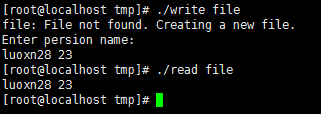
参考
google protobuf安装与使用的更多相关文章
- Google protobuf安装
1:需要安装sudo apt-get install x11-apps libwayland-ltst-client0 libtxc-dxtn-s2tc0 x11-session-utils x11 ...
- Google protobuf的安装及使用
最近应为工作的需要,合作的部门提供了protobuf的接口,总结了一下使用的过程和方法如下: 下载protobuf-2.3.0: http://protobuf.googlecode.com/file ...
- mac安装protobuf2.4.1时报错./include/gtest/internal/gtest-port.h:428:10: fatal error: 'tr1/tuple' file not found和google/protobuf/message.cc:175:16: error: implicit instantiation of undefined template
通过网上下载的protobuf2.4.1的压缩文件,然后进行安装,./configure和make时遇到了两个问题. 正常的安装步骤如下: ./configure make make check m ...
- caffe安装编译问题-ImportError: No module named google.protobuf.internal
问题描述 ~/Downloads/caffe$ python Python (default, Dec , ::) [GCC ] on linux2 Type "help", &q ...
- GOOGLE PROTOBUF开发者指南
原文地址:http://www.cppblog.com/liquidx/archive/2009/06/23/88366.html 译者: gashero 目录 1 概览 1.1 什么是pro ...
- google protobuf ios开发使用
简介: protobuf 即 google protocol buffer 是一种数据封装格式协议: 比如其他经常用的xml,json等格式:protobuf的优势是效率高,同样的一份数据使用prot ...
- go protobuf 安装
1.https://github.com/google/protobuf/releases/tag/v3.0.0 下载需要的版本,如果执行autogen.sh的过程中出现autoreconf not ...
- protobuf 安装 及 小测试
参考:http://shift-alt-ctrl.iteye.com/blog/2210885 版本: 2.5.0 百度云盘上有jar包. mac 上安装: 新建:/Users/zj/software ...
- google protobuf使用
下载的是github上的:https://github.com/google/protobuf If you get the source from github, you need to gener ...
随机推荐
- 使用AWS亚马逊云搭建Gmail转发服务(二)
title: 使用AWS亚马逊云搭建Gmail转发服务(二) author:青南 date: 2014-12-31 14:44:27 categories: [Python] tags: [Pytho ...
- Python标准模块--argparse
1 模块简介 你一定很奇怪Python是如何命令行中的变量的吧?argparse就是用来解决这个问题的,argparse是optparse的替代. 2 模块使用 2.1 开始 我发现解释一个编程的概念 ...
- ElasticSearch 5学习(7)——分布式集群学习分享2
前面主要学习了ElasticSearch分布式集群的存储过程中集群.节点和分片的知识(ElasticSearch 5学习(6)--分布式集群学习分享1),下面主要分享应对故障的一些实践. 应对故障 前 ...
- Android数据存储之SQLCipher数据库加密
前言: 最近研究了Android Sqlite数据库(文章地址:Android数据存储之Sqlite的介绍及使用)以及ContentProvider程序间数据共享(Android探索之ContentP ...
- Android Tint
Android Tint 如果要实现下图效果,第一时间想到的是让 UI 切图,第二时间想到的是自己会被 UI 打死,第三时间想到的是自己会被命名累死.  那么,这该如何快速高效的实现呢? 其实 An ...
- 【分布式】Zookeeper客户端
一.前言 前篇博客分析了Zookeeper的序列化和通信协议,接着继续学习客户端,客户端是开发人员使用Zookeeper最主要的途径,很有必要弄懂客户端是如何与服务端通信的. 二.客户端 2.1 客户 ...
- [MEF插件式开发] 一个简单的例子
偶然在博客园中了解到这种技术,顺便学习了几天. 以下是搜索到一些比较好的博文供参考: MEF核心笔记 <MEF程序设计指南>博文汇总 先上效果图 一.新建解决方案 开始新建一个解决方案Me ...
- Angularjs环境搭建
Angularjs架构搭建 1.搭建Angularjs项目 1)在package.json中配置如下,然后 npm install下载包 { "na ...
- div+css3绘制基本图形
基本图形包括:矩形.圆角矩形.圆形.椭圆形.三角形.值线.弧 这些图形的绘制用到了CSS圆角属性,不考虑IE8. 下面的实现在chrome浏览器运行通过. 1.矩形 比较简单,通过CSS设置宽度.高度 ...
- Entity Framework Plus 系列目录
Entity Framework Plus 系列文章计划的已经全部写完,可能还有其他功能没有写到,希望大家能够多动手,尝试一下使用,一定会给您带来一些帮助的.文章全部写完,也应该出一个目录方便查看,目 ...