
3.2-3.3 Hive中常见的数据压缩
一、数据压缩
1、
数据压缩

    数据量小

    *本地磁盘,IO

    *减少网络IO

Hadoop作业通常是IO绑定的;

压缩减少了跨网络传输的数据的大小;

通过简单地启用压缩,可以提高总体作业性能;

要压缩的数据必须支持可分割性;
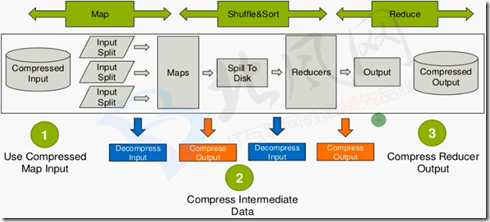
2、什么时候压缩?
1、Use Compressed Map Input

· Mapreduce jobs read input from HDFS

· Compress if input data is large. This will reduce disk read cost.

· Compress with splittable algorithms like Bzip2

· Or use compression with splittable file structures such as Sequence Files, RC Files etc.

2、Compress Intermediate Data

·Map output is written to disk(spill)and transferred accross the network

·Always use compression toreduce both disk write,and network transfer load

·Beneficial in performace point of view even if input and output is uncompressed

·Use faster codecs such as Snappy,LZO

3、Compress Reducer Output

.Mapreduce output used for both archiving or chaining mapreduce jobs

·Use compression to reduce disk space for archiving

·Compression is also beneficial for chaining jobsespecially with limited disk throughput resource.

·Use compression methods with higher compress ratio to save more disk space
3、Supported Codecs in Hadoop
Zlib→org.apache.hadoop.io.compress.DefaultCodec

Gzip →org.apache.hadoop.io.compress.Gzipcodec

Bzip2→org.apache.hadoop.io.compress.BZip2Codec

Lzo→com.hadoop.compression.1zo.LzoCodec

Lz4→org.apache.hadoop.io.compress.Lz4Codec

Snappy→org.apache.hadoop.io.compress.Snappycodec
4、Compression in MapReduce
#####

Compressed Input Usage:

    File format is auto recognized with extension.

    Codec must be defined in core-site.xml.

#####

Compress

Intermediate Data

(Map Output):

    mapreduce.map.output.compress=True;

    mapreduce.map.output.compress.codec=CodecName;

#####

Compress Job Output (Reducer Output):

    mapreduce.output.fileoutputformat.compress=True;

    mapreduce.output.fileoutputformat.compress.codec=CodecName;
5、Compression in Hive
#####

Compressed

Input Usage:

Can be defined in table definition

STORED AS INPUTFORMAT

\"com.hadoop.mapred.DeprecatedLzoText Input Format\"

#####

Compress Intermediate Data (Map Output):

SET hive. exec. compress. intermediate=True;

SET mapred. map. output. compression. codec=CodecName;

SET mapred. map. output. compression. type=BLOCK/RECORD;

Use faster codecs such as Snappy, Lzo, LZ4

Useful for chained mapreduce jobs with lots of intermediate data such as joins.

#####

Compress Job Output (Reducer Output):

SET hive.exec.compress.output=True;

SET mapred.output.compression.codec=CodecName;

SET mapred.output.compression.type=BLOCK/RECORD;
二、snappy
1、简介
在hadoop集群中snappy是一种比较好的压缩工具,相对gzip压缩速度和解压速度有很大的优势,

而且相对节省cpu资源,但压缩率不及gzip。它们各有各的用途。

Snappy是用C++开发的压缩和解压缩开发包,旨在提供高速压缩速度和合理的压缩率。Snappy比zlib更快,但文件相对要大20%到100%。

在64位模式的Core i7处理器上,可达每秒250~500兆的压缩速度。

Snappy的前身是Zippy。虽然只是一个数据压缩库,它却被Google用于许多内部项目程,其中就包括BigTable,MapReduce和RPC。

Google宣称它在这个库本身及其算法做了数据处理速度上的优化,作为代价,并没有考虑输出大小以及和其他类似工具的兼容性问题。

Snappy特地为64位x86处理器做了优化,在单个Intel Core i7处理器内核上能够达到至少每秒250MB的压缩速率和每秒500MB的解压速率。

如果允许损失一些压缩率的话,那么可以达到更高的压缩速度,虽然生成的压缩文件可能会比其他库的要大上20%至100%,但是,

相比其他的压缩库,Snappy却能够在特定的压缩率下拥有惊人的压缩速度,“压缩普通文本文件的速度是其他库的1.5-1.7倍,

HTML能达到2-4倍,但是对于JPEG、PNG以及其他的已压缩的数据,压缩速度不会有明显改善”。
2、使得Snappy类库对Hadoop可用
此处使用的是编译好的库文件;
#这里是编译好的库文件,在压缩包里,先解压缩

[root@hadoop-senior softwares]# mkdir 2.5.0-native-snappy

[root@hadoop-senior softwares]# tar zxf 2.5.0-native-snappy.tar.gz -C 2.5.0-native-snappy

[root@hadoop-senior softwares]# cd 2.5.0-native-snappy

[root@hadoop-senior 2.5.0-native-snappy]# ls

libhadoop.a       libhadoop.so        libhadooputils.a  libhdfs.so        libsnappy.a   libsnappy.so    libsnappy.so.1.2.0

libhadooppipes.a  libhadoop.so.1.0.0  libhdfs.a         libhdfs.so.0.0.0  libsnappy.la  libsnappy.so.1

#替换hadoop的安装

[root@hadoop-senior lib]# pwd

/opt/modules/hadoop-2.5.0/lib

[root@hadoop-senior lib]# mv native/ 250-native

[root@hadoop-senior lib]# mkdir native

[root@hadoop-senior lib]# ls

250-native  native  native-bak

[root@hadoop-senior lib]# cp /opt/softwares/2.5.0-native-snappy/* ./native/

[root@hadoop-senior lib]# ls native

libhadoop.a       libhadoop.so        libhadooputils.a  libhdfs.so        libsnappy.a   libsnappy.so    libsnappy.so.1.2.0

libhadooppipes.a  libhadoop.so.1.0.0  libhdfs.a         libhdfs.so.0.0.0  libsnappy.la  libsnappy.so.1

#检查

[root@hadoop-senior hadoop-2.5.0]# bin/hadoop checknative

19/04/25 09:59:51 INFO bzip2.Bzip2Factory: Successfully loaded & initialized native-bzip2 library system-native

19/04/25 09:59:51 INFO zlib.ZlibFactory: Successfully loaded & initialized native-zlib library

Native library checking:

hadoop: true /opt/modules/hadoop-2.5.0/lib/native/libhadoop.so

zlib:   true /lib64/libz.so.1

snappy: true /opt/modules/hadoop-2.5.0/lib/native/libsnappy.so.1    #snappy已经为true

lz4:    true revision:99

bzip2:  true /lib64/libbz2.so.1
3、mapreduce压缩测试
#创建测试文件

[root@hadoop-senior hadoop-2.5.0]# bin/hdfs dfs -mkdir -p /user/root/mapreduce/wordcount/input

[root@hadoop-senior hadoop-2.5.0]# touch /opt/datas/wc.input

[root@hadoop-senior hadoop-2.5.0]# vim !$

hadoop hdfs

hadoop hive

hadoop mapreduce

hadoop hue

[root@hadoop-senior hadoop-2.5.0]# bin/hdfs dfs -put /opt/datas/wc.input /user/root/mapreduce/wordcount/input

put: `/user/root/mapreduce/wordcount/input/wc.input': File exists

[root@hadoop-senior hadoop-2.5.0]# bin/hdfs dfs -ls -R /user/root/mapreduce/wordcount/input

-rw-r--r--   1 root supergroup         12 2019-04-08 15:03 /user/root/mapreduce/wordcount/input/wc.input

#先不压缩运行MapReduce

[root@hadoop-senior hadoop-2.5.0]# bin/yarn jar share/hadoop/mapreduce/hadoop-mapreduce-examples-2.5.0.jar wordcount /user/root/mapreduce/wordcount/input /user/root/mapreduce/wordcount/output

#压缩运行MapReduce

[root@hadoop-senior hadoop-2.5.0]# bin/yarn jar share/hadoop/mapreduce/hadoop-mapreduce-examples-2.5.0.jar wordcount -Dmapreduce.map.output.compress=true -Dmapreduce.map.output.compress.codec=org.apache.hadoop.io.compress.SnappyCodec /user/root/mapreduce/wordcount/input /user/root/mapreduce/wordcount/output2

#-Dmapreduce.map.output.compress=true :map输出的值要使用压缩;-D是参数
#-Dmapreduce.map.output.compress.codec=org.apache.hadoop.io.compress.SnappyCodec :使用snappy压缩;-D是参数

#由于数据量太小,基本上看不出差别
三、hive配置压缩
hive (default)> set mapreduce.map.output.compress=true;

hive (default)> set mapreduce.map.output.compress.codec=org.apache.hadoop.io.compress.SnappyCodec;
测试:
在hive中运行一个select会执行MapReduce:
hive (default)> select count(*) from emp;
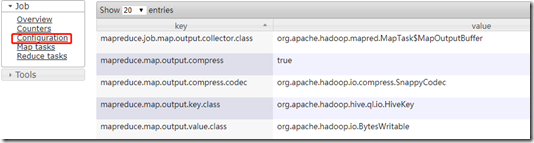
在web页面的具体job中可以看到此作业使用的配置:
3.2-3.3 Hive中常见的数据压缩的更多相关文章
- 2.9-2.10 hive中常见查询
一.查询语句 https://cwiki.apache.org/confluence/display/Hive/LanguageManual+Select 1.select语法 SELECT [ALL ...
- HIVE中的order by操作
hive中常见的高级查询包括:group by.Order by.join.distribute by.sort by.cluster by.Union all.今天我们来看看order by操作,O ...
- 工作中常见的hive语句总结
hive的启动: 1.启动hadoop2.开启 metastore 在开启 hiveserver2服务nohup hive --service metastore >> log.out 2 ...
- Hive中row_number()、dense_rank()、rank()的区别
摘要 本文对Hive中常用的三个排序函数row_number().dense_rank().rank()的特性进行类比和总结,并通过笔者亲自动手写的一个小实验,直观展现这三个函数的特点. 三个排序函数 ...
- Hive 中的四种排序详解,再也不会混淆用法了
Hive 中的四种排序 排序操作是一个比较常见的操作,尤其是在数据分析的时候,我们往往需要对数据进行排序,hive 中和排序相关的有四个关键字,今天我们就看一下,它们都是什么作用. 数据准备 下面我们 ...
- Spring中常见的bean创建异常
Spring中常见的bean创建异常 1. 概述 本次我们将讨论在spring中BeanFactory创建bean实例时经常遇到的异常 org.springframework.beans.fa ...
- Fouandation(NSString ,NSArray,NSDictionary,NSSet) 中常见的理解错误区
Fouandation 中常见的理解错误区 1.NSString //快速创建(实例和类方法) 存放的地址是 常量区 NSString * string1 = [NSString alloc]init ...
- C程序中常见的内存操作错误
对C/C++程序员来说,管理和使用虚拟存储器可能是个困难的, 容易出错的任务.与存储器有关的错误属于那些令人惊恐的错误, 因为它们在时间和空间上, 经常是在距错误源一段距离之后才表现出来. 将错误的数 ...
- SparkSQL读取Hive中的数据
由于我Spark采用的是Cloudera公司的CDH,并且安装的时候是在线自动安装和部署的集群.最近在学习SparkSQL,看到SparkSQL on HIVE.下面主要是介绍一下如何通过SparkS ...
随机推荐
- 无线热点登陆认证原理探究---captive portal
什么是Captive Portal 大家肯定都连过公共场所的wifi热点,比如麦当劳等地方的.他们的wifi往往一连上去就会弹出一个要求登录或者微信关注之类的页面,只有在这个页面完成操作了才能正常访问 ...
- 不能hadoop-daemon.sh start datanode, 显示 错误: 找不到或无法加载主类 ”-Djava.library.path=.home.hadoop.apps.hadoop-2.6.4.lib”
这两行代码是用来解决一个Hadoop,32位和64位不兼容的警告的,(这个警告可以忽略) 这两行加到mini2~min4后, export HADOOP_COMMON_LIB_NATIVE_DIR=$ ...
- iOS之简单瀑布流的实现
iOS之简单瀑布流的实现 前言 超简单的瀑布流实现,这里说一下笔者的思路,详细代码在这里. 实现思路 collectionView能实现各中吊炸天的布局,其精髓就在于UICollectionVie ...
- HDU 4622 Reincarnation 后缀自动机 // BKDRHash(最优hash)
Reincarnation Time Limit: 6000/3000 MS (Java/Others) Memory Limit: 131072/65536 K (Java/Others) P ...
- EasyDarwin开源摄像机访问EasyCamera中海康摄像头语音对讲和云台控制转发实现
转自:http://blog.csdn.net/yanzhuomin/article/details/52887311 EasyCamera中关于摄像头SDK的调用都集中在EasyCameraSour ...
- EasyPusher手机直播编码推送之图像旋转90度后画面重复的问题
本文转自EasyDarwin开源团队开发Holo的博客:http://blog.csdn.net/holo_easydarwin 最初在做EasyPusher手机直播的时候遇到过一个问题:手机竖屏推送 ...
- js 中常用的正则表达式
主要有以下几种: 匹配中文字符的正则表达式: [\u4e00-\u9fa5] 评注:匹配中文还真是个头疼的事,有了这个表达式就好办了哦 获取日期正则表达式:\d{4}[年|\-|\.]\d{1,2}[ ...
- 虚拟机linux安装mysql
安装mysql时需要的全套安装包 mysql-5.1.73-3.el6_5.i686.rpm mysql-libs-5.1.73-3.el6_5.i686.rpm mysql-server-5.1.7 ...
- SpringBoot-(3)-RestController接口参数
一,无参接口: //无参接口 @RequestMapping("/appSecret") public String secret() { return "EK125EK ...
- 常用git命令和工具
0. ln -s src_dir //一个参数即可在当前目录下生成一个软链接 1.git command --clone/push a branch git clone <url ...