
python3 通过邮件发送测试报告
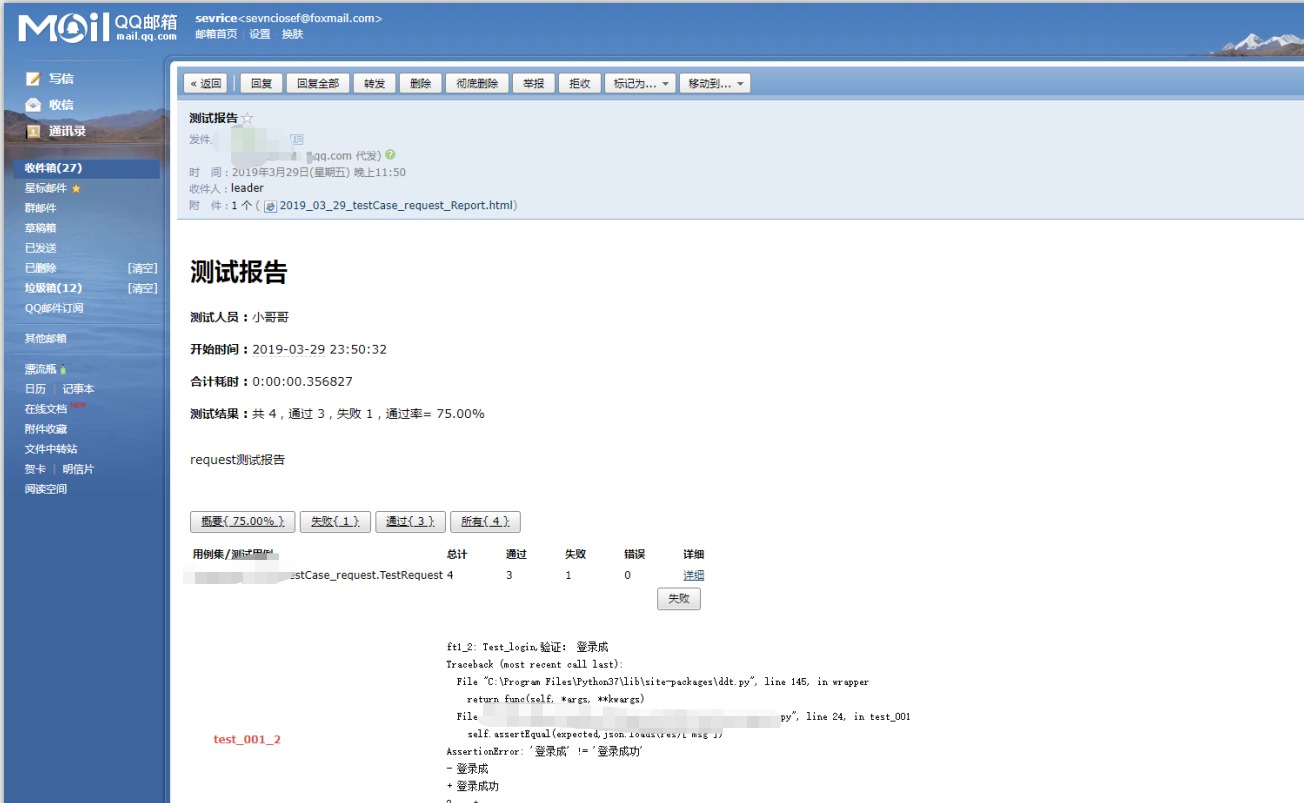
通过之前的学习,了解到了如何利用excel进行读取数据,如何采用DDT数据驱动,如何使用unittest。下面是将之前所学进行结合,并发送邮件-->leader,废话不多说,上代码:
email_report.py
 # -*- coding: utf-8 -*-

 # @Time    : 2019/3/29/029 20:55

 # @Author  : bing

 # @File    : email_report.py

 # @Software: PyCharm

 import smtplib

 import time

 from email.mime.text import MIMEText

 from email.mime.multipart import MIMEMultipart

 from email.mime.application import MIMEApplication

 from email.header import Header

 class email_Smtp:

     '''smtp-email sendemail'''

     def __init__(self,email_User,email_Pwd,to_Email_user):

         self.email_User = email_User

         self.to_Email_user = to_Email_user

         self.server = smtplib.SMTP_SSL("smtp.qq.com", 465)

         self.server.login(email_User, email_Pwd)

     def send_email_msg(self,file_path):

         test_Time = str(time.strftime("%Y_%m_%d", time.localtime()))

         test_file_name = test_Time + "_testCase_request_Report.html"

         msg_total = MIMEMultipart()  # multipart类型主要有三种子类型:mixed、alternative、related  默认mixed

         msg_total['From'] = Header("Test-Mine", 'utf-8')

         msg_total['To'] = Header("leader", 'utf-8')

         msg_total['Subject'] = '测试报告'

         # 正文模块

         msg_raw = open(file_path,"r",encoding='utf-8').read()

         msg = MIMEText(msg_raw, 'html')

         msg_total.attach(msg)

         # 附件模块

         mfile = MIMEApplication(open(file_path,"rb").read())

         # 添加附件的头信息

         mfile.add_header('Content-Disposition', 'attachment', filename=test_file_name)

         # 附件摸快添加到总的里面

         msg_total.attach(mfile)

         self.server.sendmail(self.email_User , self.to_Email_user , msg_total.as_string())

         print("邮件发送成功!请查收")
excel_file.py
 from openpyxl import load_workbook

 import json

 class RwExcelFile:

     def read_Excel_Case(self,file_path):

         """获取excel的登录信息,保存到列表里面"""

         excel_File = load_workbook(file_path)

         sheet = excel_File.worksheets[0]

         login_datas = []

         for row in range(2, sheet.max_row + 1):

             user = {

                 "method": sheet.cell(row, 1).value,

                 "data": json.loads(sheet.cell(row, 2).value),

                 "exp_data": sheet.cell(row, 3).value,

                 "case_id": sheet.cell(row, 6).value,

             }

             login_datas.append(user)

             excel_File.close()

         return login_datas

     def read_Excel(self,file_path,sheet_name,start_row,start_cloumn):

         '''

         读取excel中所有数据并以列表形式返回

         :param file_path:

         :return:

         '''

         excel_File = load_workbook(file_path)

         sheet = excel_File[sheet_name]

         list_column = []

         list_row    = []

         for i in range(start_row,sheet.max_row+1):

             for j in range(start_cloumn,sheet.max_column+1):

                 list_column.append(sheet.cell(i,j).value)

             list_row.append(list_column)

             list_column = []

         excel_File.close()

         return list_row

     def write_Excel(self,file_path,sheetname,row,cloumn,T_value):

         '''

         向excel指定位置写入值

         :param file_path: 文件地址

         :param sheetname: sheet名

         :param row: 行

         :param cloumn:列

         :param T_value: 值

         :return: 无返回

         '''

         excel_File = load_workbook(file_path)

         excel_File[sheetname].cell(row,cloumn,T_value)

         excel_File.save(file_path)

         excel_File.close()
request_login.py
import requests

class Interface_Request:

    def __init__(self,mobilephone,pwd):

        '''login参数初始化'''

        self.url = '****'

        self.dict = {'mobilephone':mobilephone,'pwd':pwd}

    def http_request(self,way):

        '''login接口请求'''

        if way=='get':

            return requests.get(self.url,self.dict).text

        elif way=='post':

            return requests.post(self.url,self.dict).text
testCase_request.py
import unittest

from excel_file import *

from request_login import Interface_Request

from ddt import ddt,unpack,data

@ddt#@ddt装饰测试类 unittest.TestCase的子类

class TestRequest(unittest.TestCase,RwExcelFile):

    @data(*RwExcelFile().read_Excel_Case('request测试数据.xlsx'))

    @unpack

    def test_001(self,method,data,exp_data,case_id):

        print('Test_login,验证:',exp_data)

        expected=exp_data#期望值

        res=Interface_Request(data["mobilephone"],data["pwd"]).http_request(method) #实际值

        #断言

        try:

            self.assertEqual(expected,json.loads(res)['msg'])

            row = int(case_id) + 1

            RwExcelFile().write_Excel('request测试数据.xlsx', "Sheet1", row, 5, 'pass')

        except AssertionError as e:

            # logging

            # 测试不通过的结果: “failed” 写到 Excel

            row = int(case_id) + 1

            RwExcelFile().write_Excel('request测试数据.xlsx',"Sheet1",row,5,'failed')

            raise
testSuite_Run.py
 import unittest

 import HTMLTestRunnerNew

 import time

 from email_report import email_Smtp

 from Test import testCase_request

 loader=unittest.TestLoader()#用例的加载器

 suite=unittest.TestSuite()#创建了一个对象

 suite.addTest(loader.loadTestsFromModule(testCase_request))#注意引入的是模块名不是类名,这里犯过错

 #执行并生成html测试报告--HTMLTestRunnerNew

 test_Time = str(time.strftime("%Y_%m_%d", time.localtime()))

 test_file_name = test_Time+"_testCase_request_Report.html"

 with open(test_file_name,'wb+') as file:

     runner=HTMLTestRunnerNew.HTMLTestRunner(

         stream=file,

         verbosity=2,

         title='测试报告',

         description='request测试报告',

         tester='Test_Mine'

     )#创建一个对象来执行用例

     runner.run(suite)#这一行没有任何改变

 email_Smtp("****@qq.com", "密钥" , "*****@qq.com").send_email_msg(test_file_name)

邮件截图:
python3 通过邮件发送测试报告的更多相关文章
- Java+Selenium3框架设计篇5-如何实现邮件发送测试报告
https://blog.csdn.net/u011541946/article/details/77278837 本篇继续回答网友的问题,这个主题是如何通过邮件发送测试报告.通过邮件发送测试报告,这 ...
- Jenkins配置邮件发送测试报告
前言 在之前的文章(Jenkins自动执行python脚本输出测试报告)中,我们已成功实现利用Jenkins自动执行python脚本,输出并可直接在界面上查看测试报告,这里我们还差最后一步,我们需要将 ...
- Python添加邮件附件并通过邮件发送测试报告
import smtplib from email.mime.multipart import MIMEMultipart from email.mime.text import MIMEText c ...
- python3实现邮件发送程序
刚开始的想法很简单,由于有上千封的邮件需要发出去,并且需要一条一条发送,不能转发或群发,每条邮件要署对方的姓名,并加上几个相同的符件,考虑到手工操作繁琐无趣,所以想到用程序实现,python好像非常胜 ...
- Jenkins发送测试报告
邮件全局配置 邮件插件:Email Extension Plugin 功能:发送邮件 邮件全局配置:jenkins--系统管理--系统配置:截图: 配置说明: 系统管理员邮件地址:必须配置,配置后邮件 ...
- python3 邮件方式发送测试报告
以邮件方式发送测试报告 import smtplib from email.mime.text import MIMEText class SendEmail: """邮 ...
- 【Python + Selenium3】自动化测试之DDT数据驱动并生成测试报告以及用yagmail邮件发送文件
我的文件路径 一.DDT代码: import unittest from time import sleep from selenium import webdriver from ddt impor ...
- python3 邮件发送
这是搜罗网络上的文章总结的一份文档, 参考: https://www.jb51.net/article/140604.htm https://www.jb51.net/article/140604.h ...
- Python Selenium unittest+HTMLTestRunner实现 自动化测试及发送测试报告邮件
1.UI测试框架搭建-目录结构 2. 文件介绍 2.1.baseinfo->__init__.py 配置文件定义基础参数 #-*-coding:utf-8-*- #测试用例配置参数 base_u ...
随机推荐
- 使用 ES.later 的装饰器作为 mixin
原文链接:http://raganwald.com/2015/06/26/decorators-in-es7.html 在函数式 mixin 中,我们讨论了将功能糅合进 JavaScript 类中 ...
- MDK调试无法进入main()函数
今天在用MDK调试stm32时出现了无法进入main函数,进入startup文件的情况. 在网上查找资料时发现,MDK调试设置断点最多只能设置5个.在减少断点后,调试果然能够正常进入main()函数了 ...
- jquery实现点击页面空白处,弹框消失
要求:点击1,弹框2显示,点击空白处,弹框2消失 $("#AddDevices"):按钮1 $(".addDeviceBox")弹框2 //点击添加设备弹框 $ ...
- python捕获异常及方法总结
调试Python程序时,经常会报出一些异常,异常的原因一方面可能是写程序时由于疏忽或者考虑不全造成了错误,这时就需要根据异常Traceback到出错点,进行分析改正:另一方面,有些异常是不可避免的,但 ...
- 3D Slicer中文教程(七)—图像中值滤波
1.中值滤波概念 中值滤波是对一个滑动窗口内的诸像素灰度值排序,用其中值代替窗口中心象素的原来灰度值,它是一种非线性的图像平滑法,它对脉冲干扰级椒盐噪声的抑制效果好,在抑制随机噪声的同时能有效保护边缘 ...
- 使用Setup factory打包WPF
软件环境 Win10 .NET452 WPF Setup Factory 工具直接百度下啦,关键词:Setup Factory 95 With Sn 打包过程主要参考了以下文章: https://ww ...
- 手把手教你写vue插件并发布(二)
前记:上一篇 https://www.cnblogs.com/adouwt/p/9211003.html, 说到了一个完整的vue插件开发.发布的流程,总结下来就讲了这么一个事,如何注入vue, 如果 ...
- Light OJ 1343 - Aladdin and the Black Stones
题目 link 求偶数子序列 满足 的个数. 分析 首先, 我们先把每一对a[i] + a[j]存起来, 这样就可以把题目的偶数个条件无视了. 设 T[i,j] = a[i] + a[j]; 因为我们 ...
- [Linux]出错处理errno
概述 公共头文件<errno.h>定义了一个整型值errno以及可以赋予它的各种常量. 大部分函数出错后返回-1,并且自动给errno赋予当前发生的错误枚举值. 需要注意的一点是,errn ...
- C# 操作Session、Cookie,Url 编码解码工具类WebHelper
using System; using System.Collections.Generic; using System.IO; using System.Net; using System.Text ...