
Spring+Mybatis 复杂的分组查询
1、需要的结果数据格式为
{

    "responseCode": "0000",

    "responseMsg": null,

    "data": [

        {

            "genreId": "6015",

            "genreName": "财务",

            "appRankDtos": [

                {

                    "ranking": "10",

                    "rankDate": "2019-04-22"

                },

                {

                    "ranking": "8",

                    "rankDate": "2019-04-23"

                },

                {

                    "ranking": "9",

                    "rankDate": "2019-04-24"

                }

            ]

        },

        {

            "genreId": "6007",

            "genreName": "应用总榜",

            "appRankDtos": [

                {

                    "ranking": "20",

                    "rankDate": "2019-04-22"

                },

                {

                    "ranking": "28",

                    "rankDate": "2019-04-23"

                }

            ]

        }

    ]

}
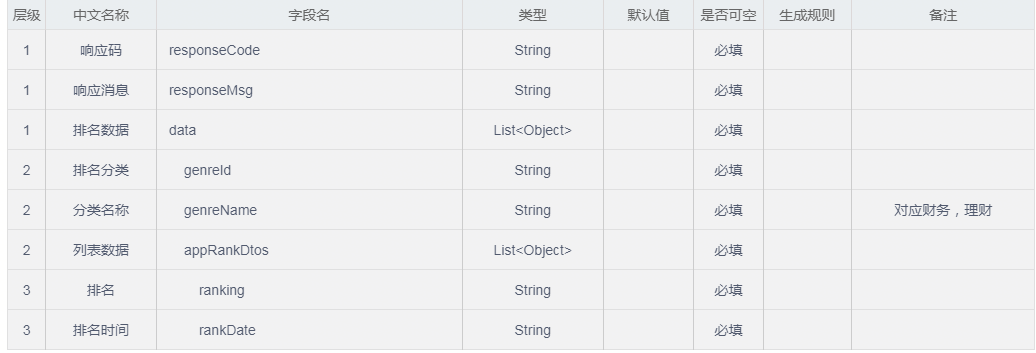
创建的bean
RankResult:
public class RankResult extends CommonResult {

    /**

     * CommentResult中包含responseCode和responseMsg

     */

    private List<RankGenreResult> data;

    public List<RankGenreResult> getData() {

        return data;

    }

    public void setData(List<RankGenreResult> data) {

        this.data = data;

    }

}
RankGenreResult:
public class RankGenreResult {

    /**

     * 排名分类

     */

    private String genreId;

    /**

     * 分类名称

     */

    private String genreName;

    /**

     * 分类列表数据

     */

    private List<AppRankDto> appRankDtos;

    // 省略getter and setter

}
AppRankDto:
public class AppRankDto {

    /**

     * 排名

     */

    private String ranking;

    /**

     * 排名时间

     */

    private String rankDate;

    // 省略getter and setter

}
controller:
    @ResponseBody

    @RequestMapping("queryAppRank")

    public RankResult queryAppRank(@RequestBody Map<String, String> param) {

        RankResult result = new RankResult();

        List<RankGenreResult> rankGenreResultList;

        try {

            rankGenreResultList = commentService.queryAppRankGenreResult(param);

            result.setData(rankGenreResultList);

        } catch (Exception e) {

            result.fail(ResponseEnum.SYSTEM_ERROR.getResponseCode(), ResponseEnum.SYSTEM_ERROR.getResponseMsg());

            LOGGER.error("查询XXX,e={}", ExceptionUtil.getAllStackTrace(e));

            return result;

        }

        return result;

    }
service:
    @Override

    public List<RankGenreResult> queryAppRankGenreResult(Map<String, String> param) {

        return commentMapper.queryAppRankGenreResult(param);

    }
mapper:
List<RankGenreResult> queryAppRankGenreResult(Map<String, String> param);
mapper.xml
  <!--定义映射resultMap-->

    <resultMap id="rankGenreResult" type="RankGenreResult">

        <result property="genreId" column="genre_id"/>

        <result property="genreName" column="genre_name"/>

        <collection property="appRankDtos" ofType="AppRankDto">

            <result property="ranking" column="ranking"/>

            <result property="rankDate" column="rank_date"/>

        </collection>

    </resultMap>

    <select id="queryAppRankGenreResult" resultMap="rankGenreResult">

        select genre_id,genre_name,ranking,rank_date

        from

        t_app_rank

        <where>

            <if test="popId!=''and popId!=null">

                t.POP_ID=#{popId}

            </if>

            <if test="marketAppId!=''and marketAppId!=null">

                t.MARKET_APP_ID=#{marketAppId}

            </if>

            <if test="beginRankDate!=''and beginRankDate!=null">

                <![CDATA[t.RANK_DATE>=#{beginRankDate}]]>

            </if>

            <if test="endRankDate!=''and endRankDate!=null">

                <![CDATA[t.RANK_DATE<=#{endRankDate}]]>

            </if>

        </where>

        group by

        genre_id,GENRE_NAME,ranking,rank_date

        ORDER BY rank_date

    </select>
返回父菜单及其下的子菜单
需要的数据格式:
[

    {

      "name": "一级菜单",

      "pid": 0,

      "sub_button": [

        {

          "key": "",

          "name": "二级菜单1",

          "pid": 1,

          "sub_button": [],

          "type": "view",

          "url": "http://oa.cnsuning.com/portal/soa/index.htm"

        },

        {

          "key": "",

          "name": "二级菜单2",

          "pid": 1,

          "sub_button": [],

          "type": "view",

          "url": "http://oa.cnsuning.com/portal/soa/index.htm"

        },

        {

          "key": "",

          "name": "二级菜单4",

          "pid": 1,

          "sub_button": [],

          "type": "view",

          "url": "http://oa.cnsuning.com/portal/soa/index.htm"

        },

        {

          "key": "",

          "name": "二级菜单5",

          "pid": 1,

          "sub_button": [],

          "type": "view",

          "url": "http://oa.cnsuning.com/portal/soa/index.htm"

        }

      ]

    },

    {

      "name": "一级菜单2",

      "pid": 0,

      "sub_button": [

        {

          "key": "",

          "name": "二级菜单21",

          "pid": 4,

          "sub_button": [],

          "type": "view",

          "url": "http://oa.cnsuning.com/portal/soa/index.htm"

        },

        {

          "key": "",

          "name": "二级菜单22",

          "pid": 4,

          "sub_button": [],

          "type": "view",

          "url": "http://oa.cnsuning.com/portal/soa/index.htm"

        },

        {

          "key": "",

          "name": "二级菜单23",

          "pid": 4,

          "sub_button": [],

          "type": "view",

          "url": "http://oa.cnsuning.com/portal/soa/index.htm"

        },

        {

          "key": "",

          "name": "二级菜单24",

          "pid": 4,

          "sub_button": [],

          "type": "view",

          "url": "http://oa.cnsuning.com/portal/soa/index.htm"

        }

      ]

    },

    {

      "name": "一级菜单",

      "pid": 0,

      "sub_button": [

        {

          "key": "123456789",

          "name": "二级菜单1",

          "pid": 23,

          "sub_button": [],

          "type": "click",

          "url": ""

        }

      ]

    }

  ]
表结构:
CREATE TABLE `t_wechat_menu` (

  `ID` bigint(15) NOT NULL AUTO_INCREMENT COMMENT '主键',

  `TYPE` varchar(10) DEFAULT NULL COMMENT '菜单的响应动作类型',

  `NAME` varchar(60) DEFAULT NULL COMMENT '菜单标题',

  `KEY` varchar(128) DEFAULT NULL COMMENT '菜单KEY值,用于消息接口推送',

  `URL` varchar(1024) DEFAULT NULL COMMENT '网页链接',

  `MEDIA_ID` varchar(40) DEFAULT NULL COMMENT '调用新增永久素材接口',

  `PID` bigint(15) DEFAULT '0',  // 父菜单

  `WECHAT_ID` bigint(20) NOT NULL,

  PRIMARY KEY (`ID`)

) ENGINE=InnoDB AUTO_INCREMENT=27 DEFAULT CHARSET=utf8;
pojo
public class WechatMenu {

    private transient Integer id;//JSON序列化时忽略此字段

    private String url;

    private String type;

    private String name;

    private String key;

    private transient Integer pid;//JSON序列化时忽略此字段

    private List<WechatMenu> sub_button = new ArrayList<WechatMenu>();

}
dao
    @Override

    public List<WechatMenu> queryWechatMenuAndSub(@Param("wechatId") Integer wechatId) {

        return sqlSessionTemplate.selectList("weChatMenuDao.queryWechatMenuAndSub", wechatId);

    }
mapper.xml
    <resultMap id="wechatMenuResultMap" type="com.suning.epps.fmmb.dmo.wechat.WechatMenu">

        <result property="id" column="id"/>

        <result property="name" column="name"/>

        <result property="type" column="type"/>

        <result property="key" column="key"/>

        <result property="url" column="url"/>

        <collection column="id" property="sub_button" ofType="com.suning.epps.fmmb.dmo.wechat.WechatMenu"

                    select="queryWechatMenuByPid"/>

    </resultMap>

    <select id="queryWechatMenuAndSub" resultMap="wechatMenuResultMap">

        select t.ID,t.TYPE,t.NAME,t.KEY,t.URL from t_wechat_menu t where PID=0 and wechat_id=#{wechatId}

    </select>

    <select id="queryWechatMenuByPid" resultMap="wechatMenuResultMap" parameterType="String">

        select t.ID,t.TYPE,t.NAME,t.KEY,t.URL from t_wechat_menu t where PID=#{id}

    </select>
service
        // 转成json

        String json = JSON.toJSONString(menu, SerializerFeature.SkipTransientField);
Spring+Mybatis 复杂的分组查询的更多相关文章
- spring data jpa条件分组查询及分页
原book对象 package com.shaying.domain; import javax.persistence.Column; import javax.persistence.Entity ...
- Spring Data Solr的分组查询 for 搜索面板的商品分类
private List searchCategoryList(Map searchMap) { SimpleQuery query = new SimpleQuery(new Criteria(&q ...
- 【mybatis】【mysql】mybatis查询mysql,group by分组查询报错:Expression #1 of SELECT list is not in GROUP BY clause and contains nonaggregated column
mybatis查询mysql,group by分组查询报错:Expression #1 of SELECT list is not in GROUP BY clause and contains no ...
- Spring+MyBatis框架中sql语句的书写,数据集的传递以及多表关联查询
在很多Java EE项目中,Spring+MyBatis框架经常被用到,项目搭建在这里不再赘述,现在要将的是如何在项目中书写,增删改查的语句,如何操作数据库,以及后台如何获取数据,如何进行关联查询,以 ...
- Idea SpringMVC+Spring+MyBatis+Maven调整【转】
Idea SpringMVC+Spring+MyBatis+Maven整合 创建项目 File-New Project 选中左侧的Maven,选中右侧上方的Create from archetyp ...
- SpringMVC+Spring+MyBatis+Maven调整【转】
Idea SpringMVC+Spring+MyBatis+Maven整合 创建项目 File-New Project 选中左侧的Maven,选中右侧上方的Create from archetyp ...
- Spring+Mybatis基于注解整合Redis
基于这段时间折腾redis遇到了各种问题,想着整理一下.本文主要介绍基于Spring+Mybatis以注解的形式整合Redis.废话少说,进入正题. 首先准备Redis,我下的是Windows版,下载 ...
- 3.springMVC+spring+Mybatis整合Demo(单表的增删该查,这里主要是贴代码,不多解释了)
前面给大家讲了整合的思路和整合的过程,在这里就不在提了,直接把springMVC+spring+Mybatis整合的实例代码(单表的增删改查)贴给大家: 首先是目录结构: 仔细看看这个目录结构:我不详 ...
- 2.springMVC+spring+Mybatis整合
前面已经说了,springMVC+spring+Mybatis的整合思路了,现在就照着这个思路来做一下: 在开始之前先来看一下工程的目录结构: config这个目录底下放的都是配置文件: mybati ...
随机推荐
- cf自训4.10
cf933A dp题 一开始看错是连续子序列了,然后样例刚好能过.. 然后正解没想出来,网上看了题解:感觉正解是枚举2开始的位置,然后再枚举翻转的区间,pos左右两侧分别求出贡献最大的那个区间,左右两 ...
- systemd: Started Session 305 of user root.
方法1: echo 'if ($programname == "systemd-logind" or $programname == "systemd") an ...
- oracle 列行转换
1.列转换 1:每个字母转成一行 SELECT SUBSTR(A.COLUMN1, LEV, 1) COLUMN1FROM ( SELECT 'AABDC' COLUMN1 FROM DUA ...
- Main Thread Checker 问题解决
1. without a return value https://developer.apple.com/documentation/code_diagnostics/main_thread_che ...
- Web微信模拟
一.概要 目的:实现一个具有web微信类似功能的项目 框架:Django 模块:render.HttpResponse.BeautifulSoup.re.time.requests.json.rand ...
- 初学Python的一些细节
一.python的数据类型 1.python的基本数据类型包括数值数据类型和字符串数据类型:基本数据类型的特点是不允许改变,如果改变基本数据类型的值,会导致内存的重新分配. int 整形 二进制 ...
- WPF:TreeView绑定
namespace PostViewer { using System.Collections.ObjectModel; using System.ComponentModel; /// <su ...
- 第二篇flask响应方式
响应三件套 1.Flask中的HTTPResponse @app.route('/home') # app中的route装饰器 def home(): # 视图 return '登陆成功' #HTTP ...
- Chapter 1 An Overview of Computers and Programming Languages
Babylon巴比伦 loom织布机 weaver, WHO uses loom to work census: to count the population tabulate: make into ...
- centos官网下载地址
CentOS 7官方下载地址:https://www.centos.org/download/ 源自博友的博客:https://blog.csdn.net/yf9595/article/details ...