
rabbitMq交换机direct、topics
一: direct
上面我用采用了广播的模式进行消息的发送,现在我们采用路由的方式对不同的消息进行过滤
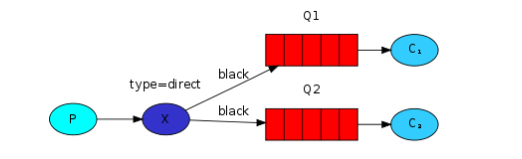
发送端代码

public class RoutingSendDirect {

    private static final String EXCHANGE_NAME = "direct_logs";

    // 路由关键字

    private static final String[] routingKeys = new String[]{"info" ,"warning", "error"};

    public static void main(String[] args) throws IOException, TimeoutException {

        ConnectionFactory factory = new ConnectionFactory();

        factory.setHost("localhost");

        Connection connection = factory.newConnection();

        Channel channel = connection.createChannel();

        //声明交换机

        channel.exchangeDeclare(EXCHANGE_NAME,"direct");//注意是direct

        //发送信息

        for (String routingKey:routingKeys){

            String message = "RoutingSendDirect Send the message level:" + routingKey;

            channel.basicPublish(EXCHANGE_NAME,routingKey,null,message.getBytes());

            System.out.println("RoutingSendDirect Send"+routingKey +"':'" + message);

        }

        channel.close();

        connection.close();

    }

}
ReceiveLogsDirect1 消费者代码
public class ReceiveLogsDirect1 {

    // 交换器名称

    private static final String EXCHANGE_NAME = "direct_logs";

    // 路由关键字

    private static final String[] routingKeys = new String[]{"info" ,"warning"};

    public static void main(String[] args) throws IOException, TimeoutException {

        ConnectionFactory factory = new ConnectionFactory();

        factory.setHost("localhost");

        Connection connection = factory.newConnection();

        Channel channel = connection.createChannel();

        //声明交换器

        channel.exchangeDeclare(EXCHANGE_NAME, "direct");

        //获取匿名队列名称

        String queueName=channel.queueDeclare().getQueue();

        //根据路由关键字进行绑定

        for (String routingKey:routingKeys){

            channel.queueBind(queueName,EXCHANGE_NAME,routingKey);

            System.out.println("ReceiveLogsDirect1 exchange:"+EXCHANGE_NAME+"," +

                    " queue:"+queueName+", BindRoutingKey:" + routingKey);

        }

        System.out.println("ReceiveLogsDirect1  Waiting for messages");

        Consumer consumer = new DefaultConsumer(channel) {

            @Override

            public void handleDelivery(String consumerTag, Envelope envelope, AMQP.BasicProperties properties, byte[] body) throws IOException {

                String message = new String(body, "UTF-8");

                System.out.println("ReceiveLogsDirect1 Received '" + envelope.getRoutingKey() + "':'" + message + "'");

            }

        };

        channel.basicConsume(queueName, true, consumer);

    }
ReceiveLogsDirect2消费者代码
public class ReceiveLogsDirect2 {

    // 交换器名称

    private static final String EXCHANGE_NAME = "direct_logs";

    // 路由关键字

    private static final String[] routingKeys = new String[]{"error"};

    public static void main(String[] argv) throws Exception {

        ConnectionFactory factory = new ConnectionFactory();

        factory.setHost("localhost");

        Connection connection = factory.newConnection();

        Channel channel = connection.createChannel();

        //声明交换器

        channel.exchangeDeclare(EXCHANGE_NAME, "direct");

        //获取匿名队列名称

        String queueName = channel.queueDeclare().getQueue();

        //根据路由关键字进行多重绑定

        for (String severity : routingKeys) {

            channel.queueBind(queueName, EXCHANGE_NAME, severity);

            System.out.println("ReceiveLogsDirect2 exchange:"+EXCHANGE_NAME+", queue:"+queueName+", BindRoutingKey:" + severity);

        }

        System.out.println("ReceiveLogsDirect2 Waiting for messages");

        Consumer consumer = new DefaultConsumer(channel) {

            @Override

            public void handleDelivery(String consumerTag, Envelope envelope, AMQP.BasicProperties properties, byte[] body) throws UnsupportedEncodingException {

                String message = new String(body, "UTF-8");

                System.out.println("ReceiveLogsDirect2 Received '" + envelope.getRoutingKey() + "':'" + message + "'");

            }

        };

        channel.basicConsume(queueName, true, consumer);

    }

}
上面代码可以看出这里是通过路由来找个这个对列的。我们看下结果


二:Topics
这种应该属于模糊匹配
* :可以替代一个词
#:可以替代0或者更多的词
现在我们继续看看代码来理解
发送端
public class TopicSend {

    private static final String EXCHANGE_NAME = "topic_logs";

    public static void main(String[] args) throws IOException, TimeoutException {

        Connection connection = null;

        Channel channel = null;

        try{

            ConnectionFactory factory=new ConnectionFactory();

            factory.setHost("localhost");

            connection=factory.newConnection();

            channel=connection.createChannel();

            //声明一个匹配模式的交换机

            channel.exchangeDeclare(EXCHANGE_NAME,"topic");

            //待发送的消息

            String[] routingKeys=new String[]{

                    "quick.orange.rabbit",

                    "lazy.orange.elephant",

                    "quick.orange.fox",

                    "lazy.brown.fox",

                    "quick.brown.fox",

                    "quick.orange.male.rabbit",

                    "lazy.orange.male.rabbit"

            };

            //发送消息

            for(String severity :routingKeys){

                String message = "From "+severity+" routingKey' s message!";

                channel.basicPublish(EXCHANGE_NAME, severity, null, message.getBytes());

                System.out.println("TopicSend Sent '" + severity + "':'" + message + "'");

            }

        }catch (Exception e){

            e.printStackTrace();

            if (connection!=null){

                channel.close();

                connection.close();

            }

        }finally {

            if (connection!=null){

                channel.close();

                connection.close();

            }

        }

    }

}
消费者1:
public class ReceiveLogsTopic1 {

    private static final String EXCHANGE_NAME = "topic_logs";

    public static void main(String[] args) throws IOException, TimeoutException {

        ConnectionFactory factory = new ConnectionFactory();

        factory.setHost("localhost");

        Connection connection = factory.newConnection();

        Channel channel = connection.createChannel();

        //声明一个匹配模式的交换机

        channel.exchangeDeclare(EXCHANGE_NAME, "topic");

        String queueName = channel.queueDeclare().getQueue();

        //路由关键字

        String[] routingKeys = new String[]{"*.orange.*"};

        //绑定路由

        for (String routingKey : routingKeys) {

            channel.queueBind(queueName, EXCHANGE_NAME, routingKey);

            System.out.println("ReceiveLogsTopic1 exchange:" + EXCHANGE_NAME + ", queue:" + queueName + ", BindRoutingKey:" + routingKey);

        }

        System.out.println("ReceiveLogsTopic1 Waiting for messages");

        Consumer consumer = new DefaultConsumer(channel) {

            @Override

            public void handleDelivery(String consumerTag, Envelope envelope, AMQP.BasicProperties properties, byte[] body) throws IOException {

                String message = new String(body, "UTF-8");

                System.out.println("ReceiveLogsTopic1 Received '" + envelope.getRoutingKey() + "':'" + message + "'");

            }

        };

        channel.basicConsume(queueName, true, consumer);

    }

}
消费者2:
复制代码

ublic class ReceiveLogsTopic2 {

    private static final String EXCHANGE_NAME = "topic_logs";

    public static void main(String[] argv) throws IOException, TimeoutException {

        ConnectionFactory factory = new ConnectionFactory();

        factory.setHost("localhost");

        Connection connection = factory.newConnection();

        Channel channel = connection.createChannel();

//      声明一个匹配模式的交换器

        channel.exchangeDeclare(EXCHANGE_NAME, "topic");

        String queueName = channel.queueDeclare().getQueue();

        // 路由关键字

        String[] routingKeys = new String[]{"*.*.rabbit", "lazy.#"};

//      绑定路由关键字

        for (String bindingKey : routingKeys) {

            channel.queueBind(queueName, EXCHANGE_NAME, bindingKey);

            System.out.println("ReceiveLogsTopic2 exchange:"+EXCHANGE_NAME+", queue:"+queueName+", BindRoutingKey:" + bindingKey);

        }

        System.out.println("ReceiveLogsTopic2 Waiting for messages");

        Consumer consumer = new DefaultConsumer(channel) {

            @Override

            public void handleDelivery(String consumerTag, Envelope envelope, AMQP.BasicProperties properties, byte[] body) throws UnsupportedEncodingException  {

                String message = new String(body, "UTF-8");

                System.out.println("ReceiveLogsTopic2 Received '" + envelope.getRoutingKey() + "':'" + message + "'");

            }

        };

        channel.basicConsume(queueName, true, consumer);

    }

}
三,远程调用
public class RPCServer {

    private static final String RPC_QUEUE_NAME = "rpc_queue";

    private static int fib(int n) {

        if (n == 0) {

            return 0;

        }

        if (n == 1) {

            return 1;

        }

        return fib(n - 1) + fib(n - 1);

    }

    public static void main(String[] args) throws IOException, InterruptedException, TimeoutException {

        ConnectionFactory factory = new ConnectionFactory();

        factory.setHost("localhost");

        Connection connection = factory.newConnection();

        Channel channel = connection.createChannel();

        channel.queueDeclare(RPC_QUEUE_NAME, false, false, false, null);

        channel.basicQos(1);

        QueueingConsumer consumer = new QueueingConsumer(channel);

        channel.basicConsume(RPC_QUEUE_NAME, false, consumer);

        System.out.println("RPCServer Awating RPC request");

        while (true) {

            QueueingConsumer.Delivery delivery = consumer.nextDelivery();

            BasicProperties props = delivery.getProperties();

            BasicProperties replyProps = new AMQP.BasicProperties.Builder().

                    correlationId(props.getCorrelationId()).build();

            String message = new String(delivery.getBody(), "UTF-8");

            int n = Integer.parseInt(message);

            System.out.println("RPCServer fib(" + message + ")");

            String response = "" + fib(n);

            channel.basicPublish( "", props.getReplyTo(), replyProps, response.getBytes());

            channel.basicAck(delivery.getEnvelope().getDeliveryTag(), false);

        }

    }

}
服务器代码比较简单
1:建立连接,通道,队列
2:我们可能运行多个服务器进程,为了分散负载服务器压力,我们设置channel.basicQos(1);
3:我们用basicconsume访问队列。然后进入循环,在其中我们等待请求消息并处理消息然后发送响应。
public class RPCClient {

    private Connection connection;

    private Channel channel;

    private String requestQueueName = "rpc_queue";

    private String replyQueueName;

    private QueueingConsumer consumer;

    public RPCClient() throws IOException, TimeoutException {

        ConnectionFactory factory = new ConnectionFactory();

        factory.setHost("localhost");

        connection = factory.newConnection();

        channel = connection.createChannel();

        replyQueueName = channel.queueDeclare().getQueue();

        consumer = new QueueingConsumer(channel);

        channel.basicConsume(replyQueueName, true, consumer);

    }

    public String call(String message) throws IOException, InterruptedException {

        String response;

        String corrID = UUID.randomUUID().toString();

        AMQP.BasicProperties props = new AMQP.BasicProperties().builder()

                .correlationId(corrID).replyTo(replyQueueName).build();

        channel.basicPublish("", requestQueueName, props, message.getBytes("UTF-8"));//发送消息等待服务端返回

        while (true) {

            QueueingConsumer.Delivery delivery = consumer.nextDelivery();//服务端响应后 阻塞解除

            if (delivery.getProperties().getCorrelationId().equals(corrID)) {

                response = new String(delivery.getBody(), "UTF-8");

                break;

            }

        }

        return response;

    }

    public void close() throws Exception {

        connection.close();

    }

    public static void main(String[] args) throws Exception {

        RPCClient rpcClient = null;

        String response;

        try {

            rpcClient = new RPCClient();

            System.out.println("RPCClient  Requesting fib(20)");

            response = rpcClient.call("20");

            System.out.println("RPCClient  Got '" + response + "'");

        } catch (Exception e) {

            e.printStackTrace();

        } finally {

            if (rpcClient != null) {

                rpcClient.close();

            }

        }

    }

}
客户端代码解读
1:建立一个连接和通道,并声明了一个唯一的“回调”队列的答复
2:我们订阅回调队列,这样就可以得到RPC的响应
3:定义一个call方法用于发送当前的回调请求
4:生成一个唯一的correlationid,然后通过while循环来捕获合适的回应
5:我们请求信息,发送2个属性,replyTo 和correlationId
6:然后就是等待直到有合适的回应到达
7:while循环是做一个非常简单的工作,对于每一个响应消息,它检查是否有correlationid然后进行匹配。然后是就进行响应。
8:最后把响应返回到客户端。
rabbitMq交换机direct、topics的更多相关文章
- RabbitMQ交换机、RabbitMQ整合springCloud
目标 1.交换机 2.RabbitMQ整合springCloud 交换机 蓝色区域===生产者 红色区域===Server:又称Broker,接受客户端的连接,实现AMQP实体服务 绿色区域===消费 ...
- RabbitMQ 交换机类型
1,扇形交换机 fanout 2, 直连交换机 direct 3, 通配符交换机 topic
- SpringBoot应用操作Rabbitmq(direct高级操作)
一.首先声明完成任务架构,通过direct订阅/发布的模式进行生产消费. a.消息生产指定交换器和路由key b.消费者绑定交换器,路由key和队列的关系(集群监控收到的消息不重复) 二.实战演练 1 ...
- rabbitmq 交换机模式一 直连模式 direct
代码 <?php require_once "./vendor/autoload.php"; use PhpAmqpLib\Connection\AMQPStreamConn ...
- RabbitMQ交换机规则实例
RabbitMQ Exchange分发消息时根据类型的不同分发策略有区别,目前共四种类型:direct.fanout.topic.headers .headers 匹配 AMQP 消息的 header ...
- 认识RabbitMQ交换机模型
前言 RabbitMQ是消息队列中间件(Message Queue Middleware)中一种,工作虽然有用到,但是却没有形成很好的整体包括,主要是一些基础概念的认识,这里通过阅读<Rabbi ...
- 关于RabbitMQ交换机的理解
RabbitMQ是实现AMQP(高级消息队列协议)的消息中间件的一种,最初起源于金融系统,用于在分布式系统中存储转发消息,在易用性.扩展性.高可用性等方面表现不俗.消息中间件主要用于组件之间的解耦,消 ...
- spring boot整合RabbitMQ(Direct模式)
springboot集成RabbitMQ非常简单,如果只是简单的使用配置非常少,springboot提供了spring-boot-starter-amqp项目对消息各种支持. Direct Excha ...
- Rabbit的直连交换机direct
直连交换机类型为:direct.加入了路由键routingKey的概念. 就是说 生产者投递消息给指定交换机的指定路由键. 只有绑定了此交换机指定路由键的消息队列才可以收到消息. 生产者: packa ...
随机推荐
- 第二个项目:WC
第二个项目:Word Count 一.主要功能:文件中字符数.单词数.行数的统计 二.github源码和工程文件地址:https://github.com/miniyuan222/the-second ...
- __x__(35)0908第五天__ 层级 z-index
如果三个 div 全部设置 position: absolute; 绝对定位,且未设置 z-index, 则从代码结构上 下面的元素 会盖住 上面的元素. z-index 层级: 通过 z-i ...
- windows创建定时任务执行python脚本
一.创建定时任务 \ [程序或脚本]文本框中填的是Python编译器的名称,一般就是python.exe, [起始于]文本框中填的是Python编译器的目录,上图中假设你的Python编译器的完整路径 ...
- treesoft,couchDB,
下载 docker 镜像:docker pull docker.io/lu566/treesoft:1.0启动容器:docker run -d -p 127.0.0.1:18080:8080 dock ...
- Head First Python-Python中与文件相关的操作-读、处理、写
最近在看head first python,前面也写了一些笔记,但是基本上没有涉及到一些完整的代码,现在将书中的文件相关操作的代码整理,供以后参考. 主要分为两大部分,读取文件.处理异常,处理文件.存 ...
- 创建一个vue单页面应用
最最开始是要安装cli3 1.npm install -g @vue/cli 2.npm install -g @vue/cli-service-global 然后是创建单页面应用si ...
- css 修改svg图标的颜色(不修改fill)
给icon加样式 (利用原图标的阴影区域,同时将原图标移动超过之前父元素范围)filter: drop-shadow(red 80px 0);transform: translateX(-80px); ...
- elasticsearch安装head插件
安装Head插件 由于head插件本质上还是一个nodejs的工程,因此需要安装node,使用npm来安装依赖的包. <1>安装Node.js 下载解压 wget https://node ...
- ASM
一. 磁盘阵列 RAID 5 二. STRRPE 三. LAT 四. [root@localhost ~]# fdisk /dev/sdjDevice contains neither a valid ...
- 关于映射路径@ReuqestMapping的总结
何谓映射路径呢? 映射路径,就是匹配请求路径和执行方法关系的路径 基于注解的映射路径可以忽略前后缀,如: @RequestMapping(value="/say.do") @Req ...