
DocX开源WORD操作组件的学习系列三
DocX学习系列
DocX开源WORD操作组件的学习系列一 : http://www.cnblogs.com/zhaojiedi1992/p/zhaojiedi_sharp_001_docx1.html
DocX开源WORD操作组件的学习系列二 : http://www.cnblogs.com/zhaojiedi1992/p/zhaojiedi_csharp_005_docx2.html
DocX开源WORD操作组件的学习系列三: http://www.cnblogs.com/zhaojiedi1992/p/zhaojiedi_csharp_006_docx3.html
DocX开源WORD操作组件的学习系列四: http://www.cnblogs.com/zhaojiedi1992/p/zhaojiedi_csharp_006_docx4.html
替换文本
        private static void ReplaceText()

        {

            Console.WriteLine("ReplaceText()");

            File.Copy(@"docs\Lists.docx", @"docs\ReplaceText.docx", true);

            using (var document = DocX.Load(@"docs\ReplaceText.docx"))

            {

                //全局替换

                document.ReplaceText("zhao", "zhang");

                //段落定位后替换

                var p1=   document.Paragraphs.FirstOrDefault(r => r.Text == "赵杰迪");

                if (p1 == null)

                {

                    return;

                }

                p1.ReplaceText("zhaojiedi","zhaojiedi2");

                //书签定位后替换

                document.Bookmarks["书签1"].Paragraph.ReplaceText("zhaojiedi","zhaojiedi2");

                //基于正则表达式的替换 用途:我们事先做一个模板文件, 然后基于正则表达式查找,然后替换。

                List<Regex> regexList = new List<Regex>()

                {

                   new Regex("[name](.*)[/name]"),

                    new Regex("[age](.*)[/age]"),

                     new Regex("[age](.*)[/age]")

                };

                foreach (var item in regexList)

                {

                    Match match = item.Match(document.Text);

                    if (match.Success && match.Groups.Count >= )

                    {

                       document.ReplaceText(match.Groups[].ToString(),match.Groups[].ToString());

                    }

                }

                document.Save();

                Console.WriteLine("\tCreated: docs\\ReplaceText.docx");

            }

        }
编号
  private static void AddList()

        {

            Console.WriteLine("\tAddList()");

            using (var document = DocX.Create(@"docs\Lists.docx"))

            {

                var numberedList = document.AddList("First List Item.", , ListItemType.Numbered);

                //Add a numbered list starting at 2

                document.AddListItem(numberedList, "Second List Item.");

                document.AddListItem(numberedList, "Third list item.");

                document.AddListItem(numberedList, "First sub list item", );

                document.AddListItem(numberedList, "Nested item.", );

                document.AddListItem(numberedList, "Fourth nested item.");

                var bulletedList = document.AddList("First Bulleted Item.", , ListItemType.Bulleted);

                document.AddListItem(bulletedList, "Second bullet item");

                document.AddListItem(bulletedList, "Sub bullet item", );

                document.AddListItem(bulletedList, "Second sub bullet item", );

                document.AddListItem(bulletedList, "Third bullet item");

                document.InsertList(numberedList);

                document.InsertList(bulletedList);

                document.Save();

                Console.WriteLine("\tCreated: docs\\Lists.docx");

            }

        }
3创建图形
3.1效果图
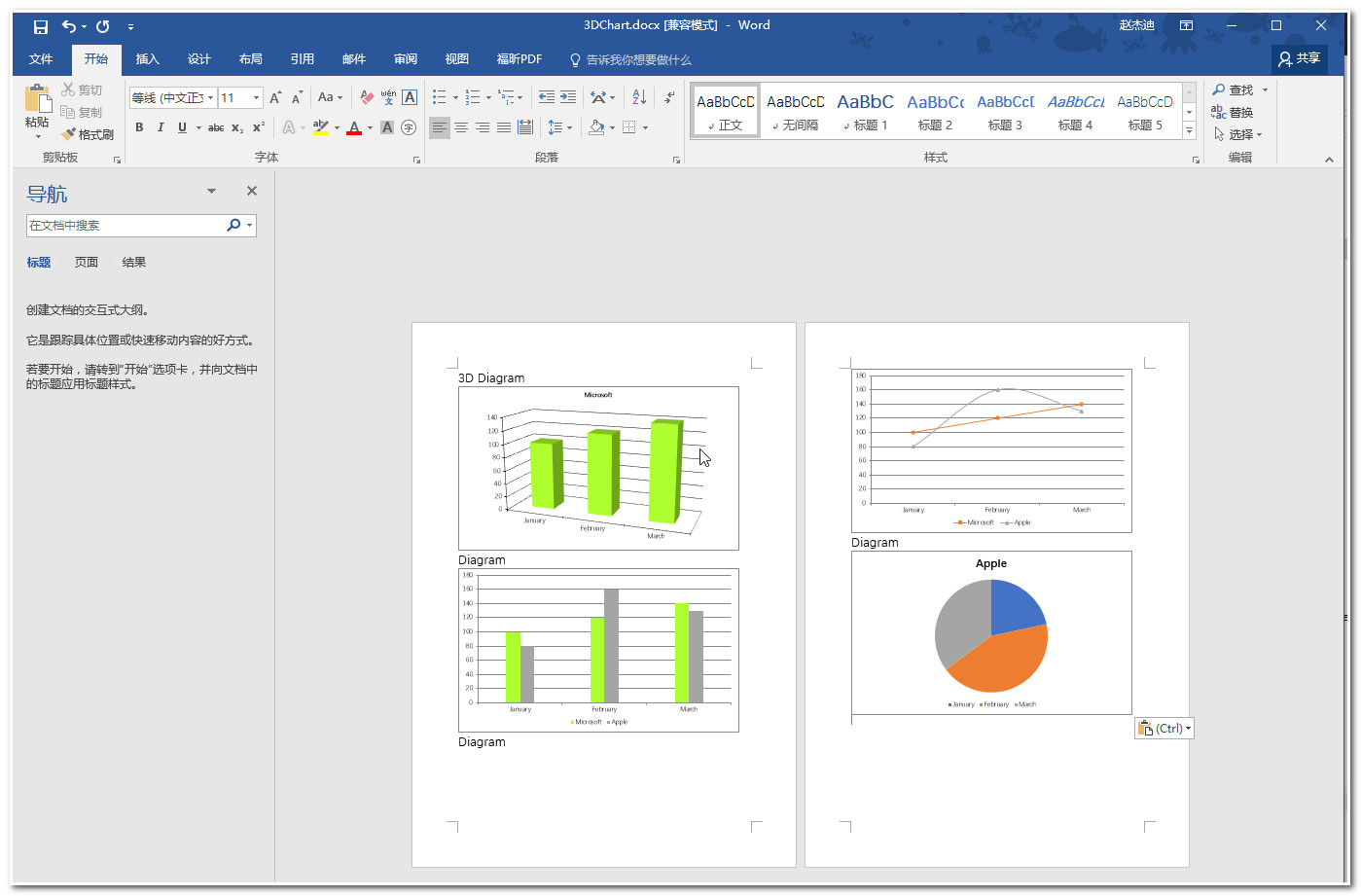
        private class ChartData

        {

            public String Mounth { get; set; }

            public Double Money { get; set; }

            public static List<ChartData> CreateCompanyList1()

            {

                List<ChartData> company1 = new List<ChartData>();

                company1.Add(new ChartData() { Mounth = "January", Money =  });

                company1.Add(new ChartData() { Mounth = "February", Money =  });

                company1.Add(new ChartData() { Mounth = "March", Money =  });

                return company1;

            }

            public static List<ChartData> CreateCompanyList2()

            {

                List<ChartData> company2 = new List<ChartData>();

                company2.Add(new ChartData() { Mounth = "January", Money =  });

                company2.Add(new ChartData() { Mounth = "February", Money =  });

                company2.Add(new ChartData() { Mounth = "March", Money =  });

                return company2;

            }

        }

        private static void BarChart()

        {

            Console.WriteLine("\tBarChart()");

            // Create new document.

            using (DocX document = DocX.Create(@"docs\BarChart.docx"))

            {

                // Create chart.

                BarChart c = new BarChart();

                c.BarDirection = BarDirection.Column;

                c.BarGrouping = BarGrouping.Standard;

                c.GapWidth = ;

                c.AddLegend(ChartLegendPosition.Bottom, false);

                // Create data.

                List<ChartData> company1 = ChartData.CreateCompanyList1();

                List<ChartData> company2 = ChartData.CreateCompanyList2();

                // Create and add series

                Series s1 = new Series("Microsoft");

                s1.Color = WindowsColor.GreenYellow;

                s1.Bind(company1, "Mounth", "Money");

                c.AddSeries(s1);

                Series s2 = new Series("Apple");

                s2.Bind(company2, "Mounth", "Money");

                c.AddSeries(s2);

                // Insert chart into document

                document.InsertParagraph("Diagram").FontSize();

                document.InsertChart(c);

                document.Save();

            }

            Console.WriteLine("\tCreated: docs\\BarChart.docx\n");

        }

        private static void PieChart()

        {

            Console.WriteLine("\tPieChart()");

            // Create new document.

            using (DocX document = DocX.Create(@"docs\PieChart.docx"))

            {

                // Create chart.

                PieChart c = new PieChart();

                c.AddLegend(ChartLegendPosition.Bottom, false);

                // Create data.

                List<ChartData> company2 = ChartData.CreateCompanyList2();

                // Create and add series

                Series s = new Series("Apple");

                s.Bind(company2, "Mounth", "Money");

                c.AddSeries(s);

                // Insert chart into document

                document.InsertParagraph("Diagram").FontSize();

                document.InsertChart(c);

                document.Save();

            }

            Console.WriteLine("\tCreated: docs\\PieChart.docx\n");

        }

        private static void LineChart()

        {

            Console.WriteLine("\tLineChart()");

            // Create new document.

            using (DocX document = DocX.Create(@"docs\LineChart.docx"))

            {

                // Create chart.

                LineChart c = new LineChart();

                c.AddLegend(ChartLegendPosition.Bottom, false);

                // Create data.

                List<ChartData> company1 = ChartData.CreateCompanyList1();

                List<ChartData> company2 = ChartData.CreateCompanyList2();

                // Create and add series

                Series s1 = new Series("Microsoft");

                s1.Color = WindowsColor.GreenYellow;

                s1.Bind(company1, "Mounth", "Money");

                c.AddSeries(s1);

                Series s2 = new Series("Apple");

                s2.Bind(company2, "Mounth", "Money");

                c.AddSeries(s2);

                // Insert chart into document

                document.InsertParagraph("Diagram").FontSize();

                document.InsertChart(c);

                document.Save();

            }

            Console.WriteLine("\tCreated: docs\\LineChart.docx\n");

        }

        private static void Chart3D()

        {

            Console.WriteLine("\tChart3D()");

            // Create new document.

            using (DocX document = DocX.Create(@"docs\3DChart.docx"))

            {

                // Create chart.

                BarChart c = new BarChart();

                c.View3D = true;

                // Create data.

                List<ChartData> company1 = ChartData.CreateCompanyList1();

                // Create and add series

                Series s = new Series("Microsoft");

                s.Color = WindowsColor.GreenYellow;

                s.Bind(company1, "Mounth", "Money");

                c.AddSeries(s);

                // Insert chart into document

                document.InsertParagraph("3D Diagram").FontSize();

                document.InsertChart(c);

                document.Save();

            }

            Console.WriteLine("\tCreated: docs\\3DChart.docx\n");

        }
5添加图片
     static void HelloWorldAddPictureToWord()

        {

            Console.WriteLine("\tHelloWorldAddPictureToWord()");

            // Create a document.

            using (DocX document = DocX.Create(@"docs\HelloWorldAddPictureToWord.docx"))

            {

                // Add an image into the document.

                RelativeDirectory rd = new RelativeDirectory(); // prepares the files for testing

                rd.Up();

                Image image = document.AddImage(rd.Path + @"\images\logo_template.png");

                // Create a picture (A custom view of an Image).

                Picture picture = image.CreatePicture();

                picture.Rotation = ;//旋转10度

                picture.SetPictureShape(BasicShapes.cube);

                // Insert a new Paragraph into the document.

                Paragraph title = document.InsertParagraph().Append("This is a test for a picture").FontSize().Font(new Font("Comic Sans MS"));

                title.Alignment = Alignment.center;

                // Insert a new Paragraph into the document.

                Paragraph p1 = document.InsertParagraph();

                // Append content to the Paragraph

                p1.AppendLine("Just below there should be a picture ").Append("picture").Bold().Append(" inserted in a non-conventional way.");

                p1.AppendLine();

                p1.AppendLine("Check out this picture ").AppendPicture(picture).Append(" its funky don't you think?");

                p1.AppendLine();

                // Insert a new Paragraph into the document.

                Paragraph p2 = document.InsertParagraph();

                // Append content to the Paragraph.

                p2.AppendLine("Is it correct?");

                p2.AppendLine();

                // Lets add another picture (without the fancy stuff)

                Picture pictureNormal = image.CreatePicture();

                Paragraph p3 = document.InsertParagraph();

                p3.AppendLine("Lets add another picture (without the fancy  rotation stuff)");

                p3.AppendLine();

                p3.AppendPicture(pictureNormal);

                // Save this document.

                document.Save();

                Console.WriteLine("\tCreated: docs\\HelloWorldAddPictureToWord.docx\n");

            }

        }
6.替换模板中的图片
      public bool ReplaceImage(string oldImageName, string newImageNmae)

        {

            Paragraph paragraph = null;

            int width = ;

            int height = ;

            foreach (Paragraph item in Document.Paragraphs){

                if (item.Pictures.Count >  && item.Pictures[].FileName == oldImageName)

                {

                    paragraph = item;

                    break;

                }

            }

            if (paragraph == null)

            {

                return false;

            }

            width = paragraph.Pictures[].Width;

            //height = paragraph.Pictures[0].Height;

            paragraph.Pictures[].Remove();

            using (System.Drawing.Image tmpImage = new Bitmap(newImageNmae))

            {

                int tmpWidth = tmpImage.Width;

                int tmpHeight = tmpImage.Height;

                float radio = tmpHeight  * 1.0f /tmpWidth;

                height = (int)(width*radio);

            }

            Novacode.Image newImage = this.Document.AddImage(newImageNmae);

            // Insert the extracted logo into the paragraph

            paragraph.InsertPicture(newImage.CreatePicture(height, width));//注意createpicture的构造函数

            //paragraph.InsertPicture(newImage.CreatePicture());//注意createpicture的构造函数

            return true;

        }
DocX开源WORD操作组件的学习系列三的更多相关文章
- DocX开源WORD操作组件的学习系列四
DocX学习系列 DocX开源WORD操作组件的学习系列一 : http://www.cnblogs.com/zhaojiedi1992/p/zhaojiedi_sharp_001_docx1.htm ...
- DocX开源WORD操作组件的学习系列二
DocX学习系列 DocX开源WORD操作组件的学习系列一 : http://www.cnblogs.com/zhaojiedi1992/p/zhaojiedi_sharp_001_docx1.htm ...
- DocX开源WORD操作组件的学习系列一
DocX学习系列 DocX开源WORD操作组件的学习系列一 : http://www.cnblogs.com/zhaojiedi1992/p/zhaojiedi_sharp_001_docx1.htm ...
- 开源word操作组件DocX的记录
开源word操作组件DocX的记录 使用开源word操作组件DocX的记录 1.DocX简介 1.1 简介 DocX是一个在不需要安装word的情况下对word进行操作的开源轻量级.net组件,是由爱 ...
- 使用开源word操作组件DocX的记录
1.DocX简介 1.1 简介 DocX是一个在不需要安装word的情况下对word进行操作的开源轻量级.net组件,是由爱尔兰的一个叫Cathal Coffey的博士生开发出来的.DocX使得操作w ...
- 开源Word读写组件DocX 的深入研究和问题总结
一. 前言 前两天看到了asxinyu大神的[原创]开源Word读写组件DocX介绍与入门,正好我也有类似的自动生成word文档得需求,于是便仔细的研究了这个DocX. 我也把它融入到我的项目当中并进 ...
- [.NET] 开头不讲"Hello Word",读尽诗书也枉然 : Word 操作组件介绍 - Spire.Doc
开头不讲"Hello Word",读尽诗书也枉然 : Word 操作组件介绍 - Spire.Doc [博主]反骨仔 [原文地址]http://www.cnblogs.com/li ...
- 开源RabbitMQ操作组件
开源RabbitMQ操作组件 对于目前大多的.NET项目,其实使用的技术栈都是差不多,估计现在很少用控件开发项目的了,毕竟一大堆问题.对.NET的项目,目前比较适合的架构ASP.NET MVC,ASP ...
- .net reactor 学习系列(三)---.net reactor代码自动操作相关保护功能
原文:.net reactor 学习系列(三)---.net reactor代码自动操作相关保护功能 接上篇,上篇已经学习了界面的各种功能以及各种配置,这篇准备学习下代码控制许可证. ...
随机推荐
- 我的 FPGA 学习历程(14)—— PWM 脉冲宽度调制
PWM 是一种调节输出功率的技术(俗称调压),其原理在于改变输出方波的占空比,具体输出见下图: 输出信号为电压值,当负载为恒阻时,上图中的输出功率分别为 25%.50%.75%. 实现方法如下: 设置 ...
- banner | what is the "banner" ?
banner/横幅 获取 banner(横幅) 信息属于信息搜集 因为在 banner 信息中,可以获取到软件开发商.软件名称.服务类型.版本号等 而版本号有时候就会存在公开的 CVE 问 ...
- RSP小组——团队冲刺博客五
RSP小组--团队冲刺博客五 冲刺日期:2018年12月17日 前言 周末的结束,我们并没有完全的休息,对于这个项目,以我们的实力还是需要花费更多的时间. 各成员今日(12.17)完成的任务 马瑞蕃由 ...
- idea设置调用方法时提示方法注释
如图所示:打开file-->setting-->Editor-->General,搜索show,然后勾选上Show quick documentation on mouse move ...
- Rest API 操作List Items
获取所有的List Itemsfunction getItems(url) { $.ajax({ url: url, type: "GET", headers: { "a ...
- vue-cli跳转到新页面的顶部
我这里有两种方法都是可以用的 1,利用vue-router的默认模式hash,可以记录上一页的位置,如果需要点话,如果没有记录,在进入新页面的时候是返回到新页面的最顶部的 scrollBehavior ...
- 把.zip文件转化为.tar.gz文件
工作中正好用到上传tar.gz文件,没有现成的转换工具,就写了方法转换 #encoding: utf-8import osimport tarfileimport zipfileimport osim ...
- 记一次Dynamic Batching不生效的爬坑实例分析[Unity]
最近在项目开发过程中,无意发现游戏场景的绘制占用了大量的Batches,几乎一个模型显示就占用了一个Batch,而Saved by batching数量几乎为0,即没有任何合批渲染优化.这显然跟预期相 ...
- Android第三次作业
制作音乐播放器 实现的功能: 歌曲的播放.暂停.停止.上一首.下一首.歌单列表的显示(获取本地歌曲). 成品图: 功能代码实现: 实现歌曲的播放.暂停.停止.上一首.下一首: public void ...
- Java_重载与重写
在java中,重载与重写都是多态的体现.重载(Overload)体现的是编译时多态,而重写(Override)体现了运行时多态. 重载(Overload): 定义:在一个类中,同名的方法如果有不同的参 ...