
DocX开源WORD操作组件的学习系列二
DocX学习系列
DocX开源WORD操作组件的学习系列一 : http://www.cnblogs.com/zhaojiedi1992/p/zhaojiedi_sharp_001_docx1.html
DocX开源WORD操作组件的学习系列二 : http://www.cnblogs.com/zhaojiedi1992/p/zhaojiedi_csharp_005_docx2.html
DocX开源WORD操作组件的学习系列三: http://www.cnblogs.com/zhaojiedi1992/p/zhaojiedi_csharp_006_docx3.html
DocX开源WORD操作组件的学习系列四: http://www.cnblogs.com/zhaojiedi1992/p/zhaojiedi_csharp_006_docx4.html
1 创建目录
1.1创建目录效果图
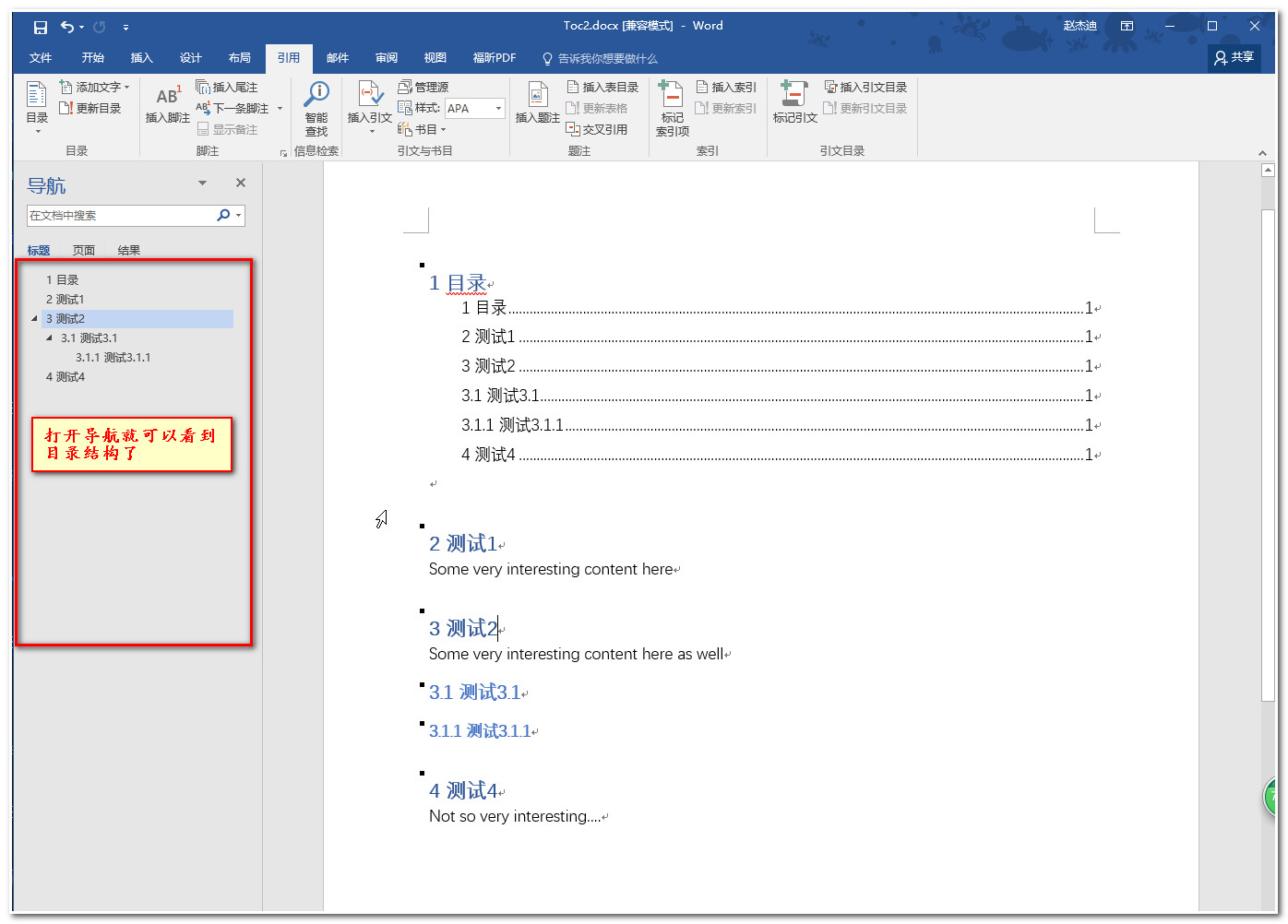
1.2创建目录代码:
   static void AddToc()

        {

            Console.WriteLine("\tAddToc()");

            using (var document = DocX.Create(@"docs\Toc2.docx"))

            {

                document.InsertTableOfContents("1 目录", TableOfContentsSwitches.O | TableOfContentsSwitches.U | TableOfContentsSwitches.Z | TableOfContentsSwitches.H, "Heading1");

               // document.InsertSectionPageBreak();//分页

                var h1 = document.InsertParagraph("2 测试1");

                h1.StyleName = "Heading1";

                document.InsertParagraph("Some very interesting content here");

                var h2 = document.InsertParagraph("3 测试2");

                h2.StyleName = "Heading1";

                document.InsertParagraph("Some very interesting content here as well");

                var h3 = document.InsertParagraph("3.1 测试3.1");

                h3.StyleName = "Heading2";

                var h4 = document.InsertParagraph("3.1.1 测试3.1.1");

                h4.StyleName = "Heading3";

                var h5 = document.InsertParagraph("4 测试4");

                h5.StyleName = "Heading1";

                document.InsertParagraph("Not so very interesting....");

                document.Save();

            }

        }
2.添加书签
2.1添加书签效果图
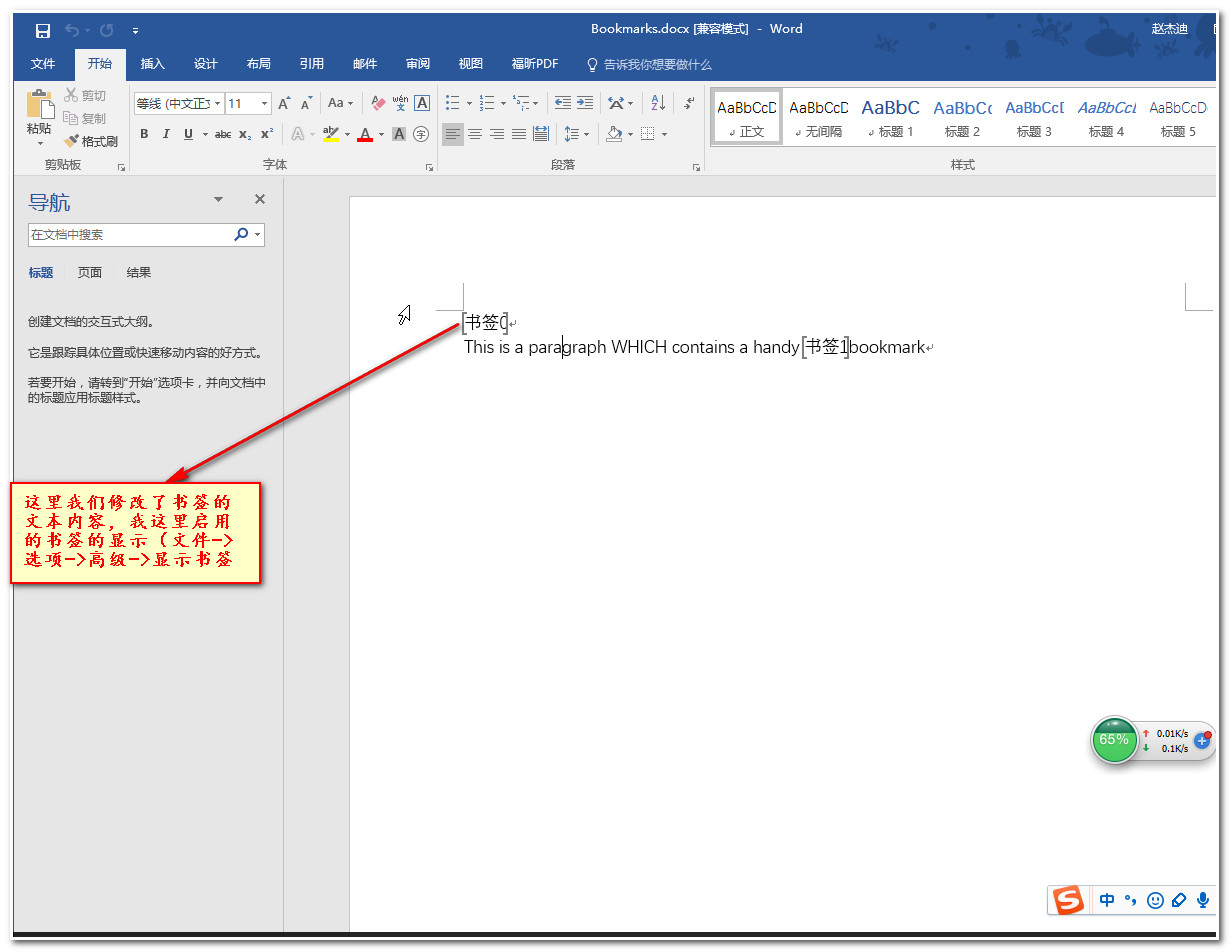
2.2添加书签代码:
    private static void Bookmarks()

        {

            Console.WriteLine("\tBookmarks()");

            using (var document = DocX.Create(@"docs\Bookmarks.docx"))

            {

                //添加一个书签

                var paragraph = document.InsertBookmark("firstBookmark");

                //添加一个段落并填充文本

                var paragraph2 = document.InsertParagraph("This is a paragraph which contains a ");

                //给段落2尾部添加一个书签,名字为secondBookmark

                paragraph2.AppendBookmark("secondBookmark");

                //给段落2原有文本的基础上追加文本bookmark

                paragraph2.Append("bookmark");

                //将段落2的secondBookmark的书签位置插入文本handy

                paragraph2.InsertAtBookmark("handy ", "secondBookmark");

                paragraph2.ReplaceText("which","WHICH");

                //遍历书签

                for (var index = ; index < document.Bookmarks.Count; index++)

                {

                    var item = document.Bookmarks[index];

                    Console.WriteLine(item.Name, item.Paragraph.Text);

                }

                //修改书签TEXT

                for (var index = ; index < document.Bookmarks.Count; index++)

                {

                    var item = document.Bookmarks[ index];

                    item.SetText("书签" + index);

                    Console.WriteLine(item.Name, item.Paragraph.Text);

                }

                document.Save();

                Console.WriteLine("\tCreated: docs\\Bookmarks.docx\n");

            }

        }
3.插入各种分隔符
        static void HelloWorldInsertHorizontalLine()

        {

            Console.WriteLine("\tHelloWorldInsertHorizontalLine()");

            // Create a new document.

            using (DocX document = DocX.Create(@"docs\HelloWorldInsertHorizontalLine.docx"))

            {

                // Insert a Paragraph into this document.

                Paragraph p = document.InsertParagraph();

                // Append some text and add formatting.

                p.Append("Hello World!^011Hello World!")

                .Font(new Font("Times New Roman"))

                .FontSize()

                .Color(WindowsColor.Blue)

                .Bold();

                p.InsertHorizontalLine("double", , , "auto");

                Paragraph p1 = document.InsertParagraph();

                p1.InsertHorizontalLine("double", , , "red");

                Paragraph p2 = document.InsertParagraph();

                p2.InsertHorizontalLine("single", , , "red");

                Paragraph p3 = document.InsertParagraph();

                p3.InsertHorizontalLine("triple", , , "blue");

                Paragraph p4 = document.InsertParagraph();

                p4.InsertHorizontalLine("double", , , "red");

                // Save this document to disk.

                document.Save();

                Console.WriteLine("\tCreated: docs\\HelloWorldInsertHorizontalLine.docx\n");

            }

        }
4.插入超链接
 private static void Hyperlinks()

        {

            // Create a document.

            using (DocX document = DocX.Create(@"docs\Hyperlinks.docx"))

            {

                // Add a hyperlink into the document.

                Hyperlink link1 = document.AddHyperlink("百度一下", new Uri("http://www.baidu.com"));

                Hyperlink link2 = document.AddHyperlink("TOC文档",new Uri("file:///" + @"E:\soft\DocX-master\Examples\bin\Debug\docs\Toc2.docx".Replace("\\", "/")));

                Uri uri = new Uri("http://www.baidu.com");

                Paragraph p1 = document.InsertParagraph();

                // Append content to the Paragraph

                p1.AppendLine("下面是2个超链接").Append(":").Bold();

                p1.AppendLine("百度的: ").AppendHyperlink(link1).Color(WindowsColor.FromArgb(, , )).Append(".");

                p1.AppendLine("本地的绝对路径 :").AppendHyperlink(link2).Color(WindowsColor.FromArgb(, , )).Append(".");

                p1.AppendLine();

                document.Save();

                Console.WriteLine("\tCreated: docs\\Hyperlinks.docx\n");

            }

        }
5.插入分页符合换行符
 private static void BreakPageLine()

        {

            Console.WriteLine("\tBreakPageLine()");

            // Create a new document.

            using (DocX document = DocX.Create(@"docs\BreakPageLine.docx"))

            {

                // Add Headers and Footers to this document.

                Paragraph p0 = document.InsertParagraph();

                p0.Append("Hello First line").Bold();

                p0.InsertPageBreakAfterSelf();

                var p1 = document.InsertParagraph("zhaojiedi");

                document.InsertSectionPageBreak();

                document.InsertParagraph("zhaojiedi2");

                document.InsertSection();

               var p2= document.InsertParagraph("zhaojiedi3");

                p2.AppendLine("zhaojiedi4");

                p2.AppendLine("zhaojiedi5");

                p2.AppendLine("zhaojiedi6");

                document.Save();

            }// Release this document from memory.

        }
6.插入公式
  private static void Equations()

        {

            Console.WriteLine("\tEquations()");

            // Create a new document.

            using (DocX document = DocX.Create(@"docs\Equations.docx"))

            {

                // Insert first Equation in this document.

                Paragraph pEquation1 = document.InsertEquation("x = y+z");

                // Insert second Equation in this document and add formatting.

                Paragraph pEquation2 = document.InsertEquation("x = (y+z)/t").FontSize().Color(WindowsColor.Blue);

                // Save this document to disk.

                document.Save();

                Console.WriteLine("\tCreated: docs\\Equations.docx\n");

            }

        }
7.插入页眉页脚
        private static void HeadersAndFooters2()

        {

            Console.WriteLine("\tHeadersAndFooters()");

            // Create a new document.

            using (DocX document = DocX.Create(@"docs\HeadersAndFooters.docx"))

            {

                // Add Headers and Footers to this document.

                document.AddHeaders();

                document.AddFooters();

                // Force the first page to have a different Header and Footer.

                document.DifferentFirstPage = true;

                // Force odd & even pages to have different Headers and Footers.

                document.DifferentOddAndEvenPages = true;

                // Get the first, odd and even Headers for this document.

                Header header_first = document.Headers.first;

                Header header_odd = document.Headers.odd;

                Header header_even = document.Headers.even;

                // Get the first, odd and even Footer for this document.

                Footer footer_first = document.Footers.first;

                Footer footer_odd = document.Footers.odd;

                Footer footer_even = document.Footers.even;

                // Insert a Paragraph into the first Header.

                Paragraph p0 = header_first.InsertParagraph();

                p0.Append("Hello First Header.").Bold();

                // Insert a Paragraph into the odd Header.

                Paragraph p1 = header_odd.InsertParagraph();

                p1.Append("Hello Odd Header.").Bold();

                // Insert a Paragraph into the even Header.

                Paragraph p2 = header_even.InsertParagraph();

                p2.Append("Hello Even Header.").Bold();

                // Insert a Paragraph into the first Footer.

                Paragraph p3 = footer_first.InsertParagraph();

                p3.Append("Hello First Footer.").Bold();

                // Insert a Paragraph into the odd Footer.

                Paragraph p4 = footer_odd.InsertParagraph();

                p4.Append("Hello Odd Footer.").Bold();

                // Insert a Paragraph into the even Header.

                Paragraph p5 = footer_even.InsertParagraph();

                p5.Append("Hello Even Footer.").Bold();

                // Insert a Paragraph into the document.

                Paragraph p6 = document.InsertParagraph();

                p6.AppendLine("Hello First page.");

                // Create a second page to show that the first page has its own header and footer.

                p6.InsertPageBreakAfterSelf();

                // Insert a Paragraph after the page break.

                Paragraph p7 = document.InsertParagraph();

                p7.AppendLine("Hello Second page.");

                // Create a third page to show that even and odd pages have different headers and footers.

                p7.InsertPageBreakAfterSelf();

                // Insert a Paragraph after the page break.

                Paragraph p8 = document.InsertParagraph();

                p8.AppendLine("Hello Third page.");

                //Insert a next page break, which is a section break combined with a page break

                document.InsertSectionPageBreak();

                //Insert a paragraph after the "Next" page break

                Paragraph p9 = document.InsertParagraph();

                p9.Append("Next page section break.");

                //Insert a continuous section break

                document.InsertSection();

                //Create a paragraph in the new section

                var p10 = document.InsertParagraph();

                p10.Append("Continuous section paragraph.");

                // Save all changes to this document.

                document.Save();

                Console.WriteLine("\tCreated: docs\\HeadersAndFooters.docx\n");

            }// Release this document from memory.

        }
DocX开源WORD操作组件的学习系列二的更多相关文章
- DocX开源WORD操作组件的学习系列四
DocX学习系列 DocX开源WORD操作组件的学习系列一 : http://www.cnblogs.com/zhaojiedi1992/p/zhaojiedi_sharp_001_docx1.htm ...
- DocX开源WORD操作组件的学习系列三
DocX学习系列 DocX开源WORD操作组件的学习系列一 : http://www.cnblogs.com/zhaojiedi1992/p/zhaojiedi_sharp_001_docx1.htm ...
- DocX开源WORD操作组件的学习系列一
DocX学习系列 DocX开源WORD操作组件的学习系列一 : http://www.cnblogs.com/zhaojiedi1992/p/zhaojiedi_sharp_001_docx1.htm ...
- 开源word操作组件DocX的记录
开源word操作组件DocX的记录 使用开源word操作组件DocX的记录 1.DocX简介 1.1 简介 DocX是一个在不需要安装word的情况下对word进行操作的开源轻量级.net组件,是由爱 ...
- 使用开源word操作组件DocX的记录
1.DocX简介 1.1 简介 DocX是一个在不需要安装word的情况下对word进行操作的开源轻量级.net组件,是由爱尔兰的一个叫Cathal Coffey的博士生开发出来的.DocX使得操作w ...
- 开源Word读写组件DocX 的深入研究和问题总结
一. 前言 前两天看到了asxinyu大神的[原创]开源Word读写组件DocX介绍与入门,正好我也有类似的自动生成word文档得需求,于是便仔细的研究了这个DocX. 我也把它融入到我的项目当中并进 ...
- [.NET] 开头不讲"Hello Word",读尽诗书也枉然 : Word 操作组件介绍 - Spire.Doc
开头不讲"Hello Word",读尽诗书也枉然 : Word 操作组件介绍 - Spire.Doc [博主]反骨仔 [原文地址]http://www.cnblogs.com/li ...
- 开源RabbitMQ操作组件
开源RabbitMQ操作组件 对于目前大多的.NET项目,其实使用的技术栈都是差不多,估计现在很少用控件开发项目的了,毕竟一大堆问题.对.NET的项目,目前比较适合的架构ASP.NET MVC,ASP ...
- 图机器学习(GML)&图神经网络(GNN)原理和代码实现(前置学习系列二)
项目链接:https://aistudio.baidu.com/aistudio/projectdetail/4990947?contributionType=1 欢迎fork欢迎三连!文章篇幅有限, ...
随机推荐
- Android全平台书籍
<Android Database Programming>:全书研究Android平台下的数据库技术. <Android Application Programming with ...
- DW1000 用户手册中文版 第5章 媒体访问控制(帧过滤)
由于已经在wode中排版无法直接复制到博客中,故本节博客发布使用了图片. PDF下载 http://bphero.com.cn/forum.php?mod=viewthread&tid=68
- 神奇高效的Linux命令行
一.为什么要学linux命令 Linux是由命令行组成的操作系统,精髓在命令行,无论图形界面发展到什么水平,命令行方式的操作永远是不会变的.Linux命令有许多强大的功能:从简单的磁盘操作.文件存取, ...
- elasticsearch 文档资料
1.Function Score Query 自定义查询评分 https://www.elastic.co/guide/en/elasticsearch/reference/current/query ...
- Tips_发送请求时添加一个随机数参数,让浏览器每次都重新发请求到服务器
<!DOCTYPE html> <html lang="en"> <head> <meta charset="UTF-8&quo ...
- Go语言基础之结构体
Go语言基础之结构体 Go语言中没有“类”的概念,也不支持“类”的继承等面向对象的概念.Go语言中通过结构体的内嵌再配合接口比面向对象具有更高的扩展性和灵活性. 类型别名和自定义类型 自定义类型 在G ...
- CVE-2018-20129:DedeCMS V5.7 SP2前台文件上传漏洞
一.漏洞摘要 漏洞名称: DedeCMS V5.7 SP2前台文件上传漏洞上报日期: 2018-12-11漏洞发现者: 陈灿华产品首页: http://www.dedecms.com/软件链接: ht ...
- thinkphp 找数据库某个字段为空的数据,PHP 数据调取 空数据
$arr['dingwei'] = array('EXP','is null');
- 大数据BI框架知识点备注
将这段时间的一些基于大数据方案的BI知识点暂时做些规整,可能还存在较多问题,后续逐步完善修改. 数据模型: 1.星型模型和雪花模型,同样是将业务表拆分成事实表和纬度表:例如一个员工数据表,可以拆分为员 ...
- 前端系列——jquery.i18n.properties前端国际化解决方案“填坑日记”
前言:最近,新的平台还没有开发完成,原来的老项目又提出了新的需求:系统国际化.如果是前后端完全分离的开发模式,要做国际化,真的太简单了,有现成的解决方案,基于Node构建的时下热门的任何一种技术选型都 ...