
Memo
1.Webpack: node_modules/css/index.js didn't return a function
npm install css-loader style-loader --save-dev
2.更改webpack 端口
webpack-dev-server --hot --host 127.0.0.1 --port 9999
3.jquery相关重叠造成的混乱
    <ul>

        <li>index</li>

        <li>foo</li>

        <li>foo2</li>

    </ul>

    <div id="cc">

    </div>

    <script>

        $(function(){

          $("li" ).each(function( index ) {

              $("div").append("<div>"+index+ ":"+$(this).text()+"</div>");

          });

       });

    </script>
浏览器渲染成这样:

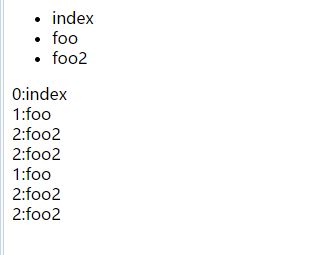
我理解就是选择器与添加元素,重叠造成的混乱
$("div").append("<div>"+index+ ":"+$(this).text()+"</div>");
明确一个ID就好了
$("#cc").append("<div>"+index+ ":"+$(this).dtext()+"</div>");
4.禁用在UC上点到图片显示看图模式
5.jquery children和find
.children( [selector ] )Returns: jQuery
Description: Get the children of each element in the set of matched elements, optionally filtered by a selector.
Given a jQuery object that represents a set of DOM elements, the .children() method allows us to search through the children of these elements in the DOM tree and construct a new jQuery object from the matching elements. The .children()method differs from .find() in that .children() only travels a single level down the DOM tree while .find() can traverse down multiple levels to select descendant elements (grandchildren, etc.) as well. Note also that like most jQuery methods, .children() does not return text nodes; to get all children including text and comment nodes, use .contents().
The .children() method optionally accepts a selector expression of the same type that we can pass to the $() function. If the selector is supplied, the elements will be filtered by testing whether they match it.
.find( selector )Returns: jQuery
Description: Get the descendants of each element in the current set of matched elements, filtered by a selector, jQuery object, or element.
Given a jQuery object that represents a set of DOM elements, the .find() method allows us to search through the descendants of these elements in the DOM tree and construct a new jQuery object from the matching elements. The .find()and .children() methods are similar, except that the latter only travels a single level down the DOM tree.
The first signature for the .find()method accepts a selector expression of the same type that we can pass to the $()function. The elements will be filtered by testing whether they match this selector.
children() 不返回文本节点
.find()和.children()方法相似,但是children()只是查找子元素,返回的是儿子辈儿的,不是后代元素,参数可选。
而find()方法是返回匹配元素集合中每个元素的后代,参数必选。find()方法只在后代中遍历,不包括自己。
if($(“table:eq(“+j+”)”).find(“tbody tr:nth-child(“+i+”)”).children(“td:nth-child(2)”).text()==”直航”)
if($(“table:eq(“+j+”)”).children(“tbody”).children(“tr:nth-child(“+i+”)”).children(“td:nth-child(2)”).text()==”直航”)
6.监测当前浏览器是否支持download属性
7.微信浏览器缓存
8.兼容trim
兼容旧环境如果 trim() 不存在,可以在所有代码前执行下面代码
if (!String.prototype.trim) {

  String.prototype.trim = function () {

    return this.replace(/^[\s\uFEFF\xA0]+|[\s\uFEFF\xA0]+$/g, '');

  };

}
9.IE10+ 半透明自动隐藏的滚动条
/* IE10+ 半透明自动隐藏的滚动条 */

@-ms-viewport {

  width: device-width;

}
CSS 自定义滚动条样式 适用于 webkit 内核浏览器
::-webkit-scrollbar 滚动条整体部分

::-webkit-scrollbar-thumb  滚动条里面的小方块,能向上向下移动(或往左往右移动,取决于是垂直滚动条还是水平滚动条)

::-webkit-scrollbar-track  滚动条的轨道(里面装有Thumb)

::-webkit-scrollbar-button 滚动条的轨道的两端按钮,允许通过点击微调小方块的位置。

::-webkit-scrollbar-track-piece 内层轨道,滚动条中间部分(除去)

::-webkit-scrollbar-corner 边角,即两个滚动条的交汇处

::-webkit-resizer 两个滚动条的交汇处上用于通过拖动调整元素大小的小控件
10.改完JS文件夹版本号真的挺重要的。今天不小心疏忽了
11.今天写按着一篇博文写vue-demo 在外部引入CSS的时候,最后发现总是报
You may need an appropriate loader to handle this file type.
我按着博主的原文看了看 对比一下,没有哪不对。但就是不行。最后发现 ,在webpack.config.js 里 这则项不对
{
test: /\\.css$/,
loader: "style!css"
},
Memo的更多相关文章
- memo的一般方法
str := '好时代卡卡卡的水平佛单师傅开锁'; Memo1.Lines.Add(str); // 在最后加一行字符串 Memo1.Lines.Delete(x); // 删除x+1行字符串 Mem ...
- 修复 XE8 Win 平台 Firemonkey Memo 卷动后会重叠的问题
问题:XE8 Firemonkey 在 Windows 平台 Memo 卷动时,在第 1 , 2 行会产生重叠现象. 更新:XE8 update 1 已经修复这个问题,无需再使用下面方法. 修改前: ...
- 修正 Memo 設定為 ReadOnly 後, 無法有複製的功能
问题:当 Memo 設定為 ReadOnly = True 後, 选取一段文字后,無法有複製的功能. 适用:XE6 Android 系统(目前 iOS 还找不到方法) 修正方法: 请将源码 FMX.P ...
- TStringList TMemo Text与Add赋值的区别 Memo.Text赋值高度注意事项,不得不知的技巧。
Memo.Text赋值高度注意事项,不得不知的技巧. list := TStringList.Create; list.Text:= str: list.Count; list.Clear; l ...
- ORA-04031 With Leak in "OBJ STAT MEMO" Allocations Seen in V$SGASTAT on 10.2.0.5 (文档 ID 1350050.1)
APPLIES TO: Oracle Server - Enterprise Edition - Version: 10.2.0.5<max_ver> and later [Relea ...
- 第一部分实现功能:使用一个TabControl和一个Memo和TDictionary类实现文本临时存储
效果图: 一期功能概要: a.双击tab关闭tab,双击tab右边空白添加tab(标题为以hhnnsszzz的时间格式命名) b.切换tab将数据存入dictionary,key为标题,value为m ...
- 问题-Fastreport4 Memo打印时中文显示不全
问题现象:在使用Fastreport4制作打印工具时,发现Memo显示中文老是显不不全. 问题原因:可能是因为字符编码的原因,希望高人指点. 问题处理:将属性font-charset设置为DEFAUL ...
- Memo打印1
Delphi 打印Memo里面的内容 实现的功能和记事本的打印的功能一样 打印保存为文件时此时的文件名如何设置? 当Memo里的文本数量巨大时 窗体正在打印会出现点数字显示问题 闪 ...
- Delphi Memo的记事本功能
Delphi Memo的记事本功能 下载地址 : http://download.csdn.net/detail/teststudio/6412883 这个代码实现了Windows ...
- Delphi TFindDialog TReplaceDialog对话框在Memo中的使用
Delphi TFindDialog TReplaceDialog对话框的使用 下载地址1: http://download.csdn.net/detail/teststudio/6408383 ...
随机推荐
- api签名
当你提交以上信息时,办公逸将发送GET请求到填写的URL,GET请求将携带四个参数, 参数 描述 是否必带 signature 办公逸签名,signature结合了企业填写的token,请求中的tim ...
- 一起阅读《Java多线程编程核心技术》
目录 第一章 Java多线程技能 (待续...)
- jQuery $(document).ready() 与window.onload的区别
ps:jQuery中$(document).ready()的作用类似于传统JavaScript中的window.onload方法,虽然具有类似的效果,但是它们在触发操作的时间上存在着微妙的差异. 在j ...
- Linux中find常见用法示例
·find path -option [ -print ] [ -exec -ok command ] {} \; find命令的参数: pathname: find命 ...
- axios基本用法
vue更新到2.0之后,作者就宣告不再对vue-resource更新,而是推荐的axios,前一段时间用了一下,现在说一下它的基本用法. 首先就是引入axios,如果你使用es6,只需要安装axios ...
- 关于JS事件的几点总结
1.理解事件(2点) 事件行为本身:没有给事件绑定方法事件也是一直存在的,当触发行为的时候,也对触发对应的行为,只不过由于没有绑定事件,导致没有任何事件发生: 事件绑定:给元素绑定一个方法:触发行为, ...
- JS 深浅拷贝
首先理解概念 浅拷贝: 只复制对象的基本类型, 对象类型, 仍属于原来的引用. 深拷贝: 不紧复制对象的基本类, 同时也复制原对象中的对象.就是说完全是新对象产生的. 首先看浅拷贝 //浅拷贝 var ...
- 常用js代码集
<img src="{:url('publics/verify')}" onclick="this.src='{:url('publics/verify')}'&q ...
- c语言socket通信
http://www.cnblogs.com/xudong-bupt/archive/2013/12/29/3483059.html
- linux配置网卡IP地址命令详细介绍及一些常用网络配置命令
linux配置网卡IP地址命令详细介绍及一些常用网络配置命令2010-- 个评论 收藏 我要投稿 Linux命令行下配置IP地址不像图形界面下那么方 便,完全需要我们手动配置,下面就给大家介绍几种配置 ...