
WebService客户端几种实现方式
1、jdk原生调用(需要获取服务接口文件)
import java.net.URL;

import javax.xml.namespace.QName;

import javax.xml.ws.Service;

import com.soft.platform.webservice.server.MyService;

public class WsClient {

	public static void main(String[] args) throws Exception {

		URL url = new URL("http://192.168.0.101:8089/myservice?wsdl");

		// 指定命名空间和服务名称

		QName qName = new QName("http://com.soft.ws/my", "MyService");

		Service service = Service.create(url, qName);

		// 通过getPort方法返回指定接口

		MyService myServer = service.getPort(new QName("http://com.soft.ws/my",

				"LoginPort"), MyService.class);

		// 调用方法 获取返回值

		String result = myServer.authorization("admin", "123456");

		System.out.println(result);

	}

}

返回结果: success
2.import生成客户端代码
wsimport -d d:/webservice -keep -p com.soft.test.wsimportClient -verbose http://192.168.0.101:8089/myservice?wsdl
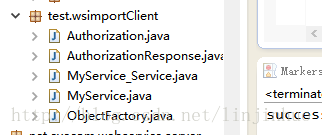
public static void main(String[] args) {

		MyService_Service service = new MyService_Service();

		MyService login = service.getLoginPort();

		String result = login.authorization("admin", "123456");

		System.out.println(result);

	}
3、cxf两种调用方式。
public static void main(String[] args) {

		JaxWsProxyFactoryBean factory = new JaxWsProxyFactoryBean();

		factory.setServiceClass(MyService.class);

		factory.setAddress("http://192.168.0.101:8089/myservice?wsdl");

		// 需要服务接口文件

		MyService client = (MyService) factory.create();

		String result = client.authorization("admin", "123456");

		System.out.println(result);

	}
public static void main(String[] args) throws Exception {

		//采用动态工厂方式 不需要指定服务接口

		JaxWsDynamicClientFactory dcf = JaxWsDynamicClientFactory.newInstance();

		Client client = dcf

				.createClient("http://192.168.0.101:8089/myservice?wsdl");

		QName qName = new QName("http://com.soft.ws/my", "authorization");

		Object[] result = client.invoke(qName,

				new Object[] { "admin", "123456" });

		System.out.println(result[0]);

	}
4、axis调用方式
import java.net.MalformedURLException;

import java.net.URL;

import java.rmi.RemoteException;

import javax.xml.namespace.QName;

import javax.xml.rpc.ParameterMode;

import javax.xml.rpc.ServiceException;

import org.apache.axis.client.Call;

import org.apache.axis.client.Service;

import org.apache.axis.encoding.XMLType;

public class WsAClient {

     /**

	 * 跨平台调用Web Service出现

	 *  faultString: 服务器未能识别 HTTP 头 SOAPAction 的值:

	 * JAX-WS规范不需要SoapAction,但是.NET需要,所以产生了这个错误。

	 * options.setAction("目标的TargetNameSpace"+"调用的方法名");

	 */

	public static void main(String[] args) {

		String url = "http://192.168.0.101:8089/myservice?wsdl";

		Service service = new Service();

		try {

			Call call = (Call) service.createCall();

			call.setTargetEndpointAddress(new URL(url));

			// WSDL里面描述的接口名称(要调用的方法)

			call.setOperationName(new QName("http://com.soft.ws/my",

					"authorization"));

			//跨平台调用加上这个

		   call.setUseSOAPAction(true);

		   call.setSOAPActionURI("http://com.soft.ws/my/authorization");

			// 接口方法的参数名, 参数类型,参数模式 IN(输入), OUT(输出) or INOUT(输入输出)

			call.addParameter("userId", XMLType.XSD_STRING, ParameterMode.IN);

			call.addParameter("password", XMLType.XSD_STRING, ParameterMode.IN);

			// 设置被调用方法的返回值类型

			call.setReturnType(XMLType.XSD_STRING);

			// 设置方法中参数的值

			Object result = call.invoke(new Object[] { "admin", "123456" });

			System.out.println(result.toString());

		} catch (ServiceException | RemoteException | MalformedURLException e) {

			e.printStackTrace();

		}

	}

}
axis方式依赖的相关jar包如下: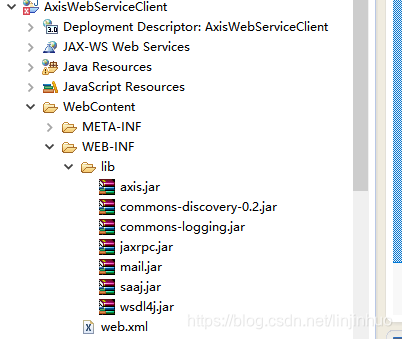
5、httpClient调用方式。
(1)maven依赖如下
<properties>

<httpclient.version>4.5.6</httpclient.version>

</properties>

<dependencies>

<dependency>

<groupId>org.apache.httpcomponents</groupId>

<artifactId>httpclient</artifactId>

<version>${httpclient.version}</version>

</dependency>

</dependencies>
(2)httpclient作为客户端调用webservice。代码如下
/*

 * Copyright (c)

 */

package test;

import org.apache.http.client.config.RequestConfig;

import org.apache.http.client.methods.CloseableHttpResponse;

import org.apache.http.client.methods.HttpPost;

import org.apache.http.entity.StringEntity;

import org.apache.http.impl.client.CloseableHttpClient;

import org.apache.http.impl.client.HttpClients;

import org.apache.http.util.EntityUtils;

import java.nio.charset.Charset;

/**

 * webservice客户端

 *

 * @author David Lin

 * @version: 1.0

 * @date 2018-09-09 12:16

 */

public class SoapClient {

    public static void main(String args[]) throws Exception {

        //soap服务地址

        String url = "http://localhost:8888/ssm/Services/UserService?wsdl";

        StringBuilder soapBuilder = new StringBuilder(64);

        soapBuilder.append("<?xml version=\"1.0\" encoding=\"UTF-8\"?>");

        soapBuilder.append("<soapenv:Envelope xmlns:soapenv=\"http://schemas.xmlsoap.org/soap/envelope/\" xmlns:web=\"http://webservice.soft.com/\">");

        soapBuilder.append("   <soapenv:Header/>");

        soapBuilder.append("       <soapenv:Body>");

        soapBuilder.append("             <web:authorization>");

        soapBuilder.append("                     <userId>").append("admin").append("</userId>");

        soapBuilder.append("                     <password>").append("123456").append("</password>");

        soapBuilder.append("               </web:authorization>");

        soapBuilder.append("    </soapenv:Body>");

        soapBuilder.append("</soapenv:Envelope>");

        //创建httpcleint对象

        CloseableHttpClient httpClient = HttpClients.createDefault();

        //创建http Post请求

        HttpPost httpPost = new HttpPost(url);

        // 构建请求配置信息

        RequestConfig config = RequestConfig.custom().setConnectTimeout(1000) // 创建连接的最长时间

                .setConnectionRequestTimeout(500) // 从连接池中获取到连接的最长时间

                .setSocketTimeout(3 * 1000) // 数据传输的最长时间10s

                .build();

        httpPost.setConfig(config);

        CloseableHttpResponse response = null;

        try {

            //采用SOAP1.1调用服务端,这种方式能调用服务端为soap1.1和soap1.2的服务

            httpPost.setHeader("Content-Type", "text/xml;charset=UTF-8");

            //采用SOAP1.2调用服务端,这种方式只能调用服务端为soap1.2的服务

            // httpPost.setHeader("Content-Type", "application/soap+xml;charset=UTF-8");

            StringEntity stringEntity = new StringEntity(soapBuilder.toString(), Charset.forName("UTF-8"));

            httpPost.setEntity(stringEntity);

            response = httpClient.execute(httpPost);

            // 判断返回状态是否为200

            if (response.getStatusLine().getStatusCode() == 200) {

                String content = EntityUtils.toString(response.getEntity(), "UTF-8");

                System.out.println(content);

            } else {

                System.out.println("调用失败!");

            }

        } catch (Exception e) {

            e.printStackTrace();

        } finally {

            if (null != response) {

                response.close();

            }

            if (null != httpClient) {

                httpClient.close();

            }

        }

    }

}
返回结果为:
<soap:Envelope xmlns:soap="http://schemas.xmlsoap.org/soap/envelope/">

<soap:Body>

<ns2:authorizationResponse xmlns:ns2="http://webservice.soft.com/">

<return>success</return>

</ns2:authorizationResponse>

</soap:Body>

</soap:Envelope>
(3)用Jsoup提取响应数据。
maven依赖
<properties>

      <jsoup.version>1.11.3</jsoup.version>

  </properties>

  <dependencies>

    <dependency>

      <groupId>org.jsoup</groupId>

      <artifactId>jsoup</artifactId>

      <version>${jsoup.version}</version>

    </dependency>

  </dependencies>
代码如下:
 Document soapRes = Jsoup.parse(content);

 Elements returnEle = soapRes.getElementsByTag("return");

 System.out.println("调用结果为:"+returnEle.text());
WebService客户端几种实现方式的更多相关文章
- WebService的几种验证方式
转 http://www.cnblogs.com/yoshiki1895/archive/2009/06/03/1495440.html WebService的几种验证方式 1.1 WebS ...
- WebService学习整理(一)——客户端三种调用方式整理
1 WebService基础 1.1 作用 1, WebService是两个系统的远程调用,使两个系统进行数据交互,如应用: 天气预报服务.银行ATM取款.使用邮箱账号登录各网站等. 2, ...
- java 调用wsdl的webservice接口 两种调用方式
关于wsdl接口对于我来说是比较头疼的 基本没搞过.一脸懵 就在网上搜 看着写的都很好到我这就不好使了,非常蓝瘦.谨以此随笔纪念我这半个月踩过的坑... 背景:短短两周除了普通开发外我就接到了两个we ...
- webservice的两种调用方式
如下 using ConsoleApplication1.TestWebService; using System; using System.Collections; using System.Co ...
- C#调用webService的几种方法
转自: WebClient 用法小结 http://www.cnblogs.com/hfliyi/archive/2012/08/21/2649892.html http://www.cnblogs. ...
- Axis2开发WebService客户端 的3种方式
Axis2开发WebService客户端 的3种方式 在dos命令下 wsdl2java -uri wsdl的地址(网络上或者本地) -p com.whir.ezoffi ...
- WebService的两种方式Soap和Rest比较
我的读后感:由于第一次接触WebService,对于很多概念不太理解,尤其是看到各个OpenAPI的不同提供方式时,更加疑惑.如google map api采用了AJAX方式,通过javascript ...
- C# .NET 动态调用webservice的三种方式
转载自 百度文库 http://wenku.baidu.com/link?url=Q2q50wohf5W6UX44zqotXFEe_XOMaib4UtI3BigaNwipOHKNETloMF4ax4W ...
- WebService的两种方式SOAP和REST比较 (转)
我的读后感:由于第一次接触WebService,对于很多概念不太理解,尤其是看到各个OpenAPI的不同提供方式时,更加疑惑.如google map api采用了AJAX方式,通过javascript ...
随机推荐
- 怎么让Word编辑公式又快又好
现在很多办公学习都是在电脑中进行的.很多文件论文都是在Word中编写定稿以后再打印成册或者去投稿.毫无疑问,在Word中编辑各种各样的文字与符号是一项现在社会中非常必要的技能,而这其中一项就是对公式的 ...
- Learning Deep CNN Denoiser Prior for Image Restoration阅读笔记
introduction 图像恢复目标函数一般形式: 前一项为保真项(fidelity),后一项为惩罚项,一般只与去噪有关. 基于模型的优化方法可以灵活地使用不同的退化矩阵H来处理不同的图像恢复问题, ...
- go在线图书
https://books.studygolang.com/The-Golang-Standard-Library-by-Example/
- Supervisor安装与配置(非守护进程管理工具)
http://blog.csdn.net/xyang81/article/details/51555473
- Landpy.ActiveDirecoty,按照Active Record Pattern设计的方便Lib开源发布
想方便的操作AD吗,不想记住那么多AD Attribute名称和常量?请使用Landpy.ActiveDirecoty库,按照Active Record Pattern设计的AD Lib已经在Code ...
- Python Scrapy初步使用
1.创建爬虫工程 scrapy startproject stockproject001 2.创建爬虫项目 cd stockproject001 scrapy genspider stockinfo ...
- Java中自己定义缓存方式
说说自己在开发中经常用到的写法. /** * 数据缓存 * @author * */public class DataCache { /** 对象缓存*/ public static Ma ...
- Oracle里 用sql*plus 登陆时,用户名和密码是多少啊?
Oracle里sql*plus的用户名即system用户,密码是自己设置的密码. 如果密码忘记,可通过如下方法重置. 1.win键+R键,输入cmd,打开命令提示符. 2.输入sqlplus /nol ...
- JS AJAX传递List数组到后台(对象)
今天在写代码的时候,碰到的问题,百度了一下,发现原来AJAX传递List数据是可以的,之前还一直用JSON序列化(new Array()数组设置)进行传值的. var _list = {}; //等价 ...
- Android之ListView分页数据加载
1.效果如下: 实例如下: 上图的添加数据按钮可以换成一个进度条 因为没有数据所以我加了一个按钮添加到数据库用于测试:一般在服务器拉去数据需要一定的时间,所以可以弄个进度条来提示用户: 点击加载按 ...