
【Android进阶学习】shape和selector的结合使用(转)
shape和selector是Android UI设计中经常用到的,比如我们要自定义一个圆角Button,点击Button有些效果的变化,就要用到shape和selector。可以这样说,shape和selector在美化控件中的作用是至关重要的。
1.Shape
简介
作用:XML中定义的几何形状
位置:res/drawable/文件的名称.xml
使用的方法:
Java代码中:R.drawable.文件的名称
XML中:android:background="@drawable/文件的名称"
属性:
<shape> android:shape=["rectangle" | "oval" | "line" | "ring"]
其中rectagle矩形,oval椭圆,line水平直线,ring环形
<shape>中子节点的常用属性:
<gradient> 渐变
android:startColor 起始颜色
android:endColor 结束颜色
android:angle 渐变角度,0从上到下,90表示从左到右,数值为45的整数倍默认为0;
android:type 渐变的样式 liner线性渐变 radial环形渐变 sweep
<solid > 填充
android:color 填充的颜色
<stroke > 描边
android:width 描边的宽度
android:color 描边的颜色
android:dashWidth 表示'-'横线的宽度
android:dashGap 表示'-'横线之间的距离
<corners > 圆角
android:radius 圆角的半径 值越大角越圆
android:topRightRadius 右上圆角半径
android:bottomLeftRadius 右下圆角角半径
android:topLeftRadius 左上圆角半径
android:bottomRightRadius 左下圆角半径
2.Selector
简介
位置:res/drawable/文件的名称.xml
使用的方法:
Java代码中:R.drawable.文件的名称
XML中:android:background="@drawable/文件的名称"
- <?xml version="1.0" encoding="utf-8" ?>
- <selector xmlns:android="http://schemas.android.com/apk/res/android">
- <!-- 默认时的背景图片-->
- <item android:drawable="@drawable/pic1" />
- <!-- 没有焦点时的背景图片 -->
- <item
- android:state_window_focused="false"
- android:drawable="@drawable/pic_blue"
- />
- <!-- 非触摸模式下获得焦点并单击时的背景图片 -->
- <item
- android:state_focused="true"
- android:state_pressed="true"
- android:drawable= "@drawable/pic_red"
- />
- <!-- 触摸模式下单击时的背景图片-->
- <item
- android:state_focused="false"
- android:state_pressed="true"
- android:drawable="@drawable/pic_pink"
- />
- <!--选中时的图片背景-->
- <item
- android:state_selected="true"
- android:drawable="@drawable/pic_orange"
- />
- <!--获得焦点时的图片背景-->
- <item
- android:state_focused="true"
- android:drawable="@drawable/pic_green"
- />
- </selector>
第一个例子:圆角的Button
http://liangruijun.blog.51cto.com/3061169/630051
第二个例子:shape+selector综合使用的例子 漂亮的ListView
先看看这个例子的结构:
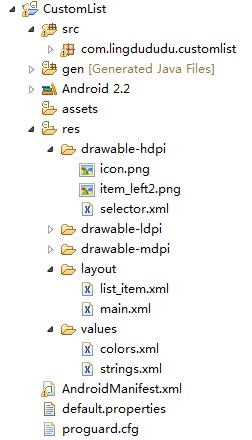
selector.xml
- <?xml version="1.0" encoding="utf-8"?>
- <selector xmlns:android="http://schemas.android.com/apk/res/android">
- <item android:state_selected="true">
- <shape>
- <gradient android:angle="270" android:endColor="#99BD4C"
- android:startColor="#A5D245" />
- <size android:height="60dp" android:width="320dp" />
- <corners android:radius="8dp" />
- </shape>
- </item>
- <item android:state_pressed="true">
- <shape>
- <gradient android:angle="270" android:endColor="#99BD4C"
- android:startColor="#A5D245"/>
- <size android:height="60dp" android:width="320dp" />
- <corners android:radius="8dp" />
- </shape>
- </item>
- <item>
- <shape>
- <gradient android:angle="270" android:endColor="#A8C3B0"
- android:startColor="#C6CFCE" />
- <size android:height="60dp" android:width="320dp" />
- <corners android:radius="8dp" />
- </shape>
- </item>
- </selector>
list_item.xml
- <?xml version="1.0" encoding="utf-8"?>
- <LinearLayout xmlns:android="http://schemas.android.com/apk/res/android"
- android:orientation="horizontal"
- android:layout_width="fill_parent"
- android:layout_height="wrap_content"
- android:background="@drawable/selector"
- >
- <ImageView
- android:id="@+id/img"
- android:layout_width="wrap_content"
- android:layout_height="wrap_content"
- android:layout_gravity="center_vertical"
- android:layout_marginLeft="20dp"
- />
- <TextView
- android:text="data"
- android:id="@+id/title"
- android:layout_width="fill_parent"
- android:layout_height="wrap_content"
- android:gravity="center_vertical"
- android:layout_marginLeft="20dp"
- android:layout_marginTop="20dp"
- android:textSize="14sp"
- android:textStyle="bold"
- android:textColor="@color/black"
- >
- </TextView>
- </LinearLayout>
main.xml
- <?xml version="1.0" encoding="utf-8"?>
- <LinearLayout xmlns:android="http://schemas.android.com/apk/res/android"
- android:orientation="vertical"
- android:layout_width="fill_parent"
- android:layout_height="wrap_content"
- android:background="#253853"
- >
- <ListView
- android:id="@+id/list"
- android:layout_width="match_parent"
- android:layout_height="match_parent"
- android:cacheColorHint="#00000000"
- android:divider="#2A4562"
- android:dividerHeight="3px"
- android:listSelector="#264365"
- android:drawSelectorOnTop="false"
- >
- </ListView>
- </LinearLayout>
colors.xml
- <?xml version="1.0" encoding="utf-8"?>
- <resources>
- <color name="white">#FFFFFFFF</color>
- <color name="transparency">#00000000</color>
- <color name="title_bg">#1C86EE</color>
- <color name="end_color">#A0cfef83</color>
- <color name="black">#464646</color>
- </resources>
MainActivity.xml
- package com.lingdududu.customlist;
- import java.util.ArrayList;
- import java.util.HashMap;
- import xb.customlist.R;
- import android.R.array;
- import android.app.Activity;
- import android.os.Bundle;
- import android.widget.ArrayAdapter;
- import android.widget.ListView;
- import android.widget.SimpleAdapter;
- public class MainActivity extends Activity {
- ListView list;
- String data[] = new String[]{
- "China","UK","USA","Japan","German","Canada","ET","Narotu"
- };
- /** Called when the activity is first created. */
- @Override
- public void onCreate(Bundle savedInstanceState) {
- super.onCreate(savedInstanceState);
- setContentView(R.layout.main);
- list =(ListView) findViewById(R.id.list);
- SimpleAdapter adapter = new SimpleAdapter(this, getData(), R.layout.list_item,
- new String[]{"title","img"}, new int[]{R.id.title,R.id.img});
- list.setAdapter(adapter);
- }
- private ArrayList<HashMap<String, Object>> getData() {
- ArrayList<HashMap<String, Object>> dlist = new ArrayList<HashMap<String,Object>>();
- for(int i =0;i<data.length;i++){
- HashMap<String, Object>map = new HashMap<String, Object>();
- map.put("title", data[i]);
- map.put("img", R.drawable.item_left2);
- dlist.add(map);
- }
- return dlist;
- }
- }
效果图:
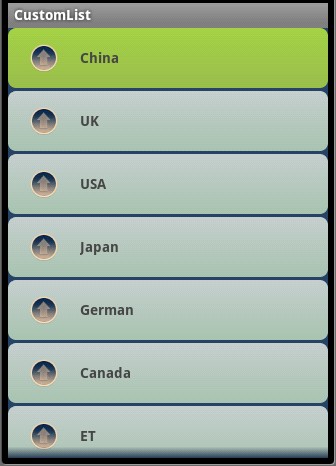
上面的例子中用到很多关于颜色RGB的参数,对RGB不熟悉的,可以参照我博客的一篇文章
http://liangruijun.blog.51cto.com/3061169/629276
本文出自 “IT的点点滴滴” 博客,请务必保留此出处http://liangruijun.blog.51cto.com/3061169/732310
【Android进阶学习】shape和selector的结合使用(转)的更多相关文章
- 【Android进阶学习】shape和selector的结合使用
shape和selector是Android UI设计中经常用到的,比如我们要自定义一个圆角Button,点击Button有些效果的变化,就要用到shape和selector.可以这样说,shape和 ...
- android 开发:shape和selector和layer-list的(详细说明)
目录(?)[+] Shape 简介 使用的方法 属性 Selector 简介 使用的方法 layer-list 简介 例子 最后 <shape>和<selector>在An ...
- 【转】Android开发:shape和selector和layer-list的(详细说明)
<shape>和<selector>在Android UI设计中经常用到.比如我们要自定义一个圆角Button,点击Button有些效果的变化,就要用到<shape> ...
- [Android进阶]学习AccessibilityService实现微信抢红包插件
在你的手机更多设置或者高级设置中,我们会发现有个无障碍的功能,很多人不知道这个功能具体是干嘛的,其实这个功能是为了增强用户界面以帮助残障人士,或者可能暂时无法与设备充分交互的人们 它的具体实现是通过A ...
- Android 进阶学习:事件分发机制全然解析,带你从源代码的角度彻底理解(上)
http://blog.csdn.net/guolin_blog/article/details/9097463 事实上我一直准备写一篇关于Android事件分发机制的文章,从我的第一篇博客開始,就零 ...
- Android进阶——学习AccessibilityService实现微信抢红包插件
在你的手机更多设置或者高级设置中,我们会发现有个无障碍的功能,很多人不知道这个功能具体是干嘛的,其实这个功能是为了增强用户界面以帮助残障人士,或者可能暂时无法与设备充分交互的人们 它的具体实现是通过A ...
- Android开发学习—— shape标签的使用
参考这片文章http://www.cnblogs.com/armyfai/p/5912414.html
- Android开发:shape和selector和layer-list的(详细说明)
http://blog.csdn.net/brokge/article/details/9713041
- Android开发教程:shape和selector的结合使用
shape和selector是Android UI设计中经常用到的,比如我们要自定义一个圆角Button,点击Button有些效果的变化,就要用到shape和selector.可以这样说,shape和 ...
随机推荐
- 报错:init: Could not find wglGetExtensionsStringARB!
如下操作即可恢复:
- JS监听键盘的组合按键
Mark 一下: $(document).keydown(function (e) { console.log(e); var keyCode = e.keyCode || e.which || e. ...
- redis-window 集群配置
参考文章: 1.http://www.cnblogs.com/zr520/p/5057141.html (主从配置) 2.http://www.cnblogs.com/lori/p/5825691.h ...
- [Algorithm] 局部敏感哈希算法(Locality Sensitive Hashing)
局部敏感哈希(Locality Sensitive Hashing,LSH)算法是我在前一段时间找工作时接触到的一种衡量文本相似度的算法.局部敏感哈希是近似最近邻搜索算法中最流行的一种,它有坚实的理论 ...
- java实现二叉树
栈在遍历的时候不能使用for循环,因为他的size函数在动态变小.
- MFC去掉标题栏
在初始化的时候加入以下函数 //去掉标题栏 ModifyStyle(WS_CAPTION, NULL, SWP_DRAWFRAME );
- Jquery客户端校验——jquery.validate.js
jQuery Validate 插件为表单提供了强大的验证功能,让客户端表单验证变得更简单,同时提供了大量的定制选项,满足应用程序各种需求.该插件捆绑了一套有用的验证方法,包括 URL 和电子邮件验证 ...
- C++中有关数组的相关问题
1.数组长度相关: strlen(from <string.h>)只是针对字符数组才有的,他不包含\0的长度.无法对其他类型求长度.sizeof()则可以对\0发起作用.记住(a.leng ...
- Lua在单片机中的移植
Lua代码符合ANSI C标准,只要有C编译器的开发环境就能跑Lua. 虽说只要有C编译器就能跑Lua,但是单片机的环境太简单,有些C标准的内容仍旧无法支持. Lua的官网是:www.lua.org ...
- 使用Impersonation仿冒用户运行WCF 服务方法
默认情况下,当我们把wcf服务器部署在IIS上时, 我们访问wcf时使用的是IIS内建的内建角色,对于IIS8.0,它被命名为ApplicationPoolIdentity, 一般来说,系统为每个应用 ...