
Vue--- Vue(Pubsub + Ajax) 数据交互
案例知识点
- 兄弟组件儿的通信 使用了Pubsub 订阅与发布
- ajax数据请求 获取前 获取中 获取后 获取为空 获取异常
- 获取成功后显示数据给到 原先定义号的 jsonData users
vue Search案例 消息订阅pubsub与ajax
pubsub消息订阅组件,便于兄弟组件间调用
npm install --save pubsub-js
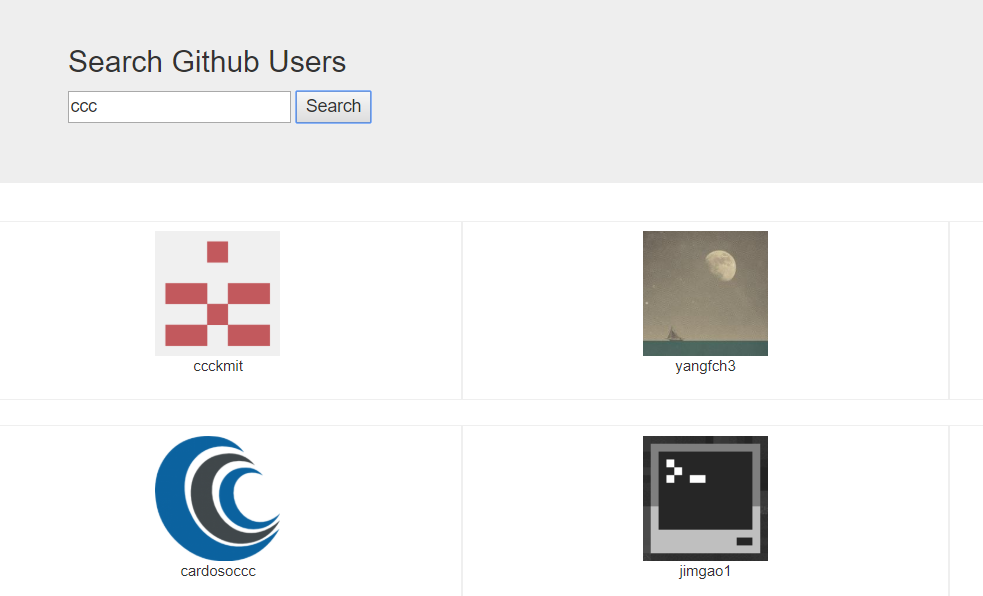
App.vue
 <template>

     <div id="app">

   <div class="container">

         <Search/>

            <users-main/>

   </div>

 </div>

 </template>

 <script>

     import Search from './components/Search.vue'

     import Main from './components/Main.vue'

     export default{

         components:{

             Search,

             // 内部定义的关键词名称 不可以使用 所以赋值一个名字

             UsersMain:Main

         }

     };

 </script>

 <style type="stylus">

 </style>
Main.vue
// 由于请求状态在Main中,ajax写在main中以便同步更新4个状态。 写在search中不便更新状态。
<template>

<div>

    <!-- 搜索我有四种状态 -->

        <!-- 1.搜索之前 -->

     <h2 v-if="firstView">输入用户名搜索</h2>

         <!-- 2.搜索中.... -->

     <h2 v-if="loading">GitData...</h2>

         <!-- 4.没有搜索到 -->

     <h2 v-if="overNull">该关键字没有搜索到Data...</h2>

         <!-- 3.搜索失败error -->

     <h2 v-if="errorMsg">{{errorMsg}}</h2>

     <div v-else class="row" v-for="(user,index) in users" :key="index" :index="index">

          <div class="card">

            <a :href="user.url" target="_blank">

              <img :src="user.avatar_url" style='width: 100px'/>

            </a>

            <p class="card-text">{{user.name}}</p>

          </div>

    </div>

</div>

</template>

<script type="text/ecmascript-6">

import PubSub from 'pubsub-js'

import axios from 'axios'

    export default{

        data(){

            return {

                firstView: true,

                loading:false,

                overNull:false,

                errorMsg: '',

                users:null

                // [

                //     {url:'',avatar_url:'',name:''},

                // ]

            }

        },

        mounted(){

            // 是否在此发ajax消息  是点击search后

            // 订阅搜索的消息

            PubSub.subscribe('search',(msg,searchName)=>{

                const url = `https://api.github.com/search/users?q=${searchName}`

                // 更新失败(请求中)

                this.firstView = false

                this.loading = true

                this.overNull = false

                alert('请求中')

                // 发送ajax请求

                axios.get(url).then(response=> {

                    // 获取数据 data

                    const result = response.data

                    // data中的items 里面有图片的路径  名称

                    const users = result.items.map(item=>({

                        url:item.html_url,

                        avatar_url:item.avatar_url,

                        name: item.login

                    }))

                    if(users.length !== 0){

                        console.log(users)

                    }

                    // 成功更新状态(成功)

                    this.loading = false

                    this.users = users

                    if(users.length == 0){

                        this.overNull = true

                    }

                    // 失败更新状态(失败)

                }).catch(error=>{

                    this.loading = false

                    this.errorMsg = '请求失败'

                })

            })

        }

    };

</script>

<style type="stylus" rel="stylesheet/stylus">

.card {

  float: left;

  width: 33.333%;

  padding: .75rem;

  margin-bottom: 2rem;

  border: 1px solid #efefef;

  text-align: center;

}

.card > img {

  margin-bottom: .75rem;

  border-radius: 100px;

}

.card-text {

  font-size: 85%;

}

</style>
Search.vue
 <template>

     <div>

         <section class="jumbotron">

               <h3 class="jumbotron-heading">Search Github Users</h3>

               <div>

                 <input type="text" placeholder="enter the name you search" v-model="searchName"/>

                 <button @click="search">Search</button>

               </div>

         </section>

     </div>

 </template>

 <script type="text/ecmascript-6">

 import PubSub from 'pubsub-js'

     export default{

         data(){

             return {

                 searchName:''

             }

         },

         methods:{

             search(){

                 const searchName = this.searchName.trim()

                 if(searchName){

                     // 发布搜索的消息

                     PubSub.publish('search',searchName)

                 }

             }

         }

     };

 </script>

 <style type="stylus" rel="stylesheet/stylus">

 </style>
Vue--- Vue(Pubsub + Ajax) 数据交互的更多相关文章
- Atitit vue.js 把ajax数据 绑定到form表单
Atitit vue.js 把ajax数据 绑定到form表单 1.1. 使用场景:主要应用在编辑与提交场合..1 1.2. 绑定数据到form控件,可以使用jquery,不过vue.js更加简单1 ...
- 弹出层和ajax数据交互
<%@ Page Language="C#" AutoEventWireup="true" CodeFile="Default.aspx.cs& ...
- Struts2与Ajax数据交互
写在前面: ajax请求在项目中常常使用,今天就平时掌握的总结一下,关于使用ajax请求到Struts2中的action时,前台页面与后台action之间的数据传递交互问题. 这里我主要记录下自己所掌 ...
- ajax数据交互
目录 一.ORM查询优化 1-1. only与defer 1-2. select_related与prefatch_related 二.MTV与MVC模型 三.choices参数 四.AJAX 4-1 ...
- django建立管理系统之五----单页ajax数据交互
ajax数据提交: 需求: 1. 点击ajax方式提交后数据提交到后台数据库,并且在前台实现数据更新 a.可以用刷新页面来实现数据页面的更新 对应的html,实现局部刷新(可以用刷新页面实现,例如 $ ...
- vue.js 三(数据交互)isomorphic-fetch
至于fetch的介绍,在这里就不多说了,官方和网络上的说明不少 之前使用jquery的Ajax朋友,可以尝试一下使用一下这个新的api 推荐使用isomorphic-fetch,兼容Node.js和浏 ...
- ajax数据交互(arcgis server)
通过ajax来调用服务器map数据,来实现搜索功能. 效果: 1.我要搜索下中国移动的地理信息: 2.会搜出17条消息,然后把他们分页显示,一页6条: 3.每一页的6天数据,会在map生成一个6条ma ...
- jq ajax数据交互
get 与 post 的区别 了解和使用 get和post是HTTP与服务器交互的方式, 说到方式,其实总共有四种:put,delete,post,get. 他们的作用分别是对服务器资源的增,删,改, ...
- jSon和Ajax登录功能,ajax数据交互案例
ajax实例,检测用户与注册 检测用户名是否被占用: 在用户填写完用户名之后,ajax会异步向服务器发送请求,判断用户名是否存在 首先写好静态页面: index.html <!DOCTYPE h ...
- EChats+Ajax之柱状图的数据交互
原文链接:https://blog.csdn.net/qq_37936542/article/details/79723710 一:下载 echarts.min.js 选择完整版进行下载,精简版和常用 ...
随机推荐
- javascript window.open in safari
在ios系统中,无法使用 window.open 打开url,经过一番尝试终于找到了解决办法 var url='http://www.baodu.com'; var deviceAgent = nav ...
- C# ADO.NET
ADO.NET 作业总结难点 数据库语句掌握太差 //查询 select * from Users //查询表中所有数据 select * from Users where UserName = 'l ...
- js实现选中当前元素并改变颜色(js、jq的各种循环)
1.jq伪类选择器(:not)的使用 2.js jq运用数组循环 3.checkbox的选中循环事件 4.select的选中事件 <select class="ssss" o ...
- scss-@at-root
@at-root指令可以使一个或多个规则被限定输出在文档的根层级上,而不是被嵌套在其父选择器下. 下面就通过scss代码实例介绍一下它的作用: 没有使用@at-root命令的默认情况. .parent ...
- windows常用命令集锦
开始→运行→输入的命令集锦 gpedit.msc-----组策略 sndrec32-------录音机 Nslookup-------IP地址侦测器 explorer-------打开资源管理器 lo ...
- 1977年提出的OSI七层模型
OSI七层模型: 7应用层 数据用户接口,提供人操作软件的接口 6表示层 数据的表现形式,特定的功能实现,比如数据加密.数据传输的编码等,一般由软件完成 ...
- C/C++:函数的调用约定(Calling Convention)和名称修饰(Decorated Name)以及两者不匹配引起的问题
转自:http://blog.csdn.net/zskof/article/details/3475182 注:C++有着与C不同的名称修饰,主要是为了解决重载(overload):调用约定则影响函数 ...
- AMOLED原理介紹
1. OLED发光原理 OLED(Organic Light Emitting Display,有机发光显示器)是指有机半导体材料在电场驱动下,通过载流子注入和复合导致发光的现象.其基本原理是用ITO ...
- db2的count()函数和sum()函数的用法
一.count()函数可以使用参数,例如count(*)和count(列名) count(*)用来计算在指定条件下,满足条件的行数,例如: select count(*) from tablename ...
- C# 轻松读取、改变文件的创建、修改、访问时间 z
// 读取文件的创建.修改.访问时间FileInfo fi = new FileInfo("C://test.txt");Console.WriteLine(fi.Creation ...