
通过布局文件来显示ListView内容并注册 ListView事件
1:layout/vlist.xml是我们的布局文件,在这里一定要对首节点加上
android:descendantFocusability="blocksDescendants" 这一属性,如果不加这一属性那么ListView就会获取不到点击事件。
<?xml version="1.0" encoding="utf-8"?>

<LinearLayout xmlns:android="http://schemas.android.com/apk/res/android"

    android:layout_width="match_parent"

    android:layout_height="match_parent"

    android:orientation="horizontal"

    android:descendantFocusability="blocksDescendants" >

    <ImageView

        android:id="@+id/imgNf"

        android:layout_width="wrap_content"

        android:layout_height="wrap_content"/>

    <TextView

        android:id="@+id/titleNf"

        android:layout_width="wrap_content"

        android:layout_height="wrap_content"

        android:textIsSelectable="true"/>

</LinearLayout>
2:activity_main.xml
<RelativeLayout xmlns:android="http://schemas.android.com/apk/res/android"

    xmlns:tools="http://schemas.android.com/tools"

    android:layout_width="match_parent"

    android:layout_height="match_parent">

    <ListView

        android:id="@+id/lvList"

        android:layout_width="match_parent"

        android:layout_height="wrap_content"></ListView>

</RelativeLayout>
3:MainActivity.java
public class MainActivity extends Activity {

    private List<Map<String,Object>>list=null;

    @Override

    protected void onCreate(Bundle savedInstanceState) {

        super.onCreate(savedInstanceState);

        setContentView(R.layout.activity_main);

        ListView lv=(ListView)findViewById(R.id.lvList);

        lv.setAdapter(initAdapter());

        //注册点击事件

        lv.setOnItemClickListener(new OnItemClickListener(){

            @Override

            public void onItemClick(AdapterView<?> arg0, View arg1, int arg2, long arg3) {

                String title=list.get(arg2).get("title").toString();

                Toast.makeText(MainActivity.this, title, Toast.LENGTH_SHORT).show();

            }

        });

    }

    public SimpleAdapter initAdapter(){

        SimpleAdapter simpleAdapter=new SimpleAdapter(

                MainActivity.this,

                getData(),

                R.layout.vlist,

                new String[]{"title","img"},

                new int[]{R.id.titleNf,R.id.imgNf});

        return simpleAdapter;

    }

    private List<Map<String,Object>>getData(){

        list=new ArrayList<Map<String,Object>>();

        Map<String,Object>map=new HashMap<String,Object>();

        map.put("title", "This is a test 1");

        map.put("img",R.drawable.ic_launcher);

        list.add(map);

        map=new HashMap<String,Object>();

        map.put("title", "This is a test 2");

        map.put("img",R.drawable.ic_launcher);

        list.add(map);

        return list;

    }

}
4:效果
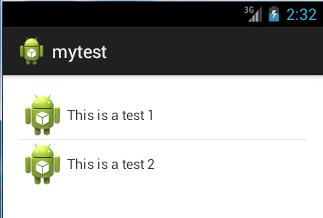
点击第二行数据后:

通过布局文件来显示ListView内容并注册 ListView事件的更多相关文章
- pycharm设置文件中显示模板内容
pycharm中设置自己的文件模板 File>>Settings>>Editor>>File and Code Templates 选择文件类型或者输入文件类型 ...
- ifrem上传文件后显示
ifrem上传文件后显示 1.上传文件按钮 <a class="btn btn-primary pull-right" id="data-upload&quo ...
- Android学习---ListView和Inflater的使用,将一个布局文件转化为一个对象
本文将介绍ListView和Inflater的使用,将接上一篇文章内容. 一.什么是ListView? 在android开发中ListView是比较常用的控件,ListView 控件可使用四种不同视图 ...
- 自定义ListView适配器Adapter引用布局文件的情况下实现点击列表项时背景颜色为灰色
listview控件设置适配器的时候,如果使用自定义的adapter,比如MyArrayAdapter extends ArrayAdapter<String> 如果listitem布局文 ...
- Android如何在一个线性布局里完美显示两个listview啊?
复写一个listView ,在你布局文件中使用此view: <ScrollView android:layout_width="fill_parent" android:la ...
- 安卓---achartengine图表----简单调用----使用view显示在自己的布局文件中----actionBar的简单设置
AChartEngine 是一个安卓系统上制作图表的框架,关于它的介绍大家可以百度,也可以参考下面这篇博客http://blog.csdn.net/lk_blog/article/details/76 ...
- 编程检查d:\test.txt文件是否存在,若在则显示该文件的名称和内容。
下面放两种方法 老师写的: import java.io.File; import java.io.FileInputStream; import java.io.FileNotFoundExcept ...
- 【转】 C# ListView实例:文件图标显示
[转] C# ListView实例:文件图标显示 说明:本例将目录中的文件显示在窗体的ListView控件中,并定义了多种视图浏览.通过调用Win32库函数实现图标数据的提取. 主程序: 大图标: 列 ...
- androidstudio新建项目中在布局文件中不显示title的方法
在androidstudio新建项目的时候,在布局文件里有时候会出现如下情况: 上面的标题栏非常碍眼,要想隐藏标题栏的话,可以在Manifest文件的theme标签里进行配置,自定义一个theme,加 ...
随机推荐
- SignalR 的跨域支持
How to establish a cross-domain connection Typically if the browser loads a page from http://contoso ...
- [置顶] 宏途_LCD调试流程.
今天在调试宏途的LCD屏时,开始是开机屏幕不亮,背光都不亮,可能板子已经损坏,一般通过测试电流电压简单验证,(注:硬件引脚没焊好也会引起读lcd id出现错误!!!)出现这个问题一般是因为引脚没焊好, ...
- storm高级原语-Transactional topology
参考: http://xumingming.sinaapp.com/736/twitter-storm-transactional-topolgoy/ http://xumingming.sinaap ...
- 根据请求头跳转判断Android&iOS
if(navigator.userAgent.match(/Android/i)) { window.location = 'http://apk.hiapk.com/m/downloads?id=c ...
- Android中BroadCast与Activity之间的通信
在看本文之前,假设你对于Android的广播机制不是非常了解.建议先行阅读我转载的一篇博文:图解 Android 广播机制. 因为本案例比較简单,故直接在此贴出代码,不做过多的阐述. 先上效果截图: ...
- 基本SQL语句练习之SELECT
一.SQL Plus连接sqlplus:以命令行方式连接数据库sqlplusw:以窗口登录方式连接数据库conn sys/password as sysdba;show userselect * fr ...
- vim的基本使用方法
头记:vim作为被大多数程序员所推崇的编辑器,是源于它的自由灵活以及令人舒服的输入模式,但对于新手来说无疑是个噩梦(需要记太多的命令), 而作为使用了vim有一段时间的我来说,总结下常用的命令,以备新 ...
- css float父元素高度塌陷
css float父元素高度塌陷 float 使父元素高度塌陷不是BUG,反而是标准. float 原本是为了解决文字环绕才出现的. 当然有的时候要解决高度塌陷的问题 以下几个方法可以解决float ...
- 使用VS Code开发AngularJS 2 第一个应用程序
使用VS Code开发AngularJS 2 第一个应用程序 目录 运行环境 创建项目 安装依赖包 创建TypeScript应用程序 配置应用程序 运行应用程序 运行环境 运行环境: Windows ...
- 使用VS Code开发TypeScript--定义变量推荐使用let
使用VS Code开发TypeScript--定义变量推荐使用let 目录 作用域规则 JavaScript的严格模式 let与var的区别 作用域规则 一直以来我们都是通过var关键字定义JavaS ...