
纯代码利用CSS3 圆角边框和盒子阴影 制作 iphone 手机效果
原文:纯代码利用CSS3 圆角边框和盒子阴影 制作 iphone 手机效果
大家好,我是小强老师。 今天我们看下CSS3最为简单的两个属性。
css3给我们带来了很多视觉的感受和变化,以前的图片做的事情,很多代码都能实现。 下面给大家简单介绍两种最为常见的圆角边框和盒子阴影,同时附上一个iphone 手机效果,提供大家练习。
1.border-radius 圆角矩形
语法格式: border-radius: 水平半径/垂直半径
只不过我们平时都把后面的这个垂直半径给省略了。
圆角也有连写的方法
border-radius: 左上角 右上角 右下角 左下角; 采取的是 顺时针
如下图:
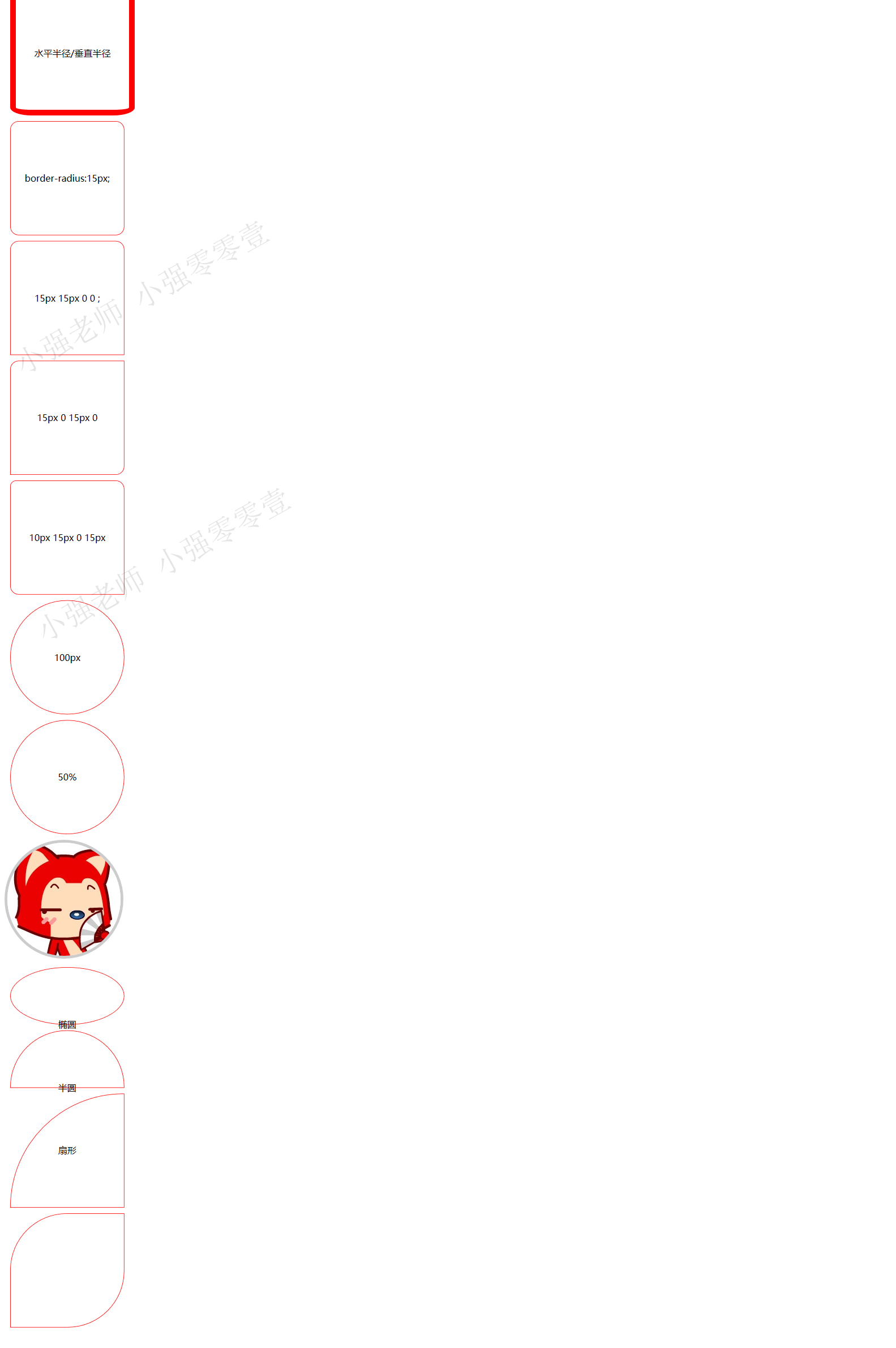
代码如下:
 <!DOCTYPE html>

 <html>

 <head lang="en">

     <meta charset="UTF-8">

     <title></title>

     <style>

         div{

             width: 200px;

             height: 200px;

             border:1px solid red;

             margin:10px;

             text-align: center;

             line-height: 200px;

         }

         div:nth-of-type(1)

         {

             border:10px solid red;

             border-radius: 38px/14px;

         }

         div:nth-of-type(2)

         {

             border-radius:15px;

         }

         div:nth-of-type(3)

         {

             border-radius:15px 15px 0 0 ;

         }

         div:nth-of-type(4)

         {

             border-radius:15px 0 15px 0  ;

         }

         div:nth-of-type(5)

         {

             border-radius:10px 15px 0 15px  ;

         }

         div:nth-of-type(6)

         {

             border-radius:100px;

         }

         div:nth-of-type(7)

         {

             border-radius:50%;

         }

         img{

             border:5px solid #ccc;

             border-radius:50%;

         }

         div:nth-of-type(8)

         {

             border-radius:50%;

             height: 100px;

         }

         div:nth-of-type(9)

         {

             border-radius:100px 100px 0 0 ;

             height: 100px;

         }

         div:nth-of-type(10)

         {

             border-radius:200px 0 0 0 ;

         }

         div:nth-of-type(11)

         {

             border-radius:100px 0 100px 0 ;

         }

     </style>

 </head>

 <body>

 <div>水平半径/垂直半径</div>

 <div>border-radius:15px;</div>

 <div>15px 15px 0 0 ;</div>

 <div>15px 0 15px 0</div>

 <div>10px 15px 0 15px  </div>

 <div>100px</div>

 <div>50%</div>

 <img src="1.jpg" alt=""/>

 <div>椭圆</div>

 <div>半圆</div>

 <div>扇形</div>

 <div></div>

 </body>

 </html>
1.2 阴影(box-shadow)
Box-shadow: 水平阴影 垂直阴影 模糊距离 阴影尺寸 阴影颜色 内外阴影;
里面只有水平阴影和垂直阴影是必须的。其他的可以省略有默认值。
默认的外阴影 outset 不能写,写上就看不到效果
1.3 CSS3iphone 手机的写法
先看效果图吧:
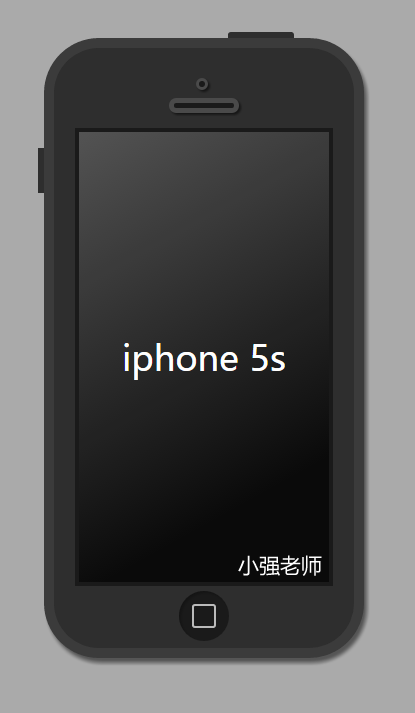
完整代码如下:
<!DOCTYPE html>

<html lang="en">

<head>

    <meta charset="UTF-8">

    <title>Document</title>

    <style type="text/css">

    body{

        background-color: #aaa;

    }

    .iphone5s{

        width: 300px;

        height:600px;

        margin:50px auto;

        background-color: #2e2e2e;

        border:10px solid #3b3b3b;

        border-radius: 55px;

        position: relative;

        box-shadow: 3px 5px 5px  rgba(0,0,0,0.5);

    }

    .iphone5s:before

    {   content: "";

        position: absolute;

        width: 66px;

        height: 6px;

        background-color: #2e2e2e;

        right:60px;

        top:-16px;

        border-radius: 3px 3px 0 0;

    }

    .iphone5s:after{

        content: "";

        position: absolute;

        height: 45px;

        width: 6px;

        background-color: #2e2e2e;

        left:-16px;

        top:100px;

    }

    .listen{

        width: 6px;

        height:6px;

        background-color: #1a1a1a;

        border:3px solid #4a4a4a;

        position: absolute;

        top:30px;

        left:50%;

        margin-left:-8px;

        border-radius: 50%;

        box-shadow: 2px 2px 2px  rgba(0,0,0,0.5);

    }

    .speaker{

        width: 60px;

        height:5px;

        border:5px solid #4a4a4a;

        background-color: #1a1a1a;

        position: absolute;

        left:50%;

        margin-left:-35px;

        top:50px;

        border-radius: 10px;

        box-shadow: 2px 2px 2px  rgba(0,0,0,0.5);

    }

    .content{

        width: 250px;

        height: 450px;

        background-color: #0a0a0a;

        margin:80px auto 0;

        font:35px/450px "微软雅黑";

        text-align: center;

        color:white;

        border:4px solid #1a1a1a;

        position: relative;

    }

    .content:before{

        content: "";

        width: 250px;

        height: 450px;

        position: absolute;

        top:0;

        left:0;

        background: -webkit-linear-gradient(top left,rgba(255,255,255,0.3),rgba(255,255,255,0) 80%)

    }

    .home{

        width: 50px;

        height: 50px;

        background-color: #1a1a1a;

        border-radius: 50%;

        margin:5px auto 0;

        position: relative;

        box-shadow: 2px 2px 2px  rgba(0,0,0,0.2) inset;

    }

    .home:before{

        content: "";

        width: 20px;

        height: 20px;

        border:2px solid rgba(255,255,255,0.7);

        position:absolute;

        top:13px;

        left:13px;

        border-radius: 3px;

    }

    </style>

</head>

<body>

    <div class="iphone5s">

        <div class="listen"></div>

        <div class="speaker"></div>

        <div class="content">

            iphone 5s

        </div>

        <div class="home"></div>

    </div>

</body>

</html>
嘻嘻,怎么样,很简单吧,喜欢,就赶紧自己动手写一下吧! 感谢CSS3给我们带来的好处。 我是小强老师
纯代码利用CSS3 圆角边框和盒子阴影 制作 iphone 手机效果的更多相关文章
- css3圆角矩形、盒子阴影
css3圆角矩形 div{ width: 200px; height: 200px; border: #f00 solid 1px; margin-bottom: 10px; } 1.设置 borde ...
- css3圆角边框
圆角边框 一.border-radius属性简介 为元素添加圆角边框,可以对元素的四个角进行圆角设置(属性不具有继承性) 二.border-radius定义方法 border-radius属性有两 ...
- 纯代码实现CSS圆角
我这里说的是纯代码,是指的不使用图片实现圆角,图片实现圆角,这里就不说了. 纯代码实现圆角主要有3种方法: 第一种:CSS3圆角 #chaomao{ border-radius:2px 2 ...
- css3圆角边框,边框阴影
border-radius向元素添加圆角边框,css3中的.IE9+ chrome safari5+ firefox4+ 现在都支持.可以向input div等设置边框.与border相似,可以四个角 ...
- 盒子显隐,伪类边框,盒子阴影,2d平面形变
-盒子显隐 显隐的盒子尽量不影响其他盒子的布局 display:none; 消失的时候不占位置,显示的时候占位 opacity:0-1; 盒子透明度 overflow: hidden; 超出部分隐藏 ...
- CSS3圆角边框的使用-遁地龙卷风
0.快速入门 border-radius:50px; 1.border-radius详解 border-radius:50px; 上右下左,水平和垂直距离都是50px border-radius:50 ...
- 利用css3的多背景图属性实现幻灯片切换效果
css3里关于背景的属性增加了可以添加多背景图的特性,例如: .box{background: url(img/1.png),url(img/2.png),url(img/3.png);} 这段css ...
- 利用css3实现超出文本指定行数与省略号效果
<style> .text1 {/*单行*/ width:200px; overflow:hidden; text-overflow:ellipsis; -o-text-overflow: ...
- CSS3圆角
使用border-radius属性: (1): (2)但是,如果你要在四个角上一一指定,可以使用以下规则: 四个值: 第一个值为左上角,第二个值为右上角,第三个值为右下角,第四个值为左下角. 三个值: ...
随机推荐
- JAVA关键字transient
转载自http://www.cnblogs.com/liuling/archive/2013/05/05/transient.html 1.transient关键字只能修饰变量,而不能修饰方法和类.注 ...
- php mysql_insert_id() 获取为空
mysql_insert_id() 获取插入数据后的最新的id 遇到问题和解决的步骤如下: 1. 使用后总是返回空的字符串,网上查了一番有人说是id要AUTO_INCREMENT,并且mysql_in ...
- Linux学习之awk命令
一. AWK 说明 awk是一种编程语言,用于在linux/unix下对文本和数据进行处理.数据可以来自标准输入.一个或多个文件,或其它命令的输出.它支持用户自定义函数和动态正则表达式等先进功能 ...
- background-size使用
background-size: left center | 0% 50% | cover | contain backgound-size: left center | 0% 50%; 这个指的是背 ...
- NET Core 的 Views
NET Core 十种方式扩展你的 Views 原文地址:http://asp.net-hacker.rocks/2016/02/18/extending-razor-views.html作者:Jür ...
- (15)Visual Studio中使用PCL项目加入WCF WebService参考
原文 Visual Studio中使用PCL项目加入WCF WebService参考 Visual Studio中使用PCL项目加入WCF WebService参考 作者:Steven Chang 2 ...
- Java学习疑惑(8)----可视化编程, 对Java中事件驱动模型的理解
我们编写程序就是为了方便用户使用, 我觉得UI设计的核心就是简洁, 操作过于繁琐的程序让很大一部分用户敬而远之. 即使功能强大, 但是人们更愿意使用易于操作的软件. 近年流行起来的操作手势和逐渐趋于成 ...
- vagrant打造自己的开发环境
vagrant打造自己的开发环境 缘由: 在网上看到斌哥,爽神都写了关于vagrant的博客,都在说很强大,所以很好奇这玩意怎么个强大,然后也就自己来一发玩玩看看. 真实缘由: 说实话是电脑配置太低, ...
- Unix/Linux环境C编程入门教程(10) SUSE Linux EnterpriseCCPP开发环境搭建
安装SUSE企业版以及搭建C/C++开发环境 1. SUSELinux Enterprise是一款服务器操作系统,异常稳定. 2.设置虚拟机类型. 3.选择稍后安装操作系统. 4.选择SUS ...
- 剑指offer 27二叉搜索树与双向链表
class Solution { public: void ConvertNode(TreeNode* pRootOfTree,TreeNode** pre) { if(pRootOfTree) { ...