
AngularJs(一) MVC 模式的应用
Model的应用
MVC的模式大家都是十分熟悉了,那么Angular是怎么规划的呢。数据被放在json文件中,通过Ajax获取数据。
[{ "action": "Buy Flowers", "done": false},

   { "action": "Get shoes", "done": false },

    { "action": "Call Leona", "done": true },

    { "action": "Collect Tickets","done": false}]
<!DOCTYPE html>

<html xmlns="http://www.w3.org/1999/xhtml" ng-app="todoApp" >

<head>

<meta http-equiv="Content-Type" content="text/html; charset=utf-8"/>

    <title>todo</title>

    <script src="angular.js"></script>

    <link href="bootstrap-theme.css" rel="stylesheet" />

    <link href="bootstrap.css" rel="stylesheet" />

    <script>

        var model = {

            user: "Adam"

        }

        var todoApp = angular.module("todoApp", []);

        //通过Ajax获取todo.json数据

        todoApp.run(function ($http) {

            $http.get("todo.json").success(function (data) {

                model.items = data;

            });

        });

        //自定义自己的过滤器items,是$scope定义的。

        todoApp.filter("checkedItems", function () {

            return function (items, showCompleted) {

                var resultArr = [];

                angular.forEach(items, function (item) {

                    if (item.done == false || showCompleted == true)

                        resultArr.push(item);

                });

                return resultArr;

            };

        });

        todoApp.controller("ToDoCtrl", function ($scope) {

            $scope.todo = model;

            //创建用户行为

            $scope.inCompleteCount = function () {

                var count = 0;

                angular.forEach($scope.todo.items, function (item) {

                    if(!item.done)

                    {

                        count++;

                    }

                });

                return count;

            };

            //依赖行为创建行为

            $scope.warningLevel = function () {

                return $scope.inCompleteCount() < 3 ? "label-sucess" : "label-warning";

            };

            //响应用户交互

            $scope.addNewItem = function (actionText) {

                $scope.todo.items.push({ action: actionText, done: false });

            };

        });

    </script>

</head>

<body ng-controller="ToDoCtrl">

    <div class="page-header">

        <h1>{{todo.user}}'s To do List

        <span class="label label-default" ng-hide="inCompleteCount()==0" ng-class="warningLevel()">{{inCompleteCount()}}</span>

        </h1>

    </div>

    <div class="panel-primary">

        <div class="input-group">

            <input class="form-control"  ng-model="actionText"/>

            <span class="input-group-btn">

                    <button class="btn btn-default" ng-click="addNewItem(actionText)">Add</button>

            </span>

        </div>

        <table class="table table-striped">

            <thead>

                <tr>

                    <th>Description</th>

                    <th>Done</th>

                </tr>

            </thead>

            <tbody>

               <tr ng-repeat="item in todo.items | checkedItems:showCompleted | orderBy:'action'" >

                   <td>{{item.action}}</td>

                   <td><input type="checkbox"  ng-model="item.done"/></td>

               </tr>

            </tbody>

        </table>

        <div class="checkbox-inline">

            <label><input type="checkbox" ng-model="showCompleted" />showCompleted</label>

        </div>

    </div>

</body>

</html>
我们知道Model,是存放数据,对数据进行CRUD的逻辑的地方。
在例程中,首先使用了一个todo.json 文件进行对数据的封装。
var todoApp = angular.module("todoApp", []);//在html 后面是angularJS的指令,指定程序域。通过module实例化一个todoApp的域
数据的获取
/*
* $http 表示angularJS 内置的服务。我是以get请求获取数据,通过success函数把得到数据转出js对象data. 然后为model添加items属性赋值。
*/
 todoApp.run(function ($http) {

            $http.get("todo.json").success(function (data) {

                model.items = data;

            });

        });
致此,model 数据已经完成。也就是我们表单的所有数据。
Controller的应用
由于是例程,我也是最近在学,所以就把自己所学的感悟写下啦,
<body ng-controller="ToDoCtrl"> //ng-controller 是angularJS的指令,同时也是一个angular的控制器,按照书上说的命名一般都是约定俗称。例如:<name>Ctrl.
controller的作用是链接model和view之间的桥梁,在这里controller把model的数据通过$scope 展示到view视图中。
 todoApp.controller("ToDoCtrl", function ($scope) {

            $scope.todo = model;}); // $scope 是内置的,表示域,表示需要把那些model数据展示到view中。
  <tr ng-repeat="item in todo.items >

                   <td>{{item.action}}</td>

                   <td><input type="checkbox"  ng-model="item.done"/></td>

                   <td>{{item.done}}</td>

               </tr>
以上只是实现了单向的数据绑定,即通过controller将Model的数据绑定到view中。这个页面的数据是死的,不能改变,也就是无法和用户交互。Angular实现了一种双向数据绑定模型。
控制器行为
行为是指js函数,能对数据(model)操作的行为。
//创建用户行为

            $scope.inCompleteCount = function () {

                var count = 0;

                angular.forEach($scope.todo.items, function (item) { //angular提供的forEach函数,其写法完全符合js标准。

                    if(!item.done)

                    {

                        count++;

                    }

                });

                return count;

            };
<span class="label label-default" ng-hide="inCompleteCount()==0" >{{inCompleteCount()}}</span> //通过done属性来控制显示,当done都被选中时,隐藏,ng-hide也是指令。
为了实现更加丰富的操作,controller的行为可以依赖行为进行创建,减少行为。便于维护和测试。
//依赖行为创建行为,当剩余的小于3时,显示label-success,否则label-warning.

            $scope.warningLevel = function () {

                return $scope.inCompleteCount() < 3 ? "label-sucess" : "label-warning";

            };
<span class="label label-default" ng-hide="inCompleteCount()==0" ng-class="warningLevel()">{{inCompleteCount()}}</span>
响应用户交互
//响应用户交互

            $scope.addNewItem = function (actionText) {

                $scope.todo.items.push({ action: actionText, done: false });

            };
<button class="btn btn-default" ng-click="addNewItem(actionText)">Add</button> //把用户输入的数据显示。
过滤器
<tr ng-repeat="item in todo.items | checkedItems:showCompleted | orderBy:'action'" > //自定义的
<tr ng-repeat="item in todo.items | filter:{done:false} | orderBy:'action'" > //angular 实现的filter ’|‘ 管道命令。
//自定义自己的过滤器items,是$scope定义的。

        todoApp.filter("checkedItems", function () {

            return function (items, showCompleted) {  //items 是有$scope.todo.items传来。

                var resultArr = [];

                angular.forEach(items, function (item) {

                    if (item.done == false || showCompleted == true)

                        resultArr.push(item);

                });

                return resultArr;

            };

        });
View视图
view就是DOM展示数据的部分。
<body ng-controller="ToDoCtrl">

    <div class="page-header">

        <h1>{{todo.user}}'s To do List

        <span class="label label-default" ng-hide="inCompleteCount()==0" ng-class="warningLevel()">{{inCompleteCount()}}</span>

        </h1>

    </div>

    <div class="panel-primary">

        <div class="input-group">

            <input class="form-control"  ng-model="actionText"/>

            <span class="input-group-btn">

                    <button class="btn btn-default" ng-click="addNewItem(actionText)">Add</button>

            </span>

        </div>

        <table class="table table-striped">

            <thead>

                <tr>

                    <th>Description</th>

                    <th>Done</th>

                </tr>

            </thead>

            <tbody>

               <tr ng-repeat="item in todo.items | checkedItems:showCompleted | orderBy:'action'" >

                   <td>{{item.action}}</td>

                   <td><input type="checkbox"  ng-model="item.done"/></td>

               </tr>

            </tbody>

        </table>

        <div class="checkbox-inline">

            <label><input type="checkbox" ng-model="showCompleted" />showCompleted</label>

        </div>

    </div>

</body>
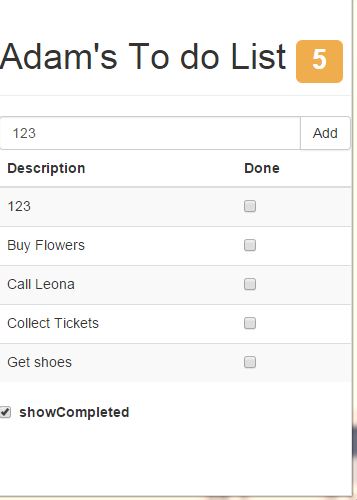
最终效果图如:
综上所述,如何利用好MVC模式,是设计已维护,已测试的web站 重要思想。这也只是今天的所学。
AngularJs(一) MVC 模式的应用的更多相关文章
- AngularJs的MVC模式
在AngularJs也有带有MVC模式.此时你完全可以把html的js中的Controller写到一个外部的js文件中. Ok,在ASP.NET MVC项目,打开Content目录,创建一个新文件夹A ...
- AngularJS学习笔记(1)——MVC模式的清单列表效果
MVC模式的清单列表效果 使用WebStorm新建todo.html并链入bootstrap.css.bootstrap-theme.css.angular.js.要链入的相关css和js文件预先准备 ...
- AngularJS学习之MVC模式
AngularJS是谷歌开发维护的前端MVC框架,克服了HTML在构建应用上的不足,从而降低了开发的成本. 在学习AngularJS之前,有必要和之前学过的jQuery进行对比.jQuery是java ...
- 【Web开发】Mean web开发 01-Express实现MVC模式开发
简介 Mean是JavaScript的全栈开发框架.更多介绍 用Express实现MVC模式开发是Mean Web全栈开发中的一部分. Express 是一个基于 Node.js 平台的极简.灵活的 ...
- Android 腾讯入门教程( 智能手表UI设计 和 MVC模式 )
*****注意到mvc 在android 中是如何进行分层分域执行各自的功能.**** 官方推荐的按钮尺寸是48像素 前端之Android入门(1):环境配置 前端之Android入门(2):程序目录 ...
- ASP.Net MVC开发基础学习笔记:一、走向MVC模式
一.ASP.Net的两种开发模式 1.1 ASP.Net WebForm的开发模式 (1)处理流程 在传统的WebForm模式下,我们请求一个例如http://www.aspnetmvc.com/bl ...
- 完成AngularJS with MVC 5, Web API 2项目
经过接近两个月的日夜奋战,完成AngularJS with MVC 5, Web API 2的项目,这也是进入公司以后最大的一个项目,从项目需求.用户Prototype/Demo,招人,开发完成,可谓 ...
- [ASP.NET MVC 小牛之路]01 - 理解MVC模式
本人博客已转移至:http://www.exblr.com/liam PS:MVC出来很久了,工作上一直没机会用.出于兴趣,工作之余我将展开对MVC的深入学习,通过博文来记录所学所得,并希望能得到各 ...
- 深入理解MVC模式
一,什么是MVC模式 该模式是一种软件设计典范,他把软件系统划分为三个基本部分:模型层(Model).视图层(View).控制器(Controller) *Model(模型)表示应用程序核心(比如数据 ...
随机推荐
- iterm快捷键及操作技巧(附Linux快捷键)
标签操作 新建标签:command + t 关闭标签:command + w 切换标签:command + 数字 command + 左右方向键 切换全屏:command + enter 查找:com ...
- 【HDU】4923 Room and Moor(2014多校第六场1003)
Room and Moor Time Limit: 12000/6000 MS (Java/Others) Memory Limit: 262144/262144 K (Java/Others) ...
- 复旦大学EWP菁英女性课程(复旦卓越女性课程改版后第一期) _复旦大学、女性课程、高级研修班、心理学、EWP_培训通课程
复旦大学EWP菁英女性课程(复旦卓越女性课程改版后第一期) _复旦大学.女性课程.高级研修班.心理学.EWP_培训通课程 复旦大学EWP菁英女性课程(复旦卓越女性课程改版后第一期) 学 ...
- wx.Dialog
wx.Dialog A dialog box is a window with a title bar and sometimes a system menu, which can be moved ...
- Curious Robin Hood(树状数组+线段树)
1112 - Curious Robin Hood PDF (English) Statistics Forum Time Limit: 1 second(s) Memory Limit: 64 ...
- Error occured processing XML 'Cannot find class [springmvc.extention.BeanArgumentResolver]'.
<Description Resource Path Location Type Error occured processing XML 'Cannot find class [springm ...
- DOM注意事项(八):JavaScript操作环境和垃圾收集
一.运行环境 在约JavaScript对象或this当指向问题,念就是运行环境.即上下文环境.运行环境在JavaScript是一个非常重要的概念.由于它定义了变量或函数有权訪问的其他数据,决定了它们各 ...
- 如何修改 UINavigationController、UINavigationBar 中 navigationItem 左侧 “返回” 按钮的名称
如果我们从 title 为 “首页” 的页面 A 点击进入一个子页面 B,那么在页面 B 的左上角将显示一个名为 “<首页” 的按钮.假设这个页面 A 叫 “你是我天边最美的云彩”,那在页面 B ...
- 基于HTML5 Canvas的网页画板实现教程
HTML5的功能非常强大,尤其是Canvas的应用更加广泛,Canvas画布上面不仅可以绘制任意的图形,而且可以实现多种多样的动画,甚至是一些交互式的应用,比如网页网版.这次我们要来看的就是一款基于H ...
- 还是log4net的使用
最近做个项目要用到日志系统,这这可把我给难住了,后来问了下度娘,发现只有你想不到的,没有那些找不到的开源组件,后来发现了log4net,但是我是控制台程序,没有个实例还真不好搞,想想还是看看他的运行过 ...