
AngularJS学习笔记(1)——MVC模式的清单列表效果
MVC模式的清单列表效果
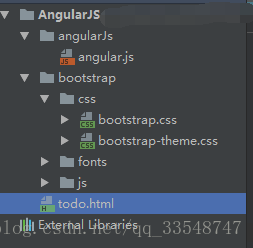
使用WebStorm新建todo.html并链入bootstrap.css、bootstrap-theme.css、angular.js。要链入的相关css和js文件预先准备好,文件目录如下:
使用MVC模式前的代码:
<!DOCTYPE html>

<html ng-app>

<head>

    <meta charset="UTF-8">

    <title>TO DO List</title>

    <link href="./bootstrap/css/bootstrap.css" rel="stylesheet"/>

    <link href="./bootstrap/css/bootstrap-theme.css" rel="stylesheet"/>

</head>

<body>

    <div class="page-header">

        <h1>Yimi's TO DO List</h1>

    </div>

    <div class="panel">

        <div class="input-group">

            <input class="form-control"/>

            <span class="input-group-btn">

                <button class="btn btn-default">Add</button>

            </span>

        </div>

        <table class="table table-striped">

            <thead>

                <tr>

                    <th>Description</th>

                    <th>Done</th>

                </tr>

            </thead>

            <tbody>

                <tr><td>练车</td><td>Yes</td></tr>

                <tr><td>看课外书</td><td>No</td></tr>

            </tbody>

    </table>

    </div>

</body>

</html>
使用MVC模式后代码如下:
<!DOCTYPE html>

<html ng-app="todoApp">

<head>

    <meta charset="UTF-8">

    <title>TO DO List</title>

    <link href="./bootstrap/css/bootstrap.css" rel="stylesheet"/>

    <link href="./bootstrap/css/bootstrap-theme.css" rel="stylesheet"/>

    <script src="./angularJs/angular.js"></script>

    <script>

        var model = {

            user:"Yimi",

            items:[{action:"练车",done:true},

                {action:"看课外书",done:false}]

        };

        var todoApp = angular.module("todoApp",[]);

        todoApp.controller("ToDoCtrl",function($scope){ //以$开头的变量名表示AngularJS的内置特性

            $scope.todo = model;

        });

    </script>

</head>

<body ng-controller="ToDoCtrl">

    <div class="page-header">

        <h1>{{todo.user}}'s TO DO List</h1>

        <span class="label label-default">{{todo.items.length}}</span>

    </div>

    <div class="panel">

        <div class="input-group">

            <input class="form-control"/>

            <span class="input-group-btn">

                <button class="btn btn-default">Add</button>

            </span>

        </div>

        <table class="table table-striped">

            <thead>

                <tr>

                    <th>Description</th>

                    <th>Done</th>

                </tr>

            </thead>

            <tbody>

                <tr ng-repeat="item in todo.items">

                    <td>{{item.action}}</td>

                    <td>{{item.done}}</td>

                </tr>

            </tbody>

    </table>

    </div>

</body>

</html>
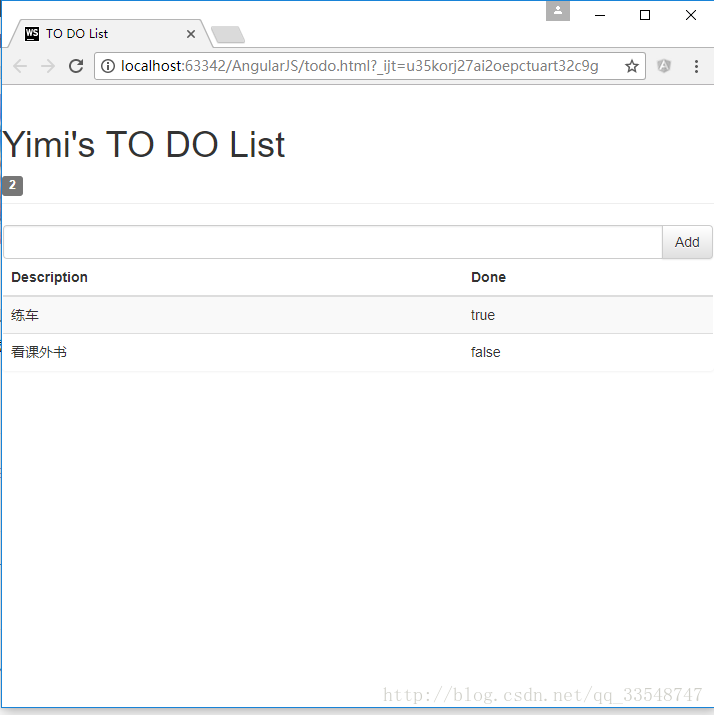
效果图如下:
使用Chrome浏览器查看
模型-视图-控制器(MVC)
M:模型。程序中的数据
......

var model = {

            user:"Yimi",

            items:[{action:"练车",done:true},

                {action:"看课外书",done:false}]

        };

......
V:视图。显示数据的逻辑
比如在间通过{{和}}调用之前定义的模型的值
......

<h1>{{todo.user}}'s TO DO List</h1>

        <span class="label label-default">{{todo.items.length}}</span>

......

<tr ng-repeat="item in todo.items">

         <td>{{item.action}}</td>

         <td>{{item.done}}</td>

</tr>

......
C:控制器。对数据进行操作的逻辑
var todoApp = angular.module("todoApp",[]);

        todoApp.controller("ToDoCtrl",function($scope){ //以$开头的变量名表示AngularJS的内置特性

            $scope.todo = model;

        });
<body ng-controller="ToDoCtrl">AngularJS学习笔记(1)——MVC模式的清单列表效果的更多相关文章
- AngularJS学习笔记(2)——与用户交互的动态清单列表
与用户交互的动态清单列表 以我之前写的一个清单列表页面作为例子(MVC模式的清单列表效果),优化前代码如下: <!DOCTYPE html> <html ng-app="t ...
- jsp学习笔记:mvc开发模式
jsp学习笔记:mvc开发模式2017-10-12 22:17:33 model(javabe)与view层交互 view(视图层,html.jsp) controller(控制层,处理用户提交的信息 ...
- AngularJs学习笔记--expression
原版地址:http://code.angularjs.org/1.0.2/docs/guide/expression 表达式(Expressions)是类Javascript的代码片段,通常放置在绑定 ...
- AngularJs学习笔记--Using $location
原版地址:http://code.angularjs.org/1.0.2/docs/guide/dev_guide.services.$location 一.What does it do? $loc ...
- AngularJs学习笔记--Understanding the Model Component
原版地址:http://docs.angularjs.org/guide/dev_guide.mvc.understanding_model 在angular文档讨论的上下文中,术语“model”可以 ...
- AngularJs学习笔记--Understanding the Controller Component
原版地址:http://docs.angularjs.org/guide/dev_guide.mvc.understanding_model 在angular中,controller是一个javasc ...
- AngularJs学习笔记--Understanding Angular Templates
原版地址:http://docs.angularjs.org/guide/dev_guide.mvc.understanding_model angular template是一个声明规范,与mode ...
- AngularJS 学习笔记--01
学习 AngularJS 要先了解 MVC 模式 , 即 " 模型--视图--控制器 " . 模型: 包含了需要用到的数据 ; 有两种广义上的模型 : 视图模型 , 只表示从控制器 ...
- AngularJs学习笔记--Forms
原版地址:http://code.angularjs.org/1.0.2/docs/guide/forms 控件(input.select.textarea)是用户输入数据的一种方式.Form(表单) ...
随机推荐
- Spring中的@Transactional
spring中的@Transactional基于动态代理的机制,提供了一种透明的事务管理机制,方便快捷解决在开发中碰到的问题. 一般使用是通过如下代码对方法或接口或类注释: @Transactiona ...
- Eclipse 常用快捷键和使用技巧
1.查看快捷键定义的地方 Window->Preferences->General->Keys. 2.更改启动页 在AndroidManifest.xml第一个activity标签项 ...
- springboot问题集(一)------junit内Assert.assertEquals()的含义
1. assertEquals([String message],Object target,Object result) target与result不相等,中断测试方法,输出message asse ...
- 重构 demo篇
本文背景为学习重构一书中的一些信息的记录. 该篇以一个影片租赁为背景.通过一层层的重构,最终实现相对来说比较完美的代码. 文中经典语句摘要: “如果它没有坏,就不要动它 .” 用来形容我们工作中一些比 ...
- Git 之 git原理简介
这里只是很简单.超简单的介绍下git,为的是方便记忆: 本地仓库分为三个部分:工作区.暂存区.仓库区,其中暂存区和仓库区属于版本区. 对于文件的操作,需要从工作区----> 暂存区 ----&g ...
- js 验证手机号码
js 验证手机号码 //验证手机号 function isMobel(value) { if (/^1[3-8]+\d{9}$/g.test(value)) { ...
- Ipv4和Ipv6的地址字符串长度
SOURCE IPv4采用32位地址长度 xxx.xxx.xxx.xxx 15max(string) IPv6采用128位地址长度 估计是 xxx.xxx.xxx.xxx. xx ...
- 每天一个linux命令(网络):【转载】ifconfig命令
许多windows非常熟悉ipconfig命令行工具,它被用来获取网络接口配置信息并对此进行修改.Linux系统拥有一个类似的工具,也就是ifconfig(interfaces config).通常需 ...
- Mac触摸板没有弹性了
关机后,同时按启动键,空格键左边的option,command键还有p和r,听到开机声音响四声后再松开.一定要同时按!然后触摸板就可以用了. (转自知乎)
- flask第二十五篇——控制语句
有兴趣的请加船长公众号:自动化测试实战 先和大家强调一个发邮件的问题 # coding: utf-8 import smtplib from email.mime.text import MIMETe ...