
Play Framework 完整实现一个APP(八)
创建Tag标签
1.创建Model
@Entity

@Table(name = "blog_tag")

public class Tag extends Model implements Comparable<Tag> {

    public String name;

    private Tag(String name) {

        this.name = name;

    }

    public String toString() {

        return name;

    }

    public int compareTo(Tag otherTag) {

        return name.compareTo(otherTag.name);

    }

    public static Tag findOrCreateByName(String name) {

        Tag tag = Tag.find("byName", name).first();

        if(tag == null) {

            tag = new Tag(name);

        }

        return tag;

    }

}
2.Post类添加Tag属性
@ManyToMany(cascade = CascadeType.PERSIST)

public Set<Tag> tags;

public Post(User author, String title, String content) {

        this.comments = new ArrayList<Comment>();

        this.tags = new TreeSet<Tag>();

        this.author = author;

        this.title = title;

        this.content = content;

        this.postedAt = new Date();

}
3.Post类添加方法
关联Post和Tag
public Post tagItWith(String name) {

        tags.add(Tag.findOrCreateByName(name));

        return this;

}
返回关联指定Tag的Post集合
public static List<Post> findTaggedWith(String... tags) {

        return Post.find(

                "select distinct p from Post p join p.tags as t where t.name in (:tags) group by p.id, p.author, p.title, p.content,p.postedAt having count(t.id) = :size"

        ).bind("tags", tags).bind("size", tags.length).fetch();

}
4.写测试用例
@Test

public void testTags() {

        // Create a new user and save it

        User bob = new User("bob@gmail.com", "secret", "Bob").save();

        // Create a new post

        Post bobPost = new Post(bob, "My first post", "Hello world").save();

        Post anotherBobPost = new Post(bob, "Hop", "Hello world").save();

        // Well

        assertEquals(0, Post.findTaggedWith("Red").size());

        // Tag it now

        bobPost.tagItWith("Red").tagItWith("Blue").save();

        anotherBobPost.tagItWith("Red").tagItWith("Green").save();

        // Check

        assertEquals(1, Post.findTaggedWith("Red", "Blue").size());

        assertEquals(1, Post.findTaggedWith("Red", "Green").size());

        assertEquals(0, Post.findTaggedWith("Red", "Green", "Blue").size());

        assertEquals(0, Post.findTaggedWith("Green", "Blue").size());

}
测试Tag
5.继续修改Tag类,添加方法
public static List<Map> getCloud() {

        List<Map> result = Tag.find(

            "select new map(t.name as tag, count(p.id) as pound) from Post p join p.tags as t group by t.name order by t.name"

        ).fetch();

        return result;

}
6.将Tag添加到页面上
/yabe/conf/initial-data.yml 添加预置数据
Tag(play):

    name:           Play

Tag(architecture):

    name:           Architecture

Tag(test):

    name:           Test

Tag(mvc):

    name:           MVC

Post(jeffPost):

    title:          The MVC application

    postedAt:       2009-06-06

    author:         jeff

    tags:

                    - play

                    - architecture

                    - mvc

    content:        >

                    A Play
7.修改display.html将tag显示出来
<div class="post-metadata">

        <span class="post-author">by ${_post.author.fullname}</span>,

        <span class="post-date">${_post.postedAt.format('dd MMM yy')}</span>

	    #{if _as != 'full'}

			<span class="post-comments">

				 |  ${_post.comments.size() ?: 'no'}

				comment${_post.comments.size().pluralize()}

				 #{if _post.comments}

				 	 , latest by ${_post.comments[0].author}

				 #{/if}

			</span>

		#{/if}

		#{elseif _post.tags}

			<span class="post-tags">

				- Tagged

				#{list items:_post.tags, as:'tag'}

					<a href="#">${tag}</a>${tag_isLast ? '' : ', '}

				#{/list}

			</span>

		#{/elseif}

 </div>
8.添加listTagged 方法(Application Controller)
点击Tagged,显示所有带有Tag的Post列表
public static void listTagged(String tag) {

    List<Post> posts = Post.findTaggedWith(tag);

    render(tag, posts);

}
9.修改display.html,Tag显示
- Tagged

#{list items:_post.tags, as:'tag'}

    <a href="@{Application.listTagged(tag.name)}">${tag}</a>${tag_isLast ? '' : ', '}

#{/list}
10.添加Route
GET /posts/{tag} Application.listTagged
现在有两条Route规则URL无法区分
GET     /posts/{id}                             Application.show

GET     /posts/{tag}                    	Application.listTagged
为{id}添加规则
GET /posts/{<[0-9]+>id} Application.show
11.添加Post list页面,有相同Tag的Post
创建/app/views/Application/listTagged.html
#{extends 'main.html' /}

#{set title:'Posts tagged with ' + tag /}

*{********* Title ********* }*

#{if posts.size()>1}

	<h3>There are ${posts.size()} posts tagged ${tag}</h3>

#{/if}

#{elseif posts}

    <h3>There is 1 post tagged '${tag}'</h3>

#{/elseif}

#{else}

    <h3>No post tagged '${tag}'</h3>

#{/else}

*{********* Posts list *********}*

<div class="older-posts">

	#{list items:posts, as:'post'}

		#{display post:post, as:'teaser' /}

	#{/list}

</div>
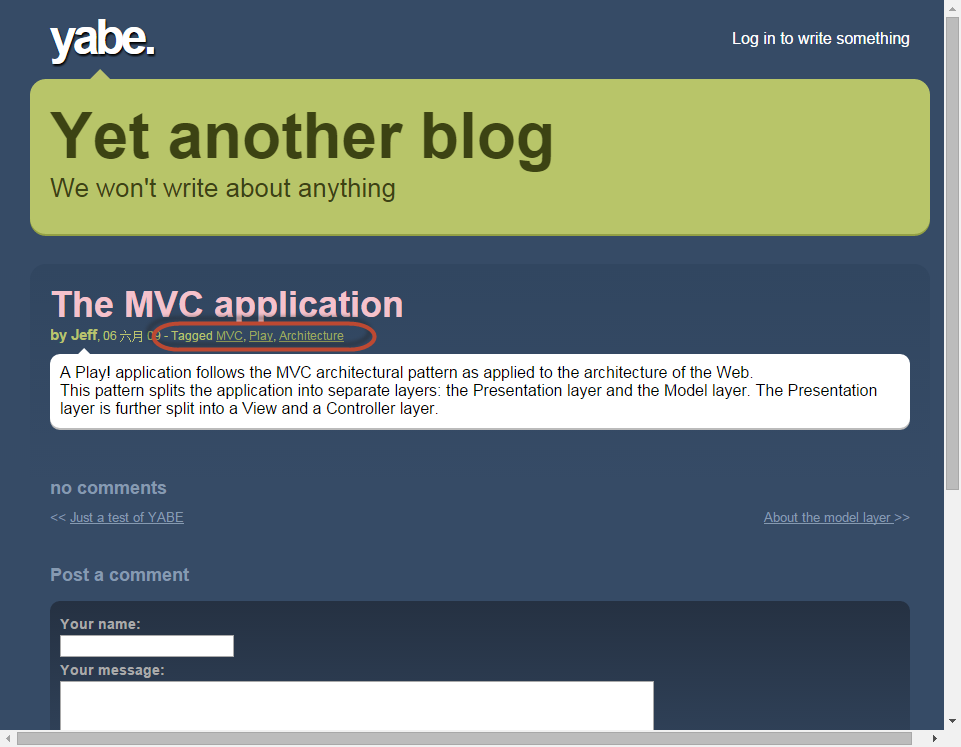
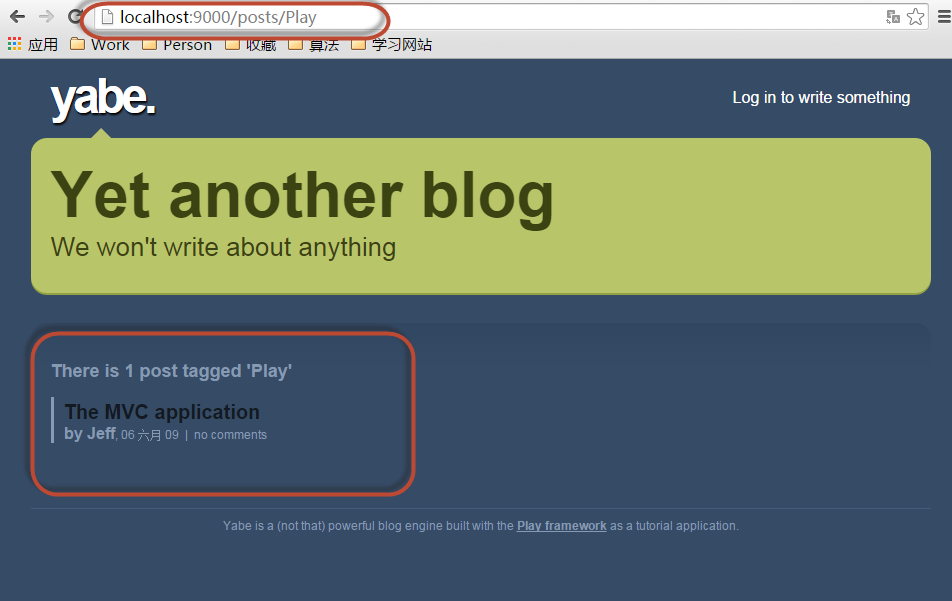
效果:
。。
Play Framework 完整实现一个APP(八)的更多相关文章
- Play Framework 完整实现一个APP(十一)
添加权限控制 1.导入Secure module,该模块提供了一个controllers.Secure控制器. /conf/application.conf # Import the secure m ...
- Play Framework 完整实现一个APP(五)
程序以及基本可用了,需要继续完善页面 1.创建页面模板 创建文件 app/views/tags/display.html *{ Display a post in one of these modes ...
- Play Framework 完整实现一个APP(二)
1.开发DataModel 在app\moders 下新建User.java package models; import java.util.*; import javax.persistence. ...
- Play Framework 完整实现一个APP(十四)
添加测试 ApplicationTest.java @Test public void testAdminSecurity() { Response response = GET("/adm ...
- Play Framework 完整实现一个APP(十三)
添加用户编辑区 1.修改Admin.index() public static void index() { List<Post> posts = Post.find("auth ...
- Play Framework 完整实现一个APP(十二)
1.定制CRUD管理页面 > play crud:ov --layout 替换生成文件内容 app/views/CRUD/layout.html #{extends 'admin.html' / ...
- Play Framework 完整实现一个APP(十)
1.定制Comment列表 新增加Comment list页面,执行命令行 > play crud:ov --template Comments/list 会生成/app/views/Comme ...
- Play Framework 完整实现一个APP(九)
添加增删改查操作 1.开启CRUD Module 在/conf/application.conf 中添加 # Import the crud module module.crud=${play.pat ...
- Play Framework 完整实现一个APP(六)
需要为Blog添加 查看和发表评论的功能 1.创建查看功能 Application.java中添加 show() 方法 public static void show(Long id) { Post ...
随机推荐
- UWP开发之Mvvmlight实践二:Mvvmlight的核心框架MVVM与MVC、MVP的区别(图文详解)
最近UWP开发在海外很潮流,随着微软收购Xamarin,我们这些C#程序员也可以靠这杆小米枪挑战Android,IOS平台了. 那我们为什么选择MVVM做UWP开发?MVC,MVP,MVVM他们之间到 ...
- typeof的一些兼容性问题
typeof存在一些兼容性的问题,在IE6,7,8中的DOM和BOM元素及其对象上的方法的判定会出现误差,在safari上对NodeList实例 的判定,对ExpReg实例的判断(早期的chrome, ...
- ZOJ Problem Set - 1115 Digital Roots
水题记录: 注:此题题目并没有限定数值的大小,所以要用字符串进行处理 #include <stdio.h> #include <string.h> int main() { ] ...
- 【集合框架】JDK1.8源码分析之LinkedHashMap(二)
一.前言 前面我们已经分析了HashMap的源码,已经知道了HashMap可以用在哪种场合,如果这样一种情形,我们需要按照元素插入的顺序来访问元素,此时,LinkedHashMap就派上用场了,它保存 ...
- 创建自己的Vagrant box
这是一个关于Vagrant的学习系列,包含如下文章: Vagrant入门 创建自己的Vagrant box 用Vagrant搭建Jenkins构建环境 用Vagrant和Ansible搭建持续交付平台 ...
- SQL 循环语句 while 介绍 实例
declare @i int begin insert into test (userid) values(@i) end --------------- while 条件 begin 执行操作 en ...
- WPF数据编辑的提交与撤销
当为一个集合(通常绑定在DataGrid或其它ItemsControl控件)添加或编辑一个项时,通常会弹出一个编辑界面编辑项的属性,编辑结束再提交,或者我们不想编辑数据了,此时选择取消,数据项的内容没 ...
- csharp: ODP.NET,System.Data.OracleClient(.net 4.0) and System.Data.OleDb读取Oracle g 11.2.0的区别
ODP.NET: 引用: using Oracle.DataAccess; //Oracle g 11.2.0 using Oracle.DataAccess.Client; using Oracle ...
- Java 代码完成删除文件、文件夹操作
import java.io.File;/** * 删除文件和目录 * */public class DeleteFileUtil { /** * 删除文件,可以是文件或文件夹 ...
- for循环语句的笔试
首先对for循环的初始条件进行调用打印A,之后判断语句输出B,第三个条件先不使用,直接进入循环内部 打印D,再到C:第二次判断i=1,A这个条件不使用了,进入B判定,再是D,C,最后进行判定输出B