
Play Framework 完整实现一个APP(十一)
添加权限控制
1.导入Secure module,该模块提供了一个controllers.Secure控制器。
/conf/application.conf
# Import the secure module

module.secure=${play.path}/modules/secure
/conf/routes
# Import Secure routes

*       /                                       module:secure
2.在Post Comment User Tag控制器上添加标签
@With(Secure.class)

public class Posts extends CRUD {

}
启动Server,访问 localhost:9000/admin,如果页面报错(或编译失败),参考上一章添加CRUD模块

3.添加权限控制
创建权限控制器 /controllers/Security.java
import models.*;

public class Security extends Secure.Security {

    static boolean authenticate(String username, String password) {

        return User.connect(username, password) != null;

    }

}
通过 localhost:9000/logout 退出登录,使用正确的用户名密码进行登录
4.添加登录页面
创建Admin Controller
@With(Secure.class)

public class Admin extends Controller {

    @Before

    static void setConnectedUser() {

        if(Security.isConnected()) {

            User user = User.find("byEmail", Security.connected()).first();

            renderArgs.put("user", user.fullname);

        }

    }

    public static void index() {

        render();

    }

}
添加路由
# Administration

GET       /admin/?                                 Admin.index

*         /admin                                   module:crud
修改main.html
<ul id="tools">

    <li>

        <a href="@{Admin.index()}">Log in to write something</a>

    </li>

</ul>
添加/views/admin.html
<!DOCTYPE html>

<html>

    <head>

        <title>Administration</title>

        <meta http-equiv="Content-Type" content="text/html; charset=utf-8"/>

        #{get 'moreStyles' /}

        <link rel="stylesheet" type="text/css" media="screen"

                href="@{'/public/stylesheets/main.css'}" />

        <link rel="shortcut icon" type="image/png"

                href="@{'/public/images/favicon.png'}" />

        <script src="@{'/public/javascripts/jquery-1.4.2.min.js'}"></script>

        <script src="@{'/public/javascripts/jquery.tools-1.2.5.toolbox.expose.min.js'}"></script>

    </head>

    <body id="admin">

        <div id="header">

            <div id="logo">

                yabe. <span>administration</span>

            </div>

            <ul id="tools">

                <li>

                    <a href="@{Secure.logout()}">Log out</a>

                </li>

            </ul>

        </div>

        <div id="main">

            #{doLayout /}

        </div>

        <p id="footer">

            Yabe is a (not so) powerful blog engine built with the

            <a href="http://www.playframework.org">Play framework</a>

            as a tutorial application.

        </p>

    </body>

</html>
添加/views/Admin/index.html
#{extends 'admin.html' /}

Welcome ${user}!
5.添加角色
Security控制器重写check方法
static boolean check(String profile) {

    if("admin".equals(profile)) {

        return User.find("byEmail", connected()).<User>first().isAdmin;

    }

    return false;

}
修改admin.html,显示用户是否有admin角色
<div id="main">

    <ul id="adminMenu">

        <li class="${request.controller == 'Admin' ? 'selected' : ''}">

            <a href="@{Admin.index()}">My posts</a>

        </li>

        #{secure.check 'admin'}

            <li class="${request.controller == 'Posts' ? 'selected' : ''}">

                <a href="@{Posts.list()}">Posts</a>

            </li>

            <li class="${request.controller == 'Tags' ? 'selected' : ''}">

                <a href="@{Tags.list()}">Tags</a>

            </li>

            <li class="${request.controller == 'Comments' ? 'selected' : ''}">

                <a href="@{Comments.list()}">Comments</a>

            </li>

            <li class="${request.controller == 'Users' ? 'selected' : ''}">

                <a href="@{Users.list()}">Users</a>

            </li>

        #{/secure.check}

    </ul>

    #{doLayout /}

</div>
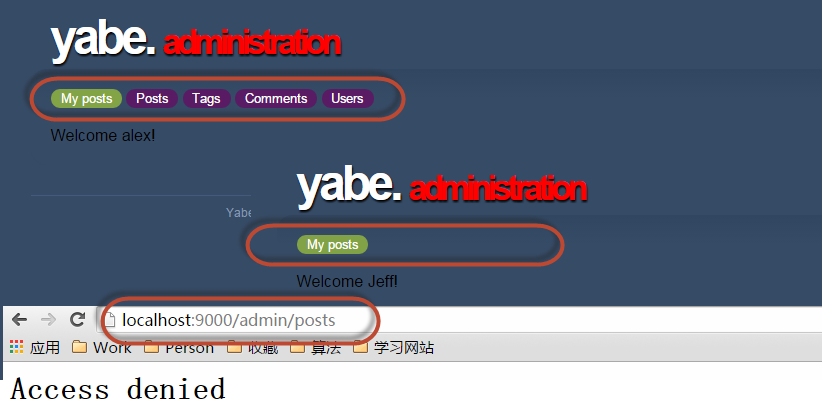
在Post、Tag、User、Comment控制器上添加标签,只有admin role的User才能访问 http://localhost:9000/admin/{####}
@Check("admin")

@With(Secure.class)

public class Posts extends CRUD {

}
。。
Play Framework 完整实现一个APP(十一)的更多相关文章
- Play Framework 完整实现一个APP(五)
程序以及基本可用了,需要继续完善页面 1.创建页面模板 创建文件 app/views/tags/display.html *{ Display a post in one of these modes ...
- Play Framework 完整实现一个APP(二)
1.开发DataModel 在app\moders 下新建User.java package models; import java.util.*; import javax.persistence. ...
- Play Framework 完整实现一个APP(十四)
添加测试 ApplicationTest.java @Test public void testAdminSecurity() { Response response = GET("/adm ...
- Play Framework 完整实现一个APP(十三)
添加用户编辑区 1.修改Admin.index() public static void index() { List<Post> posts = Post.find("auth ...
- Play Framework 完整实现一个APP(十二)
1.定制CRUD管理页面 > play crud:ov --layout 替换生成文件内容 app/views/CRUD/layout.html #{extends 'admin.html' / ...
- Play Framework 完整实现一个APP(十)
1.定制Comment列表 新增加Comment list页面,执行命令行 > play crud:ov --template Comments/list 会生成/app/views/Comme ...
- Play Framework 完整实现一个APP(九)
添加增删改查操作 1.开启CRUD Module 在/conf/application.conf 中添加 # Import the crud module module.crud=${play.pat ...
- Play Framework 完整实现一个APP(八)
创建Tag标签 1.创建Model @Entity @Table(name = "blog_tag") public class Tag extends Model impleme ...
- Play Framework 完整实现一个APP(六)
需要为Blog添加 查看和发表评论的功能 1.创建查看功能 Application.java中添加 show() 方法 public static void show(Long id) { Post ...
随机推荐
- 项目中遇到的Integer问题--转
Integer类型值相等或不等分析 http://www.cnblogs.com/zzllx/p/5778470.html 看到博客园一位博友写的面试问题,其中一题是 Integer a = 1; I ...
- 【集合框架】JDK1.8源码分析HashSet && LinkedHashSet(八)
一.前言 分析完了List的两个主要类之后,我们来分析Set接口下的类,HashSet和LinkedHashSet,其实,在分析完HashMap与LinkedHashMap之后,再来分析HashSet ...
- 非对称技术栈实现AES加密解密
非对称技术栈实现AES加密解密 正如前面的一篇文章所述,https协议的SSL层是实现在传输层之上,应用层之下,也就是说在应用层上看到的请求还是明码的,对于某些场景下要求这些http请求参数是非可读的 ...
- Windows Phone 如何在程序中播放提示声音?
在Windows Phone 中播放提示音可以使用 Microsoft.Xna.Framework.Audio 命名空间下的 SoundEffect 类.具体使用方法如下: 1. 根据声音文件路径创建 ...
- commons-lang包中我们常用的类的作用
commons-lang包中对我们有用的类主要有: 1.StringUtils 该类主要提供对字符串的操作,对null是安全的,主要提供了字符串查找,替换,分割,去空白,去掉非法字符等等操作 2.Ob ...
- 如何通过cmd开一个本地服务器
1.首先你要下载安装node.js http://nodejs.cn/download/ 并且根据提示安装在自己的电脑上即可 2.打开cmd管理员窗口输入npm -v 检测node.js是否安装成功: ...
- 详解Javascript的继承实现(二)
上文<详解Javascript的继承实现>介绍了一个通用的继承库,基于该库,可以快速构建带继承关系和静态成员的javascript类,好使用也好理解,额外的好处是,如果所有类都用这种库来构 ...
- 自己实现简单的AOP(三) 实现增强四项基本功能
前面的两篇随笔,都是只是个铺垫,真正实现增强四项基本功能的重头戏,在本篇随笔中, 本文将通过AOP实现如下的四个基本功能: /// <para>1.自动管理数据库连接[可选]</pa ...
- C# 超时工具类 第二版
附源码,没有附测试demo 之前的工具类:C# 给某个方法设定执行超时时间 /// <summary> /// 超时工具 /// </summary> public class ...
- [C#] 获取打印机列表
一:获得本地安装的打印机列表 注:(如果在"设备和打印机"中已经添加了局域网的打印机设备,也算是本地安装的打印机:没有添加的则算作局域网打印机) 1,通过 C# 中 Printer ...