
Play Framework 完整实现一个APP(八)
创建Tag标签
1.创建Model
@Entity

@Table(name = "blog_tag")

public class Tag extends Model implements Comparable<Tag> {

    public String name;

    private Tag(String name) {

        this.name = name;

    }

    public String toString() {

        return name;

    }

    public int compareTo(Tag otherTag) {

        return name.compareTo(otherTag.name);

    }

    public static Tag findOrCreateByName(String name) {

        Tag tag = Tag.find("byName", name).first();

        if(tag == null) {

            tag = new Tag(name);

        }

        return tag;

    }

}
2.Post类添加Tag属性
@ManyToMany(cascade = CascadeType.PERSIST)

public Set<Tag> tags;

public Post(User author, String title, String content) {

        this.comments = new ArrayList<Comment>();

        this.tags = new TreeSet<Tag>();

        this.author = author;

        this.title = title;

        this.content = content;

        this.postedAt = new Date();

}
3.Post类添加方法
关联Post和Tag
public Post tagItWith(String name) {

        tags.add(Tag.findOrCreateByName(name));

        return this;

}
返回关联指定Tag的Post集合
public static List<Post> findTaggedWith(String... tags) {

        return Post.find(

                "select distinct p from Post p join p.tags as t where t.name in (:tags) group by p.id, p.author, p.title, p.content,p.postedAt having count(t.id) = :size"

        ).bind("tags", tags).bind("size", tags.length).fetch();

}
4.写测试用例
@Test

public void testTags() {

        // Create a new user and save it

        User bob = new User("bob@gmail.com", "secret", "Bob").save();

        // Create a new post

        Post bobPost = new Post(bob, "My first post", "Hello world").save();

        Post anotherBobPost = new Post(bob, "Hop", "Hello world").save();

        // Well

        assertEquals(0, Post.findTaggedWith("Red").size());

        // Tag it now

        bobPost.tagItWith("Red").tagItWith("Blue").save();

        anotherBobPost.tagItWith("Red").tagItWith("Green").save();

        // Check

        assertEquals(1, Post.findTaggedWith("Red", "Blue").size());

        assertEquals(1, Post.findTaggedWith("Red", "Green").size());

        assertEquals(0, Post.findTaggedWith("Red", "Green", "Blue").size());

        assertEquals(0, Post.findTaggedWith("Green", "Blue").size());

}
测试Tag
5.继续修改Tag类,添加方法
public static List<Map> getCloud() {

        List<Map> result = Tag.find(

            "select new map(t.name as tag, count(p.id) as pound) from Post p join p.tags as t group by t.name order by t.name"

        ).fetch();

        return result;

}
6.将Tag添加到页面上
/yabe/conf/initial-data.yml 添加预置数据
Tag(play):

    name:           Play

Tag(architecture):

    name:           Architecture

Tag(test):

    name:           Test

Tag(mvc):

    name:           MVC

Post(jeffPost):

    title:          The MVC application

    postedAt:       2009-06-06

    author:         jeff

    tags:

                    - play

                    - architecture

                    - mvc

    content:        >

                    A Play
7.修改display.html将tag显示出来
<div class="post-metadata">

        <span class="post-author">by ${_post.author.fullname}</span>,

        <span class="post-date">${_post.postedAt.format('dd MMM yy')}</span>

	    #{if _as != 'full'}

			<span class="post-comments">

				 |  ${_post.comments.size() ?: 'no'}

				comment${_post.comments.size().pluralize()}

				 #{if _post.comments}

				 	 , latest by ${_post.comments[0].author}

				 #{/if}

			</span>

		#{/if}

		#{elseif _post.tags}

			<span class="post-tags">

				- Tagged

				#{list items:_post.tags, as:'tag'}

					<a href="#">${tag}</a>${tag_isLast ? '' : ', '}

				#{/list}

			</span>

		#{/elseif}

 </div>
8.添加listTagged 方法(Application Controller)
点击Tagged,显示所有带有Tag的Post列表
public static void listTagged(String tag) {

    List<Post> posts = Post.findTaggedWith(tag);

    render(tag, posts);

}
9.修改display.html,Tag显示
- Tagged

#{list items:_post.tags, as:'tag'}

    <a href="@{Application.listTagged(tag.name)}">${tag}</a>${tag_isLast ? '' : ', '}

#{/list}
10.添加Route
GET /posts/{tag} Application.listTagged
现在有两条Route规则URL无法区分
GET     /posts/{id}                             Application.show

GET     /posts/{tag}                    	Application.listTagged
为{id}添加规则
GET /posts/{<[0-9]+>id} Application.show
11.添加Post list页面,有相同Tag的Post
创建/app/views/Application/listTagged.html
#{extends 'main.html' /}

#{set title:'Posts tagged with ' + tag /}

*{********* Title ********* }*

#{if posts.size()>1}

	<h3>There are ${posts.size()} posts tagged ${tag}</h3>

#{/if}

#{elseif posts}

    <h3>There is 1 post tagged '${tag}'</h3>

#{/elseif}

#{else}

    <h3>No post tagged '${tag}'</h3>

#{/else}

*{********* Posts list *********}*

<div class="older-posts">

	#{list items:posts, as:'post'}

		#{display post:post, as:'teaser' /}

	#{/list}

</div>
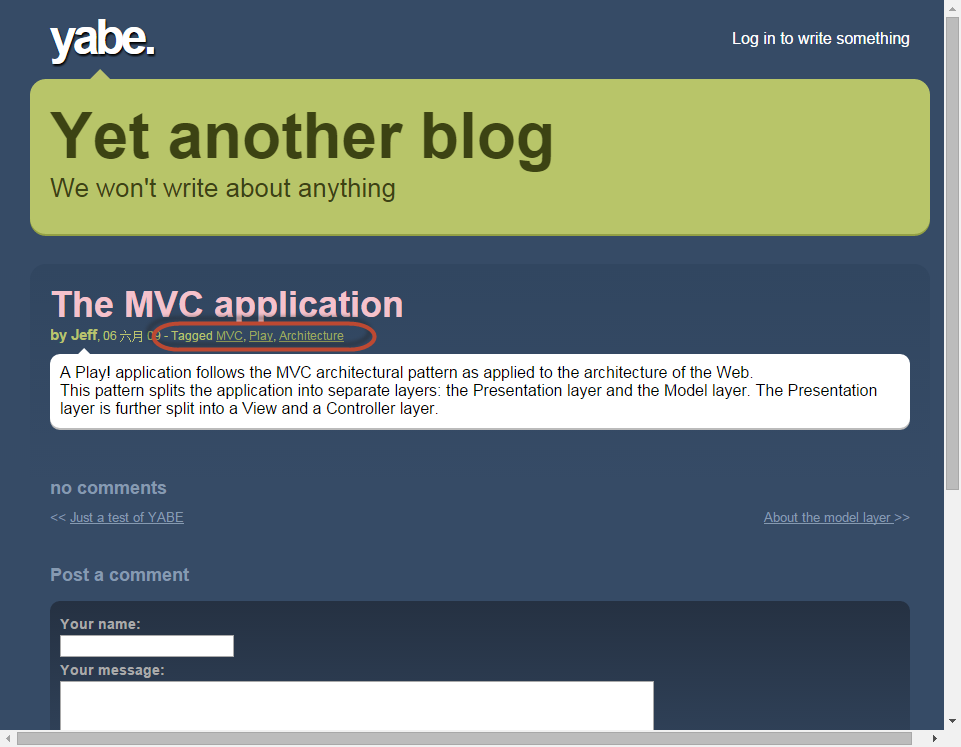
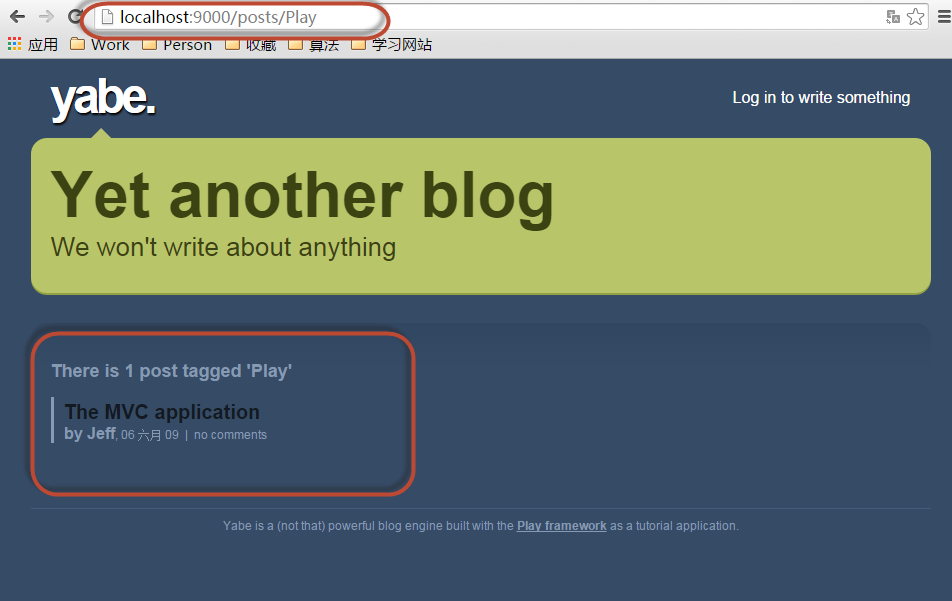
效果:
。。
Play Framework 完整实现一个APP(八)的更多相关文章
- Play Framework 完整实现一个APP(十一)
添加权限控制 1.导入Secure module,该模块提供了一个controllers.Secure控制器. /conf/application.conf # Import the secure m ...
- Play Framework 完整实现一个APP(五)
程序以及基本可用了,需要继续完善页面 1.创建页面模板 创建文件 app/views/tags/display.html *{ Display a post in one of these modes ...
- Play Framework 完整实现一个APP(二)
1.开发DataModel 在app\moders 下新建User.java package models; import java.util.*; import javax.persistence. ...
- Play Framework 完整实现一个APP(十四)
添加测试 ApplicationTest.java @Test public void testAdminSecurity() { Response response = GET("/adm ...
- Play Framework 完整实现一个APP(十三)
添加用户编辑区 1.修改Admin.index() public static void index() { List<Post> posts = Post.find("auth ...
- Play Framework 完整实现一个APP(十二)
1.定制CRUD管理页面 > play crud:ov --layout 替换生成文件内容 app/views/CRUD/layout.html #{extends 'admin.html' / ...
- Play Framework 完整实现一个APP(十)
1.定制Comment列表 新增加Comment list页面,执行命令行 > play crud:ov --template Comments/list 会生成/app/views/Comme ...
- Play Framework 完整实现一个APP(九)
添加增删改查操作 1.开启CRUD Module 在/conf/application.conf 中添加 # Import the crud module module.crud=${play.pat ...
- Play Framework 完整实现一个APP(六)
需要为Blog添加 查看和发表评论的功能 1.创建查看功能 Application.java中添加 show() 方法 public static void show(Long id) { Post ...
随机推荐
- 编写简单的ramdisk(选择IO调度器)
前言 目前linux中包含anticipatory.cfq.deadline和noop这4个I/O调度器.2.6.18之前的linux默认使用anticipatory,而之后的默认使用cfq.我们在前 ...
- 部署Icinga-php4
关于Icinga-php4的文档信息及下载地址,可参考:http://icinga-cn.sourceforge.net/ 我这里使用的是icinga-pnp4-cn-1.12.2.tar.xz. 因 ...
- DB2 Enterprise Server Edition(DB2 ESE)9.1在Windows Server 2008 下出现无法新建数据库的情况,及解决办法
在安装有,DB2 9.1版本的Windows Server 2008 上面,使用默认的安装方式导致无法创建数据库,相关的错误提示: "SQL3012C 发生系统错误(原因码= "& ...
- Anliven - 基础知识梳理汇总 - 软件测试
基础知识梳理 - 软件测试 - 概念 基础知识梳理 - 软件测试 - 分类 基础知识梳理 - 软件测试 - 流程 基础知识梳理 - 软件测试 - 用例 基础知识梳理 - 软件测试 - 方法 基础知识梳 ...
- react入门(5)
对前面四篇内容进行简单的回顾: react入门(1):jsx,组件,css写法 react入门(2):事件,this.props.children,props,...other,map循环 react ...
- Oracle索引梳理系列(四)- Oracle索引种类之位图索引
版权声明:本文发布于http://www.cnblogs.com/yumiko/,版权由Yumiko_sunny所有,欢迎转载.转载时,请在文章明显位置注明原文链接.若在未经作者同意的情况下,将本文内 ...
- 如何通过cmd开一个本地服务器
1.首先你要下载安装node.js http://nodejs.cn/download/ 并且根据提示安装在自己的电脑上即可 2.打开cmd管理员窗口输入npm -v 检测node.js是否安装成功: ...
- 从View向Controller传递复杂类型Json
mvc给我们提供多种controller中读取view数据的方法 1.从Ruquest["name"]中直接读取 2.将表单中name名称直接写在Action的参数列表中 3.将表 ...
- jQuery网页版五子棋小游戏源码下载
体验效果:http://hovertree.com/texiao/game/4/ 网页五子棋源代码: <!DOCTYPE html> <html> <head> & ...
- SQL分页查询的几种方式
需求:查询表dbo.Message,每页10条,查询第2页 1:TOP() ) * FROM dbo.Message WHERE Code NOT IN () Code FROM dbo.Messag ...