
java读取properties文件总结
一、java读取properties文件总结
在java项目中,操作properties文件是经常要做的,因为很多的配置信息都会写在properties文件中,这里主要是总结使用getResourceAsStream方法和InputStream流去读取properties文件,使用getResourceAsStream方法去读取properties文件时需要特别注意properties文件路径的写法,测试项目如下:
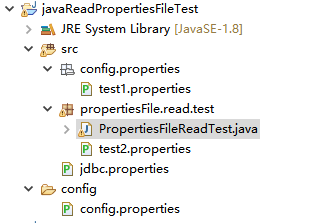
/*    范例名称:java读取properties文件总结

 *     源文件名称:PropertiesFileReadTest.java

 *    要  点:

 *        1. 使用getResourceAsStream方法读取properties文件

 *        2. 使用InPutStream流读取properties文件

 *        3. 读取properties文件的路径写法问题

 *

 **/

package propertiesFile.read.test;

import java.io.BufferedInputStream;

import java.io.FileInputStream;

import java.io.FileNotFoundException;

import java.io.IOException;

import java.io.InputStream;

import java.text.MessageFormat;

import java.util.Properties;

public class PropertiesFileReadTest {

    public static void main(String[] args) throws FileNotFoundException {

        readPropFileByGetResourceAsAtream();

        System.out.println("--------------");

        //readPropFileByInPutStream();

    }

    /*

     * 使用getResourceAsAtream方法读取

     */

    private static void readPropFileByGetResourceAsAtream() {

        /*

         * 读取src下面config.properties包内的配置文件 test1.properties位于config.properties包内

         */

        InputStream inl = PropertiesFileReadTest.class.getClassLoader()

                .getResourceAsStream("config/properties/test1.properties");

        /*

         * 读取和PropertiesFileReadTest类位于同一个包里面的配置文件

         * test2.properties和PropertiesFileReadTest类在同一个包内

         */

        InputStream in2 = PropertiesFileReadTest.class.getResourceAsStream("test2.properties");

        /*

         * 读取src根目录下文件的配置文件 jdbc.properties位于src目录

         */

        InputStream in3 = PropertiesFileReadTest.class.getClassLoader().getResourceAsStream("jdbc.properties");

        /*

         * 读取位于另一个source文件夹里面的配置文件 config是一个source文件夹,config.properties位于config

         * source文件夹中

         */

        InputStream in4 = PropertiesFileReadTest.class.getClassLoader().getResourceAsStream("config.properties");

        Properties properties = new Properties();

        System.out.println("----使用getResourceAsStream方法读取properties文件----");

        // 从输入字节流读取属性列表(键,值)

        try {

            System.out.println("-----------------------");

            properties.load(inl);

            System.out.println("test1.properties:name=" + properties.getProperty("name") + ",age="

                    + properties.getProperty("age"));

            System.out.println("-----------------------");

            System.out.println("-----------------------");

            properties.load(in2);

            System.out.println("test2.properties:name=" + properties.getProperty("name") + ",age="

                    + properties.getProperty("age"));

            System.out.println("-----------------------");

            properties.load(in3);

            System.out.println("jdbc.properties:");

            // 使用指定的格式字符串和参数返回格式化的字符串, 这里的%s是java String占位符

            System.out.println(String.format("jdbc.url=%s", properties.getProperty("jdbc.url")));

            System.out.println(String.format("jdbc.usename=%s", properties.getProperty("jdbc.usename")));

            System.out.println(String.format("jdbc.password=%s", properties.getProperty("jdbc.password")));

            properties.load(in4);

            System.out.println("config.properties:");

            // 使用给定的模式创建一个MessageFormat,并使用它来格式化给定的参数,{0}是一个java的字符串占位符

            System.out.println(MessageFormat.format("dbuser={0}", properties.getProperty("dbuser")));

            System.out.println(MessageFormat.format("dbpassword={0}", properties.getProperty("dbpassword")));

            System.out.println(MessageFormat.format("database={0}", properties.getProperty("database")));

            System.out.println("----------------------------------------------");

        } catch (IOException e) {

            // TODO Auto-generated catch block

            e.printStackTrace();

        }finally {

            if(inl != null) {

                try {

                    inl.close();

                } catch (IOException e) {

                    e.printStackTrace();

                }

            }

            if(in2 != null) {

                try {

                    inl.close();

                } catch (IOException e) {

                    e.printStackTrace();

                }

            }

            if(in3 != null) {

                try {

                    inl.close();

                } catch (IOException e) {

                    e.printStackTrace();

                }

            }

            if(in4 != null) {

                try {

                    inl.close();

                } catch (IOException e) {

                    e.printStackTrace();

                }

            }

        }

    }
/*

     * 使用InputStream流读取properties

     */

    private static void readPropFileByInPutStream() throws FileNotFoundException {

        InputStream in1=null;

        InputStream in2=null;

        InputStream in3=null;

        InputStream in4=null;

        System.out.println("----使用InputStream流读取properties文件----");

        try {

        /*

          * 读取src下面config.properties包内的配置文件 test1.properties位于config.properties包内

          */

        in1 =new BufferedInputStream(new FileInputStream("src/config/properties/test1.properties"));

        /*

         * 读取和PropertiesFileReadTest类位于同一个包里面的配置文件

         * test2.properties和PropertiesFileReadTest类在同一个包里面

         */

         in2=new BufferedInputStream(new FileInputStream("src/propertiesFile/read/test/test2.properties"));

        /*

         * 读取src根目录下文件的配置文件

         * jdbc.properties位于src目录

         */

         in3 = new BufferedInputStream(new FileInputStream("src/jdbc.properties"));

        /*

         * 读取位于另一个source文件夹里面的配置文件

         * config是一个source文件夹,config.properties位于config source文件夹中

         */

        in4 = new FileInputStream("config/config.properties");

        Properties properties=new Properties();

            System.out.println("-----------------------");

            properties.load(in1);

            System.out.println("test1.properties:name=" + properties.getProperty("name") + ",age="

                    + properties.getProperty("age"));

            System.out.println("-----------------------");

            System.out.println("-----------------------");

            properties.load(in2);

            System.out.println("test2.properties:name=" + properties.getProperty("name") + ",age="

                    + properties.getProperty("age"));

            System.out.println("-----------------------");

            properties.load(in3);

            System.out.println("jdbc.properties:");

            // 使用指定的格式字符串和参数返回格式化的字符串, 这里的%s是java String占位符

            System.out.println(String.format("jdbc.url=%s", properties.getProperty("jdbc.url")));

            System.out.println(String.format("jdbc.usename=%s", properties.getProperty("jdbc.usename")));

            System.out.println(String.format("jdbc.password=%s", properties.getProperty("jdbc.password")));

            properties.load(in4);

            System.out.println("config.properties:");

            // 使用给定的模式创建一个MessageFormat,并使用它来格式化给定的参数,{0}是一个java的字符串占位符

            System.out.println(MessageFormat.format("dbuser={0}", properties.getProperty("dbuser")));

            System.out.println(MessageFormat.format("dbpassword={0}", properties.getProperty("dbpassword")));

            System.out.println(MessageFormat.format("database={0}", properties.getProperty("database")));

            System.out.println("----------------------------------------------");

        } catch (IOException e) {

            // TODO Auto-generated catch block

            e.printStackTrace();

        }finally {

            if (in1 != null) {

                try {

                    in1.close();

                } catch (IOException e) {

                    e.printStackTrace();

                }

            }

            if (in2 != null) {

                try {

                    in2.close();

                } catch (IOException e) {

                    e.printStackTrace();

                }

            }

            if (in3 != null) {

                try {

                    in3.close();

                } catch (IOException e) {

                    e.printStackTrace();

                }

            }

            if (in4 != null) {

                try {

                    in4.close();

                } catch (IOException e) {

                    e.printStackTrace();

                }

            }

        }

    }
java读取properties文件总结的更多相关文章
- java分享第十六天( java读取properties文件的几种方法&java配置文件持久化:static块的作用)
java读取properties文件的几种方法一.项目中经常会需要读取配置文件(properties文件),因此读取方法总结如下: 1.通过java.util.Properties读取Propert ...
- 用java读取properties文件--转
今天为了通过java读取properties文件,google了很长时间,终于找到了.现在特记录之和大家一起分享. 下面直接贴出代码:java类 public class Mytest pub ...
- java 读取properties文件总结
一.java读取properties文件总结 在java项目中,操作properties文件是经常要做的,因为很多的配置信息都会写在properties文件中,这里主要是总结使用getResource ...
- java基础学习总结——java读取properties文件总结
摘录自:http://www.cnblogs.com/xdp-gacl/p/3640211.html 一.java读取properties文件总结 在java项目中,操作properties文件是经常 ...
- java读取properties文件时候要注意的地方
java读取properties文件时,一定要注意properties里面后面出现的空格! 比如:filepath = /home/cps/ 我找了半天,系统一直提示,没有这个路径,可是确实是存在的, ...
- java基础—java读取properties文件
一.java读取properties文件总结 在java项目中,操作properties文件是经常要做的,因为很多的配置信息都会写在properties文件中,这里主要是总结使用getResource ...
- Java基础学习总结(15)——java读取properties文件总结
一.java读取properties文件总结 在java项目中,操作properties文件是经常要做的,因为很多的配置信息都会写在properties文件中,这里主要是总结使用getResource ...
- java读取.properties文件
在web开发过程中,有些配置要保存到properties文件里,本章将给出一个工具类,用来方便读取properties文件. 案例: 1:config.properties文件 name=\u843D ...
- Java 读取Properties文件时应注意的路径问题
1. 使用Class的getResourceAsStream()方法读取Properties文件(资源文件)的路径问题: InputStream in = this.getClass().getRe ...
随机推荐
- mysql 对数据库操作的常用sql语句
1.查看创建某个数据库的 创建语句 show create database mysql 这个sql语句的意思是 展示创建名为mysql的数据库的 语句.执行之后如下图所示 仿造上面这个创建语句 创建 ...
- InnoDB: Error number 24 means ‘Too many open files’
一.问题的描述 备份程序 执行前滚的时候报错.(-apply-log) InnoDB: Errornumber 24 means 'Too many open files'. InnoDB: Some ...
- reduce个数问题
reduce的数目到底和哪些因素有关 1.我们知道map的数量和文件数.文件大小.块大小.以及split大小有关,而reduce的数量跟哪些因素有关呢? 设置mapred.tasktracker.r ...
- python时间处理,datetime中的strftime/strptime
python中datetime模块非常好用,提供了日期格式和字符串格式相互转化的函数strftime/strptime 1.由日期格式转化为字符串格式的函数为: datetime.datetime.s ...
- Django之ORM多表操作
1.创建一对多: 1.外键建在多的一方(如:一个出版社可出版多本书,所以建在书的表) 2.创建表: 1.创建外键 2.关联的表名 2.一对多数据的操作 2.1数据的添加: 第一种方法: 第二种方法: ...
- Visual studio 编译错误 无法将文件obj\Debug\*.exe复制到bin\Debug\*.exe
问题: 错误 未能将“obj\Debug\Server.exe”复制到“bin\Debug\Server.exe”.超出了重试计数 10.失败. Server 错误 无法将文件“obj\Debug\S ...
- 移动web--移动屏幕适配-完整的viewport设置
- androidstudio实现增量更新步骤
本文demo和参考例子参考-传送 门:http://blog.csdn.net/duguang77/article/details/17676797 一.增量更新优点:节省客户端和服务器端流量 增量 ...
- JS---案例:tab切换效果
案例:tab切换效果 获取所有的li标签 第一件事:把这个a所在的所以兄弟元素的类样式全部移除 (removeAttributes) 第二件事:当前点击的a父级元素li (点击这个a所在的所在元素li ...
- 看完就会用的GIT操作图解分析
无论你是前端还是后台,无论是运维还是移动端研发,GIT是逃避不了的东西,当然你说你要用SVN,那不在这次的讨论范围之内.不多说,请看下文GIT图解分析,10分钟学会git操作,当然下面的教程是为实战为 ...