
docker运行容器后agetty进程cpu占用率100%
1、最近在使用docker容器的时候,发现宿主机的agetty进程cpu占用率达到100%
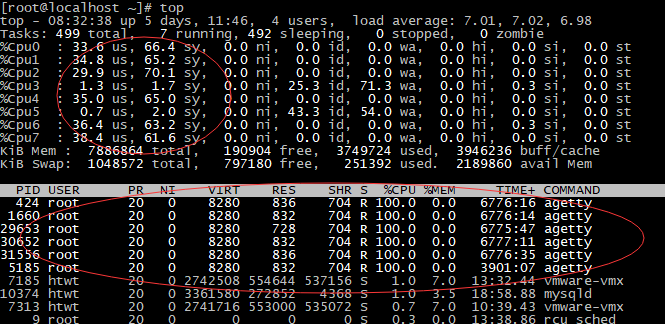
在Google上搜了下,引起这个问题的原因是在使用"docker run"运行容器时使用了"/sbin/init"和"--privileged"参数。
使用/sbin/init启动容器并加上--privileged参数,相当于docker容器获得了宿主机的全权委托权限。这时docker容器内部的init与宿主机的init产生了混淆。
# 引用google到的一段话:
I've done all my testing on them without using --privileged, especially since that's so dangerous (effectively, you're telling this second init process on your system that it's cool to go ahead and manage your system resources, and then giving it access to them as well). I always think of --privileged as a hammer to be used very sparingly.
出于对安全的考虑,在启动容器时,docker容器里的系统只具有一些普通的linux权限,并不具有真正root用户的所有权限。而--privileged=true参数可以让docker容器具有linux root用户的所有权限。
为了解决这个问题,docker后来的版本中docker run增加了两个选项参数"--cap-add"和"--cap-drop"。
--cap-add : 获取default之外的linux的权限
--cap-drop: 放弃default linux权限
从docker官网的文档中可以查到,docker容器具有的default权限及--cap-add可以获取到的扩展权限如下:
Default 权限:
|
Capability Key |
Capability Description |
|
SETPCAP |
Modify process capabilities. |
|
MKNOD |
Create special files using mknod(2). |
|
AUDIT_WRITE |
Write records to kernel auditing log. |
|
CHOWN |
Make arbitrary changes to file UIDs and GIDs (see chown(2)). |
|
NET_RAW |
Use RAW and PACKET sockets. |
|
DAC_OVERRIDE |
Bypass file read, write, and execute permission checks. |
|
FOWNER |
Bypass permission checks on operations that normally require the file system UID of the process to match the UID of the file. |
|
FSETID |
Don’t clear set-user-ID and set-group-ID permission bits when a file is modified. |
|
KILL |
Bypass permission checks for sending signals. |
|
SETGID |
Make arbitrary manipulations of process GIDs and supplementary GID list. |
|
SETUID |
Make arbitrary manipulations of process UIDs. |
|
NET_BIND_SERVICE |
Bind a socket to internet domain privileged ports (port numbers less than 1024). |
|
SYS_CHROOT |
Use chroot(2), change root directory. |
|
SETFCAP |
Set file capabilities. |
通过--cap-add获取到的权限:
|
Capability Key |
Capability Description |
|
SYS_MODULE |
Load and unload kernel modules. |
|
SYS_RAWIO |
Perform I/O port operations (iopl(2) and ioperm(2)). |
|
SYS_PACCT |
Use acct(2), switch process accounting on or off. |
|
SYS_ADMIN |
Perform a range of system administration operations. |
|
SYS_NICE |
Raise process nice value (nice(2), setpriority(2)) and change the nice value for arbitrary processes. |
|
SYS_RESOURCE |
Override resource Limits. |
|
SYS_TIME |
Set system clock (settimeofday(2), stime(2), adjtimex(2)); set real-time (hardware) clock. |
|
SYS_TTY_CONFIG |
Use vhangup(2); employ various privileged ioctl(2) operations on virtual terminals. |
|
AUDIT_CONTROL |
Enable and disable kernel auditing; change auditing filter rules; retrieve auditing status and filtering rules. |
|
MAC_OVERRIDE |
Allow MAC configuration or state changes. Implemented for the Smack LSM. |
|
MAC_ADMIN |
Override Mandatory Access Control (MAC). Implemented for the Smack Linux Security Module (LSM). |
|
NET_ADMIN |
Perform various network-related operations. |
|
SYSLOG |
Perform privileged syslog(2) operations. |
|
DAC_READ_SEARCH |
Bypass file read permission checks and directory read and execute permission checks. |
|
LINUX_IMMUTABLE |
Set the FS_APPEND_FL and FS_IMMUTABLE_FL i-node flags. |
|
NET_BROADCAST |
Make socket broadcasts, and listen to multicasts. |
|
IPC_LOCK |
Lock memory (mlock(2), mlockall(2), mmap(2), shmctl(2)). |
|
IPC_OWNER |
Bypass permission checks for operations on System V IPC objects. |
|
SYS_PTRACE |
Trace arbitrary processes using ptrace(2). |
|
SYS_BOOT |
Use reboot(2) and kexec_load(2), reboot and load a new kernel for later execution. |
|
LEASE |
Establish leases on arbitrary files (see fcntl(2)). |
|
WAKE_ALARM |
Trigger something that will wake up the system. |
|
BLOCK_SUSPEND |
Employ features that can block system suspend. |
所以,在运行容器时,可以不用--privileged参数的尽量不用,用--cap-add参数替代。如果必须使用--privileged=true参数的,可以通过在宿主机和容器中执行以下命令将agetty关闭。
shell> systemctl stop getty@tty1.service

shell> systemctl mask getty@tty1.service
参考资料:
https://github.com/docker/docker/issues/4040
https://docs.docker.com/engine/reference/run/
docker运行容器后agetty进程cpu占用率100%的更多相关文章
- 获取进程CPU占用率
获取进程CPU占用率 // 时间转换 static __int64 file_time_2_utc(const FILETIME* ftime) { LARGE_INTEGER li; li.LowP ...
- Linux下java进程CPU占用率高分析方法
Linux下java进程CPU占用率高分析方法 在工作当中,肯定会遇到由代码所导致的高CPU耗用以及内存溢出的情况.这种情况发生时,我们怎么去找出原因并解决. 一般解决方法是通过top命令找出消耗资源 ...
- Linux下分析某个进程CPU占用率高的原因
Linux下分析某个进程CPU占用率高的原因 通过top命令找出消耗资源高的线程id,利用strace命令查看该线程所有系统调用 1.top 查到占用cpu高的进程pid 2.查看该pid的线程 ...
- (转)Linux下java进程CPU占用率高-分析方法
Linux下java进程CPU占用率高-分析方法 原文:http://itindex.net/detail/47420-linux-java-%E8%BF%9B%E7%A8%8B?utm_source ...
- Linux下java进程CPU占用率高分析方法(一)
Linux下java进程CPU占用率高分析方法 在工作当中,肯定会遇到由代码所导致的高CPU耗用以及内存溢出的情况.这种情况发生时,我们怎么去找出原因并解决. 一般解决方法是通过top命令找出消耗资源 ...
- Linux下java进程CPU占用率高分析方法(二)
1. 通过 top 命令查看当前系统CPU使用情况,定位CPU使用率超过100%的进程ID:2. 通过 ps aux | grep PID 命令进一步确定具体的线程信息:3. 通过 ps -mp pi ...
- Linux下java进程CPU占用率高-分析方法
今天登陆同事的一台gateway 开始以为hive环境登陆不了了,仔细一看看了下是因为机器很卡,我每次等几秒没登陆就ctrl+c了,看了下是有个java进程cpu:340.4% mem:14.6% ...
- cidaemon.exe进程cpu占用率高及关闭cidaemon.exe进程方法
问题描写叙述: 这段时间机器总是出现一个奇怪的问题:cidaemon.exe进程占用CUP率98%以上,大大影响了电脑的正常使用.资源管理器中出现多个cidaemon.exe进程,强制结束占用cp ...
- WMI获取进程CPU占用率
Monitor % Process CPU Usage (specific process) http://www.tek-tips.com/viewthread.cfm?qid=395765 for ...
随机推荐
- apply( )与 call( ) 的区别
JavaScript中的每一个Function对象都有一个apply()方法和一个call()方法 语法 /*apply()方法*/ function.apply(thisObj[, argArray ...
- 详解 CALayer 和 UIView 的区别和联系
http://www.cocoachina.com/ios/20150828/13244.html 作者:@武蕴牛x 授权本站转载. 前言 前面发了一篇iOS 面试的文章,在说到 UIView 和 C ...
- MaxCompute 图计算用户手册(下)
示例程序 强连通分量 在有向图中,如果从任意一个顶点出发,都能通过图中的边到达图中的每一个顶点,则称之为强连通图.一张有向图的顶点数极大的强连通子图称为强连通分量.此算法示例基于 parallel C ...
- 三 nginx+uWSGI+django+virtualenv+supervisor发布web服务器
https://www.cnblogs.com/pyyu/p/9481344.html?tdsourcetag=s_pcqq_aiomsg 一 uwsgi安装 1.安装uwsgi,进入到一个虚拟机环境 ...
- 如何用Chrome浏览器下载网页音乐视频
打开网页,先让要下载的视频播放,右键单击选择审查元素(F12),选择上方的Network选项,按F5刷新,这个时候我们可以看到框架中Size下的不少文件数据数字正在变大,按size降序排列.点击表格的 ...
- 【转载】字符编码笔记:ASCII,Unicode和UTF-8
字符编码笔记:ASCII,Unicode和UTF-8 作者: 阮一峰 今天中午,我突然想搞清楚Unicode和UTF-8之间的关系,于是就开始在网上查资料. 结果,这个问题比我想象的复杂,从午饭后一直 ...
- @codechef - BIKE@ Chef and Bike
目录 @description@ @solution@ @accepted code@ @details@ @description@ 输入 n(n ≤ 22) 个点,m(m ≤ 8000) 个边.每 ...
- HZOJ 砍树
考试时打了个暴力T40,正解是整除分块???完全没听过……而且这题居然还有人A了…… 整除分块 暴力就不说了,直接上正解: 将d除过去,右边向下取整(显然不能向上取整啊,会超k的)这个不用处理,整除就 ...
- ViewPager封装工具类: 轻松实现APP导航或APP中的广告栏
相信做app应用开发的,绝对都接触过ViewPager,毕竟ViewPager的应用可以说无处不在:APP第一次启动时的新手导航页,APP中结合Fragment实现页面滑动,APP中常见的广告栏的自动 ...
- 一、JVM内存区域组成
一.JVM内存区域组成 java把内存分四种: 1.栈区(stack segment)— 由编译器自动分配释放,存放函数的参数值,局部变量的值等,具体方法执行结束之后,系统自动释放内存资源 2. ...