
配置Nexus Tacacs管理
1、设备拓扑:
N7K(mgmt0)----VMnet1-----ACS5.2
2、设备配置:
2.1、基础配置
第一部分:N7K
interface mgmt0
vrf member management
ip address 10.0.0.101/24
测试连通性:
N7K-2# ping 10.0.0.1
PING 10.0.0.1 (10.0.0.1): 56 data bytes
ping: sendto 10.0.0.1 64 chars, No route to host
^C
--- 10.0.0.1 ping statistics ---
1 packets transmitted, 0 packets received, 100.00% packet loss
N7K-2# ping 10.0.0.1 vrf management
PING 10.0.0.1 (10.0.0.1): 56 data bytes
64 bytes from 10.0.0.1: icmp_seq=0 ttl=63 time=0.677 ms
64 bytes from 10.0.0.1: icmp_seq=1 ttl=63 time=0.524 ms
64 bytes from 10.0.0.1: icmp_seq=2 ttl=63 time=0.952 ms
64 bytes from 10.0.0.1: icmp_seq=3 ttl=63 time=0.843 ms
64 bytes from 10.0.0.1: icmp_seq=4 ttl=63 time=0.469 ms
--- 10.0.0.1 ping statistics ---
5 packets transmitted, 5 packets received, 0.00% packet loss
round-trip min/avg/max = 0.469/0.692/0.952 ms
第二部分:ACS5.2
ACS/admin# sho interface gigabitEthernet 0
eth0 Link encap:Ethernet HWaddr 00:0C:29:33:F9:EF
inet addr:10.0.0.102 Bcast:10.0.0.255 Mask:255.255.255.0
inet6 addr: fe80::20c:29ff:fe33:f9ef/64 Scope:Link
UP BROADCAST RUNNING MULTICAST MTU:1500 Metric:1
RX packets:5735 errors:0 dropped:0 overruns:0 frame:0
TX packets:7979 errors:0 dropped:0 overruns:0 carrier:0
collisions:0 txqueuelen:1000
RX bytes:1319303 (1.2 MiB) TX bytes:8018911 (7.6 MiB)
Interrupt:177 Base address:0x2000
测试连通性:
ACS/admin# ping 10.0.0.1
PING 10.0.0.1 (10.0.0.1) 56(84) bytes of data.
64 bytes from 10.0.0.1: icmp_seq=0 ttl=64 time=0.240 ms
64 bytes from 10.0.0.1: icmp_seq=1 ttl=64 time=0.190 ms
64 bytes from 10.0.0.1: icmp_seq=2 ttl=64 time=0.207 ms
64 bytes from 10.0.0.1: icmp_seq=3 ttl=64 time=0.185 ms
--- 10.0.0.1 ping statistics ---
4 packets transmitted, 4 received, 0% packet loss, time 3016ms
rtt min/avg/max/mdev = 0.185/0.205/0.240/0.025 ms, pipe 2
ACS/admin#
2.2、保证N7K和ACS之前的连通性:
N7K-2# ping 10.0.0.102 vrf management
PING 10.0.0.102 (10.0.0.102): 56 data bytes
64 bytes from 10.0.0.102: icmp_seq=0 ttl=63 time=0.713 ms
64 bytes from 10.0.0.102: icmp_seq=1 ttl=63 time=0.564 ms
64 bytes from 10.0.0.102: icmp_seq=2 ttl=63 time=0.629 ms
64 bytes from 10.0.0.102: icmp_seq=3 ttl=63 time=0.654 ms
64 bytes from 10.0.0.102: icmp_seq=4 ttl=63 time=1.162 ms
--- 10.0.0.102 ping statistics ---
5 packets transmitted, 5 packets received, 0.00% packet loss
round-trip min/avg/max = 0.564/0.744/1.162 ms
N7K-2#
2.3、配置Tacacs
主要配置部分体现为绿色配置,其他部分为默认或自动产生配置。
N7K-2# sho running-config tacacs+ all
!Command: show running-config tacacs+ all
!Time: Mon Sep 2 12:21:19 2019
version 6.1(1)
feature tacacs+
tacacs-server key 7 "Fewhg@123"
no ip tacacs source-interface
tacacs-server test username test password test idle-time 0
tacacs-server timeout 5
tacacs-server deadtime 0
tacacs-server host 10.0.0.102 port 49
tacacs-server host 10.0.0.102 test username test password test idle-time 0
aaa group server tacacs+ TACACS
server 10.0.0.102
use-vrf management
no source-interface
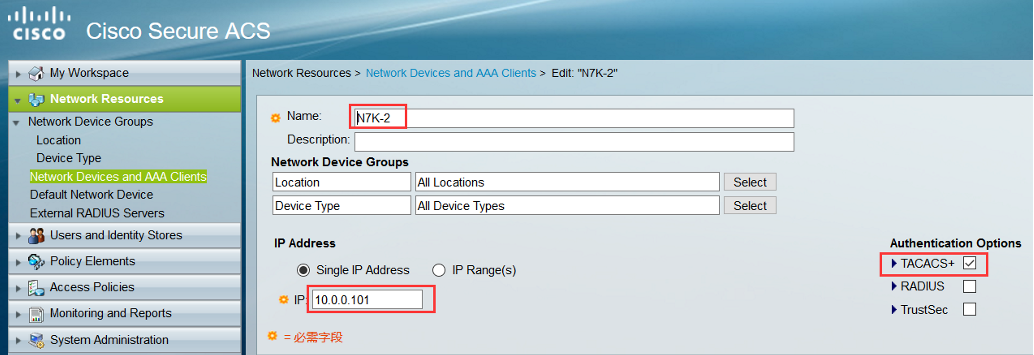
2.4、ACS配置
N7K-2这个名字不一定要和设备一样,这里为了好分别!这只是定义设备的一个名字,主要是那个IP地址。


3、验证
N7K-2# exit
*****************
Username: admin
Password: cisco
*****************
N7K-2 login: admin
Password: (这里使用的是cisco,错误了!)
Login incorrect
*****************
Username: admin
Password: cisco
*****************
login: admin
Password: (这里使用了AAA的账户,成功了!)
Last login: Mon Sep 2 12:03:31 UTC 2019 on ttyS0
Last login: Mon Sep 2 12:25:25 on ttyS0
Cisco NX-OS Software
Copyright (c) 2002-2012, Cisco Systems, Inc. All rights reserved.
NX-OS/Titanium software ("NX-OS/Titanium Software") and related
documentation, files or other reference materials ("Documentation")
are the proprietary property and confidential information of Cisco
Systems, Inc. ("Cisco") and are protected, without limitation,
pursuant to United States and International copyright and trademark
laws in the applicable jurisdiction which provide civil and criminal
penalties for copying or distribution without Cisco's authorization.
The use of NX-OS/Titanium Software and Documentation is strictly
limited to Cisco's internal use.
Any use or disclosure, in whole or in part, of the NX-OS/Titanium
Software or Documentation to any third party for any purposes is
expressly prohibited except as otherwise authorized by Cisco in writing.
The copyrights to certain works contained herein are owned by other
third parties and are used and distributed under license. Some parts
of this software may be covered under the GNU Public License or the
GNU Lesser General Public License. A copy of each such license is
available at
http://www.gnu.org/licenses/gpl.html and
http://www.gnu.org/licenses/lgpl.html
N7K-2#
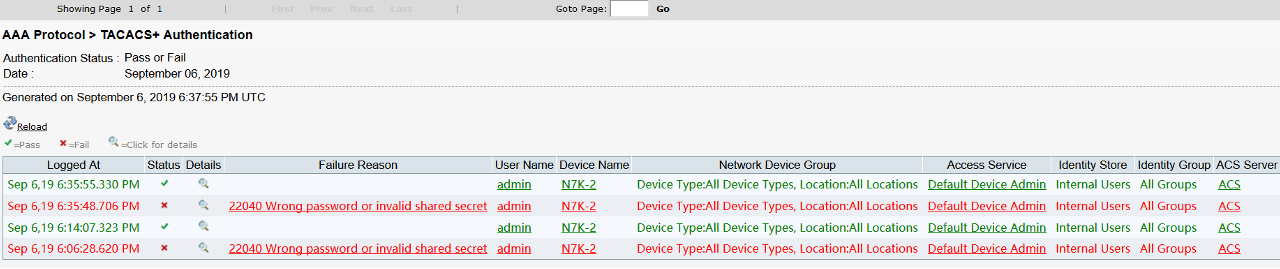
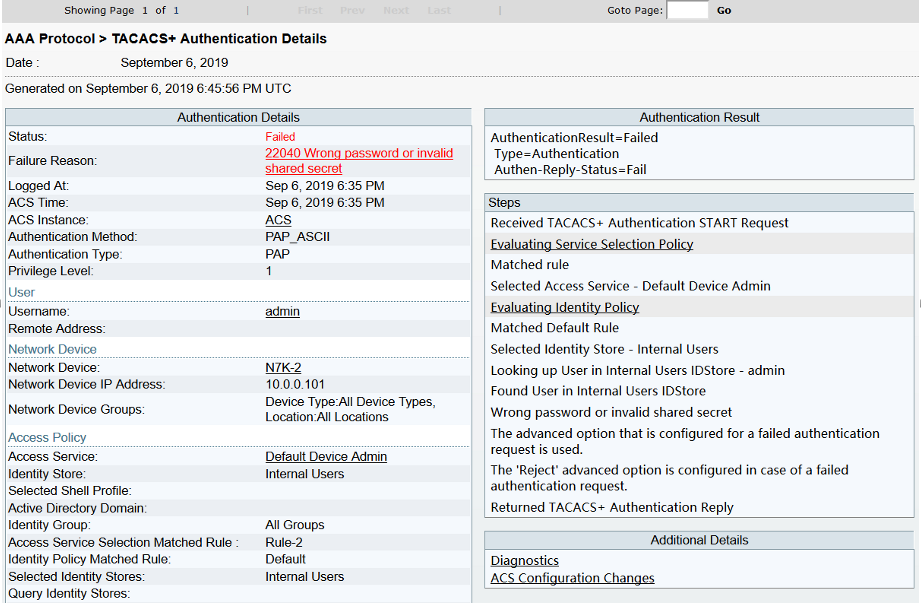
4、ACS上查看认证信息


可以看到如下是我前后两次输错和输对密码的情况:
Detail信息:

配置Nexus Tacacs管理的更多相关文章
- 事务管理(下) 配置spring事务管理的几种方式(声明式事务)
配置spring事务管理的几种方式(声明式事务) 概要: Spring对编程式事务的支持与EJB有很大的区别.不像EJB和Java事务API(Java Transaction API, JTA)耦合在 ...
- JavaWeb学习之tomcat安装与运行、tomcat的目录结构、配置tomcat的管理用户、web项目目录、虚拟目录、虚拟主机(1)
1.tomcat安装与运行双击tomcat目录下的bin/startup.bat,启动之后,输入http://localhost:8080,出现安装成功的提示,表示安装tomcat成功 2.tomca ...
- Linux下安装配置Nexus
一.安装和运行nexus 1.下载nexus:http://www.sonatype.org/nexus/go 可选择tgz和zip格式,以及war,选择tgz或zip时不同版本可能在启动时存在一定问 ...
- 配置安全的管理访问(GNS3)
实验拓扑: 实验目的: 尝试用R2/R3远程登陆R1路由器并进行管理,在此之前先在R1配置安全的管理访问 1.端口IP配置 R1: e1/0 192.168.1.1/24 e1/1 192.168.2 ...
- ssdb主从及双主模型配置和简单管理
ssdb主从及双主模型配置和简单管理 levelDB是一个key->value 的数据存储库,其只能在本地保存数据,支持持久化,并且支持保存非常大的数据,单机redis在保存较大数据的时候数十G ...
- linux 安装配置nexus以及maven私服应用
---------------------nexus---------------------- 1.编辑nexus脚本, 配置 RUN_AS_USER 参数vi /usr/local/src/nex ...
- Django配置后台xadmin管理界面
Django配置后台xadmin管理界面 python版本3.6.5 Django版本1.10.8(刚开始是2.1.5,由于各种错误,改成了低版本) 1.xadmin的安装,下载地址https://g ...
- api的使用机制:继承、实例化、实现(继承)配置、实例(参数化)配置、机制管理模块
api的使用机制:继承.实例化.实现(继承)配置.实例(参数化)配置.机制管理模块 facade模式.管理模块
- Maven零散笔记——配置Nexus
安装&配置Nexus 解压后,应该获得如下目录结构: nexus-2.0.6是nexus服务主目录 sonatype-work是真正的仓库,同时包含了nexus的配置,如定时任务.用户配置等 ...
随机推荐
- 【PAT甲级】1115 Counting Nodes in a BST (30分)(二叉查找树)
题意: 输入一个正整数N(<=1000),接着输入N个整数([-1000,1000]),依次插入一棵初始为空的二叉排序树.输出最底层和最底层上一层的结点个数之和,例如x+y=x+y. AAAAA ...
- EF CodeFirst 一对一、一对多、多对多关系
一对一关系 如图,无需专门指定,系统会默认在Person表中生成字段Pet_Id为Pet表的外键(一对一). Require:必要的(一对一) Optional:可选的(一对零) Principa ...
- Laravel-admin 刷新页面后,左侧菜单栏怎么默认选中当前栏目
修改public\vendor\laravel-admin\laravel-admin里面的laravel-admin.js $(window).on('load',function(){ $('.s ...
- MonoBehaviour单例的另外一种省事的写法
using UnityEngine; public class CommSystem: SingletonGeneric<CommSystem> { public static strin ...
- web前端基础-css-尺寸边框
尺寸和边框: 一.尺寸 行内元素是不能设置宽和高的,其高度是由元素里面的内容的高度撑起来的: 行内块元素可以设置宽和高,当行内块元素没有设置宽高的时候,行内块元素的宽高是其默认的宽高: 块级元素:可以 ...
- appium---webview(H5)元素定位
我们在做UI自动化的时候,肯定需要元素定位,那么webview(H5)的元素怎么定位呢? webview定位方法 方法一: 1.打开chrome浏览器,输入chrome://inspect 2.连接手 ...
- 2.sleep和wait的区别:
sleep是Thread类的方法,wait是object(Java类库的老祖宗)的方法 sleep阻塞的线程在指定时间后,会转变为可执行状态:wait它要等待notify的唤醒 执行了sleep的线程 ...
- PLSQL Developer12注册码
product code: 4vkjwhfeh3ufnqnmpr9brvcuyujrx3n3le serial Number:226959 password: xs374ca 绝对靠谱
- 用python脚本测试接口
自己写一个脚本,统计调用200次接口的请求时长. # -*- coding=utf-8 -*-import osimport requestsimport time url = "http: ...
- go-redis 基于beego正确使用序列化存储数据和反序列化获取数据
安装go-redis // 安装命令 go get github.com/gomodule/redigo/redis // 导入使用 import( "github.com/gomodule ...