
Nexus 安装运维手册
1. Nexus 安装与配置
1.1 下载Nexus
登录https://www.sonatype.com/download-oss-sonatype,下载最新的Nexus版本。 我这里使用的是nexus-3.16.1-02版本;
1.2 安装Nexus
#将tar包上传到服务器/usr/local/目录下解压,这个时候会出现 nexus-3.16.1-02、sonatype-work 两个文件夹

tar -zxvf nexus-3.16.1-02-unix.tar.gz

#修改配置文件,eg:端口号

cd /usr/local/nexus-3.16.1-02/etc

vim nexus-default.properties
1.3 启动Nexus
启动用户是root的时候会出现下面的警告,可以通过修改/usr/local/nexus-3.16.1-02/bin/nexus.rc文件解决;

#修改启动用户run_as_user,建议不要使用root

vim /usr/local/nexus-3.16.1-02/bin/nexus.rc

#

cd /usr/local/nexus-3.16.1-02/bin

./nexus start --后台启动

./nexus run --前台启动,显示日志
1.4 登录Nexus
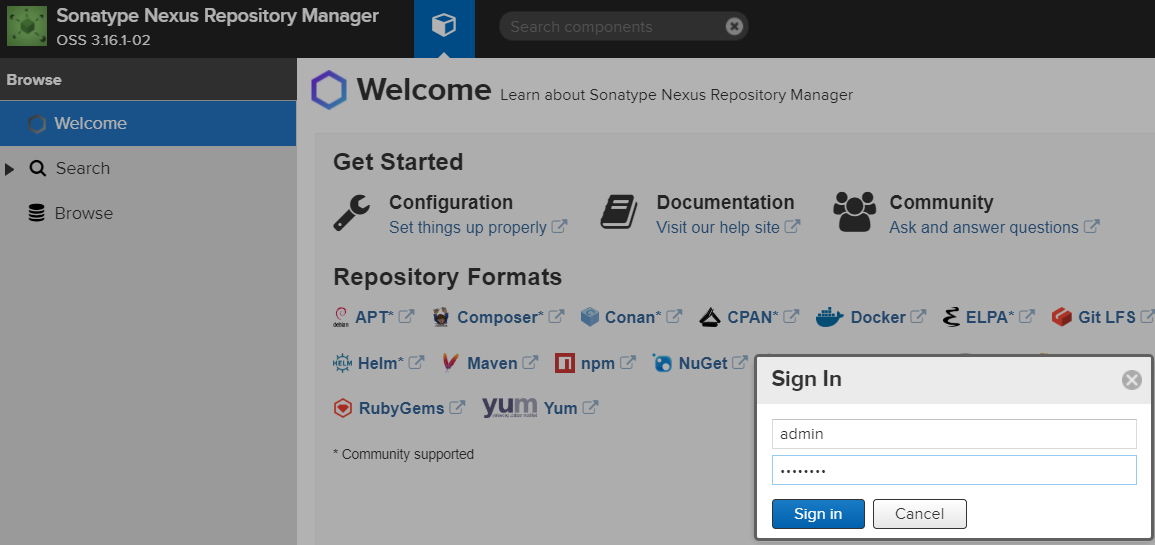
服务启动完以后,输入Ip地址+端口访问(8081),Nexus默认的账户名和密码是是 admin/admin123
1.5 配置私有库
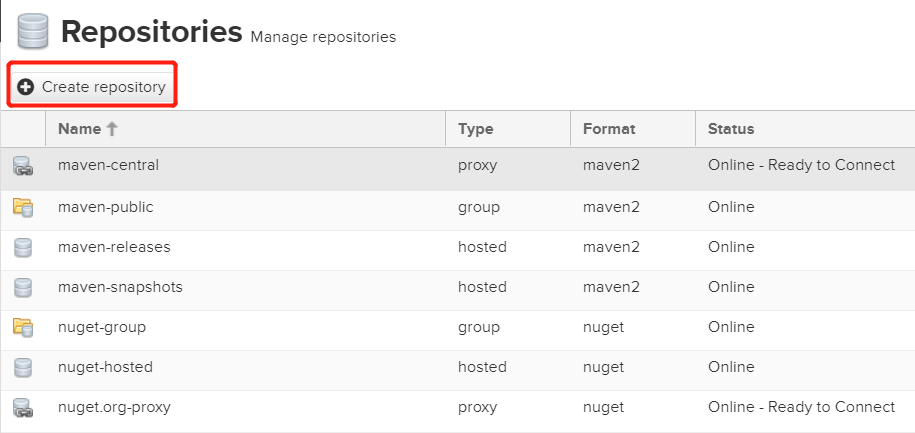
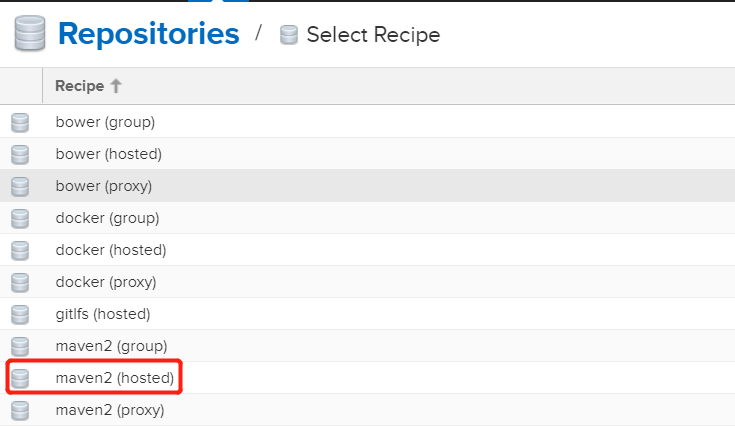
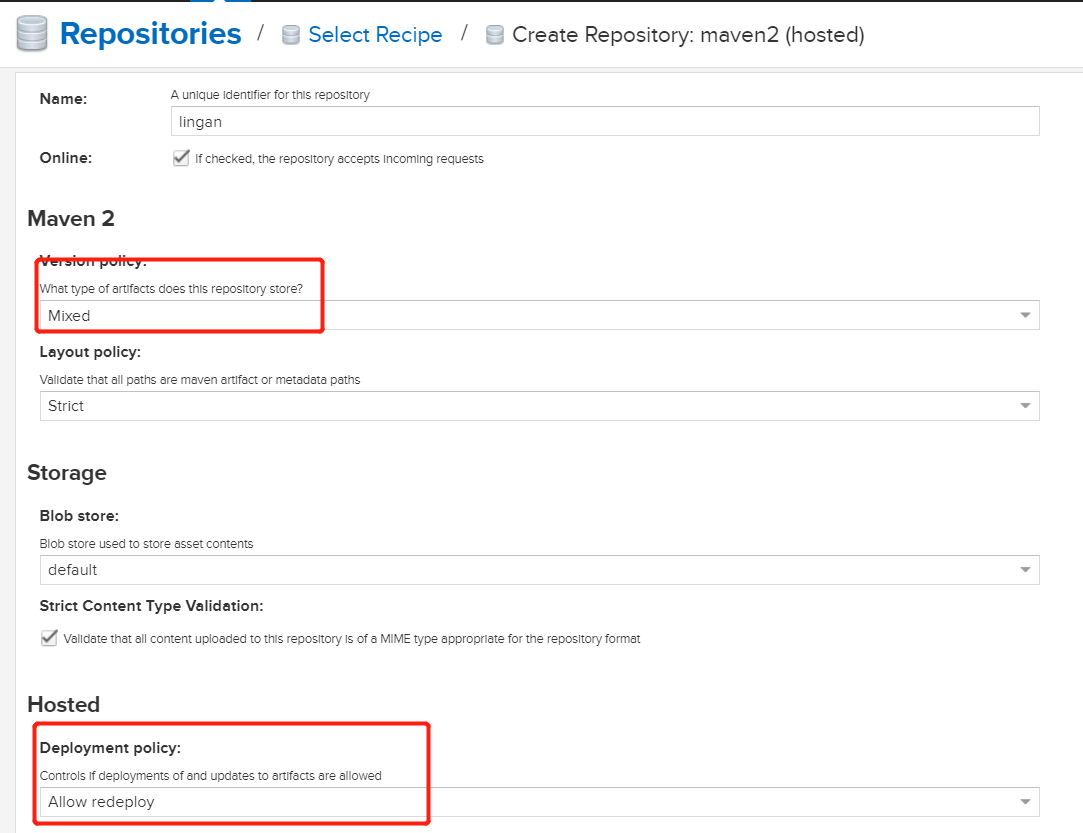
将私有库添加到http://192.168.209.128:8081/repository/maven-public/中。
1.6 导入jar包
一般私服都是存在内网环境,Nexus3.0以后需要通过命令命令将具体的jar包打到私服中;
#将下面的脚本丢到需要上传jar包的文件目录下
chmod u+x mavenimport.sh
./mavenimport.sh -u admin -p admin123 -r http://192.168.209.128:8081/repository/lingan/
#!/bin/bash

# copy and run this script to the root of the repository directory containing files

# this script attempts to exclude uploading itself explicitly so the script name is important

# Get command line params

while getopts ":r:u:p:" opt; do

	case $opt in

		r) REPO_URL="$OPTARG"

		;;

		u) USERNAME="$OPTARG"

		;;

		p) PASSWORD="$OPTARG"

		;;

	esac

done

find . -type f -not -path './mavenimport\.sh*' -not -path '*/\.*' -not -path '*/\^archetype\-catalog\.xml*' -not -path '*/\^maven\-metadata\-local*\.xml'
-not -path '*/\^maven\-metadata\-deployment*\.xml' | sed "s|^\./||" | xargs -I '{}' curl -u "$USERNAME:$PASSWORD" -X PUT -v -T {} ${REPO_URL}/{} ;
1.7 设置登录用户权限
建议将admin注销,重新定义一个登录用户。在Nexus 3.0 这个版本中我直接删除admin会报错,但是设置为不可用没有问题;

2. Maven 安装与配置
2.1 下载Maven
登录http://maven.apache.org 下载最新的maven版本,我这里使用的是apache-maven-3.6.1版本。
2.2 安装Maven
将tar包上传到服务器/usr/local/目录下解压

tar -zxvf apache-maven-3.6.1-bin.tar.gz
2.3 配置Maven
#配置release、snapshot的用户信息;

#配置mirror指向私服的nexus-public;

vim /usr/local/maven/apache-maven-3.6.1/conf/setting.xml
3. 工作空间配置
3.1 修改本地Maven配置
配置release、snapshot的用户信息;
配置mirror指向私服的nexus-public;
3.2 修改工程中的pom文件
<repositories>
<repository>
<id>nexus-public</id>
<url>http://192.168.11.23:8180/repository/maven-public/</url>
<snapshots>
<enabled>true</enabled>
</snapshots>
</repository>
</repositories>
<distributionManagement>
<repository>
<id>release</id>
<url>http://192.168.11.23:8180/repository/maven-releases/</url>
</repository>
<snapshotRepository>
<id>snapshot</id>
<url>http://192.168.11.23:8180/repository/maven-snapshots/</url>
</snapshotRepository>
</distributionManagement>
<build>
<plugins>
<plugin>
<groupId>org.apache.maven.plugins</groupId>
<artifactId>maven-compiler-plugin</artifactId>
<version>3.8.0</version>
<configuration>
<source>1.7</source>
<target>1.7</target>
<encoding>UTF-8</encoding>
</configuration>
</plugin>
<plugin>
<groupId>org.apache.maven.plugins</groupId>
<artifactId>maven-war-plugin</artifactId>
<version>3.2.2</version>
</plugin>
</plugins>
</build>
Nexus 安装运维手册的更多相关文章
- 使用ansible编译安装运维工具tmux
实验系统:CentOS 6.6_x86_64 实验前提:提前准备好编译环境,防火墙和selinux都关闭 软件介绍:tmux是一个优秀的终端复用软件,类似GNU Screen,但来自于OpenBSD, ...
- 最全的linux命令大全,shell运维手册
shell实例手册 0 说明{ 手册制作: 雪松} 1 文件{ ls -rtl # 按时间倒叙列出所有目录和文件 ll -rt touch file ...
- [转帖]Shell运维手册
shell实例手册 https://github.com/liquanzhou/ops_doc 0 说明{ 手册制作: 雪松 更新日期: 2018-09-11 欢 ...
- redis 运维手册
redis cli命令 - milkty - 博客园https://www.cnblogs.com/kongzhongqijing/p/6867960.html Redis多个数据库 - EasonJ ...
- Hbase运维手册(1)
1. region情况 需要检查 1. region的数量(总数和每台regionserver上的region数) 2. region的大小 如果发现异常可以通过手动merge region和手动分配 ...
- VERITAS NETBACKUP运维手册(自制)
ps:本文为目录.详情请点如下目录超链接 1 VERITAS NETBACKUP介绍 1.1 NBU基本概念 1.2 配置存储单元 1.3 配置备份策略(Policy) 1.4 配置NetBackup ...
- redis运维手册
版本采用:redis-3.2.11.tar.gz 官网下载地址:https://redis.io/download 1.redis服务器资源 redis服务器基础配置CPU2核.内存按需分配,系统磁盘 ...
- 命令行界面下使用emca安装配置Oracle Database Control实战
作为命令行忠有用户,server端软件的运维都倾向于使用命令或 脚本完毕,非常讨厌资源占用非常大的GUI.Oracle数据库作为重要的server端软件.其安装运维自然也全然支持纯命令行方式.虽然同一 ...
- 2019阿里云开年Hi购季基础云产品分会场全攻略!
2019阿里云云上Hi购季活动已经于2月25日正式开启,从已开放的活动页面来看,活动分为三个阶段: 2月25日-3月04日的活动报名阶段.3月04日-3月16日的新购满返+5折抢购阶段.3月16日-3 ...
随机推荐
- 深夜话题boot2docker还有那些隐藏MENU
马克思的博士论文:自由意识的集中表达 --字体我设为5(18pt),你们懂的 总有人埋汰,终于我想起一个负负得正的话题 为什么放在深夜,因为希望看到的人越少越好,深夜是时差党的乐园 本篇作为之前几篇围 ...
- 枚举 + exgcd
题意:已知xi=(a*xi-1+b) mod 10001,且告诉你x1,x3.........x2*t-1,让你求出其偶数列 思路分析 : 题目所要求的的是对 10001 取余,由模运算的性质可知,a ...
- java 魔术
每4个字节都有对应的含义
- rabbitmq 实现延迟队列的两种方式
原文地址:https://blog.csdn.net/u014308482/article/details/53036770 ps: 文章里面延迟队列=延时队列 什么是延迟队列 延迟队列存储的对象肯定 ...
- 9、python判断语句与循环语句
前言:本文主要介绍python判断语句与循环语句,包括if语句.while循环.for循环.range函数. 一.if语句 关键字:if.elif.else,写法如下: # if if 条件: # ...
- 【转载】Notepad++源码分析
在网上发现了一个哥们写了关于Notepad++源码的文章,不过就写了一就没有了,我就接着他的工作再说说吧! 大三了,也写了一点儿程序了,但是如果只是按照自己的思路写下去恐怕难以提高,于是准备开始阅读一 ...
- Ubuntu学习之路1
最近重装了系统,对自己很久的win7 say goodBye.学习了自制U盘系统盘,重装了win8,然后在win8上倒腾,发现还是不错的.于是又在win8上装回了win7上的VMware,捣鼓了一下U ...
- Vmware上安装Linux(centos7)图文教程
Vmware上安装Linux(centos7)图文教程 一.准备安装文件(vmware && centos7 镜像) 1.下载 vmware workstations :链接: ...
- 报错requests.exceptions.InvalidSchema: No connection adapters were found for
刚开始学习,使用requests时,敲了点demo import requests params = { "name": "name", "passw ...
- iOS 利用UICollectionView做一个无限循环广告栏
一.效果图 左右丝滑滑动,并且有缩放动画. 二.分析和思路 1. 为什么选择用UICollectionView去做上面的效果? 首先无限效果永远是表现出来的,而不是程序里面创建了无数个view,如何做 ...