
【笔记5-购物车及地址模块】从0开始 独立完成企业级Java电商网站开发(服务端)
购物车模块
数据库表设计
购物车表
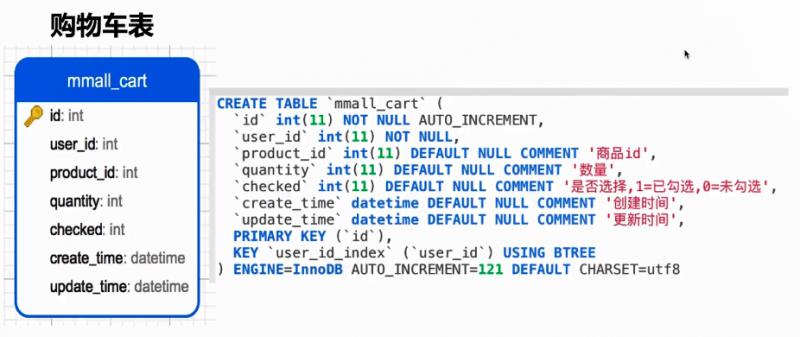
CREATE TABLE mmall_ cart (

'id' int(11) NOT NULL AUTO_ INCREMENT,

'user_ id' int(11) NOT NULL,

'product_ id' int(11) DEFAULT NULL COMMENT ' 商品id',

'quantity' int(11) DEFAULT NULL COMMENT  '数量',

'checked' int(11) DEFAULT NULL COMMENT ' 是否选择,1=已勾选,0=未勾选' ,

'create_ time' datetime DEFAULT NULL COMMENT ' 创建时间'

'update_ _time' datetime DEFAULT NULL COMMENT ' 更新时间' ,

PRIMARY KEY (' id'),

KEY 'user_ id_ index' (user_ id') USING BTREE

) ENGINE=InnoDB AUTO_ INCREMENT=121 DEFAULT CHARSET=utf8
功能
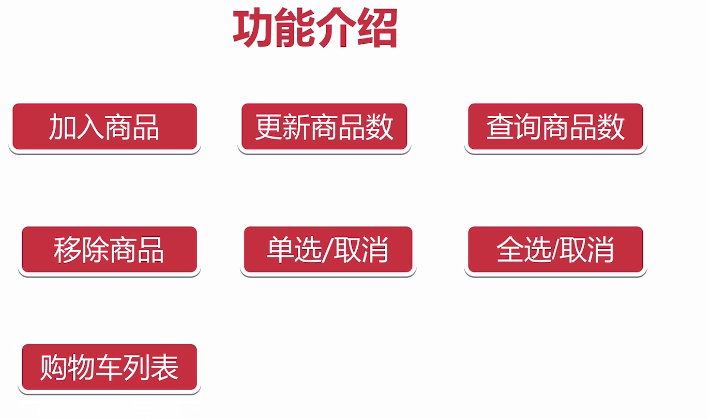
加入商品
更新商品数
查询商品数
移除商品
单选/取消
全选/取消
购物车列表
涉及知识点
购物车模块的设计思想
如何封装一个高复用购物车核心方法
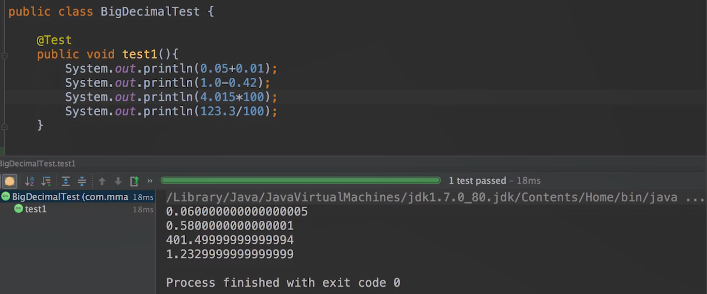
解决浮点型商业运算中丢失精度的问题
接口设计
【门户】
1.购物车List列表
/cart/list.do
http://localhost:8080/cart/list.do
注意点:
- 需要先登录,所有的密码都是123
- NEED_LOGIN(10, "NEED_LOGIN"),//需要登录的错误编码
- 价格的单位是元,保留小数后2位
request
无参数,需要登录状态
response
success
{

    "status": 0,

    "data": {

        "cartProductVoList": [

            {

                "id": 1,

                "userId": 13,

                "productId": 1,

                "quantity": 1,

                "productName": "iphone7",

                "productSubtitle": "双十一促销",

                "productMainImage": "mainimage.jpg",

                "productPrice": 7199.22,

                "productStatus": 1,

                "productTotalPrice": 7199.22,

                "productStock": 86,

                "productChecked": 1,

                "limitQuantity": "LIMIT_NUM_SUCCESS"

            },

            {

                "id": 2,

                "userId": 13,

                "productId": 2,

                "quantity": 1,

                "productName": "oppo R8",

                "productSubtitle": "oppo促销进行中",

                "productMainImage": "mainimage.jpg",

                "productPrice": 2999.11,

                "productStatus": 1,

                "productTotalPrice": 2999.11,

                "productStock": 86,

                "productChecked": 1,

                "limitQuantity": "LIMIT_NUM_SUCCESS"

            }

        ],

        "allChecked": true,

        "cartTotalPrice": 10198.33

    }

}
2.购物车添加商品
/cart/add.do
http://localhost:8080/cart/add.do?productId=1&count=10
请注意这个字段,超过数量会返回这样的标识"limitQuantity"
失败的:LIMIT_NUM_FAIL
成功的:LIMIT_NUM_SUCCESS
request
productId,count
response
success
{

    "status": 0,

    "data": {

        "cartProductVoList": [

            {

                "id": 1,

                "userId": 13,

                "productId": 1,

                "quantity": 12,

                "productName": "iphone7",

                "productSubtitle": "双十一促销",

                "productMainImage": "mainimage.jpg",

                "productPrice": 7199.22,

                "productStatus": 1,

                "productTotalPrice": 86390.64,

                "productStock": 86,

                "productChecked": 1,

                "limitQuantity": "LIMIT_NUM_SUCCESS"

            },

            {

                "id": 2,

                "userId": 13,

                "productId": 2,

                "quantity": 1,

                "productName": "oppo R8",

                "productSubtitle": "oppo促销进行中",

                "productMainImage": "mainimage.jpg",

                "productPrice": 2999.11,

                "productStatus": 1,

                "productTotalPrice": 2999.11,

                "productStock": 86,

                "productChecked": 1,

                "limitQuantity": "LIMIT_NUM_SUCCESS"

            }

        ],

        "allChecked": true,

        "cartTotalPrice": 89389.75

    }

}
3.更新购物车某个产品数量
/cart/update.do
http://localhost:8080/cart/update.do?productId=1&count=2
request
productId,count
response
响应同2
success
{

    "status": 0,

    "data": {

        "cartProductVoList": [

            {

                "id": 1,

                "userId": 13,

                "productId": 1,

                "quantity": 12,

                "productName": "iphone7",

                "productSubtitle": "双十一促销",

                "productMainImage": "mainimage.jpg",

                "productPrice": 7199.22,

                "productStatus": 1,

                "productTotalPrice": 86390.64,

                "productStock": 86,

                "productChecked": 1,

                "limitQuantity": "LIMIT_NUM_SUCCESS"

            },

            {

                "id": 2,

                "userId": 13,

                "productId": 2,

                "quantity": 1,

                "productName": "oppo R8",

                "productSubtitle": "oppo促销进行中",

                "productMainImage": "mainimage.jpg",

                "productPrice": 2999.11,

                "productStatus": 1,

                "productTotalPrice": 2999.11,

                "productStock": 86,

                "productChecked": 1,

                "limitQuantity": "LIMIT_NUM_SUCCESS"

            }

        ],

        "allChecked": true,

        "cartTotalPrice": 89389.75

    }

}
4.移除购物车某个产品
/cart/delete_product.do
http://localhost:8080/cart/delete_product.do?productIds=1,3
request
productIds
response
success
{

    "status": 0,

    "data": {

        "cartProductVoList": [

            {

                "id": 2,

                "userId": 13,

                "productId": 2,

                "quantity": 1,

                "productName": "oppo R8",

                "productSubtitle": "oppo促销进行中",

                "productMainImage": "mainimage.jpg",

                "productPrice": 2999.11,

                "productStatus": 1,

                "productTotalPrice": 2999.11,

                "productStock": 86,

                "productChecked": 1,

                "limitQuantity": "LIMIT_NUM_SUCCESS"

            }

        ],

        "allChecked": true,

        "cartTotalPrice": 2999.11

    }

}
5.购物车选中某个商品
/cart/select.do
http://localhost:8080/cart/select.do?productId=1
request
productId
response
success
{

    "status": 0,

    "data": {

        "cartProductVoList": [

            {

                "id": 2,

                "userId": 13,

                "productId": 2,

                "quantity": 1,

                "productName": "oppo R8",

                "productSubtitle": "oppo促销进行中",

                "productMainImage": "mainimage.jpg",

                "productPrice": 2999.11,

                "productStatus": 1,

                "productTotalPrice": 2999.11,

                "productStock": 86,

                "productChecked": 1,

                "limitQuantity": "LIMIT_NUM_SUCCESS"

            }

        ],

        "allChecked": true,

        "cartTotalPrice": 2999.11

    }

}
6.购物车取消选中某个商品
/cart/un_select.do
http://localhost:8080/cart/un_select.do?productId=2
注意返回值中的cartTotalPrice,如果反选之后总价的变化
request
productId
response
success
{

    "status": 0,

    "data": {

        "cartProductVoList": [

            {

                "id": 2,

                "userId": 13,

                "productId": 2,

                "quantity": 1,

                "productName": "oppo R8",

                "productSubtitle": "oppo促销进行中",

                "productMainImage": "mainimage.jpg",

                "productPrice": 2999.11,

                "productStatus": 1,

                "productTotalPrice": 2999.11,

                "productStock": 86,

                "productChecked": 0,

                "limitQuantity": "LIMIT_NUM_SUCCESS"

            }

        ],

        "allChecked": true,

        "cartTotalPrice": 0

    }

}
7.查询在购物车里的产品数量
/cart/get_cart_product_count.do
http://localhost:8080/cart/get_cart_product_count.do
未登录返回0
request
无
response
success
{

    "status": 0,

    "data": 0

}
8.购物车全选
/cart/select_all.do
http://localhost:8080/cart/select_all.do
注意返回值中的cartTotalPrice的变化
request
无
response
success
{

    "status": 0,

    "data": {

        "cartProductVoList": [

            {

                "id": 2,

                "userId": 13,

                "productId": 2,

                "quantity": 1,

                "productName": "oppo R8",

                "productSubtitle": "oppo促销进行中",

                "productMainImage": "mainimage.jpg",

                "productPrice": 2999.11,

                "productStatus": 1,

                "productTotalPrice": 2999.11,

                "productStock": 86,

                "productChecked": 0,

                "limitQuantity": "LIMIT_NUM_SUCCESS"

            }

        ],

        "allChecked": true,

        "cartTotalPrice": 2999.11

    }

}
9.购物车取消全选
/cart/un_select_all.do
http://localhost:8080/cart/un_select_all.do
注意返回值中的cartTotalPrice总价的变化
request
无
response
success
{

    "status": 0,

    "data": {

        "cartProductVoList": [

            {

                "id": 2,

                "userId": 13,

                "productId": 2,

                "quantity": 1,

                "productName": "oppo R8",

                "productSubtitle": "oppo促销进行中",

                "productMainImage": "mainimage.jpg",

                "productPrice": 2999.11,

                "productStatus": 1,

                "productTotalPrice": 2999.11,

                "productStock": 86,

                "productChecked": 0,

                "limitQuantity": "LIMIT_NUM_SUCCESS"

            }

        ],

        "allChecked": true,

        "cartTotalPrice": 0

    }

}
收货地址模块
数据库表设计
收货地址表
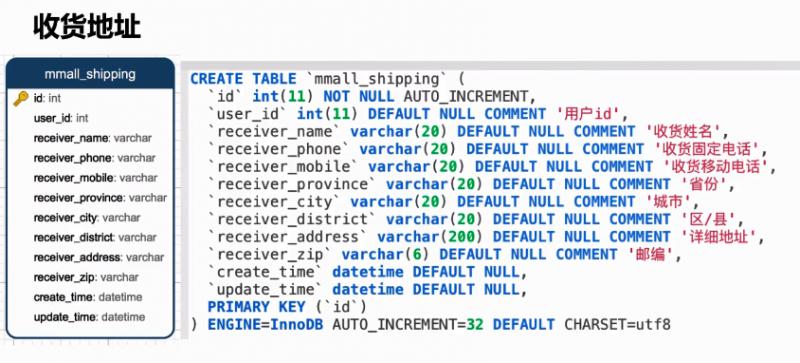
CREATE TABLE‘mmall_ shipping (

'id' int(11) NOT NULL AUTO_INCREMENT,

'user_ id'  int(11) DEFAULT NULL COMMENT '用户id'',

'receiver_ name' varchar(20) DEFAULT NULL COMMENT '收货姓名',

'receiver_ phone' varchar(20) DEFAULT NULL COMMENT '收货固定电话',

'receiver_ _mobile' varchar(20) DEFAULT NULL COMMENT ' 收货移动电话'',

'receiver_ province' varchar(20) DEFAULT NULL COMMENT '省份',

'receiver_ _city' varchar(20) DEFAULT NULL COMMENT ' 城市'',

'receiver_ _district' varchar (20) DEFAULT NULL COMMENT '区/县'',

'receiver_ address'  varchar(200) DEFAULT NULL COMMENT ' 详细地址',

'receiver_ zip'  varchar(6) DEFAULT NULL COMMENT ' 邮编' ,

'create_ _time' datetime DEFAULT NULL,

'update_ time' datetime DEFAULT NULL,

PRIMARY KEY ('id')

) ENGINE=InnoDB AUTO_ INCREMENT=32 DEFAULT CHARSET=utf8
功能
添加地址
删除地址
更新地址
地址列表
地址分页
地址详情
涉及知识点
SpringMVC数据绑定中对象绑定
mybatis自动生成主键、配置和使用
如何避免横向越权漏洞的巩固
接口设计
【前台】
1.添加地址
/shipping/add.do
request
userId=1

receiverName=geely

receiverPhone=010

receiverMobile=18688888888

receiverProvince=北京

receiverCity=北京市

receiverAddress=中关村

receiverZip=100000
response
success
{

    "status": 0,

    "msg": "新建地址成功",

    "data": {

        "shippingId": 28

    }

}
2.删除地址
/shipping/del.do
request
shippingId
response
success
{

    "status": 0,

    "msg": "删除地址成功"

}
3.登录状态更新地址
/shipping/update.do
request
id=1

receiverName=geely

receiverPhone=010

receiverMobile=18688888888

receiverProvince=北京

receiverCity=北京市

receiverAddress=中关村

receiverZip=100000
response
success
{

    "status": 0,

    "msg": "更新地址成功"

}
4.选中查看具体的地址
/shipping/select.do
request
shippingId
response
success
{

    "status": 0,

    "data": {

        "id": 4,

        "userId": 13,

        "receiverName": "geely",

        "receiverPhone": "010",

        "receiverMobile": "18688888888",

        "receiverProvince": "北京",

        "receiverCity": "北京市",

        "receiverAddress": "中关村",

        "receiverZip": "100000",

        "createTime": 1485066385000,

        "updateTime": 1485066385000

    }

}
5.地址列表
/shipping/list.do
http://localhost:8080/shipping/list.do
request
pageNum(默认1),pageSize(默认10)
response
success
{

    "status": 0,

    "data": {

        "pageNum": 1,

        "pageSize": 10,

        "size": 2,

        "orderBy": null,

        "startRow": 1,

        "endRow": 2,

        "total": 2,

        "pages": 1,

        "list": [

            {

                "id": 4,

                "userId": 13,

                "receiverName": "geely",

                "receiverPhone": "010",

                "receiverMobile": "18688888888",

                "receiverProvince": "北京",

                "receiverCity": "北京市",

                "receiverAddress": "中关村",

                "receiverZip": "100000",

                "createTime": 1485066385000,

                "updateTime": 1485066385000

            },

            {

                "id": 5,

                "userId": 13,

                "receiverName": "AAA",

                "receiverPhone": "010",

                "receiverMobile": "18688888888",

                "receiverProvince": "北京",

                "receiverCity": "北京市",

                "receiverAddress": "中关村",

                "receiverZip": "100000",

                "createTime": 1485066392000,

                "updateTime": 1485075875000

            }

        ],

        "firstPage": 1,

        "prePage": 0,

        "nextPage": 0,

        "lastPage": 1,

        "isFirstPage": true,

        "isLastPage": true,

        "hasPreviousPage": false,

        "hasNextPage": false,

        "navigatePages": 8,

        "navigatepageNums": [

            1

        ]

    }

}
【笔记5-购物车及地址模块】从0开始 独立完成企业级Java电商网站开发(服务端)的更多相关文章
- 【笔记6-支付及订单模块】从0开始 独立完成企业级Java电商网站开发(服务端)
支付模块 实际开发工作中经常会遇见如下场景,一个支付模块,一个订单模块,有一定依赖,一个同事负责支付模块,另一个同事负责订单模块,但是开发支付模块的时候要依赖订单模块的相关类 ,方法,或者工具类,这些 ...
- 【笔记4-商品模块】从0开始 独立完成企业级Java电商网站开发(服务端)
分类管理模块 数据表结构设计 分类表 CREATE TABLE.mmall_ category' ( 'id' int(11) NOT NULL AUTO_ INCREMENT COMMENT ' 类 ...
- 【笔记3-用户模块】从0开始 独立完成企业级Java电商网站开发(服务端)
数据表结构设计 关系设计 为什么不用外键? 分库分表有外键会非常麻烦,清洗数据也很麻烦.数据库内置触发器也不适合采用. 查业务问题的后悔药--时间戳 create_time 数据创建时间 update ...
- 【笔记7-部署发布】从0开始 独立完成企业级Java电商网站开发(服务端)
阿里云服务 购买 连接 购买域名 域名备案 域名解析 源配置步骤 资源地址 http://learning.happymmall.com/ 配置阿里云的yum源 1.备份 mv /etc/yum.re ...
- 【笔记8-Redis分布式锁】从0开始 独立完成企业级Java电商网站开发(服务端)
Redis分布式锁 Redis分布式锁命令 setnx当且仅当 key 不存在.若给定的 key 已经存在,则 setnx不做任何动作.setnx 是『set if not exists』(如果不存在 ...
- 【笔记2-环境配置及初始化】从0开始 独立完成企业级Java电商网站开发(服务端)
准备工作 Linux系统安装 云服务器部署 概要 申请和配置 域名的购买.解析.配置.绑定流程 用户创建实操 环境安装及部署 JDK.Tomcat.Maven下载安装及配置 vsftpd下载安装及配置 ...
- 从0开始独立完成企业级Java电商网站开发(服务端)
数据表结构设计 唯一索引unique,保证数据唯一性 CREATE TABLE `mmall_user` ( `id` int(11) NOT NULL AUTO_INCREMENT COMMENT ...
- 如何一步一步用DDD设计一个电商网站(十)—— 一个完整的购物车
阅读目录 前言 回顾 梳理 实现 结语 一.前言 之前的文章中已经涉及到了购买商品加入购物车,购物车内购物项的金额计算等功能.本篇准备把剩下的购物车的基本概念一次处理完. 二.回顾 在动手之前我对之 ...
- 如何一步一步用DDD设计一个电商网站(六)—— 给购物车加点料,集成售价上下文
阅读目录 前言 如何在一个项目中实现多个上下文的业务 售价上下文与购买上下文的集成 结语 一.前言 前几篇已经实现了一个最简单的购买过程,这次开始往这个过程中增加一些东西.比如促销.会员价等,在我们的 ...
随机推荐
- 随缘记录 LeetCode第168场周赛 2019-12-22
5292. 划分数组为连续数字的集合 给你一个整数数组 nums 和一个正整数 k,请你判断是否可以把这个数组划分成一些由 k 个连续数字组成的集合. 如果可以,请返回 True:否则,返回 Fals ...
- jvm(n):JVM面试
Jvm内存结构,一般是面试官对Java虚拟机这块考察的第一问. Java虚拟机的内存结构一般可以从线程共有和线程私有两部分起头作答,然后再详细说明各自的部分,类似树状结构的作答,好处就是思路清晰,面试 ...
- DVWA全级别之CSRF(跨站请求伪造)
CSRF(Cross-site request forgery) CSRF,全称Cross-site request forgery,翻译过来就是跨站请求伪造,是指利用受害者尚未失效的身份认证信息( ...
- 路飞-git操作
复习 """ 1.pip换源 - 采用国内源下载,速度快 2.虚拟环境 - 可以为项目单独配置开发环境,方便管理依赖模块及模块的版本迭代 3.后台项目重构目录结构 4.后 ...
- 拦截导弹类问题 (Codevs4888零件分组POJ1065Wooden Sticks)(LIS及其覆盖问题)
拦截导弹 题意:求最长不上升子序列长度:求一个序列最少分成几个非增子序. 第一问易求,已知序列a,令f[i]为a前i个元素的最长非增子序的长度,则有 f[i]=max{f[i],f[j]+1} (1& ...
- url中的参数加密
有时候我们需要在地址栏传输一些信息,比如查询数据的时候,传一个参数location.href = "/admin/extract?name="+"参数aaa"’ ...
- AC3 IMDCT
AC3 encoder 在进行MDCT时,使用两种长度的block. 512 samples的block用于输入信号频谱是stationary,或者在时间上变化缓慢.在fs 为48k时,使用512 s ...
- 励志成为优产的母猪--------猜数游戏 ,历史记录,pickle保存,队列deque
# pickle 可以处理复杂的序列化语法.(例如自定义的类的方法,游戏的存档等),存档以文件的形式保存 参见 https://www.cnblogs.com/abobo/p/8080447.html ...
- Python核心编程:8个实践性建议
前言 我们在用Python进行机器学习建模项目的时候,每个人都会有自己的一套项目文件管理的习惯,我自己也有一套方法,是自己曾经踩过的坑踩过的雷总结出来的,现在在这里分享一下给大家,因为很多伙伴是接触P ...
- 一篇文章了解JsBridge
链接:https://blog.csdn.net/duwen90/article/details/79389545