
centos7 配置国内yum源
配置清华大学镜像仓库
URL:https://mirrors.cnnic.cn/
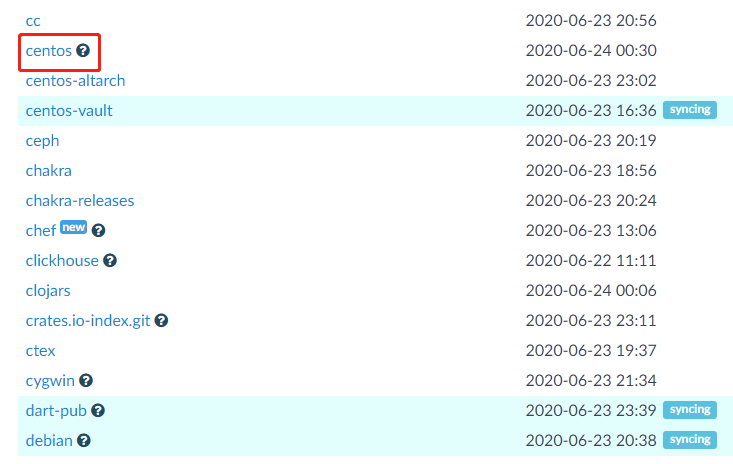
CentOS 镜像使用帮助
https://mirrors.cnnic.cn/help/centos/
建议先备份 CentOS-Base.repo
# sudo cp /etc/yum.repos.d/CentOS-Base.repo /etc/yum.repos.d/CentOS-Base.repo.bak
然后编辑 /etc/yum.repos.d/CentOS-Base.repo 文件,在 mirrorlist= 开头行前面加 # 注释掉;
并将 baseurl= 开头行取消注释(如果被注释的话),把该行内的域名(例如mirror.centos.org)替换为 mirrors.tuna.tsinghua.edu.cn。
或者,你也可以直接使用如下内容覆盖掉 /etc/yum.repos.d/CentOS-Base.repo 文件:(未经充分测试)


# CentOS-Base.repo

#

# The mirror system uses the connecting IP address of the client and the

# update status of each mirror to pick mirrors that are updated to and

# geographically close to the client.  You should use this for CentOS updates

# unless you are manually picking other mirrors.

#

# If the mirrorlist= does not work for you, as a fall back you can try the

# remarked out baseurl= line instead.

#

#

[base]

name=CentOS-$releasever - Base

baseurl=https://mirrors.tuna.tsinghua.edu.cn/centos/$releasever/os/$basearch/

#mirrorlist=http://mirrorlist.centos.org/?release=$releasever&arch=$basearch&repo=os

enabled=1

gpgcheck=1

gpgkey=file:///etc/pki/rpm-gpg/RPM-GPG-KEY-7

#released updates

[updates]

name=CentOS-$releasever - Updates

baseurl=https://mirrors.tuna.tsinghua.edu.cn/centos/$releasever/updates/$basearch/

#mirrorlist=http://mirrorlist.centos.org/?release=$releasever&arch=$basearch&repo=updates

enabled=1

gpgcheck=1

gpgkey=file:///etc/pki/rpm-gpg/RPM-GPG-KEY-7

#additional packages that may be useful

[extras]

name=CentOS-$releasever - Extras

baseurl=https://mirrors.tuna.tsinghua.edu.cn/centos/$releasever/extras/$basearch/

#mirrorlist=http://mirrorlist.centos.org/?release=$releasever&arch=$basearch&repo=extras

enabled=1

gpgcheck=1

gpgkey=file:///etc/pki/rpm-gpg/RPM-GPG-KEY-7

#additional packages that extend functionality of existing packages

[centosplus]

name=CentOS-$releasever - Plus

baseurl=https://mirrors.tuna.tsinghua.edu.cn/centos/$releasever/centosplus/$basearch/

#mirrorlist=http://mirrorlist.centos.org/?release=$releasever&arch=$basearch&repo=centosplus

gpgcheck=1

enabled=0

gpgkey=file:///etc/pki/rpm-gpg/RPM-GPG-KEY-7
Centos 7
# CentOS-Base.repo

#

# The mirror system uses the connecting IP address of the client and the

# update status of each mirror to pick mirrors that are updated to and

# geographically close to the client.  You should use this for CentOS updates

# unless you are manually picking other mirrors.

#

# If the mirrorlist= does not work for you, as a fall back you can try the

# remarked out baseurl= line instead.

#

#

[base]

name=CentOS-$releasever - Base

baseurl=https://mirrors.tuna.tsinghua.edu.cn/centos/$releasever/os/$basearch/

#mirrorlist=http://mirrorlist.centos.org/?release=$releasever&arch=$basearch&repo=os

enabled=1

gpgcheck=1

gpgkey=file:///etc/pki/rpm-gpg/RPM-GPG-KEY-6

#released updates

[updates]

name=CentOS-$releasever - Updates

baseurl=https://mirrors.tuna.tsinghua.edu.cn/centos/$releasever/updates/$basearch/

#mirrorlist=http://mirrorlist.centos.org/?release=$releasever&arch=$basearch&repo=updates

enabled=1

gpgcheck=1

gpgkey=file:///etc/pki/rpm-gpg/RPM-GPG-KEY-6

#additional packages that may be useful

[extras]

name=CentOS-$releasever - Extras

baseurl=https://mirrors.tuna.tsinghua.edu.cn/centos/$releasever/extras/$basearch/

#mirrorlist=http://mirrorlist.centos.org/?release=$releasever&arch=$basearch&repo=extras

enabled=1

gpgcheck=1

gpgkey=file:///etc/pki/rpm-gpg/RPM-GPG-KEY-6

#additional packages that extend functionality of existing packages

[centosplus]

name=CentOS-$releasever - Plus

baseurl=https://mirrors.tuna.tsinghua.edu.cn/centos/$releasever/centosplus/$basearch/

#mirrorlist=http://mirrorlist.centos.org/?release=$releasever&arch=$basearch&repo=centosplus

gpgcheck=1

enabled=0

gpgkey=file:///etc/pki/rpm-gpg/RPM-GPG-KEY-6

#contrib - packages by Centos Users

[contrib]

name=CentOS-$releasever - Contrib

baseurl=https://mirrors.tuna.tsinghua.edu.cn/centos/$releasever/contrib/$basearch/

#mirrorlist=http://mirrorlist.centos.org/?release=$releasever&arch=$basearch&repo=contrib

gpgcheck=1

enabled=0

gpgkey=file:///etc/pki/rpm-gpg/RPM-GPG-KEY-6
Centos 6
最后,更新软件包缓存
# sudo yum makecache
centos7 配置国内yum源的更多相关文章
- centos7配置国内yum源
文章目录 1.什么是yum仓库? 2.yum仓库配置 2.1.阿里镜像仓库配置 2.1.1.配置步骤 2.1.2.epel源 安装和配置 2.1.3.查看yum源 2.2.配置 清华大学镜像仓库 1. ...
- contos 配置国内yum源
contos配置国内yum源 前言 rpm管理软件包的命令,很难用,需要手动解决以来关系,所以最好用 yum 的理念是使用一个中心仓库(repository)管理一部分甚至一个distribution ...
- contos配置国内yum源
contos配置国内yum源 前言 rpm管理软件包的命令,很难用,需要手动解决以来关系,所以最好用 yum 的理念是使用一个中心仓库(repository)管理一部分甚至一个distribution ...
- CentOS7 配置163 yum源(详细步骤)
CentOS7 配置163 yum源 1)下载repo文件 wget http://mirrors.163.com/.help/CentOS7-Base-163.repo 2)备份并替换系统的r ...
- linux 配置本地yum源,配置国内yum源,配置epel源
目录 一.配置本地yum源 二.配置国内yum源和epel源 一.配置本地yum源 1.挂载ISO镜像 mount -o loop /mnt/yum-iso/CentOS-7-x86_64-DVD-1 ...
- 虚拟机centos7配置本地yum源
在虚拟机中要使用yum命令,就要先配置一下yum源,下面就分享一下这个过程: 1. 挂载iso到vmware,首先得确保CD/DVD连接到镜像.可以这样操作 2. 执行下面的命令 # mkdir /m ...
- CentOS6配置国内yum源
在安装完CentOS后为了加快安装.更新rpm包的速度.需要将yum源改为国内源,国内比较快的源有中科大.163.sohu源.下面修改为163源为例子: 首先进入源的配置目录:执行 cd /etc/y ...
- Centos配置国内yum源
网易(163)yum源是国内最好的yum源之一 ,无论是速度还是软件版本,都非常的不错,将yum源设置为163yum,可以提升软件包安装和更新的速度,同时避免一些常见软件版本无法找到.具体设置方法如下 ...
- [转]Centos配置国内yum源
原文地址:http://blog.chinaunix.net/uid-23683795-id-3477603.html 网易(163)yum源是国内最好的yum源之一 ,无论是速度还是软件版本,都非常 ...
随机推荐
- Win64 驱动内核编程-19.HOOK-SSDT
HOOK SSDT 在 WIN64 上 HOOK SSDT 和 UNHOOK SSDT 在原理上跟 WIN32 没什么不同,甚至说 HOOK 和 UNHOOK 在本质上也没有不同,都是在指定的地址上填 ...
- springboot 项目中css js 等静态资源无法访问的问题
目录 问题场景 问题分析 问题解决 问题场景 今天在开发一个springboot 项目的时候突然发现 css js 等静态资源竟然都报404找不到,折腾了好久终于把问题都解决了,决定写篇博客,纪录总结 ...
- 看雪加密解密第一个traceme程序破解
工具:ollydbg(吾爱破解2.10版) 工具设置:因为traceme是一个win32图形用户程序,所以其程序入口点在WinMain()函数处,设置ollydbg的调试设置的事件选项,选中在WinM ...
- JAVA8 lambda表达式权威教程!
Java 8新特性----Stream流 jdk8是Java 语言开发的一个主要版本,它支持函数式编程,新的 JavaScript 引擎,新的日期 API,新的Stream API 等等.今天就重点介 ...
- 动态内存:delete作用于空指针
在学习<C++primer 第五版>(中文版)中第12章动态内存与智能指针的时候遇到了一个习题,练习12.13: 练习 12.13:如果执行下面的代码,会发生什么? auto sp=mak ...
- CRM是什么意思,有哪些作用?
我们总会听到一些人提到CRM或CRM系统,但是通常不知道它的含义,所以今天小Z就来详细介绍一下CRM. GartnerGroup1993年首次提出了这一概念:所谓的客户关系管理就是为企业提供一个全面的 ...
- 自定义元类 __call__,__init__,__new__总结
只要对象能被调用 产生对象的类里必然有__call__方法 在调用类时,必定先触发type里的__call__ __call__下有: 1.产生对象的object.__new__ 2..被调用的类自己 ...
- ltp 测试流程及测试脚本分析
LTP介绍 (2011-03-25 18:03:53) 转载▼ 标签: ltp linux 压力测试 杂谈 分类: linux测试 LTP介绍 一.LTP介绍1.简介LTP(Linux Test Pr ...
- OpenStack neutron vlan 模式下的网络包流向
时间:2015-01-15 18:09:41 1.什么是Neutron? Neutron是OpenStack的network project ,是NaaS(networking-as-a-servic ...
- 7.10-11 visudo、sudo
7.10 visudo:编辑 sudoers文件 visudo命令是专门用来编辑/etc/sudoers这个文件的,同时提供语法检查等功能./etc/sudoers文件是sudo命令的配置文件 ...