
微服务监控之三:Prometheus + Grafana Spring Boot 应用可视化监控
一、Springboot增加Prometheus
1、Spring Boot 应用暴露监控指标,添加如下依赖
<dependency>

    <groupId>org.springframework.boot</groupId>

    <artifactId>spring-boot-starter-actuator</artifactId>

</dependency>

<dependency>

    <groupId>io.prometheus</groupId>

    <artifactId>simpleclient_spring_boot</artifactId>

    <version>0.0.26</version>

</dependency>
    compile 'org.springframework.boot:spring-boot-starter-actuator'

    compile 'io.prometheus:simpleclient_spring_boot:0.0.26'
2、然后,在启动类 Application.java 添加如下注解:
@SpringBootApplication

@EnablePrometheusEndpoint

@EnableSpringBootMetricsCollector

public class Application {

    public static void main(String[] args) {

        SpringApplication.run(Application.class, args);

    }

}
3、配置文件设置
在application.xml里设置属性:spring.metrics.servo.enabled=false,

去掉重复的metrics,不然在prometheus的控制台的targets页签里,会一直显示此endpoint为down状态。
#应用可视化监控

management.security.enabled=false

spring.metrics.servo.enabled=false
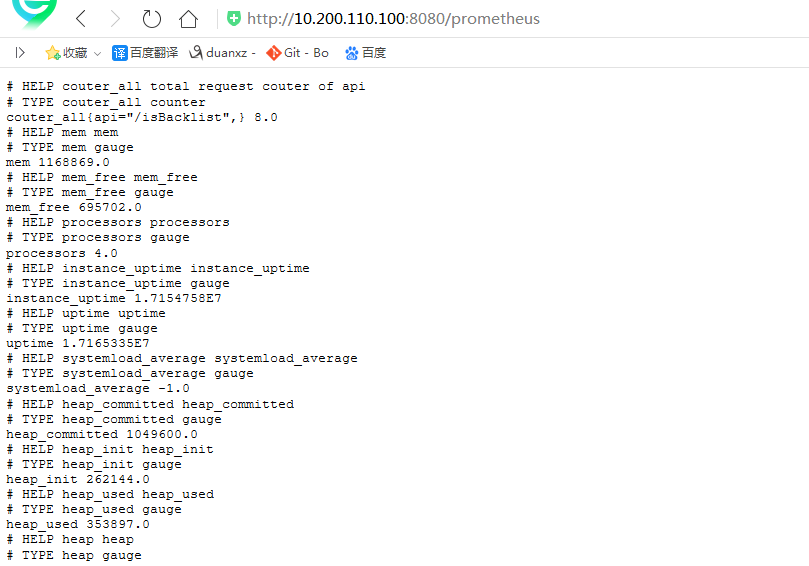
4、访问:http://192.168.10.213:6010/prometheus,可以看到 Prometheus 格式的指标数据
二、自定义prometheus注解
2.1、自定义prometheus注解
import java.lang.annotation.*;

@Target(ElementType.METHOD)

@Retention(RetentionPolicy.RUNTIME)

@Documented

public @interface PrometheusMetrics {

    /**

     * 默认为空,程序使用method signature作为Metric name 如果name有设置值,使用name作为Metric name

     *

     * @return

     */

    String name() default "";

}
2.2、自定义prometheus切面
import io.prometheus.client.Counter;

import io.prometheus.client.Histogram;

import org.apache.commons.lang3.StringUtils;

import org.aspectj.lang.ProceedingJoinPoint;

import org.aspectj.lang.annotation.Around;

import org.aspectj.lang.annotation.Aspect;

import org.aspectj.lang.annotation.Pointcut;

import org.aspectj.lang.reflect.MethodSignature;

import org.springframework.stereotype.Component;

import org.springframework.web.context.request.RequestContextHolder;

import org.springframework.web.context.request.ServletRequestAttributes;

import javax.servlet.http.HttpServletRequest;

@Aspect

@Component

public class PrometheusMetricsAspect {

    private static final Counter requestTotal = Counter.build().name("couter_all").labelNames("api")

            .help("total request couter of api").register();

    private static final Counter requestError = Counter.build().name("couter_error").labelNames("api")

            .help("response Error couter of api").register();

    private static final Histogram histogram = Histogram.build().name("histogram_consuming").labelNames("api")

            .help("response consuming of api").register();

    // 自定义Prometheus注解的全路径

    @Pointcut("@annotation(com....annotation.PrometheusMetrics)")

    public void pcMethod() {

    }

    @Around(value = "pcMethod() && @annotation(annotation)")

    public Object MetricsCollector(ProceedingJoinPoint joinPoint, PrometheusMetrics annotation) throws Throwable {

        MethodSignature methodSignature = (MethodSignature) joinPoint.getSignature();

        PrometheusMetrics prometheusMetrics = methodSignature.getMethod().getAnnotation(PrometheusMetrics.class);

        if (prometheusMetrics != null) {

            String name;

            if (StringUtils.isNotEmpty(prometheusMetrics.name())) {

                name = prometheusMetrics.name();

            } else {

                HttpServletRequest request = ((ServletRequestAttributes) RequestContextHolder.getRequestAttributes())

                        .getRequest();

                name = request.getRequestURI();

            }

            requestTotal.labels(name).inc();

            Histogram.Timer requestTimer = histogram.labels(name).startTimer();

            Object object;

            try {

                object = joinPoint.proceed();

            } catch (Exception e) {

                requestError.labels(name).inc();

                throw e;

            } finally {

                requestTimer.observeDuration();

            }

            return object;

        } else {

            return joinPoint.proceed();

        }

    }

}
2.3、被监控的方法上添加--自定义prometheus注解
    @PrometheusMetrics

    @PostMapping(value = "isBacklist")

    @ApiOperation(value = "黑名单判断", notes = "是否在黑名单中,如果存在并且记录状态为2,则为黑名单,返回true,否则返回:false")

    @Log

    public RespResult<Boolean> isBacklist(@RequestBody BacklistReqDTO reqDTO) {
三、Prometheus 采集 Spring Boot 指标数据
# my global config

global:

  scrape_interval:     15s # Set the scrape interval to every  seconds. Default is every  minute.

  evaluation_interval: 15s # Evaluate rules every  seconds. The default is every  minute.

  # scrape_timeout is set to the global default (10s).

# Alertmanager configuration

alerting:

  alertmanagers:

  - static_configs:

    - targets:

      # - alertmanager:

# Load rules once and periodically evaluate them according to the global 'evaluation_interval'.

rule_files:

  # - "first_rules.yml"

  # - "second_rules.yml"

# A scrape configuration containing exactly one endpoint to scrape:

# Here it's Prometheus itself.

scrape_configs:

  # The job name is added as a label `job=<job_name>` to any timeseries scraped from this config.

  - job_name: 'prometheus'

 # metrics_path defaults to '/metrics'

    # scheme defaults to 'http'.

static_configs:

- targets: ['10.200.110.100:8080']   #此处填写 Spring Boot 应用的 IP + 端口号
docker run -d -p : \

-u root \

-v /opt/prometheus/tsdb:/etc/prometheus/tsdb \

-v /opt/prometheus/prometheus.yml:/etc/prometheus/prometheus.yml \

--privileged=true prom/prometheus \

--storage.tsdb.path=/etc/prometheus/tsdb \

--storage.tsdb.retention=7d \

--config.file=/etc/prometheus/prometheus.yml
./prometheus --config.file=prometheus2.yml
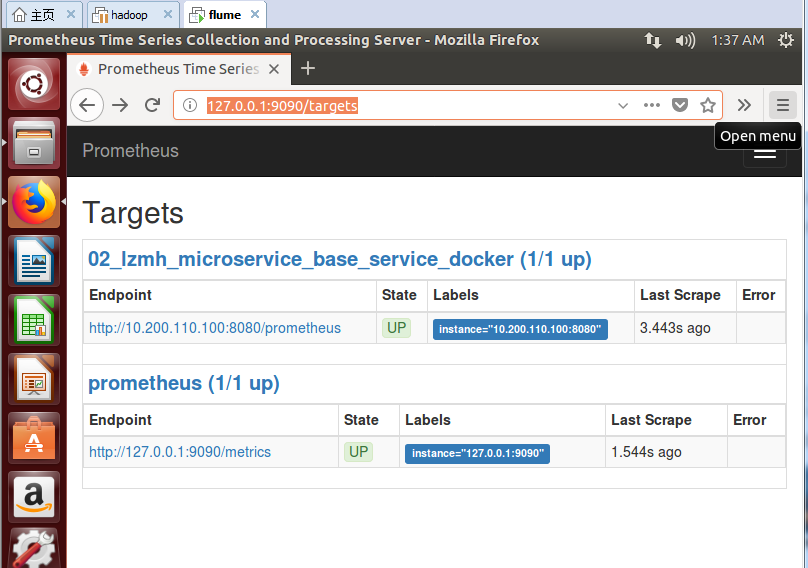
结果:
duanxz@ubuntu:~/Downloads/prometheus-2.0.0.linux-amd64$ ./prometheus --config.file=prometheus2.yml

level=info ts=2018-06-19T08:27:47.222527495Z caller=main.go:215 msg="Starting Prometheus" version="(version=2.0.0, branch=HEAD, revision=0a74f98628a0463dddc90528220c94de5032d1a0)"

level=info ts=2018-06-19T08:27:47.222895906Z caller=main.go:216 build_context="(go=go1.9.2, user=root@615b82cb36b6, date=20171108-07:11:59)"

level=info ts=2018-06-19T08:27:47.223110655Z caller=main.go:217 host_details="(Linux 4.4.0-128-generic #154~14.04.1-Ubuntu SMP Fri May 25 14:58:51 UTC 2018 x86_64 ubuntu (none))"

level=info ts=2018-06-19T08:27:47.227443134Z caller=web.go:380 component=web msg="Start listening for connections" address=0.0.0.0:9090

level=info ts=2018-06-19T08:27:47.234616341Z caller=main.go:314 msg="Starting TSDB"

level=info ts=2018-06-19T08:27:47.244932582Z caller=targetmanager.go:71 component="target manager" msg="Starting target manager..."

level=info ts=2018-06-19T08:27:47.24608357Z caller=main.go:326 msg="TSDB started"

level=info ts=2018-06-19T08:27:47.246514727Z caller=main.go:394 msg="Loading configuration file" filename=prometheus2.yml

level=info ts=2018-06-19T08:27:47.247799187Z caller=main.go:371 msg="Server is ready to receive requests."
四、Grafana 可视化监控数据
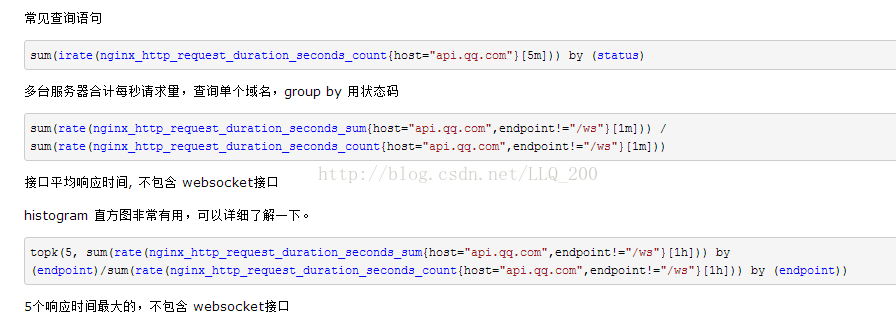
五、常用Prometheus 表达式
参考:http://www.spring4all.com/article/265
微服务监控之三:Prometheus + Grafana Spring Boot 应用可视化监控的更多相关文章
- Spring Boot 微服务应用集成Prometheus + Grafana 实现监控告警
Spring Boot 微服务应用集成Prometheus + Grafana 实现监控告警 一.添加依赖 1.1 Actuator 的 /prometheus端点 二.Prometheus 配置 部 ...
- 拒绝黑盒应用-Spring Boot 应用可视化监控
图文简介 逻辑关系 效果演示 快速开始 1.Spring Boot 应用暴露监控指标[版本 1.5.7.RELEASE] 首先,添加依赖如下依赖: <dependency> <gro ...
- 【微框架】之一:从零开始,轻松搞定SpringCloud微服务系列--开山篇(spring boot 小demo)
Spring顶级框架有众多,那么接下的篇幅,我将重点讲解SpringCloud微框架的实现 Spring 顶级项目,包含众多,我们重点学习一下,SpringCloud项目以及SpringBoot项目 ...
- 谁才是微服务赢家:Quarkus 与 Spring Boot
在容器时代("Docker 时代")Java 仍然处于领先地位,但哪个更好?Spring Boot 还是 Quarkus? 谁会最先进的?Spring Boot 或 Quarkus ...
- Spring Boot 2.x监控数据可视化(Actuator + Prometheus + Grafana手把手)
TIPS 本文基于Spring Boot 2.1.4,理论支持Spring Boot 2.x所有版本 众所周知,Spring Boot有个子项目Spring Boot Actuator,它为应用提供了 ...
- 从实践出发:微服务布道师告诉你Spring Cloud与Spring Boot他如何选择
背景 随着公司业务量的飞速发展,平台面临的挑战已经远远大于业务,需求量不断增加,技术人员数量增加,面临的复杂度也大大增加.在这个背景下,平台的技术架构也完成了从传统的单体应用到微服务化的演进. 系统架 ...
- Springboot监控之二:Spring Boot Admin对Springboot服务进行监控
概述 Spring Boot 监控核心是 spring-boot-starter-actuator 依赖,增加依赖后, Spring Boot 会默认配置一些通用的监控,比如 jvm 监控.类加载.健 ...
- 从实践出发:微服务布道师告诉你Spring Cloud与Boot他如何选择
背景 随着公司业务量的飞速发展,平台面临的挑战已经远远大于业务,需求量不断增加,技术人员数量增加,面临的复杂度也大大增加.在这个背景下,平台的技术架构也完成了从传统的单体应用到微服务化的演进. 系统架 ...
- Spring Boot Admin2.X监控的服务context-path问题
在使用Spring Boot Admin进行监控时,如果被监控的服务没有加context-path的话是不会有任何问题的,一旦服务加了context-path的配置,监控就会失败. 下图是正常情况的显 ...
随机推荐
- Hadoop学习资料整理
1.hadoop相关 hadoop 0.18文档(详细介绍Hadoop,MapReduce,FS Shell,Streaming等) hadoop资料汇总 2.实习的时候用的是streaming,非j ...
- RabbitMQ(3) Java客户端使用
RabbitMQ针对不同的开发语言(java,python,c/++,Go等等),提供了丰富对客户端,方便使用.就Java而言,可供使用的客户端有RabbitMQ Java client. Rabbi ...
- cursor游标(mysql)
/* 游标 cursor 什么是游标?为什么需要游标 使用存储过程对sql进行编程的时候,我们查询的语句可能是数据是多个,它总是一口气全部执行,我们无法针对每一条进行判断.也就是说,我们无法控制程序的 ...
- Corosync+pacemaker实现集群的高可用
一.Corosync和pacemaker的了解: Corosync是集群管理套件的一部分,他在传递信息的时候可以通过一个简单的配置文件来定义信息传递的方式和协议等.也就是说,corosync是Mess ...
- Linux下的网络设定
一.IP相关介绍 1.IP是internet protocal的简称,也叫网络进程. 2.ipv4全称internet protocal version 4.它是由32个二进制组成:改为十进制的话,一 ...
- 添加机构organizations模块
startapp organizations models内容: from django.db import models from datetime import datetime # Create ...
- Android 和 Dagger 2 中的依赖注入
原文:Dependency Injection in Android with Dagger 2 作者:Joe Howard 译者:kmyhy 在现代开发团队中到处充斥着"你一定要用依赖注入 ...
- 机器人操作系统(ROS)在线实训平台学习实验指南
机器人操作系统(ROS)在线学习指南 在高校开设ROS相关课程已经积累了一年多的经验,由于自动化类专业在课程安排中不同于计算机相关专业,通常没有Linux相关的课程基础,直接上手ROS较为 ...
- go语言学习 strings常用函数
strings包中的函数用法 参考链接http://studygolang.com/articles/88 1.strings.replace() 函数原型 func Replace(str1, ol ...
- node.js 之爬虫
1. cheerio 与 request request:模拟客户端行为,对页面进行请求 cheerio:对服务器端返回的页面进行解析: var cheerio = require('cheerio' ...