
Spring Boot 入门之持久层篇(三)
一、前言
上一篇《Spring Boot 入门之 Web 篇(二)》介绍了 Spring Boot 的 Web 开发相关的内容,项目的开发离不开数据,因此本篇开始介绍持久层相关的知识。
二、整合 JdbcTemplate
2.1 添加依赖
<!-- jdbc -->

<dependency>

    <groupId>org.springframework.boot</groupId>

    <artifactId>spring-boot-starter-jdbc</artifactId>

</dependency>

<!-- mysql 驱动包 -->

<dependency>

	<groupId>mysql</groupId>

	<artifactId>mysql-connector-java</artifactId>

</dependency>
2.2 配置数据库连接
在 application.properties 中添加:
spring.datasource.driver-class-name=com.mysql.jdbc.Driver

spring.datasource.url=jdbc:mysql://localhost:3306/springboot?useUnicode=true&characterEncoding=utf8&serverTimezone=UTC

spring.datasource.username=root

spring.datasource.password=tiger
其中,可以不指定 driver-class-name,因为 spring boot 会自动识别 url。
2.3 测试
2.3.1 建表
在 MySQL 中创建名为 springboot 的数据库,在该库中创建 user 表:
CREATE TABLE `user` (

	`id` INT(11) NOT NULL AUTO_INCREMENT,

	`username` VARCHAR(50) NOT NULL,

	`password` VARCHAR(64) NOT NULL,

	`birthday` DATE NOT NULL,

	PRIMARY KEY (`id`)

)

COLLATE='utf8_general_ci'

ENGINE=InnoDB

AUTO_INCREMENT=3

;
2.3.2 建实体类
public class User implements Serializable{

	private static final long serialVersionUID = -6249397911566315813L;

	private Integer id;

	private String username;

	private String password;

	private Date birthday;

}
setter 和 getter 方法此处省略。
2.3.3 dao 接口
接口和实现类如下:
public interface UserDao {

	public int insert(User user);

	public int deleteById(Integer id);

	public int update(User user);

	public User getById(Integer id);

}

@Repository

public class UserDaoImpl implements UserDao {

	@Autowired

	private JdbcTemplate jdbcTemplate;

	@Override

	public int insert(User user) {

		String sql = "insert into user(id,username,password,birthday) values(?,?,?,?)";

		return this.jdbcTemplate.update(

		                  sql,

						  user.getId(),

						  user.getUsername(),

						  user.getPassword(),

						  user.getBirthday()

										);

	}

	@Override

	public int deleteById(Integer id) {

		String sql = "delete from user where id = ?";

		return this.jdbcTemplate.update(sql,id);

	}

	@Override

	public int update(User user) {

		String sql = "update user set password = ? where id = ?";

		return this.jdbcTemplate.update(

		                        sql,

								user.getPassword(),

								user.getId()

										);

	}

	@Override

	public User getById(Integer id) {

		String sql = "select * from user where id = ?";

		return this.jdbcTemplate.queryForObject(sql, new RowMapper<User>() {

			@Override

			public User mapRow(ResultSet rs, int rowNum) throws SQLException {

				User user = new User();

				user.setId(rs.getInt("id"));

				user.setUsername(rs.getString("username"));

				user.setPassword(rs.getString("password"));

				user.setBirthday(rs.getDate("birthday"));

				return user;

			}

		},id);

	}

}
2.3.4 测试类:
@RunWith(SpringRunner.class)

@SpringBootTest

public class UserDaoTest {

	@Autowired

	private UserDao userDao;

	@Test

	public void testInsert() {

		User user = new User();

		user.setId(1);

		user.setUsername("张三");

		user.setPassword("zhangsan");

		user.setBirthday(new Date());

		int result = this.userDao.insert(user);

		System.out.println(result);

	}

	@Test

	public void testGetById() {

		User user = this.userDao.getById(1);

		System.out.println(user.getUsername());

	}

	@Test

	public void testUpdate() {

		User user = new User();

		user.setId(1);

		user.setPassword("zhangsan123");

		this.userDao.update(user);

	}

	@Test

	public void testDeleteById() {

		int result = this.userDao.deleteById(1);

		System.out.println(result);

	}

}
测试结果省略...
如需打印日志,在日志配置文件中添加如下配置:
<logger name="org.springframework.jdbc.core.JdbcTemplate" level="debug"/>
三、整合 Spring-data-jpa
3.1 添加依赖
<!-- jdbc -->

<dependency>

    <groupId>org.springframework.boot</groupId>

    <artifactId>spring-boot-starter-jdbc</artifactId>

</dependency>

<!-- springboot,jpa 整合包-->

<dependency>

    <groupId>org.springframework.boot</groupId>

    <artifactId>spring-boot-starter-data-jpa</artifactId>

</dependency>

<!-- mysql 驱动包 -->

<dependency>

	<groupId>mysql</groupId>

	<artifactId>mysql-connector-java</artifactId>

</dependency>
3.2 配置数据库连接
在 application.properties 中添加:
# 数据库连接配置

spring.datasource.driver-class-name=com.mysql.jdbc.Driver

spring.datasource.url=jdbc:mysql://localhost:3306/springboot?useUnicode=true&characterEncoding=utf8&serverTimezone=UTC

spring.datasource.username=root

spring.datasource.password=tiger

# JPA 配置

spring.jpa.hibernate.ddl-auto=update

spring.jpa.show-sql=true
3.3 编码
3.3.1 建表
在 MySQL 中创建名为 springboot 的数据库,在该库中创建 role 表:
CREATE TABLE `role` (

	`id` INT(11) NOT NULL AUTO_INCREMENT,

	`name` VARCHAR(10) NOT NULL,

	`descr` VARCHAR(100) NULL DEFAULT NULL,

	PRIMARY KEY (`id`)

)

COLLATE='utf8_general_ci'

ENGINE=InnoDB

;
注意,主键 ID 为 AUTO_INCREMENT 自增。
3.3.2 建实体类
添加相应的注解
@Entity

public class Role implements Serializable{

	private static final long serialVersionUID = 3926276668667517847L;

	@Id

	@GeneratedValue

	private Integer id;

	@Column

	private String name;

	@Column

	private String descr;

}
setter 和 getter 方法此处省略。
3.3.3 Repository 接口
public interface RoleRepository extends JpaRepository<Role, Integer>{

}
3.3.4 测试类
@RunWith(SpringRunner.class)

@SpringBootTest

public class RoleRepositoryTest {

	@Autowired

	private RoleRepository roleRepository;

	@Test

	public void testInsert() {

		Role role = new Role();

		role.setName("管理员");

		role.setDescr("测试");

		Role result = this.roleRepository.save(role);

		System.out.println(result);

	}

	@Test

	public void testFindOne() {

		Role role = this.roleRepository.findOne(1);

		System.out.println(role);

	}

	@Test

	public void testUpdate() {

		Role role = new Role();

		role.setId(1);

		role.setName("管理员");

		role.setDescr("控制权限");

		Role result = this.roleRepository.save(role);

		System.out.println(result);

	}

	@Test

	public void testDelete() {

		this.roleRepository.delete(1);

	}

}
测试结果省略...
四、整合 Mybatis
整合 MyBatis 有两种方式:
使用 mybatis 官方提供的 Spring Boot 整合包实现。
使用 mybatis-spring 整合的方式,也就是传统的方式(推荐,此方式容易控制 MyBatis 的配置)。
4.1 配置依赖
方式一:使用官方整合包
1)添加依赖:
<!-- springboot,mybatis 整合包 -->

<dependency>

	<groupId>org.mybatis.spring.boot</groupId>

	<artifactId>mybatis-spring-boot-starter</artifactId>

	<version>1.3.0</version>

</dependency>

<!-- mysql 驱动包 -->

<dependency>

	<groupId>mysql</groupId>

	<artifactId>mysql-connector-java</artifactId>

</dependency>
2)配置数据库连接:
在 application.properties 中添加:
# 数据源配置

spring.datasource.driver-class-name=com.mysql.jdbc.Driver

spring.datasource.url=jdbc:mysql://localhost:3306/springboot?useUnicode=true&characterEncoding=utf8&serverTimezone=UTC

spring.datasource.username=root

spring.datasource.password=tiger

# mybatis 配置

mybatis.config-location=classpath:mybatis/mybatis-config.xml

mybatis.mapper-locations=classpath:mybatis/mapper/*.xml
方式二:原始 Jar 包 + 手动编程
1)添加依赖:
<!-- jdbc -->

<dependency>

	<groupId>org.springframework.boot</groupId>

	<artifactId>spring-boot-starter-jdbc</artifactId>

</dependency>

<!-- mybatis -->

<dependency>

	<groupId>org.mybatis</groupId>

	<artifactId>mybatis</artifactId>

	<version>3.4.4</version>

</dependency>

<!-- spring,mybatis整合包 -->

<dependency>

	<groupId>org.mybatis</groupId>

	<artifactId>mybatis-spring</artifactId>

  	<version>1.3.1</version>

</dependency>

<!-- mysql 驱动包 -->

<dependency>

	<groupId>mysql</groupId>

	<artifactId>mysql-connector-java</artifactId>

</dependency>
2)配置数据库连接:
在 application.properties 中添加:
# 数据源配置

spring.datasource.driver-class-name=com.mysql.jdbc.Driver

spring.datasource.url=jdbc:mysql://localhost:3306/springboot?useUnicode=true&characterEncoding=utf8&serverTimezone=UTC

spring.datasource.username=root

spring.datasource.password=tiger
3)创建配置类:
@Configuration

public class MyBatisConfiguration {

    @Bean

    @ConditionalOnMissingBean // 当容器里没有指定的 Bean 的情况下创建该对象

    public SqlSessionFactoryBean sqlSessionFactory(DataSource dataSource) {

        SqlSessionFactoryBean sqlSessionFactoryBean = new SqlSessionFactoryBean();

        // 设置数据源

        sqlSessionFactoryBean.setDataSource(dataSource);

        // 设置mybatis的主配置文件

        sqlSessionFactoryBean.setConfigLocation(new ClassPathResource("mybatis/mybatis-config.xml"));

        // 设置mapper映射文件

        PathMatchingResourcePatternResolver resolver = new PathMatchingResourcePatternResolver();

        Resource[] mapperXml;

        try {

            mapperXml = resolver.getResources("classpath:mybatis/mapper/*.xml");

            sqlSessionFactoryBean.setMapperLocations(mapperXml);

        } catch (IOException e) {

            e.printStackTrace();

        }

        // 设置别名包

        sqlSessionFactoryBean.setTypeAliasesPackage("com.light.springboot.domain");

        return sqlSessionFactoryBean;

    }

    @Bean

    @ConditionalOnBean(SqlSessionFactoryBean.class) // 当 SqlSessionFactoryBean 实例存在时创建对象

    public MapperScannerConfigurer mapperScannerConfigurer() {

        MapperScannerConfigurer mapperScannerConfigurer = new MapperScannerConfigurer();

        mapperScannerConfigurer.setBasePackage("com.light.springboot.mapper");

        return mapperScannerConfigurer;

    }

}
以上便是两种方式的配置的不同之处,不同之处就在于如何配置 mybatis 配置文件和 mapper 映射文件的路径。
在 src/main/resources 下创建 mybatis 文件夹,并在 mybatis 文件夹中创建 "mybatis-config.xml" 配置文件,内容如下:
<?xml version="1.0" encoding="UTF-8"?>

<!DOCTYPE configuration

        PUBLIC "-//mybatis.org//DTD Config 3.0//EN"

        "http://mybatis.org/dtd/mybatis-3-config.dtd">

<configuration>

    <settings>

		<!-- 获取数据库自增主键值 -->

		<setting name="useGeneratedKeys" value="true"/>

		<!-- 使用列别名替换列名,默认为 true -->

		<setting name="useColumnLabel" value="true"/>

		<!-- 开启驼峰命名转换:Table(create_time) => Entity(createTime) -->

		<setting name="mapUnderscoreToCamelCase" value="true"/>

	</settings>

</configuration>
mybatis 文件夹下再创建一个 "mapper" 文件夹,里边存放 Mpper 接口对应的 mapper 映射文件。
4.2 测试
4.2.1 建表
在 MySQL 中创建名为 springboot 的数据库,在该库中创建 role 表:
CREATE TABLE `department` (

	`id` INT(11) NOT NULL,

	`name` VARCHAR(10) NOT NULL,

	`descr` VARCHAR(50) NULL DEFAULT NULL,

	PRIMARY KEY (`id`)

)

ENGINE=InnoDB

;
4.2.2 实体类
public class Department implements Serializable{

	private static final long serialVersionUID = 6067283535977178571L;

	private Integer id;

	private String name;

	private String descr;

}
setet 和 getter 方法省略。
4.2.3 Mapper 接口
@Mapper

public interface DepartmentMapper {

	public void insert(Department department);

	public Department getById(Integer id);

	public void update(Department department);

	public void deleteById(Integer id);

}
mybatis/mapper/departmentMapper.xml :
<?xml version="1.0" encoding="UTF-8"?>

<!DOCTYPE mapper PUBLIC "-//mybatis.org//DTD Mapper 3.0//EN"

"http://mybatis.org/dtd/mybatis-3-mapper.dtd">

<mapper namespace="com.light.springboot.dao.DepartmentMapper">

	<insert id="insert" parameterType="com.light.springboot.domain.Department">

		insert into department(id,name,descr) values(#{id},#{name},#{descr})

	</insert>

	<select id="getById" parameterType="java.lang.Integer" resultType="com.light.springboot.domain.Department">

		select id,name,descr from department where id = #{id}

	</select>

	<update id="update" parameterType="com.light.springboot.domain.Department">

		update department set descr = #{descr} where id = #{id}

	</update>

	<delete id="deleteById" parameterType="java.lang.Integer">

		delete from department where id = #{id}

	</delete>

</mapper>
4.2.4 测试类
@RunWith(SpringRunner.class)

@SpringBootTest

public class DepartmentTest {

	@Autowired

	private DepartmentMapper departmentMapper;

	@Test

	public void testInsert() {

		Department department = new Department();

		department.setId(1);

		department.setName("研发部");

		department.setDescr("开发产品");

		this.departmentMapper.insert(department);

	}

	@Test

	public void testGetById() {

		Department department = this.departmentMapper.getById(1);

		System.out.println(department);

	}

	@Test

	public void testUpdate() {

		Department department = new Department();

		department.setId(1);

		department.setDescr("开发高级产品");

		this.departmentMapper.update(department);

	}

	@Test

	public void testDeleteById() {

		this.departmentMapper.deleteById(1);

	}

}
测试结果省略...
五、配置 Druid 数据源
同样地,有两种方式配置:
1)Spring boot,Druid 整合包
2)原始 jar 包 + 手动编程
5.1 Spring boot,Druid 整合包方式
5.1.1 添加依赖
<!-- springboot,druid 整合包 -->

<dependency>

   <groupId>com.alibaba</groupId>

   <artifactId>druid-spring-boot-starter</artifactId>

   <version>1.1.8</version>

</dependency>
5.1.2 添加配置
在 application.properties 中添加:
spring.datasource.driver-class-name=com.mysql.jdbc.Driver

spring.datasource.url=jdbc:mysql://localhost:3306/springboot?useUnicode=true&characterEncoding=utf8&serverTimezone=UTC

spring.datasource.username=root

spring.datasource.password=tiger

# 修改数据源

spring.datasource.type=com.alibaba.druid.pool.DruidDataSource

spring.datasource.druid.initial-size=5

spring.datasource.druid.min-idle=5

spring.datasource.druid.max-active=20

spring.datasource.druid.max-wait=60000

spring.datasource.druid.time-between-eviction-runs-millis=60000

spring.datasource.druid.min-evictable-idle-time-millis=300000

spring.datasource.druid.validation-query=SELECT 1 FROM DUAL

spring.datasource.druid.test-while-idle=true

spring.datasource.druid.test-on-borrow=false

spring.datasource.druid.test-on-return=false

spring.datasource.druid.pool-prepared-statements=true

spring.datasource.druid.max-pool-prepared-statement-per-connection-size=20

spring.datasource.druid.filters=stat,wall,log4j
5.2 原始 jar 包 + 手动编程方式
5.2.1 添加依赖
<dependency>

    <groupId>com.alibaba</groupId>

    <artifactId>druid</artifactId>

    <version>1.1.8</version>

</dependency>
5.2.2 添加配置
spring.datasource.druid.driverClassName=com.mysql.jdbc.Driver

spring.datasource.druid.url=jdbc:mysql://localhost:3306/springboot?useUnicode=true&characterEncoding=utf8&serverTimezone=UTC

spring.datasource.druid.username=root

spring.datasource.druid.password=tiger

spring.datasource.druid.initialSize=5

spring.datasource.druid.minIdle=5

spring.datasource.druid.maxActive=20

spring.datasource.druid.maxWait=60000

spring.datasource.druid.timeBetweenEvictionRunsMillis=60000

spring.datasource.druid.min-evictableIdleTimeMillis=300000

spring.datasource.druid.validationQuery=SELECT 1 FROM DUAL

spring.datasource.druid.testWhileIdle=true

spring.datasource.druid.testOnBorrow=false

spring.datasource.druid.testOnReturn=false

spring.datasource.druid.poolPreparedStatements=true

spring.datasource.druid.maxPoolPreparedStatementPerConnectionSize=20

spring.datasource.druid.filters=stat,wall
注意:配置中都是以 spring.datasource.druid 开头,使用驼峰命名
5.2.3 手动编程
@Configuration

public class DruidConfiguration {

    @ConfigurationProperties(prefix = "spring.datasource.druid")

    @Bean(initMethod = "init",destroyMethod = "close")

    public DruidDataSource dataSource() {

        DruidDataSource ds = new DruidDataSource();

        ds.setProxyFilters(Arrays.asList(statFilter()));

        return ds;

    }

    @Bean

    public Filter statFilter() {

        StatFilter filter = new StatFilter();

        filter.setSlowSqlMillis(5000);

        filter.setLogSlowSql(true);

        filter.setMergeSql(true);

        return filter;

    }

}
通过上文 MyBatis 的测试代码,运行结果如下:
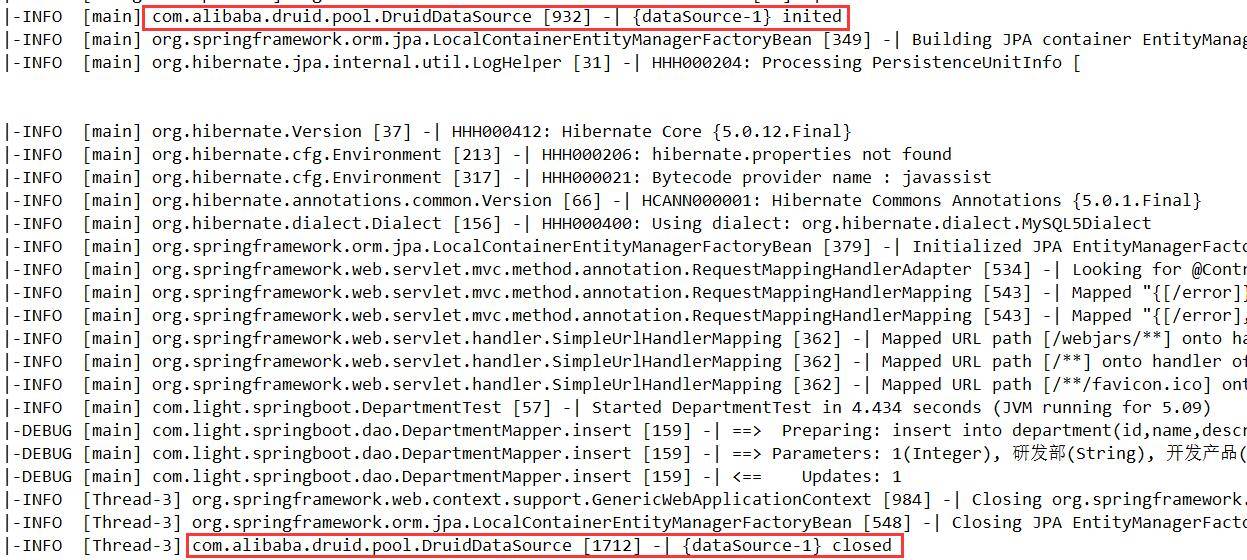
项目已经使用了 Druid 数据源了。
六、配置 Druid 监控
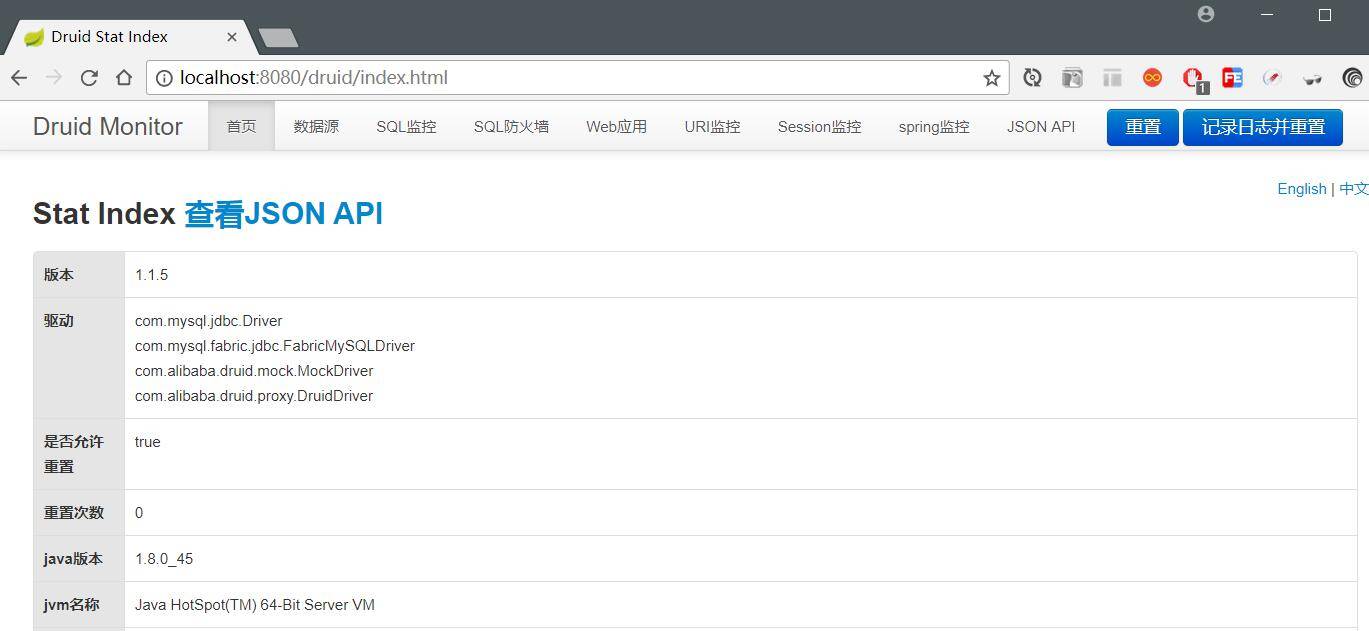
默认情况下,Druid 的监控统计功能和页面是开启的。
我们启动项目,访问 http://localhost:8080/druid/index.html,如下图:
为了保证访问的安全性,我们可以如下配置:
在 application.properties 中添加:
## druid 监控

spring.datasource.druid.web-stat-filter.enabled=true

spring.datasource.druid.web-stat-filter.url-pattern=/*

spring.datasource.druid.web-stat-filter.exclusions=*.js,*.gif,*.jpg,*.png,*.css,*.ico,/druid/*

## druid 监控页面

spring.datasource.druid.stat-view-servlet.enabled=true

spring.datasource.druid.stat-view-servlet.url-pattern=/druid/*

spring.datasource.druid.stat-view-servlet.login-username=druid

spring.datasource.druid.stat-view-servlet.login-password=druid123
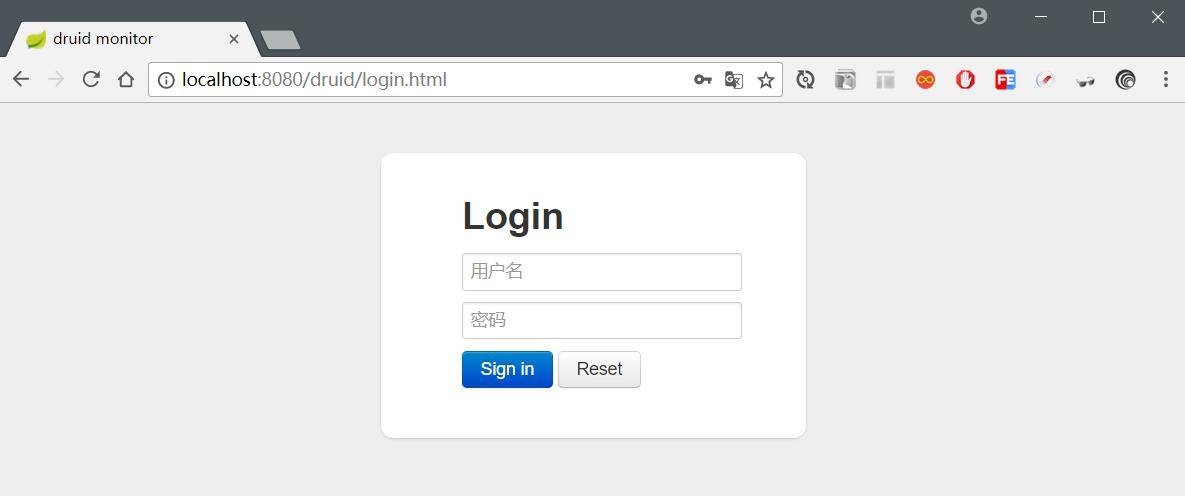
重启项目,再次访问 http://localhost:8080/druid/index.html 地址时需要身份验证:
七、源码下载
八、参考资料
Spring Boot 入门之持久层篇(三)的更多相关文章
- spring boot整合双持久层框架jpa、mybatis
公司之前用的是spring boot + jpa,但由于jpa无法完美的解决某些动态查询问题,就使用的jdbcTemplate 动态封装SQL,由于代码相对复杂,可读性差,现准备再引入mybatis. ...
- Spring Boot 入门之基础构建篇(一)
博客地址:http://www.moonxy.com 一.前言 随着 Spring 的功能越来越强,在使用 Spring 的时候,门槛也变得高了起来,诸如搭建一个基于 Spring 的 Web 程序却 ...
- spring boot入门,看这篇文章就够了
一.SpringBoot入门 1.基本介绍 简化Spring应用开发的一个框架.整个Spring技术栈的一个大整合: J2EE开发的一站式解决方案: 优点: 快速创建独立运行的Spring项目以及与主 ...
- Spring Boot 入门之整合 log4jdbc 篇(六)
博客地址:http://www.moonxy.com 一.前言 Spring Data JPA 默认采用 Hibernate 实现.Hibernate 的 showSql 配置只打印 SQL,但并不打 ...
- Spring Boot 入门之缓存和 NoSQL 篇(四)
原文地址:Spring Boot 入门之缓存和 NoSQL 篇(四) 博客地址:http://www.extlight.com 一.前言 当系统的访问量增大时,相应的数据库的性能就逐渐下降.但是,大多 ...
- Spring Boot 入门之单元测试篇(五)
博客地址:http://www.moonxy.com 一.前言 JUnit 是一个由 Java 语言编写的开源的回归测试(回归测试是指重复以前全部或部分的相同测试)框架,由Erich Gamma 和 ...
- Spring Boot入门教程1、使用Spring Boot构建第一个Web应用程序
一.前言 什么是Spring Boot?Spring Boot就是一个让你使用Spring构建应用时减少配置的一个框架.约定优于配置,一定程度上提高了开发效率.https://zhuanlan.zhi ...
- Spring Boot入门教程2-1、使用Spring Boot+MyBatis访问数据库(CURD)注解版
一.前言 什么是MyBatis?MyBatis是目前Java平台最为流行的ORM框架https://baike.baidu.com/item/MyBatis/2824918 本篇开发环境1.操作系统: ...
- Spring boot学习1 构建微服务:Spring boot 入门篇
Spring boot学习1 构建微服务:Spring boot 入门篇 Spring Boot是由Pivotal团队提供的全新框架,其设计目的是用来简化新Spring应用的初始搭建以及开发过程.该框 ...
随机推荐
- tomcat安装图文教程
tomcat安装图文教程 运维 memory 发布于June 1, 2013 标签: Windows, Tomcat 下载Tomcat安装文件,官方下载地址是:http://tomcat.apache ...
- 使用XMLHttpRequest对象完成原生的AJAX请求
1.大家眼中的Ajax 说到Ajax,只要有过前端开发经验的童鞋一定都不陌生,大都知道它就是一种与后端之间的通信技术,通过这个神奇的家伙,我们不用像传统表单那样填完信息一点提交就呼啦呼啦跳转了.Aja ...
- 十七、dbms_tts(检查表空间集合是否是自包含)
1.概述 作用:用于检查表空间集合是否是自包含的,并在执行了检查之后,将违反自包含规则的信息写入到临时表TRANSPORT_SET_VIOLATIONS中. 2.包的组成 1).transport_s ...
- C++STL内存配置的设计思想与关键源码分析
说明:我认为要读懂STL中allocator部分的源码,并汲取它的思想,至少以下几点知识你要了解:operator new和operator delete.handler函数以及一点模板知识.否则,下 ...
- c# 获取随机数字/字符/时间
using System; using System.Text; namespace HuaTong.General.Utility { /// <summary> /// 随机字符/数字 ...
- Linux:网络配置
网络配置 1.网卡配置 vim /etc/sysconfig/network-scripts/ifcfg-eth0 1DEVICE=eth0 2 HWADDR=00:0C:29:93:41:2B 3 ...
- JSP和JS的区别
从本科毕业设计开始就一直困扰我,jsp和js这两者的区别,一直处于迷糊状态,也没有搞清楚.今天就简单的介绍下两者的区别. 1.JSP全称是java server page JS全称是javaSc ...
- 两个init方法的区别
容器创建了Servlet实例后,它将调用实例的init(ServletConfig)方法初始化Servlet.该方法的参数ServletConfig对象包含了在WEB应用程序的部署描述文件中指定的初始 ...
- online learning,batch learning&批量梯度下降,随机梯度下降
以上几个概念之前没有完全弄清其含义及区别,容易混淆概念,在本文浅析一下: 一.online learning vs batch learning online learning强调的是学习是实时的,流 ...
- 【剑指offer】找出数组中任意重复的数字(不修改数组),C++实现
原创博文,转载请注明出处! # 题目 在一个长度为n+1的数组里的所有数字都在1~n的范围内,所以数组中至少有一个数字是重复的.请找出数组中任意一个重复的数字,但不能修改输入的数组.例如,如果输入长度 ...