
composer安装Workerman报错:Installation failed, reverting ./composer.json to its original content.
今天想在TP5上安装workerman,实现一个后台消息提醒功能。
第一步就卡住了,根据手册里说的首先通过composer安装
$ composer require topthink/think-worker
结果报错
$ composer require topthink/think-worker

Using version ^2.0 for topthink/think-worker

./composer.json has been updated

Loading composer repositories with package information

Updating dependencies (including require-dev)

Your requirements could not be resolved to an installable set of packages.

  Problem 1

    - topthink/think-worker v2.0.5 requires topthink/framework 5.1.* -> satisfiable by topthink/framework[5.1.x-dev, v5.1-beta.1, v5.1-rc.1, v5.1-rc.2, v5.1-rc.3, v5.1.0, v5.1.1, v5.1.10, v5.1.11, v5.1.12, v5.1.13, v5.1.14, v5.1.15, v5.1.16, v5.1.17, v5.1.18, v5.1.19, v5.1.2, v5.1.3, v5.1.4, v5.1.5, v5.1.6, v5.1.7, v5.1.8, v5.1.9] but these conflict with your requirements or minimum-stability.

    - topthink/think-worker v2.0.4 requires topthink/framework 5.1.* -> satisfiable by topthink/framework[5.1.x-dev, v5.1-beta.1, v5.1-rc.1, v5.1-rc.2, v5.1-rc.3, v5.1.0, v5.1.1, v5.1.10, v5.1.11, v5.1.12, v5.1.13, v5.1.14, v5.1.15, v5.1.16, v5.1.17, v5.1.18, v5.1.19, v5.1.2, v5.1.3, v5.1.4, v5.1.5, v5.1.6, v5.1.7, v5.1.8, v5.1.9] but these conflict with your requirements or minimum-stability.

    - topthink/think-worker v2.0.3 requires topthink/framework 5.1.* -> satisfiable by topthink/framework[5.1.x-dev, v5.1-beta.1, v5.1-rc.1, v5.1-rc.2, v5.1-rc.3, v5.1.0, v5.1.1, v5.1.10, v5.1.11, v5.1.12, v5.1.13, v5.1.14, v5.1.15, v5.1.16, v5.1.17, v5.1.18, v5.1.19, v5.1.2, v5.1.3, v5.1.4, v5.1.5, v5.1.6, v5.1.7, v5.1.8, v5.1.9] but these conflict with your requirements or minimum-stability.

    - topthink/think-worker v2.0.2 requires topthink/framework 5.1.* -> satisfiable by topthink/framework[5.1.x-dev, v5.1-beta.1, v5.1-rc.1, v5.1-rc.2, v5.1-rc.3, v5.1.0, v5.1.1, v5.1.10, v5.1.11, v5.1.12, v5.1.13, v5.1.14, v5.1.15, v5.1.16, v5.1.17, v5.1.18, v5.1.19, v5.1.2, v5.1.3, v5.1.4, v5.1.5, v5.1.6, v5.1.7, v5.1.8, v5.1.9] but these conflict with your requirements or minimum-stability.

    - topthink/think-worker v2.0.1 requires topthink/framework 5.1.* -> satisfiable by topthink/framework[5.1.x-dev, v5.1-beta.1, v5.1-rc.1, v5.1-rc.2, v5.1-rc.3, v5.1.0, v5.1.1, v5.1.10, v5.1.11, v5.1.12, v5.1.13, v5.1.14, v5.1.15, v5.1.16, v5.1.17, v5.1.18, v5.1.19, v5.1.2, v5.1.3, v5.1.4, v5.1.5, v5.1.6, v5.1.7, v5.1.8, v5.1.9] but these conflict with your requirements or minimum-stability.

    - topthink/think-worker v2.0.0 requires topthink/framework 5.1.* -> satisfiable by topthink/framework[5.1.x-dev, v5.1-beta.1, v5.1-rc.1, v5.1-rc.2, v5.1-rc.3, v5.1.0, v5.1.1, v5.1.10, v5.1.11, v5.1.12, v5.1.13, v5.1.14, v5.1.15, v5.1.16, v5.1.17, v5.1.18, v5.1.19, v5.1.2, v5.1.3, v5.1.4, v5.1.5, v5.1.6, v5.1.7, v5.1.8, v5.1.9] but these conflict with your requirements or minimum-stability.

    - Installation request for topthink/think-worker ^2.0 -> satisfiable by topthink/think-worker[v2.0.0, v2.0.1, v2.0.2, v2.0.3, v2.0.4, v2.0.5].

Installation failed, reverting ./composer.json to its original content.
这里提示说让恢复Composer.json文件,如果没错的话你能在文件里看到topthink这样的,把它删掉
网上找了好多资料,都不对,后来发现是workerman版本的问题,重新安装
这里后面的 -vvv 我也不知道是什么意思,有知道的朋友吗?欢迎留言告知,万分感谢。
composer require topthink/think-worker=1.0.* -vvv
如果需要在window下做服务端,还需要
composer require workerman/workerman-for-win -vvv
安装好以后项目根目录下的vendor目录下会多出两个文件夹,到这一步我们就可以根据手册里的说明测试了。
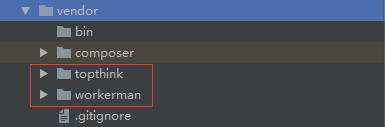
这是我工作中遇到的问题,记录下来,如果有什么不对的地方欢迎留言讨论交流。
composer安装Workerman报错:Installation failed, reverting ./composer.json to its original content.的更多相关文章
- Oracle 12c安装报错Installation failed to access the temporary location(无法访问临时位置)
报错如图 1.先检查当前windows账户用户名是否为全英文,没有就新建一个,大多数用户败在这一步,而官方也没有解释 如何新建:开始-->控制面板-->用户账户和家庭安全-->用户账 ...
- Linux下安装vim-plug报错:Failed to connect to raw.githubusercontent.com port 443: Connection refused
安装vim-plug时,输入以下命令: curl -fLo ~/.vim/autoload/plug.vim --create-dirs https://raw.githubusercontent.c ...
- Adobe ZXPInstaller 报错 Installation failed because of a file operation error.
1. Drag a ZXP file or click here to select a file. 拖放一个 zxp 文件或点击打开选择一个 zxp 文件来安装: 2. Installation f ...
- docker安装完报错:Failed to start docker.service: Unit docker.service is masked
执行 systemctl start docker 报错 Failed to start docker.service: Unit docker.service is masked. 解决 syste ...
- Azkban上传文件报错installation Failed.Error chunking
azkaban 上传文件报错Caused by: java.sql.SQLException: The size of BLOB/TEXT data inserted in one transacti ...
- 安装msyql报错——error: Failed dependencies
报错原因: 1.存在两个版本的msyql-community-release. 解决方法: 1.将不要的哪个进行去除,使用命令: rpm -e --nodeps mysql80-community-r ...
- android 解决报错 installation failed with message Failed to finalize session : INSTALL_PARSE_FAILED_UNEXPECTED_EXCEPTION: Failed parse during installPackageLI: Failed to read manifest from /xx/xx/xx.apk
新工程启动报错 怎么办? 解决: 将这个选项去掉勾选后点击ok即可
- mac电脑上安装appium报错:Failed at the appium-chromedriver@4.25.1 postinstall script.
mac电脑安装appium,装好node.js后,使用命令:npm install appium@1.18.0,安装appium,报如下错误 ``` ERR! errno1 ERR! appium-c ...
- 解决Mac安装tesserocr报错问题 Failed building wheel for
localhost:~ jerry$ Processing /var/www/git/python/tesserocr -bash: Processing: command not found loc ...
随机推荐
- python网络编程--进程线程
一:什么是进程 一个程序执行时的实例被称为一个进程. 每个进程都提供执行程序所需的资源.一个进程有一个虚拟地址空间.可执行代码.对系统对象的开放句柄.一个安全上下文.一个独特的进程标识符.环境变量.一 ...
- MyBatis框架的基本使用
MyBatis框架简介 MyBatis 本是apache的一个开源项目iBatis, 2010年这个项目由apache software foundation 迁移到了google code,并且改名 ...
- thinkphp5高亮当前页(仅针对个人项目记录,不做通用参考)
<div class="navbg"> <ul class="menu"> <li> <a href="/& ...
- Linux下fastbin利用小结——fd覆盖与任意地址free(House of Spirit)
linux下的fastbin是ctf中pwn题的重点出题点.去年(2015)中,XCTF就有两站是使用fastbin的利用作为pwn400的压轴题来出现,这也是我刚开始接触fastbin的利用,参考了 ...
- C#基础系列 - 抽象类及其方法的学习
在C#中使用关键字 abstract 来定义抽象类和抽象方法. 不能初始化的类被叫做抽象类,它们只提供部分实现,但是另一个类可以继承它并且能创建它们的实例. "一个包含一个或多个纯虚函数的类 ...
- Asp.net Vnext 中间件实现基本验证
概述 本文已经同步到<Asp.net Vnext 系列教程 >中] vnext 没有 web.config 可以配置基本验证,本文使用中间件实现基本验证 实现 通过Startup(启动类) ...
- 【51nod】1149 Pi的递推式
题解 我们把这个函数的递归形式画成一张图,会发现答案是到每个出度为0的点的路径的方案数 这个可以用组合数算 记录一下P[i]为i减几次PI减到4以内 如果P[i + 1] > P[i],那么转向 ...
- Codeforces Round #239 (Div. 1) 二项式差分
C - Curious Array 思路:对于区间[l, r]每个数加上C(i - l + k, k), 可以在l处+1, 在r+1处-1, 然后做k+1次求前缀和操作,然后就可以写啦. 然后逐层求前 ...
- ffmpeg 添加filter步骤
a). 自己写一个XXX.c文件,比如vf_transform.c,放在libavfilter目录下.代码可以参考其他filter: b) 在libavfilter/allfilters.c添加一行: ...
- Hadoop基准测试
其实就是从网络上copy的吧,在这里做一下记录 这个是看一下有哪些测试方式: hadoop jar /opt/cloudera/parcels/CDH-5.3.6-1.cdh5.3.6.p0.11/ ...