
UWP开发---嵌套DataTemplate&模板选择器
对于Json结构体items不完全一致的情况下,在UWP平台是如何处理数据,并通过不同的模板选择,进行显示呢?
一,嵌套Json分析
1,结构
通过抓取index的API(点击请求API)获取到的json,来看主页的数据是嵌套结构的Json,并且在Recs结构体中的items具有不完全一致性,结构如下图:
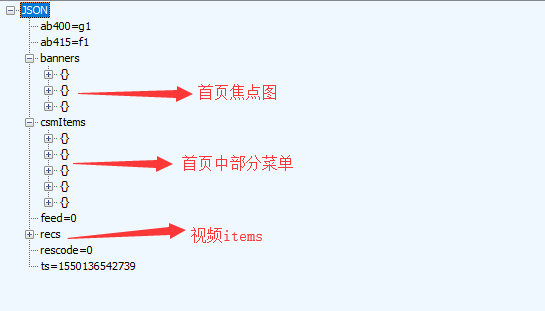
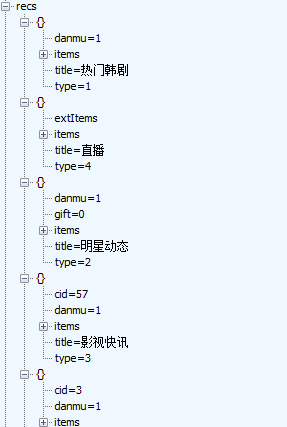
如上图所示,recs有若干子项,但是展开子项的items即可发现
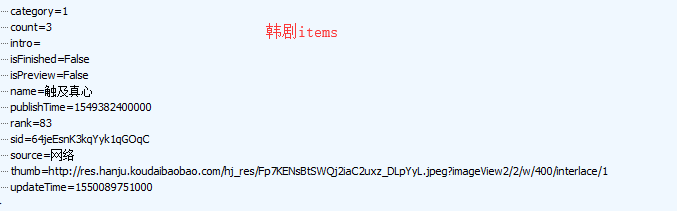
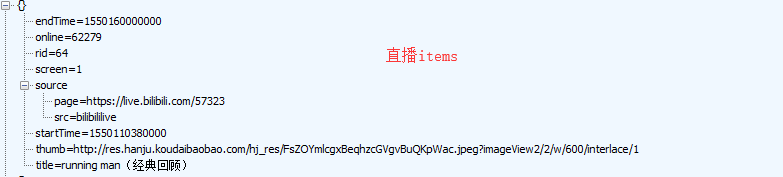
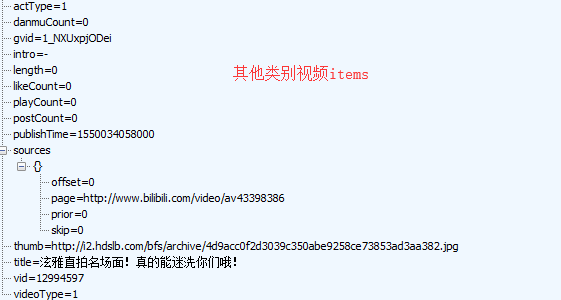
还有其他就不依依列举图片出来了。
为了让开发工作更加简便,我们可以新建两个类:Hanju,CommonVideo,设置好各类别的各个字段
二,DataTemplate嵌套
①首先最基本的是最低层次的(单个视频,单个韩剧)
韩剧模板(图中那些转换器,宽度不必在意,后续文章会展开来讲)
 <DataTemplate x:Key="seriesTemplate">
             <Border Margin="2" Width="{Binding ElementName=hanjuThumb_width, Path=Width}">
                 <Grid>
                     <Grid.RowDefinitions>
                         <RowDefinition/>
                         <RowDefinition Height="20"/>
                     </Grid.RowDefinitions>
                     <RelativePanel CornerRadius="10">
                         <Image x:Name="thumb" Source="{Binding thumb}" HorizontalAlignment="Center"  Stretch="UniformToFill"/>
                         <Image Source="/Assets/Icons/series_preview_icon.png" Visibility="{Binding isPreview,Converter={StaticResource BoolToVisibilityConverter}}" Height="40" RelativePanel.AlignRightWithPanel="True"/>
                         <Image Source="/Assets/Icons/new_series.png" Visibility="{Binding updateTime,Converter={StaticResource IsNewUpdateConverter}}" Height="40" RelativePanel.AlignRightWithPanel="True"/>
                         <Image Source="/Assets/Icons/live_ing.png" Visibility="{Binding living,Converter={StaticResource SeriesLivingImgShowConverter}}" RelativePanel.AlignRightWithPanel="True" Height="30"/>
                         <TextBlock Text="{Binding count}" Foreground="White" RelativePanel.AlignBottomWithPanel="True" RelativePanel.AlignLeftWithPanel="True"/>
                     <TextBlock  Text="{Binding rank}" Foreground="White" RelativePanel.AlignBottomWithPanel="True" RelativePanel.AlignRightWithPanel="True"/>
                 </RelativePanel>
                 <TextBlock Grid.Row="2" Text="{Binding name}" HorizontalAlignment="Center" TextWrapping="Wrap" Foreground="Black" FontSize="15"/>
                 </Grid>
             </Border>
             </DataTemplate>
韩剧模板
视频模板
<DataTemplate x:Key="videoTemplate">
            <Border Margin="2" Width="{Binding ElementName=videoThumb_width,Path=Width}">
                <Grid>
                    <Grid.RowDefinitions>
                        <RowDefinition/>
                        <RowDefinition Height="40"/>
                    </Grid.RowDefinitions>
                    <Image Source="{Binding thumb}" Stretch="UniformToFill"/>
                    <TextBlock Grid.Row="2" Text="{Binding title}" TextTrimming="WordEllipsis" Foreground="Black"  FontSize="15" TextWrapping="Wrap"/>
                </Grid>
            </Border>
</DataTemplate>
视频模板
直播模板
 <DataTemplate x:Key="liveTemplate">
            <RelativePanel Width="{Binding ElementName=videoThumb_width,Path=Width}">
                <Image Source="{Binding thumb}" HorizontalAlignment="Stretch" VerticalAlignment="Stretch"/>
                <Image Source="/Assets/Icons/star_living.png" Width="50" Margin="5" RelativePanel.AlignRightWithPanel="True"/>
                <TextBlock Text="{Binding longTitle}" Foreground="White" RelativePanel.AlignLeftWithPanel="True" RelativePanel.AlignBottomWithPanel="True"/>
                <TextBlock Text="{Binding online}" Foreground="White" RelativePanel.AlignRightWithPanel="True" RelativePanel.AlignBottomWithPanel="True"/>
            </RelativePanel>
            </DataTemplate>
直播模板
②其次是高一层次的模板,上述模板是下列这些的子项(整个韩剧集合,整个视频分类集合,GridView从左往右放单个视频)
<!--模板1韩剧-->
<DataTemplate x:Key="DataTemplate1">
<GridView IsItemClickEnabled="True" ItemClick="Hanju_ItemClick" Header="{Binding title,Converter={StaticResource StringFormatConverter},ConverterParameter='
UWP开发---嵌套DataTemplate&模板选择器的更多相关文章
- UWP开发必备:常用数据列表控件汇总比较
今天是想通过实例将UWP开发常用的数据列表做汇总比较,作为以后项目开发参考.UWP开发必备知识点总结请参照[UWP开发必备以及常用知识点总结]. 本次主要讨论以下控件: GridView:用于显示数据 ...
- win10 uwp 列表模板选择器
本文主要讲ListView等列表可以根据内容不同,使用不同模板的列表模板选择器,DataTemplateSelector. 如果在 UWP 需要定义某些列的显示和其他列不同,或者某些行的显示和其他行不 ...
- UWP开发笔记——嵌套式页面的实现
绪论 UWP开发中,Page是最常用的Control之一,通常情况下,在开发的application中,每一个页面就是一个Page.有时候,为了开发整合度更高,UI表现更为一致的UI,开发者需要把UI ...
- 【转】wpf 模板选择器DataTemplateSelector及动态绑定,DataTemplate.Triggers触发器的使用
通常,如果有多个 DataTemplate 可用于同一类型的对象,并且您希望根据每个数据对象的属性提供自己的逻辑来选择要应用的 DataTemplate,则应创建 DataTemplateSelect ...
- wpf 模板选择器DataTemplateSelector及动态绑定,DataTemplate.Triggers触发器的使用
通常,如果有多个 DataTemplate 可用于同一类型的对象,并且您希望根据每个数据对象的属性提供自己的逻辑来选择要应用的 DataTemplate,则应创建 DataTemplateSelect ...
- 2019-11-29-win10-uwp-列表模板选择器
原文:2019-11-29-win10-uwp-列表模板选择器 title author date CreateTime categories win10 uwp 列表模板选择器 lindexi 20 ...
- 2019-9-2-win10-uwp-列表模板选择器
title author date CreateTime categories win10 uwp 列表模板选择器 lindexi 2019-09-02 12:57:38 +0800 2018-2-1 ...
- Win10 UWP开发系列:使用VS2015 Update2+ionic开发第一个Cordova App
安装VS2015 Update2的过程是非常曲折的.还好经过不懈的努力,终于折腾成功了. 如果开发Cordova项目的话,推荐大家用一下ionic这个框架,效果还不错.对于Cordova.PhoneG ...
- Win10/UWP开发—使用Cortana语音指令与App的前台交互
Win10开发中最具有系统特色的功能点绝对少不了集成Cortana语音指令,其实Cortana语音指令在以前的wp8/8.1时就已经存在了,发展到了Win10,Cortana最明显的进步就是开始支持调 ...
随机推荐
- day3:vcp考试
Q41. An administrator creates a custom ESXi firewall rule using an XML file, however the rules do no ...
- 查看端口号根据pid号找到相关占用端口应用
查看端口号根据pid号找到相关占用端口应用 8080 端口被占用不知道被哪个应用软件占用,下面我来教你查出那个该死的应用 方法/步骤 1 首先用netstat 找到端口对应的pid号,找到之后 ...
- popupMenu-----弹出菜单
import android.os.Bundle; import android.app.Activity; import android.graphics.Color; import android ...
- uploadify 文件上传报http 302错误
uploadify文件上传会报http 302错误,在配置文件中将处理上传的通用类取消验证, 假设上传的通用处理类是fileUpload.ashx,则在配置文件同添加下面过滤配置能解决问题. < ...
- 部署maven的一些要点、遇到的问题
一. maven环境的搭建 . 下载并配置maven(可做可不做) ()到http://maven.apache.org下载maven的最新版本,并解压到某一目录(假设是d:\develop\apac ...
- zabbix分布式系统监视
http://blog.chinaunix.net/uid-25266990-id-3380929.html
- g++报错原因分析:expected class-name before ‘{’ token
今天写程序的时候, 遇到这样一个错误expected class-name before ‘{’ token 最后发现原来是我的头文件声明没有加. 继承时不要忘记加基类的头文件 错误: class F ...
- Laravel 认证原理及完全自定义认证
Laravel 默认的 auth 功能已经是很全面了,但是我们也经常会碰到一些需要自定义的一些情况,比如验证的字段和默认的不匹配,比如需要能够同时满足 user name 和 email 认证等等.如 ...
- 5. Import the project download from Git
1.Recover eclipse project Copy .project from other project(You can new a project first in eclipse. T ...
- 06 Maven 聚合和继承
Maven 聚合和继承 1. 聚合 2. 继承 <parent> <groupId>org.apache.karaf.demos</groupId> <art ...