
UWP开发---嵌套DataTemplate&模板选择器
对于Json结构体items不完全一致的情况下,在UWP平台是如何处理数据,并通过不同的模板选择,进行显示呢?
一,嵌套Json分析
1,结构
通过抓取index的API(点击请求API)获取到的json,来看主页的数据是嵌套结构的Json,并且在Recs结构体中的items具有不完全一致性,结构如下图:
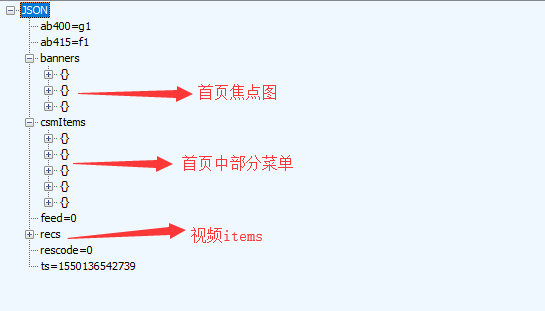
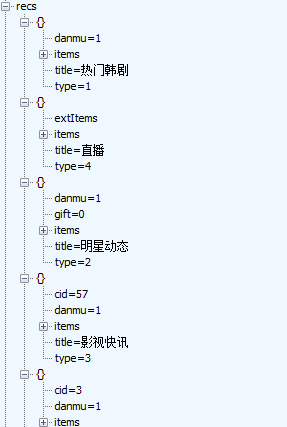
如上图所示,recs有若干子项,但是展开子项的items即可发现
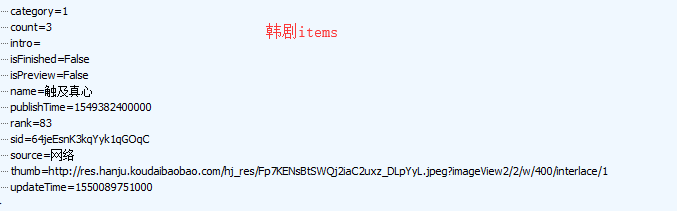
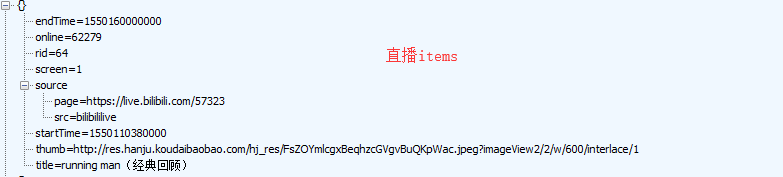
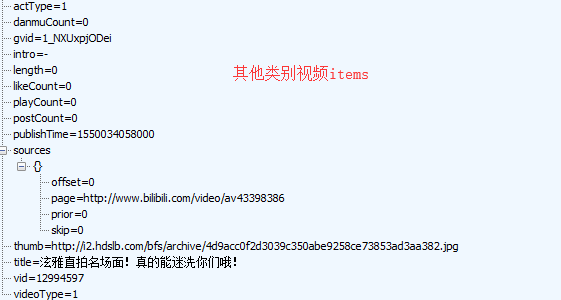
还有其他就不依依列举图片出来了。
为了让开发工作更加简便,我们可以新建两个类:Hanju,CommonVideo,设置好各类别的各个字段
二,DataTemplate嵌套
①首先最基本的是最低层次的(单个视频,单个韩剧)
韩剧模板(图中那些转换器,宽度不必在意,后续文章会展开来讲)
 <DataTemplate x:Key="seriesTemplate">
             <Border Margin="2" Width="{Binding ElementName=hanjuThumb_width, Path=Width}">
                 <Grid>
                     <Grid.RowDefinitions>
                         <RowDefinition/>
                         <RowDefinition Height="20"/>
                     </Grid.RowDefinitions>
                     <RelativePanel CornerRadius="10">
                         <Image x:Name="thumb" Source="{Binding thumb}" HorizontalAlignment="Center"  Stretch="UniformToFill"/>
                         <Image Source="/Assets/Icons/series_preview_icon.png" Visibility="{Binding isPreview,Converter={StaticResource BoolToVisibilityConverter}}" Height="40" RelativePanel.AlignRightWithPanel="True"/>
                         <Image Source="/Assets/Icons/new_series.png" Visibility="{Binding updateTime,Converter={StaticResource IsNewUpdateConverter}}" Height="40" RelativePanel.AlignRightWithPanel="True"/>
                         <Image Source="/Assets/Icons/live_ing.png" Visibility="{Binding living,Converter={StaticResource SeriesLivingImgShowConverter}}" RelativePanel.AlignRightWithPanel="True" Height="30"/>
                         <TextBlock Text="{Binding count}" Foreground="White" RelativePanel.AlignBottomWithPanel="True" RelativePanel.AlignLeftWithPanel="True"/>
                     <TextBlock  Text="{Binding rank}" Foreground="White" RelativePanel.AlignBottomWithPanel="True" RelativePanel.AlignRightWithPanel="True"/>
                 </RelativePanel>
                 <TextBlock Grid.Row="2" Text="{Binding name}" HorizontalAlignment="Center" TextWrapping="Wrap" Foreground="Black" FontSize="15"/>
                 </Grid>
             </Border>
             </DataTemplate>
韩剧模板
视频模板
<DataTemplate x:Key="videoTemplate">
            <Border Margin="2" Width="{Binding ElementName=videoThumb_width,Path=Width}">
                <Grid>
                    <Grid.RowDefinitions>
                        <RowDefinition/>
                        <RowDefinition Height="40"/>
                    </Grid.RowDefinitions>
                    <Image Source="{Binding thumb}" Stretch="UniformToFill"/>
                    <TextBlock Grid.Row="2" Text="{Binding title}" TextTrimming="WordEllipsis" Foreground="Black"  FontSize="15" TextWrapping="Wrap"/>
                </Grid>
            </Border>
</DataTemplate>
视频模板
直播模板
 <DataTemplate x:Key="liveTemplate">
            <RelativePanel Width="{Binding ElementName=videoThumb_width,Path=Width}">
                <Image Source="{Binding thumb}" HorizontalAlignment="Stretch" VerticalAlignment="Stretch"/>
                <Image Source="/Assets/Icons/star_living.png" Width="50" Margin="5" RelativePanel.AlignRightWithPanel="True"/>
                <TextBlock Text="{Binding longTitle}" Foreground="White" RelativePanel.AlignLeftWithPanel="True" RelativePanel.AlignBottomWithPanel="True"/>
                <TextBlock Text="{Binding online}" Foreground="White" RelativePanel.AlignRightWithPanel="True" RelativePanel.AlignBottomWithPanel="True"/>
            </RelativePanel>
            </DataTemplate>
直播模板
②其次是高一层次的模板,上述模板是下列这些的子项(整个韩剧集合,整个视频分类集合,GridView从左往右放单个视频)
<!--模板1韩剧-->
<DataTemplate x:Key="DataTemplate1">
<GridView IsItemClickEnabled="True" ItemClick="Hanju_ItemClick" Header="{Binding title,Converter={StaticResource StringFormatConverter},ConverterParameter='
UWP开发---嵌套DataTemplate&模板选择器的更多相关文章
- UWP开发必备:常用数据列表控件汇总比较
今天是想通过实例将UWP开发常用的数据列表做汇总比较,作为以后项目开发参考.UWP开发必备知识点总结请参照[UWP开发必备以及常用知识点总结]. 本次主要讨论以下控件: GridView:用于显示数据 ...
- win10 uwp 列表模板选择器
本文主要讲ListView等列表可以根据内容不同,使用不同模板的列表模板选择器,DataTemplateSelector. 如果在 UWP 需要定义某些列的显示和其他列不同,或者某些行的显示和其他行不 ...
- UWP开发笔记——嵌套式页面的实现
绪论 UWP开发中,Page是最常用的Control之一,通常情况下,在开发的application中,每一个页面就是一个Page.有时候,为了开发整合度更高,UI表现更为一致的UI,开发者需要把UI ...
- 【转】wpf 模板选择器DataTemplateSelector及动态绑定,DataTemplate.Triggers触发器的使用
通常,如果有多个 DataTemplate 可用于同一类型的对象,并且您希望根据每个数据对象的属性提供自己的逻辑来选择要应用的 DataTemplate,则应创建 DataTemplateSelect ...
- wpf 模板选择器DataTemplateSelector及动态绑定,DataTemplate.Triggers触发器的使用
通常,如果有多个 DataTemplate 可用于同一类型的对象,并且您希望根据每个数据对象的属性提供自己的逻辑来选择要应用的 DataTemplate,则应创建 DataTemplateSelect ...
- 2019-11-29-win10-uwp-列表模板选择器
原文:2019-11-29-win10-uwp-列表模板选择器 title author date CreateTime categories win10 uwp 列表模板选择器 lindexi 20 ...
- 2019-9-2-win10-uwp-列表模板选择器
title author date CreateTime categories win10 uwp 列表模板选择器 lindexi 2019-09-02 12:57:38 +0800 2018-2-1 ...
- Win10 UWP开发系列:使用VS2015 Update2+ionic开发第一个Cordova App
安装VS2015 Update2的过程是非常曲折的.还好经过不懈的努力,终于折腾成功了. 如果开发Cordova项目的话,推荐大家用一下ionic这个框架,效果还不错.对于Cordova.PhoneG ...
- Win10/UWP开发—使用Cortana语音指令与App的前台交互
Win10开发中最具有系统特色的功能点绝对少不了集成Cortana语音指令,其实Cortana语音指令在以前的wp8/8.1时就已经存在了,发展到了Win10,Cortana最明显的进步就是开始支持调 ...
随机推荐
- MD5加密获得文件的MD5码
哈希函数将任意长度的二进制字符串映射为固定长度的小型二进制字符串.加密哈希函数有这样一个属性:在计算不大可能找到散列为相同的值的两个不同的输入:也就是说,两组数据的哈希值仅在对应的数据也匹配时才会匹配 ...
- JS如何获取PHP循环中的ID
JS如何获取PHP循环中的ID kaalrz 二路公交车 结帖率:83.33% 首先抱歉,因为昨天那帖图片几次都不能用,修改到不能再次修改,今天早上回帖又提示没有这个帖,只好重发一次. 如 ...
- C语言字符串操作函数实现
1.字符串反转 – strRev void strRev(char *str) { assert(NULL != str); int length=strlen(str); ; while(end ...
- DirectFB编程
一.简介 DirectFB是一个轻量级的提供硬件图形加速,输入设备处理和抽象的图形库,它集成了支持半透明的视窗系统以及在LinuxFramebuffer驱动之上的多层显示.它是一个用软件封装当前硬件无 ...
- p3412 [POI2005]SKO-Knights
传送门 分析 图1 我们假设我们现在有两个向量(2,3)和(4,2),将他们所能到达的点在几何画板上画出来,再将这些点用红线连起来,在将横坐标相同的点用蓝线连起来便能得到图1,就此我们可以发现可以用绿 ...
- noi 1997 最优乘车
H城是一个旅游胜地,每年都有成千上万的人前来观光.为方便游客,巴士公司在各个旅游景点及宾馆,饭店等地都设置了巴士站并开通了一些单程巴上线路.每条单程巴士线路从某个巴士站出发,依次途经若干个巴士站,最终 ...
- redis缓存设置和读取
一/写入 <?php $redis = new Redis(); //实例化redis $redis->pconnect('); $redis->,'huahua'); //设置变量 ...
- Easyui form 处理 Laravel 返回的 Json 数据
默认地,Easyui Form 请求的格式是 Html/Text,如果服务端 Laravel 返回的数据是 Json 格式,则应当在客户端进行解析.以下是 Easyui 官方文档的说明: Handle ...
- common常用到的类
org.apache.commons.codec.digest.DigestUtils.md5Hex(String) md5
- tomcat 时间相差8个小时,百度上查到的,备份下
通常网上一查都是 修改 tomcat 的参数 ,如catalina 文件,jvm parameters 等.如果都不起作用,可以使用如下方式.. 你可以修改jdk的时间校正了,你这么来.进入 \hom ...