
How to generate UML Diagrams from Java code in Eclipse
UML diagrams compliment inline documentation ( javadoc ) and allow to better explore / understand a design. Moreover, you can print and bring them to table to discuss a design.
In this post, we will install and use the ObjectAid plugin for Eclipse to produce jUnit lib class diagrams. Then, we will be able to generate UML diagrams by simply dragging and dropping classes into the editor. We can further manipulate the diagram by selecting which references, operations or attributes to display.
- Open Eclipse and go to Help > Install New Software
- Click on add to add a new repository
- Enter name
ObjectAid UML Explorer
- Enter Location
http://www.objectaid.net/update
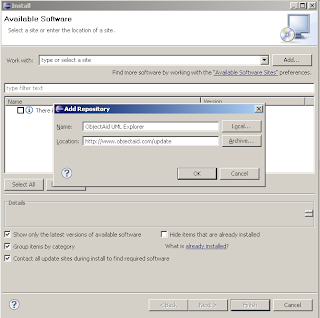
Next, select the ObjectAid Class Diagram plugin - it is free - and click Next. The Sequence Diagram one requires a paid license.
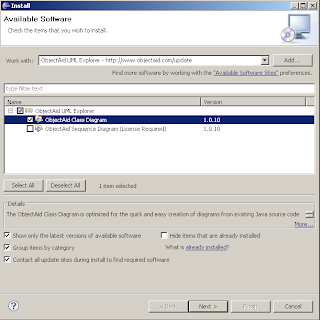
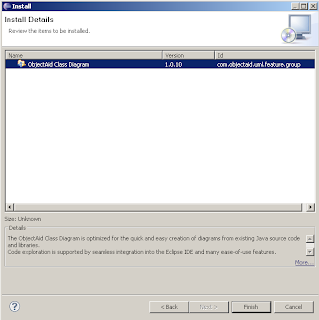
Click Finish to confirm your choices and start the instalation process.
- Click Ok on the security warning
- Select Restart Now after the installation completes to restart Eclipse.
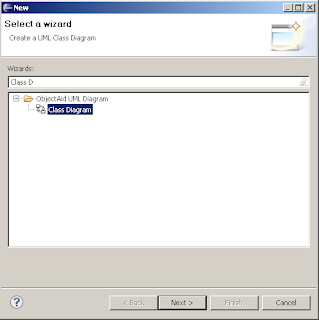
To create a new UML diagram we start the ObjectAid wizard with File > New > Other... and start typing in the textbox Class Diagram to filter the desired wizard. Click Next, and enter a directory and name for the diagram.
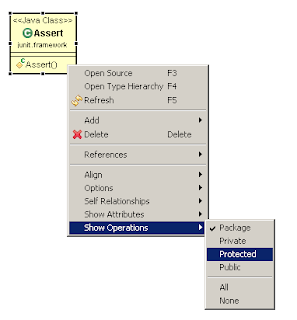
Drop java source or compiled class files into the visual UML editor to start populating the diagram. Right click on a generated class to bring up a context menu and adjust visibility, operations attributes, etc as you like.
Below, we see the Assert class from the jUnit library with all operations and fileds hidden.
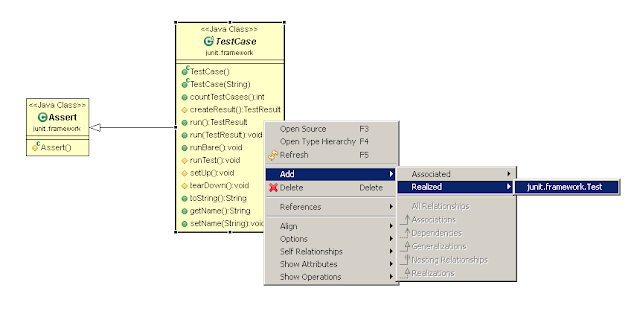
From the context menu, we can add implementations and associations for a selected class. In the following screen, we add the interface Test implemented by the TestCase class.
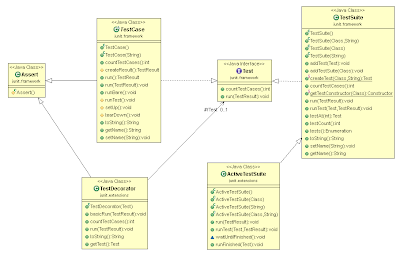
This is how part of the jUnit UML class diagram look after adding some more classes.
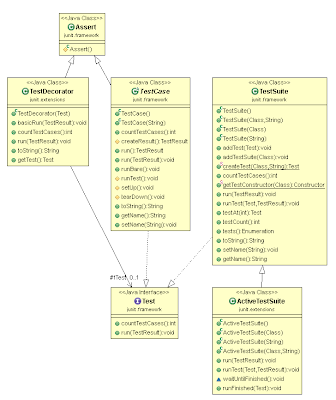
To auto layout the diagram right click anywhere within the editor and select Layout Diagram. From the same menu, you can export the diagram to an image ( gif png jpeg ) by clicking the Save As Image... menu item
How to generate UML Diagrams from Java code in Eclipse的更多相关文章
- UML Diagrams Using Graphviz Dot
Introduction Background This article is about using the dot tool from the Graphviz package to automa ...
- Java语言编码规范(Java Code Conventions)
Java语言编码规范(Java Code Conventions) 名称 Java语言编码规范(Java Code Conventions) 译者 晨光(Morning) 简介 本文档讲述了Java语 ...
- java code to byte code--partone--reference
Understanding how Java code is compiled into byte code and executed on a Java Virtual Machine (JVM) ...
- [转]Java Code Examples for android.util.JsonReader
[转]Java Code Examples for android.util.JsonReader The following are top voted examples for showing h ...
- SQL to Java code for Elasticsearch
Elasticsearch虽然定位为Search Engine,但是因其可以持久化数据,很多时候,我们把Elasticsearch当成Database用,但是Elasticsearch不支持SQL,就 ...
- JUnit单元测试教程(翻译自Java Code Geeks)
JUnit单元测试教程--终极指南 JUnit单元测试教程终极指南 说明 单元测试简介 1 什么是单元测试 2 测试覆盖 3 Java中的单元测试 JUnit简介 1 使用Eclipse实现简单JUn ...
- Java Code Style
近期困惑于团队成员代码风格迥异,代码质量不可控,作为一名老司机,忧患于后期服务的可维护性,多次一对一的代码Review,耗时耗力不说,效果也不明显.痛定思痛,多次反思之后得出结论:无规矩不成方圆,可靠 ...
- 玩转Eclipse — 自动代码生成的Java Code Template
文章转载地址:点击打开链接 当代码写到一定程度之后,就会发现很多代码都被重复地敲了N多遍,甚至毫不夸张地说:闭着眼睛都能敲出来.大量地敲这些重复地代码,除了锻炼敲键盘的速度,基本上没有其他益处,但是长 ...
- Use formatter to format your JAVA code
In order to make the codes looks unified and make it easy to understand, it's better to use the same ...
随机推荐
- VMware下CentOS6.8配置GFS文件系统
1.GFS介绍 GFS简要说明,它有两种: 1. Google文件系统:GFS是GOOGLE实现的是一个可扩展的分布式文件系统,用于大型的.分布式的.对大量数据进行访问的应用.它运行于廉价的普通硬件上 ...
- Fiery Youth
青春和时间是一对好兄弟,让人留恋的时光总是那么快偷偷溜走了.学习java不能确定改变生活和现状,至少是迈出了进步的决定,而不是停滞不前.既然这样,那就动起来吧!看了刘树勇老师的演讲,就得出一个结论:千 ...
- 第7章 权限管理(1)_ACL权限
1. ACL权限 1.1 ACL权限简介与开启 (1)ACL权限简介 ①ACL是Access Control List的缩写,主要目的是在提供传统的owner,group,others的read,wr ...
- 第38课 Qt中的事件处理(上)
1. GUI程序原理回顾 (1)图形界面应用程序的消息处理模型 (2)思考:操作系统发送的消息如何转变为Qt信号 2. Qt中的事件处理 (1)Qt平台将系统产生的消息转换为Qt事件 ①Qt事件是一个 ...
- Oracle SQL函数
Oracle将函数大致分为单行函数,聚合函数和分析函数. 单行函数分为字符函数,日期函数,转换函数,数字函数,通用函数,decode函数 一.字符函数 1)大小写控制函数 01.Lower() 全部小 ...
- insert、update select from
1.insert select from <一棵树-博客园> 收集整理,转载请注明出处! 使用SELECT INTO 和 INSERT INTO SELECT 表复制语句了. 1.INSE ...
- jmeter(三)Sample之SOAP/XML-RPC Request
项目背景:公司的微信端H5界面新开发了会员注册功能,需要对其进行压力测试 项目目标:需要承受每分钟最少6000的压力 一.建立一个测试计划(test plan) 之前有说过,jmeter打开后会自动生 ...
- JavaScript事件流原理解析
一.为什么会有这一篇的文章 国庆前几天由于任务比较重,要赶在国庆前把一个进度的任务开发完成,所以也就有点赶,但是却遇到了一个比较奇怪的Bug,导致了任务比预计的延迟了几个小时,对此深表遗憾,所以利用国 ...
- python基础-RE正则表达式
re 正则表示式 正则表达式(或 RE)是一种小型的.高度专业化的编程语言,(在Python中)它内嵌在Python中,并通过 re 模块实现.正则表达式模式被编译成一系列的字节码,然后由用 C 编写 ...
- OC中的@property详解
简介: @property 生成了变量的get set 方法,同时指定了变量名称. 例如@property (nonatomic,strong) NSString *name;表示生成了_name私有 ...